Join our next Live Demo on April 9th!

Resource Blog News Customers Stories

Updated: Aug 20, 2025 Upd: 20.08.25

2 min read

Gain Full Visibility Into Your Infrastructure as Code Versions

Gain Full Visibility Into Your Infrastructure as Code Versions

Keeping track of Infrastructure as Code (IaC) versions across multiple repositories can be a challenge.
With different teams using different versions of Terraform, Terragrunt, or OpenTofu, keeping track of compliant and vetted modules while ensuring alignment within the team becomes a burden.

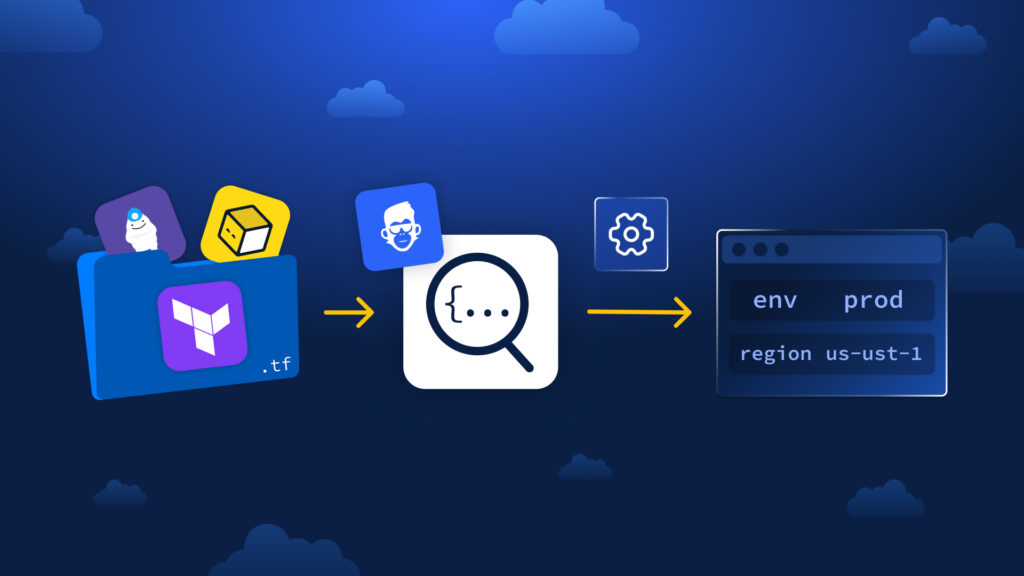
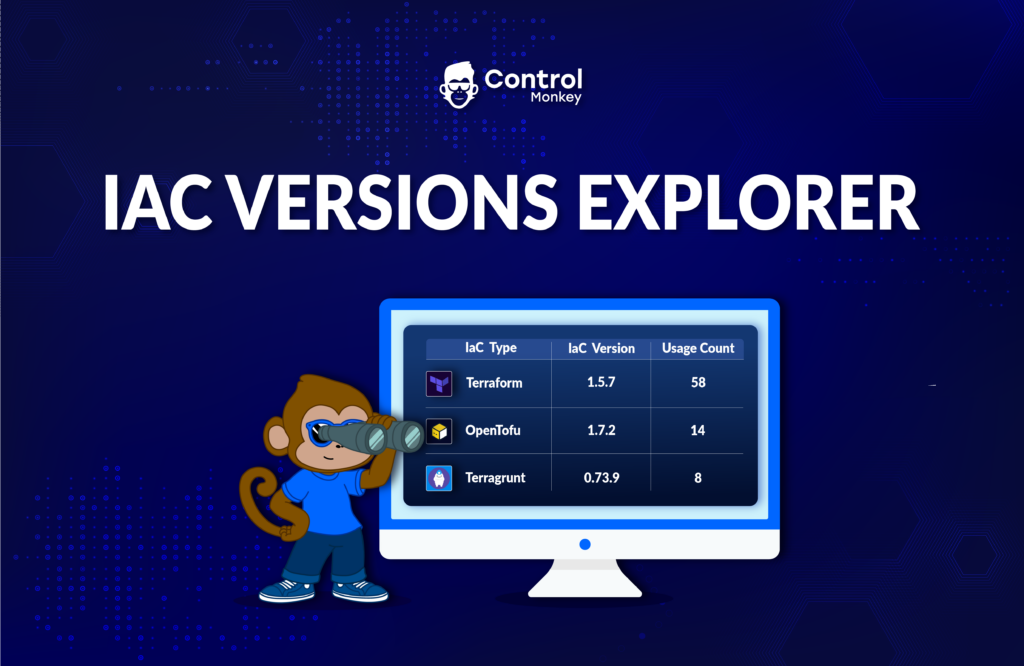
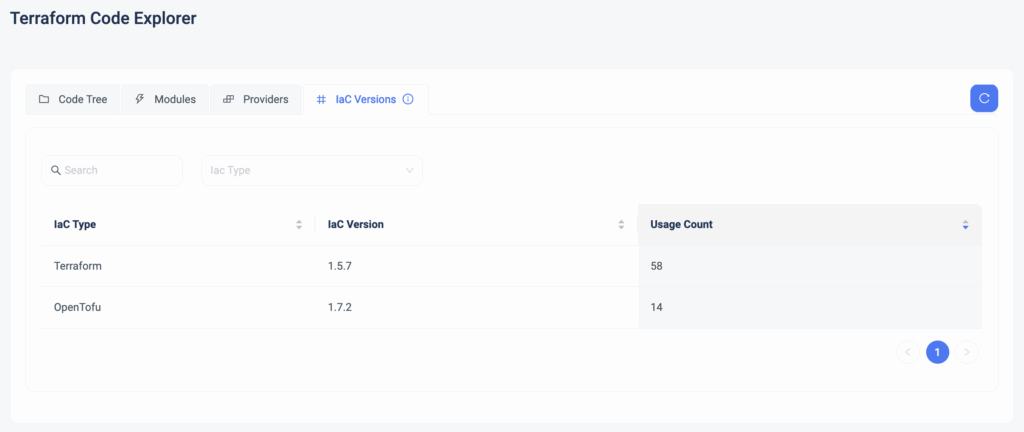
Today, we are happy to announce the release of IaC Versions Explorer, the single source of truth for all your IaC versions.
This means:

  • See it all in one place: Instantly view all Terraform, Terragrunt, and OpenTofu versions in use across your stacks.
  • Prevent version drift: Identify outdated or unapproved versions.
  • Standardize across teams: Ensure everyone uses the correct versions, reducing compatibility issues.
How It Works

The IaC Versions Explorer gives you a real-time view of all the Terraform and OpenTofu versions running in your environment. With just a few clicks, you can:

  • See a full breakdown of the IaC versions in use.
  • Drill down into each version to check where it’s deployed across namespaces and stacks.
  • Catch outdated versions early and ensure consistency across all teams.

ControlMonkey helps eliminate uncertainty and keeps your IaC environments consistent by giving you complete visibility and Control.

No more misaligned versions

ControlMonkey’s Terraform Knowledge Hub solution provides all the tools to visualize and control your Terraform modules, providers, IaC versions, and repositories on a single platform. 

Ready to take control of your infrastructure?
Meet with our Terraform experts for a 30-minute technical call to learn more.

Bottom CTA Background

A 30-min meeting will save your team 1000s of hours

A 30-min meeting will save your team 1000s of hours

Book Intro Call

    Sounds Interesting?

    Request a Demo

    Resource Blog News Customers Stories

    Updated: Aug 20, 2025 Upd: 20.08.25

    2 min read

    Custom Flow – Failure Behavior: More Control Over Your Terraform Deployments

    Test User

    Test User

    CTO & Co-Founder

    Custom Flow – Failure Behavior: More Control Over Your Terraform Deployments

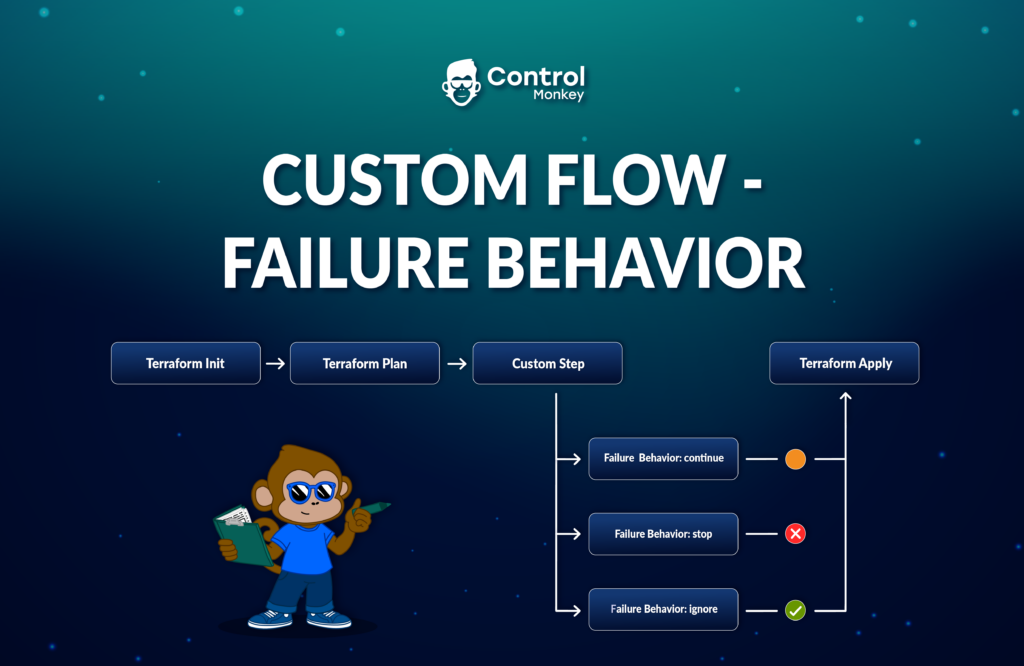
    At ControlMonkey, we understand that every infrastructure deployment is unique. That’s why we built Custom Flow, a core feature of our Terraform CI/CD solution that allows you to integrate custom scripts before and after every phase of your Terraform deployment, from ‘terraform init to ‘terraform apply.’

    With Custom Flow, DevOps teams can define pre- and post-execution step and automate essential tasks across their Terraform stacks.

    Today, we are happy to announce that we’re taking it a step further by introducing Failure Behavior, which will give teams even more control over how deployments react to failing steps.

    Custom Flow – Failure Behavior: Stop, Continue, or Ignore

    Failures are inevitable when running complex infrastructure deployments.
    But how your workflow responds to those failures makes all the difference.

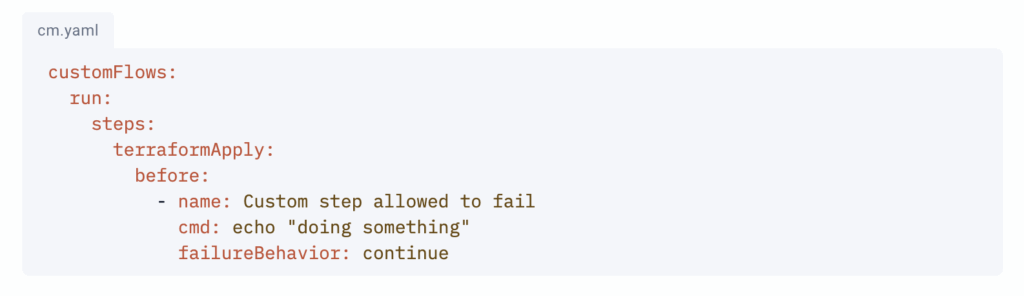
    With Failure Behavior, you can precisely define what happens when a custom script fails, ensuring a safer, more predictable deployment process.

    Here’s what you can configure:

    • stop: The run will stop if the custom step fails. (the default behavior)
    • continue: The run will continue even if the custom step fails. However, the overall run will be considered failed when it ends.
    • ignore: The run will continue even if the custom step fails. In this case, the overall run will be considered successful when it ends.

    Without failure management, DevOps teams are forced to intervene manually when something goes wrong, leading to delays and uncertainty.

    Failure Behavior is an additional automation layer on top of ‘Custom Flows,’ allowing ControlMonkey users to run Terraform with greater deployment confidence by defining clear failure-handling rules

    Bringing Total Cloud Control with Terraform

    With the addition of Failure Behavior, Custom Flow now gives you even more precision and automation in how your deployments handle unexpected scenarios.

    ControlMonkey’s Terraform CI/CD solution provides all the tools to run your deployments with complete control on your terms.

    Ready to take control of your infrastructure?
    Meet with our Terraform experts for a 30-minute technical call to learn more.
    Bottom CTA Background

    A 30-min meeting will save your team 1000s of hours

    A 30-min meeting will save your team 1000s of hours

    Book Intro Call

    Author

    Test User

    Test User

    CTO & Co-Founder

    Lorem ipsum dolor sit amet, consectetur adipisicing elit. Animi architecto consequuntur dicta dolor, excepturi ipsam iste laudantium, magnam molestiae obcaecati odio quam quas repellendus sed, sint magnam molestiae.

      Sounds Interesting?

      Request a Demo

      Resource Blog News Customers Stories

      Updated: Aug 20, 2025 Upd: 20.08.25

      2 min read

      Exclude Folders or Paths from Stack Auto-Discovery

      Test User

      Test User

      CTO & Co-Founder

      Exclude Folders or Paths from Stack Auto-Discovery

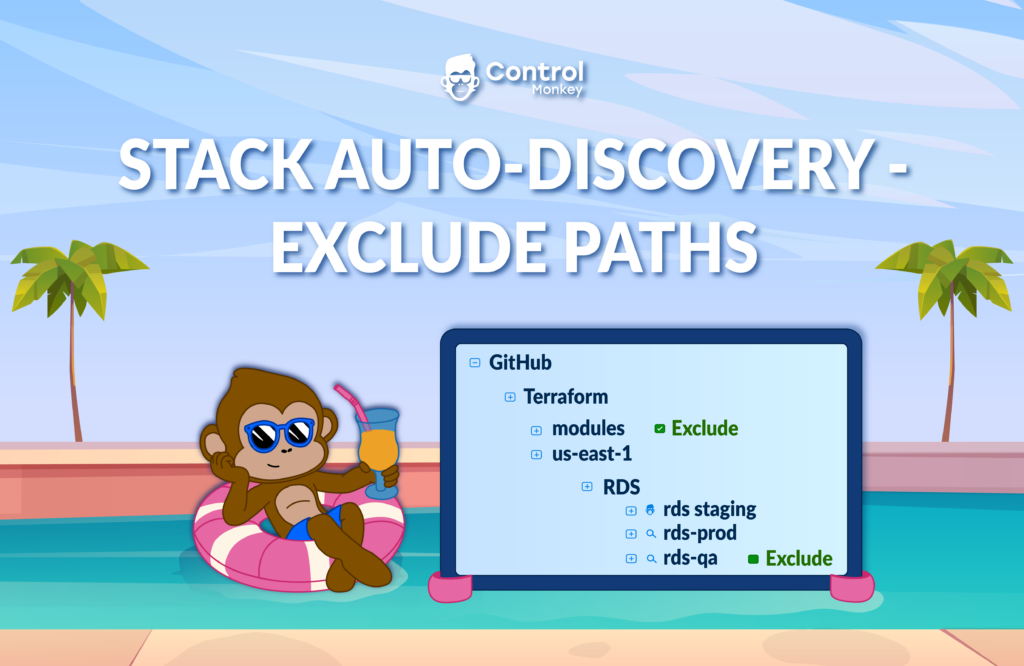
      Today, we are happy to announce the upgrade of our Stack Auto-Discovery solution, with the option to exclude specific folders or paths from the discovery process.

      As a recap, ‘Stack Auto-Discovery’ detects new folders and branches in your Git repositories and automatically creates stacks in the ControlMonkey platform.

      New folders or paths in the Git repository will be detected by ControlMonkey, which will automatically create the corresponding Stack rather than the user creating one manually.
      Any new Terraform code will be included in the infrastructure CI/CD approval and testing process, ensuring resource alignment with organizational standards.

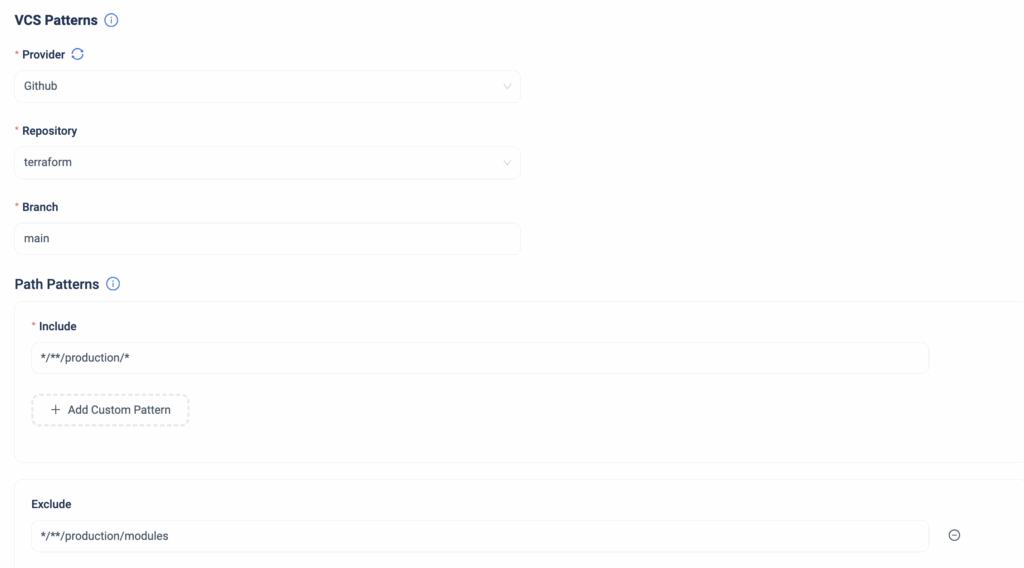
      With the latest exclusion enhancement, ControlMonkey users gain total control over which folders or paths should be included or excluded from the ‘Stack Auto-discovery’ process.


      ‘Stack auto-discovery’ adds a new level of automation to your GitOps. It guarantees that all Terraform code is tested and validated before deployment, which minimizes the chances of misconfigurations and human mistakes.

      Today, with the option to exclude specific folders or paths, ControlMonkey users can fully customize their stack discovery process to make their day-to-day operations even more efficient and controlled.
      This feature request came from one of our customers, and we’re thrilled to bring this enhancement to life.

      ControlMonkey’s Terraform Automation Platform transforms how infrastructure teams automate and govern large-scale cloud environments.
      Our Terraform experts are ready for a technical discussion whenever you are.

      Bottom CTA Background

      A 30-min meeting will save your team 1000s of hours

      A 30-min meeting will save your team 1000s of hours

      Book Intro Call

      Author

      Test User

      Test User

      CTO & Co-Founder

      Lorem ipsum dolor sit amet, consectetur adipisicing elit. Animi architecto consequuntur dicta dolor, excepturi ipsam iste laudantium, magnam molestiae obcaecati odio quam quas repellendus sed, sint magnam molestiae.

        Sounds Interesting?

        Request a Demo

        Resource Blog News Customers Stories

        Updated: Aug 20, 2025 Upd: 20.08.25

        2 min read

        Announcing ControlMonkey’s Terraform Private Modules Registry

        Test User

        Test User

        CTO & Co-Founder

        Announcing ControlMonkey’s Terraform Private Modules Registry

        When you reach a large scale, leveraging Terraform Modules to replicate cloud services across environments becomes more of a necessity than a “Nice to have.”
        Most organizations leverage Terraform Modules that reside in a public registries like Hashicorp or OpenTofu or modules from public Git repositories. (e.g. source = git::ssh://[email protected]…).

        But every now and then we’ve met customers that had the need to manage their modules in a private registry.
        Main reason to do so is making sure their engineers use only pre-defined, compliant modules, and also to adequately manage versions of modules.
        So today, we proudly announce the release of the ControlMonkey’s Terraform Private Modules Registry.

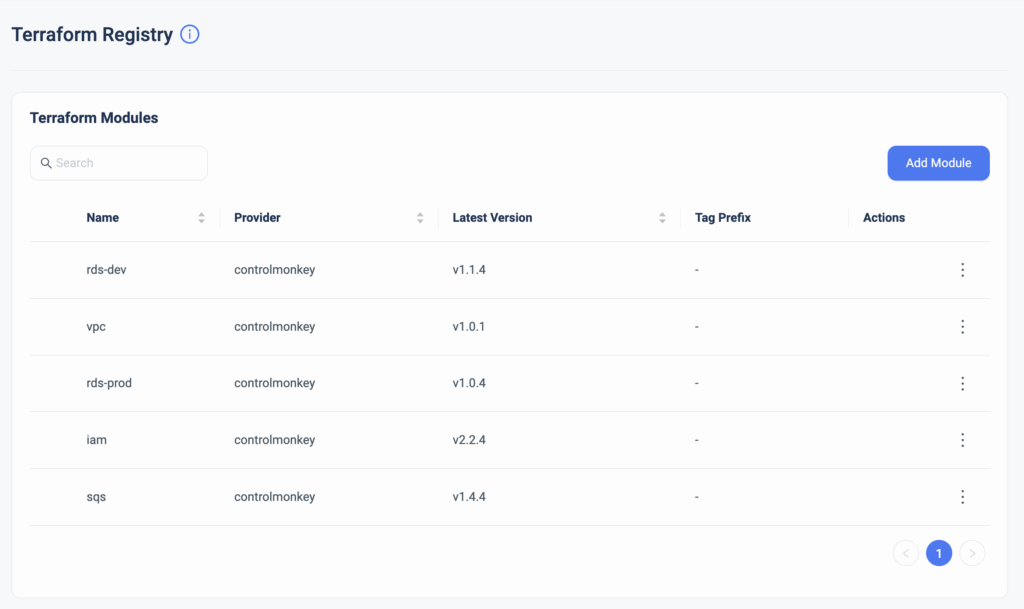
        ControlMonkey’s Terraform Registry is a private registry for securely sharing, reusing, and version-controlling Terraform modules within your organization.
        Starting today, ControlMonkey users can seamlessly leverage custom modules directly from their VCS without sharing credentials, and integrate them into ControlMonkey’s Terraform CI/CD.

        Our Private Modules Registry enables cloud engineering teams to create trusted and reusable modules and enforce module versions within their organization. With ControlMonkey, private modules can now be easily accessible in your Terraform code.

        Terraform Private Modules Registry applies a Management Layer to private modules that enables the following:

        • Delete outdated module versions so they won’t be used.
        • Mark specific modules as obsolete (before deletion)
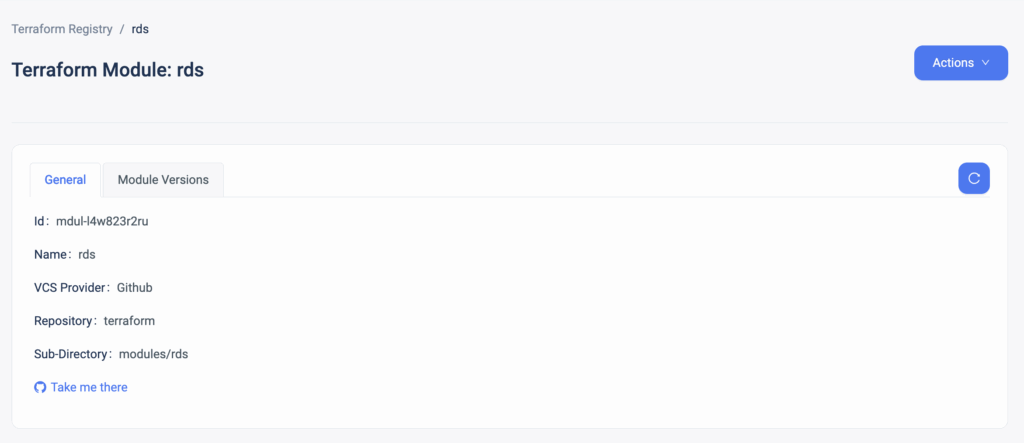
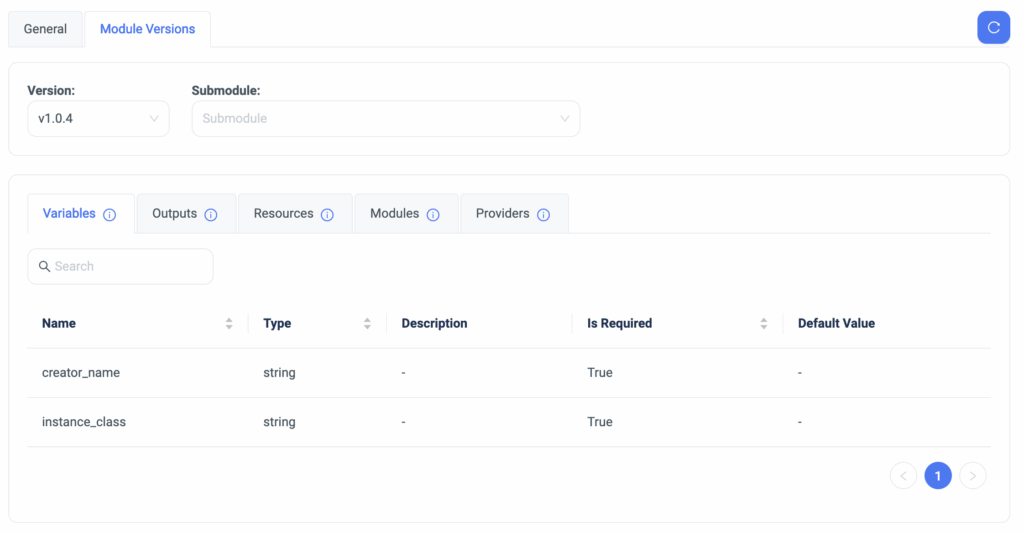
        • Display viable information on each module, such as:
          • Which variables are that module using
          • What outputs are defined for that module
          • Which resources are utilized in that Terraform Module
          • Which external Terraform Modules are being used in that module
          • Which Terraform Providers are specified in that module

        When you use ControlMonkey as your private registry, you don’t need to be worried about authorization within your Terraform CI/CD pipeline, as we take care of it for you.

        Are you leveraging Terraform Modules and looking for the easiest and safest way to manage them?
        Our team is waiting to jump on a 30-minute technical discussion to see how ControlMonkey can help.

        Bottom CTA Background

        A 30-min meeting will save your team 1000s of hours

        A 30-min meeting will save your team 1000s of hours

        Book Intro Call

        Author

        Test User

        Test User

        CTO & Co-Founder

        Lorem ipsum dolor sit amet, consectetur adipisicing elit. Animi architecto consequuntur dicta dolor, excepturi ipsam iste laudantium, magnam molestiae obcaecati odio quam quas repellendus sed, sint magnam molestiae.

          Sounds Interesting?

          Request a Demo

          Resource Blog News Customers Stories

          Updated: Aug 20, 2025 Upd: 20.08.25

          2 min read

          Automatic Detection and Creation of Terraform Stacks

          Test User

          Test User

          CTO & Co-Founder

          Automatic Detection and Creation of Terraform Stacks

          Today, we are happy to announce the latest enhancement to our Terraform CI/CD solution – “Stack Auto-discovery.”
          This capability detects new folders and branches in your Git repositories and automatically creates stacks in the ControlMonkey platform.

          ControlMonkey’s Terraform CI/CD solution helps cloud engineering teams. It offers a simple way to validate, plan, and deploy infrastructure changes. All of this comes from a central source of truth. With ControlMonkey, engineers can easily apply cloud policies. This includes tagging, security, and compliance in the infrastructure CI/CD process.
          By proactively standardizing their cloud environments, they can prevent misconfigurations from reaching production.

          Until today, ControlMonkey users had to create Stacks manually for new folders or paths in their Git repository. This was necessary for those Stacks to be part of the infrastructure CI/CD process.

          New: Automatic Detection and Creation of Terraform Stacks

          Now, with “Stack Auto-discovery,” ControlMonkey will find any new folder or path in the Git repository. It will then automatically create the Stack for it.
          Any new Terraform code created will automatically be incorporated into the infrastructure CI/CD approval and testing process, ensuring that all resources align with the organization’s standard.


          A classic use case is when a new DevOps engineer is onboarded and tasked with creating cloud environments. They create a new branch and a new folder. They also make a PR. ControlMonkey gives them instant feedback on the following:

          • Which resources are going to be created if this PR will be merged.
          • Which of the organization’s Cloud Policies have passed or failed, and what is the reason behind it.

          TL;DR – Terraform Stacks and ControlMonkey 

          To summarize, “Stack auto-discovery” provides an additional layer of automation to your GitOps. It makes sure that all your Terraform code is tested and checked before it goes to production. This reduces the chance of mistakes and misconfigurations.
          Automating the whole process makes daily tasks easier. It also boosts the overall efficiency of the Cloud Engineering team. The new capability supports Terraform, OpenTofu, and Terragrunt.

          ControlMonkey’s Terraform Automation Platform dramatically changes how engineering teams standardize and deploy their cloud infrastructure.
          Our Terraform experts are ready for a technical discussion whenever you are.

          Bottom CTA Background

          A 30-min meeting will save your team 1000s of hours

          A 30-min meeting will save your team 1000s of hours

          Book Intro Call

          Author

          Test User

          Test User

          CTO & Co-Founder

          Lorem ipsum dolor sit amet, consectetur adipisicing elit. Animi architecto consequuntur dicta dolor, excepturi ipsam iste laudantium, magnam molestiae obcaecati odio quam quas repellendus sed, sint magnam molestiae.

            Sounds Interesting?

            Request a Demo

            Resource Blog News Customers Stories

            Updated: Oct 20, 2025 Upd: 20.10.25

            2 min read

            Explore your Terraform Git Repositories

            Explore your Terraform Git Repositories

            We are happy to announce that we have reinforced our Terraform Knowledge Hub solution, giving you full visibility into your Terraform Git repository tree.

            Since its initial release, we have upgraded our Terraform Explorer Dashboard with many awesome capabilities, such as the Terraform Modules Explorer and the Terraform Providers Explorer.

            We often encounter customers who manage large-scale Terraform codebases across multiple Git repositories and various version control systems (GitHub, GitLab, BitBucket, Azure DevOps). These customers struggle to track where their Terraform code resides and determine which code is managed with GitOps methodologies or has drift detection mechanisms in place.

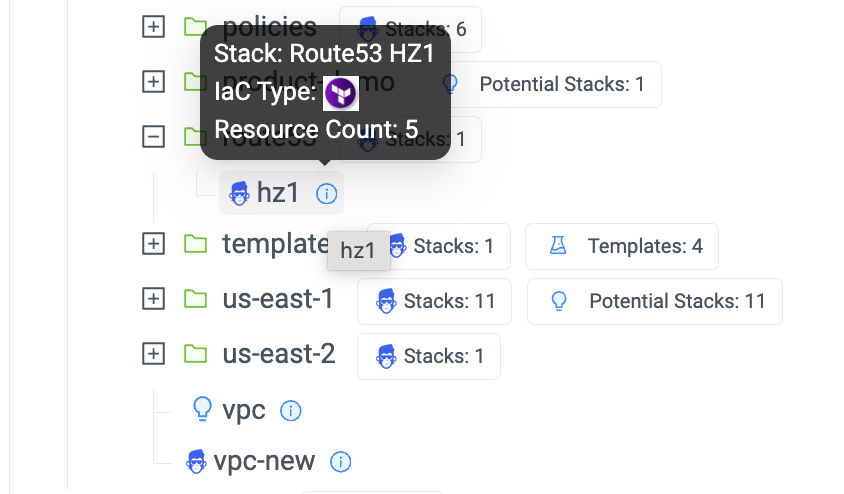
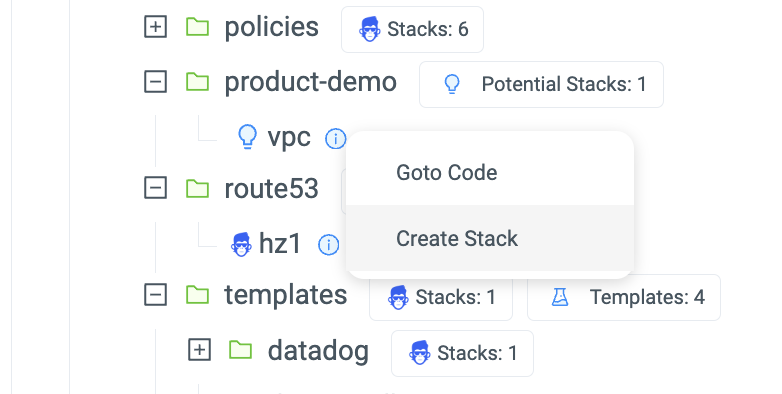
            Today, we have added a new view to our Terraform Explorer Dashboard called ‘Code Tree.’
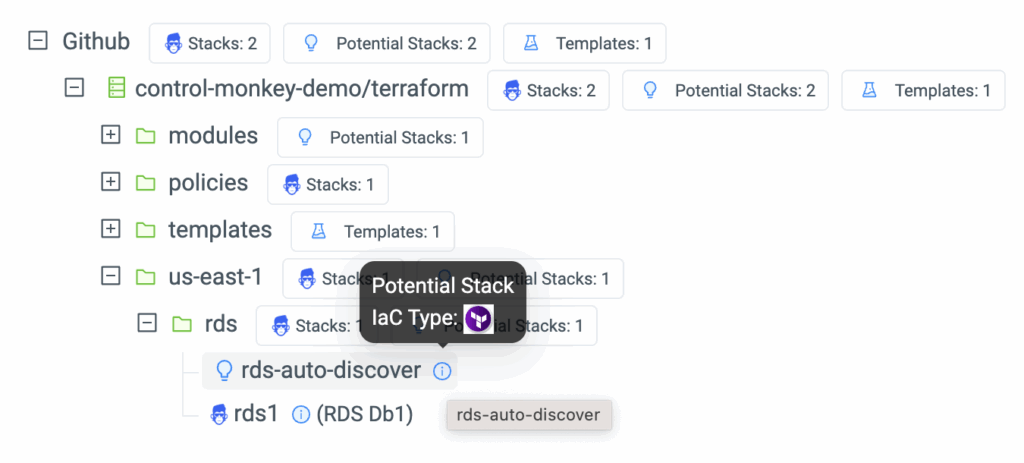
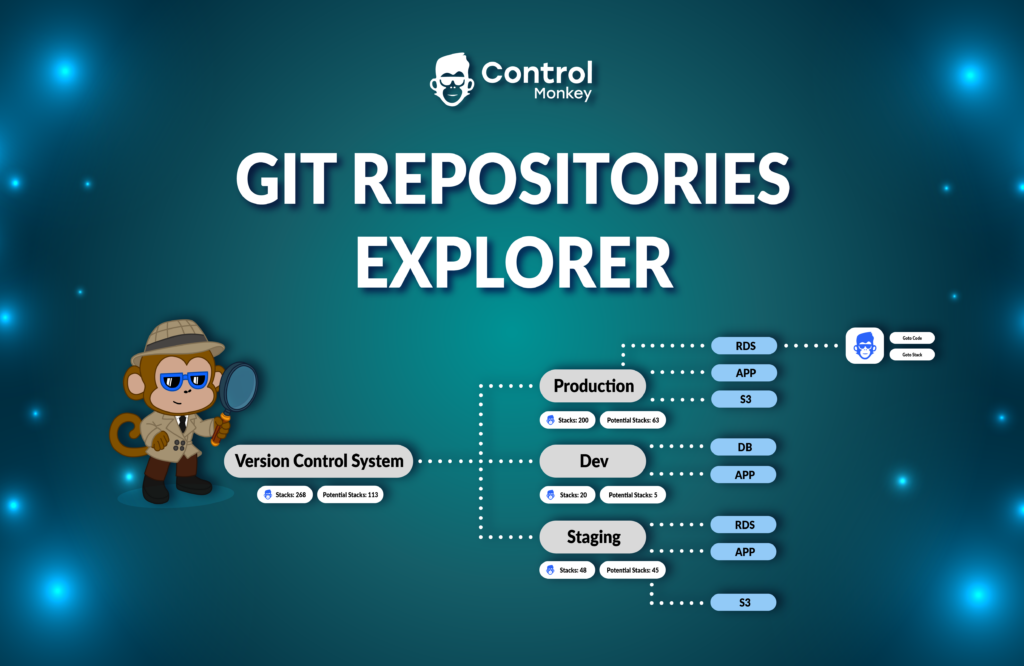
            Code Tree scans your Git repos in your version Control System and provides a birds-eye view of:

            • Where ControlMonkey detected Terraform/Terragrunt/OpenTofu Code:


            • Which sub-directories of code are managed by ControlMonkey Stacks and benefits from Terraform CI/CD, Security Policies, Drift Detection & Remediation and more:


            • Which sub-directories are currently not managed by ControlMonkey (aka potential stacks) but can be with a 1-Click:


            With Code Tree, ControlMonkey users gain a 30,000-foot view of their entire code-base and understand exactly which parts of their environment are not yet managed by ControlMonkey.

            Managing Terraform stacks with ControlMonkey provides the advanced layer of Terraform Automation:

            1. Infrastructure CI/CD with Control Policies to enforce security and compliance standards
            2. Drift Detection and remediation capabilities to quickly resolve any code discrepancies.

            If you have a large-scale Terraform Codebase and you find yourself struggle to manage it efficiently we would love to chat!

            Bottom CTA Background

            A 30-min meeting will save your team 1000s of hours

            A 30-min meeting will save your team 1000s of hours

            Book Intro Call

              Sounds Interesting?

              Request a Demo

              Resource Blog News Customers Stories

              Updated: Aug 20, 2025 Upd: 20.08.25

              2 min read

              Remote Plan from Local Machine

              Remote Plan from Local Machine

              Today, we are pleased to announce the release of ‘Remote Plan from Local Machine,’ the latest enhancement to our Terraform CI/CD engine.

              How do your cloud engineers properly test their Terraform code changes before committing to Git and getting feedback without running a PR?
              There are a few challenges there:

              • The Secrets and variables their code requires are unavailable on their local machine and shouldn’t be for security reasons.
              • They don’t have the organization’s guardrails and policies to test their local code.

              Up until now, users had to commit the code, create a PR, and then get the needed feedback from their centralized Terraform pipeline. This process, of course, slowed down the pace of development and created a lot of “waiting time” between each code update and PR inspection.

              Today, we’re happy to announce our “Remote Plan from Local Machine” capability, where cloud engineers can test their Terraform Code changes locally without initiating a full PR and pushing the GIT code.

              Remote Plan enables you to run your ‘Terraform plan’ locally by triggering a plan simulation remotely on ControlMonkey and getting feedback on the plan’s output.

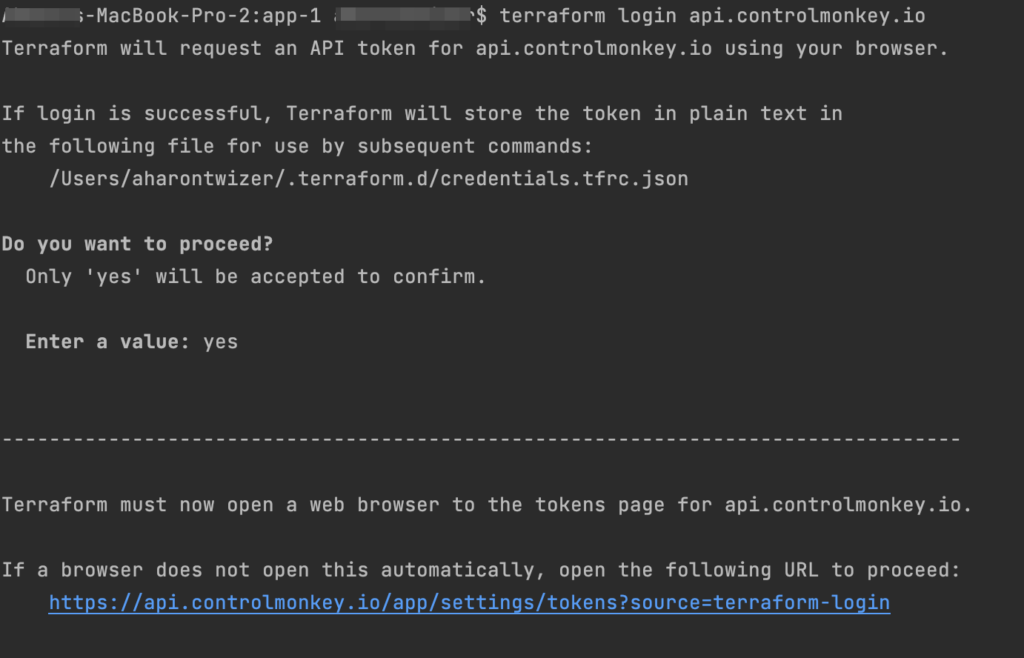
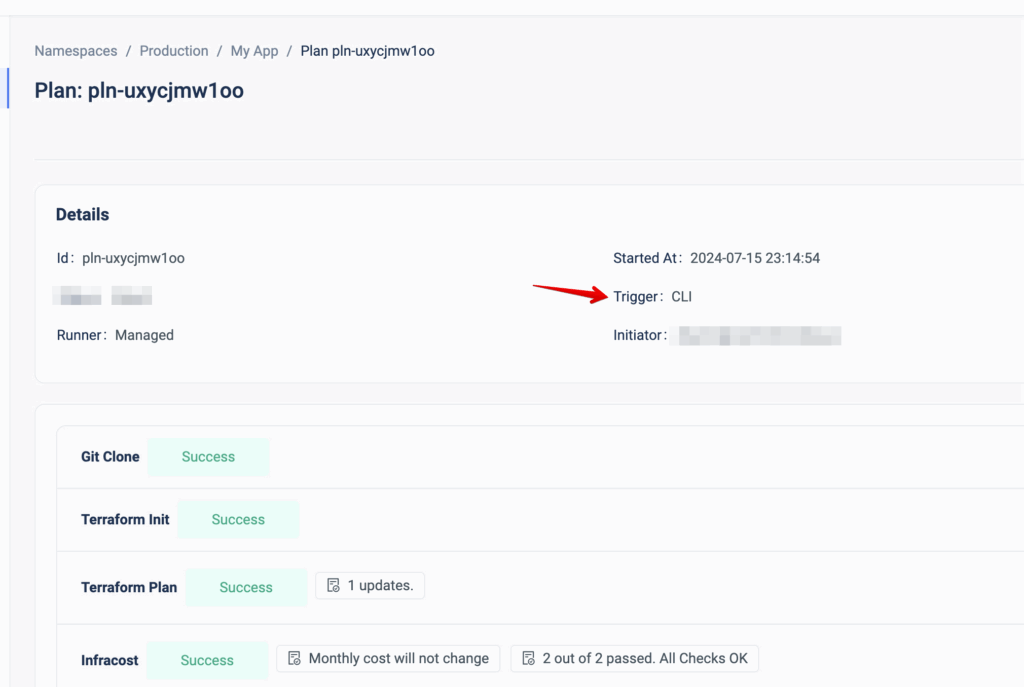
              The integration is pretty easy. All you have to do is run the ‘terraform login api.controlmonkey.io’ command:


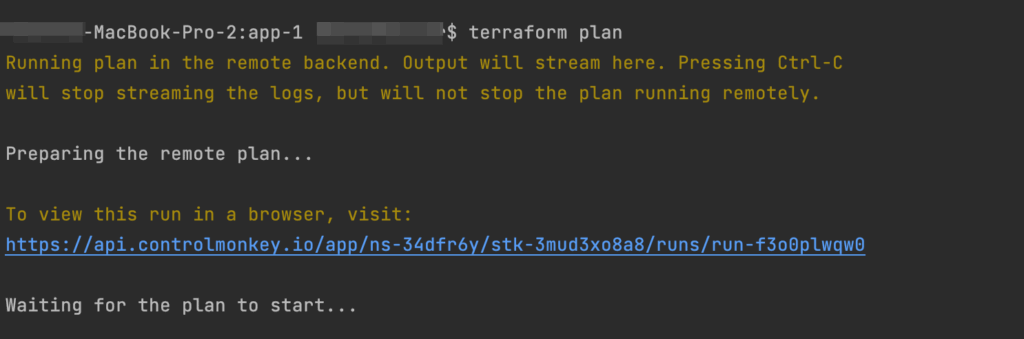
              And then you can work as you’re used to, running ‘terraform plan’ commands on your local machine:


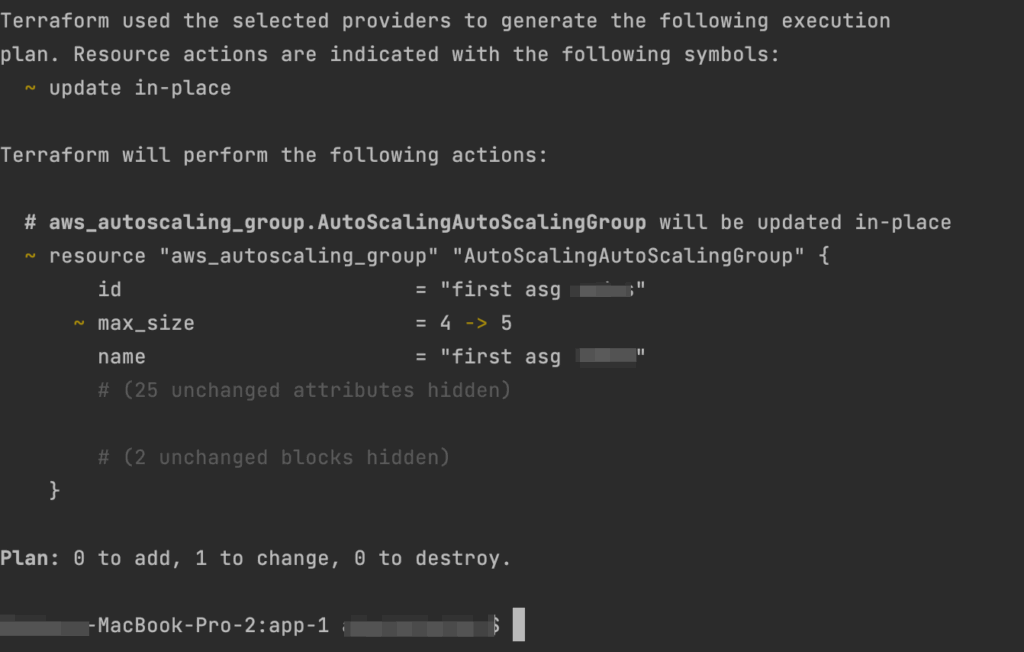
              It uses your local Terraform files but actually runs it remotely in ControlMonkey, using the shared state and your environment’s variables and secrets. Every Remote Plan triggers a Plan in ControlMonkey, so you will have the full audit also on the ControlMonkey console:


              By running a remote plan, your engineers can build faster and test their changes locally before committing to them.

              Are you managing Terraform at scale?
              Our Experts are available for a quick call so you can learn more about the future of Terraform Automation and how it can benefit your team.

              Bottom CTA Background

              A 30-min meeting will save your team 1000s of hours

              A 30-min meeting will save your team 1000s of hours

              Book Intro Call

                Sounds Interesting?

                Request a Demo

                Resource Blog News Customers Stories

                Updated: Aug 20, 2025 Upd: 20.08.25

                1 min read

                Approval Policy – Teams Approval

                Approval Policy – Teams Approval

                A few months ago, we released ControlMonkey ‘Approval Policies ,’ a validation mechanism that requires reviewing and approving any infrastructure change before ‘Terraform Apply’ is executed.

                Today, we are pleased to announce the latest enhancement to these policies – ‘Teams Approval.’
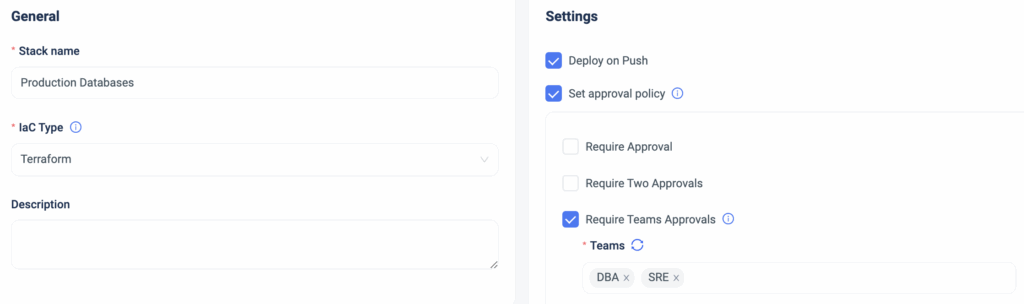
                Starting today, ControlMonkey users can require deployment reviews and approvals from specific teams, adding an additional layer of granularity.

                Example: If I have a stack managing my production DBs and I want to update one of them, I can define that the DBA team must review and approve the change in the stack before ‘Terraform Apply’ is executed.

                So if your organization’s infrastructure approval policy is by teams (DevOps, SRE, Security, Networking, etc.), with ControlMonkey, you can apply these guardrails automatically, straight out of the box.

                Changes to production are always risky, but with ControlMonkey Approved Policies, you can add an extra layer of control and prevent costly misconfigurations before every ‘Terraform Apply’ is executed.

                Are you interested in learning how ControlMonkey streamlines every infrastructure change  and helps companies like yours fully govern their cloud with Terraform?
                Our team is waiting to speak with you!

                Bottom CTA Background

                A 30-min meeting will save your team 1000s of hours

                A 30-min meeting will save your team 1000s of hours

                Book Intro Call

                  Sounds Interesting?

                  Request a Demo

                  Resource Blog News Customers Stories

                  Updated: Aug 20, 2025 Upd: 20.08.25

                  2 min read

                  Resource Explorer support for Azure Resources

                  Resource Explorer support for Azure Resources

                  Today, we are super excited to announce that we are continuing our expansion beyond AWS and adding support to Microsoft Azure in our Resource Explorer.

                  Until now, ControlMonkey’s resource explorer helped DevOps teams discover and investigate their AWS resources. Starting today, we have added the option to discover and investigate Azure resources.

                  Azure users can leverage our Resource Explorer to:

                  • Search for Azure resources per subscription, region, resource type, and name.
                  • Determine whether this resource is managed by Terraform code or not.
                  • Access the resource’s corresponding code in your GIT repository with a 1-click link.
                  • Access the resource’s corresponding ControlMonkey stack with a 1-click link.

                  With Resource Explorer, you can search for any Azure resource, gain visibility into your Terraform coverage, and easily access the corresponding Terraform Code in your GIT repository or corresponding ControlMonkey stack.

                  ControlMonkey’s Resource Explorer serves as the organization’s Terraform knowledge base, providing your team an easy way to locate Terraform code across your Git repositories regardless of specific team member seniority or tenure within the organization.

                  Save precious time when searching for resources and ensure that all your Azure resources are covered with Terraform Code.

                  This is one of many Azure enhancements we will release this year, so stay tuned to what’s coming next!

                  Bottom CTA Background

                  A 30-min meeting will save your team 1000s of hours

                  A 30-min meeting will save your team 1000s of hours

                  Book Intro Call

                    Sounds Interesting?

                    Request a Demo

                    Resource Blog News Customers Stories

                    Updated: Aug 20, 2025 Upd: 20.08.25

                    2 min read

                    Approval Policies

                    Approval Policies

                    ControlMonkey solution for Terraform CI/CD acts as a quality gate for any changes performed to the infrastructure in the Git repository, so whenever someone pushes new code, we run a procedure called ‘Deployment’ that validates the code change and runs ‘Terraform Apply’, in case all tests pass successfully.

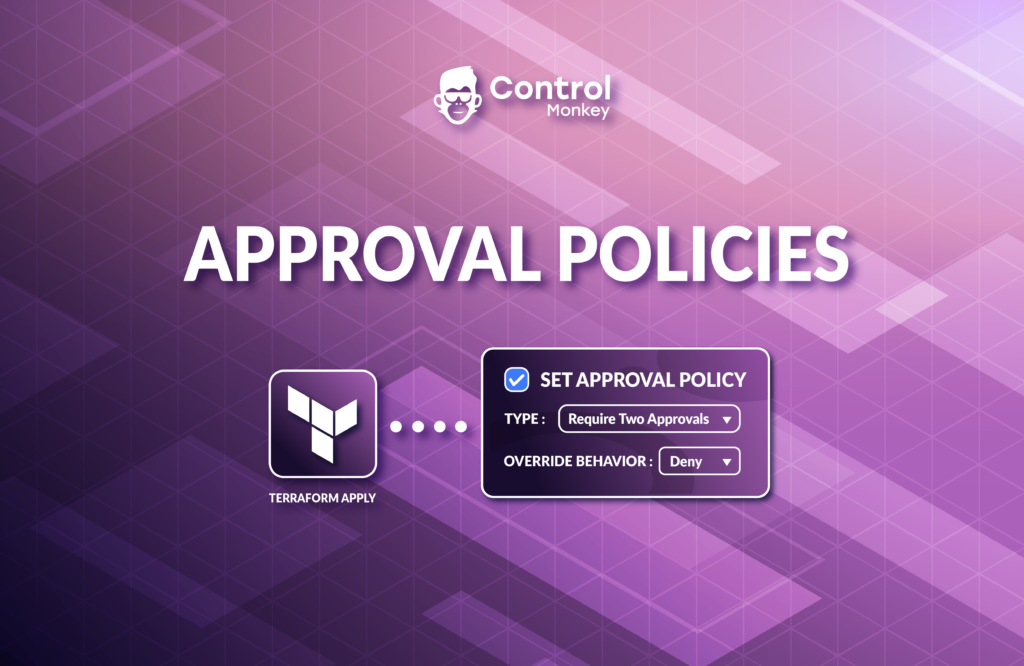
                    Today we are pleased to announce that we have enhanced our CI/CD solution with Approval Policies, an additional validation mechanism for any infrastructure change done in your Git repository.
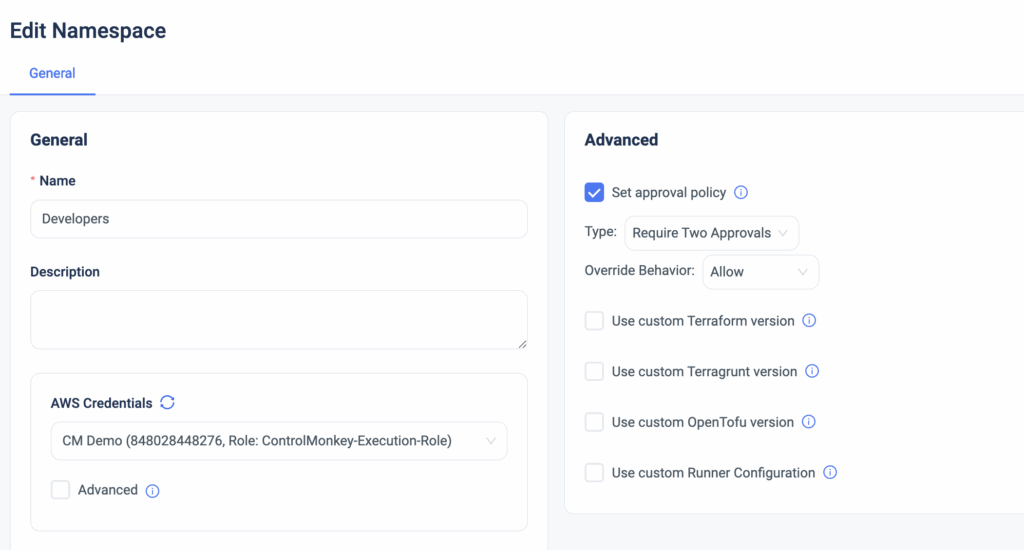
                    Starting today, ControlMonkey users can set approval policies that require the review of any requested infrastructure change.
                    These approval policies can be applied to a namespace or to a specific stack for that extra layer of granularity.

                    Setting approval policies introduces a manual approval step before the ‘Terraform Apply’ command actually runs. By default, Every deployment requires manual approval.

                    Types of approval policies:

                    • Auto Approve
                    • Require 1 approval
                    • Require 2 approvals

                    Changes to production are always risky, but with ControlMonkey Approved Policies, you can add an extra layer of control and prevent costly misconfigurations before every ‘Terraform Apply’ is executed.

                    Approval Policies are predefined and are available out of the box, so no manual policy writing is needed here.
                    Interested to learn how ControlMonkey streamlines every infrastructure change and helps companies like yours in their Day 2?
                    Our team is waiting to speak with you!

                    Bottom CTA Background

                    A 30-min meeting will save your team 1000s of hours

                    A 30-min meeting will save your team 1000s of hours

                    Book Intro Call

                      Sounds Interesting?

                      Request a Demo
                      Cookies banner

                      We use cookies to enhance site navigation, analyze usage, and support marketing efforts. For more information, please read our. Privacy Policy