![Rubrik vs. Commvault: Who Actually Wins on Value For Money? [2026]](https://controlmonkey.io/wp-content/uploads/2026/02/Rubrik-vs.-Commvault.png)
Rubrik looks like the obvious choice until you realize it doesn’t touch your mainframes or half your legacy stack.
So you lean toward Commvault for the breadth, and now your team’s fighting dual consoles and a deployment timeline that keeps slipping.
Your Commvault evangelist friend told you that you can streamline Commvault but warned you that you’ll have to invest heavily in architecture and expertise.
Back and forth you go, comparing both.
And the whole time, neither platform is answering the question that actually keeps infrastructure teams up at night after a disaster:
Who’s responsible for getting the networking, identity policies, and cloud configurations back to a working state before any restored data even matters?
This guide puts Rubrik and Commvault side by side on features, integrations, pricing, and what real customers are saying about both platforms in 2026.
I’ll also show you why pairing either data backup platform with an infrastructure configuration backup solution like ControlMonkey (that’s us!) closes the critical gap that neither one fully addresses on its own.
TL;DR
- Everything Rubrik does revolves around one bet: that security should be the foundation of data protection, not a feature bolted on later. Zero-trust architecture, immutable backups, an SLA policy engine that handles scheduling, retention and replication without you babysitting it.
I’d go for Rubrik if ransomware protection is my top priority, I value a management experience that mostly runs itself, and I’m comfortable with its high price tag.
- Almost nobody else in enterprise data protection covers as many workload types as Commvault. Over 250 at last count: on-prem, hybrid, and multi-cloud environments. Its Cloud Rewind feature goes beyond traditional backup by recovering cloud infrastructure configurations like VPCs, security groups, and load balancers.
I’d go for Commvault if my environment is complex, I’ve got legacy workloads that other platforms can’t touch, and I want some infrastructure-level recovery without bolting on a separate tool.
- ControlMonkey isn’t a replacement for either Rubrik or Commvault. It’s the missing layer. Both platforms protect your data. ControlMonkey protects what your data runs on: the VPCs, IAM policies, DNS records, security groups, and SaaS vendor settings that make your cloud environment actually function.
It captures daily Terraform-based snapshots of your entire cloud footprint, stores them in your own Git repository, and lets you restore any resource or environment with a single click.
I’d go for Rubrik paired with ControlMonkey if I want strong data security and full infrastructure recoverability in the same DR strategy, so my enterprise could restore both my data and the environment it lives in after an incident.
Rubrik vs. Commvault: Features
| Rubrik | Commvault | ControlMonkey | |
|---|---|---|---|
| Core Data Protection | SLA-driven policy engine with incremental-forever backups and Live Mount for near-instant VM recovery. | Global deduplication saving up to 90% storage, Synthetic Recovery for clean restore points, and support for over 250 workload types. | Protects infrastructure configuration with daily Terraform-based snapshots of your entire cloud state, stored in your own Git repository. |
| Cloud Integration & Modern Workloads | Cloud-Native Protection for AWS, Azure, GCP, and Oracle Cloud. Protects EC2, EBS, RDS, and now Okta, Azure DevOps, and GitHub. | Covers 160 cloud regions and 200 cloud services. Cloud Rewind recovers infrastructure configs (VPCs, security groups, load balancers) for 105 AWS resource types. | Backs up infrastructure configuration across AWS, Azure, GCP, and 30+ third-party platforms (e.g., Datadog, Cloudflare, Okta, Confluent, Temporal). |
| Management & Usability | Single HTML5 console. SLA Domains automate backup policies with Gold, Silver, and Bronze tiers. Minimal daily management. | Dual interfaces: legacy Java console and newer HTML5 Command Center. | A Cloud Resilience Dashboard that will give you a single pane of glass for DR readiness across all cloud accounts and third-party platforms. |
| Security & Ransomware Protection | Zero-trust architecture with immutable Atlas file system, Cloud Vault (air-gapped storage), retention lock, and $10M ransomware warranty. | Threatwise cyber deception with 500 lightweight sensors per appliance. | Drift detection and auto-remediation that aims to catch unauthorized configuration changes in real-time. Our platform also prevents misconfigurations from becoming security incidents. |
| Disaster Recovery (DR) | Orchestrated failover with Live Mount and instant recovery. Strong for VM and database-level DR. However, it doesn’t have an infrastructure config backup. | Orchestrated DR with recovery-as-code via Cloud Rewind. Generates CloudFormation and ARM templates to rebuild cloud environments. Some gaps in DNS automation and cross-account recovery. | One-click infrastructure recovery to any previous known-good state. Our platform is capable of restoring VPCs, IAM, DNS, security groups, load balancers, and SaaS configs. |
| Scalability & Performance | Scale-out appliance architecture. Adds capacity by adding nodes. | Software-defined architecture decouples compute from storage. | Scales across multi-cloud and multi-account environments. |
| Ecosystem & Platform Coverage | Growing rapidly but narrower. Strong on VMware, Hyper-V, major databases, Microsoft 365, and expanding SaaS coverage. | Physical servers, mainframes, Oracle, SAP HANA, Kubernetes, AWS Lambda, endpoints, and SaaS apps. | Covers cloud providers (AWS, Azure, GCP) and 30+ SaaS vendors, including Datadog, Cloudflare, Okta, Confluent, and Temporal. |
Rubrik’s Features
Zero-Trust Data Security Architecture
The security posture is what separates Rubrik from the rest of the pack.
The platform’s proprietary Atlas file system is append-only and immutable by design, which means backup data can’t be modified, encrypted, or deleted by attackers or rogue insiders.
Not a setting you flip on. Not a module you license separately. The immutability is structural.
Then there’s Rubrik Cloud Vault: a fully managed, logically air-gapped backup repository in AWS and Azure.
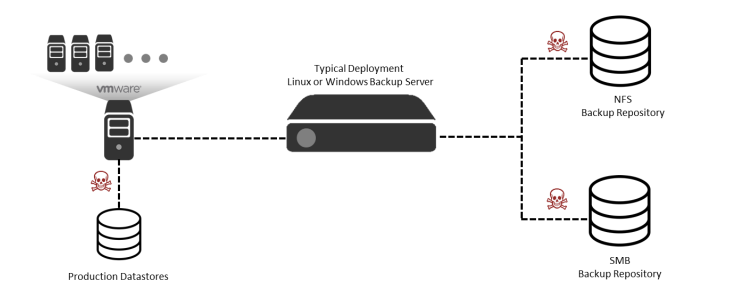
Retention lock means nobody deletes backups before their retention window closes.
Not your admins. Not anyone.
The $10 million ransomware recovery warranty for Enterprise Edition customers backs that up with actual dollars, not just a slide deck.
On the threat detection side, Rubrik holds its own.
Anomaly detection powered by ML scans both on-prem and cloud backups looking for suspicious changes. Threat Hunting and its faster cousin, Turbo Threat Hunting, comb through backup data for known malware signatures before you hit restore.
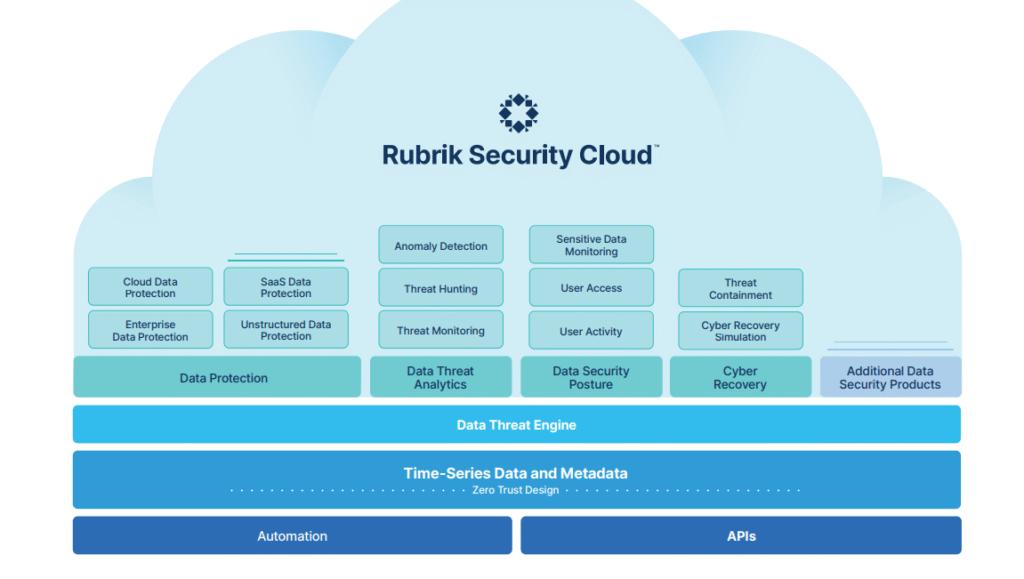
The gap? Rubrik catches threats by looking at backup data after something has already happened.
It won’t spot an attacker doing recon across your live production environment.
SLA-Driven Automation and Live Mount Recovery
Most backup platforms require you to configure individual jobs for each workload. Rubrik flips this.
You assign workloads to SLA Domains (Gold, Silver, Bronze, or custom), and Rubrik handles the rest: backup scheduling, retention, replication, and archival. Once it’s configured, you can largely walk away.
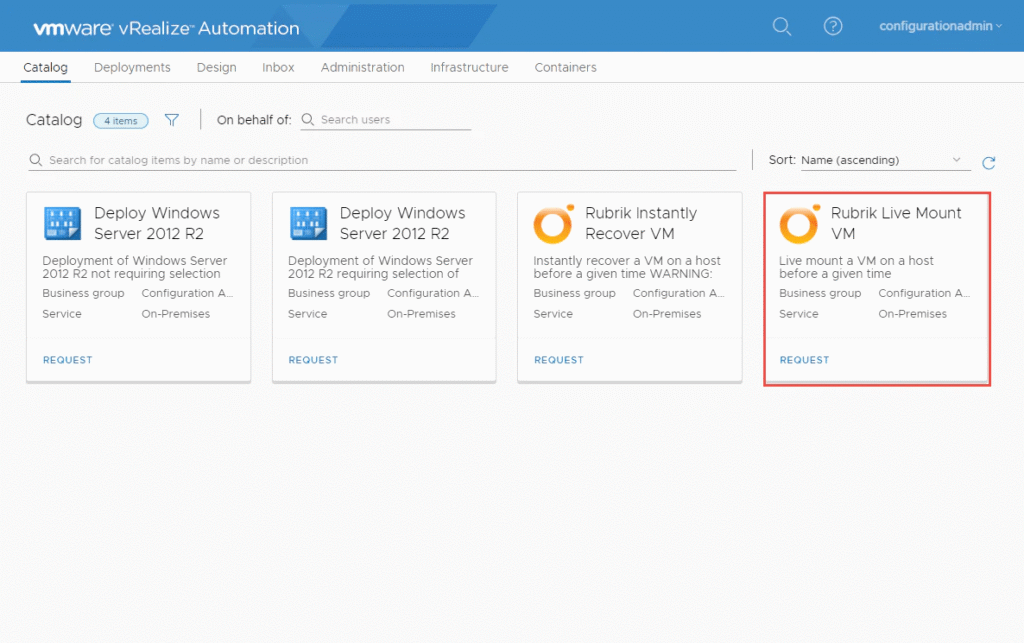
Live Mount is where this gets interesting for disaster recovery. Instead of waiting for a full restore, Rubrik runs VMs directly from backup storage.
Within minutes, a VM is up and running, and you migrate it to production storage afterwards.
The incremental-forever architecture also means Rubrik performs one full backup and then only tracks changed blocks going forward.
Short backup windows. Low storage consumption.
Despite this, Rubrik’s SLA Domains cover data and application-level policies. They don’t extend to infrastructure configuration like VPC settings, IAM roles, or DNS records.
Identity Recovery and Expanding SaaS Protection
The platform now offers Identity Recovery for Active Directory Forest and Microsoft Entra ID so that you can restore entire identity environments without reintroducing malware.
Rubrik also launched Okta Recovery with immutable backup support and DevOps Protection for Azure DevOps and GitHub repositories.
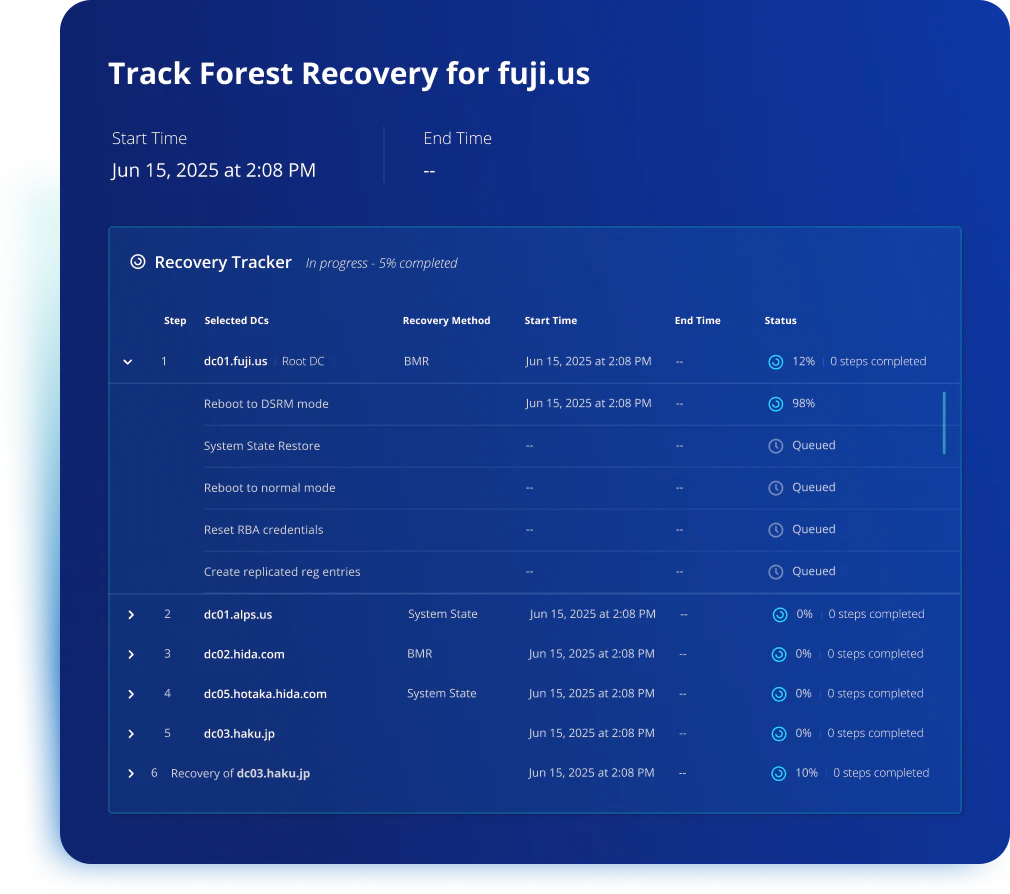
If an attacker compromises your identity infrastructure (which is increasingly common in ransomware playbooks), being able to restore AD forests and Entra ID tenants to a clean state is a real differentiator.
Rubrik also expanded to protect Oracle Cloud Infrastructure, PostgreSQL databases, and Red Hat OpenShift Virtualization to broaden its cloud-native coverage.
But here’s the thing that keeps coming up: Rubrik protects your data, your identities, and your SaaS application content. It doesn’t protect the cloud infrastructure that those things run on.
With Rubrik, you’ll have your data protected. But how about infrastructure?
Here’s a scenario that plays out more often than most teams want to admit.
Your company runs production on AWS.
You’ve got 200 EC2 instances, 50 RDS databases, networking spread across 15 VPCs with dozens of subnets and security groups, 30 IAM roles with custom policies, Route 53 DNS configurations, Application Load Balancers, and EKS cluster settings.
Ransomware hits. Or someone accidentally deletes a critical CloudFormation stack. Or a misconfiguration cascades. Or an entire AWS region goes down, and you need to failover to your secondary region.
Rubrik restores your VM images, database snapshots, and file data. That part works.
But before any of that restored data becomes functional, someone needs to rebuild every VPC, subnet, route table, security group, IAM role, DNS record, load balancer, and Kubernetes setting.
Manually. Under pressure. With the CEO asking why systems are still down. Microsoft Teams notifications blazing.
Studies indicate that approximately 40% of cloud recovery efforts fail due to overlooked infrastructure gaps.
This is exactly the gap that ControlMonkey’s infrastructure disaster recovery fills.
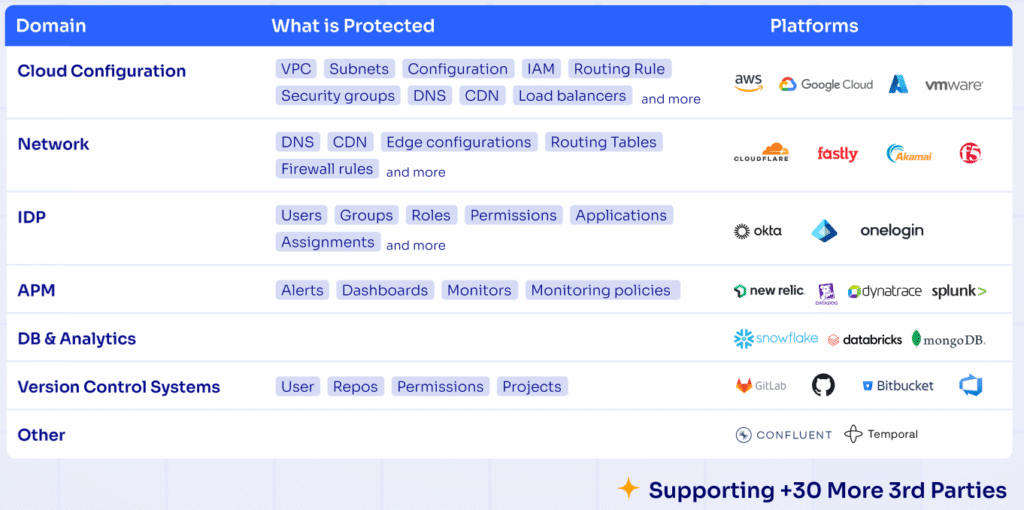
While Rubrik secures your data and workloads, ControlMonkey secures the cloud control plane: the networking, identity, DNS, CDN, security policies, and SaaS configurations that your data actually runs on.
Here’s what ControlMonkey does that Rubrik doesn’t
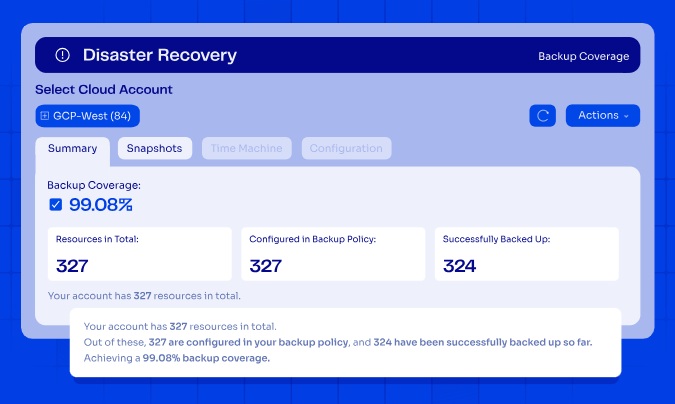
Daily Terraform-Based Infrastructure Snapshots
ControlMonkey takes automated snapshots of your entire cloud configuration across AWS, Azure, GCP, and third-party vendors like Datadog, Cloudflare, Okta, Confluent, and Temporal.
These aren’t proprietary backups. They’re stored as Terraform code and state files in your own Git repository.
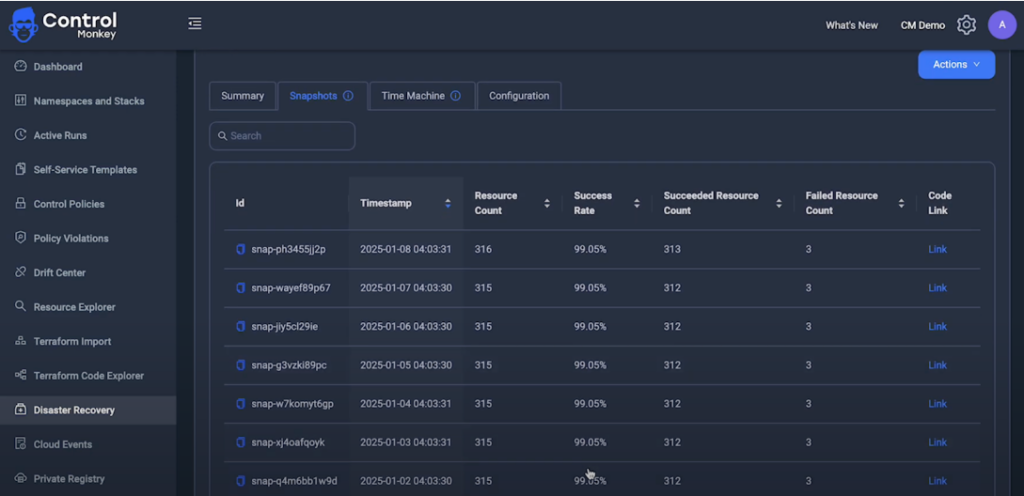
One-Click Recovery with Time Machine
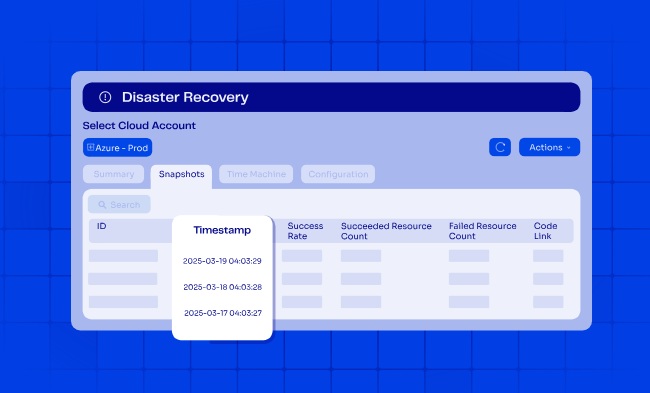
When a misconfiguration, accidental deletion, or region-level failure happens, your team can use ControlMonkey’s built-in Time Machine to browse any previous known-good state and restore with a single click.
No scrambling. No manual scripting. No crossed fingers.
This applies whether you’re rolling back a single IAM policy change, recovering from a Terraform mistake, or rebuilding an entire environment in a secondary region.
Cloud Resilience Dashboard
A real-time, executive-level view of your organization’s infrastructure readiness across cloud accounts and third-party platforms.
You can instantly see what’s covered by IaC, what isn’t, and what’s ready for recovery.
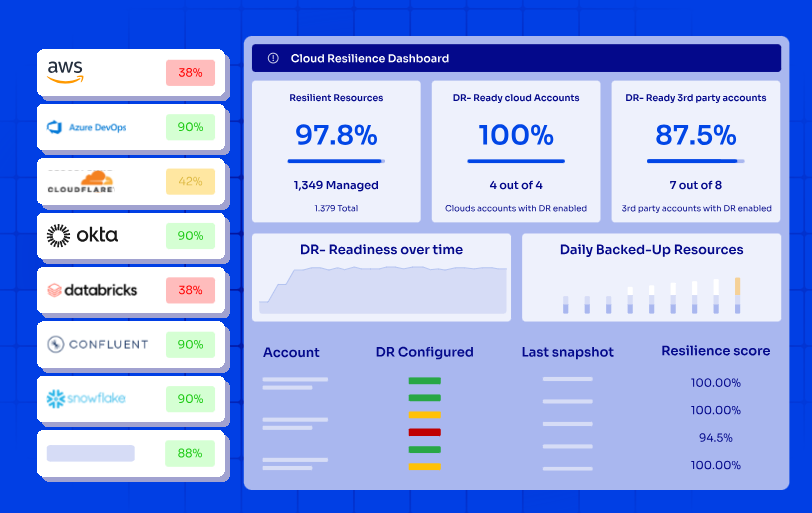
ControlMonkey continuously validates DR readiness to provide automated compliance with SOC 2, ISO 27001, PCI DSS, and other frameworks.
Drift Detection and Auto-Remediation
ControlMonkey monitors your cloud environments for configuration drift in real time.
Unlike data backup tools that don’t track infrastructure state, ControlMonkey detects unauthorized changes and automatically remediates them through Git-based pull requests.
This means misconfigurations get fixed before they become outages, and IAM or networking errors are caught before they cascade.
Complete Cloud Inventory and Terraform Generation
Our platform scans your cloud accounts to create a full inventory of all resources. It shows what’s managed by IaC and what isn’t.
And it generates production-ready Terraform code for existing unmanaged resources, so you can bring your entire environment under version control.
Companies like Block (the fintech behind Cash App and Square), Intel, and Comcast rely on ControlMonkey to protect their infrastructure configuration.
Block, a global fintech processing over $240 billion annually for 55 million users, achieved 100% DR-readiness and approximately 90% faster configuration recovery time after deploying ControlMonkey across their multi-cloud infrastructure.Check out the full case study: Block and ControlMonkey: Achieving 100% Cloud Resilience at Massive Scale.
How Would ControlMonkey Work with Rubrik in Reality?
Here’s a realistic disaster recovery sequence when you pair both platforms:
- Step 1: The incident. A ransomware attack encrypts your production AWS environment. VMs, databases, networking, IAM policies, DNS records, and security groups are all compromised.
- Step 2: Infrastructure recovery with ControlMonkey. Your team opens ControlMonkey’s Time Machine and selects the last known-good infrastructure snapshot from before the attack.
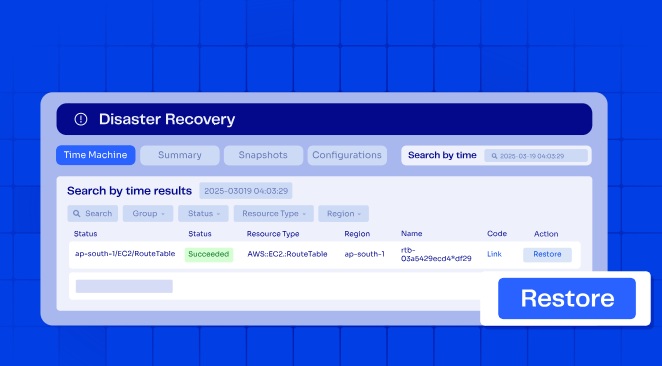
With one click, ControlMonkey generates and applies the Terraform code to rebuild your VPCs, subnets, security groups, IAM roles, Route 53 DNS records, load balancers, CDN configurations, and SaaS settings.
The infrastructure skeleton is back in minutes, not days.
If you need to failover to a different AWS region or even a different cloud provider entirely, ControlMonkey’s multi-cloud coverage means the same one-click process works across environments.
- Step 3: Data recovery with Rubrik. Once the infrastructure is restored, your team uses Rubrik’s immutable backups to restore clean VM images, database snapshots, and application data onto the rebuilt infrastructure.
Rubrik’s Threat Hunting scans ensure the restored data is free of malware.
- Step 4: Identity and access restoration. Rubrik’s Identity Recovery restores your AD Forest and Entra ID tenants to a clean state.
ControlMonkey restores your Okta configuration (groups, policies, assignments) that was backed up as Terraform code.
- Step 5: Verification and go-live. ControlMonkey’s drift detection confirms the recovered environment matches the known-good state. Rubrik confirms data integrity. You’re live.
Without ControlMonkey, Step 2 would have been days or weeks of manual infrastructure rebuilding, and your Recovery Time Objective (RTO) would have blown past every SLA you’ve committed to. That’s the difference.
Rubrik answers the question: “Can I get my data back?”
ControlMonkey answers the question: “Can I get my infrastructure back?”
Together, they give you complete disaster recovery and an RTO measured in minutes instead of days.

Rubrik answers the question: "Can I get my data back?"
ControlMonkey answers the question: “Can I get my infrastructure back?”
Together, they give you complete disaster recovery and an RTO measured in minutes instead of days.
Commvault’s Features
Broad Workload Coverage
Commvault protects more workload types than any other traditional backup platform.
We’re talking about over 250 platforms: physical servers, VMware, Hyper-V, Oracle, SAP HANA, Microsoft 365, Kubernetes, AWS Lambda, endpoints, mainframes, and more.

And the Synthetic Recovery feature uses threat intelligence to piece together optimal recovery points from multiple backups to minimize data loss while ensuring no malware makes it into the restore.
Commvault claimed some aggressive performance numbers at SHIFT 2025: 111 TB per hour for S3 protection, 84% faster backups, and 91% faster restores compared to previous generations.
Cloud Rewind: Recovery-as-Code for Cloud Infrastructure
Cloud Rewind is Commvault’s most distinctive capability and the feature that sets it apart from Rubrik in the infrastructure recovery conversation.
Cloud Rewind connects to your cloud accounts, continuously discovers all resources and their dependencies, and backs up infrastructure configurations alongside data.
For AWS alone, it supports over 105 resource types, including VPCs, subnets, route tables, security groups, network ACLs, load balancers, Lambda functions, and more.
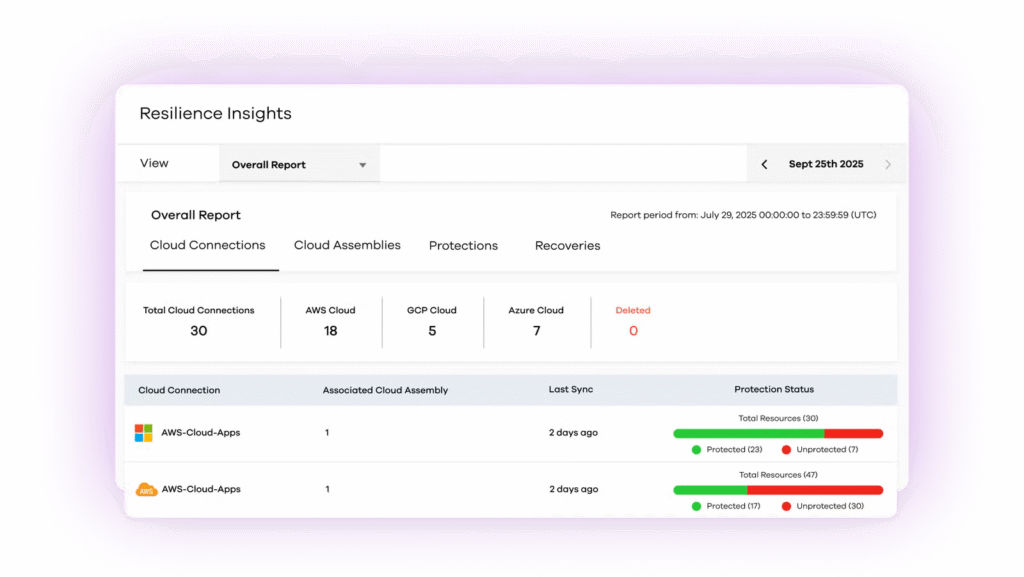
During recovery, Cloud Rewind generates native CloudFormation or Azure ARM templates to orchestrate point-in-time restoration of full application stacks, including all cloud constructs, metadata, and dependencies.
But Cloud Rewind has documented limitations worth knowing about.
Route 53 DNS records aren’t automatically updated during recovery, and you’ll need to configure manual webhooks or Lambda functions to handle them.
Elastic IP association isn’t supported yet. Cross-account recovery is unavailable for several service types, including EFS, Lambda, DynamoDB, and SNS.
And it generates CloudFormation and ARM templates, not Terraform, which may not align with teams that have standardized on Terraform for their IaC workflows.
Cloud Rewind is a real step forward for Commvault.
However, it doesn’t cover third-party SaaS configurations (Datadog, Cloudflare, Okta), doesn’t provide drift detection or auto-remediation, and doesn’t store backups as Terraform code in your Git repository.
Threatwise Cyber Deception
Commvault’s approach to ransomware defense takes a fundamentally different path than Rubrik’s.
While Rubrik focuses on detecting threats by scanning backup data after an attack, Commvault’s Threatwise deploys lightweight decoy assets across your production environment to catch attackers during the reconnaissance phase.

Each Threatwise appliance can deploy over 500 threat sensors that mimic real network assets like servers, VMs, endpoints, and networking equipment.
These decoys require only IP addresses, with no additional hardware or licensing needed.
Since only an attacker performing lateral movement would interact with these decoys, Commvault claims zero false positives and coverage across over 50 MITRE ATT&CK techniques.
Commvault also offers Air Gap Protect with FedRAMP High certification and Cleanroom Recovery for isolated forensic testing.
Integrations: Rubrik vs. Commvault
Rubrik’s Integrations
Rubrik integrates natively with the major cloud providers: AWS, Azure, GCP, and Oracle Cloud Infrastructure.
- On the hypervisor side, it covers VMware vSphere, Microsoft Hyper-V, Nutanix AHV, and Red Hat OpenShift Virtualization.
- For databases, Rubrik supports SQL Server, Oracle, SAP HANA, PostgreSQL, MongoDB, and others.
- On the SaaS side, Rubrik protects Microsoft 365 (Exchange, OneDrive, SharePoint, Teams), Salesforce, and recently added Okta, Azure DevOps, and GitHub.
- Security integrations include Microsoft Sentinel, Splunk, CrowdStrike, Palo Alto Networks, and Zscaler. Rubrik also integrates with ServiceNow for IT operations.

And with the Annapurna platform, Rubrik is pushing into AI integrations with Amazon Bedrock and Google Agentspace for secure AI data access.
Commvault’s Integrations
Commvault’s integration ecosystem is the broadest in the industry.
- It covers AWS, Azure, GCP, Oracle Cloud, and IBM Cloud natively, spanning 160 cloud regions and over 200 cloud services.
- Hypervisor support includes VMware, Hyper-V, Nutanix, Proxmox VE 9, and Citrix. Database support extends to Oracle, SQL Server, SAP HANA, PostgreSQL, MySQL, MongoDB, Cassandra, and mainframe databases.
- For SaaS, Commvault protects Microsoft 365, Google Workspace, Salesforce, Dynamics 365, and ServiceNow.
- Security tool integrations are also deep: bidirectional connections with Splunk, Palo Alto XSOAR, Microsoft Sentinel, CrowdStrike, and Darktrace.
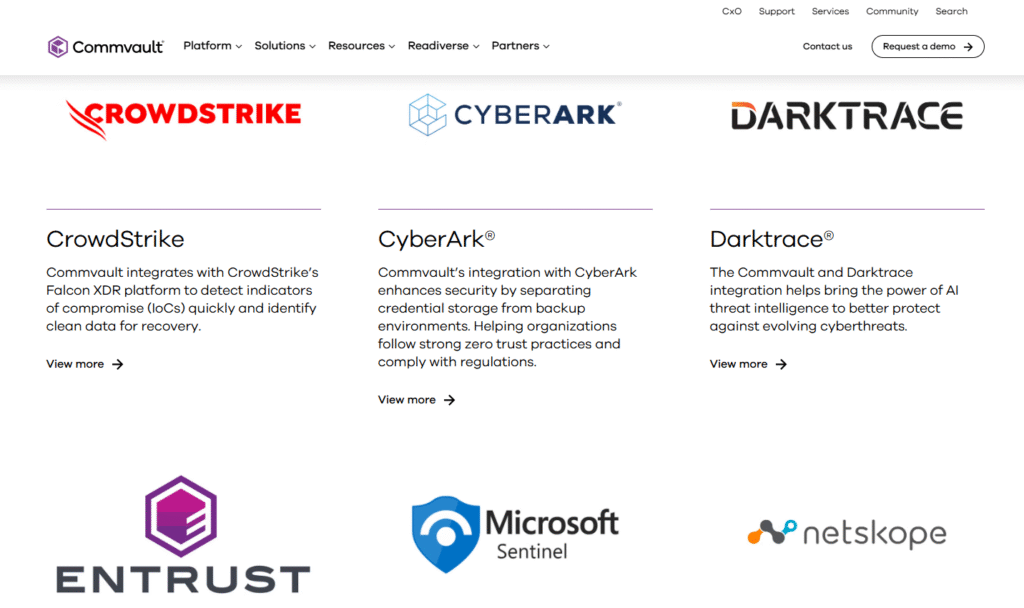
If sheer integration breadth matters to your team, Commvault has a clear lead over Rubrik.
Pricing: Rubrik vs. Commvault
Rubrik’s Pricing
Rubrik doesn’t publish transparent pricing.
The platform uses subscription-based licensing tied to data capacity and protected workloads. According to third-party data from Vendr, reported deals reach up to $601,917 per year, with $192,384/year on the low end: based on data from 3 purchases.

But that’s just the software.
Rubrik’s appliance-based architecture means hardware costs stack on top.
The Rubrik R334 (3-node, 36TB) lists at approximately $100,000, while the R344 (4-node, 48TB) runs around $200,000.
The Cloud-Native Protection for AWS and Azure doesn’t require appliances but still carries subscription costs based on protected capacity.
Commvault’s Pricing
Commvault’s pricing structure is more complex but potentially more flexible.
As a software-defined platform, Commvault decouples compute from storage, so you’re not locked into buying bundled appliance nodes.
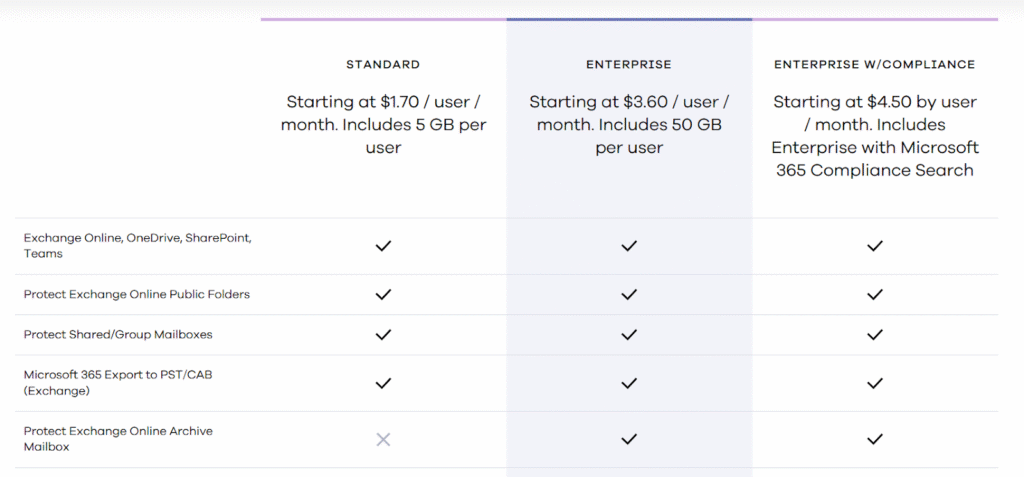
Microsoft 365 backup starts at $1.70 per user per month for the Standard tier and scales to $4.50 per user per month for Enterprise with Compliance features.
Cloud Rewind uses usage-based pricing. On the AWS Marketplace, you’ll pay $0.035 per instance per hour for up to 10,000 instances, dropping to $0.021 per instance per hour for over 100,000 instances.

The argument Commvault makes against Rubrik is that its software-only approach delivers lower TCO because customers can scale performance and storage independently, rather than buying pre-configured appliance nodes.
What are customers saying about Rubrik and Commvault?
TL;DR:
- Rubrik’s reviews consistently praise its usability and security architecture, but some are not happy with its cost and under-documentation.
- Commvault’s users are satisfied with its coverage breadth and storage efficiency, but some users were not happy with its deployment complexity.
Rubrik Reviews
G2 Rating: 4.6 out of 5 (based on 106 reviews).
What users love:
- The intuitive UI and minimal management overhead. Multiple reviewers highlight that backups can be configured with just a few clicks and that the SLA Domain model eliminates most daily administration.
- How the policies are very flexible and can be tailored to any business’s needs.
- Fast backup and recovery times without wrestling with overly complex setups.

‘’What I like the most is how simple it makes the whole backup and recovery process. The platform is very clear, tasks are set up quickly, and it allows you to see the status of all backups in a very transparent way.’’ – G2 Review
Common complaints:
- High cost and expensive renewals. This is the most frequent criticism across every review platform.
- How some of the advanced features, like analytics and threat hunting, can feel under-documented or require deeper product knowledge.
- Its limited support for opening some open source databases.

‘’Rubrik can be pricey compared to alternatives. Licensing and subscriptions for enterprise features sometimes feel steep, especially for smaller environments.’’ – G2 Review.
Commvault Reviews
G2 Rating: 4.3 out of 5 (based on 182 reviews).
What users love:
- Its strong balance between enterprise-grade capabilities and operational simplicity.
- How reliable and easy it is to manage once set up.
- The tool’s backup data copy encryption and compliance lock.
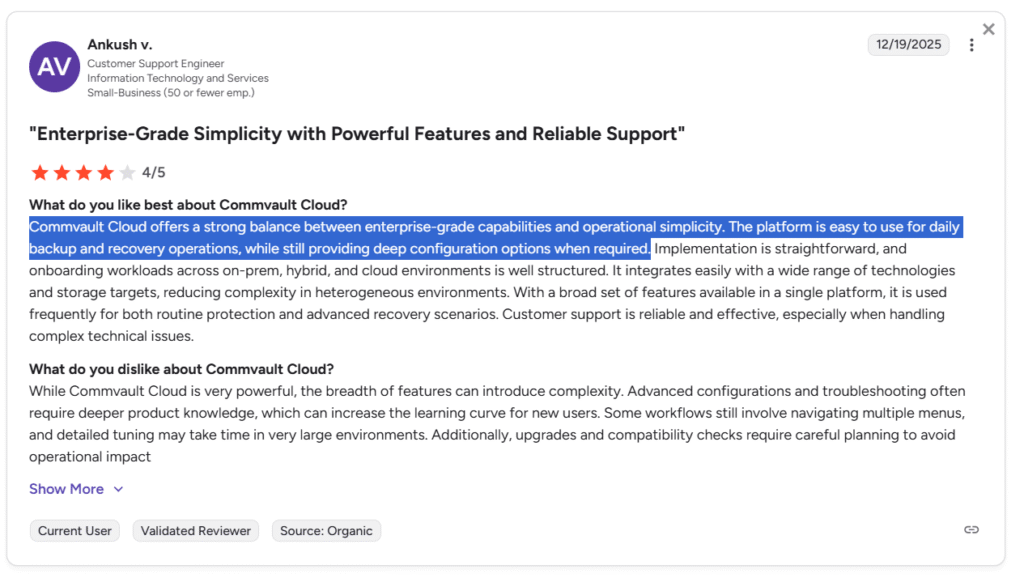
‘’Commvault Cloud offers a strong balance between enterprise-grade capabilities and operational simplicity. The platform is easy to use for daily backup and recovery operations, while still providing deep configuration options when required.’’ – G2 Review.
Common complaints:
- Complex deployment and steep learning curve.
- How advanced configurations and troubleshooting often require deeper product knowledge.
- Upgrades and compatibility checks require careful planning to avoid operational impact
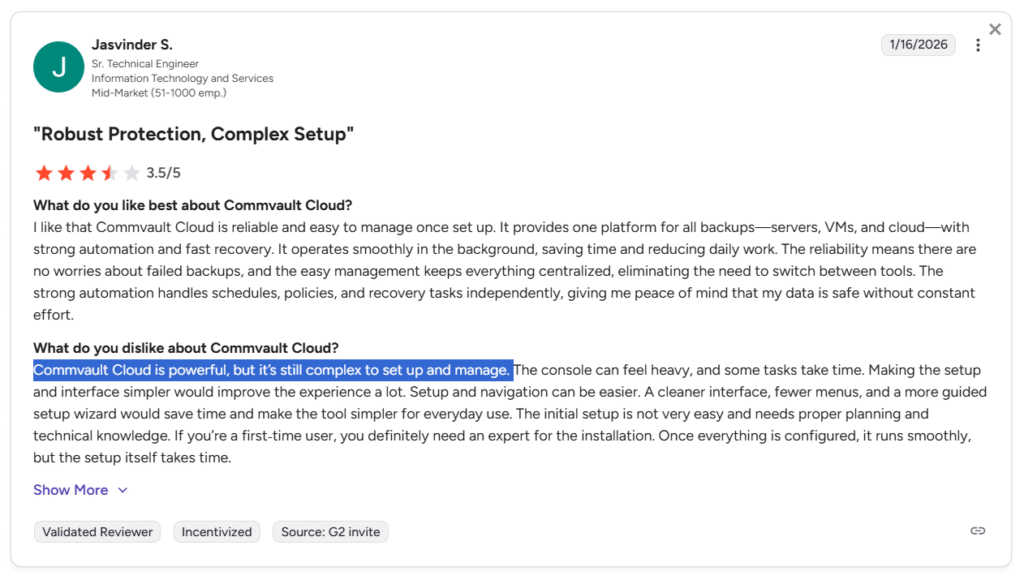
‘’Commvault Cloud is powerful, but it’s still complex to set up and manage.’’ – G2 Review.
Which platform should you choose for your data backup?
Rubrik is the right choice if you:
- Prioritize ransomware protection above all else and want an immutable-by-design architecture with a $10M recovery warranty.
- Want the simplest management experience with SLA-driven automation that minimizes daily administration.
- Need strong identity recovery for Active Directory, Entra ID, and Okta environments.
- Run a primarily cloud and VMware-based environment without heavy legacy workload requirements.
Rubrik isn’t the best option if you:
- Have a tight budget. Rubrik’s appliance costs and subscription pricing are premium, and renewals are expensive.
- Run a highly heterogeneous environment with legacy workloads like mainframes, older databases, or physical servers that need backup coverage.
- Need infrastructure configuration recovery after a cloud disaster. Rubrik doesn’t back up VPCs, IAM policies, DNS records, or networking configurations.
Commvault is the right choice if you:
- Need to protect the widest range of workloads from a single platform, including legacy on-prem, hybrid, and cloud-native environments.
- Want some infrastructure-level recovery through Cloud Rewind, including VPC, security group, and load balancer restoration for AWS and Azure.
- Value proactive security with Threatwise cyber deception that catches attackers during reconnaissance, before damage is done.
- Prefer a software-defined architecture with flexible deployment options and potentially lower TCO than appliance-based solutions.
Commvault isn’t the best option if you:
- Want a simple, quick-to-deploy solution. Commvault’s learning curve and dual-interface situation frustrate many users.
- Need Terraform-native infrastructure recovery. Cloud Rewind generates CloudFormation and ARM templates, not Terraform, and has gaps in DNS automation and cross-account recovery.
- Need SaaS vendor configuration backup beyond cloud providers. Cloud Rewind doesn’t cover Datadog, Cloudflare, Okta, or other third-party platforms that modern infrastructure depends on.
Data recovery is only half the equation: protect your cloud infrastructure with ControlMonkey
Both Rubrik and Commvault protect your data. Neither fully protects the infrastructure that runs it.
Outages don’t fail businesses because data is lost. They fail because infrastructure can’t be rebuilt fast enough, accurately enough, or completely enough.
That’s the uncomfortable truth most disaster recovery strategies ignore.
When DNS is broken, identities are misconfigured, routing rules are missing, SaaS policies are gone, and nobody knows what the last working state looked like, data backups become irrelevant.
You may still have your data, but you’ve lost the ability to operate.
That gap is where ControlMonkey fits.
ControlMonkey protects the thing that actually runs your business: your infrastructure configuration.
Every rule, permission, route, dependency, and integration that makes your cloud environment function is continuously captured, versioned, and recoverable.
Not partially. Not manually. Not someday. Always.
ControlMonkey is the right choice as a complement to your data backup platform if you:
- Need to recover infrastructure configurations, not just data, after an outage or ransomware attack.
- Want daily, automated backups of cloud and SaaS configurations stored as Terraform code in your own Git repository.
- Care about drift remediation and want misconfigurations detected and fixed automatically before they become outages.
- Need visibility into what’s actually running in your cloud, not just what’s in your backup vault. ControlMonkey scans your accounts, shows what’s managed by IaC, and generates Terraform code for unmanaged resources.
- Want predictable pricing with a fixed plan. ControlMonkey starts at $800 per month, with no consumption-based surprises.

A 30-min meeting will save your team 1000s of hours
A 30-min meeting will save your team 1000s of hours
Author