TL;DR
- Cloud backup mistakes don’t cause most failures – recovery gaps do. Backups protect data, but not the systems around it.
- Most disaster recovery failures happen because environments can’t be rebuilt, even when backups are intact.
- Untracked changes, drift, and poor testing create hidden risks that only surface during real outages.
- Teams must validate full system recovery – not just backups – and continuously track real infrastructure state.
Most teams believe they’ve solved cloud backup. Yet cloud backup mistakes still lead to costly disaster recovery failures – and teams only realize it when recovery actually fails. They follow best practices: replicating data across regions, enforcing immutability, and storing backups off-site.
Ask any cloud leader, and the answer is predictable: “We’re covered.” And yet, cloud disasters keep dragging on longer than expected. Recovery takes days. Sometimes weeks. Not because backups failed. Because backup was never the real problem.
Most teams ask: “Do we still have the data?” — because that’s what backup tools are designed to answer. But disaster recovery requires a different question: “Can we recreate the system exactly as it was and how long will it take?”
The key metric is RTO (Recovery Time Objective).
Those are not the same problem. And solving one does not guarantee the other.
The Real Cost of Cloud Backup Mistakes
Downtime is far more expensive than most organizations realize. From ransomware attacks that lock you out of critical systems to human errors that delete vital records, a backup failure can cost millions in lost revenue, regulatory fines, and brand damage.
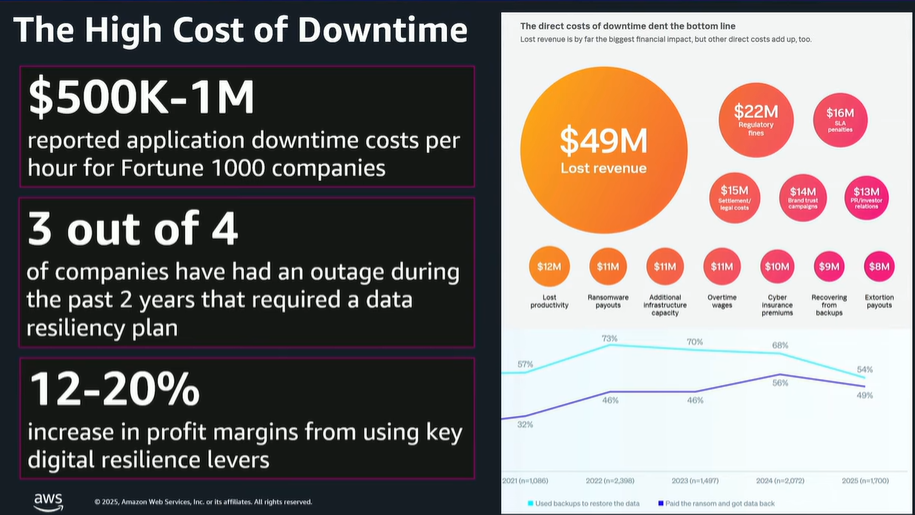
According to AWS, downtime for Fortune 100 companies can cost between $500,000 and $1 million per day.
The problem is the avoidable mistakes that leave backups vulnerable or unusable when you need them most. Relying on outdated strategies, skipping restore tests, or storing backups in a single location all increase your risk.
Why Cloud Backup Mistakes Lead to Disaster Recovery Failures
Backup mistakes can halt your business entirely. When backups fail or can’t be restored quickly, the consequences ripple through every part of the organization, including:
| Operational Disruption | Revenue Loss | Regulatory Fines | Customer Trust |
|---|---|---|---|
| Critical internal systems like payroll, inventory, and reporting fail without access to core infrastructure. | Sales teams lose access to customer data, orders stop processing, and production can come to a halt | Failing to retain or protect regulated data can trigger compliance violations and costly penalties. | Extended downtime damages your reputation and drives customers toward competitors. |
The Real Problem Behind Cloud Backup Mistakes: Ignoring Infrastructure
The industry still talks about backup mistakes as if they’re just operational gaps:
- Missed backup jobs
- Weak retention policies
- Lack of immutability
- Poor monitoring
These practices matter. But they all assume one thing: recovery starts from data.
In cloud environments, it doesn’t. It starts from infrastructure configuration and the relationships between data and applications – the exact combination of configurations, permissions, and dependencies that made your system work. And that layer is rarely captured.
8 Cloud Backup Mistakes That Break Disaster Recovery
Cloud Backup Mistake #1: Not Testing Full Recovery
This is usually the moment teams get surprised. Everything looked fine – until they tried to bring the system back online. This is one of the most common backup mistakes, and most teams are aware of it.
Backups are created and monitored. Alerts are configured. Everything looks healthy.
But restore testing is inconsistent. And when it happens, it usually answers one question: Can we restore the data?
Not can we bring the system back online? That distinction matters.
Because restoring data is only one step. Recovery requires rebuilding the environment around it – permissions, networking, dependencies, and runtime behavior.
You can pass every restore test and still fail to recover. The real test isn’t data restore. It’s full environmental recovery.
Validate Your RTO with Full Recovery Tests
- Test full recovery workflows, not just data restores.
- Simulate real incidents where infrastructure, permissions, and dependencies must be rebuilt.
- Align tests to RTO and RPO, but also to actual system behavior.
Relying on Too Few Backup Locations
Many teams still rely on one backup location – sometimes two. It looks redundant. It passes basic checks. Until it doesn’t.
When failures hit- whether ransomware, misconfiguration, or regional outages- they rarely affect just one layer. If backups sit too close to production, they share the same blast radius.
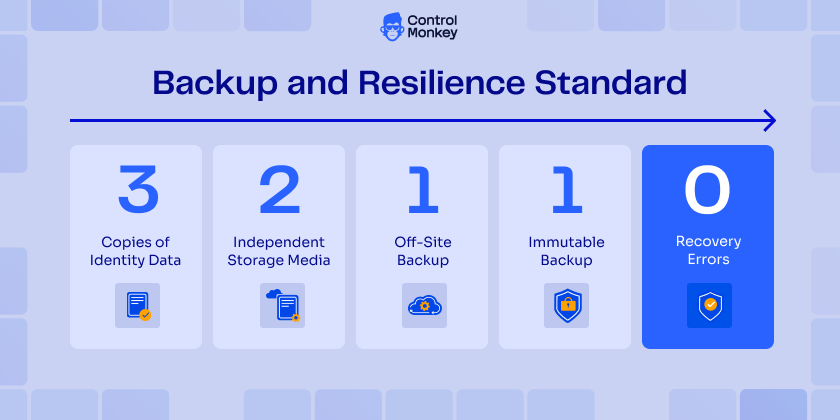
This is why the 3-2-1-1-0 rule exists:
- 3 Copies of data
- 2 Different media
- 1 Off-site
- 1 Immutable
- 0 Errors in recovery tests
It’s a strong foundation – but most teams stop at replication. That’s not resilience. It’s just duplication.
Even with multiple backup locations, recovery can still fail. Because cloud failures aren’t caused by missing data they’re caused by broken systems:
- IAM permissions that no longer work
- Network paths that don’t exist
- Dependencies that were never documented
Backup location strategy protects data. It doesn’t guarantee recovery.
The real question isn’t where your data is stored- it’s whether you can rebuild the environment that made it usable.
How to Build a Resilient Backup Location Strategy
- Fully implement the 3-2-1-1-0 rule- not partially.
- Isolate backup environments from production.
- Regularly validate that backups are accessible and usable – not just stored.
3. IaC is not your source of truth
Infrastructure as Code is treated as the source of truth. But in real environments, that assumption breaks quickly.
Changes happen outside Terraform or your IaC:
- Emergency fixes in the console
- Temporary overrides that become permanent
- Manual adjustments no one documents
Over time, drift builds. Terraform shows what should exist. Your cloud reflects what actually exists.
When recovery starts, that gap becomes visible—and it slows everything down.
Because now you’re not restoring – you’re reconciling.
How to Align IaC with Your Actual Cloud State
- Continuously compare IaC with actual cloud state.
- Track and flag drift automatically.
- Enforce workflows that reduce unmanaged changes- but assume they will still happen.
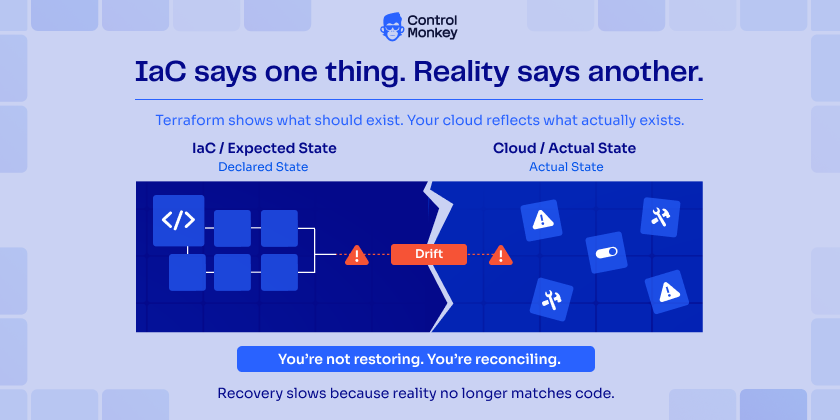

ControlMonkey takes daily snapshots of your real infrastructure state, bridging the gap between Terraform and reality.
4. Unmanaged drift breaks recovery assumptions
Drift is often framed as a governance issue – but it is actually a recovery problem. When infrastructure diverges from code, your recovery assumptions become unreliable.
You don’t know:
- Which version of the system is correct
- Which changes matter
- Which dependencies are still valid
So when something breaks, you’re not restoring a known state. You’re forced to guess. And recovery built on guesswork doesn’t scale.
How to Manage Drift Before It Breaks Recovery
- Monitor drift continuously, not periodically.
- Make drift visible to both DevOps and security teams.
- Treat drift as a recovery risk- not just a compliance issue.
ControlMonkey detects and tracks drift in real time, including ClickOps changes, so you always know what actually changed.
5. Backing Up Data, Not Relationships
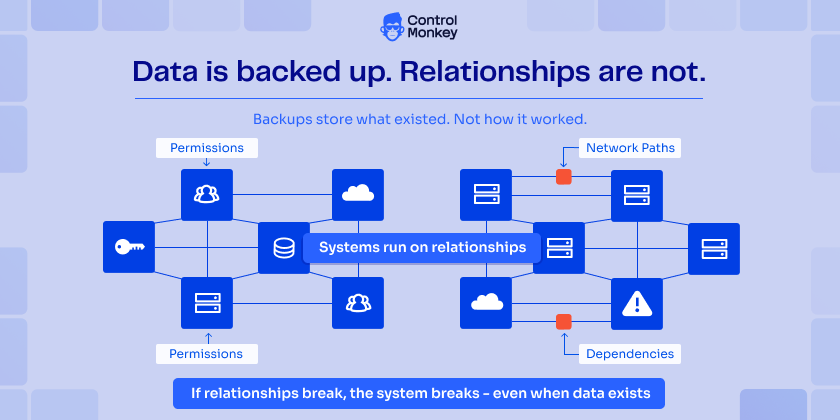
Cloud systems are not collections of resources. They are systems of relationships – Permissions connect services. Networks define access paths, and dependencies determine behavior.
If those relationships break, the system breaks – even if the data is intact.
Most cloud backup mistakes come from ignoring this layer. Backups store what existed.
They don’t explain how it actually worked in practice. And without that, recovery becomes incomplete.
How to Capture Infrastructure Relationships
- Map dependencies between services, permissions, and network layers.
- Ensure recovery processes account for how components interact- not just what exists.
- Document or capture relationships as part of recovery planning.
6. Relying on Point-in-Time Snapshots Without Context
Snapshots are useful. They tell you what existed at a specific moment.
But they lack context.
They don’t show:
- What changed before that moment
- Why the system looked that way
- How components depended on each other
When you restore from a snapshot, you get a static copy of a dynamic system – which is rarely enough to rebuild a working environment.
How to Add Context to Snapshots
- Combine snapshots with change tracking and version history.
- Understand not just what existed- but how the system evolved.
- Use snapshots as part of a broader recovery model, not the only source of truth.
ControlMonkey provides versioned infrastructure snapshots with full context, so teams can recover to a known, working state- not just a moment in time.
7. Treating Untracked Changes as a Minor Risk
Human error is often blamed for outages. But the real issue isn’t that changes happen it’s that they aren’t tracked. Infrastructure changes occur constantly:
- Manual updates in the cloud console (ClickOps)
- Fixes applied outside Terraform workflows (Common Terraform Mistakes)
- AI agents generating and executing changes at scale
AI is accelerating this trend—and making it harder to keep track of what actually changed. It enables faster infrastructure changes – but also increases the volume and speed of untracked modifications when not properly governed.
When these changes aren’t visible, versioned, and auditable, recovery becomes significantly harder.
In a disaster scenario, the first challenge isn’t fixing the issue- it’s understanding what changed. And that uncertainty is what extends downtime.
You can’t prevent every change- human or AI-driven. But you can eliminate blind spots.
Because what isn’t tracked can’t be recovered.
How to Track Every Infrastructure Change
- Track all infrastructure changes – including those made outside IaC workflows.
- Ensure AI-driven actions go through governed and auditable processes.
- Maintain a complete, versioned view of your actual infrastructure state.
8. Not Simulating Real Disaster Recovery Scenarios
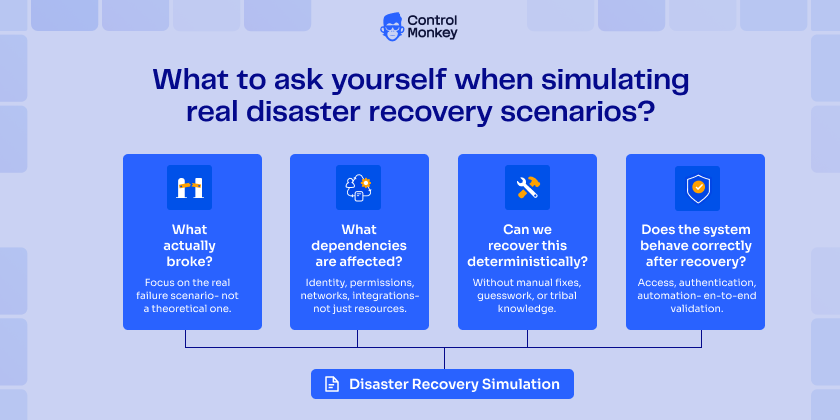
Many teams follow cloud backup best practices. They replicate data, enforce immutability, and monitor backup jobs.
But they don’t test recovery under real conditions.
AWS resilience best practices emphasize that backups must be validated through real recovery scenarios – not just data restores.
| Most tests answer one question: Can we restore the data? That’s where they stop. | They don’t answer the one that matters: |
|---|---|
| Can we restore the data? | Can we rebuild the system and bring it back online? |
Without realistic simulations, critical gaps stay hidden:
- IAM permissions that fail during recovery
- Network configurations that don’t work outside production
- Dependencies that break under real conditions
These issues don’t appear in backup reports. They only surface during real failures. Backup without simulation creates a false sense of security and teams only realize it when recovery fails.
Simulate Real Disaster Scenarios
- Run full recovery workflows – not just data restores
- Measure how long it takes to rebuild the entire environment – actually put a timer on.
- Test realistic failure scenarios like outages and misconfigurations
- After every drill, ask the hard questions: What broke? What can we automate? What failed under pressure?
How ControlMonkey Fixes These Cloud Backup Mistakes
Traditional backup strategies focus on data. But recovery depends on something else entirely: the actual state of your infrastructure.
ControlMonkey captures that missing layer—and fills the gap most backup strategies leave behind.
It continuously records your real infrastructure state across cloud environments and Terraform – not just how systems were defined, but how they actually exist.
This includes:
- Drift and manual (ClickOps) changes
- Resource relationships and dependencies
- Versioned snapshots of full environments
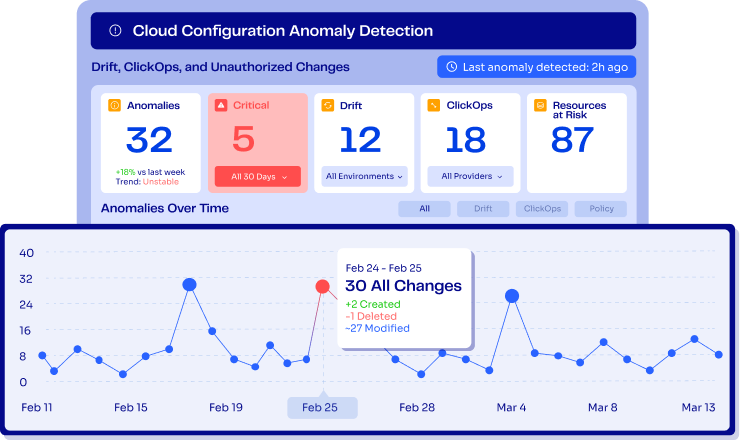
Instead of relying on assumptions or outdated IaC, teams get a complete, accurate view of their environment at any point in time.
So when something breaks, recovery doesn’t depend on guesswork. Teams don’t reconstruct systems from memory. They recreate them from reality. This turns disaster recovery into a predictable, repeatable process—not a manual reconstruction effort.
Want to eliminate cloud backup mistakes and ensure full recovery – not just data restore?
Let’s rethink your disaster recovery strategy – Get today free DR risk assessment

A 30-min meeting will save your team 1000s of hours
A 30-min meeting will save your team 1000s of hours
Author