Join our next Live Demo on Feb 12th!

Resource Blog News Customers Stories

Updated: Aug 20, 2025 Upd: 20.08.25

2 min read

Remote Plan from Local Machine

Remote Plan from Local Machine

Today, we are pleased to announce the release of ‘Remote Plan from Local Machine,’ the latest enhancement to our Terraform CI/CD engine.

How do your cloud engineers properly test their Terraform code changes before committing to Git and getting feedback without running a PR?
There are a few challenges there:

  • The Secrets and variables their code requires are unavailable on their local machine and shouldn’t be for security reasons.
  • They don’t have the organization’s guardrails and policies to test their local code.

Up until now, users had to commit the code, create a PR, and then get the needed feedback from their centralized Terraform pipeline. This process, of course, slowed down the pace of development and created a lot of “waiting time” between each code update and PR inspection.

Today, we’re happy to announce our “Remote Plan from Local Machine” capability, where cloud engineers can test their Terraform Code changes locally without initiating a full PR and pushing the GIT code.

Remote Plan enables you to run your ‘Terraform plan’ locally by triggering a plan simulation remotely on ControlMonkey and getting feedback on the plan’s output.

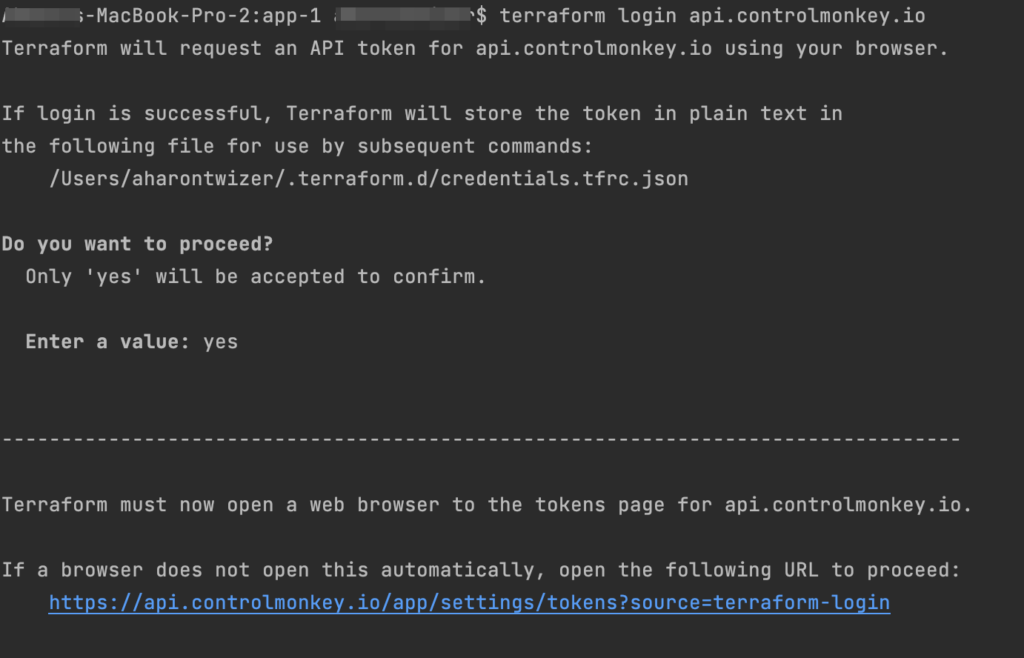
The integration is pretty easy. All you have to do is run the ‘terraform login api.controlmonkey.io’ command:

And then you can work as you’re used to, running ‘terraform plan’ commands on your local machine:
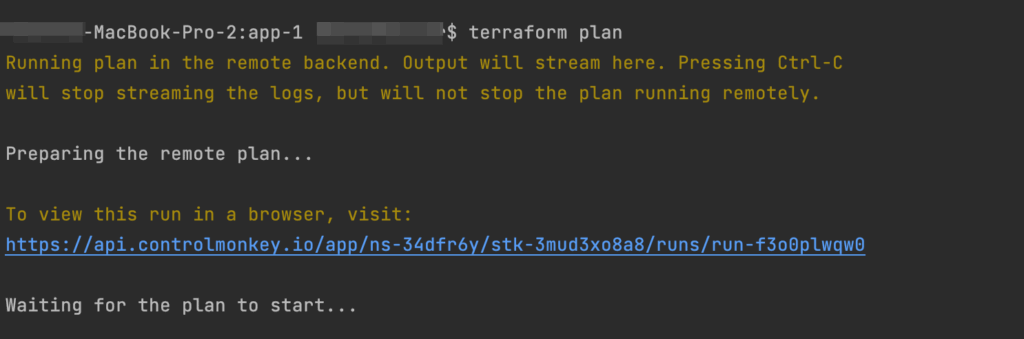
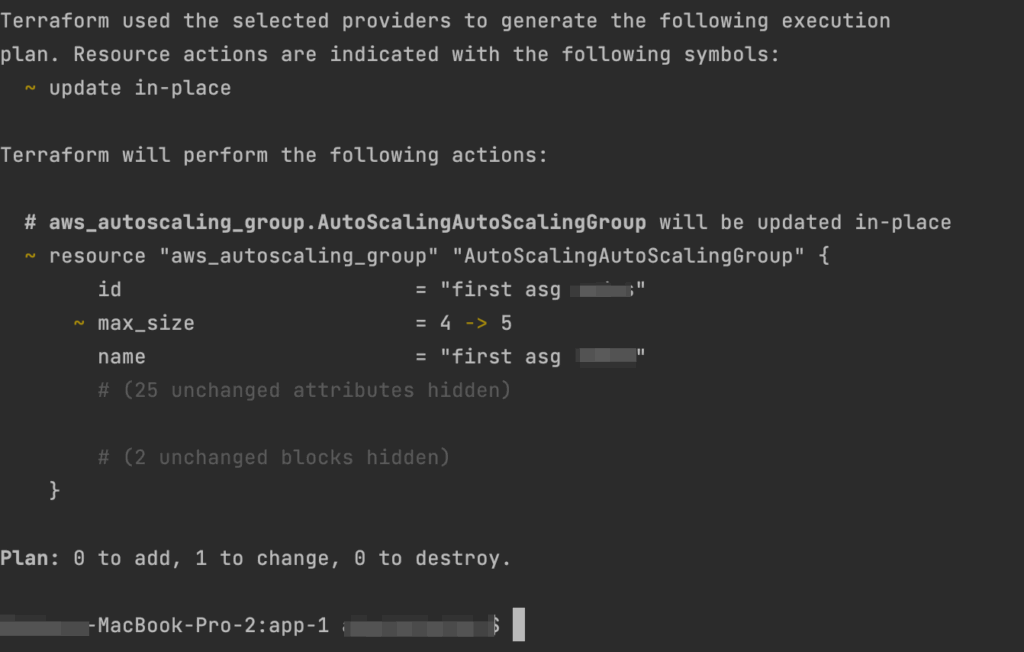
It uses your local Terraform files but actually runs it remotely in ControlMonkey, using the shared state and your environment’s variables and secrets. Every Remote Plan triggers a Plan in ControlMonkey, so you will have the full audit also on the ControlMonkey console:
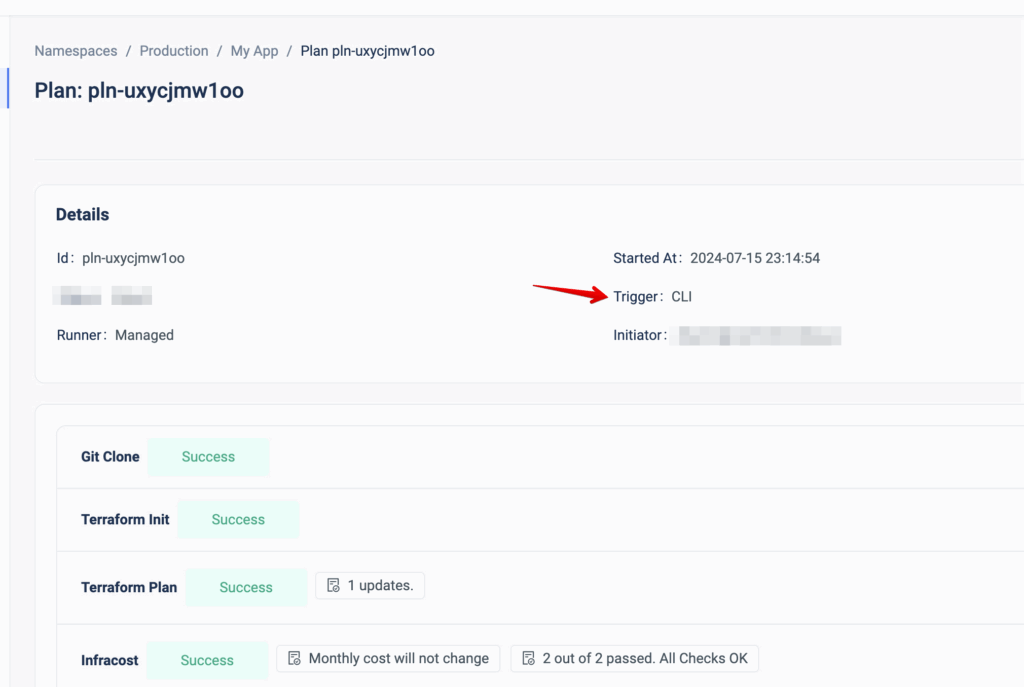

By running a remote plan, your engineers can build faster and test their changes locally before committing to them.

Are you managing Terraform at scale?
Our Experts are available for a quick call so you can learn more about the future of Terraform Automation and how it can benefit your team.

Bottom CTA Background

A 30-min meeting will save your team 1000s of hours

A 30-min meeting will save your team 1000s of hours

Book Intro Call

    Sounds Interesting?

    Request a Demo

    Resource Blog News Customers Stories

    Updated: Aug 20, 2025 Upd: 20.08.25

    1 min read

    Approval Policy – Teams Approval

    Approval Policy – Teams Approval

    A few months ago, we released ControlMonkey ‘Approval Policies ,’ a validation mechanism that requires reviewing and approving any infrastructure change before ‘Terraform Apply’ is executed.

    Today, we are pleased to announce the latest enhancement to these policies – ‘Teams Approval.’
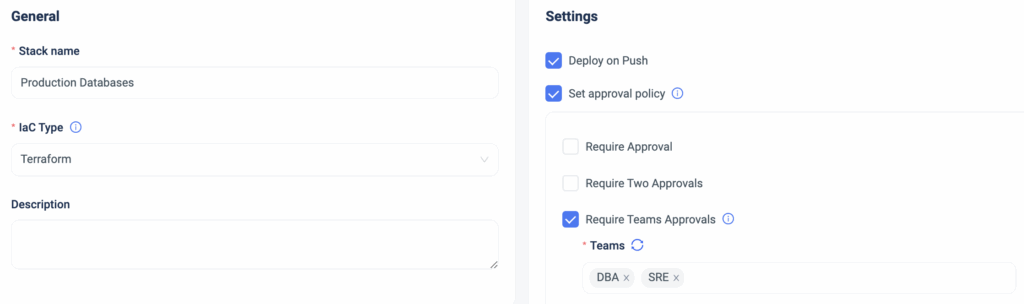
    Starting today, ControlMonkey users can require deployment reviews and approvals from specific teams, adding an additional layer of granularity.

    Example: If I have a stack managing my production DBs and I want to update one of them, I can define that the DBA team must review and approve the change in the stack before ‘Terraform Apply’ is executed.

    So if your organization’s infrastructure approval policy is by teams (DevOps, SRE, Security, Networking, etc.), with ControlMonkey, you can apply these guardrails automatically, straight out of the box.

    Changes to production are always risky, but with ControlMonkey Approved Policies, you can add an extra layer of control and prevent costly misconfigurations before every ‘Terraform Apply’ is executed.

    Are you interested in learning how ControlMonkey streamlines every infrastructure change  and helps companies like yours fully govern their cloud with Terraform?
    Our team is waiting to speak with you!

    Bottom CTA Background

    A 30-min meeting will save your team 1000s of hours

    A 30-min meeting will save your team 1000s of hours

    Book Intro Call

      Sounds Interesting?

      Request a Demo

      Resource Blog News Customers Stories

      Updated: Aug 20, 2025 Upd: 20.08.25

      1 min read

      Import OpenSearch to Terraform

      Import OpenSearch to Terraform

      Today, ControlMonkey is pleased to announce that we have added the capability to easily import AWS OpenSearch domain resources to Terraform Code using our Terraform Import Engine.

      AWS OpenSearch is a fully managed service that simplifies the deployment, operation, and scaling of OpenSearch, a powerful search and analytics engine based on Elasticsearch.
      It provides real-time search, monitoring, and analysis capabilities for various use cases.

      Managing OpenSearch resources with Terraform provides a consistent, version-controlled, and automated way to provision, update, and manage OpenSearch deployments, which enhances efficiency and reduces the risk of manual misconfigurations.

      ControlMonkey now supports the one-click Terraform Import of the following OpenSearch resources:

      OpenSearchService::Domain (aws_opensearch_domain)

      So, if you’re using OpenSearch in your environments, swiftly shift your OpenSearch resources to Terraform code and manage the cluster’s configuration with Terraform to create, update, and delete OpenSearch domains reliably and repeatedly.

      Are you using OpenSearch and have resources you would like to shift to Terraform?
      Feel free to book an intro meeting to learn more about how ControlMonkey generates the Terraform code that represents your OpenSearch configuration, making the shift to Terraform as seamless as possible.

      Bottom CTA Background

      A 30-min meeting will save your team 1000s of hours

      A 30-min meeting will save your team 1000s of hours

      Book Intro Call

        Sounds Interesting?

        Request a Demo

        Resource Blog News Customers Stories

        Updated: Jan 20, 2026 Upd: 20.01.26

        2 min read

        One-to-one mapping between infrastructure resources and Terraform code.

        One-to-one mapping between infrastructure resources and Terraform code.

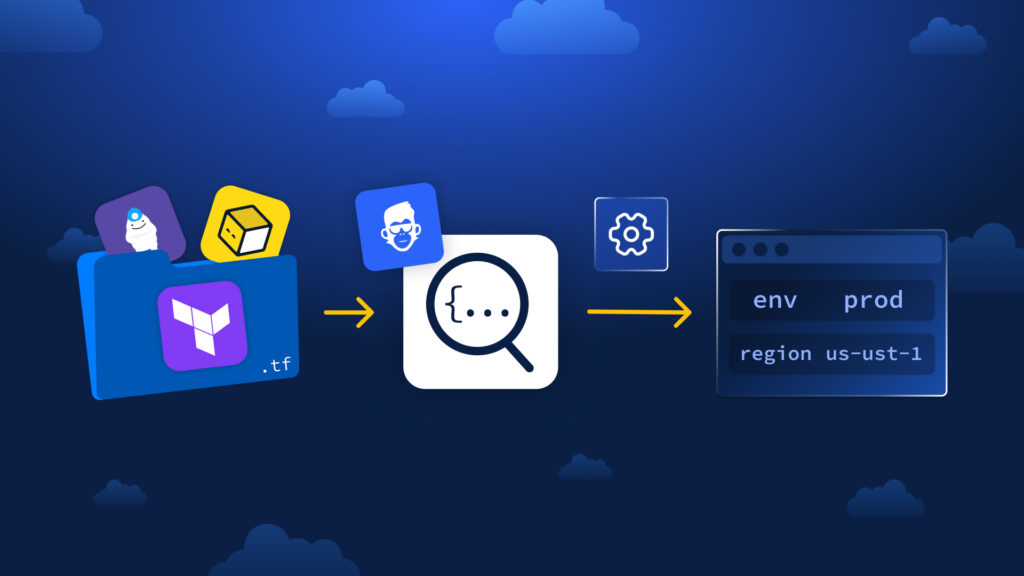
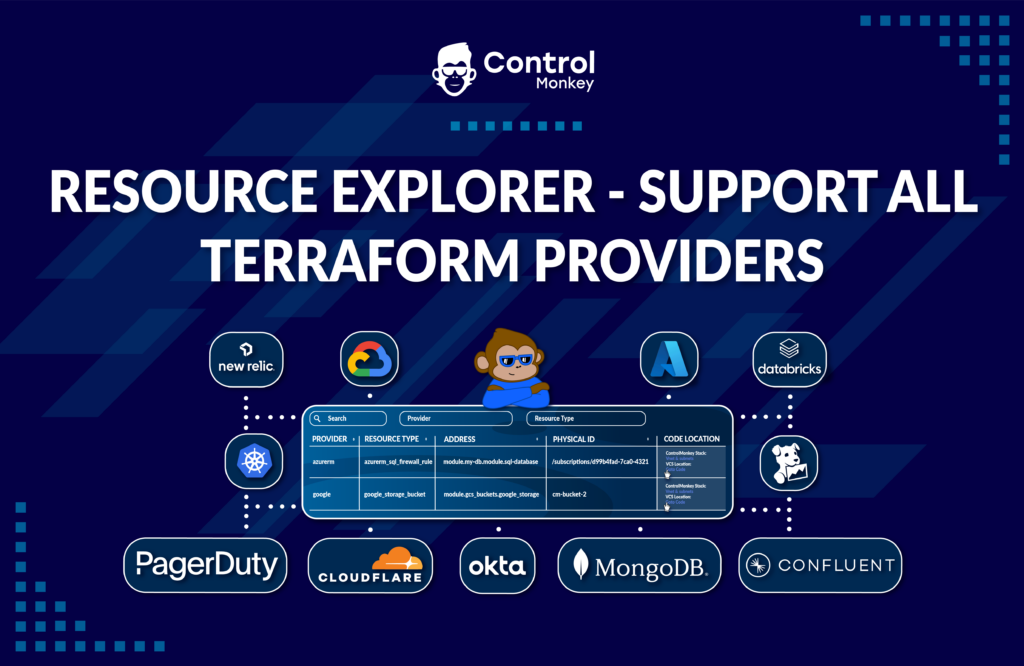
        ControlMonkey’s resource explorer is a simplified dashboard that is part of our Terraform Insights product. It helps DevOps teams discover and easily investigate all of their cloud resources and the corresponding Terraform code in their Git repo.

        Until now, Our Resource Explorer has supported only AWS & Azure Terraform Providers, but today, we are happy to announce that it supports ALL Terraform Providers.

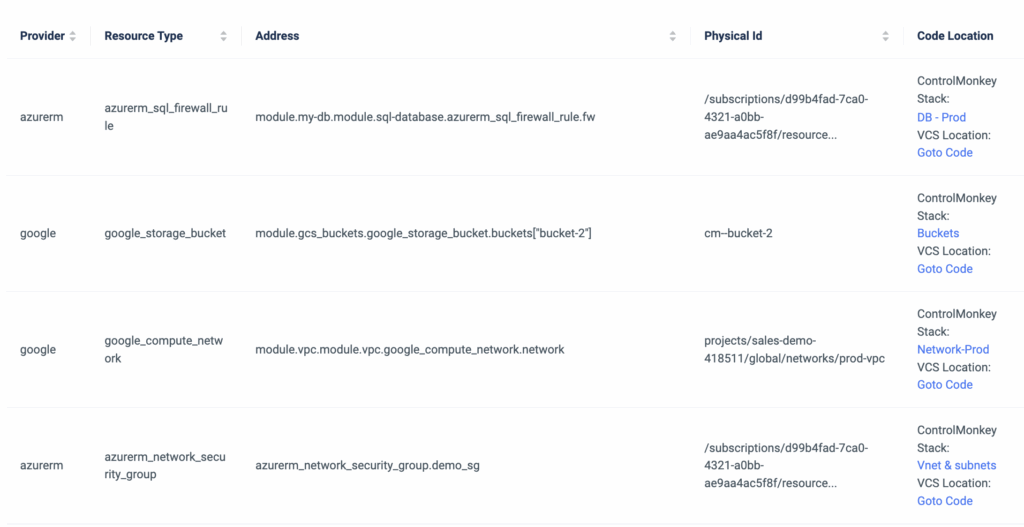
        The Terraform Provider view serves as your Terraform knowledge base, providing your team with an easy way to locate Terraform code across your Git repositories regardless of specific team member seniority or tenure within the organization.

        It provides a one-click link for each cloud resource that opens the corresponding line of code in your GIT repository.

        Imagine a scenario where a new engineer joins the team and needs to modify an Azure Vnet or GCP SQL Database. They need to understand where the resource is located in the Terraform code.
        What would be the best way to locate that resource in a large environment with thousands of lines of code?

        Not manually, that’s for sure.

        So, if you need a clear mapping between your resource infrastructure provider (Datadog, Azure, Okta, or GCP, etc) and the exact location in your Terraform code, you can do it seamlessly with ControlMonkey.

        It doesn’t matter which Terraform Provider you are using, ControlMonkey provides a clear one-to-one mapping between your infrastructure resources and the Terraform code.

        Don’t let your team waste time searching for needles in a haystack.

        Book a 30-minute Intro Call with our experts and learn how ControlMonkey changes the Terraform Automation game.

        Bottom CTA Background

        A 30-min meeting will save your team 1000s of hours

        A 30-min meeting will save your team 1000s of hours

        Book Intro Call

          Sounds Interesting?

          Request a Demo

          Resource Blog News Customers Stories

          Updated: Aug 20, 2025 Upd: 20.08.25

          1 min read

          Import Image Builder to Terraform

          Import Image Builder to Terraform

          Today, ControlMonkey is pleased to announce that we have added the capability to easily import EC2 Image Builder resources to Terraform Code using our Terraform Import Engine.

          EC2 Image Builder is an AWS service that automates creating, managing, and deploying customized and secure machine images for EC2 instances.

          Managing EC2 Image Builder with Terraform is important because it ensures consistent, repeatable, and version-controlled deployments of machine images across different environments.

          ControlMonkey now supports the one-click Terraform Import of the following Image Builder resources:

          ImageBuilder::Component (aws_imagebuilder_component)
          ImageBuilder::ContainerRecipe (aws_imagebuilder_container_recipe)
          ImageBuilder::DistributionConfiguration (aws_imagebuilder_distribution_configuration)
          ImageBuilder::Image (aws_imagebuilder_image)
          ImageBuilder::ImagePipeline (aws_imagebuilder_image_pipeline)
          ImageBuilder::ImageRecipe (aws_imagebuilder_image_recipe)
          ImageBuilder::InfrastructureConfiguration (aws_imagebuilder_infrastructure_configuration)
          ImageBuilder::Workflow (aws_imagebuilder_workflow)

          So, if you’re building images using EC2 Image Builder, you can now manage their configuration with Terraform.

          Are you using Image Builder and have resources you would like to shift to Terraform?
          Feel free to book an intro meeting with us to learn more about how ControlMonkey generates the Terraform code that represents your Image Builder resources configuration, making the shift to Terraform as seamless as possible.

          Bottom CTA Background

          A 30-min meeting will save your team 1000s of hours

          A 30-min meeting will save your team 1000s of hours

          Book Intro Call

            Sounds Interesting?

            Request a Demo

            Resource Blog News Customers Stories

            Updated: Aug 23, 2025 Upd: 23.08.25

            1 min read

            Granular RBAC Terraform and Opentofu Support 

            Zack Bentolila

            Zack Bentolila

            Marketing Director

            Granular RBAC Terraform and Opentofu Support 

            We are happy to announce that we have upgraded our permission management and added support for custom roles.

            Up until today, our users had the option to grant permissions to certain namespaces based on a predefined system role (Viewer, Deployer, or Admin).
            We’ve identified our customers’ needs to have more granularity with their permissions management by adding more customization options.

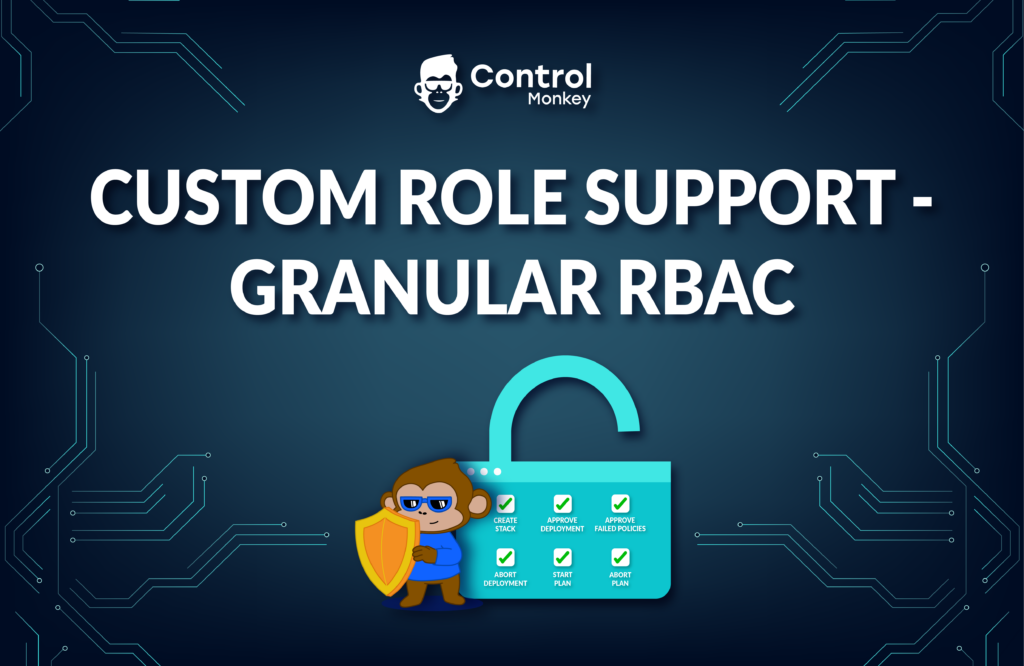
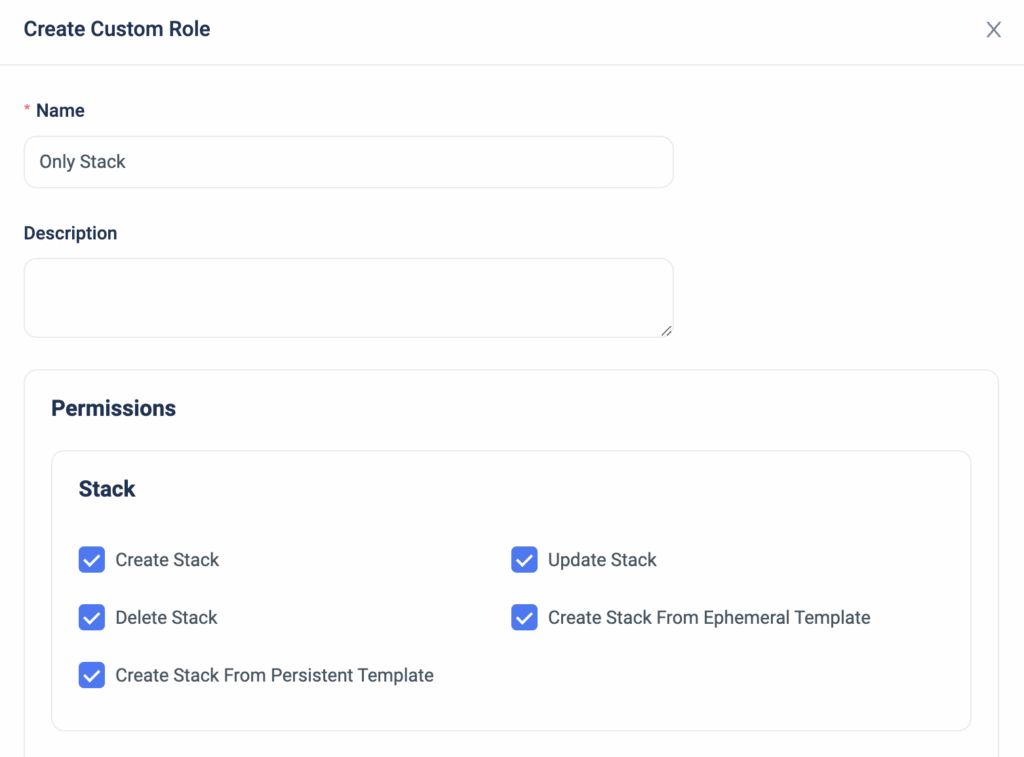
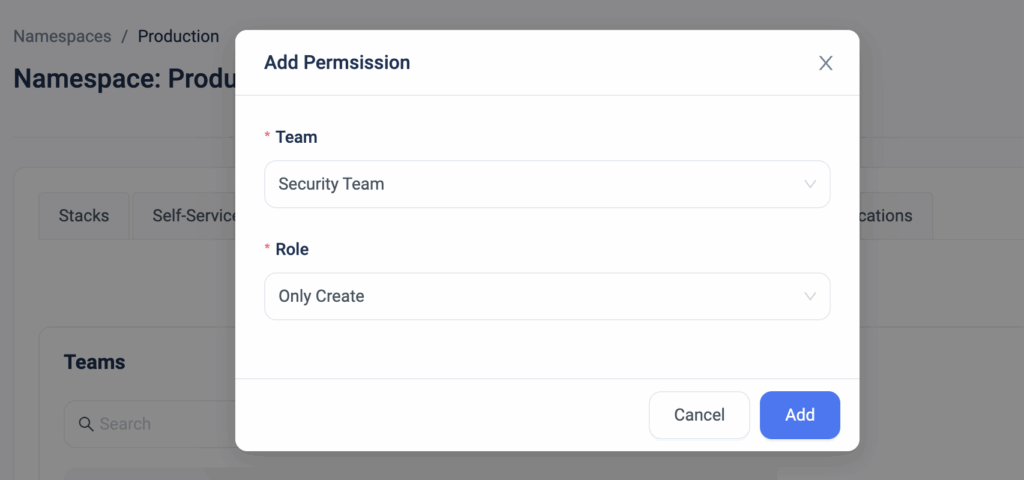
            Now, ControlMonkey users can create a custom role with permissions that are based on Stacks, Deployments, or Plans.


            The custom role can then be granularly applied on a user/team in a specific namespace for that additional layer of customization.


            With the option to limit certain users’ actions, our customers are reducing the risk of misconfigurations, allowing for better control mechanism in their environments by preventing certain users from performing ‘high-risk’ actions such as ‘Approve Deployment’ or ‘Delete Resources’.


            Bottom CTA Background

            A 30-min meeting will save your team 1000s of hours

            A 30-min meeting will save your team 1000s of hours

            Book Intro Call

            Author

            Zack Bentolila

            Zack Bentolila

            Marketing Director

            Zack is the Marketing Director at ControlMonkey, with a strong focus on DevOps and DevSecOps. He was the Senior Director of Partner Marketing and Field Marketing Manager at Checkmarx. There, he helped with global security projects. With over 10 years in marketing, Zack specializes in content strategy, technical messaging, and go-to-market alignment. He loves turning complex cloud and security ideas into clear, useful insights for engineering, DevOps, and security leaders.

              Sounds Interesting?

              Request a Demo

              Resource Blog News Customers Stories

              Updated: Aug 20, 2025 Upd: 20.08.25

              2 min read

              Control Policy Groups

              Control Policy Groups

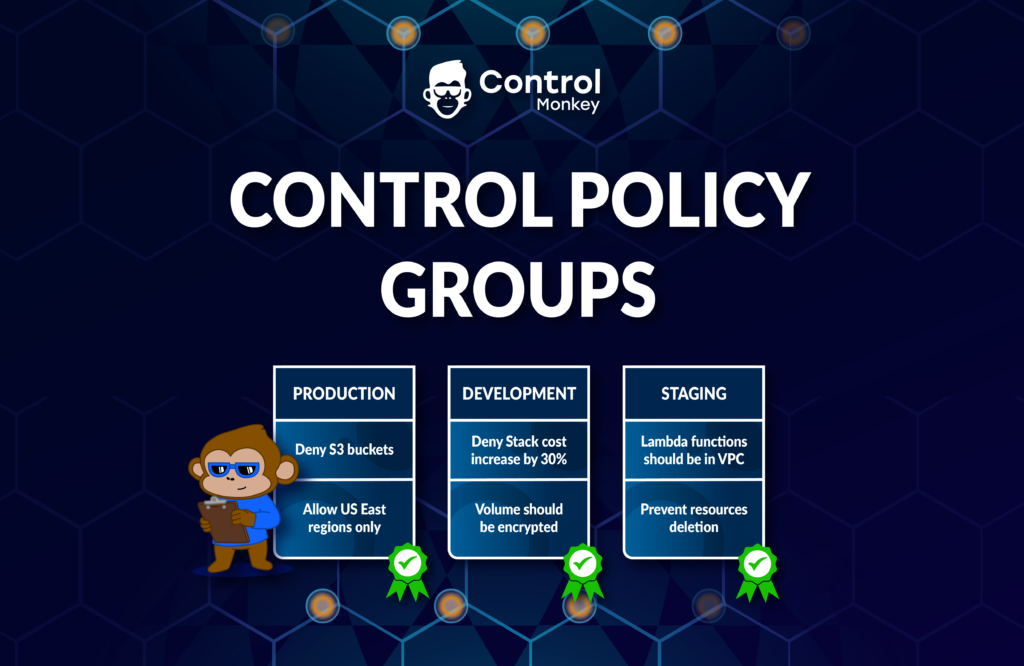
              We are pleased to announce the latest enhancement to our Terraform CI/CD solution for infrastructure – ControlPolicy Groups.

              Our Terraform CI/CD solution for infrastructure enables ControlMonkey users to define proactive policies that will be enforced at the Pull Request level and prevent security, cost, and compliance misconfigurations.
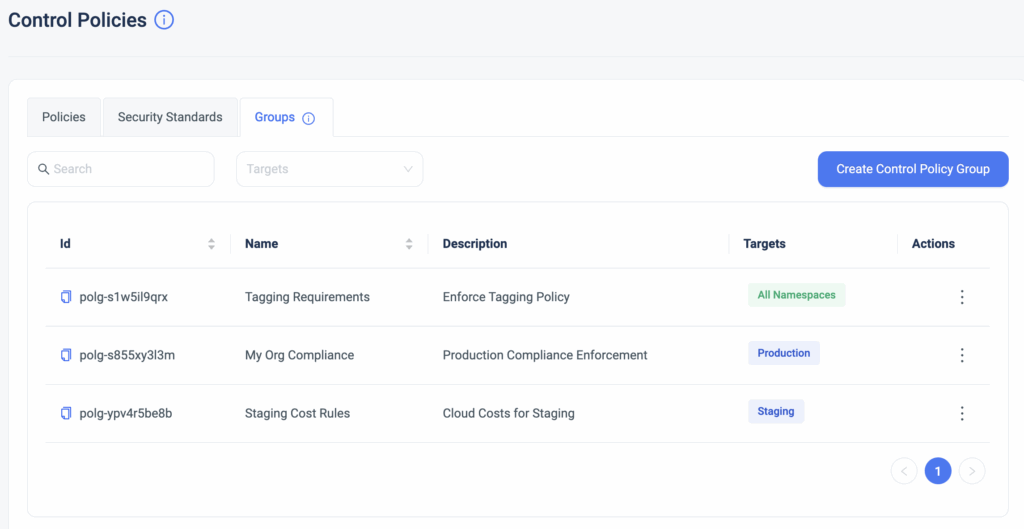
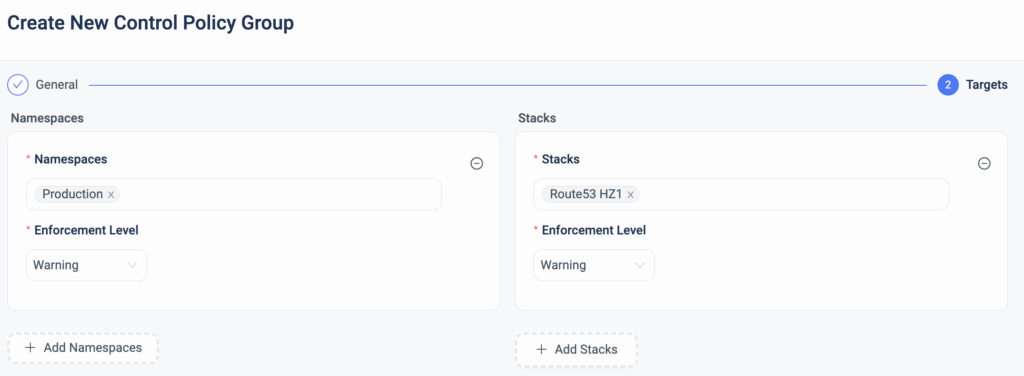
              Starting today, our users can group together control policies and apply them to specific environments by namespaces or stacks.

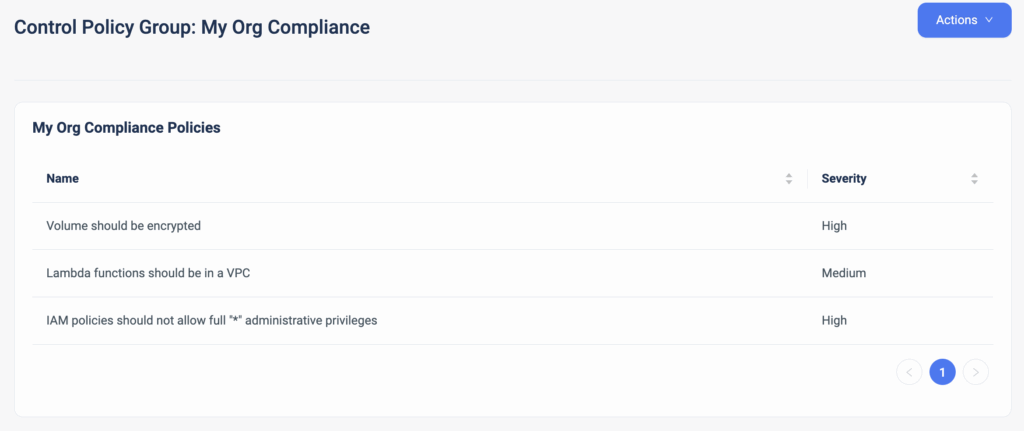
              This allows for custom-made policy packages that meet your organization’s guardrails. For example, if your organization requires each resource to be tagged with specific keys and all data volumes to be encrypted, you can now group these two policies together to create your own custom compliance.
              You can enforce these groups on a specific ControlMonkey namespace or stack, providing the granularity you need.

              Your development environment has its own requirements, while your production environment likely requires more rigid policies to be enforced. Unlike account-level policy mechanisms (e.g., AWS SecurityHub), with ControlMonkey policies, you can mix and match the appropriate policies for the relevant infrastructure stacks

              You can select the severity level for each policy, which is then translated to an enforcement level (Warning, Hard/Soft Mandatory).

              ControlMonkey also makes it super easy to granularly apply a policy group to a certain namespace or stack. For example, you can group together all of your SOC2 compliance policies and enforce those policies only in production environments that are required to be SOC-compliant.

              Enforce the guardrails of your cloud environment with our out-of-the-box policy manager and prevent costly misconfigurations.

              Bottom CTA Background

              A 30-min meeting will save your team 1000s of hours

              A 30-min meeting will save your team 1000s of hours

              Book Intro Call

                Sounds Interesting?

                Request a Demo

                Resource Blog News Customers Stories

                Updated: Aug 20, 2025 Upd: 20.08.25

                2 min read

                Terraform Modules SBOM Report in 1 click

                Test User

                Test User

                CTO & Co-Founder

                Terraform Modules SBOM Report in 1 click

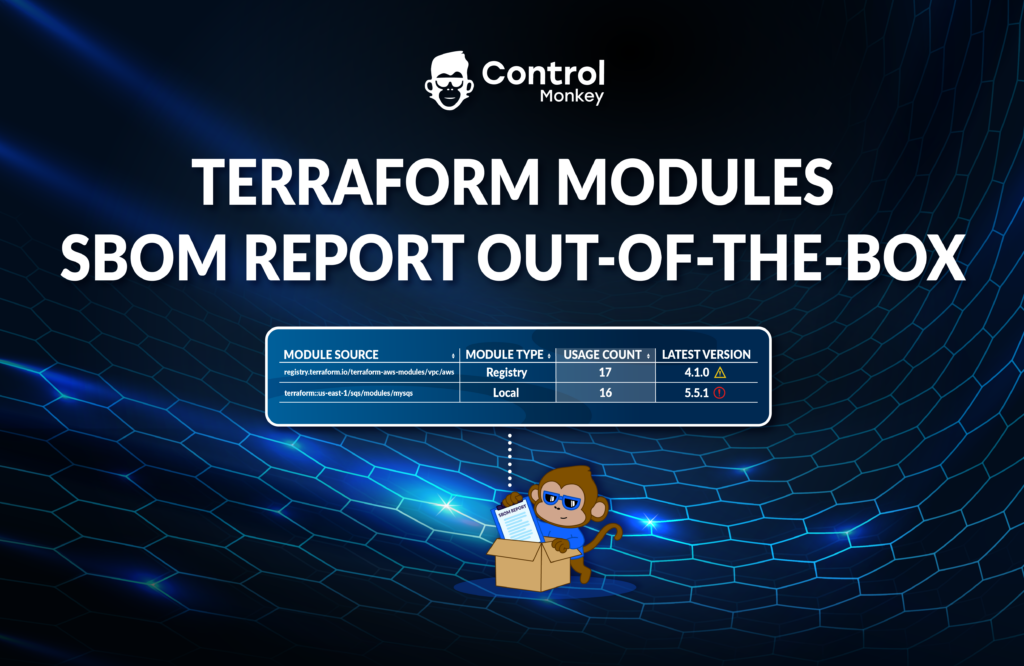
                We are very excited to announce that we have reinforced our Terraform Insights solution by allowing users to generate an SBOM (Software bill of materials) report of the Terraform Modules used in your environment with a click of a button.

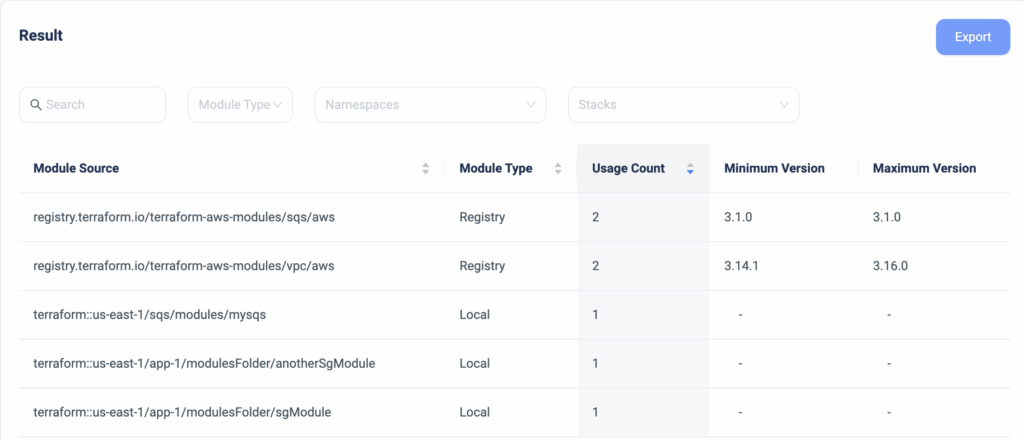
                A couple of months ago, we announced the release of our Terraform Modules Explorer, which provides DevOps teams with visibility into which Terraform Modules are being used, whether their source is a registry or local Git repository, where they are used in the code, and whether or not they are running on the latest version.

                Starting today, ControlMonkey users can generate an easy-to-read and digest SBOM report that is based on the information of the Terraform Modules Explorer with a click of a button.
                This is extremely handy for teams that need to provide this information during security audits.

                Create a Terraform Modules report that contains:

                • Which Terraform Modules are being used
                • Is their source Registry or Local
                • How many modules
                • Version control

                Gain full control over your Terraform Modules and take another step forward to being on top of your infrastructure.

                ControlMonkey is the most comprehensive Terraform Automation Platform. Do you want to know why?
                Book a 30-minute intro call with us and find out!

                Bottom CTA Background

                A 30-min meeting will save your team 1000s of hours

                A 30-min meeting will save your team 1000s of hours

                Book Intro Call

                Author

                Test User

                Test User

                CTO & Co-Founder

                Lorem ipsum dolor sit amet, consectetur adipisicing elit. Animi architecto consequuntur dicta dolor, excepturi ipsam iste laudantium, magnam molestiae obcaecati odio quam quas repellendus sed, sint magnam molestiae.

                  Sounds Interesting?

                  Request a Demo

                  Resource Blog News Customers Stories

                  Updated: Aug 20, 2025 Upd: 20.08.25

                  1 min read

                  Self-service templates support for Terragrunt & OpenTofu

                  Self-service templates support for Terragrunt & OpenTofu

                  Today, we are happy to announce that we have reinforced our Self-service infrastructure solution with support for Terragrunt and OpenTofu Iac frameworks.

                  ControlMonkey’s solution for self-service enables DevOps teams to allow other teams to spin up secure and compliant cloud environments on their own in minutes by using predefined Terraform templates.
                  Self-service Infrastructure enables agility without sacrificing governance and frees DevOps teams from responding to tickets for infrastructure provisioning.

                  ControlMonkey users that use Terragrunt or OpenTofu IaC frameworks can now allow other teams to launch cloud environments using our Self-service solution, which promotes engineering autonomy and increases team productivity while maintaining governance.

                  As supporters of the OpenTofu project, we are excited to see more of the ControlMonkey capabilities support the OpenTofu code, and we have a lot more coming your way.

                  Are you using OpenTofu and want to learn more about how the ControlMonkey platform can help you with your Day 2 challenges? Our team is waiting to hear from you; we promise we will blow your mind.


                  Bottom CTA Background

                  A 30-min meeting will save your team 1000s of hours

                  A 30-min meeting will save your team 1000s of hours

                  Book Intro Call

                    Sounds Interesting?

                    Request a Demo

                    Resource Blog News Customers Stories

                    Updated: Aug 23, 2025 Upd: 23.08.25

                    2 min read

                    Import Amazon Neptune to Terraform and OpenTofu

                    Zack Bentolila

                    Zack Bentolila

                    Marketing Director

                    Import Amazon Neptune to Terraform and OpenTofu

                    Today ControlMonkey is pleased to announce that we have added the capability to easily import NeptuneDB, Amazon Neptune, instances to Terraform and OpenTofu Code using our Terraform Import Engine.

                    What is Amazon Neptune and why import to Terrafrom and OpenTofu?

                    NeptuneDB (Amazon Neptune) is a fully managed graph database service developed by Amazon Web Services (AWS) for storing and querying highly connected data. It allows users to store and query relationships between data points efficiently, facilitating complex data analysis and traversal.

                    Managing and governing NeptuneDB instances with Terraform code is crucial for disaster recovery and version control.
                    NeptuneDB instances usually rely on ‘option group’ and ‘parameter group’ that enhance its performance, therefore it’s important also to manage those satellite resources with Terraform, and not only the instance itself.

                    ControlMonkey Import NeptuneDB to Terraform and OpenTofu

                    ControlMonkey now supports the one-click Terraform Import of the following NeptuneDB resources:

                    Neptune::DBCluster (aws_neptune_cluster)
                    Neptune::DBClusterParameterGroup (aws_neptune_cluster_parameter_group)
                    Neptune::DBInstance (aws_neptune_cluster_instance)
                    Neptune::DBParameterGroup (aws_neptune_parameter_group)

                    ControlMonkey generates the Terraform Code to represent your NeptuneDB configuration alongside the Terraform state file, so you don’t have to import those resources one by one, and you also don’t need to reprovision the DB instance and cause a service interruption.

                    Are you using NeptuneDB and have resources you would like to shift to Terraform?

                    Feel free to book an intro meeting  with us to learn more about how ControlMonkey generates the Terraform code that represents your existing NeptuneDB instance, parameter group, and option group, making the shift to Terraform as seamless as possible.

                    Bottom CTA Background

                    A 30-min meeting will save your team 1000s of hours

                    A 30-min meeting will save your team 1000s of hours

                    Book Intro Call

                    Author

                    Zack Bentolila

                    Zack Bentolila

                    Marketing Director

                    Zack is the Marketing Director at ControlMonkey, with a strong focus on DevOps and DevSecOps. He was the Senior Director of Partner Marketing and Field Marketing Manager at Checkmarx. There, he helped with global security projects. With over 10 years in marketing, Zack specializes in content strategy, technical messaging, and go-to-market alignment. He loves turning complex cloud and security ideas into clear, useful insights for engineering, DevOps, and security leaders.

                      Sounds Interesting?

                      Request a Demo
                      Cookies banner

                      We use cookies to enhance site navigation, analyze usage, and support marketing efforts. For more information, please read our. Privacy Policy