Join our next Live Demo on Mar 5th!

Resource Blog News Customers Stories

Updated: Aug 25, 2025 Upd: 25.08.25

7 min read

Using AWS CloudFormation for Cloud Costs Optimization

Using AWS CloudFormation for Cloud Costs Optimization

Managing cloud costs effectively is a top priority for businesses using AWS. Without proper governance, infrastructure sprawl and misconfigurations can lead to unexpected expenses. This is where AWS CloudFormation comes in. It is a strong Infrastructure as Code (IaC) service. It helps with cost optimization, especially when used with cloud cost optimization tools. These tools improve visibility and control over resource use.

AWS CloudFormation allows you to define and manage cloud resources using declarative templates, ensuring consistent deployments while automating resource provisioning. When integrated with cloud cost optimization tools and AWS cost optimization tools, CloudFormation helps organizations identify and eliminate wasteful spending.

  • Prevent over-provisioning by automating the creation and deletion of resources.
  • Maintain version-controlled infrastructure, improving visibility and cost tracking.
  • Utilize CloudFormation hooks to monitor and predict costs before provisioning.
  • Enforce cost-efficient infrastructure setups with pre-defined templates for teams.

By leveraging these capabilities, organizations can streamline operations, prevent cost overruns, and ensure long-term cloud cost efficiency. In this article, we’ll explore how to use CloudFormation to reduce your AWS bill without compromising performance or scalability.

1. Automate AWS Resource Lifecycle for Cost Optimization

Over-provisioning leads to unnecessary AWS costs. CloudFormation automates resource creation and deletion, ensuring only necessary infrastructure runs.

Automate Resource Lifecycle Using CloudFormation Stacks

CloudFormation stacks streamline deployment and removal of resources:

  • Temporary environments: Create dev/test environments that auto-delete after use.
  • Stack deletion: Ensure unused resources are fully removed.

Use Stack Policies to Avoid Costly AWS Mistakes

  • Restrict scaling: Prevent accidental Auto Scaling increases.
  • Protect key resources: Block deletion of essential S3 buckets or RDS instances.

Automate Cost Cleanup with Scheduled Stack Deletions

  • EventBridge + Lambda: Auto-delete non-prod stacks after hours.
  • Expiration policies: Remove test environments after a set period.
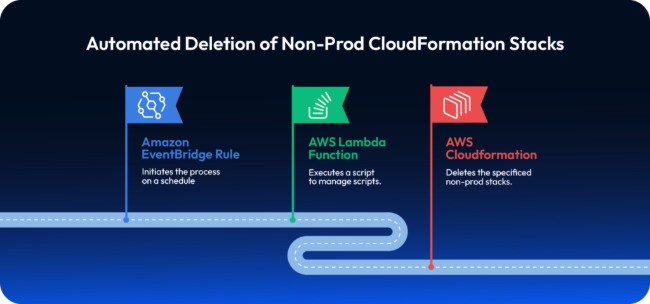
Use AWS CloudFormation templates to enforce cost policies and block expensive resource requests like m5.4xlarge.

Example: Auto-Cleanup Dev Environment

A team provisions EC2, RDS, and S3 via CloudFormation. A scheduled EventBridge rule deletes the stack every Friday at 6 PM, preventing weekend waste.

2. Improve AWS Cost Transparency with Version Control

Untracked infrastructure changes can lead to unexpected cost increases. AWS CloudFormation, when integrated with version control and change management, ensures infrastructure modifications are auditable, controlled, and cost-efficient.

Use Git for CloudFormation Cost Optimization Tracking

CloudFormation templates should be stored in Git repositories (GitHub, GitLab, AWS CodeCommit) to enable:

  • Change tracking: Every modification is version-controlled, preventing unapproved resource deployments.
  • Rollback capability: If a change leads to cost spikes, revert to a previous template version.
  • Code reviews: Teams can enforce peer reviews before applying infrastructure changes.

Example Git Workflow for CloudFormation:

  1. Developers create/update a CloudFormation template (infrastructure.yaml).
  2. The change goes through a pull request (PR) for review.
  3. A CI/CD pipeline validates the template using AWS CloudFormation Linter (cfn-lint).
  4. After approval, the stack is updated using AWS CloudFormation StackSets.

Detect Costly AWS Infrastructure Drift

AWS CloudFormation Drift Detection ensures deployed resources match the expected configuration. Undocumented changes can result in higher costs.

Steps to detect drift:

  1. Run aws cloudformation detect-stack-drift –stack-name MyStack.
  2. Check drift results with aws cloudformation describe-stack-drift-detection-status.
  3. If unexpected cost-impacting changes (e.g., increased instance sizes) are detected, restore the stack to its last known good state.

Enforce Cost Controls with AWS Budgets and Change Sets

AWS Budgets: Set budget alerts to detect cost anomalies before CloudFormation updates exceed thresholds.

  • Change Sets: Before applying a stack update, use:

aws cloudformation create-change-set –stack-name MyStack –template-body file://infrastructure.yaml

This allows teams to preview changes, avoiding unintended cost increases.

Example: Preventing Costly Resource Scaling

A team updates an Auto Scaling Group in CloudFormation. Before applying, they:

  • Use cfn-lint to validate the template.
  • Generate a change set to preview new instance counts.
  • Compare with AWS Budgets; if costs exceed limits, they reject the update.

3. Use AWS CloudFormation Hooks with Cost Optimization Tools

AWS CloudFormation Hooks allow proactive cost management by enforcing policies before deploying infrastructure. Hooks validate resources during stack creation and updates, preventing misconfigurations that could lead to cost overruns.

How CloudFormation Hooks Support Cost Optimization

CloudFormation Hooks are triggered before a stack operation is executed. They use AWS Lambda functions to validate and enforce cost-related policies.

  1. Pre-create validation: Ensure only cost-optimized resources are deployed.
  2. Pre-update checks: Block expensive modifications (e.g., oversized EC2 instances).
  3. Policy enforcement: Restrict deployments that exceed cost thresholds.

Example: Enforcing Cost Limits on EC2 Instances

A CloudFormation Hook can prevent expensive EC2 instance types from being deployed.

  1. Create a Lambda function for the hook

This function inspects the CloudFormation request and rejects costly instances.

  1. Register the hook with AWS CloudFormation

Predict AWS Costs Using Cloud Cost Optimization Tools

Hooks can also be integrated with AWS Cost Explorer to predict expenses before deployment.

  • Check estimated costs: Query AWS Cost Explorer API within a hook to estimate resource pricing.
  • Deny deployments over budget: If projected costs exceed a threshold, the hook blocks deployment.

Example: Predicting EC2 Costs Before Deployment

A hook calls AWS Cost Explorer to fetch the projected monthly cost of an EC2 instance and prevents deployment if it exceeds a predefined budget.

4. Deploy Cost-Optimized Infrastructure with CloudFormation Templates

Pre-defined CloudFormation templates ensure teams deploy cost-optimized infrastructure while maintaining compliance with best practices. By standardizing configurations, organizations reduce unnecessary spending, enforce governance, and prevent misconfigurations.

Cost Benefits of Using AWS Pre-Defined Templates

  • Enforce cost-efficient resource selection (e.g., restrict to low-cost EC2 instances).
  • Enable self-service deployments without cost risks.
  • Ensure consistency across environments (dev, test, prod).

CloudFormation Example: AWS Cost Optimization Template

A standardized CloudFormation template ensures developers use only approved, cost-efficient instance types and storage options.

Enforce Cost Governance Using AWS Optimization Tools

AWS Service Catalog allows organizations to pre-approve CloudFormation templates, ensuring teams only deploy cost-optimized resources.

Steps to implement:

  1. Define cost-efficient infrastructure templates.
  2. Store them in AWS Service Catalog as product portfolios.
  3. Grant teams self-service access while restricting unauthorized modifications.

Enforce AWS Cost Policies via CloudFormation StackSets

CloudFormation StackSets enforce cost-efficient infrastructure across multiple AWS accounts. For example, an organization can:

  • Enforce tagging policies to track costs (Environment: Production).
  • Restrict large instance types globally.
  • Automatically apply scaling limits across environments.

Example: Preventing Costly Deployments

A developer tries to launch an m5.4xlarge instance, but the pre-defined template only allows t3.micro, enforcing cost control automatically.
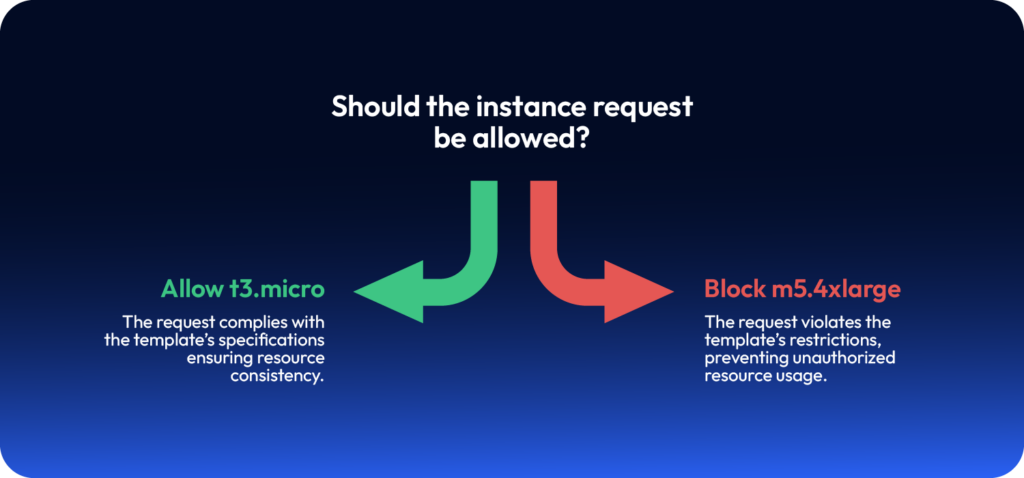
Cloud cost optimization tools can enforce CloudFormation guardrails — allowing cost-efficient EC2 instances like t3.micro while blocking costly types like m5.4xlarge.

Final: AWS CloudFormation and Costs Optimization

AWS CloudFormation is a powerful tool for cost optimization in cloud environments. Organizations can reduce unnecessary expenses, maintain governance, and ensure predictable cloud spending by automating resource lifecycle management, enforcing version control, utilizing CloudFormation Hooks for cost tracking, and leveraging pre-defined templates.

By adopting these best practices:

  • Prevent over-provisioning through automated resource creation and deletion.
  • Enable cost transparency with version-controlled infrastructure.
  • Track and predict costs using CloudFormation Hooks.
  • Standardize deployments with cost-efficient templates and Service Catalog.

Implementing these strategies ensures that cloud infrastructure remains efficient, scalable, and cost-effective—helping businesses optimize their AWS bill without compromising performance or security.

With ControlMonkey, you can optimize CloudFormation usage at scale – automate stack lifecycles, detect cost drifts in real time, and enforce budget-friendly templates across environments. Gain full visibility into your infrastructure spend, prevent over-provisioning, and deploy smarter with built-in guardrails for cost efficiency. Eliminate cloud waste before it happens.


Bottom CTA Background

A 30-min meeting will save your team 1000s of hours

A 30-min meeting will save your team 1000s of hours

Book Intro Call

    Sounds Interesting?

    Request a Demo

    Resource Blog News Customers Stories

    Updated: Nov 27, 2025 Upd: 27.11.25

    7 min read

    Terraform vs. AWS CloudFormation: Pros, Cons & Best Use Cases

    Daniel Alfasi

    Daniel Alfasi

    Backend Developer and AI Researcher

    Terraform vs. AWS CloudFormation: Pros, Cons & Best Use Cases

    With modern software engineering, Terraform Cloud and AWS CloudFormation is becoming increasingly important. For those unfamiliar with it, these are tools in which cloud infrastructure is provisioned and managed using an automated typed language rather than a manual ClickOps approach.

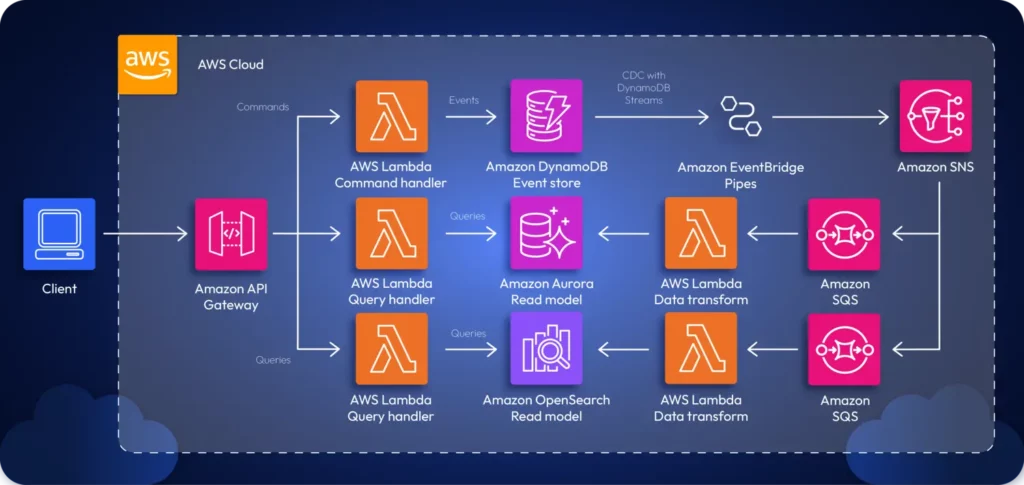
    For example, consider the following architecture diagram:

    There are two ways to provision the infrastructure for this app:

    1. By navigating the GUI on AWS
    2. By using a typed IaC tool.

    If you were navigating the GUI, you’d have to manually provision resources one by one, create the interconnectivity requirements necessary, and configure the app manually. This is time-consuming. Instead, you can leverage a typed IaC tool such as Terraform or CloudFormation to define your infrastructure as a code file and automatically provision the infrastructure with a single command.

    By using IaC tools, teams can rapidly adopt DevOps, which helps create the necessary synergy between Ops and Dev teams to boost productivity and efficiency.

    Two main tools that are heavily used in the industry for IaC are Terraform and AWS CloudFormation. Let’s look at each tool in greater detail to understand what’s right for you.

    What Is Terraform Cloud and How Does It Work?

    Terraform is an IaC tool created by Harshicorp that can be used to provision and manage your cloud infrastructure. It doesn’t necessarily have to be cloud infrastructure; Terraform can automate anything. For example, you can write a Terraform script to build a Docker image, create a text file, and more.

    When it comes to provisioning cloud infrastructure, Terraform is often sought after. Most companies don’t rely on a single cloud for their applications; most have solutions that span multiple clouds.

    In such cases, teams will need to manage infrastructure across several clouds. Terraform is a cloud-agnostic tool that lets teams manage infrastructure across any cloud, including AWS, GCP, Azure, and more.

    The snippet below showcases a Terraform script:

    provider "aws" {
    region = "us-east-1"
    }
     
    resource "aws_api_gateway_rest_api" "my_api" {
    name = "MyAPI"
    description = "API Gateway provisioned via Terraform"
    }
     
    resource "aws_api_gateway_resource" "my_resource" {
    rest_api_id = aws_api_gateway_rest_api.my_api.id
    parent_id = aws_api_gateway_rest_api.my_api.root_resource_id
    path_part = "myresource"
    }
     
    resource "aws_api_gateway_method" "my_method" {
    rest_api_id = aws_api_gateway_rest_api.my_api.id
    resource_id = aws_api_gateway_resource.my_resource.id
    http_method = "GET"
    authorization = "NONE"
    }
     
    resource "aws_api_gateway_integration" "mock_integration" {
    rest_api_id = aws_api_gateway_rest_api.my_api.id
    resource_id = aws_api_gateway_resource.my_resource.id
    http_method = aws_api_gateway_method.my_method.http_method
    type = "MOCK"
    request_templates = {
    "application/json" = "{\"statusCode\": 200}"
    }
    }
     
    resource "aws_api_gateway_deployment" "my_deployment" {
    depends_on = [aws_api_gateway_method.my_method]
    rest_api_id = aws_api_gateway_rest_api.my_api.id
    stage_name = "prod"
    }
     
    output "api_gateway_invoke_url" {
    value = "https://${aws_api_gateway_rest_api.my_api.id}.execute-api.${var.region}.amazonaws.com/prod/myresource"
    }

    The snippet above showcases an Terraform script written using HCL that provisions an API Gateway and outputs a deployment that can be invoked via the public internet.

    All you’d have to do is deploy the script using terraform apply.

    icon

    Looking to move to Terraform?

    Migrate from CloudFormation to Terraform or OpenTofu in 1-click

    What Is AWS CloudFormation and When Should You Use It?

    AWS CloudFormation is a managed AWS service that lets teams manage their application infrastructure primarily within an AWS ecosystem. However, CloudFormation also offers support for managing third-party resources through the CloudFormation public registry.

    Teams can work on their CloudFormation script and upload it to the AWS CloudFormation service to deploy the necessary infrastructure on the AWS Cloud. One good thing about this is that you don’t need to remember the order in which services must be provisioned. AWS CloudFormation will take care of that for you automatically and create the required tree.

    The snippet attached below showcases a simple CloudFormation script:

    AWSTemplateFormatVersion: '2010-09-09'
    Description: CloudFormation template to provision an API Gateway
     
    Resources:
    MyApiGateway:
    Type: AWS::ApiGateway::RestApi
    Properties:
    Name: MyAPI
    Description: API Gateway provisioned via CloudFormation
    FailOnWarnings: true
     
    MyApiGatewayResource:
    Type: AWS::ApiGateway::Resource
    Properties:
    ParentId: !GetAtt MyApiGateway.RootResourceId
    PathPart: myresource
    RestApiId: !Ref MyApiGateway
     
    MyApiGatewayMethod:
    Type: AWS::ApiGateway::Method
    Properties:
    RestApiId: !Ref MyApiGateway
    ResourceId: !Ref MyApiGatewayResource
    HttpMethod: GET
    AuthorizationType: NONE
    Integration:
    Type: MOCK
    RequestTemplates:
    application/json: '{"statusCode": 200}'
     
    MyApiGatewayDeployment:
    Type: AWS::ApiGateway::Deployment
    DependsOn: MyApiGatewayMethod
    Properties:
    RestApiId: !Ref MyApiGateway
    StageName: prod
     
    Outputs:
    ApiGatewayInvokeURL:
    Description: Invoke URL for the API Gateway
    Value: !Sub "https://${MyApiGateway}.execute-api.${AWS::Region}.amazonaws.com/prod/myresource"

    The snippet above provisions an AWS API Gateway, Resource, GET Method and a Deployment of the API using a YAML template and outputs the invocation URL so that users can immediately test out the API upon deployment.

    Terraform Cloud vs AWS CloudFormation: A Feature-by-Feature Breakdown

    How Each Tool Manages Infrastructure State

    Terraform manages infrastructure state using a state file (terraform.tfstate). This file records the current state of deployed resources, helping Terraform understand what changes need to be applied. The state file can be stored locally or in a remote backend (such as AWS S3 with DynamoDB for locking). This allows teams to collaborate efficiently without conflicts.

    Additionally, Terraform’s state management gives users more control over tracking changes, however it also comes with risks. For example:

    1. If the state file is lost or corrupted, recovering it can be challenging.
    2. Terraform doesn’t automatically reconcile the actual infrastructure state with the state file, drift detection requires running terraform plan manually.

    However, this is where tools like ControlMonkey come into play. Control Monkey is able to spin up, automate and govern your cloud infrastructure while monitoring drift.

    CloudFormation, on the other hand, automatically manages the state of resources within AWS. The AWS Management Console provides visibility into stack updates, rollbacks, and deletions. Since CloudFormation keeps track of the entire stack’s history, manual state management is unnecessary.

    A major advantage of CloudFormation is built-in drift detection. AWS automatically notifies users when infrastructure deviates from the defined CloudFormation stack, allowing proactive remediation. Since CloudFormation’s state is stored natively within AWS, there’s no risk of losing state files.

    Terraform Cloud Pricing vs AWS CloudFormation: What’s the Real Cost?

    Terraform is free to use. However, if teams want enterprise features such as policy enforcement, team collaboration, or remote execution, they may need to use Terraform Standard or Terraform Plus, both of which are paid services.

    The costs associated with Terraform mainly come from:

    1. State management – Storing the state in an AWS S3 bucket with DynamoDB (for locking) incurs minor costs.
    2. Infrastructure drift detection – Terraform doesn’t automatically detect drift, so users might need external monitoring solutions.

    On the other hand, AWS CloudFormation is free to use. Users only pay for the AWS resources they provision through CloudFormation. There are no additional charges for managing infrastructure stacks, updating resources, or using AWS drift detection.

    However, one indirect cost of using CloudFormation is the execution time of the overall deployment. CloudFormation stacks sometimes can take a longer to deploy than Terraform due to AWS handling rollback processes.  If an update fails, AWS may revert changes, prolonging deployment times and leading to higher infrastructure costs.

    Scripting Language Differences: Terraform HCL vs AWS CloudFormation YAML

    Terraform uses HCL (HashiCorp Configuration Language), which is a declarative language designed for infrastructure as code (IaC). HCL is readable, supports variables, loops, and conditionals, and integrates well with modules to promote reusability.

    Consider the HCL snippet shown below:

    resource "aws_s3_bucket" "my_bucket" {
    bucket = "MyBucket"
    }

    The snippet shown above uses HCL to define an S3 bucket that can be deployed onto AWS.

    CloudFormation supports YAML and JSON, which are more verbose, but lack built-in looping constructs (although AWS Macros and AWS CDK help overcome these limitations). Here’s the exact S3 Bucket provisioned using CloudFormation:

    Resources:
    MyBucket:
    Type: AWS::S3::Bucket

    Support & Ecosystem: Community, Docs, and Vendor Backing

    Terraform is multi-cloud, supporting AWS, Azure, GCP, Kubernetes, and on-prem infrastructure. HashiCorp provides official documentation, and there’s a strong community support system, including Terraform Registry modules.

    Additionally, for enterprise users, HashiCorp offers paid support with SLAs (Service Level Agreements), security compliance, and team collaboration features.

    However, CloudFormation is AWS-only. It is strictly revolving around AWS managed infrastructure and does not let you manage multi-cloud infra.

    Which IaC Tool Fits Your Workflow?

    Well, the answer is simple. If you have a problem in which your solution will span across multiple clouds, you will definitely have to use Terraform given that it lets you manage multi-cloud infrastructure.

    But, if your solution is a simple POC that is running on AWS, you can proceed with CloudFormation.

    Final Thoughts & Key Takeaways

    And, that’s everything you need to know about CloudFormation and Terraform.

    Both tools are widely accepted infrastructure management tools, while Terraform supports multi-cloud and CloudFormation supports only AWS.

    So, it’s important to remember that if you’re working on a multi-cloud solution, you’ll definitely need to look at using Terraform with its module support, declarative approach and multi-cloud support.

    With ControlMonkey, you can seamlessly manage your Terraform stack with ease by providing an end-to-end automation platform with AI driven code generation, automated drift detection and remediation across multiple clouds and with strict compliance policies.

    Bottom CTA Background

    A 30-min meeting will save your team 1000s of hours

    A 30-min meeting will save your team 1000s of hours

    Book Intro Call

    Author

    Daniel Alfasi

    Daniel Alfasi

    Backend Developer and AI Researcher

    Backend Developer at ControlMonkey, passionate about Terraform, Terragrunt, and AI. With a strong computer science background and Dean’s List recognition, Daniel is driven to build smarter, automated cloud infrastructure and explore the future of intelligent DevOps systems.

      Sounds Interesting?

      Request a Demo
      Cookies banner

      We use cookies to enhance site navigation, analyze usage, and support marketing efforts. For more information, please read our. Privacy Policy