Join our next Live Demo on Mar 16th!

Resource Blog News Customers Stories

Updated: Jan 26, 2026 Upd: 26.01.26

5 min read

Cloud Governance Framework: A Structure for Cloud Optimization & Total Control

Ori Yemini

Ori Yemini

CTO & Co-Founder

Cloud Governance Framework: A Structure for Cloud Optimization & Total Control

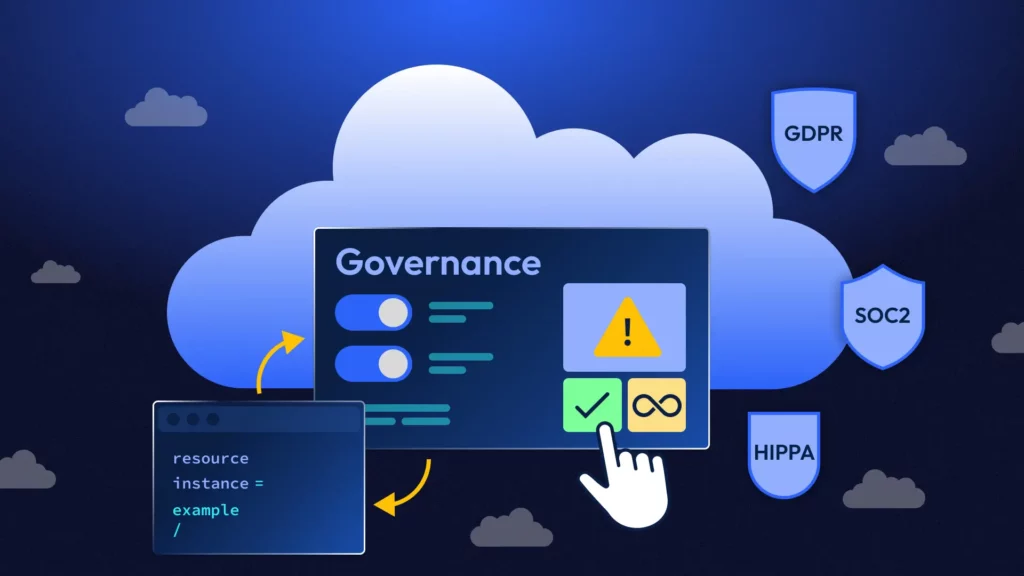
Cloud compliance starts with visibility—but it’s sustained by governance. A Cloud Governance Framework defines how your cloud resources are designed, deployed, and monitored in alignment with compliance requirements. It turns security policies into operational rules, helping organizations avoid regulatory drift and scale securely.

Here’s what a cloud governance framework includes—and how to build one that balances innovation with control

🛡️ Explore Cloud Compliance & Governance:

Laying the Foundations for a Cloud Governance Framework

Essentially a blueprint for best practice and operational discipline, a Cloud Governance Framework is a structured set of rules, policies, roles, and processes that guide the organization on how cloud resources are managed across the business. This avoids compliance risks being handled reactively and only being addressed during times of audit and/or incidents.

Businesses often look at governance as a burden, but when it is done well—and supported by the right automation tools—it streamlines compliance work by eliminating duplicated effort and reducing the risk of mistakes. This leads to a more secure, scalable and reliable cloud infrastructure.

The Four Key Pillars of a Cloud Governance Framework
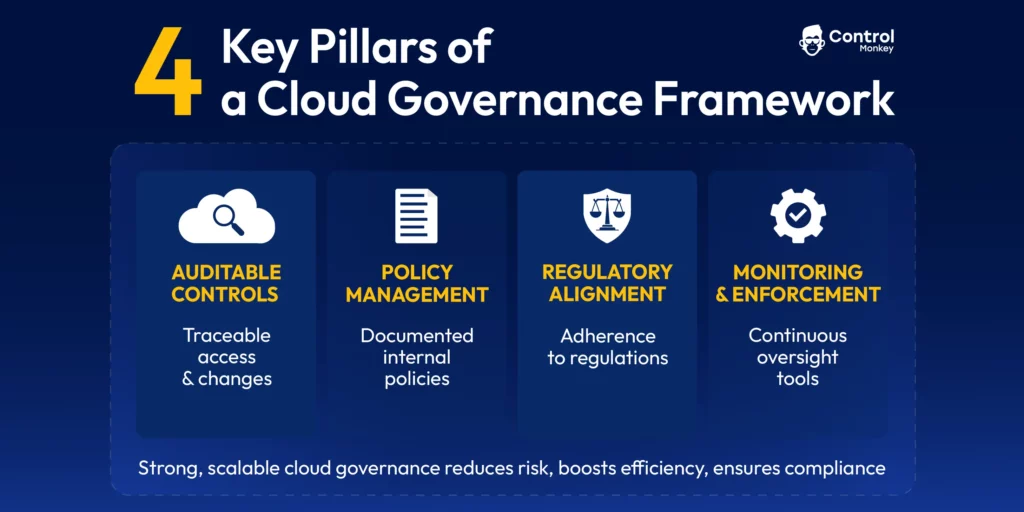
A well-implemented cloud governance framework should contain four key pillars:

Auditable cloud controls for traceability:

Having specific controls in place ensures that there is a mechanism for tracking activities such as system access, infrastructure changes, and policy implementation. These controls should be monitored by audit and compliance teams so they can provide assurance that the cloud environment is being managed in accordance with the regulations and best practices adopted by the business.

Robust policy management:

The organization’s internal policies on cost, security, data residency should be documented and implemented within the framework.

Regulatory compliance alignment:

The far-reaching requirements of the many regulations the organization must meet should be collated and rationalized within the framework, so duplicated work is avoided.

Rigorous cloud governance monitoring and enforcement tools:

Governance means ensuring the processes, roles and responsibilities outlined in the framework are effectively delivered. This makes monitoring and enforcement an integral part of the process that should be enabled with automation as far as possible.

A strong, scalable cloud governance framework reduces business risk, increases efficiency and productivity and cuts costs, while ensuring continuous compliance. Of course, every organization will need to adapt the framework to their needs, their cloud maturity and the regulations they need to adhere to. They must also ensure they devote the right level of resources to developing and maintaining cloud governance.

Implementing a Cloud Governance Framework: Essential Tools and Best Practice

Within the four pillars above there are a number of practical steps to take and technologies to deploy, including:

1. Identity and Access Management (IAM)

  • Implement least-privilege access to minimize breach risk.
  • Use role-based access controls (RBAC) to prevent over-permissive access or privilege escalation.
  • Enforce MFA and SSO policies.

You can address IAM risk and block IAM violations by enforcing pre-merge checks and RBAC policy templates. Tool such as OPA Rego Policiestfsec and Terraform AWS IAM modules can help deliver robust IAM and control.

2. Resource Visibility and Tagging

3. Cloud Cost Management and Optimization

  • Set budgets and alerts to avoid overspend.
  • Enforce resource lifecycle policies.
  • Use anomaly detection to identify spikes.

You can use native cloud cost management tools or third party cloud cost optimization options, but whichever you choose you must configure it to match your internal policies.

4.Cloud Security and Compliance Policies

  • Define guardrails for encryption, firewall rules, data egress.
  • Implement continuous compliance scanning.

Standards such as NIST SP 800 and ISO/IEC 27001offer prescriptive guidance for information management, data security and privacy controls and should be fully integrated into policies and operations via the cloud governance framework.

5. Change Management and Automation

6. Monitoring and Incident Response

Infrastructure as Code (IaC): Enabling Cloud Governance Enforcement at Scale

Infrastructure as Code (IaC) sits at the heart of the work DevOps need to do to maintain cloud compliance within a cloud governance framework. It delivers infrastructure safely and securely and enables DevOps to:

Platforms like ControlMonkey support the delivery of a strong cloud governance framework by offering automated enforcement, policy-as-code capabilities, and real-time visibility into cloud misconfigurations. IaC transforms compliance from a reactive audit tick box exercise to enabling DevOps to provide fast, compliant, standardized IaC delivery for the business.

A strong cloud governance framework does more than just provide control, stability, and risk mitigation—it fuels innovation, optimizes cloud efficiency, accelerates return on investment, and gives your business a true competitive advantage.

Don’t just keep up with, or let compliance slow you down. Book a demo and an intro call today and take the next step towards cloud excellence by automating compliance.

Bottom CTA Background

A 30-min meeting will save your team 1000s of hours

A 30-min meeting will save your team 1000s of hours

Book Intro Call

Author

Ori Yemini

Ori Yemini

CTO & Co-Founder

Ori Yemini is the CTO and Co-Founder of ControlMonkey. Before founding ControlMonkey, he spent five years at Spot (acquired by NetApp for $400M). Ori holds degrees from Tel Aviv and Hebrew University.

    Sounds Interesting?

    Request a Demo

    ❓Your Cloud Governance Framework Questions, Answered

    A cloud governance framework is a structured set of rules, policies, roles, and tools that guide how cloud resources are designed, deployed, and monitored. It ensures continuous compliance, cost control, and operational discipline across cloud environments—especially in complex, multi-team DevOps setups.

    A strong cloud governance framework transforms compliance from a reactive task to a built-in process. It enforces policies via automation and Infrastructure as Code (IaC), helping teams avoid misconfigurations, security risks, and regulatory drift—while scaling cloud usage with confidence.

    Terraform enforces cloud governance by turning infrastructure and compliance policies into code. With tools like OPA, Sentinel, and ControlMonkey Quality Gates, teams can apply tagging standards, IAM rules, encryption policies, and cost controls directly within Terraform pipelines—ensuring infrastructure is secure, consistent, and compliant by default.

    AI-generated Terraform can accelerate infrastructure delivery, but it often lacks the context needed to meet your organization’s security and compliance standards. A cloud governance framework mitigates this risk by applying automated policy checks, quality gates, and drift detection—ensuring that even GenAI-generated code remains compliant before it’s deployed. we suggest tools like ControlMonkey to set up quality gates to support scale and speed

    Resource Blog News Customers Stories

    Updated: Jan 26, 2026 Upd: 26.01.26

    8 min read

    Introduction to Cloud Compliance and Governance for DevOps

    Ori Yemini

    Ori Yemini

    CTO & Co-Founder

    Introduction to Cloud Compliance and Governance for DevOps

    What is Cloud Compliance?

    Cloud compliance and governance help organizations enjoy the benefits of cloud technologies while ensuring data privacy, security, and integrity. To reduce operational and legal risk, ensure your cloud environment meets all business regulations. For example, this will help reassure customers and partners that you are a trustworthy company.

    Cloud compliance is critical for DevOps teams, SREs, and cloud infrastructure leaders.  They specify and build cloud environments and cloud-native apps to use in them. Understanding how to achieve and maintain cloud compliance without compromising business performance is an important DevOps skill.

    Looking to go deeper into specific compliance use cases? Here are expert guides that explore how DevOps teams can stay secure and compliant at scale:

    Why is Cloud Compliance Important?

    Cloud compliance is growing increasingly important as cloud adoption accelerates, and cloud environments become more complex. Regulators are introducing more rules to ensure secure, resilient cloud usage. From a DevOps perspective, complying with these regulations is legally and ethically obligatory.

    In practice, cloud compliance is not straightforward. Cloud compliance requires expertise, resources, and automation to stay ahead. As a result, DevOps leaders are investing in automated cloud compliance tools. These support monitoring, fast remediation, and audit readiness..

    What is Cloud Governance?

    Cloud governance includes all the processes and safeguards that keep your cloud environment compliant.

    Multi-cloud adoption and AI-based provisioning, combined with rising regulation, make cloud governance complex. Using cloud governance frameworks and best practices helps create structure around cloud compliance.

    Regulations that Require Cloud Compliance

    The list of regulations that contain requirements relating to cloud environments is considerable. Organizations must comply with general data privacy and security regulations as well as those that apply specifically to their industry. Some regulations apply only to specific geographies but have extra-territorial application for companies based outside those areas that wish to do business with customers or organizations residing there.

    Common Regulations

    • FedRAMP compliance for DevOps: 
      • The U.S. government uses the Federal Risk and Authorization Management Program (FedRAMP). This program standardizes cloud security. It ensures that federal agencies have consistent protection.
      • Learn what DevOps should know about FedRAMP compliance.
    • GDPR compliance: The EU enforces the General Data Protection Regulation (GDPR), protecting personal data and ensuring privacy rights for individuals and organizations.
    • CCPA compliance: The California Consumer Privacy Act (CCPA) is a privacy law that gives California residents more control over their personal data. Organizations need to consider how they are protecting personal data.
    • ISO 27001: ISO developed ISO 27001 to define global standards for information security management and safeguarding data with minimal risks.
    • HIPAA compliance for DevOps: The United States enforces the Health Insurance Portability and Accountability Act (HIPAA) to protect the confidentiality and security of personal information in the healthcare industry.
    • DORA (EU regulation): DORA stands for DevOps Research and Assessment. It is a framework that helps DevOps teams measure and improve their software delivery.
      • Learn how working with DORA can reduce DevOps Burnout.
    • NIS2 Directive: The NIS2 Directive is an EU regulation that strengthens cybersecurity requirements for critical infrastructure and essential services.
      • Explore NIS2 compliance for DevOps.
    • SOC 2: security and compliance framework that ensures service providers securely manage customer data based on trust service criteria like security, availability, and confidentiality.
    • PCI DSS: PCI DSS regulates the payment card industry to secure data by efficiently handling cardholder information and reducing data breaches.

    This is not an exhaustive list, but it gives an idea of the scale of the cloud compliance challenge DevOps teams face.

    Who is Responsible for Cloud Compliance?

    Cloud compliance follows a shared responsibility model where Cloud Service Providers (such as AWS, Azure and GCP) assume responsibility for the security of the cloud and customers are responsible for security of everything they put in the cloud. This means they are responsible for ensuring that all data and the way resources are configured and secured must comply with the relevant regulations, such as those listed above.

    Increasingly within the organization, responsibility for cloud compliance resides with Cloud Architects, DevOps Directors and their teams. By establishing and enforcing cloud best practices, supported by automated quality controls, rigorous monitoring, and rapid remediation, cloud architects and DevOps directors can meet the – not inconsiderable – challenges of cloud compliance. .

    What are the 3 Challenges of Cloud Compliance?

    The key challenges of cloud compliance lie in scale, complexity, and the fast-moving nature of cloud environments.

    First Challenge: Scale

    Today’s mature cloud environments are sprawling. They have grown organically over time and few organizations have full visibility over what is in their cloud and how their infrastructure is configured. This presents a scale challenge for compliance.

    icon

    Terraform at Scale – Multi-Region is challenge.

    Our CTO, Ex-Spot.IO, Wrote a whole playbook of tips on how to do it in scale, regions and even multi cloud. Best part? it is completely Free

    Second Challenge: Complexity

    The regulatory environment is large and growing. From data sovereignty and privacy issues to cybersecurity standards and reporting requirements, the sheer volume of regulations governing organizations, their complicated stipulations and relationships cause headaches for compliance teams.

    Last Challenge: Dynamism

    A competitive business needs a cloud environment that is agile, flexing and adapting with the demands of the business. Modern cloud environments have evolved to meet this need, but compliance can’t always keep up – especially if teams are using manual methods.

    Cloud Compliance Tips for DevOps and Cloud Managers

    Designing a cloud compliance strategy can be daunting for DevOps and Cloud managers, but there are some good places to start:

    Understand your regulatory environment: As mentioned earlier, there are a lot of regulations in the mix, but they won’t all apply to your business or geographic region. Knowing which you need to cover helps you identify the right governance frameworks to use.

    Automate compliance monitoring: automation is the only way to build confidence in your compliance position. Many cloud service providers offer native solutions for monitoring security controls and compliance and you can supplement these with tools that continuously monitor and remediate your infrastructure configuration and enforce policies when users are provisioning environments.

    Implement role-based access control: Ensure that sensitive data is only accessible to authorised personnel and regularly review permissions to check users should still have access. Revoke unnecessary access rights in a timely way.

    Encrypt data: Use hardware and software-based encryption solutions to make sure information is protected in the vent of a breach.

    Build a compliance culture: It’s not just the technology and infrastructure that needs to meet regulatory standards. Many stipulate that employees must be regularly trained to identify cybersecurity threats and keep the organisation within compliance boundaries. This can only be achieved if senior leaders set expectations that everyone is responsible for compliance in relation to carrying out their role.

    Cloud Governance and Infrastructure Compliance Best Practices

    There is a lot of crossover between the different regulations governing cloud deployment. To avoid duplicating effort, organizations should use a cloud governance framework that identifies commonalities and helps teams implement robust policies, auditable controls, and rigorous monitoring that covers several regulatory requirements simultaneously.

    A strong cloud governance framework also helps DevOps identify where automation can be used to mitigate risk, such as when provisioning new cloud resources and monitoring the cloud environment.

    Your cloud governance framework should incorporate best practices across a variety of domains, including identity and access management, resource visibility and monitoring, cost management and optimization, security, change management and automation, and monitoring.

    icon

    Take a deeper dive into cloud governance framework essentials and best practices in our DevOps guide to cloud optimization and total control.

    DevOps Tools to Support Compliance

    Cloud compliance can be burdensome if DevOps teams don’t have the right tools. Monitoring and maintaining a compliant cloud environment manually will leave the team continuously battling to keep pace with the evolving business and the threats it faces. This compromises agility and prevents cloud scalability.

    Infrastructure as Code (IaC) supports automated cloud governance and compliance. Tools such as AWS Terraform in combination with ControlMonkey’s self-service infrastructure solution, drift detection and automated remediation, and cloud infrastructure disaster recovery simplify and streamline cloud compliance. This saves hundreds of hours and allows the team to serve the business with a fast, compliant, standardized cloud environment.

    Why use ControlMonkey for Cloud Compliance?

    ControlMonkey is your partner for cloud compliance. Our tools help you create rules that prevent non-compliant resources from going into production. They also keep your environments compliant without hurting productivity.

    We offer the facility to turn on compliance standards on specific environments, with a solution that works in one-click straight out of the box and enforce regulations directly within your infrastructure CI/CD. It can block the provisioning of non-compliant resources before they reach production. Co audit tool also simplifies gathering the evidence your auditors need.

    Learn more about how ControlMonkey delivers cloud compliance. Book a demo.

    Bottom CTA Background

    A 30-min meeting will save your team 1000s of hours

    A 30-min meeting will save your team 1000s of hours

    Book Intro Call

    Author

    Ori Yemini

    Ori Yemini

    CTO & Co-Founder

    Ori Yemini is the CTO and Co-Founder of ControlMonkey. Before founding ControlMonkey, he spent five years at Spot (acquired by NetApp for $400M). Ori holds degrees from Tel Aviv and Hebrew University.

      Sounds Interesting?

      Request a Demo

      Resource Blog News Customers Stories

      Updated: Oct 30, 2025 Upd: 30.10.25

      4 min read

      FedRAMP Compliance for Cloud and DevOps

      Zack Bentolila

      Zack Bentolila

      Marketing Director

      FedRAMP Compliance for Cloud and DevOps

      If your organization offers cloud products or services to U.S. federal agencies, you need to follow security standards. These standards are called FedRAMP. FedRAMP stands for the Federal Risk and Authorization Management Program. It is a government-wide program. FedRAMP offers a standard way to assess, authorize, and monitor the security of cloud services for federal agencies. Ensuring cloud providers meet strict security requirements makes it easier and safer for agencies to adopt cloud services while maintaining their cloud compliance obligations.

      In this blog, we will explore how DevOps and SRE teams can help with FedRAMP compliance. We will also discuss the important role of infrastructure as code (IaC) automation in strong cloud governance.

      What is FedRAMP and Why does it Matter for DevOps?

      FedRAMP is a group of security controls. These controls follow the guidelines from the National Institute of Standards and Technology (NIST). It provides a unified approach to security assessment, authorization, and continuous monitoring for cloud products and services. There are over 300 security controls that DevOps and SRE teams need to pay attention to. These controls cover areas such as access management, incident response, risk assessment, and continuous monitoring to ensure cloud security for federal agencies. FedRAMP requires DevOps and SRE teams to manage all changes, resources, and roles in your infrastructure.

      How IaC Automation Helps DevOps with FedRAMP Cloud Compliance

      Infrastructure as Code (IaC) tools like Terraform enable DevOps to automate and codify the creation and management of infrastructure across providers such as AWS, Azure, and Google Cloud. They are essential tools enabling teams to manage infrastructure in a consistent, repeatable, and scalable way. They help to prevent misconfigurations and cloud drift while maintaining compliance with critical FedRAMP controls.

      Why IaC Needs Robust Cloud Governance

      But writing secure Terraform code doesn’t automatically mean you are FedRAMP-compliant. Cloud-native DevOps teams need to spot infrastructure drift in real time. They must also block both authorized and non-compliant changes. They also need to be able to track and approve all modifications and recover from a security incident quickly.

      DevOps needs to ensure three key things. First, they should have visibility. Second, they must include governance. Third, they need the ability to roll back to a good cloud state. These requirements should be part of their Terraform or OpenTufo and GitOps pipeline from the beginning. They should not be added later.

      That’s where IaC automation platforms like ControlMonkey help with cloud compliance for DevOps. They give teams the tools, rules, and workflows they need. Most importantly, they provide the confidence to meet compliance requirements. By enforcing governance and visibility around Terraform, they can turn static IaC into continuous compliance.

      10 FedRAMP Compliance Requirements Solved with IaC Automation

      FedRAMP includes numerous control families, but not all apply to DevOps and SRE teams. Here are the 10 key control areas where IaC automation can directly help with FedRAMP cloud compliance.

      FedRAMP Control AreaOperational ChallengeIaC Solution in PracticeTools & Frameworks
      CM-2: Baseline Configuration ManagementManual changes create drift from known-safe infrastructureDetect and auto-revert drift to match Terraform baselineControlMonkey (Product)
      Terraform State Locking (Native)
      AWS Config (Native)
      AC-6: Least Privilege EnforcementOver-permissive IAM roles are applied via IaCUse pre-merge checks to validate against IAM policy guardrailsOPA Rego (Open Source)
      tfsec (Open Source)
      CM-3: Configuration Change ControlLack of traceable, reviewed infrastructure changesEnforce Git-based approvals with tagging and commit historyGitHub/GitLab PR Reviews (Product)
      ControlMonkey Governance (Product)
      IR-4: Incident ResponseSlow or manual recovery from incidents leads to non-complianceUse daily Terraform snapshots for fast rollback and state reversionControlMonkey Snapshots (Product)
      Terraform plan logs (Native)
      AWS CloudTrail (Native)
      AU-2: Audit LoggingIncomplete records of infrastructure changesMaintain full audit trail across IaC changes, authors, timestampsControlMonkey Cloud Inventory (Product)
      Git commit history (Native)
      AWS CloudTrail (Native)
      RA-5: Vulnerability ScanningCode deployed without scanning for known misconfigurationsIntegrate IaC security scanning into CI/CDtfsec (Open Source)
      Checkov (Open Source)KICS (Product)
      GitHub Actions (Product)
      SI-2: Flaw RemediationNo lifecycle tracking for code/config updates after CVEsTag changes and enforce remediation timeframes via policyOPA Policies (Open Source)
      SC-12: Cryptographic Key ManagementHardcoded secrets or poor encryption practicesReplace with encrypted variables and KMS integrationsAWS KMS (Native)
      Terraform Variable Management (Native)
      IA-2: Multi-Factor & Identity ValidationIAM misconfigurations enable unauthorized accessEnforce MFA flags, identity tags, and policy templates in codeTerraform AWS IAM Modules (Open Source)
      OPA (Open Source)
      CP-9: Information System BackupNo automated backup or rollback strategy for infrastructureUse version-controlled Terraform state and daily config snapshotsControlMonkey Cloud Infra (Product)
      Terraform State History (Native)

      IaC Automation for FedRAMP DevOps Control

      IaC automation plays a crucial role in meeting FedRAMP security controls, enabling DevOps to enforce security policies consistently across cloud environments. A comprehensive IaC automation and cloud governance solution like ControlMonkey aligns with key FedRAMP security and governance requirements.

      To learn more about how ControlMonkey can put your DevOps team in FedRAMP Control, book an intro call today.

      Bottom CTA Background

      A 30-min meeting will save your team 1000s of hours

      A 30-min meeting will save your team 1000s of hours

      Book Intro Call

      Author

      Zack Bentolila

      Zack Bentolila

      Marketing Director

      Zack is the Marketing Director at ControlMonkey, with a strong focus on DevOps and DevSecOps. He was the Senior Director of Partner Marketing and Field Marketing Manager at Checkmarx. There, he helped with global security projects. With over 10 years in marketing, Zack specializes in content strategy, technical messaging, and go-to-market alignment. He loves turning complex cloud and security ideas into clear, useful insights for engineering, DevOps, and security leaders.

        Sounds Interesting?

        Request a Demo

        Resource Blog News Customers Stories

        Updated: Aug 28, 2025 Upd: 28.08.25

        9 min read

        How AWS Security Hub Enforces Cloud Governance at Scale

        Zack Bentolila

        Zack Bentolila

        Marketing Director

        How AWS Security Hub Enforces Cloud Governance at Scale

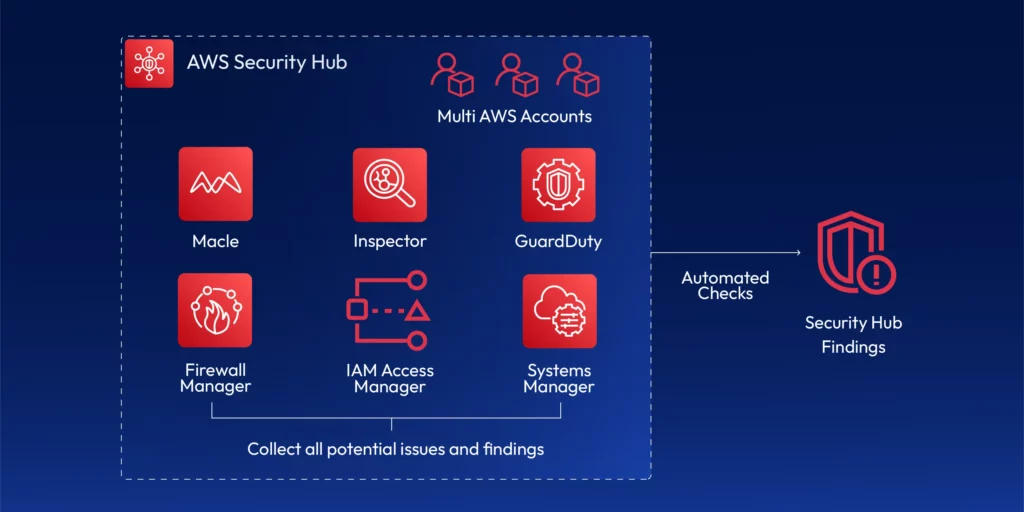
        The transition to the cloud has also been accompanied by a growing need for effective cloud governance. While it brings benefits such as cost savings, flexibility, and scalability, it also introduces challenges. The planning for security, compliance, and governance in the cloud can become very difficult due to numerous services, infrastructure configurations, and regulatory requirements. AWS Security Hub is a central security tool that manages security across several AWS accounts and automates security checks. It is integrated dashboards show the current security and compliance status so that quick actions can be taken.

        The idea is that it will aggregate alerts across multiple accounts through various services and partner tools. Such tools include:

        • Guard Duty
        • Inspector
        • Macie
        • IAM Access Analyzer
        • AWS Systems Manager
        • AWS Firewall Manager
        • AWS Partner Network Solutions

        AWS Security Hub consolidates all alerts into one centralized dashboard and collects all security findings in one place. You can act on the security alerts you receive. SecurityHub utilizes various AWS services and provides automated security auditing to ensure your cloud configuration complies with PCI-DSSSOC 2, HIPAA, and more.

        Cloud compliance and risk management are top priorities for all organizations. AWS Security Hub helps promote cloud governance. It focuses on cloud compliance and risk management. It empowers security teams to normalize processes, automate repetitive processes, and ensure that all configurations and resources comply with corporate policy.

        Understanding AWS Security Hub

        AWS Security Hub provides AWS customers and users with a single point where AWS customers have access to security findings and cloud compliance vulnerabilities across AWS accounts, services, and regions. It can detect cloud threats, analyze, and respond more quickly, staying ahead of threats and compliance standards.

        Key Features of AWS Security Hub:

        1. Centralized Dashboard: 

        Security Hub brings together findings from several AWS services. These include GuardDuty, AWS Config, AWS Inspector, and AWS Macie. You can view everything in one place. This would allow security operations to view security findings, compliance, and operational risk for all AWS accounts.

        2. Cross-region Aggregation: 

        AWS Security Hub supports cross-region aggregation, simplifying centralized visibility. That means sending data from different regions in one central region makes security administration much easier.

        3. Automated Compliance Checks with AWS Security Hub: 

        Security Hub checks the AWS environment for compliance with industry standards. These include the CIS AWS Foundations BenchmarkPCI DSS, SOC 2, and NIST. It also gives automated reports on compliance status.

        4. Security Findings: 

        Security Hub gathers and aggregates AWS services and provides them with complete details like severity, resource name, and recommended remediation actions. It helps security teams determine which issues to address first.

        5. AWS Organization Integration: 

        Security Hub has organization integration. That means you can manage all the security hub’s AWS accounts in one central account. Automatically, your organization adds new accounts. In that case, the security hub detects and adds them, and you can also have the management account by default as the security hub administrator. You can also design a member account as a designated delegated administrator for the security hub.

        6. Custom Insights and Automation: 

        You can create custom insights within the Security Hub according to specific security or compliance frameworks. This is useful for companies with specific regulatory or security needs.

        How AWS SecurityHub Works Across Services:

        it gathers information from third-party products and other AWS services.

        • GuardDuty identifies and warns against suspicious activity, such as odd traffic or unauthorized API activity.
        • AWS Config monitors configuration changes and compliance with security policy.
        • Amazon Inspector scans for vulnerabilities to analyze the security posture of an application.

        Security Hub aggregates all these services’ findings, analyzes them for actionable insight, and places them within an easy-to-understand interface. Remediation steps are also available for all findings, such as updating security groups or patching vulnerabilities.


        How AWS SecurityHub Controls Cloud Governance

        Security and compliance within the mature AWS environment are difficult to enforce without a unified system for monitoring security and compliance. AWS Security Hub makes cloud management easier by acting as an always-on monitoring control plane that monitors the entire AWS environment for security and compliance issues.

        How Security Hub Helps with Compliance Enforcement:

        • Automated Compliance Assessments: it collaborates with AWS Config to perform automated compliance scans for industry best practices and regulatory compliance. Preconfigured security controls ensure your AWS setup is up-to-date and based on the newest cloud governance best practices.
        • Enforcing Best Practices: Security Hub applies security best practices like CIS Benchmarks to scan your AWS account settings. For example, it checks whether you have turned on multi-factor authentication (MFA) for all IAM users or whether you have correctly configured security groups. It also utilizes best practices, such as least privilege access, by examining your IAM policy and suggesting improvements.
        • Integration with Security Tools: Security Hub integrates with cloud security services such as AWS IAM to audit user permissions against adherence to the principle of least privilege. It also integrates with AWS CloudTrail to track user activity and catch potential governance anomalies in real-time.
        • Security Alerts and Automation: Security Hub accumulates insights from multiple sources to assist in detecting vulnerabilities or misconfiguration. Security staff can automate remediation activities using AWS Lambda or Step Functions, which will be triggered upon detection. It significantly reduces the effort and provides more immediate responses to new risk findings.

        Best Practices for AWS Security Hub

        1. Enable Security Hub across all AWS accounts:

        To monitor centrally, enable AWS Security Hub for all AWS accounts within your organization. AWS Organizations are used to structure accounts to aggregate security findings from all accounts.

        2. Regularly Review Compliance Standards:

        Regularly audit CIS AWS Foundations, PCI DSS, and NIST benchmarks to ensure your AWS configuration meets best practices. Use AWS Config Rules to scan and check compliance regularly.

        3. Prioritized Key Findings:

        Not all discoveries are created equal—Prioritize remediation by utilizing Security Hub’s severity levels: IAM roles facing the open Internet and old security patches require rectification.

        4. Integrate Third-Party Solutions within Security Hub:

        Security Hub can integrate third-party security products to present a typical security posture. Security hubs can consume data from 3rd party integrations and send data to other partners. For example,

        • 3coresec
        • Alert Logic
        • Aqua

        Security Hub integrates with services such as Atlassian, FireEye, and Fortinet to forward findings from Security Hub. For example,

        • Atlassian
        • FireEye
        • Fortinet

        Because this is where you manage your findings. Some of these 3rd party integrations can loop back into the security hub and update the findings. For example,

        • Atlassian
        • Service Now

        5. Automated Remediation:

        Use AWS Lambda functions to automate remediating Security Hub findings. For example, if a security group is misconfigured, AWS Lambda can update security group rules based on predefined actions.

        6. Codify Infrastructure:

        Use Infrastructure as Code (IaC) tools like Terraform to define and manage cloud resources consistently. This reduces manual misconfigurations, enforces policy-as-code, and enables drift detection when integrated with Security Hub and AWS Config.

        Codifying Cloud Governance with Terraform

        While AWS Security Hub provides critical detective controls for identifying misconfigurations, effective cloud governance starts earlier — at the infrastructure provisioning stage. This is where Infrastructure as Code (IaC) becomes essential.

        Terraform, a leading IaC tool, enables teams to define cloud infrastructure in version-controlled configuration files. When paired with Security Hub and AWS Config, Terraform supports:

        • Standardized provisioning across dev, staging, and production environments
        • Enforcement of security policies by design
        • Audit trails and version control for infrastructure changes
        • Drift detection, ensuring infrastructure matches intended state

        By integrating Terraform with security controls, organizations move from reactive detection to preventive governance — addressing misconfigurations before they happen, not after.

        Integrating AWS Security Hub with Other AWS Services

        1. Security Hub and AWS GuardDuty:

        GuardDuty Generates findings, and these findings can be sent to the security hub. These findings are going to be converted to something called AWS Security Finding format (ASFF). GuardDuty dispatches these findings within 5 minutes, and then if you archive a finding in guard duty, it does not mean that it will update the finding in the security hub. Make sure you manage the findings directly in the security hub.

        2. AWS Config Integration:

        AWS Config regularly monitors the AWS resource configurations against security standards. Integrate Security Hub, receive combined compliance results, and initiate remediation actions automatically through the AWS Systems Manager.

        3. Amazon Macie Integration:

        Amazon Macie helps detect and protect sensitive information. Security Hub provides visibility of Macie results, such as exposure of Personally Identifiable Information (PII), and enables the organization to remediate them.

        4. How Security Hub Works with IAM:

        Security Hub integrates with IAM to assess the effectiveness of your policies. It scans for the use of least privilege access and notifies you of the presence of permissive roles or users.

        Meeting Compliance Requirements 

        Security Hub helps companies follow important standards. These include PCI DSS, HIPAA, and SOC 2. AWS Security Hub checks AWS systems in real-time. This ensures that companies stay compliant with these standards.

        Case Study Example:

        A financial services company within the healthcare industry uses Security Hub for HIPAA compliance. It scans its AWS environment regularly for HIPAA compliance, such as encrypting protected data at rest. It encrypts AWS storage buckets to keep data at rest. Security Hub tracks and logs all such recommendations so the company can achieve compliance with minimal risk of human error.

        TL,DR: 

        AWS Security Hub, a visionary compliance and security solution, actively addresses increasingly complex cloud configurations and stringent compliance needs. Security Hub works well with many AWS products. It helps create a single command center to manage, govern, and secure cloud environments.

        Organizations can avoid security risks and maintain compliance across the cloud environment through continued automation, centralized security monitoring, and forward-thinking governance. As cloud governance continues to grow, AWS Security Hub will lead in helping businesses with compliance. It offers an easy way to manage security and keeps companies informed about the latest industry standards.

        Take the next step in simplifying your cloud governance. With ControlMonkey, you can automate Terraform deployments, enforce policy-as-code, and manage AWS Security Hub findings from a single platform. Book a demo to see how ControlMonkey can help you scale compliance and governance with confidence.

        Bottom CTA Background

        A 30-min meeting will save your team 1000s of hours

        A 30-min meeting will save your team 1000s of hours

        Book Intro Call

        Author

        Zack Bentolila

        Zack Bentolila

        Marketing Director

        Zack is the Marketing Director at ControlMonkey, with a strong focus on DevOps and DevSecOps. He was the Senior Director of Partner Marketing and Field Marketing Manager at Checkmarx. There, he helped with global security projects. With over 10 years in marketing, Zack specializes in content strategy, technical messaging, and go-to-market alignment. He loves turning complex cloud and security ideas into clear, useful insights for engineering, DevOps, and security leaders.

          Sounds Interesting?

          Request a Demo

          AWS SecurityHub FAQ

          AWS SecurityHub is a cloud security posture management (CSPM) service that centralizes and automates security checks across AWS accounts. It collects information from services like GuardDuty, Config, and Macie. It checks your environment against standards like CIS, PCI DSS, and HIPAA.

          To use AWS SecurityHub, enable it across your AWS accounts via the AWS Console or CLI. Then integrate services like GuardDuty and AWS Config. SecurityHub automatically collects and displays findings, runs compliance checks, and can trigger automated remediation workflows using Lambda or Step Functions.

          Absolutely. DevOps teams use AWS SecurityHub to catch misconfigurations early, enforce least privilege, and stay compliant with infrastructure policies. Integrated with CI/CD pipelines, it helps DevOps shift left by surfacing risks before code reaches production.

          You can integrate AWS SecurityHub with Terraform by codifying security controls and compliance policies as part of your IaC. Use Terraform to ensure all resources meet predefined configurations, then let SecurityHub continuously audit for drift or violations. Combined, they deliver preventive and detective cloud governance.

          Resource Blog News Customers Stories

          Updated: Oct 20, 2025 Upd: 20.10.25

          5 min read

          Automating NIS2 Compliance for DevOps Teams

          Zack Bentolila

          Zack Bentolila

          Marketing Director

          Automating NIS2 Compliance for DevOps Teams

          If your organization provides essential or important services in the EU, you know that you need to comply with the recently revised Network Information Services Directive – commonly known as NIS2. However, you might be less clear on where DevOps supports NIS2 compliance. In this blog, we will explore how DevOps can help businesses follow NIS2 rules. We will also discuss why infrastructure automation is important.

          What is NIS2 and who must comply?

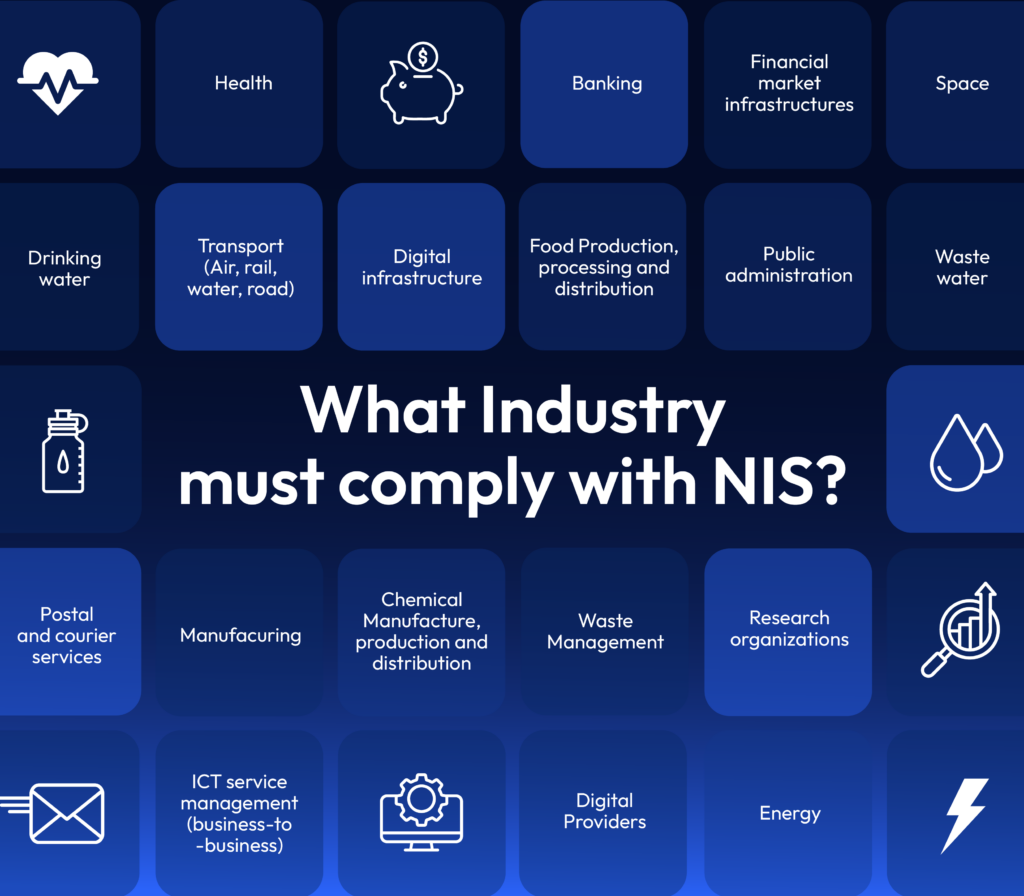
          NIS2 is an EU-wide regulation. It aims to improve the cybersecurity of organizations that provide “essential” or “important” services. It establishes minimum cybersecurity risk management measures and policies for network and information system security. These cover all areas of cybersecurity. This includes incident handling, business continuity, and supply chain security. It also covers identity and access management, employee training, and encryption.

          The list of in-scope sectors is long. It includes healthcare, banking, and energy. It also covers digital infrastructure providers like AWSGoogle Cloud, and Microsoft Azure.

          Why DevOps Is Central to NIS2 Compliance and EU Cyber Resilience

          NIS2 enhances the organization’s accountability for operating responsibly and increases its liability in the event of a cyber attack or other cyber incident. The full regulation is wide-ranging, but NIS2 compliance factors for DevOps include:

          • Companies must report breaches within 24 hours of an incident. They need to find problems, understand what is happening, and report quickly. DevOps teams must therefore undertake monitoring and reporting responsibilities.
          • Real-time visibility into infrastructure changes: NIS2 compliance requires organisations to maintain close control over infrastructure design, deployment, and changes, so it’s essential that DevOps has full visibility and control over cloud environments.
          • Proactive access control and robust privilege management: Only authorised personnel should have access to network information systems on a least-privilege basis. This is especially important for employees in DevOps teams with infrastructure management roles.

          Many companies rely on cloud-native environments. This puts DevOps and platform engineers at the center of NIS2 compliance. The amount of work is high, so manual workflows are not sufficient. That’s where Infrastructure as Code (IaC) and automation come in.

          How IaC and Automation Help DevOps with NIS2 Compliance

          Infrastructure as Code (IaC) tools like Terraform help DevOps teams automate and manage infrastructure. They work with providers like AWSAzure, and Google Cloud. They eliminate manual work and allow teams to manage infrastructure in a consistent, repeatable, and scalable way. This helps to achieve NIS2 compliance, but it isn’t the whole solution. To really put DevOps in control of NIS2 compliance, teams also need:

          IaC Governance

          Provisioning new resources should be automatically governed by NIS2 compliant policy, ensuring all additions and changes to the environment meet secure configuration requirements.

          IaC Drift Detection

          We need to keep checking that the cloud matches the code. This helps us avoid losing NIS2 compliance.

          Disaster Recovery for NIS2: Infrastructure Rollback After Incidents

          NIS2 emphasizes organizational resilience after an incident. This is just as important for cloud infrastructure as for other operational systems. DevOps need to be able to rollback infrastructure to known safe configurations after an incident.

          Audit-Ready IaC for NIS2 Breach Reporting and Change Tracking

          All changes must be approved and tagged. This allows for audits when needed. It also helps report any incidents quickly and with complete information.

          That’s where IaC automation platforms like ControlMonkey provide DevOps with automated NIS2 compliance capabilities. By enforcing governance and visibility around Terraform, they turn static IaC into continuous compliance.

          5 NIS2 Compliance Requirements Solved with IaC Automation

          NIS2 Compliance RequirementOperational ChallengeIaC Solution in PracticeTools & Frameworks
          Maintain real-time visibility and rollback to build resilience and minimise the impact of incidents.Manual cloud changes create drift and audit blind spots. Cloud-to-code integrity is compromised causing increased cost and risk.Auto-detect drift and revert unauthorized changes to match IaC baseline. Achieve continuous cloud-to-code integrity.ControlMonkey drift detection and remediation for Terraform (Product)
          Terraform State Locking (Native)
          AWS Config (Native)
          Manage network risk by enforcing secure configurations across environments.Teams skip encryption, region, or tagging policies. Non-compliant resources go into production.Validate using policy-as-code before deployment.ControlMonkey Quality Gates (Product)
          Open Policy Agent (OPA) (Open Source)
          HashiCorp Sentinel (Product)
          Enable fast breach response and recovery. Provide configuration evidence in mandatory incident reports.Manual rebuilds result in slow response times, increasing time to recovery, and delaying incident reporting.Use automated snapshots and IaC state history for rollback and forensicsControlMonkey Cloud DR (Product)
          Terraform Plan Logs (Native)
          AWS CloudTrail (Native)
          Implement robust identity and access management and prevent over-permissive access or privilege escalation.Over-broad IAM roles are deployed by mistake.Block IAM violations with pre-merge checks and RBAC policy templates.OPA Rego Policies (Open Source)
          tfsec (Open Source)
          Terraform AWS IAM Modules (Open Source)
          Ensure traceable, approved changes in shared environments for audit and reporting purposes.Failure to implement a robust approval system or and/or tagging leads to audit failures and unmanaged risk.Enforce Git-based workflows with required approvals and infrastructure tagging.GitHub/GitLab PR Reviews (Product)
          ControlMonkey Governance (Product)

          IaC Automation for NIS2 Compliance: Putting DevOps in Control

          Achieving NIS2 cloud compliance at scale demands IaC automation. Without it, DevOps workloads will escalate to an impossible degree. By deploying a coherent suite of IaC automation solutions, DevOps can fulfil NIS2 compliance obligations without compromising their workflow.

          To learn more about how ControlMonkey can put your DevOps team in full control of NIS2 Compliance, book an intro call today.

          Bottom CTA Background

          A 30-min meeting will save your team 1000s of hours

          A 30-min meeting will save your team 1000s of hours

          Book Intro Call

          Author

          Zack Bentolila

          Zack Bentolila

          Marketing Director

          Zack is the Marketing Director at ControlMonkey, with a strong focus on DevOps and DevSecOps. He was the Senior Director of Partner Marketing and Field Marketing Manager at Checkmarx. There, he helped with global security projects. With over 10 years in marketing, Zack specializes in content strategy, technical messaging, and go-to-market alignment. He loves turning complex cloud and security ideas into clear, useful insights for engineering, DevOps, and security leaders.

            Sounds Interesting?

            Request a Demo

            FAQs

            NIS2 compliance means following the cybersecurity and risk management rules in the European Union’s NIS2 Directive. It applies to essential and important entities across sectors like energy, finance, healthcare, digital infrastructure, and more.

            DevOps teams are on the front lines of NIS2 compliance. The directive demands secure defaults, change traceability, and fast rollback — all dependent on how infrastructure is built and shipped.

            Key takeaways for DevOps:

            • Manual provisioning is a risk — ClickOps breaks compliance
            • IaC must be governed — use policy-as-code and version control
            • Drift, rollback, and audit trails must be automated
            • CI/CD pipelines need compliance gates

            Tools like ControlMonkey help enforce these controls automatically within your Terraform workflows.

            Yes, but not alone. Terraform codifies infrastructure, but you still need drift detection, policy enforcement, and audit workflows to meet NIS2. That’s where tools like ControlMonkey come in.

            Resource Blog News Customers Stories

            Updated: Aug 20, 2025 Upd: 20.08.25

            6 min read

            HIPAA DevOps Compliance: Best Practices Guide

            Zack Bentolila

            Zack Bentolila

            Marketing Director

            HIPAA DevOps Compliance: Best Practices Guide

            Modern healthcare service provision is supported by cloud-based software and digital infrastructure. Sensitive patient health information (PHI) is shared between organizations. These organizations must follow the rules of the Health Insurance Portability and Accountability Act (HIPAA). This act is meant to protect how PHI is accessed and used. Strong DevOps practices, good cloud governance, and using IaC tools like Terraform are key for successful HIPAA compliance. Getting HIPAA compliance right is very important for start-ups. Getting DevOps and tool deployment right from the start helps the business succeed in the long run.

            How to Design DevOps for HIPAA Compliance

            HIPAA principles touch many aspects of software development and infrastructure provision. DevOps, as the glue uniting software development and IT Ops, is therefore pivotal to compliance. It starts with strong cloud governance. If you are looking to ensure your infrastructure is HIPAA compliant, read on to ensure you’re aligned.

            Cloud Governance for DevOps HIPAA Compliance

            Organizations regulated by HIPAA must ensure that their cloud environment is compliant and stays that way by:

            • Using a HIPAA-compliant cloud service
              Make sure your Cloud Service Provider (CSP) follows HIPAA standards for managing ePHI. Also, ensure you have a Business Associate Agreement (BAA) that explains the shared duties for protecting ePHI. AWS, Azure and Google Cloud Platform (GCP) all have HIPAA-compliant options, it’s a case of choosing the platform that suits you best.
            • Designing and implementing a robust cloud governance framework This should feature defined policies, procedures, and technologies to meet HIPAA standards for data encryption, access, monitoring, incident response, and audits.
            • Utilizing Infrastructure as Code tools to automate HIPAA-compliance infrastructure provision – Using Infrastructure as Code (IaC) tools like Terraform allows DevOps to provision consistent, HIPAA-compliant AWS infrastructure, making it easier to secure and maintain.
            • Identifying and eliminating cloud drift – As part of your cloud governance strategy, you should deploy tools that identify and rapidly mitigate cloud configuration drift that can impact the security and scalability of your HIPAA-compliant cloud environment.

            How DevOps Managers Can Meet HIPAA Requirements?

            Once the cloud environment is configured for HIPAA compliance and a cloud governance framework is in place to maintain it, DevOps managers can get into the granular requirements of the regulation, including establishing:

            HIPAA-compliant Data Security 

            Strict ePHI Access Controls

            Access controls must be implemented on the least-privilege principle, limiting access to the minimum required for users to undertake their role. They must employ multi-factor authentication and role-based access policies. Tools such as AWS IAM can facilitate permissions management and access.

            Continuous Monitoring and Audit Logs

            Data and system access and changes must be monitored and logged to ensure rapid detection and response to unauthorized access or modification attempts. Tools like AWS CloudTrailAzure Monitor, and Google Cloud Audit Logs can be leveraged as part of this task. Regular audits and assessments should be scheduled so there is early detection of vulnerabilities or instances of non-compliance.

            Secure Software Development & Automated HIPAA Compliance Checks

            Healthcare-related software development must utilize secure coding practices, regular code reviews, and vulnerability assessments to spot and address security risks and code vulnerabilities early in the SDLC. HIPAA compliance checks should be integrated into the CI/CD pipeline, and automated as far as possible, so that only code that meets requirements goes into production.

            Data Backup and Recovery

            including infrastructure recovery: Establish backup and recovery processes to prevent data loss and ensure quick recovery in case of a system failure or breach. This should include cloud infrastructure recovery to ensure you can quickly revert to a known-good state. This is much simpler if your resources are all mapped into tools like Terraform and daily snapshots are taken.

            Incident Response and Breach Reporting

            Design and test incident response procedures to minimize the impact of any breach. HIPAA has stringent breach notification rules, which you must be able to fulfil in partnership with your organization’s legal and compliance teams. Part of this will involve linking results from the relevant AWS, GCP or Azure logging and auditing tools into reporting to provide information on the context of a breach.

            Vendor Management

            Ensure that all third-party vendors and service providers are also HIPAA-compliant and implement proper agreements to protect PHI.

            Building a HIPAA-Compliant DevOps Practice

            Integrating security throughout the software development lifecycle is not just a matter of implementing the relevant tooling. DevOps teams must also commit to putting HIPAA front and centre in their approach to daily work.

            Establishing a DevOps HIPAA Mindset:

            DevOps teams must adopt a security-first mindset and treat HIPAA compliance as a core part of how they build and operate systems. They need to understand the regulation, follow internal policies, and apply the cloud governance framework that keeps infrastructure aligned with HIPAA requirements.

            By owning these responsibilities, teams move beyond checkbox compliance and build trust into every deployment

            HIPAA Awareness Training for DevOps and Business Users:

            To strengthen the HIPAA-first mindset across your engineering organization, deliver regular training sessions on HIPAA requirements, data privacy, and security best practices. DevOps and business users must understand their roles, responsibilities, and the risks of mishandling PHI.

            Ensure every team member knows how to apply access controls, follow encryption policies, and document changes correctly. This clarity builds accountability—and reduces the risk of accidental compliance violations.

            DevOps teams should build HIPAA compliance into every new project and technology integration from day one—before a single line of code is written.

            Documentation and Compliance Reporting:

            To make sure your HIPAA cloud governance framework works well, keep detailed records of DevOps processes. Document configurations and infrastructure changes. Have a strict change management process in place. This delivers the accountability and transparency needed to build confidence in your team.

            Regular compliance reporting is recommended. It gives assurance to business stakeholders in legal and compliance teams. This shows that development and operations are following compliance rules. It also helps to minimize risk.

            HIPAA Compliance at Scale with ControlMonkey

            DevOps plays a vital role in helping companies develop and deliver healthcare applications and services, and the right technology partners can help make the journey faster, smoother and safer.

            ControlMonkey delivers a suite of solutions that help you achieve strong cloud governance, deep visibility, and total control over your cloud inventory – now and in the future. It makes importing legacy cloud resources into Terraform easier. It finds unmanaged resources that may cause compliance issues. It also increases Terraform coverage with automatic code generation. ControlMonkey supports various compliance frameworks like PCI-DSSNIST 800-53, and HIPAA, helping organizations maintain secure and compliant environments efficiently. From infrastructure change management to drift detection and remediation, ControlMonkey takes the heavy lifting out of

            Bottom CTA Background

            A 30-min meeting will save your team 1000s of hours

            A 30-min meeting will save your team 1000s of hours

            Book Intro Call

            Author

            Zack Bentolila

            Zack Bentolila

            Marketing Director

            Zack is the Marketing Director at ControlMonkey, with a strong focus on DevOps and DevSecOps. He was the Senior Director of Partner Marketing and Field Marketing Manager at Checkmarx. There, he helped with global security projects. With over 10 years in marketing, Zack specializes in content strategy, technical messaging, and go-to-market alignment. He loves turning complex cloud and security ideas into clear, useful insights for engineering, DevOps, and security leaders.

              Sounds Interesting?

              Request a Demo

              Resource Blog News Customers Stories

              Updated: Aug 25, 2025 Upd: 25.08.25

              8 min read

              How DORA and Cloud Governance Prevent DevOps Burnout

              Zack Bentolila

              Zack Bentolila

              Marketing Director

              How DORA and Cloud Governance Prevent DevOps Burnout

              DORA explains how improved cloud governance can combat burnout and boost DevOps efficiency.

              The Google DORA (DevOps Research & Assessment) Community provides opportunities to learn and collaborate on Cloud Governance solution, software delivery, operational performance and continuous improvement. Its State of DevOps 2024 report delves into ways to increase DevOps resilience, wellbeing and efficiency.

              The report found a significant portion of DevOps professionals are experiencing burnout – a state of emotional, physical, and mental exhaustion caused by excessive stress. This results in low productivity, a drop in morale, potential job hopping as well as issues and mistakes that can impact compliance, cloud governance and security.

              Teams that cultivate a stable and supportive environment that empowers DevOps to excel drive positive outcomes. This blog looks at practical ways to reduce burnout in your DevOps team by improving cloud governance through Terraform automation and implementing a proactive DevOps strategy.

              More Code, More Cloud, More Burden

              In mature cloud deployments, scale brings complexity, as more cloud accounts, regions and users are added, and configurations evolve. DevOps find it harder to manage large-scale environments, especially when configurations are not managed by Infrastructure-as-Code (IaC) resources, so they gradually spiral out of control.

              Consequently, DevOps find their cloud infrastructure is not serving the business efficiently or safely. With cloud governance out-of-control, workloads continue to grow at an alarming rate.

              The Hidden Risks of Weak Cloud Governance in DevOps Teams

              According to DORA:

              • Work overload – A move-fast-and-constantly-pivot mentality negatively impacts well-being
              • Lack of control – DevOps find they are firefighting daily with an ongoing chase of continuously scaling more and more
              • Poor project management – Poor planning and unrealistic deadlines
              • High stress – The fast paced nature of DevOps leads to a constant state of pressure
              • Bad culture – Unrealistic expectations, lack of support and a general feeling of being treated unfairly

              The net result of this is that performance starts to dip and burnout creeps in. At the same time, weak cloud governance contributes to uncertainty and a lack of control.

              The DORA report outlines the correlation between organizational culture and burnout levels, recommending that organizations can combat burnout by:

              • Fostering a healthy DevOps culture
              • Providing better tools to support DevOps teams, strengthen cloud governance, and deliver operational excellence.

              Why Poor Cloud Governance Solutions Leads to DevOps Burnout & Compliance Failures

              Tackling DevOps burnout is important because it has real-world implications. Overworked teams become a bottleneck as they can’t handle the volume and frequency of infrastructure-related tickets. Cloud infrastructure is unable to scale, and cloud governance suffers as DevOps can’t easily detect or remediate cloud drifts and other problems.

              Changes in infrastructure risk breaking cloud governance, compliance and/or best practices. Demotivated DevOps teams have no time to focus on strategic projects, putting a brake on innovation and strategic ambitions. Worse still, individuals could walk out the door at any moment, causing even more resource issues as they take vital corporate knowledge with them.

              Most companies with mature cloud environments carry legacy infrastructure that is often retained in DevOps minds and inadequately documented. Teams desperately need real-time insights to bridge the gap between strategic initiatives and daily operations.

              Infrastructure as Code (IaC) for Scalable & Secure Cloud Governance Solution

              Today, the market has shifted towards automation and IaC is a journey, deemed as the present and future of cloud infrastructure engineering.

              IaC standardizes and automates infrastructure management, delivering visibility and reducing risk. This enables teams to scale more easily across cloud environments, building repeatable processes and operational excellence.

              However, this is only the first building block to deliver infrastructure at scale. Most of today’s IaC automation tools are point solutions only partially resolving cloud problems. To deliver effective IaC and adopt scalable cloud governance solutions, automation must be end-to-end and completely controlled

              Terraform Automation for Cloud Governance & Compliance: Key Benefits

              Terraform automation enhances cloud compliance and governance by enabling the definition and management of cloud infrastructure through code.  This allows for consistent deployments, automated compliance checks, clear audit trails, and the ability to enforce security policies across all environments. In turn, this leads to better control and visibility over cloud resources and minimizes the risk of human error in infrastructure management. It also enables:

              1. Policy as code
                • The creation of custom security and compliance policies that can be integrated into the infrastructure provisioning process, automatically identifying and preventing potential misconfigurations.
              2. Drift Detection
                • Detects discrepancies between the desired state of infrastructure defined in code and the actual deployed state, allowing for proactive remediation of unauthorized changes.
              3. Centralized Management
                • With Terraform, managing cloud resources across multiple cloud providers and environments can be done from a single pane, simplifying administration and ensuring consistent cloud governance practices.
              4. Role-Based Access Control (RBAC):
                • By assigning permissions based on user roles, Terraform helps enforce granular access controls to infrastructure, preventing unauthorized modifications.
              5. Self-service IaC
                1. Terraform automation enables standardized, compliant infrastructure provisioning to remove DevOps bottlenecks. Developers can self-serve infrastructure that complies with regulations such as PCI-DSS, HIPAA, and GDPR, without having to consult DevOps.

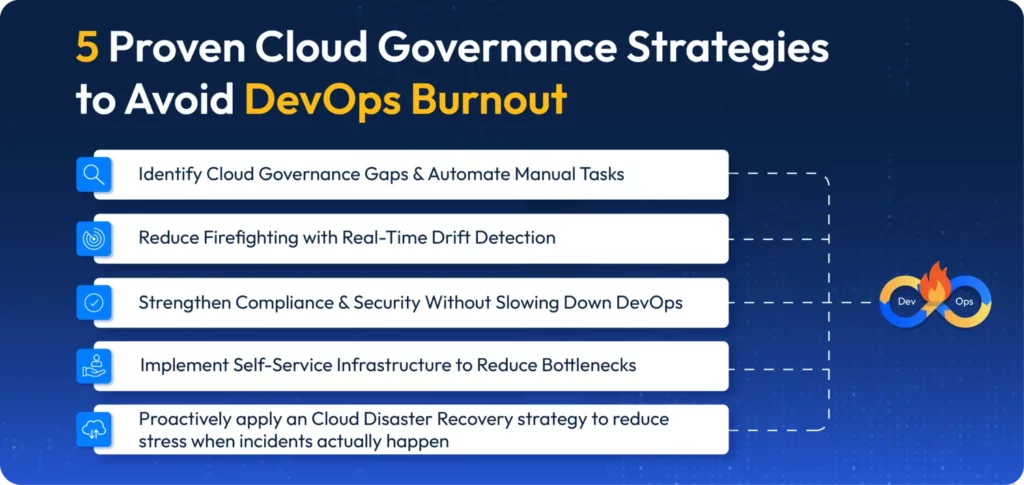
              5 Proven Cloud Governance Strategies to Avoid DevOps Burnout

              Cloud governance gaps create compliance risks, inefficiencies, and excessive manual work—all of which contribute to DevOps burnout. By applying proactive automation and governance strategies, teams can reduce stress, increase efficiency, and improve cloud security. Here’s what DevOps leaders should focus on:

              1. Identify Cloud Governance Gaps & Automate Manual Tasks

              DevOps teams often get bogged down handling repetitive governance and compliance tasks manually, leading to inefficiencies and burnout.

              Key tips:

              • Run an audit of infrastructure tickets—identify tasks that can be automated (e.g., repetitive IAM role assignments, security group modifications, environment provisioning).
              • Implement ticket automation with Terraform workflows or internal bots to reduce manual approvals.
              • Track the percentage of infrastructure requests automated versus those that are handled manually—aim to increase automation coverage over time.

              2. Reduce Firefighting with Real-Time Drift Detection

              Drift detection ensures cloud environments match IaC definitions, preventing unexpected changes that lead to compliance failures and security risks.

              Key tips:

              • Look into a drift detection tool (e.g., ControlMonkey, Open Policy Agent) to automate drift monitoring and remediation.
              • Run a bi/weekly drift audit—compare Terraform state with live cloud environments and auto-correct unauthorized changes.
              • Track the time your team is spending resolving drift-related incidents – the less manual intervention, the less burnout, and this strengthens governance.

              3. Strengthen Compliance & Security Without Slowing Down DevOps

              Security and compliance enforcement often slows down deployments when handled manually – automating these processes ensures governance without creating friction.

              Key tips:

              • Look into policy-as-code (e.g., Terraform Sentinel, Open Policy Agent) to automate compliance checks pre-deployment.
              • Run compliance tests in staging before production—ensure infrastructure meets SOC 2, HIPAA, or CIS benchmarks automatically.
              • Track policy violations caught pre-deployment versus post-deployment: the goal is to shift security left and reduce last-minute rollbacks.

              4. Implement Self-Service Infrastructure to Reduce Bottlenecks

              DevOps teams shouldn’t be gatekeepers for every infrastructure request – self-service IaC enables developers to provision resources safely without delays. Your team shouldn’t be bogged down with an overload of tickets – they need this valuable time back!

              Key tips:

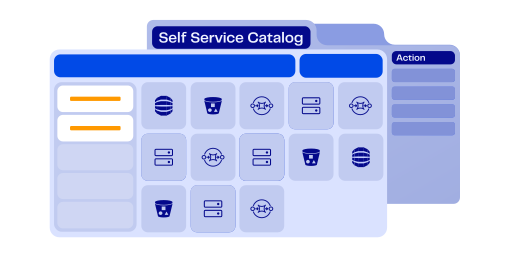
              • Set up a self-service IaC catalog (e.g., pre-approved Terraform modules, AWS Service Catalog or even ControlMonkey) so developers can deploy infrastructure without DevOps intervention.
              • Run a monthly audit of provisioning requests – identify repetitive approvals, many of which can be automated.

              5. Prevent Incidents & Reduce Stress with Automated Rollbacks

              Handling cloud failures manually increases downtime and stress – automated recovery ensures stability and confidence in cloud governance.

              Key tips:

              • Disasters happen – enable daily Terraform state backups to allow instant rollback in case of infrastructure failures. This saves your team time in advance.
              • Periodically undertake a disaster recovery drill – test restoring infrastructure from backups to ensure rollback readiness. There will be key learnings to be gained from such an exercise.
                • Aim for under 10 minutes to minimize disruption and reduce operational stress.

              Enterprise Adoption of Terraform for Cloud Governance and Compliance

              Cloud governance isn’t just about controlling infrastructure—it’s about empowering DevOps teams to focus on innovation instead of firefighting.

              • Terraform automation eliminates governance bottlenecks, ensuring that compliance, security, and infrastructure provisioning happen proactively rather than reactively.
              • A proactive DevOps culture reduces burnout, shifting teams away from manual fixes and last-minute compliance checks toward automated, scalable infrastructure management.

              With the right cloud governance strategy, enterprises can achieve both control and efficiency, giving DevOps teams the tools they need to succeed.

              This is the start of the infrastructure delivery revolution. DevOps teams are already reaping productivity and efficiency benefits with better cloud cost management, 30% increase in productivity and a 3x boost in deployment speed, plus 100% cloud configuration backup.

              Avoid stress and burnout and build the right culture and environment to empower your team. Fix your past cloud governance and compliance issues and stop them happening again in the future.

              Get peace of mind with ControlMonkey

              Ready to Automate Your Cloud Governance Strategy? Download our free guide to mastering Infrastructure as Code (IaC), preventing drift, and automating compliance with Terraform. Or book a live demo to see Terraform automation in action

              Bottom CTA Background

              A 30-min meeting will save your team 1000s of hours

              A 30-min meeting will save your team 1000s of hours

              Book Intro Call

              Author

              Zack Bentolila

              Zack Bentolila

              Marketing Director

              Zack is the Marketing Director at ControlMonkey, with a strong focus on DevOps and DevSecOps. He was the Senior Director of Partner Marketing and Field Marketing Manager at Checkmarx. There, he helped with global security projects. With over 10 years in marketing, Zack specializes in content strategy, technical messaging, and go-to-market alignment. He loves turning complex cloud and security ideas into clear, useful insights for engineering, DevOps, and security leaders.

                Sounds Interesting?

                Request a Demo

                FAQ – Frequently Asked Questions on DevOps Burnout

                DevOps burnout often stems from constant firefighting, unrealistic delivery pressures, and a lack of control over increasingly complex cloud environments. As teams scale, poor cloud governance and manual processes create inefficiencies, leading to chronic stress, fatigue, and eventually burnout.

                Without strong governance, cloud environments quickly become chaotic—configurations drift, security gaps widen, and DevOps teams are stuck solving the same problems repeatedly. This lack of structure and control creates a high-pressure environment that drains energy and undermines morale.

                The DORA (DevOps Research & Assessment) report highlights that poor organizational culture, lack of support, and high workload contribute to burnout. It also points to better tooling, including cloud governance solutions, as essential for improving DevOps well-being and performance.

                Automation eliminates repetitive tasks, reduces the margin for error, and helps teams scale cloud environments without increasing pressure. Tools like Terraform automation handle compliance checks, drift detection, and provisioning—so DevOps can spend more time building and less time babysitting infrastructure.

                Warning signs include constant last-minute fixes, high ticket volumes for routine changes, missed deadlines, increased turnover, or a general drop in morale. If your cloud governance is reactive instead of proactive, burnout is likely not far behind.

                Policy-as-code tools automatically enforce compliance and security standards, reducing the mental burden on DevOps teams. By flagging misconfigurations before deployment, they prevent last-minute rollbacks and firefighting, which are key stress drivers.

                Self-service infrastructure removes DevOps bottlenecks by letting developers safely deploy resources themselves. This frees up DevOps to focus on higher-value work and reduces the workload imbalance that often leads to burnout.

                Cookies banner

                We use cookies to enhance site navigation, analyze usage, and support marketing efforts. For more information, please read our. Privacy Policy