On October 20, 2025, an issue that began in the AWS US-EAST-1 region resulted in a global business outage. Major customer-facing services went down due to the failure of critical dependencies, as well as control-plane path failures, which occurred simultaneously. It was an automated DNS management issue tied with DynamoDB that required manual intervention to solve.
The lesson is simple. Cloud availability does not guarantee business continuity. AWS provides strong building blocks, but your architecture decides whether an outage becomes a minor disruption or a public incident.
TL;DR
- Disaster recovery on AWS depends on RTO (recovery time) and RPO (data loss tolerance).
- AWS backup and recovery protect data, but infrastructure configuration must also be restored.
- Common AWS disaster recovery solutions include Backup and Restore, Pilot Light, Warm Standby, Active-Active, and AWS DRS.
- A resilient AWS DR architecture restores networking, IAM, routing, and policies in the correct order.
- ControlMonkey strengthens AWS backup and disaster recovery by capturing configuration state and enabling repeatable infrastructure recovery.
Disaster recovery strategy is an executive risk decision. For most organizations, disaster recovery on AWS succeeds only when infrastructure, configuration, and data recovery are designed together. RTO defines how quickly you must restore service. RPO defines how much data loss you can tolerate. Meeting both requires more than backups. You also need a reliable way to rebuild infrastructure and restore state across networking, security, and identity so systems become reachable and safe again. ControlMonkey focuses on this configuration DR layer.
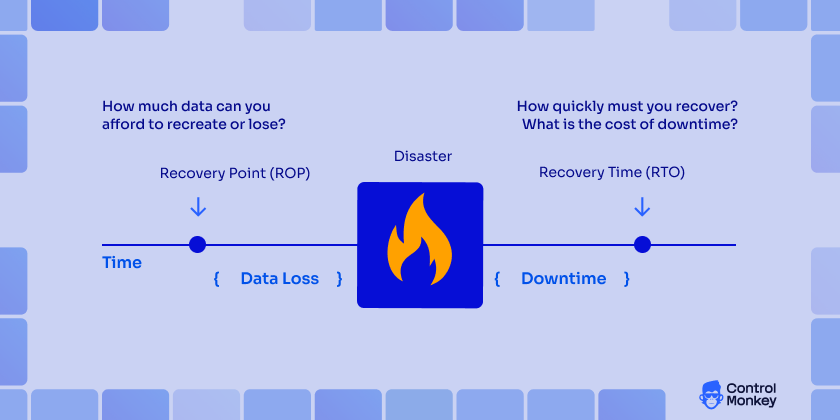
Most teams use several DR tools, including AWS services and external platforms like ControlMonkey. The key is making recovery executable. Teams must restore infrastructure and configuration in the right order, not only recover data. ControlMonkey supports “configuration DR” by helping teams restore cloud configuration state, including networking, security, and identity, so recovery starts from a known-good baseline.
DR Strategies on AWS and Their RTO and RPO
The AWS outage on October 20, 2025, started with a DNS resolution failure in Amazon DynamoDB regional endpoint. The outage primarily impacted applications running in the US-EAST-1 region but it led to widespread service disruption. For those interested in a detailed analysis of what went wrong and spread so rapidly, the AWS outage and disaster recovery lessons are for you.
The applications that had a strong DR strategy, which consisted of fully automated and detailed infrastructure, as well as clear and predetermined failover steps, were able to lose very little and restored their services moving to other regions. The main lesson learned is that just replicating data across regions is not sufficient.
What is downtime worth?
Downtime is worth the total business impact of an outage, including lost revenue, SLA penalties, customer trust damage, and operational disruption. Teams should quantify this cost before choosing AWS disaster recovery strategies because it determines the RTO and RPO targets the architecture must meet.
The scope of a solid DR strategy revolves around factors like below:
- Lost revenue from transactions that did not go through.
- SLA penalties and credits.
- Customer churn, loss of trust.
- Support load and incident fatigue.
Once these factors are quantified, teams can set realistic RTO and RPO targets and design their AWS disaster recovery plan accordingly.
From Business Risk to an AWS Disaster Recovery Plan
A disaster recovery plan is guaranteed to fail if it exists solely as documentation. A practical disaster recovery plan AWS teams trust is executable, versioned, and specific enough to run under stress. The ideal scenario is to have your plan put into practice within your infrastructure, automation, and live code. This way, you’ll be more proactive and have a clear strategy for recovery rather than just firefighting during a disaster.
AWS Disaster Recovery Plan Step 1:
Prioritize your business functions. Identify your applications by customer impact and potential revenue loss, then assign RTO and RPO goals to each level. Be clear on who is responsible for these decisions. Determine who is authorized to declare a disaster, what circumstances lead to that decision, and under what conditions the team transitions from “incident response” to “fail over now.”
AWS Disaster Recovery Plan Step 2:
Build a solid and specific plan for recovery. For each workload, create a recovery process that is detailed and specific enough to be followed under stress. This should be accompanied by a clearly defined stopping condition to avoid recovering to an unsafe, partially restored, or silently corrupted state.
AWS Disaster Recovery Plan Step 3:
Operational readiness should be a part of your design. Therefore, automate the process of disaster recovery and create a framework that incorporates your existing systems and technologies. Perform recovery exercises on a regular basis, and incorporate the actual RTO and RPO into your decisions and budget.
4 AWS Disaster Recovery Strategies
There are four strategies that can be viewed as levels of commitment to building resilience into your systems. Each level combines faster recovery and reduced impact on your business, at the expense of greater cost and operational complexity. Backup and Restore: Cost-Efficient Baseline Protection
Backup and restore is the simplest form of disaster recovery (DR). In practice, AWS backup and recovery mainly protect data and artifacts, but it does not guarantee fast restoration of the full environment. It is the simplest and cheapest because it only needs the resources and the solutions necessary to back up the cloud infrastructure, state, and data.
If something goes wrong, you will still need to build the infrastructure, redeploy the services, and run the servers in a stressed state to support the restoration. However, when the infrastructure needs to be built and services need to be deployed after something goes wrong, mistakes can and do happen, especially when the environment is different than what is stored in Infrastructure as Code (IaC).
This approach has several obstacles, such as:
- Longer Recovery Time Objective (RTO) because you have to build the infrastructure and deploy the applications.
- Higher Recovery Point Objective (RPO) because you may lose data depending on the time last backup was taken and the availability of logs.
- Higher risk of executing the process, since when you have to rebuild something, human error will occur.
Backup and Restore is a good option for you when you can tolerate several hours of downtime, some loss of data, but a quick and inexpensive implementation for disaster recovery.
Pilot Light: Balanced Resilience for Growing Systems
The key distinguishing factor of this method in regards to Backup and Restore methods is that Pilot Light retains key elements in a recovery region. You can ‘ignite’ the rest during a disaster to fully restore it. This method usually retains configurations available in platforms like ControlMonkey to automatically create the missing infrastructure using automation, requiring:
- WARM datastores (replicas or up-to-date backup).
- Supportive services that are minimal like authentication, secrets, and in some cases queuing.
You should utilize a pilot light if:
You do not mind having some operational tasks to perform when the system fails.
You desire a speedy recovery time that does not involve a total rebuild of the system.
You prefer a standby time that is less costly than a warm standby.

Infrastructure Recovery Slowing Down Your RTO?
ControlMonkey captures your cloud configuration and lets you restore infrastructure automatically when you need it most.
Warm Standby: Faster Recovery with Minimal Downtime
This method involves a smaller scale version of the system running redundantly in a secondary region. The smaller scale system with active data sync makes it possible to recover fast. In an event of a disaster, the standby system can take over making the system live again.
Multi-Region Active-Active: Continuity-First Strategy for Mission-Critical Systems
This DR strategy treats redundancy as a mandatory part of the architecture. Therefore, active-active runs production in multiple regions at the same time. You can configure DNS to route traffic across regions and serve even if an entire region goes down. One advantage of this approach is that you can also use it as a load balancer across regions and to reduce latency (latency-based routing in DNS) for the users if needed. This strategy delivers the best RTO and often the best RPO, but it adds complexity and comes at a high cost requiring:
- Multi-region data design (conflict resolution, replication semantics).
- Traffic routing and health-based failover.
- Operational discipline across environments.
You can use an active-active DR strategy when:
- Downtime creates existential risk.
- When running regulated, customer-critical systems.
- Fund continuous operational maturity.
Disaster Recovery Automation on AWS
The automation of infrastructure and disaster recovery go hand in hand. This is where AWS backup and disaster recovery becomes operational, because automation turns recovery into a tested execution path instead of manual console work. Human error is a primary factor that delays restoration. To avoid human errors, automate the following three parts of your DR plan: state capture, recovery execution, and recovery readiness.
State capture
This means that you need to version your infrastructure code continuously. You need an infrastructure automation and governance tool to keep track of infrastructure state, versions and to execute the recovery steps with accuracy.
Recovery execution
Disaster recovery should always be done in a particular order. This is called order of operations. Recovery execution should be documented and automated in that order to ensure that upper stream and downstream impacts and dependencies are not disrupted.
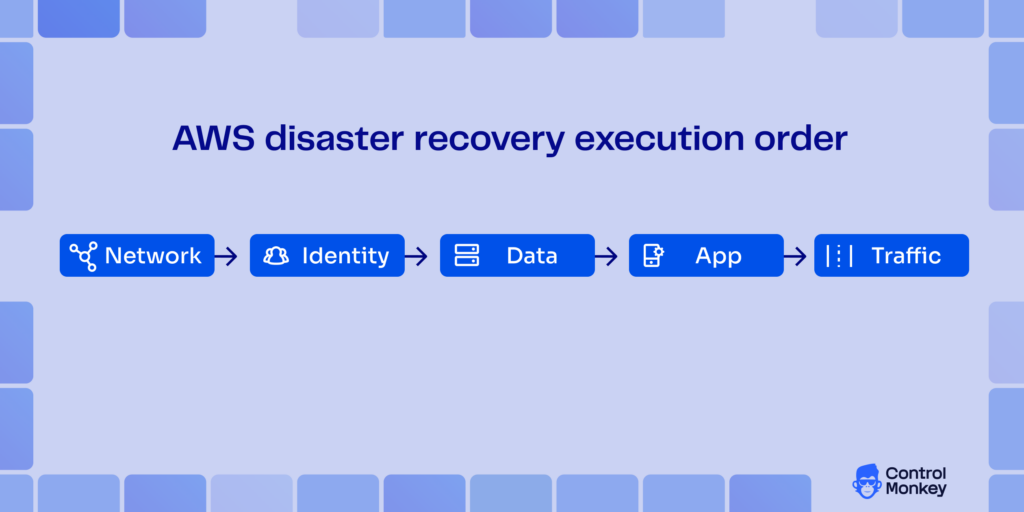
Execution should support both partial restore (one service) and complete restorations (the whole environment). The objective is to provide recovery at a granular level rather than complete restoration.
Governance and readiness
In your DR analytics, think of DR readiness as an engineering metric and monitor it time to time to uncover ungoverned resources and configurational gaps, and communicate the status to the leadership. AWS stresses the importance of establishing target recovery objectives and, through planning, testing and operational practice, validating them.
Automating DR with ControlMonkey
Most disaster recoveries fail even when the data is safe. Teams restore databases or servers, but users still can’t log in, traffic still routes to dead endpoints, or permissions block recovery actions. That happens because outages often break the infrastructure “contract” around your apps, including IAM, networking, DNS, routing, and security policy. If those layers aren’t captured and recoverable, recovery turns into manual console work under pressure.
ControlMonkey focuses on infrastructure configuration recovery. It utilizes read-only access and native Cloud APIs to discover and take continuous snapshots and automated state backups to govern cloud and external configurations.
Unlike other services that focus on recovery of data or virtual machines, ControlMonkey Infrastructure Disaster Recovery solution restores the complete infrastructure contract (network, IAM, routing, and policy).. Below is a description of the process in a simple loop.
- Utilize native Cloud APIs to discover resources (read-only).
- Continuously take snapshots of your configurations and transform these into definitions that can be deployed.
- Recover resources or whole environments. This is done through a process called dependency-aware ordering.
- Use ControlMonkey dashboards for governance and review of this over time.
The above process is documented in the Cloud Disaster Recovery Infrastructure Configuration solution brief, for which all the architecture and workflow have been created.
Can You Rebuild Your Cloud Infrastructure After a Disaster?
Backing up data isn’t enough if IAM, networking, and policies can’t be restored quickly. See how ControlMonkey enables fast, automated recovery of your entire cloud environment.
What is AWS Elastic Disaster Recovery
AWS Elastic Disaster Recovery (AWS DRS) is a service that continuously replicates source servers to a low-cost staging area in a target AWS Region, enabling fast recovery with minimal downtime and data loss. It replicates server data in near real time, supports point-in-time recovery, and allows teams to launch recovery instances during an incident, making it useful for recovering on-premises workloads to AWS or replicating EC2 environments across regions.
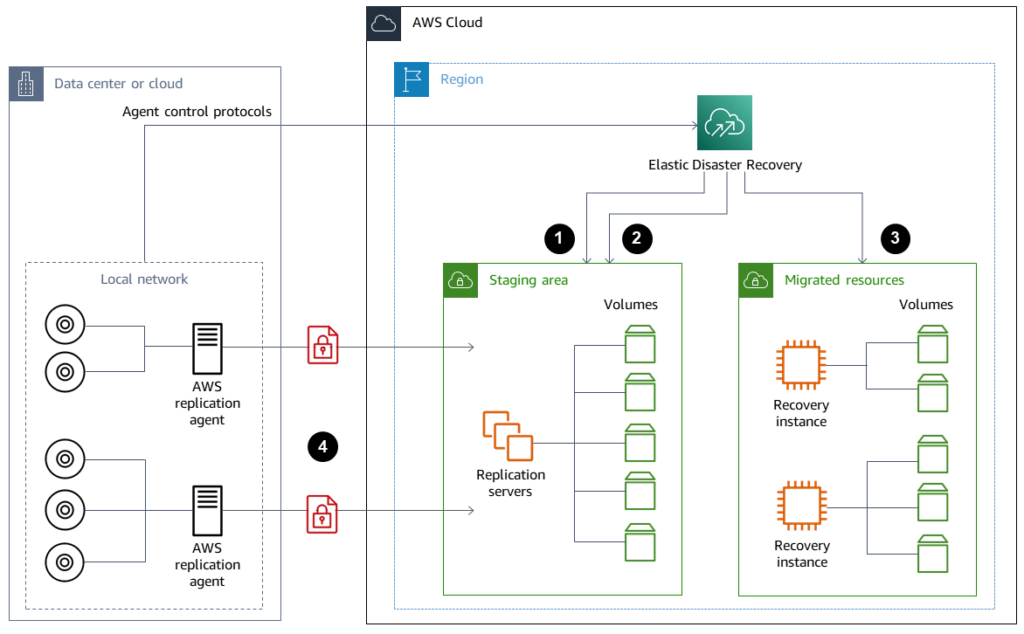
AWS DRS can be used to recover on-prem workloads into AWS.
- For migrating on-premise workloads to AWS.
- For workloads on EC2 to be moved to different Regions.
- For those EC2 workloads, there is a requirement for the full server state, inclusive of the Operating System, System Volume, and Application Stack.
- AWS DRS also offers proven best practice guides for disaster recovery including recovery drills.
An important note: While AWS DRS does help to recover the servers, along with the data state, your recovery plan must include parts of the design that exist outside of the servers, such as the Configuration and State Management for the DNS, Identity and Access Management, Edge Rules, Third Party Software as a Service, and any Ad Hoc Click Operations.
AWS Disaster Recovery Plan: How to create
A good DR plan has to be specific, measurable, and detailed, and include the various dependencies and ordering across the DNS, IAM, networking, data, and application layers. Let’s break it down into a step-by-step plan to design a disaster recovery plan.
1) Define recovery objectives per workload (RTO/RPO)
Establish recovery objectives for each workload (RTO/RPO) that is grounded in the business metrics that inform the design, architecture, and costs. A well-defined template can be found here. These best practices for cloud disaster recovery planning closely align with the tiered approach. Define RTO and RPO objectives for each application, and then select the most straightforward DR strategy that meets those objectives.
Checklist rough draft:
- Define service tiers (Tier 0-3 or something comparable).
- Allocate RTO/RPO by tier.
- Detail “must-work first” dependencies (auth, billing, core APIs).
2) Choose the DR strategy per tier and document why
Each workload can be classified at one of four levels, so avoid the one-size-fits-all designs. AWS defines DR as a set of strategy choices that align with your objectives.
Decision-making considerations:
- Cost of downtime (for the first hour versus the first day).
- Acceptable data loss per domain.
- Operational maturity and the level of your team.
3) Design the AWS DR architecture as a dependency graph
A dependable AWS DR architecture treats recovery as a dependency graph, so identity, networking, and routing come up before application traffic shifts. Using a Graph/Order of Operations, describe the dependencies concerning the restoration process.
- Accounts, identity, and access control.
- Network and security boundaries.
- Data layers and steps for the promotion of replication.
- Compute and rollout of the deployments.
- Routing and traffic facing clients.
- Observability and evidence of audits.
- Backing up not only data, but also code and configurations is essential.
4) Automate configuration capture and restore paths
Automation on these areas is important for faster and accurate recovery:
- Infra provisioning (e.g. Terraform, OpenTofu).
- Secrets plus parameters.
- DNS with edge configuration.
- Identity and access frameworks.
ControlMonkey continuously snapshots the configuration state, tracking it outside AWS infrastructure, allowing it to be restored when needed, including dependency restoration.
5) Test with drills and measure achieved RTO/RPO
Improve your readiness by scheduling drills to practice for the incident/accident that is anticipated to happen. AWS has provided guidance on incident drills for AWS Elastic Disaster Recovery and has put emphasis on the operational readiness practices.
Ensure the drills are realistic:
- Make a region in your routing logic fail.
- Perform a true restore from your point-in-time.
- Authenticate the user and perform end-to-end transaction tests.
- Track the RTO/RPO achievements over time.
AWS disaster recovery plan example
Let’s look at different tiers of an AWS disaster recovery plan:
| Tier 0: | Core APIs and authentication (Warm Standby) Target RTO is 30 minutes to 1 hour. Target RPO is under 5 minutes. Pattern: Warm Standby in Secondary Region. Data: Multi-AZ plus cross-region. Traffic: Failover based on health. |
| Tier 1: | Web App and Admin UI (Pilot Light) Target RTO is 2 to 4 hours. Target RPO is 15 minutes to 1 hour. Traffic: DNS cutover after validation. |
| Tier 2: | Batch Jobs and Analytics (Restore and Backup) Pattern: Scheduled On-demand rebuilds. |
ControlMonkey for AWS disaster recovery
ControlMonkey is at its strongest when addressing the need for configuration DR making the restoration:
- Repeatability: Takes snapshots of good configuration and sends them to Git.
- Speed: Depending on tooling and processes, restores resources or entire environments for configuration recovery workflows.
Governance: Provides visibility to engineering leadership on gaps in readiness.
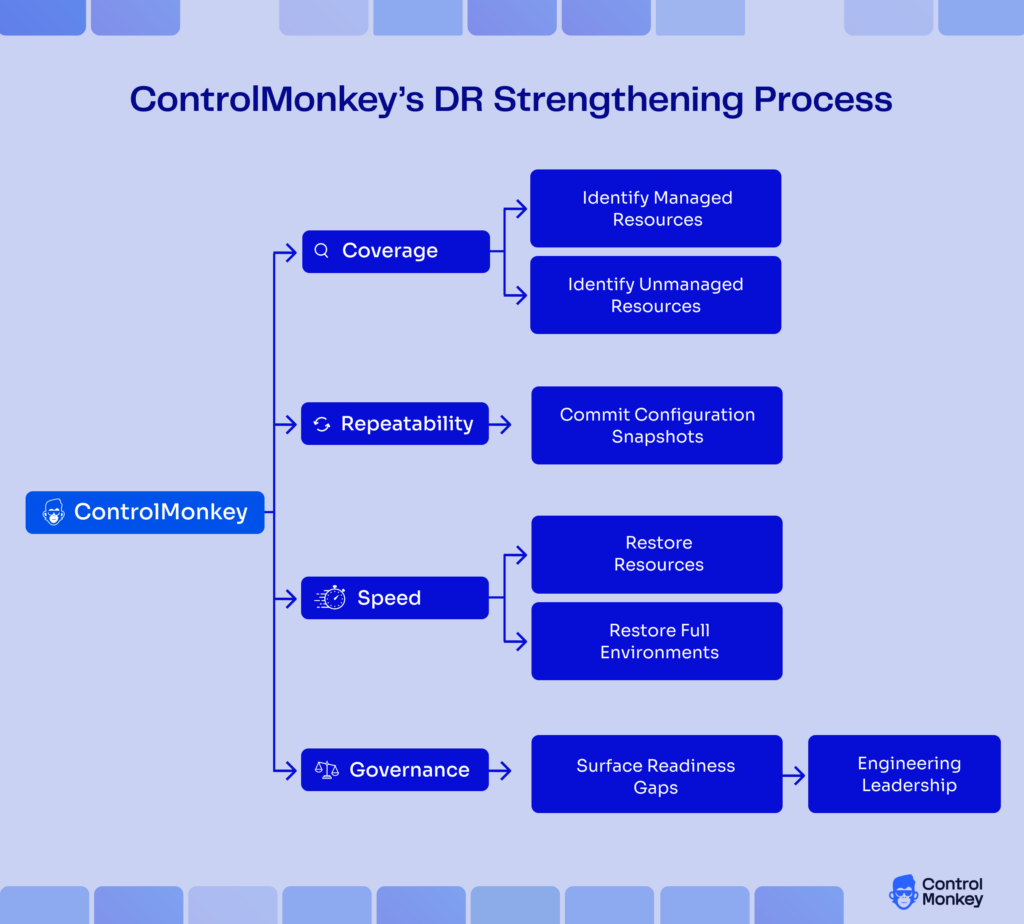
ControlMonkey helps solve this gap by continuously capturing infrastructure configuration and enabling teams to restore environments in the correct dependency order. By turning configuration state into versioned, recoverable infrastructure, organizations can recover faster and operate disaster recovery as a repeatable engineering process rather than a manual emergency response.

A 30-min meeting will save your team 1000s of hours
A 30-min meeting will save your team 1000s of hours
Author