TL;DR
- AWS ransomware protection has to cover more than encryption to compensate for the potential change of IAM, backups, routing, logging, and control-plane settings during an attack.
- AWS Backup, GuardDuty, Security Hub, KMS, and IAM together lower your risk, protection and potential for recovery point changes, and for the protection of suspicious activities.
- Backups are very useful, but they do not recover cloud backups of identity, networking, routing, policies, or configurations.
- Real recovery means meeting RTO and RPO targets, ongoing recovery exercises, and a DRP supportive of configuration recovery.
- ControlMonkey helps restore that configuration gap with cloud configuration backup, drift detection, and AWS environment restore services.
Any AWS ransomware checklist will cover a spectrum of activities, verifying whether backups are active, GuardDuty is on, reviewing IAM, and recovery points are set. But successfully recovering is very different from passing checklists, and often companies don’t know until they are already under attack.
A real incident often starts with a leaked access key or an over-permissioned role. Then, an attacker may quietly alter IAM policies, weaken backup settings, disable logging, update security groups, or break routing paths. The data may still be recoverable, but the application may not return to a working state. Simply recovering from a snapshot isn’t enough. Teams also need identity, networking, routing, permissions, and security controls to work together.
What is Ransomware on AWS cloud environments?
Ransomware on AWS describes activities involving the compromise of cloud identities and control-plane access to encrypt, delete, exfiltrate, or otherwise disrupt AWS-hosted data and services. It can modify IAM policies, AWS Backup, and security group configurations, as well as routing, logging, and data encryption access. ControlMonkey provides recovery by capturing cloud configuration backups, tracking drift, and enabling teams to reopen more of their AWS environments within RTO and RPO. ,
How ransomware shows up in AWS
AWS ransomware usually does not start as a data problem. It often begins with identity and control plane activity before anything visibly breaks. Attackers may enter through stolen credentials, access keys exposed in source code, or an overly permissive role.
Once inside, they may look for ways to delete backups, review CloudTrail logging, study IAM permissions, and identify changes that can avoid quick detection. Then they may abuse privileged access, attempt backup deletion, misuse encryption keys, edit IAM policies, change security groups, modify route tables, or disrupt logging.
AWS services like CloudTrail and GuardDuty can help identify suspicious activity, including unusual S3 access when S3 protection is enabled. But detection alone is not enough. Teams also need to know what changed from the last known-good configuration state. ControlMonkey helps here by tracking cloud configuration drift and giving teams a recoverable view of the AWS environment, so recovery does not depend only on logs or manual console checks.

Watch the AWS Webinar on Hidden Cloud DR Gaps
Ransomware recovery is not only about restoring data. Learn the 4 hidden gaps that make cloud disaster recovery fail at scale — including IAM, DNS, infrastructure drift, and configuration recovery.
AWS shared responsibility model for resilience ransomware protection
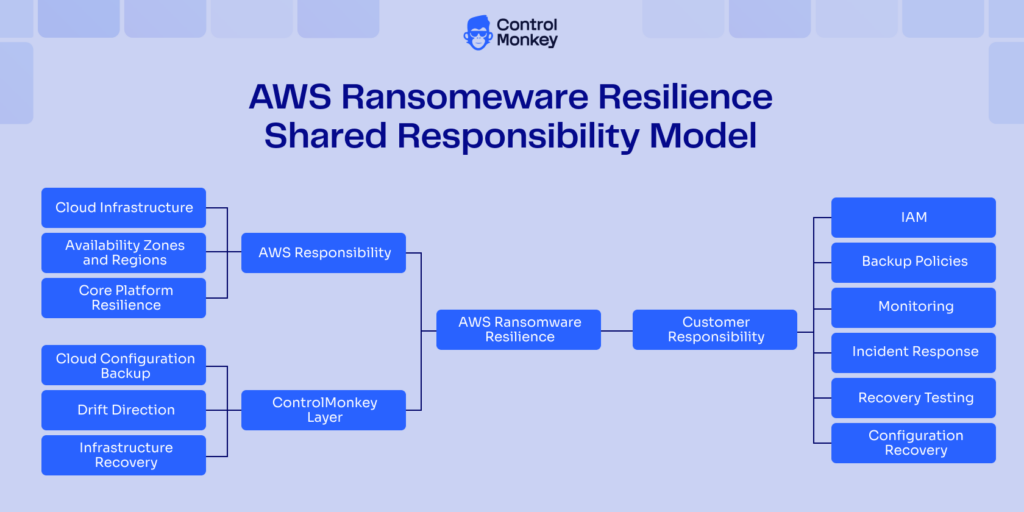
AWS secures the physical cloud infrastructure. They take full responsibility for any physical hardware attacks, as it is not accessible to anyone external. They also ensure that the virtualization layers are secure, that runs the higher-level services and virtual machines. Customers remain responsible for IAM, data protection, backup policies, monitoring, incident response, and recovery readiness.
The AWS Resilience Shared Responsibility Model makes this clear. Resiliency is shared between AWS and the customer, and disaster recovery sits inside that shared model. AWS provides resilient building blocks, but customers must design, operate, and validate recoverability for their workloads.
That distinction matters during ransomware recovery. AWS may keep the platform available, but your team still owns identity design, backup strategy, restore testing, and the configuration needed to bring applications back safely.
ControlMonkey extends this recovery responsibility into the configuration layer. It helps teams rebuild cloud environments, not just restore data into a broken shell.
AWS Ransomware Protection Best Practices
Effective AWS ransomware protection requires more than isolated security controls. It needs visibility, validation, clean backups, tested recovery paths, and configuration recovery across the full AWS environment.
AWS Backup, Amazon GuardDuty, AWS Security Hub, AWS Key Management Service, and AWS Identity and Access Management for ransomware protection and recovery readiness. ControlMonkey connects these capabilities to Cloud Disaster Recovery by backing up cloud configurations, detecting infrastructure drift, and helping teams recover IAM, networking, routing, and policy configurations after ransomware-related changes.
Harden IAM to Strengthen AWS Ransomware Protection and Reduce Blast Radius
IAM is one of the first places to mitigate the impact of ransomware. There are several rules of thumb that directly help to reduce the risk. Use least privilege, MFA, role separation, permission boundaries, and short-lived credentials wherever possible. Remove long-lived access keys when services can use IAM roles instead.
Another area that could get vulnerable is your DevOps environments. Therefore, review privileged access regularly, especially for automation users and CI/CD systems.
Amazon Web Services recommends reducing ransomware impact through AWS Identity and Access Management hardening, least-privilege access, and scoped permissions that limit what compromised identities can change during an attack. ControlMonkey extends this approach by detecting IAM-related configuration drift and helping teams restore known-good identity, access, and policy configurations during Cloud Disaster Recovery.
AWS Backup Ransomware Protection: Use Immutable, Layered, and Isolated Backups
Protecting backups against ransomware through AWS starts with isolated recovery points. With centralized backup policies, retention, restore workflows, and backup coverage, you can use AWS Backup across supported services. For stronger backup isolation, use layered backups, restricted access to backup vaults, and additional backup copies across accounts and regions.
AWS Backup Vault Lock adds another important layer. In Compliance mode, after the grace time ends, the vault configuration cannot be changed or deleted while it contains recovery points. AWS Backup also supports cross-account backup copies when accounts are configured through AWS Organizations, which helps separate recovery points from the account that may be compromised. This isolation improves ransomware resilience for recovery points.
When teams evaluate AWS backup ransomware protection features, they should look beyond “do we have backups?” A more mature question is whether attackers can delete them, change retention, access encryption keys, or block restore actions.
AWS KMS also matters here. AWS Backup vaults use AWS KMS keys for some backups, while other backups are encrypted by their source AWS services. Poor key access design can still turn a good backup plan into a failed restore.
The best aws-native backup ransomware protection gives teams clean recovery points and separation from the blast radius. But even then, backups do not restore IAM, DNS, routing, security groups, or cloud configuration. AWS backup ransomware protection is necessary. It alone is not sufficient for full business recovery.
AWS Backup can protect recovery points, but it cannot rebuild the environment around them. That is where ControlMonkey ties backup strategy to configuration recovery by helping teams restore IAM, DNS, routing, security groups, and cloud configuration.
AWS Ransomware Detection and Protection: Detect Threats Early and Contain Them Fast
AWS ransomware detection and protection depend on how quickly teams detect abnormal behavior and contain it.
Amazon GuardDuty helps identify suspicious activity across AWS accounts and workloads. With S3 Protection, GuardDuty can monitor S3 buckets and generate findings for suspicious access to data stored in those buckets. AWS Security Hub helps aggregate findings and perform automated security best practice checks across AWS resources.CloudTrail logs also matter because ransomware in AWS often uses API activity. A role change, backup deletion attempt, KMS key policy update, or logging change may show up before a service outage becomes obvious. Therefore, setting your environment for anomaly detection of cloud activities is crucial for ransomware threats. Therefore, overall detection will reduce the damage window if you can act on them on time.
GuardDuty and CloudTrail can help teams see suspicious activity, but they do not rebuild the environment. ControlMonkey adds the recovery view by comparing the live AWS environment against a known-good configuration state, so teams can see what changed.
Ransomware and AWS Recovery: Test Restores and Validate Clean Environments
An environment restore process that only proves data is being restored properly is not enough. Sometimes, data itself could have become vulnerable. Teams need to restore drills that validate data integrity, application behavior, IAM access, network connectivity, security controls, logging, and routing. They should measure actual RTO and RPO during these drills, not assume them from architecture diagrams.
A ransomware-ready restore should answer practical questions:
- Can users authenticate?
- Can the application reach its database?
- Can traffic reach the right endpoint?
- Do policies still enforce the right controls?
- Can the team prove the environment is clean enough to return to production?
Testing recovery should go beyond data restoration. Restore testing should not stop when data comes back. With ControlMonkey configuration snapshots, teams can also validate IAM, networking, routing, security groups, and policy behavior before returning systems to production.
AWS Ransomware Protection: The Missing Layer Is Configuration Recovery
Most ransomware guidance focuses on IAM, detection, backups, and encryption. Those controls matter. They reduce the chance of a large incident and improve the odds of a clean recovery.
But recovery often fails because the cloud configuration around the data is broken. Backups help, but they may not bring the whole environment back into a functional state.
This is where cloud configuration backup becomes important. Teams need a way to recover the infrastructure contract around their applications, including IAM, networking, routing, policies, DNS, security rules, and external configuration.
This is the layer ControlMonkey was built to support. It captures cloud configuration state, tracks infrastructure drift, and helps teams restore the infrastructure around the application, not only the data inside it.
Disruption is a given, the way you prepare is not
Protecting against ransomware matters. Therefore, no team should ignore IAM hardening, monitoring, backup isolation, or encryption. But eventually, a compromise can happen. For many organizations, the question is not only “if.” It is “when.”
- Will you be ready to recover?
- How long will it take to bring the business back online?
Preparation matters most after the environment changes. ControlMonkey gives teams captured configuration state they can use to rebuild from a known-good baseline instead of relying on memory or manual console work.
Why data backups alone are not enough
Data backups can restore files, databases, snapshots, and volumes. They do not automatically restore configuration state, including IAM roles, policies, VPC settings, route tables, DNS records, security groups, KMS access paths, or SaaS configurations. This creates frustrating partial recovery states.
A typical scenario is that even when the database restore is successful, users may still not be able to log in and use the system. There are many configuration gaps that could occur, similar to this. From the outside, recovery worked as expected. In practice, the service is still down. The lesson is simple. Data recovery does not equal business recovery.
Data-only recovery leaves a gap around IAM, networking, routing, DNS, security groups, and policies. ControlMonkey helps close that gap by restoring configuration state, so recovered data can become usable again.
Why is infrastructure configuration part of ransomware recovery
Real recovery requires the full AWS environment to return to a known-good state. Infrastructure configuration must be treated as a recovery asset. That includes IAM, networking, security controls, routing, and policy state. If those layers are missing, teams fall back to manual console work during the worst possible moment.
Recovery also needs dependency order:
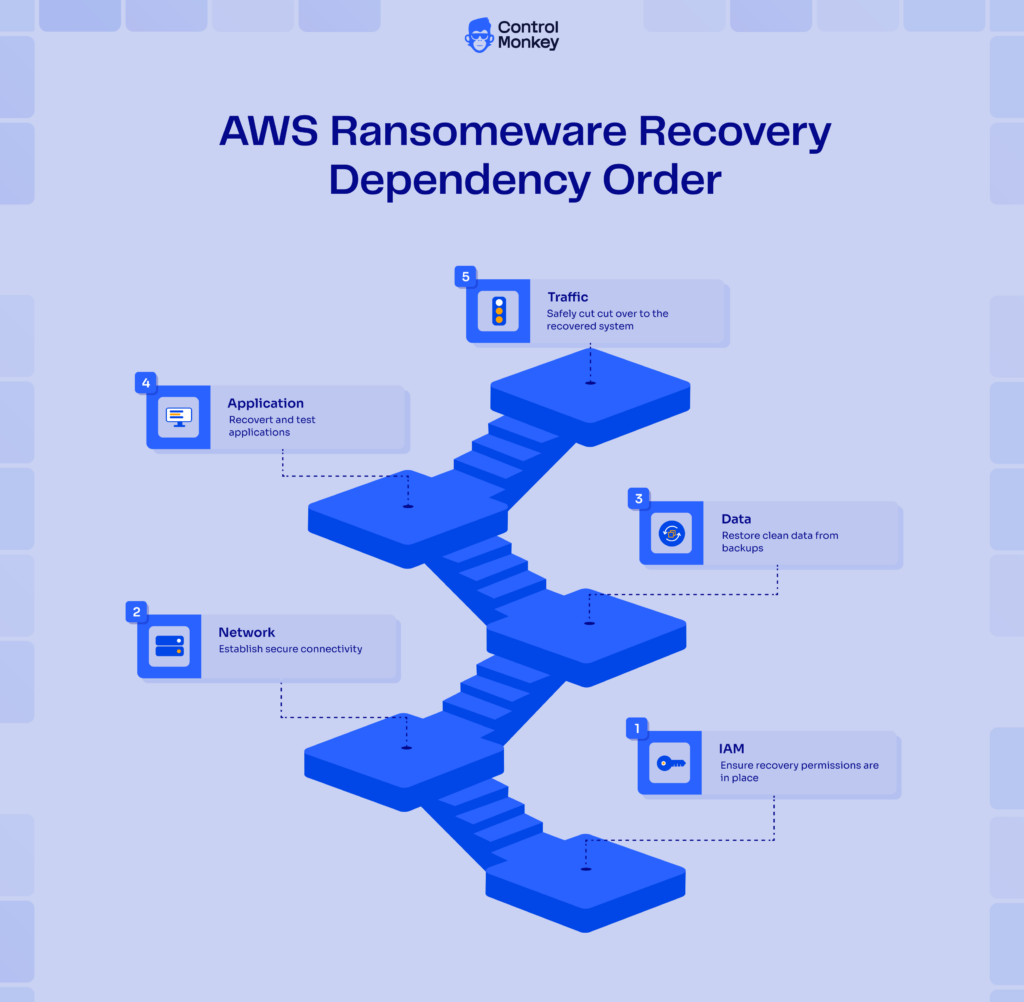
Order matters. If IAM is broken, recovery actions fail. If networking is broken, restored services cannot communicate. If the routing is wrong, users cannot reach the application. If policies are missing, the environment may recover in an unsafe state.
A ransomware-ready Cloud Disaster Recovery (DR) strategy on Amazon Web Services should go beyond backup coverage and include dependency validation, configuration recovery, and testing against Recovery Time Objective (RTO) and Recovery Point Objective (RPO) targets. ControlMonkey supports this process by maintaining cloud configuration state and helping teams recover AWS environments in the correct dependency order instead of rebuilding infrastructure manually during an incident.
AWS Ransomware Protection with ControlMonkey: Improve Recovery Resilience
ControlMonkey helps teams recover from ransomware-related disruption by securely capturing cloud configuration, detecting infrastructure drift, and directly enabling infrastructure recovery.
That distinction is important. AWS-native services help reduce risk, protect backups, detect suspicious activity, and encrypt sensitive data. ControlMonkey focuses on the configuration state recovery.
| Area | ControlMonkey | AWS-native ransomware controls |
|---|---|---|
| Focus | Recovery from disruption | Reducing risk and protecting data |
| Capabilities | Captures configuration, detects infrastructure drift, generates Terraform, and enables recovery | Protects backups, detects suspicious activity, encrypts data, and supports access controls |
| Recovery | Configuration recovery | Data recovery points |
| Modern recovery needs | Drift visibility, reproducible infrastructure, and configuration rollback | Needs a configuration recovery layer |
| Execution | Executable recovery path | Requires a tested DR process |
When teams discuss AWS ransomware protection capabilities 2026, the practical baseline has changed. Backup and detection are still required, but modern recovery also needs drift visibility, reproducible infrastructure, and configuration rollback. Those AWS ransomware protection capabilities only help when teams can execute them under stress.
How ControlMonkey supports AWS recovery outcome
ControlMonkey continuously tracks the changes that you make to your infrastructure as code. It keeps track of the resources provisioned with drift detection. Therefore, it allows teams to see the live environment configuration, not just how it was depicted in documentation or how it was designed in the IaC (infrastructure as code) repository.
This is because ransomware attacks create drift. A policy change. A route table changes. A backup setting change. A security group opens or closes a port, preventing access. ControlMonkey supports comparing the environment state to the desired state.
The tool helps to roll back to known-good versions and assists with putting infrastructure in place in the right order. The trick is to make recovery scriptable. Rather than relying on human memory during an incident. This eliminates the need to do manual work in the AWS Cloud Console and helps prevent building an insecure environment.
How ControlMonkey fits into your ransomware program
n dependencies can still delay recovery. That is where ControlMonkey fits more naturally, by helping teams recover known-good infrastructure state, improve drift visibility, and build audit-ready recovery processes into the same workflow.
ControlMonkey fits into a broader AWS ransomware recovery program across three stages. Before an incident, it supports visibility, governance, cloud configuration backup, drift detection, and recovery readiness. This helps teams see what exists and where configuration gaps may slow recovery.
During an incident, it helps teams address configuration changes, rollback, and find an order of restoration for dependencies, build infrastructure, and do less manual recovery. It is not an incident response. It gives responders a clearer way to recover.After an incident, it helps auditability and compliance evidence, and better RTO and RPO measurement and recovery control post-incident. Recovery of emerging operational challenges is not just a plan in a document for leaders; they need to recover, not just process, and recovery works. This is where the recovery of configuration is post-incident operational challenges maturity. Not just teams are restoring workloads, but also preserving the restoration of usable workloads for recovery.

A 30-min meeting will save your team 1000s of hours
A 30-min meeting will save your team 1000s of hours
Author