TL;DR
- Azure disaster recovery is more than keeping workloads alive.
- Workload recovery is a component, but complete recovery plans should encompass the restoration of applications, data, identities, networks, and infrastructure configurations within acceptable Recovery Time Objective (RTO) and RPO targets.
- There are several building blocks Azure offers, especially for recovery plans, including physical-to-logical-to-SaaS solutions such asRegions, Availability Zones, Storage Redundancy, Azure Site Recovery, and Azure Backup.
- However, only backup and failover won’t cut it.
- Teams need to accurately restore governance controls, network pathways, access models, and configurations.
How Does Azure Handle Disaster Recovery?
Disaster recovery is not just about backup or restore. When a problem occurs, a business has to think beyond recovering data, looking at how to restore networks that route, identities that authenticate, permissions that allow them to modify what they want, and infrastructure that mirrors what the operational state of the business was before the disaster.
An effective Azure disaster recovery plan has to include what operational continuity means, cost of downtime and the shared responsibility between Azure and its customers. Microsoft is responsible for keeping the Azure platform itself resilient. You, as the customer or client, are responsible for designing, protecting, and restoring your workloads and configurations. Microsoft’s reliability guidance is very clear on this.
In addition to this, we need to also look at two important matrices: Recovery time objective (RTO) and Recovery point objective (RPO). This helps to objectively analyze how effective your DR solution is. RTO is about how fast you can recover while RPO is about up to which point of time we can recover the data before the disaster. Though we try to maximize these values, it’s not always financially viable. We need to consider the effort, running costs of the DR solution, to determine what we can accept for a certain budget and complexity. That’s where there are different patterns to implement DR from backup and restore to multi-region failover.
Suppose you are building an airline reservation system. Every second of your system running affects its revenue. And, we have to keep the downtime to a minimum even amidst a disaster. That’s why these critical systems use active failover mechanisms with multi-region replication in Azure. On the other hand, a reporting system may not have the same uptime requirements. If it’s having downtime, we can wait and check the reports later on. So for these systems, the DR strategy can be simple and focus more on data backup and restore.
In both cases, it’s essential that systems running in Azure cloud need to restore its infrastructure configurations prior to restoring data.ControlMonkey is the solution to that. ControlMonkey captures, which is the configuration layer of Azure’s disaster recovery. ControlMonkey does this by continuously tracking cloud resources, automatically generating Azure Terraform code performing drift detection, and rolling back to a stable state.

Infrastructure Recovery Slowing Down Your RTO?
ControlMonkey captures your cloud configuration and lets you restore infrastructure automatically when you need it most.
Azure Disaster Recovery Architecture – Redundancy as Strategic Risk Management
The first steps in creating a solid Azure disaster recovery architecture is to find building blocks Azure natively provides such as Regions, Availability Zones, storage redundancy, and cross-region recovery capabilities.
Azure has built its infrastructure topology starting from physical infrastructure to logical building blocks. In an Availability Zone, we can find datacenters, each with its own power, cooling, and networking. When one zone goes down, the other zones can operate independently. This is to reduce the likelihood of a disaster impacting both Availability Zones.
A Region consists of multiple Availability Zones, where workloads can still operate even if a few Availability Zones are impacted.
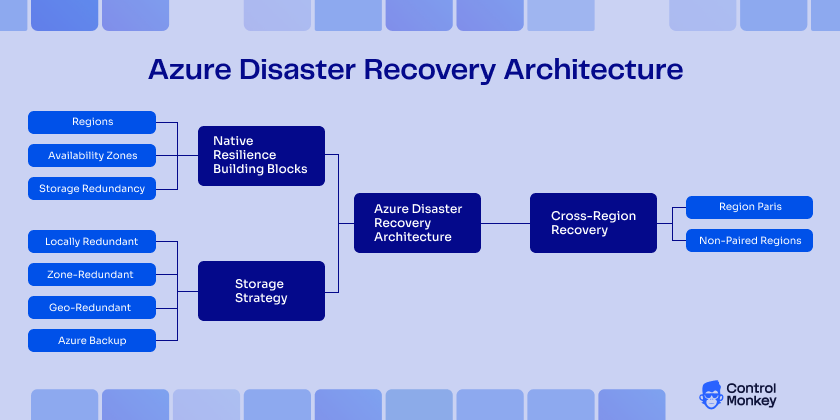
For systems that need high availability, we can design cross-region architecture for added resiliency. Depending on your design goals, some Azure services will use paired regions for geo-replication and geo-redundancy, while others will work without it. Zonal design anticipates and addresses local failures, while cross-region design is essential for larger regional disruptions.
Strategy for storage needs equal consideration. The Azure cloud storage service offers local, zone, and geo-redundant replication. Azure Backup provides retention policies, recovery points, and restore workflows. However, durable data copies don’t guarantee workload can be restored to a working, governed environment.
Existing Azure disaster recovery solutions
Azure has a set of built-in services for protecting workloads and data. Out of these, below services are used widely in many DR implementations.
What is Azure Site Recovery
Azure Site Recovery is a managed disaster recovery service that replicates workloads and orchestrates the failover and failback mechanism, making it a key Azure disaster recovery service. It supports the replication of Azure VMs, on-premises to Azure recovery, has recovery plans, and can do test failovers. It is well-suited for warm or hot recovery patterns where speed is important and the replication burden is acceptable. That said, replication covers the workload itself but not the surrounding cloud configuration. Things like IAM policies, network setups, and routing rules don’t get captured by replication alone. This is where ControlMonkey steps in, picking up the configuration layer that Site Recovery leaves behind, so the recovered environment is actually complete and not just partially functional.
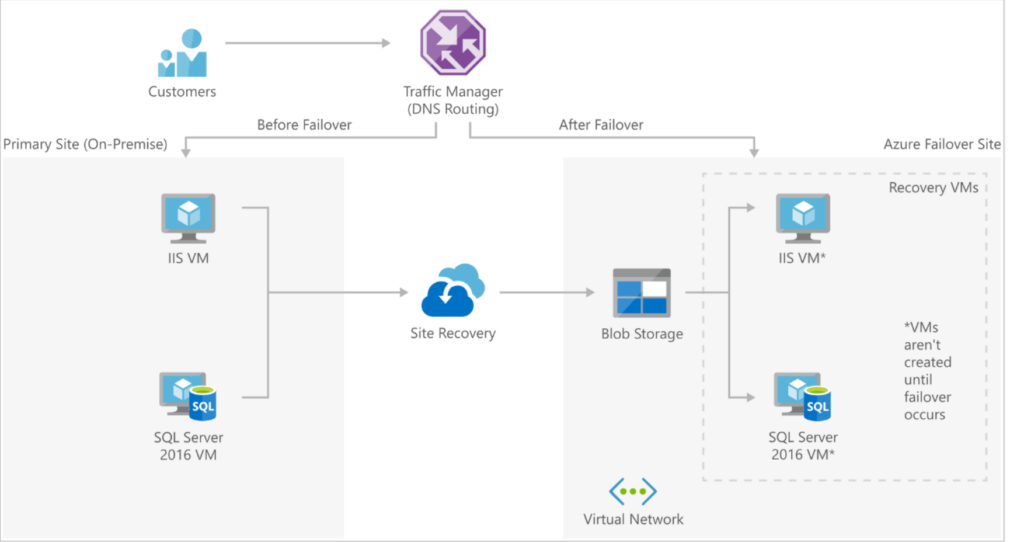
What is Azure Backup?
Azure Backup, is a cloud-based backup and recovery service that offers protection and recovery for data in supported Azure workloads. It offers backup policies, retention, recovery points, and restores from point-in-time snapshots. This service is valuable to avoid data loss and corruption, ransomware attacks, and cold restore scenarios. Backups protect data, but the infrastructure configuration that surrounds it, IAM policies, network paths, routing rules, and SaaS integrations, none of that gets included in a backup snapshot. ControlMonkey fills that gap by capturing and versioning cloud infrastructure state, so when a restore happens, the full environment can be reconstructed alongside the data, cutting downtime and strengthening business continuity.
Extend Configuration DR with ControlMonkey
As an Azure DR solution for configuration, ControlMonkey extends Azure disaster recovery into the configuration layer. It keeps track of cloud resource state helping to restore infrastructure configuration, including network, security, and identity settings.
| ControlMonkey | Traditional Azure DR | |
|---|---|---|
| Primary focus | Configuration and environment recovery | Workload and data recovery |
| Resource discovery | Continuous discovery of Azure resources | Often manual or partial |
| IaC representation | Real environment converted into Terraform | Repository-based, may be outdated |
| Rollback | Snapshot-based rollback | Often, manual restoration steps |
| Drift visibility | Yes, across subscriptions | Limited or none |
| Recovery outcome | Complete, governed, reproducible environment | Workloads may recover, but environment rebuild can remain manual |
ControlMonkey serves as the infrastructure recovery control plane in Azure disaster recovery. It continuously discovers Azure resources, ensuring teams have visibility into the anatomy real environment as it exists at any given time. By automatically generating Terraform code from that environment, it creates a reproducible infrastructure that can be restored more reliably during a disruption.
It also adds snapshot-based rollback, giving teams a way to return quickly to a known reliable state after misconfigurations or failed changes. With drift detection across subscriptions, ControlMonkey helps surface configuration changes that might otherwise go unnoticed until recovery is already underway.
This changes the meaning of failover where it’s not only about redirecting traffic or bringing workloads back online. It is about restoring a complete environment that is reproducible, governed, and operational.
Disaster Recovery Scenarios in Azure
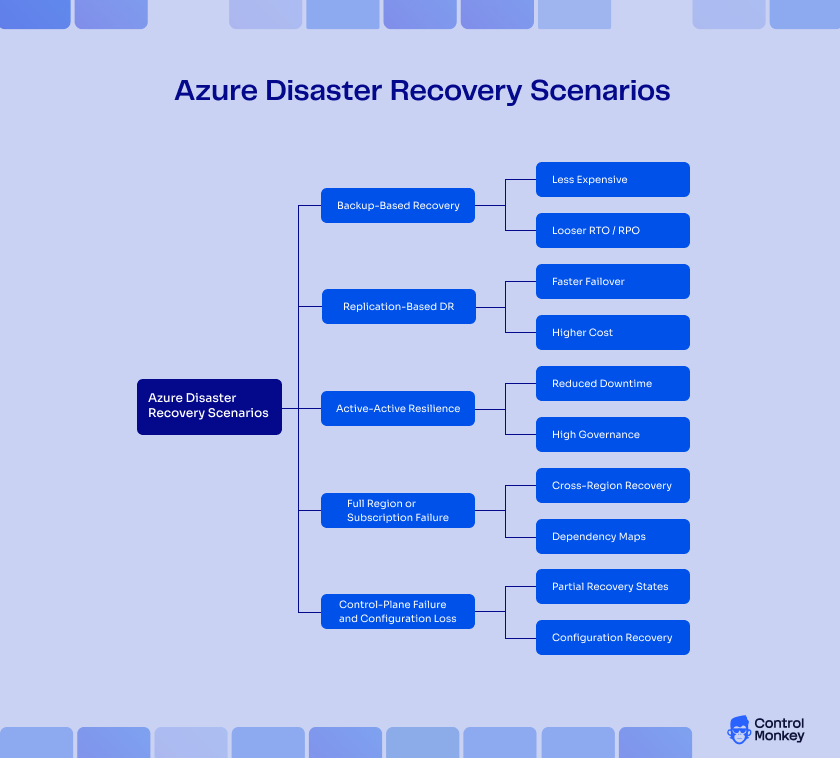
Each workload requires a unique approach to recovery. Azure disaster recovery solutions address different levels of DR requirements unique to your business needs.
Backup-Based Recovery
This is typically considered as a cold restore mechanism in an Azure backup disaster recovery strategy. Following a DR incident, data needs to be pulled from a backup. Infrastructure configuration may require fixing or redeployment. This is the most cost-effective option and also the slowest to recover.
Works for workloads where the business is willing to tolerate lower RTO and RPO targets such as internal tools, development environments, archival systems.
Replication-Based DR
With warm or hot standby, workloads are replicated to another Azure region or recovery target, so failovers can occur faster. This tightens both RTO and RPO, but there are higher costs, operational complexity, and testing requirements that you may not have a choice but to skip. Azure Site Recovery is a popular choice for this model.
Active-Active Resilience
In this kind of a setup, workloads operate across several active environments concurrently helping to achieve near-zero downtime. This kind of a DR setup is crucial for mission critical systems where even one short outage is intensely damaging.
Full Region or Subscription Failure
Some failures are bigger than a single resource problem. An Azure Region issue or a subscription-level access problem can disrupt many services at once, which is why local redundancy is not enough. Highly mission critical systems need cross-region recovery paths, dependency maps, and a repeatable way to restore infrastructure and permissions in the recovery location.
Control-Plane Failure and Configuration Loss
Not every disaster impacts the data plane. Sometimes data may be intact, but the surrounding environment gets destroyed. For example:
- A resource group can be deleted.
- A policy may be instituted that blocks deployments.
- Route tables can be set incorrectly.
- Role assignments can disappear without a trace.
These failures can be more difficult to manage than ordinary outages because they create frustrating states of partial recovery. On the surface, everything appears to be completely accessible and available, but as soon as users attempt to do something substantive, they will find that nothing is functional. This is precisely why any comprehensive Azure DR strategy must include configuration recovery.
Compliance, Audit, and Regulatory Pressure
Disaster recovery (DR) planning is not simply an operations exercise. For teams that are regulated, it becomes a matter of compliance. Documented procedures for recovery, evidence of backup coverage, tested restore records, audit logs of changes, and recovery actions are all required. These are the bare minimum to pass.
Leaders need evidence that recovery works, not a stagnant plan in a wiki. This evidence deteriorates when the state of the infrastructure is not recorded, and the environments are manually rebuilt.
The harsh truth is that the recovery and audit readiness conversations are becoming one. Governance is as important as the data when auditors arrive in cloud settings. If you cannot provide evidence of recoverability, it is a compliance issue in addition to recovery.
Hybrid Dependencies and Identity Risk
Many Azure recovery failures originate from outside the core application stack entirely. Identity services, certificates, Key Vault access, private networking, VPN connectivity, ExpressRoute, on-premises integrations, third-party dependencies. These edges break during outages and are the edges that most DR plans omit.
Teams that plan disaster recovery around compute and storage while considering identity and networking as an afterthought learn this lesson the hard way. An application restores but cannot authenticate. It boots but cannot reach a downstream service. It passes health checks but cannot securely connect back to on-prem.
That is why disaster recovery in Azure needs to treat identity and dependency mapping as a fundamental building block, and not just an appendix to workload replication.
Azure Disaster Recovery Architecture With ControlMonkey Embedded
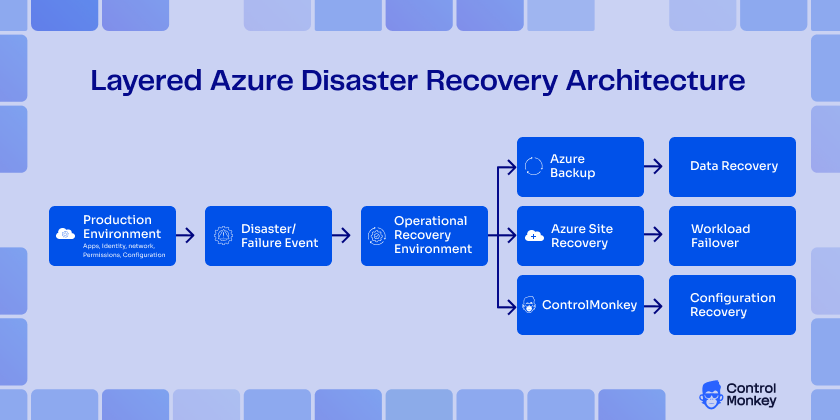
At enterprise scale, the strongest Azure disaster recovery architecture is layered. Azure Site Recovery handles replication and orchestrated failover. Azure Backup protects recovery points and historical restore paths. Regions, availability zones, and storage redundancy improve resilience. Identity and network dependency mapping reduce hidden operational risk. ControlMonkey then adds the missing layer for configuration backup, drift visibility, rollback, and reproducible environment recovery.
That mature-state architecture reflects how cloud recovery actually works. Workloads must recover, data must recover, and the environment around them must recover, too. Therefore, governance cannot disappear during failover, and infrastructure state cannot depend on memory or scattered documentation. Azure-native DR services and ControlMonkey together create the most robust model for Disaster Recovery in Azure.

A 30-min meeting will save your team 1000s of hours
A 30-min meeting will save your team 1000s of hours
Author