Have you been looking for the best cloud backup solutions to protect your critical data, cloud and infrastructure, minimize the risk of loss, and ensure long-term resilience and compliance?
In this article, I’ll explore the top cloud backup solutions that can help you securely store data, automate backups, enable fast recovery, and maintain reliable operations in the face of cyber threats or unexpected disruptions.
TL;DR
- The best cloud backup solution on the market is ControlMonkey, which provides infrastructure backup and covers network, IAM, DNS, and SaaS configuration, not just data.
- Although tools like Backblaze, iDrive, CrashPlan, Carbonite, and Acronis are great for backing up files, VMs, and application data, they do not support capturing versions of cloud configurations like IAM, network settings, or DNS.
- Commvault, Druva, and Veeam are examples of vendors that offer immutable backups, air-gapped storage, cross-account restores, and cleanroom
- Wasabi provides fast object storage that is immutable, low in cost, and predictable in pricing, although its orchestration, recovery logic, and environment reconstruction depend on using different tools.
Why should you have a cloud backup solution?
Cloud backup solutions are critical because infrastructure configurations, including networks, IAM policies, DNS settings, and security rules, change constantly and can be lost due to misconfigurations, human error, or cyber attacks.
Without proper backup, recovering from these incidents will require your team to spend hours of manual work, which can result in costly downtime.
Let alone the potential SLA violations.
Beware that a traditional data backup solution wouldn’t address infrastructure configuration loss, which might leave your critical cloud resources vulnerable.
An infrastructure disaster recovery solution would ensure continuity of operations with instant restoration of your entire cloud environment to a known-good state.
What factors should you consider when evaluating cloud backup providers?
#1: Recovery capability (RPO and RTO)
Recovery Point Objective (RPO) and Recovery Time Objective (RTO) determine how much data you can afford to lose and how quickly you can restore operations after an incident.
A good cloud backup solution should offer daily or continuous snapshots of your infrastructure configurations to help you minimize potential data loss between backup intervals.
The ability to restore entire environments with one-click rollback, rather than manual scripting and intervention, can directly impact your RTO and ensure you meet critical SLA compliance targets.
#2: Breadth of supported services (cloud providers and 3rd party providers)
Your backup solution must cover all the platforms where your infrastructure lives, including multi-cloud environments like AWS, Azure, and GCP, as well as critical third-party services.
To be fair, some SaaS providers offer limited native backup or retention. However, it’s often time-limited, not controlled by you, and not really designed for full environment reconstruction.
We’ve seen that many organizations rely on SaaS configurations from providers like Datadog, Cloudflare, F5, and Okta for identity, networking, and security, but all of them require backup protection.
A comprehensive solution should provide end-to-end coverage across different vendors to make sure that no blind spots exist in your disaster recovery strategy.
#3: Pricing and total cost of ownership
Finally, consider not just the subscription price but also the total impact of downtime, manual recovery efforts, and potential SLA penalties.
Solutions that automate daily backups and enable instant recovery reduce the hidden costs associated with DevOps teams spending hours on manual fixes.
Look for pricing models that scale with your cloud configuration count so that you can pay only for what you need while maintaining complete infrastructure resilience.
What are the 10 best cloud backup solutions in 2026?
The best cloud backup services and solutions in 2026 are ControlMonkey, Backblaze, and IDrive.
Here’s a breakdown of the disaster recovery backup solutions we shortlisted:
| Tool | Features | Pricing |
|---|---|---|
| #1: ControlMonkey | Automated daily infrastructure snapshots across AWS, Azure, GCP and SaaS vendors, one-click rollback for full environments and individual resources, and version-controlled infrastructure as code stored in Git. | Custom pricing. |
| #2: Backblaze | Unlimited automatic file backups for Mac and Windows devices, enterprise management with SSO support, and flexible restore options including web and mailed drives. | Starts from $99 per year per computer. |
| #3: IDrive | Centralized backup for multiple computers, servers, and mobile devices, zero downtime backup for SQL, Exchange, VMware and Oracle servers, and physical data transfer with IDrive Express. | Starts from $69.65 per year. |
| #4: CrashPlan | Continuous file backup every 15 minutes, endpoint server and SaaS backups for Microsoft 365 and Google Workspace, and role-based access controls for restores. | Custom pricing. |
| #5: Commvault | Enterprise data protection across cloud on premise and hybrid environments, ransomware defense with immutable storage, and isolated cleanroom recovery testing. | Custom pricing. |
| #6: Carbonite | Always-on encrypted file and image backups, instant cloud-based file recovery, and ransomware recovery assistance with guided restores. | Starts from $24 per month. |
| #7: Druva | Cloud-native backup for AWS and Azure workloads, global deduplication and compression to reduce storage costs, and cross-account recovery for compromised environments. | The median cost has been reported to be $41,634 per year. |
| #8: Veeam Cloud Backup | Automated cloud native backup for AWS, Azure, and Google Cloud, immutable and air gapped ransomware protection, and multiple recovery options, including VM and file-level restores. | Custom pricing. |
| #9: Wasabi | High-performance object storage for backups, built-in immutability with Object Lock, and zero egress and API fees for predictable pricing. | Starts from $6.99 per TB per month. |
| #10: Acronis Cyber Protect | Unified platform for backup, disaster recovery and endpoint security, full image and file-level backups across cloud and on-premise, and immutable backups for ransomware protection. | Starts from $85 per year. |
Cloud Backup Solution #1: ControlMonkey
ControlMonkey offers the best cloud backup solution on the market with its automated daily infrastructure snapshots, DR readiness, and one-click rollback capability.
Our platform is not a classic data backup service like Backblaze or IDrive.
Instead, ControlMonkey is a cloud infrastructure disaster recovery and governance solution focused on cloud configurations (e.g., networks, IAM, DNS, policies, etc.), instead of raw file or database data backups.

What Happens If Your Cloud Configuration Disappears Tomorrow?
ControlMonkey protects the layer most backup tools ignore – your infrastructure – so you can recover entire environments, not just files.
Unlike standard backup vendors that store your backed-up files in a cloud object store (e.g., AWS S3, Backblaze B2, Wasabi), ControlMonkey stores and version-controls cloud configurations as IaC code and maintains snapshots of those configs.
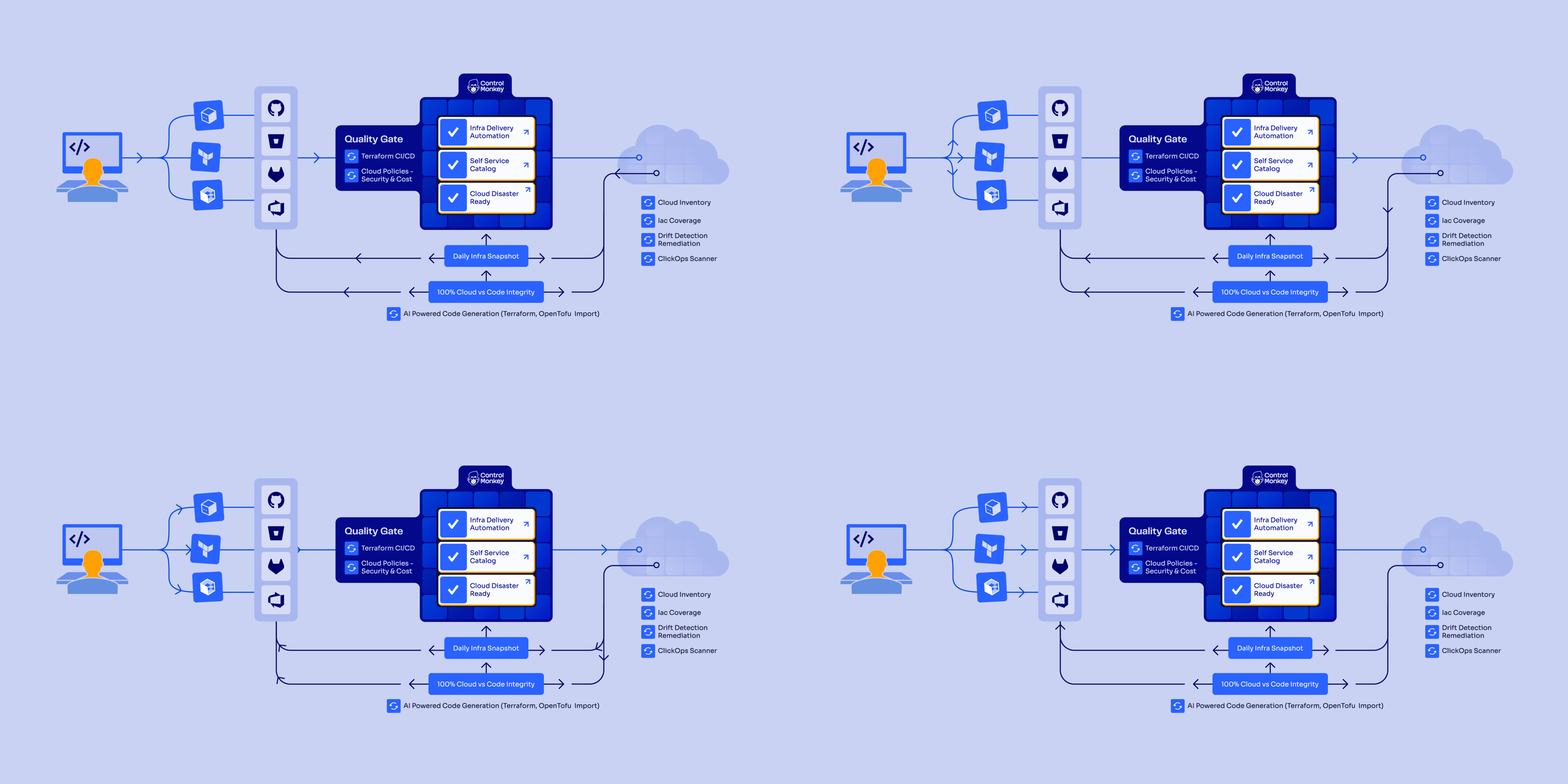
Let’s go over ControlMonkey’s cloud resilience and disaster recovery capabilities to show you why enterprises like Intel, AWS and Comcast can’t imagine their cloud without ControlMonkey:
Automated Daily Backups
The problem is that most DevOps teams discover their backup gaps during outages, not before them.
Manual backup processes leave critical infrastructure configurations unprotected, and when an IAM policy gets accidentally deleted or a network misconfiguration breaks production, traditional tools only restore your data while leaving you to manually rebuild everything else.
ControlMonkey backs up your entire cloud environment (including networks, IAM, DNS, policies, configs) and restores it to a known-good state with a single click.
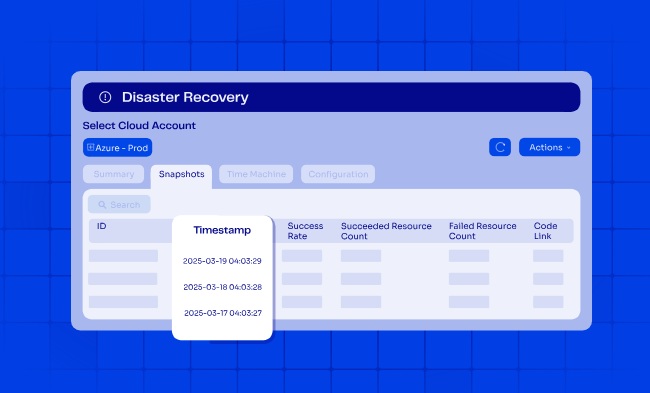
Our platform does this via daily Terraform-based snapshots and one-click rollback, which covers AWS, Azure, GCP and more.
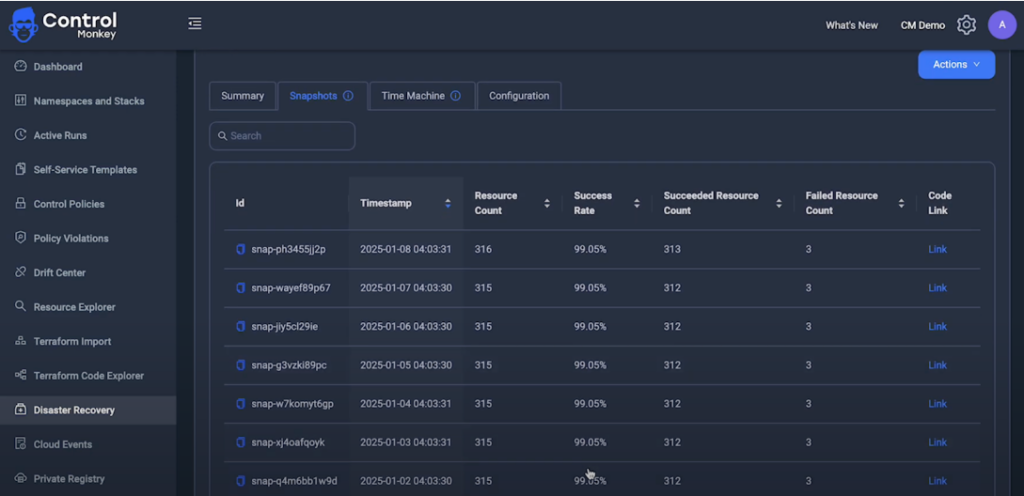
Continuously, ControlMonkey captures exact infrastructure configuration across all of your cloud accounts and regions to convert configuration into deployable infrastructure definitions that can be restored instantly, and commits each snapshot as a versioned record in your Git repository for complete audit trails.
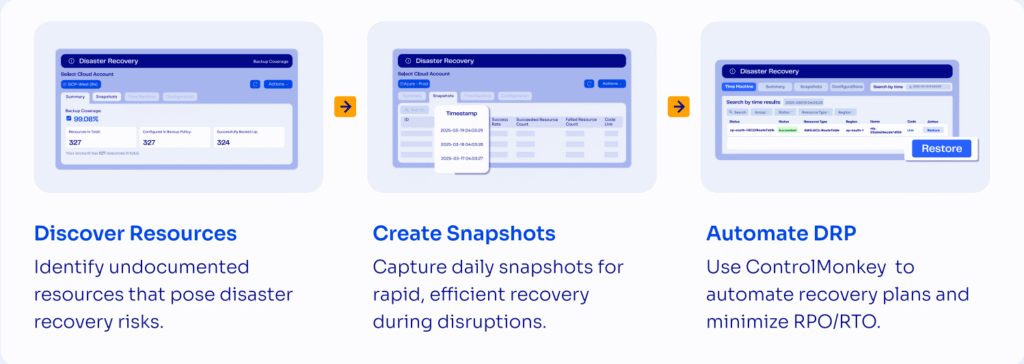
Snapshots are stored securely in your Git repository, with backup frequency ranging from 30 minutes to half a day, depending on the size of your cloud environment.
Time Machine: Cloud Disaster Recovery
From our experience, when incidents or cyber attacks occur, speed determines whether you face minutes of disruption or days of downtime.
Infrastructure teams waste hours in firefighting mode trying to figure out what changed, when it changed, and what the working configuration looked like before everything broke.
ControlMonkey’s Time Machine capability lets you track back to any IAM policy or DNS configuration from previous days.
That configuration already resides in your version control system, written in Terraform and ready to deploy. Put simply: click the restore button, and you’re back in business.
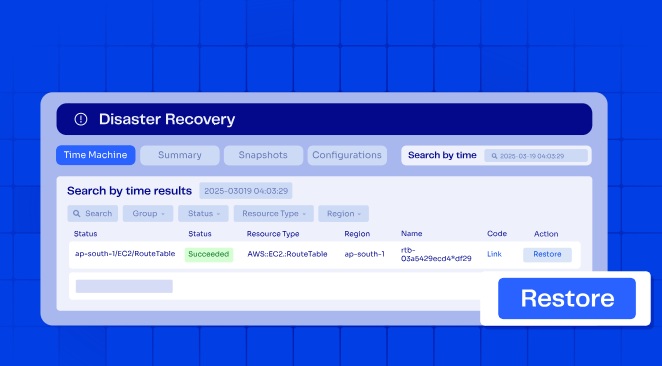
Your team can restore individual resources or full environments using any previous known-good state.
Recovery can be manual or automated, depending on severity: critical incidents trigger automatic rollbacks while routine fixes can be reviewed before deployment.
Dependencies and ordering are handled automatically to reduce human error and prevent cascading failures during restoration.
Complete Visibility Into DR Readiness With No Manual Effort
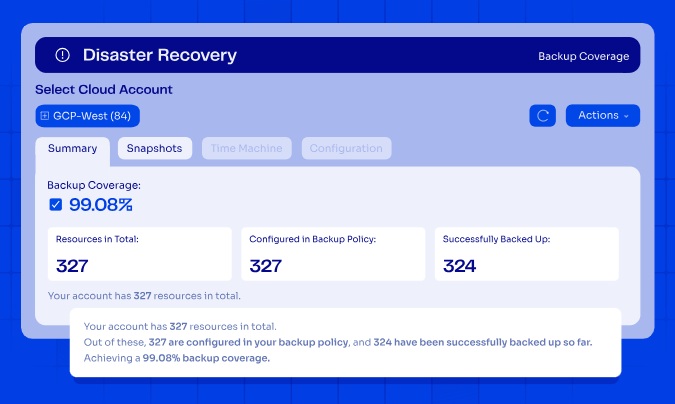
ControlMonkey connects using read-only access and native cloud APIs to discover every asset across your infrastructure footprint.
With zero manual effort, your team will be able to see what’s covered by IaC, what isn’t, and what’s ready for the next disaster.
Our platform provides real-time visibility into:
- Cloud resources across AWS, Azure, and GCP with account and region coverage.
- SaaS and third-party configurations, including identity, networking, and security platforms.
- Resources managed and unmanaged by IaC, so your team can identify coverage gaps before disasters strike.
Multi-Cloud Infrastructure Support
Your infrastructure extends far beyond cloud resources.
Routing rules, identity permissions, networking policies, SaaS configurations, and cloud resources change constantly, and many of these changes happen outside IaC.
Traditional DR plans ignore this problem: configuration drift in third-party platforms creates blind spots that leave your organization vulnerable.
ControlMonkey supports infrastructure disaster recovery across AWS, Azure, GCP, and 30+ third-party vendors, including DataDog, Cloudflare, Okta, and F5.
Our platform ensures consistent rollback strategies regardless of the vendor.
While other solutions back up your cloud data, ControlMonkey protects configuration across all these platforms.
When a critical Datadog monitor gets misconfigured or a Cloudflare routing rule is accidentally deleted, ControlMonkey can restore these configurations instantly.
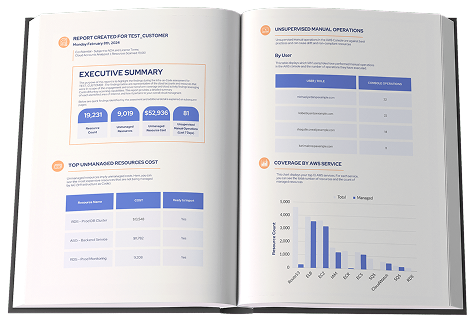
You can identify gaps in your recoverability from accidental resource deletion or cloud outages with our Free Cloud Resilience Assessment Report.
ControlMonkey vs. Traditional Cloud Backup
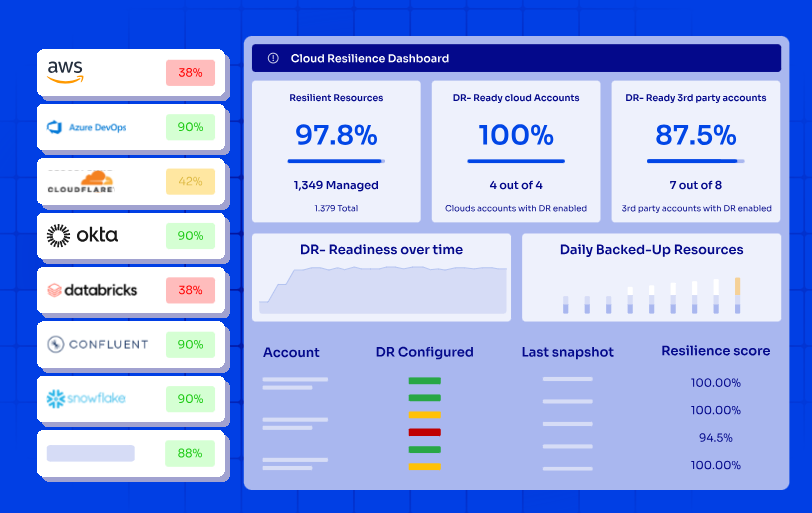
The main difference between ControlMonkey and traditional cloud backup solutions is that traditional tools focus exclusively on protecting files and databases (leaving your infrastructure configurations exposed), while ControlMonkey treats infrastructure configurations as code.
With ControlMonkey, every network rule, IAM policy, DNS setting, and SaaS configuration is captured, versioned, and stored as deployable Terraform code in your Git repository.
This means you can restore not just your data, but the entire environment that runs your applications.
When your load balancer settings are accidentally changed or your VPC configuration breaks, standard backup tools will offer zero help because they never captured that infrastructure state in the first place.
This difference becomes critical during real incidents when every minute of downtime costs your business money and damages your reputation.
Our platform also continuously validates DR readiness for automated compliance with SOC 2, ISO 27001, PCI DSS, and other frameworks.
Pricing
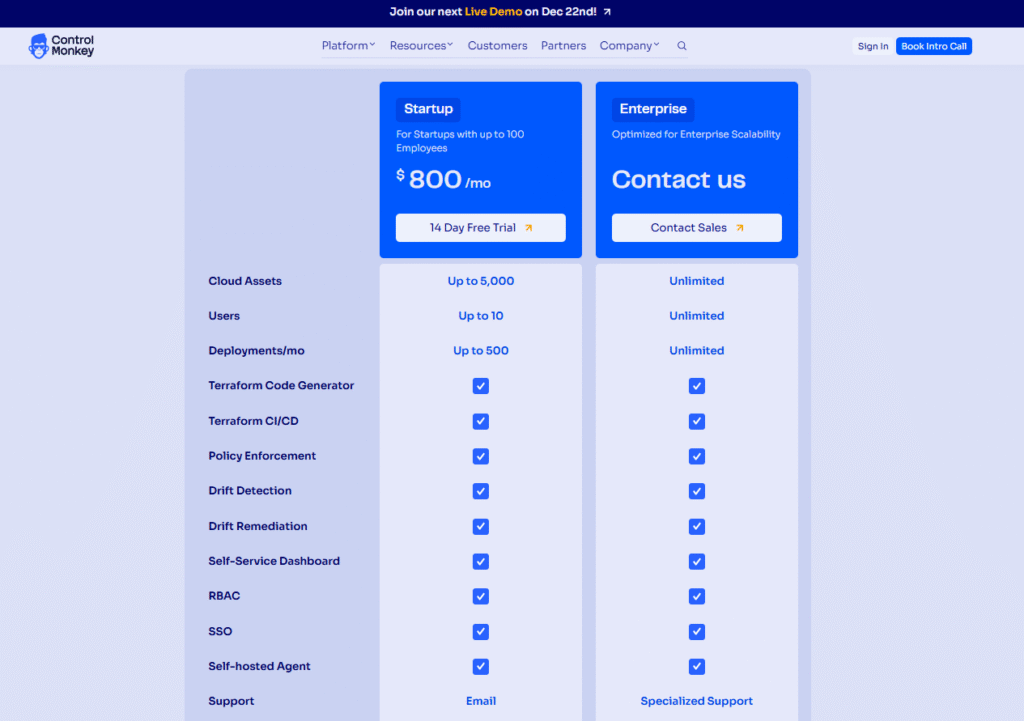
ControlMonkey offers only 2 pricing plans:
- Startup: $800 for up to 10 users, up to 5,000 cloud assets, up to 500 deployments/month, and access to our Terraform code generator, Terraform CI/CD, policy enforcement, drift detection and remediation capabilities, self-service dashboard, RBAC, and self-hosted agent.
- Enterprise: Custom pricing for unlimited cloud assets, users, and deployments, and adds specialized support.
Pros & Cons
✅ Automated snapshots back up cloud configurations across AWS, Azure, and GCP.
✅ Backs up SaaS configurations from Datadog, Cloudflare, F5, Okta, and 30+ platforms.
✅ Real-time dashboards provide complete visibility into DR readiness and IaC coverage.
✅ One-click recovery and daily snapshots reduce RTO and RPO.
✅ Continuous compliance validation for SOC 2, ISO 27001, and PCI DSS keeps you audit-ready.
✅ VIP support available 24/7 through Microsoft Teams, Slack, email, and ticketing.
❌ Focuses on infrastructure configurations rather than data backup for files or databases
Cloud Backup Solution #2: Backblaze
Backblaze is a cloud backup option for businesses looking to protect workstation data with unlimited storage at a fixed price of $99 per year per computer.
The solution focuses on automated file and database backup through continuous monitoring of user data across Mac and Windows devices.
Backblaze Features
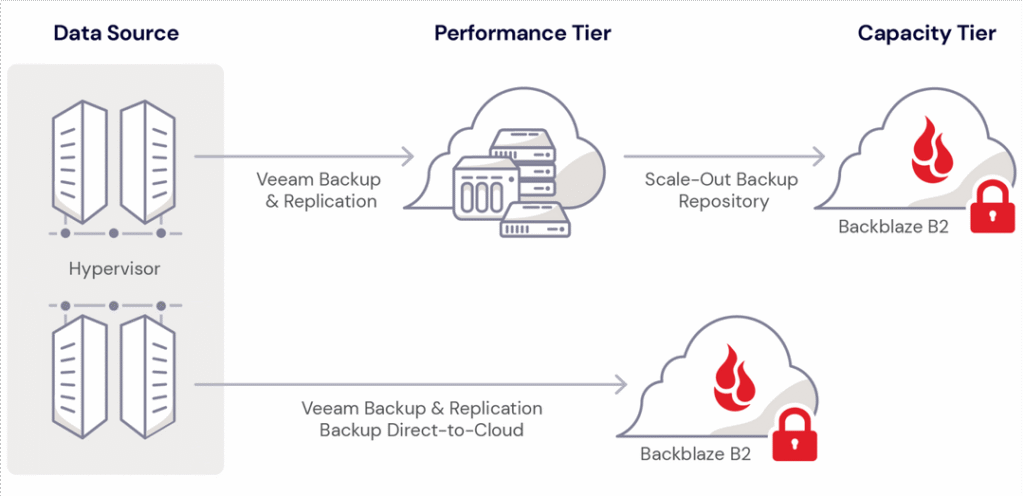
- Unlimited and automatic backup: Lightweight Mac and PC clients back up all user data to secure cloud storage by default, without any required actions or slowdowns for team members.
- Enterprise management with SSO: Advanced administration with OIDC SSO support for Okta and Azure AD, plus legal hold capabilities available through the Enterprise Control add-on.
- Flexible restore options: You’ll be able to restore files to any device with no size limits through web-based restores, a dedicated restore app, or mailed hard drive restores.
- You’ll also be able to protect Veeam backups with its immutable, virtually air-gapped B2 Cloud Storage.
Backblaze Pricing
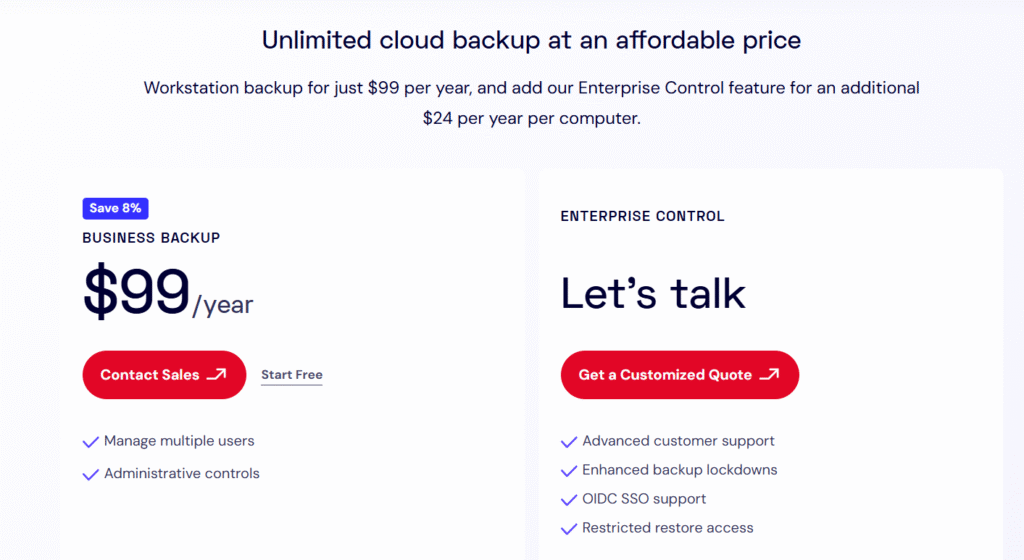
Backblaze Business Backup costs $99 per year per computer.
You can also add its Enterprise Control features that add OIDC SSO support, enhanced backup lockdowns, and restricted restore access for $24 per year per computer.
Backblaze Pros & Cons
✅ Unlimited backup at a predictable $99 per year per computer with no restrictions on file size or type.
✅ Automated continuous backup runs.
✅ Forever file version retention.
❌ Focuses exclusively on data backup for files and databases, leaving infrastructure configurations unprotected during cloud outages or misconfigurations.
❌ Lacks visibility into what percentage of your overall infrastructure is actually protected and ready for disaster recovery.
Cloud Backup Solution #3: IDrive
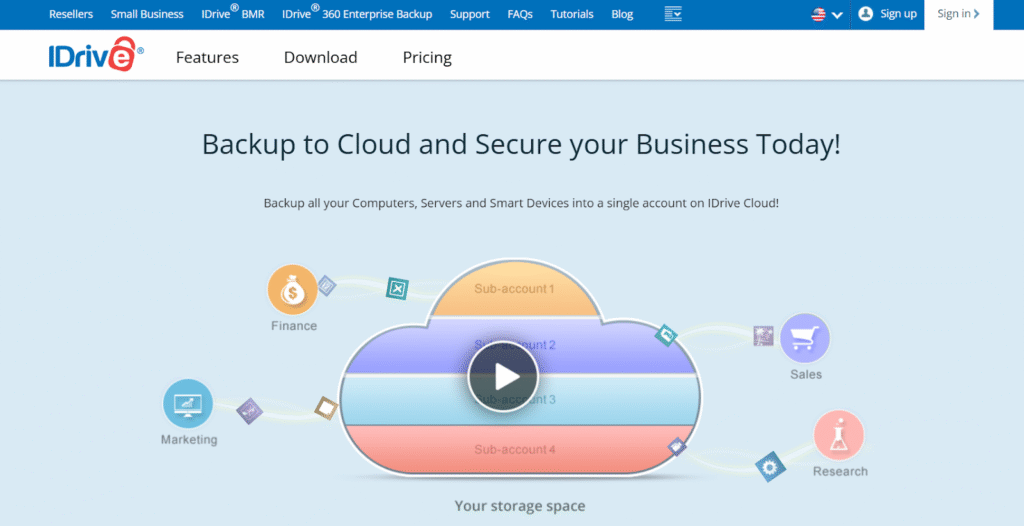
IDrive is a viable cloud backup option for businesses that need to consolidate backups from multiple devices into a single account.
The solution focuses on automated file and database backup across computers, servers, and mobile devices with encryption and compliance features.
IDrive Features
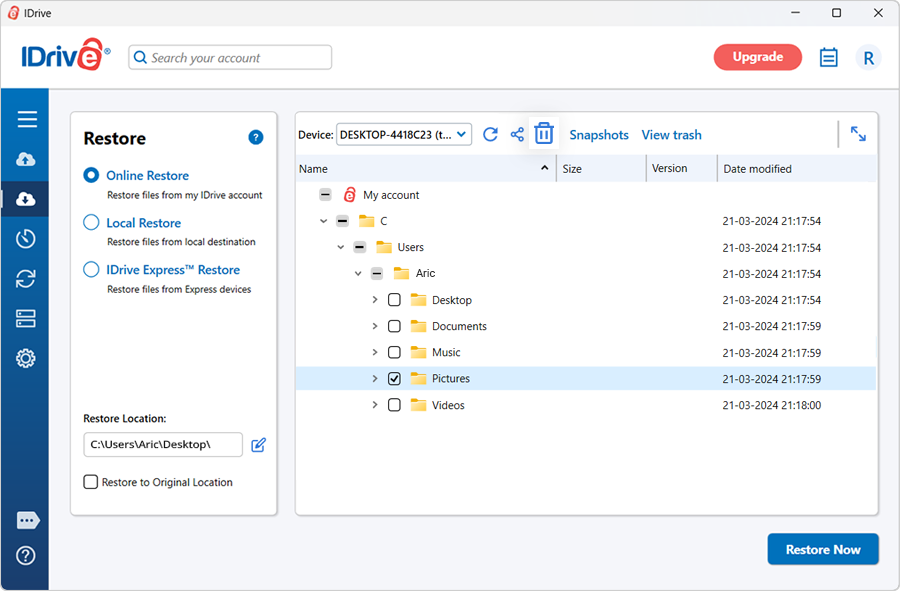
- Multiple device backup under one account: The platform backs up all computers, servers, and smart devices into a single IDrive account.
- Server cloud backup with zero downtime: Backs up MS SQL Server, on-premise MS Exchange Server, VMware, Hyper-V, Oracle Server, System State, and Linux Servers without interrupting services.
- IDrive Express for large data transfers: The tool will provide you with a quick backup and retrieval of data in less than a week via physical storage shipment, ensuring no bandwidth usage for initial or bulk transfers.
IDrive Pricing
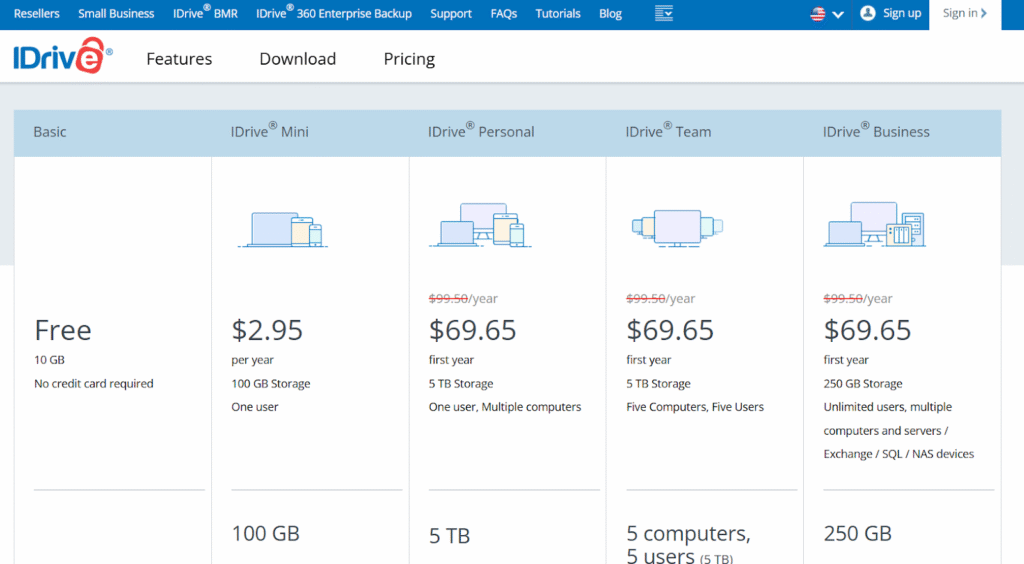
IDrive Business starts at $69.65 for the first year (regular price $99.50 per year) for 250 GB of storage with unlimited users and multiple computers, servers, Exchange, SQL, and NAS devices.
The Business plan scales from 250 GB to 5 TB, with the 5 TB tier priced at $1,049.65 for the first year (regular price $1,499.50 per year).
Server backup is also available as an add-on for $5 per month per server, and Google Workspace Backup costs $20/seat/year with 10 TB storage per seat.
IDrive Pros & Cons
✅ Single account backs up multiple computers, servers, and mobile devices for centralized data protection.
✅ Zero downtime server backup supports critical databases, including MS SQL, Exchange, VMware, and Oracle.
✅ Private encryption key option and compliance assistance for HIPAA, SOX, GLBA, and SEC & FINRA regulations.
❌ Storage-based pricing means costs increase as your infrastructure grows, unlike ControlMonkey’s asset-based model.
❌ No infrastructure-as-code conversion or one-click rollback capability for restoring complete cloud environments.
Cloud Backup Solution #4: CrashPlan
CrashPlan is a reasonable cloud backup option for businesses looking for continuous endpoint and server data protection with frequent backup intervals.
The solution focuses on automated file backup across endpoints, servers, and SaaS applications like Microsoft 365 and Google Workspace with minimal system resources.
CrashPlan Features
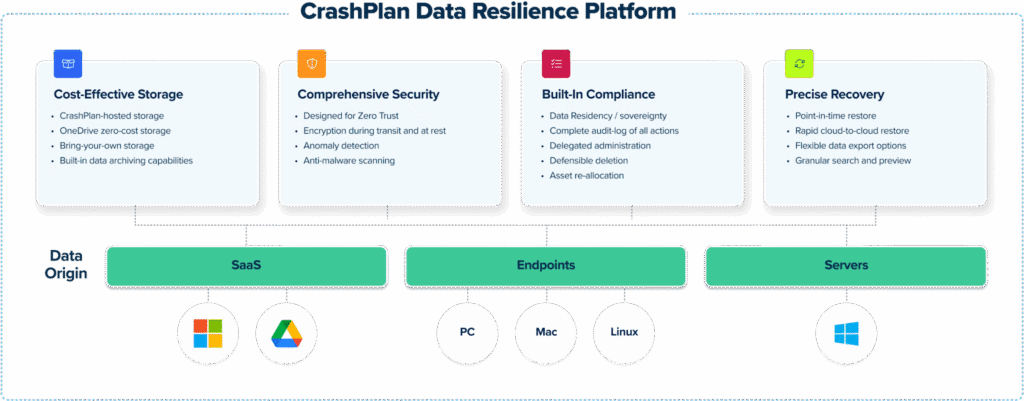
- Automatically backs up files every 15 minutes by default, monitoring every change made in listed applications to ensure minimal data loss during incidents.
- Backs up data across endpoints, servers, and SaaS applications like Microsoft 365 and Google Workspace with backup infrastructure hosted in the CrashPlan cloud.
- Role-based access controls: The platform personalizes access controls and restores options for your users and departments based on job titles.
CrashPlan Pricing
CrashPlan’s pricing is custom, so you’d have to contact their team to get a quote.
CrashPlan Pros & Cons
✅ Continuous backup every 15 minutes.
✅ There’s no need for users to be on a VPN to perform backups when they’re not in the office.
✅ The platform uses minimal system resources and runs in the background.
❌ Focuses on file and application data backup without protecting infrastructure configurations like networks, IAM, or DNS.
❌ No IaC capabilities or visibility into which cloud resources are protected and ready for disaster recovery.
Cloud Backup Solution #5: Commvault
Commvault is a reasonable cloud backup option for enterprises looking for comprehensive data protection across cloud, on-premises, and hybrid environments.
The platform focuses on protecting mission-critical data with ransomware defense through immutable storage and cleanroom recovery capabilities for testing cyber recovery plans.
Commvault Features
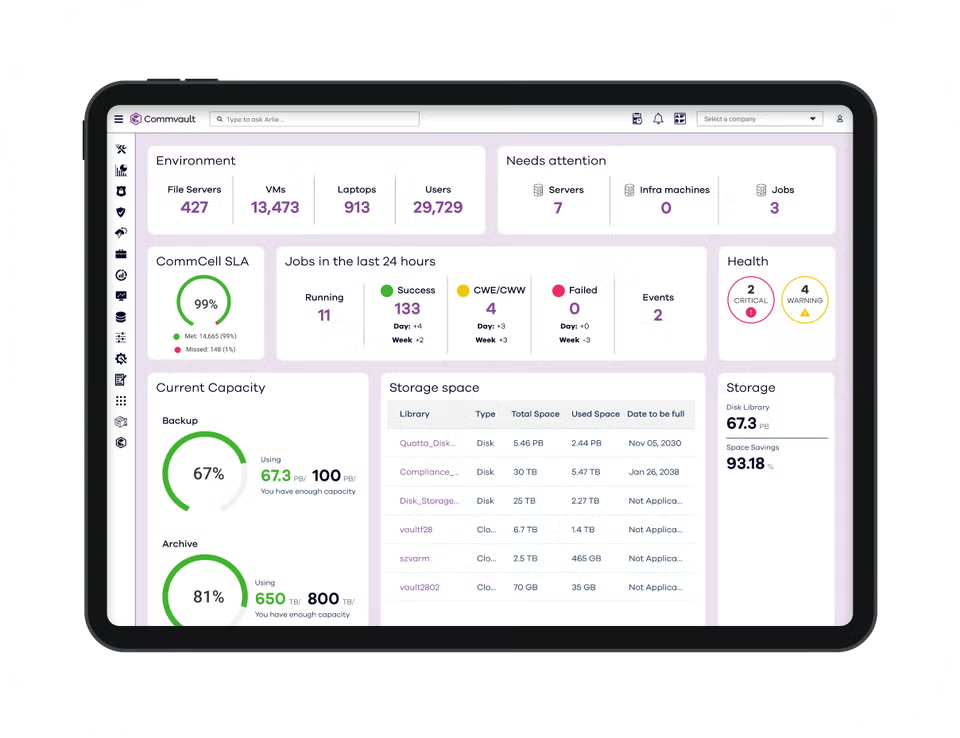
- Supports a wide array of cloud and on-premises workloads, including virtual machines, containers, databases, applications, endpoints, and files across any environment.
- Defends against ransomware and zero-day threats with shielded backup infrastructure and locked data storage that prevents deletion, encryption, or modification of backup data.
- Provides a secure, isolated, on-demand cloud environment for testing and validating cyber recovery plans, enabling fast, clean, and secure recoveries from cyberattacks.
Commvault Pricing
Commvault’s pricing is based on usage costs; for example, in AWS, you’ll be charged $0.035 per instance per hour for up to 10000 instances and $0.021 per instance per hour for more than 100000 instances.
Commvault Pros & Cons
✅ Your team will be able to discover, classify, and secure sensitive data with the tool’s AI-powered risk analysis capabilities.
✅ Mitigate ransomware risk and quickly recover from cyberattacks.
✅ Stay ahead of threats using FIPS 140-3 certified encryption.
❌ Commvault doesn’t inherently capture, version, or regenerate full cloud infrastructure state.
❌ For cloud disaster recovery, rebuilding or reconciling environment configurations would need external IaC tools or manual scripting.
Cloud Backup Solution #6: Carbonite
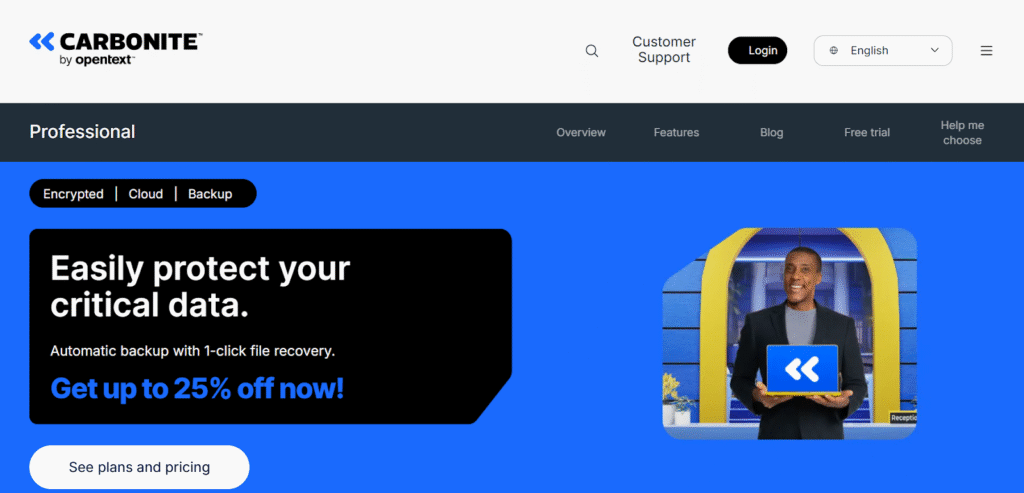
Carbonite is a file-and server-focused cloud backup service that provides always-on encrypted backups, instant file recovery, and ransomware recovery assistance.
The platform is a nice option for businesses that need reliable file- and image-level protection.
Carbonite Features
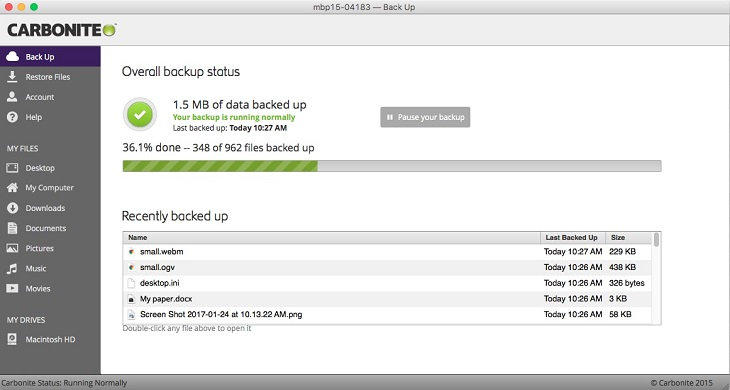
- Always-on backups that protect documents, photos, music and videos, with data encrypted in transit and at rest.
- Recover files instantly from the cloud dashboard, as critical documents remain accessible even after deletion, corruption, or device loss.
- You can restore backed-up data at any time, and its support team can assist with restoring the pre-infected versions of your files within 2 weeks.
Carbonite Pricing
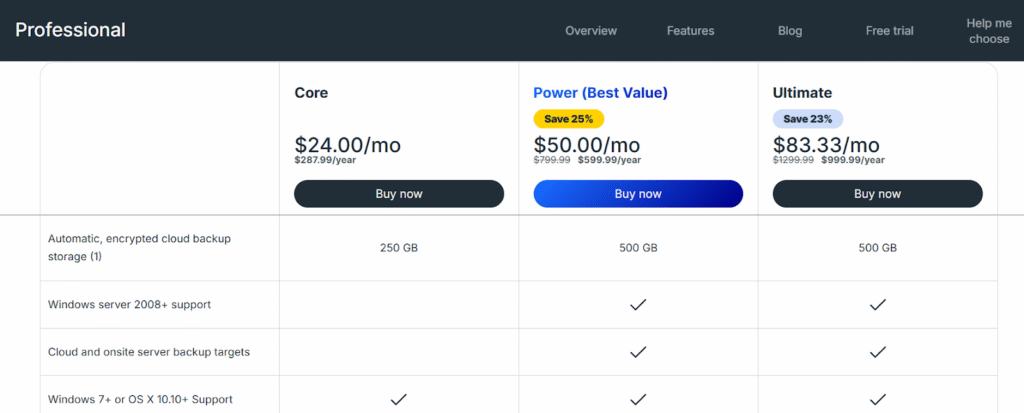
Carbonite has 3 paid plans that you can choose from:
- Core: $24/month for 250 GB of automatic, encrypted cloud backup storage, which includes Windows 7+ or OS X 10.10+ support, up to 25 computers, external drives and NAS, and the ability to recover data instantly.
- Power: $50/month for 500 GB of automatic, encrypted cloud backup storage, which adds Windows server 2008+ support, Cloud and onsite server backup targets, and backup system files.
- Ultimate: $83.33 month for 500 GB of automatic, encrypted cloud backup storage, which adds unlimited servers + 25 computers.
On the 3 plans, you’ll be able to purchase additional storage that costs $99 per 100 GB increment.
Carbonite Pros & Cons
✅ Simple file- and image-level backups with always-on protection and one-click restores.
✅ The ability to restore pre-infected versions within a 2-week window and hands-on support for restores.
✅ You’ll be able to access backup sets via a web-based dashboard on any device.
❌ Carbonite protects files and system images but does not capture cloud configuration state.
❌ Full cloud environments after configuration failures will require manual rebuilds or separate tools.
Cloud Backup Solution #7: Druva
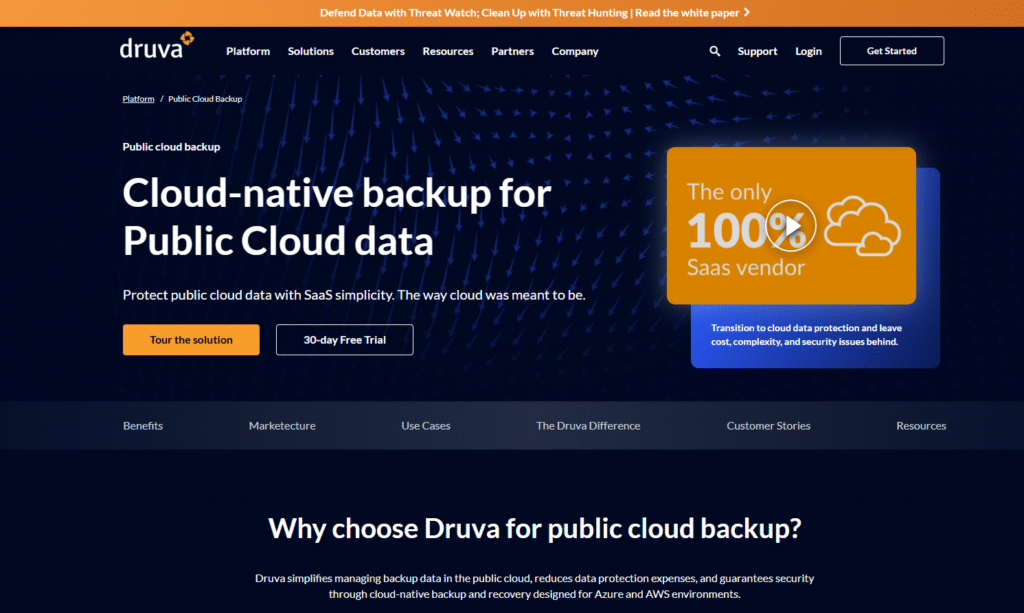
Druva is a cloud-native backup and recovery platform built specifically for protecting public cloud workloads with SaaS simplicity.
The platform simplifies the management of backup data in the public cloud with the goal of reducing data protection expenses, guaranteeing security through cloud-native backup and recovery designed for Azure and AWS environments.
Druva Features
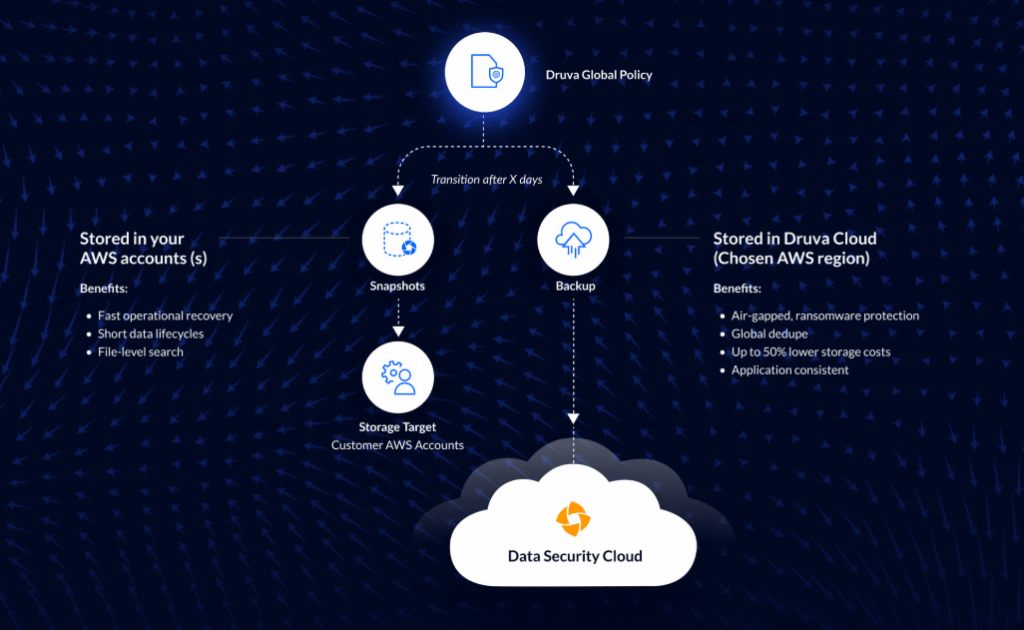
- Unified public cloud backup that protects AWS (including EC2, RDS) and Azure VMs.
- You’ll also be able to lower TCO costs compared to native snapshots with the tool’s global deduplication and compression of data.
- Restore backups to a new cloud account if the production account is compromised.
Druva Pricing
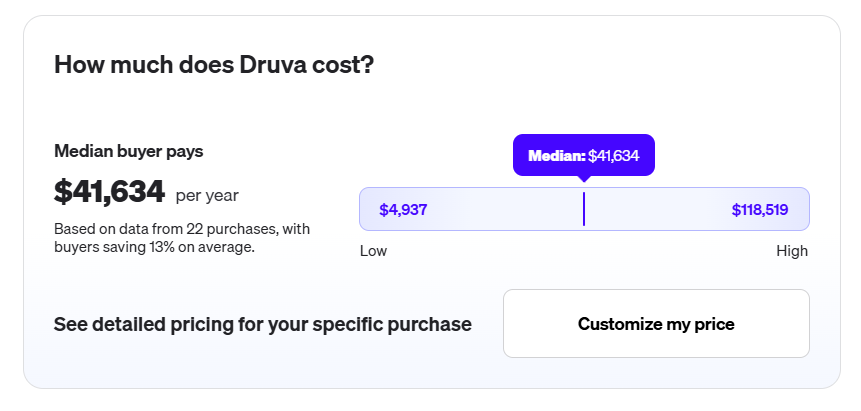
According to 3rd-party data from Vendr, including 22 purchases they’ve handled for Druva, the median platform cost is $41,634/year, with buyers paying up to $118,519/year.
Druva Pros & Cons
✅ Strong ransomware protection with its immutable, air-gapped snapshots.
✅ Cross-account recovery capabilities.
✅ Unified management across AWS and Azure to reduce tooling sprawl and improve visibility.
❌ Druva focuses on backing up cloud workloads and data rather than version-controlling cloud configurations.
❌ The platform is more expensive when compared to other alternatives on the market.
Cloud Backup Solution #8: Veeam Cloud Backup
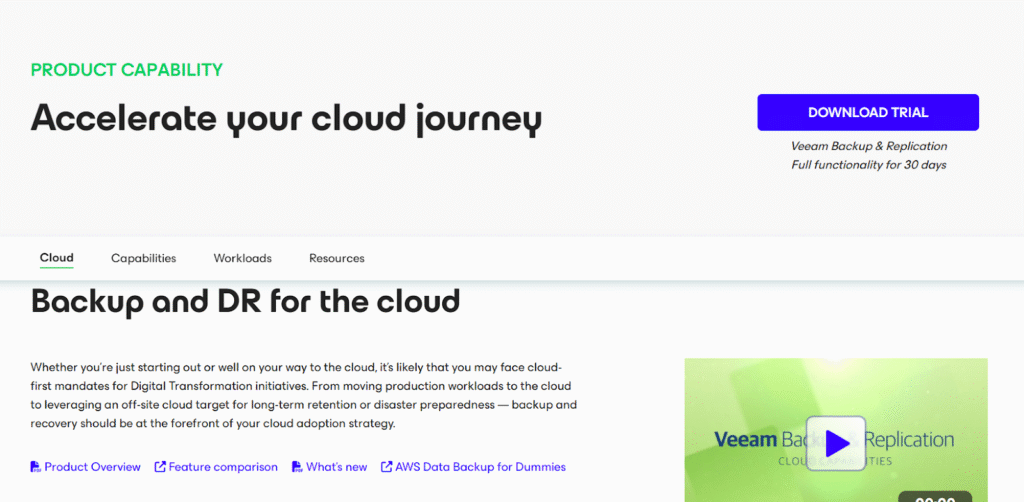
Veeam Cloud Backup provides secure and scalable data protection for cloud-native (e.g., AWS, Azure, and Google Cloud) and hybrid workloads.
The platform offers ransomware protection through immutable storage, rapid restoration, and automated policy management.
Veeam Cloud Backup Features
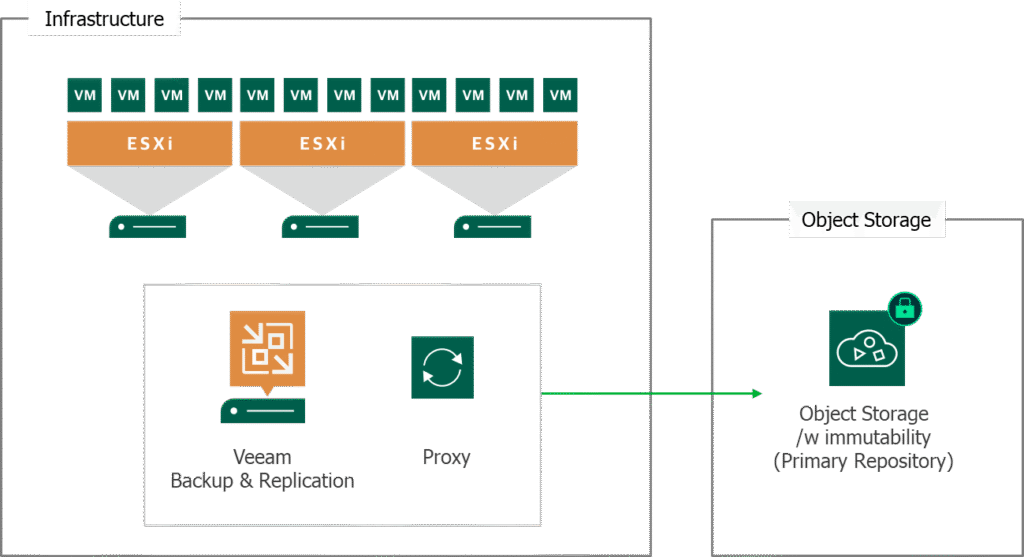
- AWS-native backup and disaster recovery that’s fully automated.
- You’ll be able to overcome ransomware and security threats with the platform’s assured clean recovery from encrypted, air-gapped and immutable backups.
- Send server and workstation backups directly to the cloud for cost optimization and managed BaaS.n environment.
Veeam Cloud Backup Pricing
Veeam’s pricing is custom, so you’ll have to contact their team to get a product demo and a quote.
Veeam Cloud Backup Pros & Cons
✅ A variety of recovery options, such as full VM recovery, instant VM recovery, file-level recovery, and application-item recovery.
✅ You can plan and manage consumption to avoid cloud overspend, making it one of the best BDR solutions on the market.
✅ Supports a “3-2-1” backup rule, which ensures data is accessible off-site for disaster recovery.
❌ Provisioning or reconfiguring cloud infrastructure (e.g., rebuilding networks and DNS routing) typically requires external IaC tooling.
❌ Veeam doesn’t version or manage full cloud infrastructure configurations (network, IAM, routing, VPC, etc.) as code.
Cloud Backup Solution #9: Wasabi
Wasabi is a cloud backup storage platform designed to deliver fast, secure, and highly predictable backup and recovery.
The platform aims to eliminate common cloud cost pitfalls like egress and API fees, which makes it an attractive option for ransomware protection and frequent recovery testing.
Wasabi Features
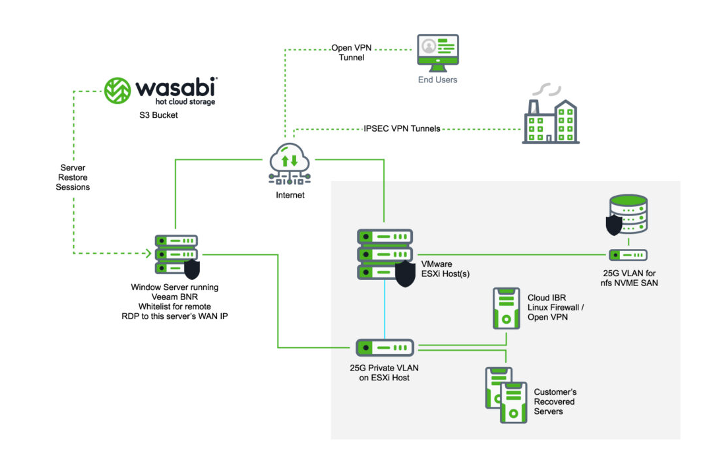
- Wasabi’s Object Lock makes it impossible for anyone to access, alter, or delete your team’s data that is stored in the Wasabi cloud.
- Delivers speeds comparable to AWS S3 Standard while being priced closer to colder storage tiers.
- The platform also doesn’t charge for egress or API calls, so you’ll never be penalized for testing or restoring your backups.
Wasabi Pricing
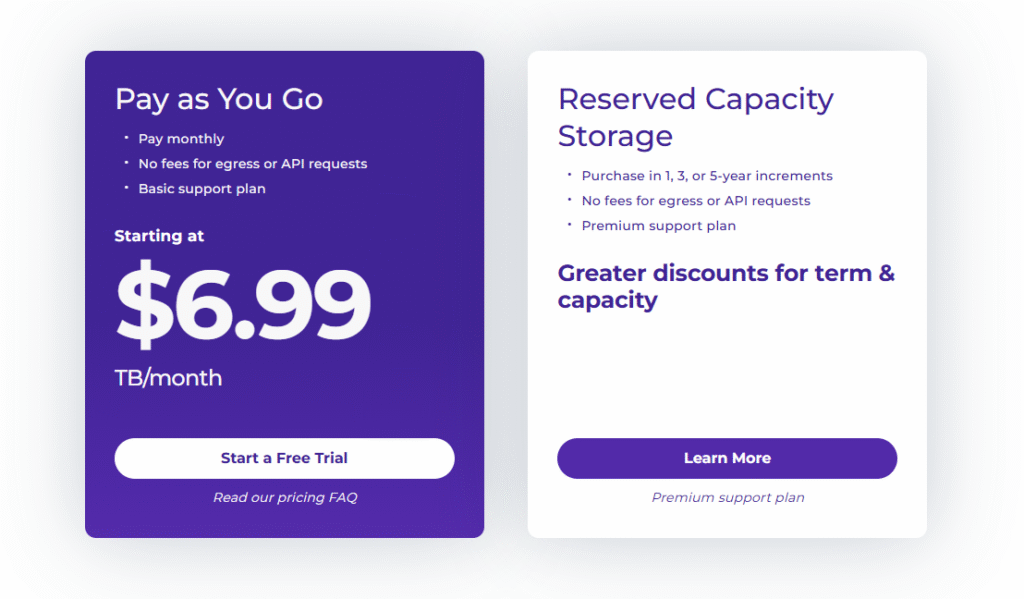
Wasabi’s pricing starts at $6.99/month/TB for its pay-as-you-go model with no fees for egress or API requests.
You can also sign up for Wasabi’s Reserved Capacity Storage plan, which you can purchase in 1, 3, or 5-year increments with premium support and greater discounts for term and capacity.
Wasabi Pros & Cons
✅ Backing up to Wasabi can be a good way to prevent both data loss and spiraling cloud costs.
✅ Data backup and disaster recovery services that offer predictable pricing with zero egress or API fees.
✅ Built-in immutability and virtual air-gapping.
❌ Wasabi is a storage layer rather than an infrastructure-aware DR solution.
❌ The platform cannot version, audit, or one-click restore cloud configurations like IAM, networking, or DNS after misconfigurations.
Cloud Backup Solution #10: Acronis Cyber Protect
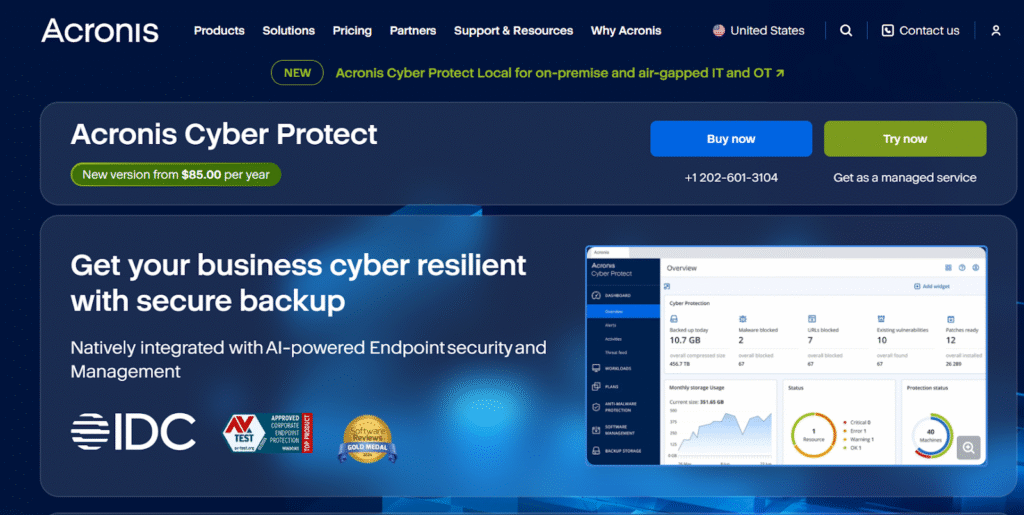
Acronis Cyber Protect is an integrated cyber resilience platform that combines backup, disaster recovery, endpoint security, and management into a single solution.
The platform can help you minimize downtime, prevent cyber threats, and recover data and systems across physical, virtual, cloud, and mobile environments.
Acronis Cyber Protect Features
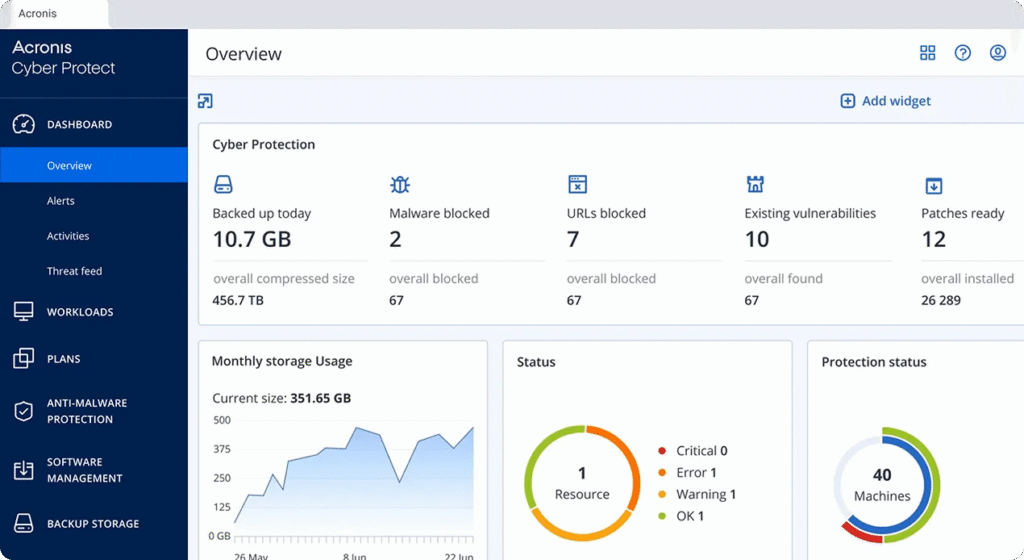
- A single platform that natively combines backup, disaster recovery, AI-powered endpoint security, and endpoint management under one policy and agent.
- Supports full-image and file-level backups with flexible storage options to fit on-prem, cloud, hybrid, and air-gapped environments.
- Protects backup data from ransomware and malicious deletion with built-in immutability.
Acronis Cyber Protect Pricing
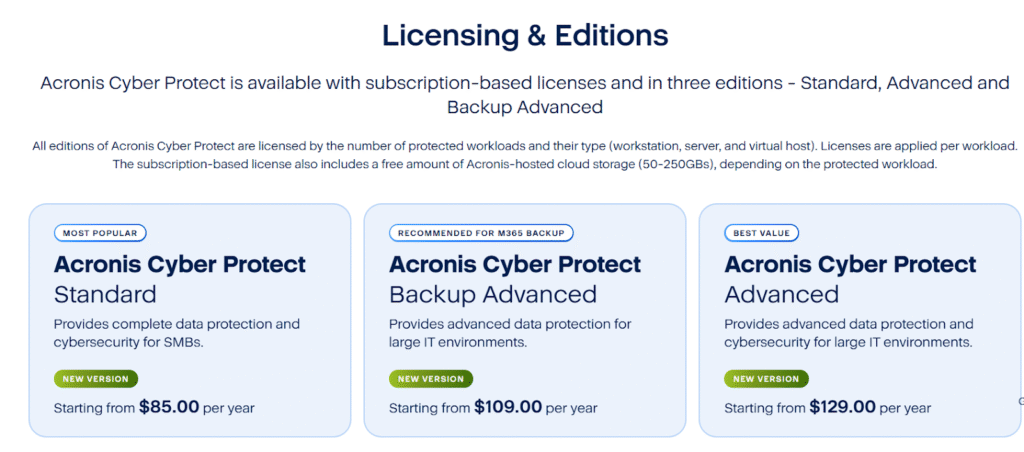
Acronis has 3 licenses that you can choose from for cloud backup:
- Acronis Cyber Protect Standard, which starts from $85/year, gives you complete data protection and cybersecurity.
- Acronis Cyber Protect Backup Advanced, which starts from $109/year and adds advanced data protection.
Acronis Cyber Protect Advanced, which starts at $129/year and includes advanced data protection and cybersecurity for large IT environments.
Acronis Cyber Protect Pros & Cons
✅ Reduces tool sprawl by combining backup, DR, security, and endpoint management.
✅ Strong ransomware protection with immutable backups.
✅ Fast recovery and continuous data protection.
❌ Acronis focuses on protecting data and systems rather than version-controlling cloud infrastructure configurations as IaC, which limits its ability to instantly roll back IAM, networking, or policy misconfigurations across cloud environments.
❌ During a disaster, the platform focuses on data and application recovery rather than infrastructure configuration.
Enable your cloud infrastructure to withstand failures and recover quickly with ControlMonkey
Most backup and disaster recovery solutions are built on a misconception: Backing up your data is enough
In reality, modern outages don’t bring companies down because files disappear: they do it because infrastructure becomes impossible to reconstruct under pressure.
When a CDN change takes production offline, when an IAM policy deletion locks teams out, when routing rules, or SaaS configs drift without anyone noticing, traditional backup tools go silent.
They give you your data back and leave you staring at a broken cloud, forcing your technical team to rebuild critical infrastructure from memory, Slack threads, and outdated runbooks.
That’s not backup disaster recovery. That’s hope.
We built ControlMonkey because this gap with the existing disaster recovery software solutions is real, costly, and growing.
By treating cloud infrastructure configurations as the asset that actually needs protection, ControlMonkey flips disaster recovery on its head.
Every network rule, identity permission, DNS record, policy, and third-party configuration is continuously captured, versioned, and stored as deployable Terraform code.
Not as screenshots. Not as documentation. But as ready-to-restore infrastructure.
This eliminates the two failures that define most outages:
- Uncertainty: Not knowing what changed or what the last working state was.
- Delay: Not being able to restore fast enough to prevent a real business impact.
With ControlMonkey, those risks disappear. Every environment becomes a time machine. Rollbacks are one click. Dependencies are handled automatically.
Recovery is precise, auditable, and fast, regardless of whether you’re restoring a single IAM policy or an entire multi-cloud environment across AWS, Azure, GCP, and critical SaaS platforms.
That’s why enterprises don’t use ControlMonkey as “another backup tool.” They use it as a safety net for their cloud itself.
ControlMonkey is the best cloud backup solution because it protects the only thing that truly matters during a disaster: the ability to operate.
When everything breaks, ControlMonkey doesn’t give your IT team work. It gives you outcomes:
- One click to restore infrastructure.
- Automatic dependency handling.
- Zero guesswork.
- Zero firefighting.
- Zero reconstruction from scratch.

A 30-min meeting will save your team 1000s of hours
A 30-min meeting will save your team 1000s of hours
Author