
Your data is backed up. Your VMs will fail over. You’ve checked every box on the standard disaster recovery checklist.
Then the outage hits. Data comes back online in hours. But your Cloudflare routing config, your Terraform state, your IAM permission sets? None of that is in the failover package. Your engineers spend two days manually rebuilding what your DRaaS provider never touched. You missed your RTO by 47 hours. Not a rounding error.
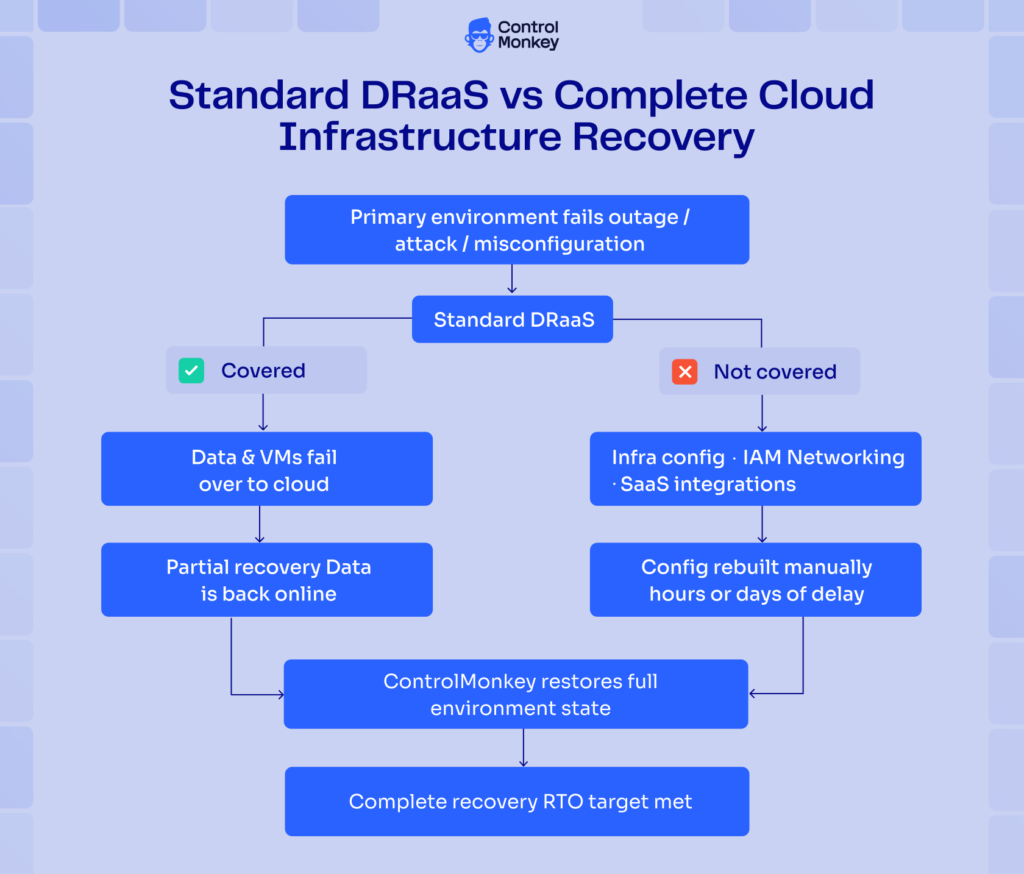
This is the gap in most disaster recovery as a service implementations. DRaaS solves the data problem. It rarely solves the environment problem. This guide explains how to close that gap.
TL;DR
- DRaaS replicates your IT environment to a cloud provider so you can fail over fast, but most solutions stop at data and VMs.
- Your infrastructure configuration, IAM, networking, and third-party integrations are just as critical for recovery, and often unprotected.
- RTO and RPO are the two metrics that actually matter; your DRaaS strategy should be built around hitting them across your full stack.
- Choosing the right DRaaS model (managed, assisted, or self-service) depends on your team’s capacity and risk tolerance.
- A complete disaster recovery strategy covers your entire environment, not just your backups.
- ControlMonkey extends DRaaS by continuously backing up and restoring AWS, Azure, GCP, Okta, Microsoft Entra ID, Cloudflare, Datadog, and other cloud and SaaS configurations, helping organizations recover the environment itself – not just the data inside it.
What is Disaster Recovery as a Service (DRaaS)?
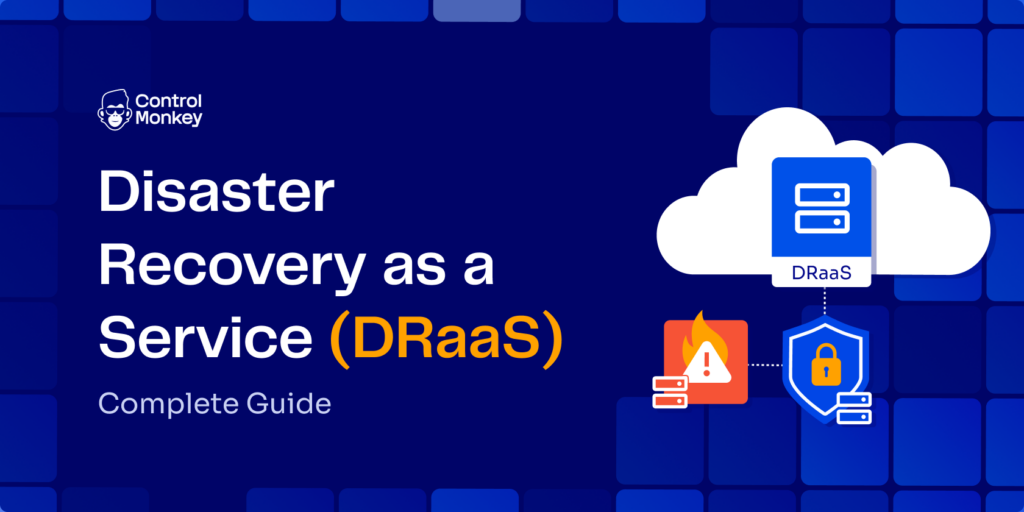
Disaster recovery as a service (DRaaS) is a cloud-hosted model that replicates workloads and data to a provider-managed recovery environment. While DRaaS helps organizations meet recovery time objectives (RTOs) for applications and databases, platforms such as ControlMonkey extend disaster recovery to cloud infrastructure configuration, identity systems, networking, and SaaS platforms, helping organizations recover their entire operational environment.
The mechanics follow four stages: replication to secure cloud storage, automated failover triggered by a defined threshold, workload restoration, and failback to your primary environment once it’s stable.
According to MarketsandMarkets, the global DRaaS market will grow from USD 16.1 billion in 2025 to USD 46.1 billion by 2032 (16.2% CAGR). Teams are moving fast away from on-prem secondary sites. The cost savings are real. So is the false confidence.
Most DRaaS solutions cover what vendors think of as “the environment”: VMs, workloads, storage, and databases. What engineers actually depend on to run that environment is different: infrastructure configuration, IAM roles and policies, network routing rules, and third-party SaaS integrations. Those gaps are where real outages live. For a deeper look at how this fits into your broader planning, see cloud disaster recovery strategy.
RTO and RPO: The Metrics That Define Your Disaster Recovery as a Service Plan
RTO (Recovery Time Objective) is the maximum acceptable delay between a service interruption and its restoration. It answers: how long can you afford to be down?
RPO (Recovery Point Objective) is the maximum acceptable amount of time since the last data recovery point. It answers: how much data can you afford to lose?
Both metrics are industry-standard DR terms and form the foundation of any DR SLA. Lower numbers mean less downtime and data loss, but they cost more in infrastructure and operational complexity.
The critical mistake most teams make: they set RTO and RPO at the data layer and never extend them to the infrastructure layer. Your database might be back in 20 minutes. Your networking config might take two days to rebuild manually. The RTO your CTO sees in the report doesn’t reflect what actually happened.
DRaaS Solutions: 3 Service Models and When to Use Each
There are three DRaaS solution models, each placing a different amount of responsibility on your team. The right choice depends on your DR expertise, your available bandwidth, and how much control you need over the recovery process.
| Model | Who owns execution | Best for | Trade-off | ControlMonkey role |
|---|---|---|---|---|
| Managed DRaaS | Provider owns everything | Teams without DR expertise or capacity | Higher cost; less control | Extends provider scope to infra config, IAM, and networking the provider doesn’t cover |
| Assisted DRaaS | Split: provider handles infra, team owns the plan | Teams that know their environment but don’t want to run cloud-side DR | Requires solid internal DR documentation | Continuously captures the environment state so the team’s DR plan reflects the actual environment |
| Self-service DRaaS | Team owns planning, testing, execution | Large teams with dedicated DR engineers | Maximum control; maximum effort | Replaces manual infra state documentation with automated, continuous capture across 30+ platforms |
Here’s what all three models share: none of them account for infrastructure configuration recovery by default. The model defines who owns the process, not what the process covers. If infra config, IAM, and networking aren’t explicitly included in your DR scope, they’re unprotected regardless of which model you choose.

When Your DRaaS Plan Doesn't Cover the Full Stack
Most DRaaS models protect data and VMs. ControlMonkey extends recovery to infra config, IAM, networking, and 30+ third-party platforms – so your failover environment matches production.
How to Build a Disaster Recovery as a Service Strategy: 5 Steps
Building a DRaaS strategy without mapping your full environment first is how teams end up with half-recoveries. Most plans look complete on paper and fall apart the moment an actual outage requires more than data restoration. Here is the five-step process that closes that gap.
Step 1: Map every system that needs to recover
Start with a full inventory, categorized by criticality:
- Tier 1 (revenue-impacting): Production databases, payment systems, customer-facing APIs, authentication services
- Tier 2 (operational): Internal tools, reporting systems, CI/CD pipelines
- Tier 3 (supporting): Dev/test environments, documentation, non-critical monitoring
Most teams stop at Tier 1 data. The gaps live in Tier 1 config. Cloudflare routing is Tier 1 for any CDN-dependent service, but it rarely appears on a DR inventory. IAM permission sets are Tier 1 for any service that needs authenticated access. Map all of it: VMs, databases, Terraform state, IAM policies, networking configs, and SaaS integrations.
Step 2: Define RTO and RPO targets per system tier
Set explicit targets for each tier, not just for the environment as a whole:
| Tier | RTO Target | RPO Target |
|---|---|---|
| Tier 1 (revenue-impacting) | Less than 1 hour | Less than 15 minutes |
| Tier 2 (operational) | Less than 4 hours | Less than 1 hour |
| Tier 3 (supporting) | Less than 24 hours | Less than 24 hours |
Then extend those targets to your infrastructure layer. If your database RTO is 30 minutes but your Terraform state takes 4 hours to reconstruct manually, your real Tier 1 RTO is 4 hours. Fix that gap before a post-incident review does it for you.
Step 3: Choose your DRaaS model and provider
Match the model to your team capacity, then evaluate providers on more than price:
- Does the provider offer geographic redundancy across regions?
- What are the contractual RTO and RPO guarantees, and are they tested, not just claimed?
- Does the DR scope include IaC state? IAM? Network layer? Third-party integrations?
- Is the provider’s recovery automation continuous, or does it require manual snapshot scheduling?
That last question is where most evaluations end too soon. A provider that skips infrastructure config leaves you rebuilding the environment manually every time a real incident occurs.
Step 4: Automate replication across your full stack
Data replication is a solved problem. The hard part is continuous, automated capture of infrastructure state: Terraform state files, ClickOps changes, IAM permission sets, network configs, and third-party integration configurations.
Manual snapshots create recovery gaps. If your infra config was last captured six hours ago and you’ve made 40 ClickOps changes since then, your environment recovery point is six hours behind your data layer. Your data layer doesn’t know that. That gap doesn’t show up in your RTO report. It shows up during an actual incident.
ControlMonkey continuously captures environment state across 30+ platforms, including Cloudflare, Fastly, Akamai, F5, Datadog, and Okta. That coverage closes the gap between data recovery and full environment recovery.
As AWS explicitly warns in its Well-Architected DR whitepaper:
“Without IaC, it may be complex to restore workloads in the recovery Region, which will lead to increased recovery times and possibly exceed your RTO.”
Automated infra config capture is the answer to that warning. Manual processes won’t hold under pressure.
Step 5: Test, measure, and iterate
DR plans degrade. What works in Q1 may fail in Q3 after three new SaaS integrations and a major refactor. Schedule quarterly failover tests and include three types:
- Tabletop exercises: Scenario-based walkthroughs that surface procedural flaws without touching production
- Live drills: Simulated outages that test how backup systems and failover protocols work in real conditions
- Automated resilience testing: Tools like Netflix Chaos Monkey randomly terminate instances and containers to expose fragility before incidents do
Measure full recovery time, not just data restoration. Include infra config rebuild time in your RTO. Most teams only clock data recovery and report an optimistic number. The config layer is where the real hours hide.
For a step-by-step checklist you can adapt to your environment, see cloud disaster recovery plan.
DRaaS vs. Traditional Disaster Recovery: What’s Actually Different
DRaaS replaced traditional disaster recovery for most organizations because the economics stopped making sense. Here is what changed, and what stayed the same.
Traditional DR means a secondary on-premises data center: physical hardware, manual failover, and a full CapEx budget for infrastructure you hope never to use. Testing is infrequent because every test risks production stability and consumes days of engineering time.
DRaaS moves recovery to the cloud. The provider automates replication. Orchestration handles failover. The cost model shifts to OpEx: you pay for what you use. Testing becomes practical because the cloud-side environment can be spun up in isolation.
The advantages of DRaaS are real:
- No secondary data center required
- Faster, automated failover
- Geographic flexibility across regions
- Regular testing at lower cost and operational overhead
Here is what hasn’t changed: both traditional DR and standard DRaaS focus on data and VMs. Neither accounts for infrastructure configuration by default. The limitation is not a flaw in the DRaaS model. It is a scope problem. Vendors designed most implementations when “the environment” meant virtual machines and storage arrays. That world no longer exists.
Cloud infrastructure is more dynamic now. AI-driven provisioning and multi-cloud architectures spread config across AWS, Azure, GCP, and a dozen third-party platforms. Configuration drift between primary and recovery environments is the new single point of failure. See AWS outage and cloud disaster recovery for a real-world breakdown of what breaks when config is missing from the DR plan.
Data recovery is not business recovery. Full stop. If your networking routes are wrong and your IAM policies are missing, your data being online doesn’t help anyone.
What to Look for in DRaaS Providers
Not all DRaaS providers cover the same ground. Evaluate on these six criteria:
1. RTO/RPO guarantees backed by testing. Claimed SLAs and tested SLAs are often different numbers. Ask to see test results.
2. Coverage scope beyond VMs and data. Does recovery extend to infrastructure configuration, IAM, and network layer configs? If not, you are buying data recovery, not environment recovery.
3. Multi-cloud and third-party platform support. Modern environments depend on Cloudflare, Okta, Datadog, and dozens of SaaS platforms. If your provider cannot recover those dependencies, the failover environment won’t match production.
4. Continuous automated replication. Manual snapshots create gaps. Look for continuous capture that includes ClickOps changes made outside your IaC pipeline.
5. Non-disruptive testing capability. You need isolated test environments that let you run drills without a maintenance window.
6. Compliance and audit trail. SOC 2, ISO 27001, and HIPAA require documented DR plans and evidence of regular testing.
Criteria 2, 3, and 4 are where most standard DRaaS providers fall short, and where ControlMonkey extends coverage for teams that need the infrastructure layer protected.
Recovery Is a Systems Problem, Not a Data Problem
Disaster recovery as a service is essential infrastructure for any team that runs in the cloud. But essential infrastructure still has a scope limit. For most DRaaS solutions, that limit is the data and VM layer.
The infrastructure layer is where most recovery plans break down in practice. The configs, the permissions, the network routes: the things that make data useful are almost never in the default DRaaS package. Your engineers know this intuitively. The problem is that most evaluations don’t test it until a real incident exposes the gap.
Cyber resilience today stops at data. ControlMonkey handles your whole environment. That means continuous capture of infrastructure configuration across 30+ platforms. When you invoke failover, you recover a working environment. Not just backed-up files waiting on a functional environment to run.

A 30-min meeting will save your team 1000s of hours
A 30-min meeting will save your team 1000s of hours
Author