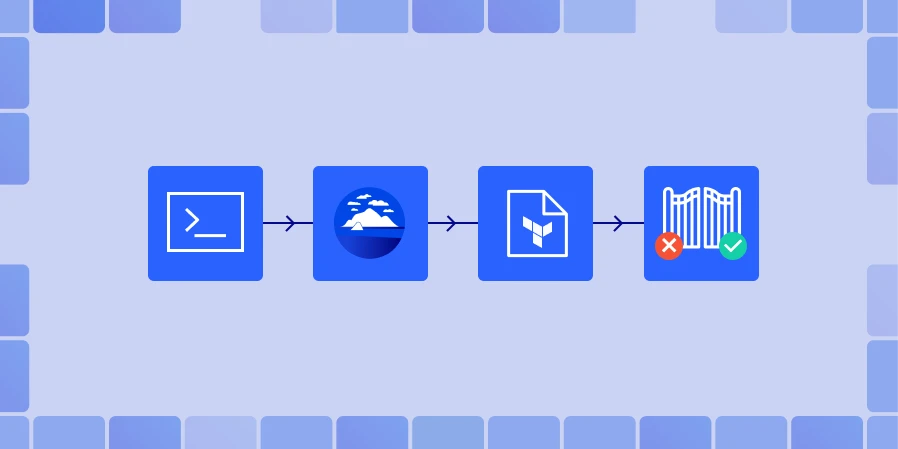
Merging a Terraform pull request should not feel like a gamble. Since it is infrastructure-as-code, every change can affect live cloud resources where all changes must be previewed and validated. Atlantis Plan automates Terraform plan on each pull request by listening to version control system webhooks, to execute the plan, and posting the Terraform plan output as a comment. This combination turns a standard pull request into a gated Terraform workflow, where reviewers can see every resource that will be created, modified, or destroyed.
How Atlantis Plan Executes Terraform Workflows
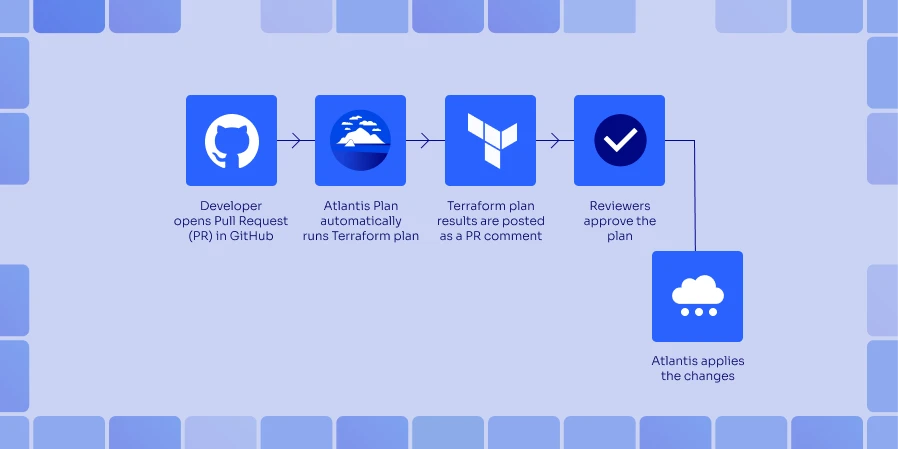
Atlantis Plan operates as a self-hosted Atlantis server, which can integrate with GitHub, GitLab, Bitbucket, or even Azure DevOps through custom workflows that are supported through webhooks.
Automatic plan:
For automatic planning, when a pull request touches Terraform code on the base branch, Atlantis receives the webhook, checks out the branch, and runs terraform init. Next, it runs terraform plan (run plan) for any directories specified in the atlantis.yaml file in each project. The plan output gets posted back as a comment in the lightweight Atlantis UI, and Atlantis locks the workspaces to prevent state conflicts.
Manual re-plan:
When reviewers want to do manual re-planning, they can use the Atlantis plan command executed manually to recalculate the plan again after any modifications. This will help in drift detection when new code and extra commits are pushed.
Controlled apply:
After reviewing and approving the Atlantis Terraform plan, you can use the command atlantis apply that in turn executes terraform apply on the base branch. And if you need terraform pull, it will run terraform refresh beforehand. It updates the comment after completion, recording it to the Atlantis log for state management and to capture the audit trail.
While Atlantis automatically runs the Terraform plan, when a pull request is created, developers can also manually trigger a plan by adding a comment in the pull request. This is extremely useful when additional commits are pushed to a branch after the initial plan, or re-validating infrastructure changes before approval.
- Open a Pull request and create a PR from your feature branch.

- Trigger a Plan via Comment

Atlantis listens for this comment through the GitHub webhook, checks out the PR branch, and runs:
terraform init
terraform plan
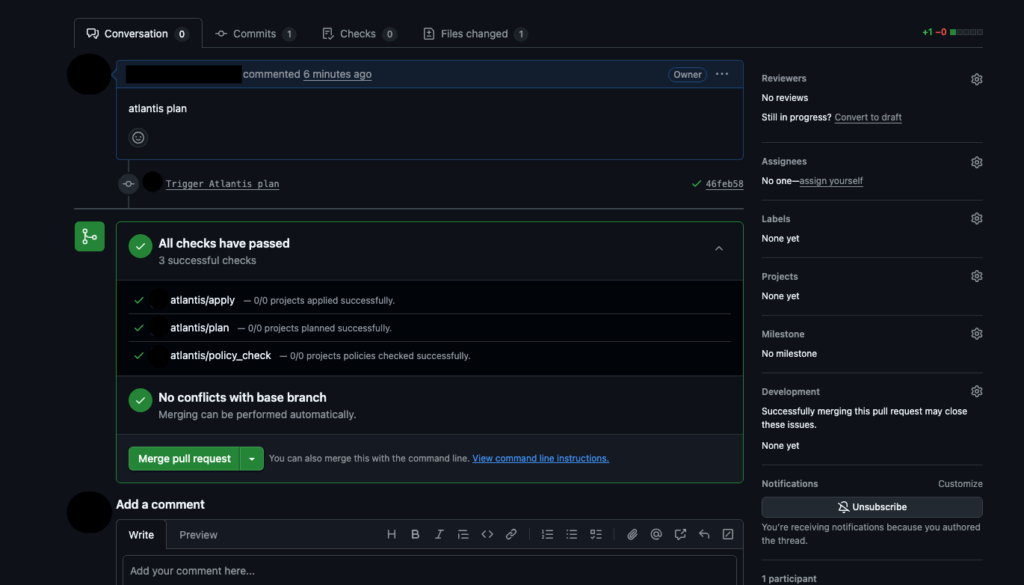
After that, Atlantis replies directly in the pull request thread with a summary of the Terraform plan.
Ran Plan for dir: . workspace: default

Terraform will perform the following actions:

  # aws_s3_bucket.demo_bucket will be created
  + resource "aws_s3_bucket" "control-monkey_demo_bucket" {
      arn    = (known after apply)
      bucket = "control-monkey_demo_bucket"
      tags   = {
        "Environment" = "control-monkey-iac"
        "Name"        = "control-monkey_demo_bucket"
      }
    }

Plan: 1 to add, 0 to change, 0 to destroy.

To apply this plan, comment:
    atlantis apply
Reviewing Terraform Plans with Atlantis Plan
Understanding the actions taken on resources configured through the Terraform commands can be understood through the execution plan created by Terraform. Learning these signs is important for identifying problems early on. In Terraform, a resource lifecycle is denoted by symbols; created (+), destroyed (–), recreated (-/+), or updated in place (~). When a plan summary is generated, Terraform also summarizes the total changes made, for example, ‘2 to add, 1 to change, and 0 to destroy’, giving a clear picture on ‘blast radius’ for the reviewer.
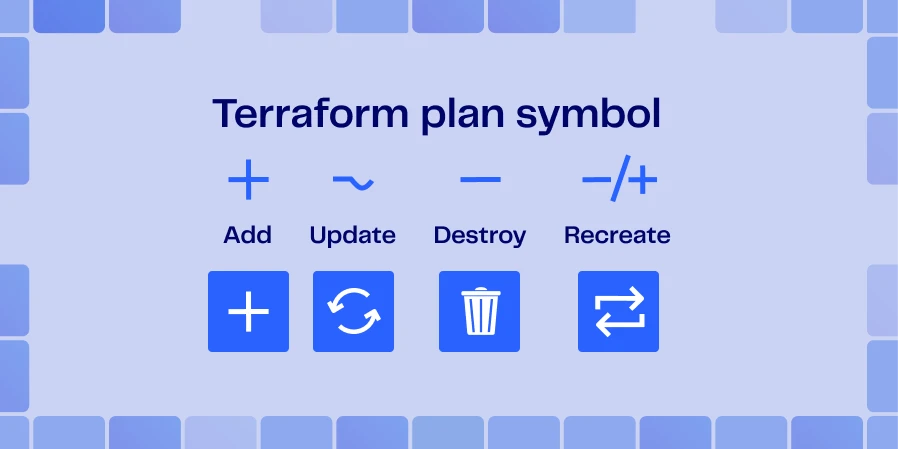
Reviewing these sections with the Atlantis Plan enables drift detection, catching of typos, and removing the need to run terraform commands locally to validate variables in the code. However it’s important to manually verify changes to sensitive resources like production load balancers, databases, and ensure they are not deleted.
ControlMonkey automates these audits by applying policy-as-code guardrails to each Atlantis plan, auto approve changes deemed safe, and mark changes that require additional examination. It reduces the burden on tiresome manual checks, fosters uniform standards, streamlining Terraform workflows, and ensuring sustained compliance of the infrastructure.

Did you know you can to streamline Atlantis plan with ControlMonkey’s automation? ControlMonkey can integrate with your existing Atlantis pipeline.
Integrating Security Tools with Atlantis Plan
Once executed, the Terraform plan displays the changes affecting the resources. Yet it has limited capability in catching policy violations and risks. Therefore, it’s important to incorporate security and policy governance platforms designed for IaC that can be connected with the CI/CD pipeline.
Checkov
Checkov is a code analysis tool created by Prisma Cloud. It uses a graph-based engine for Terraform, CloudFormation, and Kubernetes misconfigurations checking and compliance violations. Checkov has more than 1,000 policies, is integrated with CI/CD pipelines and can be used for code analysis and compliance checking. Developers can quickly resolve false positives with inline comments.
Trivy
Trivy is an integrated scanner tool for both containers and infrastructure code. The scanner estimates containers’ images, filesystems, and also examines misconfigurations in Kubernetes, CloudFormation, and Terraform, providing reports as JSON, SARIF, and HTML. The container and infrastructure code vulnerability database is fetched from an updated database, in which the scanner is continuously maintained.
KICS
KICS (Keeping Infrastructure as Code Secure) scanning uses standard query techniques for scanning infrastructure definitions. It has more than 1,500 prompts and is compatible with Terraform, Kubernetes, Docker, CloudFormation, Ansible, and Bicep. To ease KICS’ assistance for teams with proprietary markup, It recentralizes language for CI/CD integration definitions.
ControlMonkey
ControlMonkey works in tandem with these scanners. It automatically aggregates the output from scanners, enforces a suite of organization-specific policy-as-code rules for every Atlantis plan, and blocks merges when high-severity issues exceed a predefined threshold. It makes the scanner output actionable as PR comments, automatically approves plans that are all compliant, and unifies a team around a central dashboard to track remediation progress.
Running these tools after an atlantis plan (for example, via GitHub Actions) will post their findings as additional PR comments or status checks. This brings attention to insecure configurations that may not be readily apparent from the plan diff. You can stop the build if the security report has high-severity findings, which guarantees that misconfigurations will not get to terraform apply.
Best Practices for Atlantis Plan
- Execute an Atlantis plan on every PR, even when tweaking documentation. Terraform might encounter stray state changes or detect drift and autoplan guarantees that there will be no surprises at apply time.
- Enforce pre-apply Atlantis approval rules – This is understandable using branch protections and one reviewer to implement the four-eyes principle. You may also want to enforce pre-commit hooks to clean the plan using
terraform fmtandterraform validate.
- Use projects to handle several directory trees – Setup Atlantis to separate each Terraform root module as its own project within
atlantis.yamland set when_modified paths to only trigger the relevant plans. For large monorepos, refer to the multiple-directories section in the Atlantis documentation to avoid creating “mega-plans”. - Understand your constraints – Since Atlantis Plan is self-hosted, you will be responsible for running the server, state file locking, and scaling your system. Also, it doesn’t support wildcard directories, high availability, and serial run processing. This makes it more suitable for small teams, and only in the Plan you can expose sensitive data. Basic access controls leave it to you to mitigate the gaps or use other, potentially managed, solutions.
Conclusion
Incorporating Atlantis Terraform Plan as the bare minimum quality control requirement helps to lift Terraform from ad-hoc version and command-line control to a structured workflow that is auditable. This makes each adjustment automatically prepared, contextually reviewed, and security scanned, and is only applied following approval.
This method enhances uniformity, quickens deployment cycles, and leaves an unambiguous audit trail. For scaling this method, refer to the multiple-directories guide in the Atlantis documentation and understand the tool limitations.
When your team needs to establish IaC governance along with Atlantis Plan, use ControlMonkey Platform to confidently scale workflows and for strict policy enforcements/

A 30-min meeting will save your team 1000s of hours
A 30-min meeting will save your team 1000s of hours
Author