TL;DR
- A ransomware backup plan should have protection for both data recovery points and configuration state.
- Having immutable backup points makes it difficult to remove or corrupt by threats.
- Teams need to continuously test and validate resilience with Backup and Recovery tools.
- Backup and recovery strategy should be aligned with RTO and RPO.
- Teams can recover cloud and SaaS configuration and restore data using ControlMonkey.
A good ransomware backup plan should cover more than files, databases, and snapshots. Attackers can remove recovery points, reduce the quality of backup coverage, alter IAM, compromise the DNS and alter networking configurations. They can also modify settings related to SaaS applications.
Having data backup alone won’t help for business continuity. For instance, if the cloud environment is compromised, restoring data from the backup won’t solve the problem. Therefore it’s important to set up data backups using backup tools and infrastructure configurations using ControlMonkey.
Why Traditional Backups Fail Against Ransomware
If ransomware attacks target the backup layer it could make traditional backup systems ineffective. The attackers may search for admin access, backup passwords, retention, replication jobs, and restore workflows. They can remove or corrupt recovery points, affecting the safest recovery path.
Modern Backup and Recovery solutions should presume the backup layer is having a higher threat of attack. To reduce the risk we need to follow several best practices, setting up immutable backups, isolated copies, MFA and least privilege. For infrastructure configuration ControlMonkey provides secure access and immutable configuration states protected from ransomware or destructive changes.
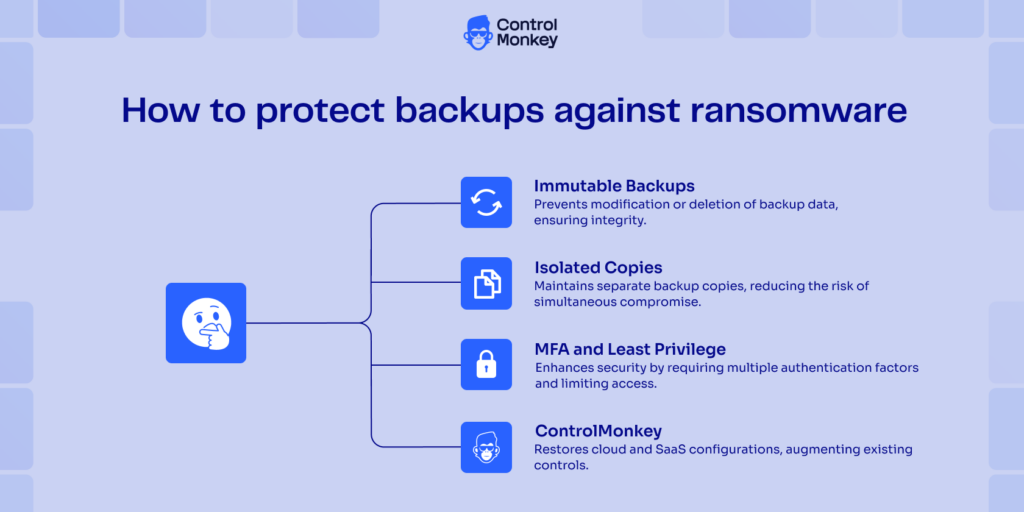
Backups are now a primary target
Ransomware attackers are aware that clean recovery points change the recovery conversation. That’s why they will often encrypt, delete or tamper with backups. They may also alter retention policies or terminate backup jobs without notifying.
Immutable Backups enhance Data Protection to help recover points from deletion and tampering. The data protection layer can be supported by native tools available in the cloud such as AWS Backup, Azure Backup, Google Cloud Backup, and SaaS Backup. For instance, AWS Backup Vault Lock offers WORM-like protection for backup vault recovery points. ControlMonkey provides support for immutable backups for infrastructure configuration.
Together, these will help to establish a solid foundation for your ransomware backup strategy.

Watch the AWS Webinar on Hidden Cloud DR Gaps
Ransomware recovery is not only about restoring data. Learn the 4 hidden gaps that make cloud disaster recovery fail at scale — including IAM, DNS, infrastructure drift, and configuration recovery.
“We have backups” is not the same as “We can restore”
A team can have backups and still fail recovery. There can be many reasons for this. Coverage may be incomplete, verification may be stale, or restore steps may depend on one engineer who is offline during the incident. That is a risky place to be during ransomware recovery.
Recovery Readiness comes from tested restores, measured Recovery Time, and clear ownership. This needs to be aligned with the company RTO (how fast the system must recover) and RPO (how much data loss the business can tolerate) objectives.
These numbers shape Business Continuity decisions, not just backup schedules. ControlMonkey helps improve recovery readiness by showing configuration drift and known-good cloud configuration state.
Why Cloud Configuration Is Critical in a Backup Strategy for Ransomware
It is critical that data is restored, but when the environment is damaged, data alone is not enough. If a database snapshot can be successfully restored, but the application fails, the business can’t continue its usual operations.
Cloud configuration recovery is one of the key components of a robust backup strategy for ransomware. That includes IAM, DNS, networking, security groups, firewall policies, cloud policies, and SaaS settings. This is what a lot of “old-fashioned” backup plans miss.
ControlMonkey monitors configuration drift across your cloud infrastructure as code. This enables teams to regain control of their data environment after malicious changes in infrastructure done by ransomware attackers. Recovery becomes straightforward with direct access to different versions of your infrastructure states tracked in ControlMonkey.
Core Components of a Ransomware Backup Strategy
A ransomware backup strategy should combine redundancy, isolation, verification, access control, and configuration recovery. Each part reduces a different recovery risk. Data copies protect history, while configuration recovery protects the system shape needed to use that history.
ControlMonkey is not a replacement for AWS Backup, Azure Backup, Google Cloud Backup, SaaS Backup, or security tools. It acts as an additional configuration recovery layer. That helps teams recover critical infrastructure and SaaS settings around restored data.
Use the 3-2-1-1-0 rule for Ransomware Backups
The 3-2-1-1-0 rule gives teams a practical baseline for ransomware backups. Keep 3 copies of data, use 2 different storage types, keep 1 offsite copy, keep 1 immutable or isolated copy, and aim for 0 backup verification errors. This model helps prevent one compromised system from destroying every recovery option.
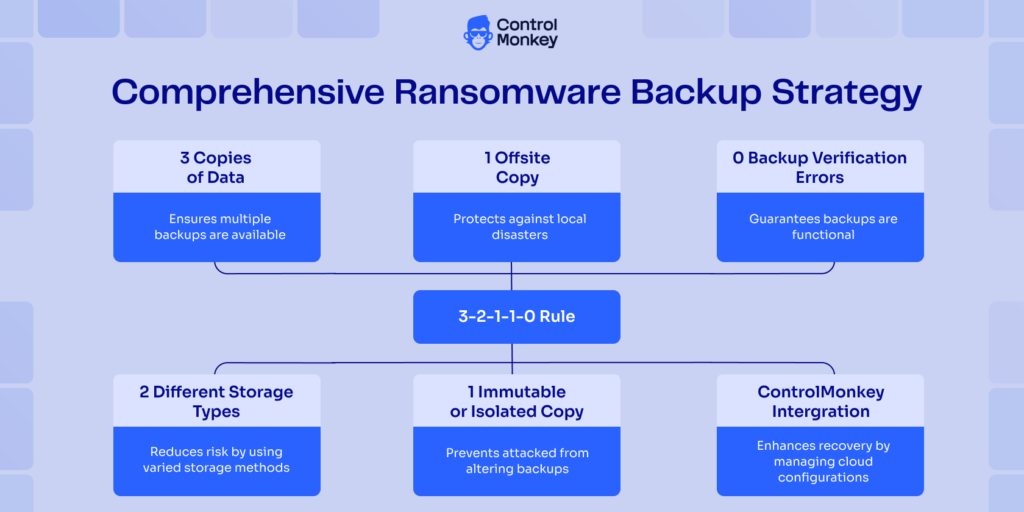
The rule is useful because ransomware and backups are now tightly linked. Attackers often search for backup paths before they encrypt production systems. A clean, isolated copy gives the recovery team options.
The 3-2-1-1-0 rule protects data copies. ControlMonkey fulfills the immutable isolated copy for configuration states and helps teams recover the cloud environment configuration. Without that layer, the recovered workload may still be unreachable.
Make backups immutable and isolated
Immutable and isolated backups minimize the risk of the destruction of recovery points by attackers. Azure Backup embraces the idea of immutability in a vault, and Google Cloud Backup and DR introduce recovery patterns to aid teams with planning for Ransomware Protection. These tools provide protection to the data layer, which alone is not sufficient.
Therefore you need to follow several best practices. You can use immutable storage solutions in appropriate places, differentiate between backup admin and production admin and set up notifications for policy changes, attempt to delete policies, unusual restore activity, unexpected failure of backups, etc.
Isolated infrastructure configuration states in ControlMonkey work together with data backup tools to assist in Data Protection and environmental recovery.
Increase backup frequency based on business criticality
Backup frequency should match RPO requirements, and those requirements may vary for different workloads. Authentication systems, billing infrastructure, customer-facing APIs, and core databases usually need tight recovery targets. On the other end, internal reporting tools can tolerate longer gaps.
Therefore, using one backup schedule across every workload is a common mistake. A ransomware backup strategy that treats a batch analytics job like a payment gateway transaction processing creates unnecessary risk. Each workload should have a recovery target that matches its business impact.
ControlMonkey helps maintain recoverable configuration state as cloud environments change. Data freshness and configuration accuracy should both reflect workload priority. Otherwise, a fresh backup may still restore into an environment that no longer works with the data.
Automate verification, testing, and strict access controls
Teams should run restore tests, validate data integrity, and track the RTO and RPO they actually achieve. These drills will help to act with confidence when a situation comes. Having strict access control by setting up MFA, least privilege, and alerting on suspicious backup activity is also critical to safeguard systems from attackers.
A restore drill should prove more than data recovery. It should prove that IAM, DNS, networking, policies, and SaaS access still work. If those layers fail, users will still see an outage.
ControlMonkey supports this by detecting unauthorized infrastructure changes and drift. It helps teams catch configuration issues before they become hidden recovery blockers. That gives teams stronger Cyber Resilience when recovery needs to happen fast.
How to Operationalize a Backup Strategy for Ransomware
A strategy only works when teams turn it into a process, ownership, tests, and automation. Someone must own backup coverage. Someone must own restoration testing. Someone must know which systems need to recover first.
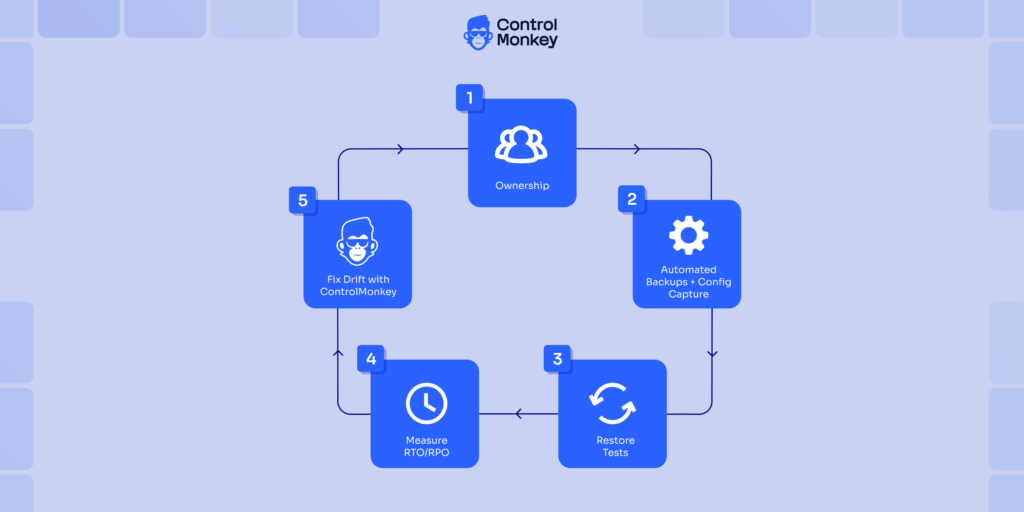
ControlMonkey helps operationalize recovery by making configuration state visible, versioned, and easier to restore. Together with data backup tools, it makes the backup strategy ransomware plan practically executable under pressure.
Why dataDefine RTO and RPO for an Effective Backup Strategy Ransomware Plan
RTO and RPO targets guide backup frequency, restore priority, system ownership, and recovery order and need to be targeted based on the workload tier. Tier 0 systems may include authentication, payment, and customer APIs. Lower tiers may include batch jobs, analytics, or internal tools.
ControlMonkey helps teams compare recovery goals with actual configuration recovery readiness. If a Tier 0 service depends on unmanaged DNS configuration or manually changed IAM, the plan has a hidden risk. Those gaps should be fixed before an incident.
Build and rehearse a clean restore workflow
A clean restore workflow should be documented and tested. It should validate backup integrity, reduce reinfection risk, and define recovery order. It should also explain when teams can safely reconnect restored systems to production traffic.
Real drills expose small problems early. Restored account lacks permissions, network path to the restored database is blocked or SaaS access policies were changed outside IaC are few examples that could be early detected with drills.
A clean restore workflow should include configuration validation. ControlMonkey helps teams compare the restored environment against a known-good configuration state. That helps teams find drift before users find broken services.
Use automation and anomaly detection to reduce recovery risk
Fast incidents create human error. Engineers switch between consoles, scripts, wikis, and chat threads. The risk grows when recovery depends on manual steps.
Automation and anomaly detection reduce that risk. Teams should detect unauthorized infrastructure changes, prevent configuration drift from going unnoticed, and restore environments in a consistent way. They should also protect clean restore points while the incident is still moving.
ControlMonkey strengthens this layer by detecting unauthorized infrastructure changes and configuration drift. It helps teams avoid hidden recovery blockers providing consistent restoration with least manual involvement.
How ControlMonkey Strengthens a Ransomware Backup Strategy
The best backup strategy for ransomware extends recovery beyond data, and this is where ControlMonkey strengthens the plan. Backup tools restore files, snapshots, databases, and workloads. ControlMonkey helps recover the cloud and SaaS configuration including IAM, DNS, networking, cloud policies, SaaS settings, and other infrastructure configurations.
These settings decide whether restored data can actually serve users again. ControlMonkey should sit beside backup, security, monitoring, and incident response tools, not replace them.
Extend ransomware recovery beyond data
During a ransomware incident, attackers may change IAM roles, DNS records, security groups, network routes, or cloud policies. They may also damage SaaS settings that teams need for normal operations. Traditional backup tools usually do not restore that full configuration layer.
ControlMonkey helps recover cloud infrastructure configuration after destructive changes. It tracks cloud and SaaS configuration, supports cloud configuration backup, and helps teams understand what changed.
Make environments reproducible and easier to restore
Recovery becomes easier when the environment is reproducible. Having infrastructure in code helps, drift detection, rollback, and restore the environment to a known-good configuration state if needed. It helps to rebuild cloud resources with more confidence.
This supports Disaster Recovery, Business Continuity, and Cyber Resilience. It also reduces the manual work and assists automated rebuilds. Manual work may still happen, but it should not be the foundation of the plan.
ControlMonkey helps turn infrastructure state into a format that teams can review, version, and restore. That gives engineering leaders better visibility into recovery gaps. It also helps SREs and platform engineers avoid rebuilding from memory.
ControlMonkey before, during, and after incidents
Before incidents, ControlMonkey helps reduce drift and improve governance. It gives teams visibility into real cloud and SaaS configuration. That makes recovery planning more grounded in the actual environment.
During incidents, ControlMonkey supports infrastructure rollback and rebuilding to work. It helps teams restore environment configuration around recovered data. That can reduce delays caused by broken IAM, DNS, networking, or policies.
After incidents, ControlMonkey improves auditability, Recovery Readiness, and operational maturity. Teams can review what changed and where recovery slowed down. That insight helps improve the next recovery drill and the next incident response plan.

A 30-min meeting will save your team 1000s of hours
A 30-min meeting will save your team 1000s of hours
Author