When teams adopt infrastructure as code (IaC), they need tools that can blend into existing Git workflows while automating Terraform plan and execution. Terraform Atlantis has emerged as a go-to bridge between GitOps and infrastructure teams, providing a plug-in solution that directly supports reviewing any infrastructure modifications.With Atlantis automation integrated into the pull-request cycle, you can listen to webhook events from Pull Requests and run terraform plan commands automatically. After verifying the output, a reviewer can add a comment to execute atlantis apply without ever leaving your Pull Request. This guide shows a complete overview of how Terraform Atlantis fits into the Git-based IaC workflows.
3 Reasons DevOps Still Use Atlantis Terraform
- Faster, safer PR automation
- Consistent, auditable workflow
- Centralized, conflict-free execution
When Atlantis Might Not Be the Right Fit for You
Atlantis shines at Git-driven Terraform automation, yet it isn’t a one-size-fits-all platform. Ask yourself these seven questions before you commit. If several answers are “no,” you may need a more enterprise-grade IaC solution.
1. Can you run, secure, and maintain your own remote-state backend and own uptime for the service itself?
Atlantis makes provision and hardens S3 + DynamoDB (or Azure Blob, etc.) and manages upgrades, monitoring, and 24×7 availability.
2. Do you have a strategy to scale high PR traffic and parallel workloads?
Atlantis executes sequentially where large monorepos or surge periods can create queues, whereas ControlMonkey runs plans/applies in parallel across dedicated runners.
3. Will basic CODEOWNERS reviews and hook-based checks meet your compliance needs?
Atlantis offers only simple locks and PR reviews where fine-grained RBAC, multi-team boundaries, and policy gates require extra tooling, while ControlMonkey bakes them in.
4. Can you operate without a centralized dashboard for drift, cost, and job visibility?
Atlantis keeps all feedback in PR comments on real-time drift alerts, cost views, or job boards so you’ll need additional tools for observability.
Does Atlantis Terraform Automation Have an Alternative?
The alternative for Atlantis Terraform is ControlMonkey, a fully-managed SaaS that fills the gaps self-hosted Atlantis leaves open. ControlMonkey keeps the familiar pull-request workflow but layers enterprise-grade governance, visibility, and resilience on top.
ControlMonkey Key advantages as an Atlantis Terraform alternative
- Built-in governance & compliance: Fine-grained RBAC, policy gates, and real-time drift detection are native features with no custom hooks required.
- Scale without bottlenecks: Parallel runners execute multiple Terraform plans and apply simultaneously, eliminating the single-threaded queue that slows Atlantis in busy repos or monorepos.
- AI-powered “cloud-to-code” onboarding: Automatically generates Terraform code and state files from existing cloud resources, speeding migration and expanding coverage.
- Resilience baked in: Daily IaC backups, instant rollback, and disaster-recovery workflows protect production environments capabilities Atlantis lacks.
- Full cloud inventory & cost visibility: Dashboards surface unmanaged resources, drift, and spend insights, giving teams a complete picture of their IaC posture.

Struggling with Atlantis limitations?
ControlMonkey enhances governance, visibility, and automation instantly
Advanced Atlantis Terraform Capabilities
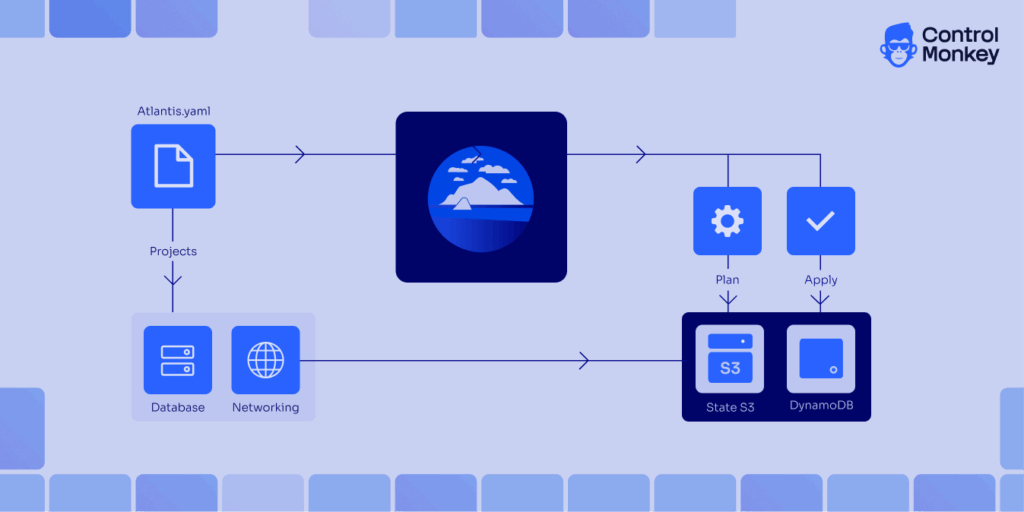
Atlantis has built-in support for Monorepos allowing you to use multiple projects in a single Git repository. You can define multiple Terraform projects in an atlantis.yaml file and set up dependencies across them. This lets you create your own custom workflows, use pre‑ and post- hooks, and run things in parallel.
version: 3
parallel_plan: true
parallel_apply: true
projects:
  - name: networking
    dir: infrastructure/networking
    autoplan:
      enabled: true
      when_modified: ["*.tf", "*.tfvars", "modules/network/**/*.tf"]
    terraform_version: 1.5.0
    execution_order_group: 1
  - name: database
    dir: infrastructure/database
    autoplan:
      enabled: true
      when_modified: ["*.tf", "*.tfvars", "modules/database/**/*.tf"]
    terraform_version: 1.5.0
    execution_order_group: 2
    depends_on: [networking]
The example above, adapted from Scalr’s best practices, stores the configuration in version control; setting parallel_plan and parallel_apply enable concurrent runs only for independent workflows or projects. If you define project dependencies or execution order groups, those workflows will run sequentially.
How to integrate Atlantis Terraform with CI/CD
Let’s look into a step by step guide on how to setup Atlantis Terraform Pull Request autom parallel_plan and paraation, where every plan and apply is fully traceable inside the PR.
First you may need to setup Atlantis server with access to your Git Repsitory with access tokens and CI workflow using Webhooks.
Integrating Atlantis Terraform Step 1: Create or Update a Pull Request
When a developer pushes Terraform changes and opens (or updates) a PR in GitHub, GitLab, Bitbucket, or Azure DevOps, the Atlantis webhook instantly detects the event.
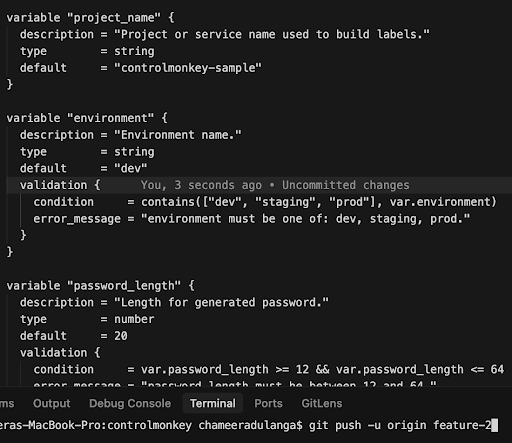
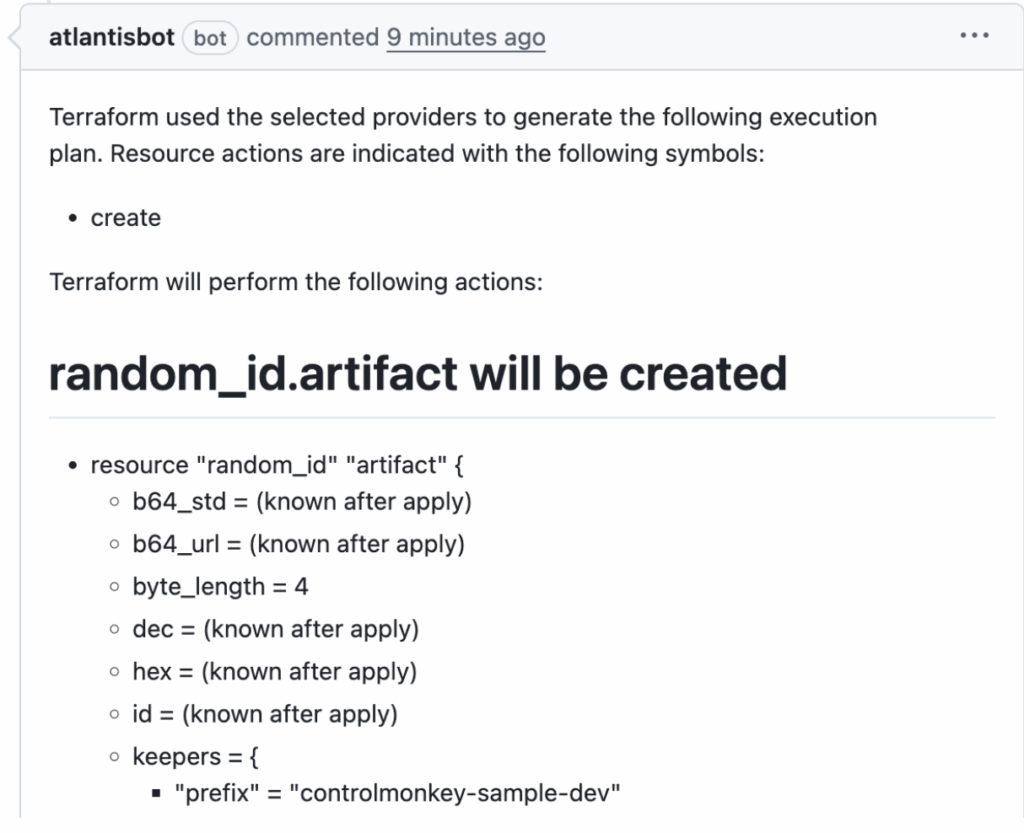
Integrating Atlantis Terraform Step 2 – Automatic terraform plan & Inline Comment
Atlantis runs terraform plan for the code modified by the commits in the PR and posts the full plan as a comment right inside the PR thread. This allow reviewers to inspect every change without leaving the PR section in your Git repository.
See the official Atlantis Terraform Pull Request automation docs and ControlMonkey’s companion guide on extending these workflows.
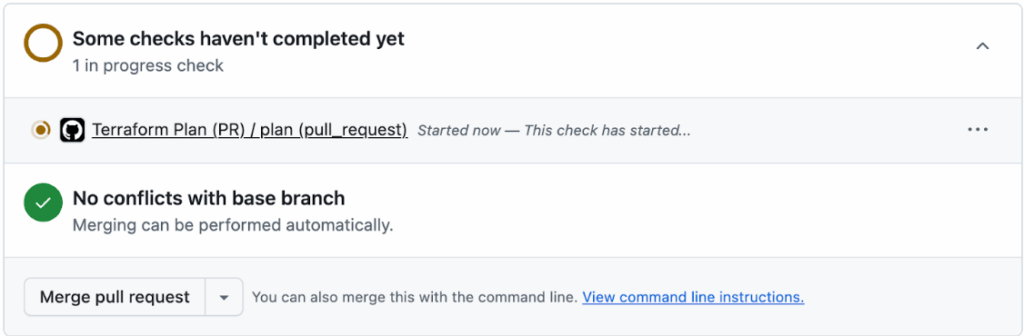
Integrating Atlantis Terraform Step 3 – Review, Iterate & Re-Plan
Teammates discuss the changes in the PR, request for modifications, and can push additional commits as needed. Each push to the PR branch automatically triggers a fresh plan and comment, ensuring the review cycle stays in sync.
Integrating Atlantis Terraform Step 4 – Approve & Apply via Comment
Once the plan looks good, an authorized reviewer types atlantis apply (or a custom command you configure) in a PR comment. Atlantis locks the workspace, executes terraform apply, and comments the result back to the PR.

Integrating Atlantis Terraform Step 5 – Merge & Unlock
After a successful apply, the PR can be merged by the reviewer. Atlantis releases its state lock so other jobs can proceed, and the workflow is complete. Atlantis Terraform Pull Request automation, the merge button only lights up once the reviewed plan has been safely applied.
Connecting Atlantis Terraform to Git Platforms
Atlantis has Webhooks, so you can connect it to basically any Git platform. It’s a piece of cake to link your Git platform to Asturias, all you have to do is set up personal access tokens, a webhook secret, and allow access to the specific repositories you need. When you set up, you need to put in your secret values and token to the environment which is where the secrets will stay. Atlantis keep tabs on Pull Requests and uses tokens to comment on them on the platform.
How to Connect Atlantis Terraform to GitLab/Bitbucket/Azure DevOps
For the integrations create an access token or set up an OAuth app. Then you can follow the same steps to set up your Atlantis webhook by providing the base url to your CI pipeline.
How to Connect Atlantis Terraform to GitHub
To connect Terraform Atlantis with GitHub, create a personal access token(PAT) with repository scope and provide it accessible to the Atlantis container. After that you can set a Webhook from your GitHub repository that points to the Atlantis server URL.
Atlantis can use Terraform Cloud as a remote state backend. Terraform Cloud’s remote execution mode is not used here and Terraform commands run inside Atlantis.
docker run -d --name atlantis \
  -p 4141:4141 \
  -v $HOME/.atlantis:/home/atlantis/.atlantis \
  -e ATLANTIS_GH_USER=your-github-user \
  -e ATLANTIS_GH_TOKEN=your-github-token \
  -e ATLANTIS_SECRET=your-webhook-secret \
  -e ATLANTIS_REPO_ALLOWLIST="github.com/your-org/*" \
  -e ATLANTIS_URL="https://atlantis.your-domain.com" \
  runatlantis/atlantis:v0.35.1
You can also deploy Atlantis using a Helm chart in Kubernetes. Current installation instructions and Helm charts can be found in the GitHub repo runatlantis/atlantis.
Or, just as with Atlantis, you can set up ControlMonkey for the same Git repositories and remote-state backends. It will take in every plan/apply event, incorporate drift detection and cost insights on top of the runs, and provide a dashboard, and policy gates which are not available in Atlantis. ControlMonkey also has a SaaS offering so, if you want to completely offload operations, you can have the same Pull Request workflow without the hassle of managing tokens, upgrades, or uptime by replacing the self-hosted Atlantis container with ControlMonkey’s SaaS runners.
Dive Into the ControlMonkey Operational Scaling Manual
Example Atlantis Terraform YAML Configuration
Each Git repository by convention should contain an atlantis.yaml file at its root. This file defines projects, specifies directories, sets Terraform versions and defines workflows, forming the backbone of your Terraform workflows.
Important fields include: YAML format version (currently 3).
- projects: list of project blocks defining name, directory (dir), workspace, Terraform version, dependencies and autoplan settings.
autoplan.when_modified: patterns used to trigger Atlantis when matching files change.parallel_plan / parallel_apply: enable concurrent plans and apply operations across independent Terraform projects.- workflows: define custom workflows, pre/post hooks and policy checks.
By tailoring atlantis.yaml to your repository structure, you ensure that only relevant parts of a Monorepo run on each plan. Therefore, it is recommended to group related resources together, using modules for reusable components and separating environments to limit the impact.
Atlantis Terraform at Scale: Best Practices
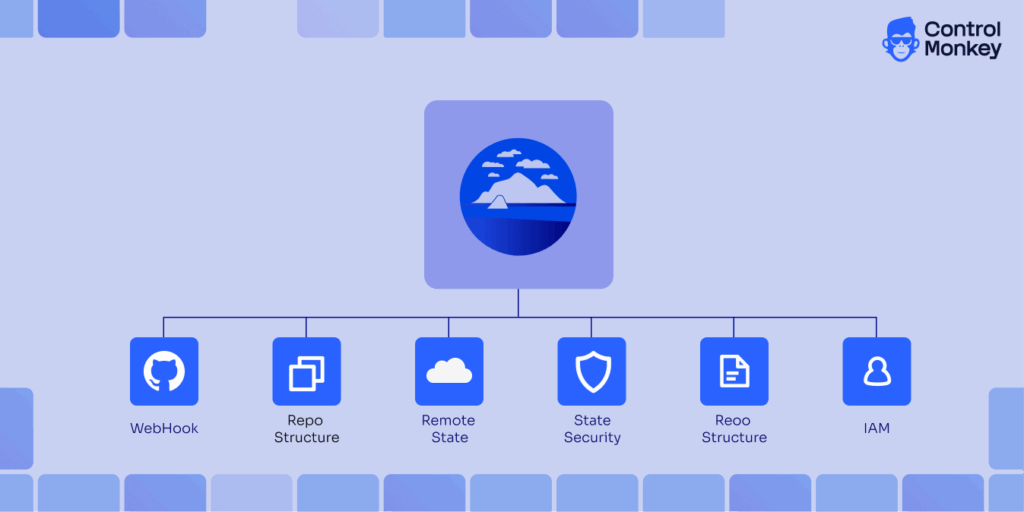
Structure repos clearly
Group modules by component and environment, and in Atlantis, define each environment as a project.yaml makes it easier to manage Terraform.
Use remote state & locks
Store state in a backend (like S3 and DynamoDB) and use Atlantis project locks to keep Terraform state safe and avoid race conditions.
Least‑privilege IAM:
Set up a separate role for Atlantis with the least amount of permissions. Then, set up the runtime environment to use the right AWS roles (for example, using AWS_ROLE_ARN) to keep infrastructure management safe.
Tight authorization controls:
Limit who can run commands via team allowlists or external auth scripts especially for production apply so that you perform Terraform actions only when approved.
Plan only what matters:
Use when_modified patterns to make sure that plans only run when files that are important change. This will help Atlantis work better.
Limitations of Atlantis Automation
Atlantis streamlines Terraform with PR-driven workflows that focuses on IaC workflow automation. When it comes to governance and observability you need different tooling for compliance, scale, and visibility.
- Self-hosting overhead: Those self-hosting their instance of Atlantis will need to handle maintenance, site stability, configuration of webhook integrations, and managing security integrations to state backends themselves. That operational overhead can quite possibly cancel out the velocity gain of Atlantis Terraform automation as those Terraform automation integrations bring operational automation to the lean SRE teams.
- Governance gaps: More granular RBAC, approval gating, policy disengagement need to rely on other external frameworks, additional tools, or hand built glue logic.
- PR-comment UI: There is no central place to see all the history of the runs, the costs, or the drift status. Most of the context is in PR comments.
- Scaling constraints: Concurrency is limited to the project’s workflow design. If there are many PRs or a heavy Monorepo, then there is a queue and it will take time to execute all of them.
No native drift handling: If there is drift, you will need additional services, as detection and remediation are not built in.
What to choose instead of Atlantis Terraform Automation?
Below is a detailed comparison of how ControlMonkey enhances and extends what Atlantis offers for Terraform automation and infrastructure governance:
| Feature | ControlMonkey Terraform automation | Atlantis Terraform automation |
| Cloud Asset Inventory & Terraform Coverage | Provides full cloud scanning & Terraform coverage insights. See all unmanaged resources. | Atlantis does not offer cloud account scanning for Terraform coverage, leaving users without a clear view of unmanaged resources. |
| Terraform Code Generation (Cloud to Code) | Automatically generates Terraform code & state files from your existing cloud resources. | No built-in Terraform code generation; engineers must manually create and maintain configurations. |
| Daily Cloud Backups | Disaster recovery ready. Instant rollback for misconfigurations. | Lacks infrastructure backup capabilities, increasing the risk of configuration loss and longer recovery times. |
| Drift Remediation | 2-way drift remediation: Fix code to match live environment or reconcile. | Does not detect or remediate drift. |
| ClickOps Scanner | Automatically identifies unsupervised manual operations performed in the cloud console. | No visibility into manual operations or console-based changes. |
| Terraform Modules Insights | Identifies outdated or insecure Terraform modules across your codebase. | Does not provide visibility into modules usage or versions. |
| Periodic scans of Terraform code for compliance vulnerabilities | Scans existing IaC code for misconfigurations and policy violations. | Cannot scan existing Terraform code for compliance or security vulnerabilities. |
| Support | Dedicated enterprise-grade support with SLAs and fast troubleshooting. | Community-only support; no guaranteed response times or enterprise assistance. |
| Scalability | Made for large businesses with multiple processes, cloud coordination, and various customizations. | Has difficulty with large teams because of line-by-line task completion and is missing enterprise functions like role-based access control and audit tracking. |
Conclusion
Atlantis automates Terraform through a plan–review–apply loop that create a solid quality gate for IaC review. With clear repo layout, selective plans, solid remote state, and least-privilege IAM, Atlantis delivers plenty of value. But its one-run-at-a-time model, DIY state upkeep, and missing perks like parallel jobs, drift detection, and granular RBAC can nudge scaling companies toward a managed IaC platform.
Therefore, if your team is starting to outgrow that foundation, explore our ControlMonkey vs. Atlantis comparison to see how enterprise-grade features stack up.

A 30-min meeting will save your team 1000s of hours
A 30-min meeting will save your team 1000s of hours
Author