
We have all been there: a critical application is “down,” and the organization turns into a madhouse. Users are opening tickets, managers are asking for updates, and everyone wants to know when service will be restored.
Except the application is running.
TravelDesk is an internal application for travel expense approvals. Employees submit requests, managers approve them, and finance processes the workflow.
The app is healthy. The database is online. The API responds. The frontend loads for anyone who can reach it.
And that last part is the problem: for anyone who can reach it.
When Access Fails Before the App Does
Access to TravelDesk depends on Microsoft Entra Conditional Access. The policy is designed to enforce a simple rule:
Allow TravelDesk only from approved office or VPN locations.
Block access from everywhere else.
In Entra terms, a Conditional Access policy targets the TravelDesk enterprise application, evaluates the user’s network location, excludes approved named locations, and applies a block control outside that boundary.
Clean design. Reasonable control. Very easy to break.
The Small Change That Breaks Access
One VPN IP range is removed from a named location. Not the whole policy. Just one range inside the object that defines “approved network.”
Yesterday:
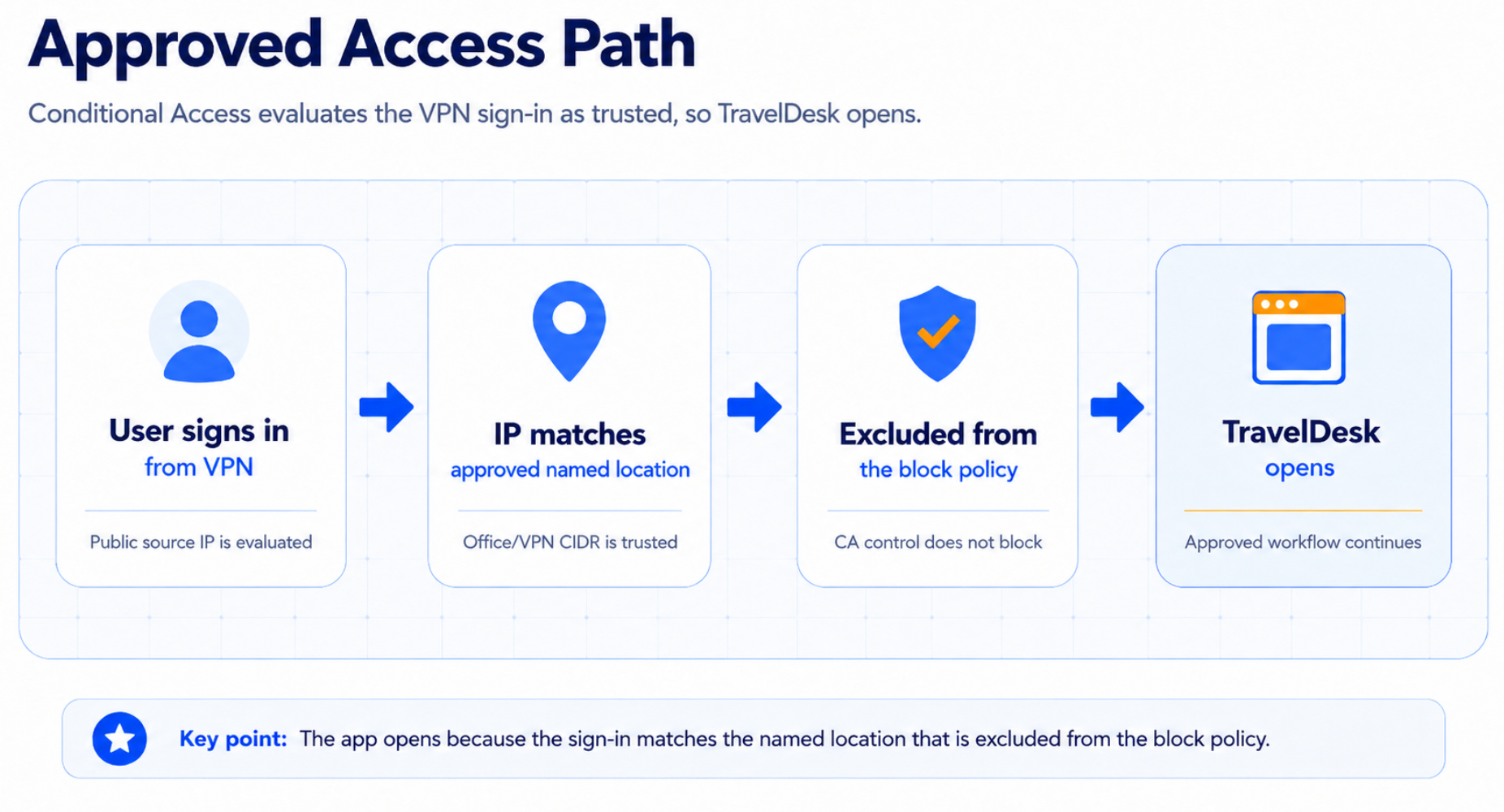
Today:
User signs in from the same VPN
-> IP no longer matches approved named location
-> User falls into the block policy
-> Access denied
Same user. Same app. Same VPN. Different result. Now the IT team opens the troubleshooting runbook.
Why the App Runbook Falls Short
Now the IT team opens the troubleshooting runbook.
Capture the symptom
Who is affected? What error do they see? Are they on VPN, office network, home network, mobile? Do they reach the TravelDesk login flow, or are they blocked before the app loads?
Reproduce from different paths
Test from an affected VPN range, an office network, and an unaffected location. If one network path fails and another works, the problem is probably not the app binary.
Check application telemetry
Review 5xx rates, latency, API health, auth callback errors, database connectivity, queue depth, background jobs, and recent deployments. If affected users do not generate backend requests, they are being stopped before TravelDesk.
Check edge and network layers
Review DNS resolution, CDN/WAF events, ingress logs, TLS issues, and network routing. If traffic is not being blocked there, move upstream again.
Check identity evidence
Review Entra sign-in logs for TravelDesk. Look at the Conditional Access result, policy applied, evaluated location, and failure reason.
At this point, the team has a strong conclusion
TravelDesk is healthy. Users are being blocked by Conditional Access.
The Problem Is Not Observability. It Is Recoverability.
Logs can show that access was denied. Entra sign-in logs can show which Conditional Access policy applied. They can show the evaluated location and the final access result.
That is useful evidence. But evidence is not recovery.
Knowing that Conditional Access blocked the sign-in does not automatically tell the team what the named location looked like yesterday, which IP range disappeared, or how to safely restore the previous access decision.
That is the missing step in most runbooks.
They are good at detecting application failure. They are weaker at recovering configuration drift. The broken state lives inside the configuration object.
One location was removed from a named location list. That changed how Entra evaluates sign-ins, but it does not look like a classic deleted-object restore.
Tiny distinction = Big outage.
What The Runbook Needs
The runbook needs a configuration recovery step.
Not just:
Check logs.
Find failed access.
Escalate to identity team.
A better runbook asks:
When did TravelDesk last work?
What changed after that?
Which control-plane object changed?
What was the last known-good configuration?
Can we restore that state without weakening the policy?
For this incident, the answer lives in the access decision chain:
Sign-in attempt
-> Target resource: TravelDesk
-> Conditional Access policy match
-> Network/location evaluation
-> Named location membership
-> Grant control
-> Final access decision
The drift is in named location membership. The friendly name Approved corporate networks is still there, but its contents are no longer the same.
The reference stayed stable. The meaning behind it changed.
That is exactly the kind of failure a normal application runbook is not built to recover.
A Runbook That Actually Recovers
A complete workflow looks like this:
Capture the failure pattern
Identify who is affected, what error they see, where they are connecting from, and whether the issue is limited to TravelDesk or also affects other applications.
Reproduce from multiple locations
Test from the affected VPN or office network, then from a known-good location. If one path fails and another works, the app is probably not the root cause.
Check application telemetry
Review API errors, latency, database connectivity, auth callback errors, queue depth, background jobs, and recent deployments. If affected users never generate backend requests, they are being stopped before the app.
Check the access path upstream
Review DNS, edge/WAF/CDN events, ingress logs, TLS, and routing. If traffic is not blocked there, continue upstream to identity.
Check identity evidence
Review Entra sign-in logs for TravelDesk. Look at the Conditional Access result, the policy applied, the evaluated network location, and the failure reason.
Establish the last known-good time
Anchor the investigation on the simplest reliable fact: “TravelDesk worked this morning.” Use last successful sign-ins, user reports, or completed approval activity to narrow the window.
Compare configuration state
Use ControlMonkey to compare the current Entra configuration against the last known-good recovery point.
Identify the drift
In this incident, the policy still exists and the named location still exists, but the named location no longer contains the required VPN or office egress range.
Restore the known-good access configuration
Restore the affected named location or related Conditional Access configuration through a governed workflow. Do not rebuild the policy from memory during the incident.
Validate recovery
Confirm affected users can reach TravelDesk, submit or approve expenses, and complete the workflow.
Validate the guardrail
Confirm unapproved locations are still blocked. The goal is not to weaken Conditional Access. The goal is to restore the intended decision.
Close the loop
Record what changed, when it changed, what recovery point was used, what was restored, and and whether the change path needs to move into IaC or tighter change control.
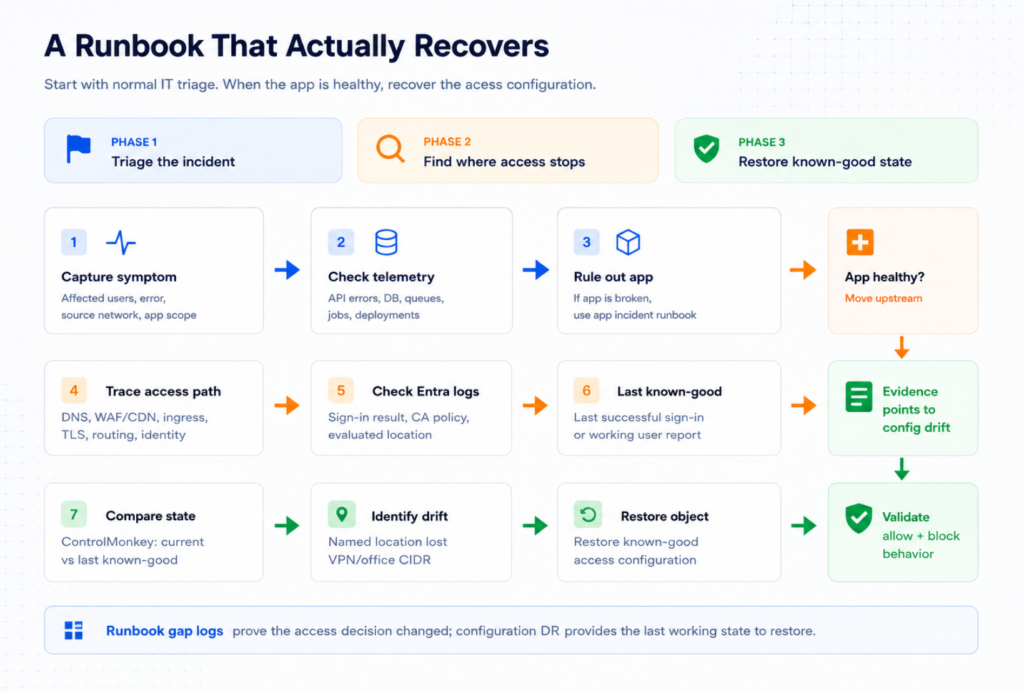
This is the difference:
A broken runbook proves the app is healthy and then leaves the team searching for the old configuration.
A complete runbook uses the last working state to restore the access path
How ControlMonkey Turns Evidence Into Recovery
During this incident, the hard question is not whether TravelDesk is healthy. The monitoring already answered that.
What did the access configuration look like when TravelDesk still worked?
ControlMonkey gives the team a way to answer that from configuration history, not memory.
Because in a real incident, nobody says:
“Ah yes, I removed 203.0.113.0/24 from the approved network object at 09:42.”
They say: “TravelDesk worked this morning.”
That is enough to start.
With ControlMonkey, the runbook becomes actionable:
Identify last known-good time
-> compare current Entra state to that recovery point
-> detect named location drift
-> restore the known-good access configuration
-> validate Conditional Access behavior
That is the difference between a runbook that proves the app is fine and a runbook that actually restores service.
Traditional monitoring tells you the application is working.
ControlMonkey helps recover the configuration that makes it reachable.

A 30-min meeting will save your team 1000s of hours
A 30-min meeting will save your team 1000s of hours
Author