Cloud security teams are great at finding risk. The harder part is fixing it safely, consistently, and at scale. That’s the automation story behind the new Wiz + ControlMonkey integration.
Wiz identifies cloud risks, misconfigurations, exposure paths, and policy violations across cloud and SaaS environments. ControlMonkey takes those findings and connects them to the infrastructure automation layer — mapping risks back to IaC, including Terraform, OpenTofu, Terragrunt, unmanaged resources, and drifted cloud assets.
The result: teams can move from manual, reactive remediation to governed, code-based action.
Why This Matters
Security findings often live in one system. Infrastructure changes happen somewhere else.
That disconnect creates delays, ownership gaps, and risky manual fixes. It also makes it harder to understand whether a cloud risk exists in code, in production, or in unmanaged infrastructure outside IaC.
With Wiz and ControlMonkey together, organizations can:
Validate infrastructure changes against real cloud risk before deployment
Map findings to live cloud resources and IaC definitions
Identify unmanaged and drifted resources tied to security exposure
Enforce guardrails before risky changes reach production
Automate remediation through controlled IaC workflows
The Automation Flow
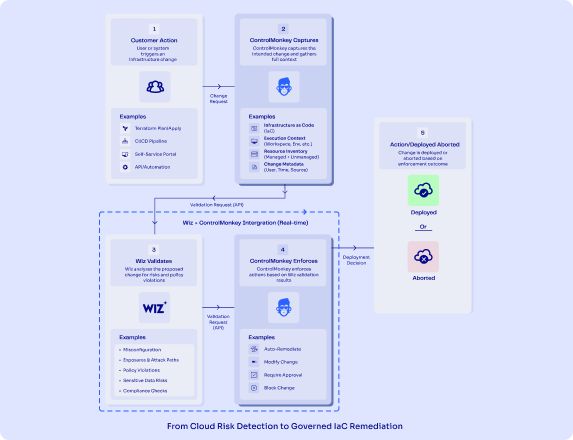
Click to enlrage: ControlMonkey Wiz Intergartion Flow
A cloud change begins — through Terraform, CI/CD, self-service, API automation, or another workflow.
ControlMonkey captures the intended change and the cloud context behind it. Wiz validates the risk, checking for misconfigurations, exposure paths, policy violations, sensitive data risk, and compliance issues.
ControlMonkey then enforces the right action: allow, require approval, modify, remediate, or block.
Instead of security findings becoming tickets, they become part of the infrastructure workflow.
Better Together
Wiz provides deep visibility into cloud risk. ControlMonkey turns that visibility into governed cloud automation.
Together, they help teams close the gap between detection and remediation — reducing manual work, eliminating blind spots, and keeping cloud environments aligned with approved IaC at scale.
Ready to connect cloud risk visibility with governed remediation?
Explore the Wiz + ControlMonkey integration today.
A 30-min meeting will save your team 1000s of hours
A 30-min meeting will save your team 1000s of hours
Zack is the Marketing Director at ControlMonkey, with a strong focus on DevOps and DevSecOps. He was the Senior Director of Partner Marketing and Field Marketing Manager at Checkmarx. There, he helped with global security projects. With over 10 years in marketing, Zack specializes in content strategy, technical messaging, and go-to-market alignment. He loves turning complex cloud and security ideas into clear, useful insights for engineering, DevOps, and security leaders.
ControlMonkey now introduces Snapshot Changes Over Time a historical diff layer for your cloud, Configuration, SaaS, Network and their dependencies
ControlMonkey now compares point-in-time snapshots of your infrastructure and shows exactly what changed between them: what was created, modified, or deleted. You can drill down to the resource level, view side-by-side differences, and understand how your environment evolved over time.
Why Change Visibility Matters
As cloud environments scale, so does the volume of change. Multiple teams are constantly updating infrastructure – some through IaC, others manually. Some changes are planned. Others are not. And many go untracked.
When incidents happen, teams are left without clear answers:
What changed?
When did it change?
Which version of the environment was stable?
Without this visibility, recovery becomes guesswork.
Teams need a reliable way to trace changes over time: both to investigate issues and to understand which point in time they can safely recover to. Just as importantly, they need a clear control layer to understand how their environment is evolving day by day.
The new feature works across all of your vendors: AWS, Azure, GCP, Datadog, Akamai, Cloudflare, Snowflake, Databriks, Launch Darkly and more. You have a single location to track them all.
How Snapshot Changes Over Time Works
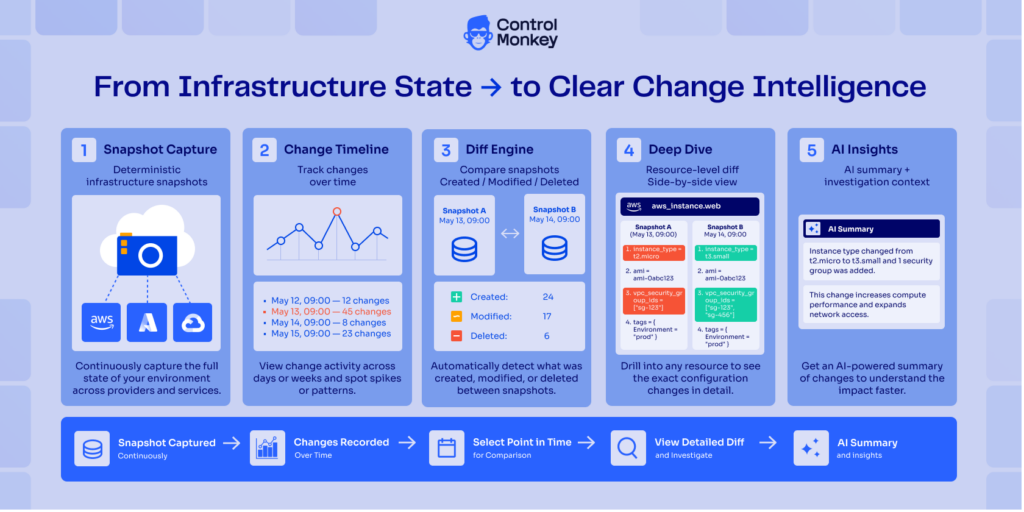
From snapshot capture to side-by-side comparison, ControlMonkey helps teams understand exactly how their infrastructure changed over time.
Snapshot and Capture
ControlMonkey continuously captures deterministic snapshots of your infrastructure state. This creates a reliable historical record of your environment across cloud, network, and SaaS systems.
Compare Changes Between Snapshots
ControlMonkey calculates the diff between two points in time and shows exactly what changed. Teams can instantly see what was created, modified, or deleted between snapshots.
Drill Down to the Resource Level
Users can click into a specific resource to inspect detailed changes over time. This includes side-by-side comparison of older and newer states, making it easy to understand the exact configuration delta.
Investigate with Context
Teams can explore change activity through a timeline view, spot unusual spikes or patterns, and understand when changes occurred. This helps investigate incidents, trace unexpected changes, and understand how dependencies evolved.
Summarize with AI
ControlMonkey KomoAI generates an AI summary of the differences between snapshots. This gives teams a faster way to understand what changed without manually reviewing every line. Even if they’re not Infrastruccture expert.
Review and Govern
By turning infrastructure history into an explorable change record, ControlMonkey gives platform teams a clearer control layer for governance, investigation, and recovery decisions. Teams can use this visibility to detect unauthorized changes, support audits, and identify the right recovery point with more confidence.
Stay Ahead with Cloud Governance and Change Control
As more teams, tools, and automation layers interact with your cloud, the volume of changes increases. Some are planned. Others are not. Without a clear view of how your environment evolves over time, teams are left reacting to incidents without understanding their root cause.
ControlMonkey gives you a deterministic, historical view of your infrastructure, across all of your vendors – so you can see exactly what changed, when, and how. By turning snapshots into an explorable change history, teams can investigate incidents faster, detect unauthorized changes, and confidently decide where to recover from.
Ready to take control? Explore Snapshot Changes Over Time today.
A 30-min meeting will save your team 1000s of hours
A 30-min meeting will save your team 1000s of hours
Zack is the Marketing Director at ControlMonkey, with a strong focus on DevOps and DevSecOps. He was the Senior Director of Partner Marketing and Field Marketing Manager at Checkmarx. There, he helped with global security projects. With over 10 years in marketing, Zack specializes in content strategy, technical messaging, and go-to-market alignment. He loves turning complex cloud and security ideas into clear, useful insights for engineering, DevOps, and security leaders.
ControlMonkey now supports GitHub Configuration Backup and Recovery, enabling teams to automatically back up and restore critical GitHub configurations, including repository settings, branch protection rules, permissions, and workflows.
GitHub controls how code is shipped, who can access it, and how pipelines operate – yet its configuration layer is rarely protected by a resilience solution.
Introducing GitHub Configuration Backup and Recovery
Protect repository configurations, access controls, and branch rules
Continuously capture workflows, policies, and configuration states
Restore GitHub environments quickly after incidents or misconfigurations
Reduce risk from human error, automation failures, or malicious changes
Extend disaster recovery to your software delivery control plane
Examples of protected GitHub configurations include:
Repository settings that define collaboration and visibility
Branch protection rules enforcing code quality and deployment safety
Permissions and access controls across teams and users
Webhooks and integrations connecting GitHub to external systems
Why Do You Need a Resilience Solution for GitHub?
GitHub is deeply embedded in your production delivery pipeline – meaning misconfigurations or compromises can immediately impact deployments, access control, and development velocity.
Here are some of the key risks teams face:
Ransomware or account takeover – What happens if your GitHub organization is compromised? Attackers could modify repositories, remove protections, or disrupt pipelines.
Cyber attacks / malicious actors – Unauthorized changes to workflows, permissions, or integrations can expose code, bypass controls, or break delivery processes.
Human error – Even experienced engineers make mistakes—removing branch protection, misconfiguring access, or altering workflows in the wrong repository.
Over-permissive AI agents – As AI-driven automation expands in CI/CD, agents with broad permissions can unintentionally introduce risky or large-scale configuration changes.
ControlMonkey helps teams safeguard GitHub by protecting the configuration layer that defines how code is managed, how pipelines run, and who has access.
Stay Ahead with GitHub Backup and Recovery
GitHub is no longer just a code repository – it is a critical layer in your infrastructure and application delivery pipeline. When configuration is lost or altered, pipelines break, access control is compromised, and recovery becomes manual and slow.
ControlMonkey brings GitHub into your Cloud Configuration Disaster Recovery strategy by continuously backing up configuration states and enabling fast, reliable restoration. This ensures that delivery workflows, governance policies, and access structures remain intact—even during outages or security incidents.
With full visibility into configuration changes and the ability to recover instantly, teams can reduce risk, maintain IaC alignment, and scale operations without losing control.
A 30-min meeting will save your team 1000s of hours
A 30-min meeting will save your team 1000s of hours
Zack is the Marketing Director at ControlMonkey, with a strong focus on DevOps and DevSecOps. He was the Senior Director of Partner Marketing and Field Marketing Manager at Checkmarx. There, he helped with global security projects. With over 10 years in marketing, Zack specializes in content strategy, technical messaging, and go-to-market alignment. He loves turning complex cloud and security ideas into clear, useful insights for engineering, DevOps, and security leaders.
ControlMonkey now extends Cloud Configuration Disaster Recovery to identity providers, protecting identity environments across Okta, Microsoft Entra ID, OneLogin, Ping Identity, and JumpCloud.
Modern cloud operations rely heavily on identity providers. During daily operations and incidents, SSO, MFA policies, and access rules control how users interact with infrastructure, SaaS applications, and internal systems.
Yet the configurations behind these systems – authentication policies, app assignments, roles, and access controls – are rarely protected by a solution for disaster recovery.
Identity DR Key capabilities:
ControlMonkey automatically captures daily snapshots of identity configurations so teams can restore access environments and maintain operational continuity during incidents.
Protect access control configuration Backup SSO settings, MFA policies, app assignments, roles, and identity rules created over time.
Restore identity environments quickly Recover identity configurations from versioned snapshots instead of rebuilding access policies manually.
Detect configuration drift in identity systems Track changes across IDP platforms and identify unexpected or unauthorized modifications.
Preserve identity-to-system relationships Maintain consistency between identity policies, application access, and infrastructure during recovery.
Extend disaster recovery beyond infrastructure Protect the broader cloud control plane including infrastructure, network, observability, and identity configuration.
Identity is not just another system – it’s the layer that connects users to everything else. Recovering identity in isolation doesn’t work. You need to restore it together with the infrastructure and applications it controls.
Aharon Twizer
CEO & Co-Founder
How does Identity Configuration Disaster Recovery work?
ControlMonkey Cloud DR solution continuously captures configuration snapshots from supported identity providers.
Each snapshot records the structure and settings of identity environments, including:
These configurations are versioned and stored securely, allowing teams to compare changes over time and restore previous configurations when needed.
If access policies are misconfigured, applications are disconnected, or identity rules break and and cause an incident – teams can restore identity configurations directly from a previous snapshot – without manually rebuilding/configuring access environments.
Why Disaster Recovery for the Identity Layer?
Traditional disaster recovery focuses on restoring data and storage. But modern cloud environments depend on access.
The identity layer connects users to infrastructure, SaaS applications, and internal systems – making it a critical part of the cloud control plane.
With ControlMonkey, teams can:
Maintain versioned backups of identity environments
Detect configuration changes and drift
Restore identity systems quickly during incidents
Ensure DR visibility with a clear Resilience Score
At scale, restoring access quickly remains a challenge. Identity configurations are complex, frequently changing, and tightly connected to other systems.
By extending configuration disaster recovery to identity providers, ControlMonkey helps teams maintain operational continuity across both systems and access.
ControlMonkey preserves and restores the relationships between identity, infrastructure, SaaS applications, and cloud resources — ensuring systems and access remain aligned after a recovery.
This prevents scenarios where identity is restored but underlying systems are not – or vice versa.
Ready to be Cyber Resilient?
Explore Cloud Configuration Disaster Recovery for Identity Providers or schedule a demo today.
Reference Table: Key Identity Provider Configurations Protected by ControlMonkeyenvironment.
Real-World Impact: Datadog dashboards, monitors, and alerting policies
Our Datadog dashboards, monitors, and alerting policies represent years of operational knowledge and tuning. Losing that configuration during an incident would significantly impact our ability to diagnose issues quickly. With ControlMonkey, we know our observability configurations are versioned and recoverable, ensuring we maintain visibility when it matters most
Doron Gutman
Director of DevOps and DevSecOps
Ready to be Cyber Resilient?
Explore Cloud Configuration Disaster Recovery for Observability or schedule a demo today.
Reference Table: Key Identity Provider Configurations Protected by ControlMonkey
Configuration
Description
Examples
SSO & Federation Settings
Configurations that define how users authenticate across systems and external identity providers.
Co-Founder and CEO of ControlMonkey. He has over 20 years of experience in software development. He was the CTO of Spot.io, which was bought by NetApp for more than $400 million. There, he led important tech innovations in cloud optimization and Kubernetes. He later joined AWS as a Principal Solutions Architect, helping global partners solve complex cloud challenges. In 2022, he started ControlMonkey to help DevOps teams discover, manage, and scale their cloud infrastructure with Infrastructure as Code. Aharon loves creating tools that help engineering teams. These tools make it easier to manage the complexity of modern cloud environments.
ControlMonkey now supports LaunchDarkly Disaster Recovery, enabling teams to automatically back up and restore critical LaunchDarkly configurations, including feature flags, segments, and views.
Why do you need a resilience solution for LaunchDarkly?
Feature flag platforms like LaunchDarkly are deeply embedded in your production environment meaning misconfigurations or compromises can have immediate, widespread impact.
Here are some of the key risks teams face:
Ransomware or account takeover – What happens if your LaunchDarkly account is compromised? An attacker could modify or disable critical flags, impacting availability and user experience.
Cyber attacks / malicious actors – Unauthorized changes to feature flags can be used to expose functionality, bypass controls, or disrupt your application.
Human error – Even experienced engineers can make mistakes – accidentally toggling the wrong flag or applying changes to the wrong environment.
Over-permissive AI agents – With the rise of AI-assisted workflows (e.g.,LaunchDarkly MCP server), agents operating with admin-level permissions can unintentionally introduce risky or large-scale changes.
ControlMonkey helps teams safeguard LaunchDarkly by protecting the operational logic that defines how features are released, who sees them, and how changes are rolled out.
Examples of protected LaunchDarkly configurations include:
Targeting rules defining rollout logic and user exposure
Segments used for user targeting and progressive delivery
Views organizing feature management workflows
With this capability, teams can:
Automatically back up LaunchDarkly configurations
Track changes to feature flags and targeting over time
Recover quickly from accidental changes or deletions
Reduce risk across production release processes
Restore feature flags and targeting logic without manual reconstruction
How LaunchDarkly Disaster Recovery Works
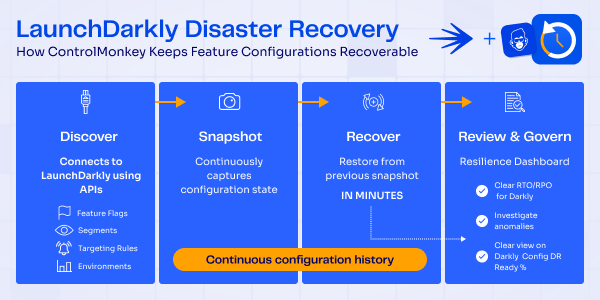
From discovery to recovery, ControlMonkey ensures LaunchDarkly configurations are always backed up, versioned, and ready to restore in minutes. Here is the full process:
Snapshot and Backup
ControlMonkey continuously captures the state of LaunchDarkly configurations and creates versioned snapshots.
This provides a reliable historical record of feature flags, segments, and targeting logic across environments.
Recover – Feature Flags, Segments, and Views
If configurations are deleted or misconfigured, teams can restore them from a known-good snapshot in minutes.
This eliminates manual rebuilding of feature flags and targeting rules—reducing recovery time and avoiding errors.
Review & Govern
The ControlMonkey Cloud Resilience Dashboard provides visibility into disaster recovery readiness across infrastructure and SaaS platforms like LaunchDarkly.
Teams can monitor protection coverage and identify resilience gaps before incidents occur.
Stay Ahead with Darkly Disaster Recovery
Feature management platforms like LaunchDarkly are critical to modern software delivery. Yet while organizations focus on application code and infrastructure, the configuration layer that controls feature rollout and targeting often remains unprotected.
ControlMonkey ensures LaunchDarkly configurations are protected alongside infrastructure and SaaS platforms. By continuously backing up configuration states and enabling rapid restoration, teams can recover quickly from outages, misconfigurations, and unintended changes—and maintain control over production behavior.
Ready to take control? Explore LaunchDarkly Disaster Recovery today.
Teams can restore feature flags, segments, and targeting logic from a known-good snapshot in minutes, reducing downtime and avoiding manual reconstruction.
A 30-min meeting will save your team 1000s of hours
A 30-min meeting will save your team 1000s of hours
Zack is the Marketing Director at ControlMonkey, with a strong focus on DevOps and DevSecOps. He was the Senior Director of Partner Marketing and Field Marketing Manager at Checkmarx. There, he helped with global security projects. With over 10 years in marketing, Zack specializes in content strategy, technical messaging, and go-to-market alignment. He loves turning complex cloud and security ideas into clear, useful insights for engineering, DevOps, and security leaders.
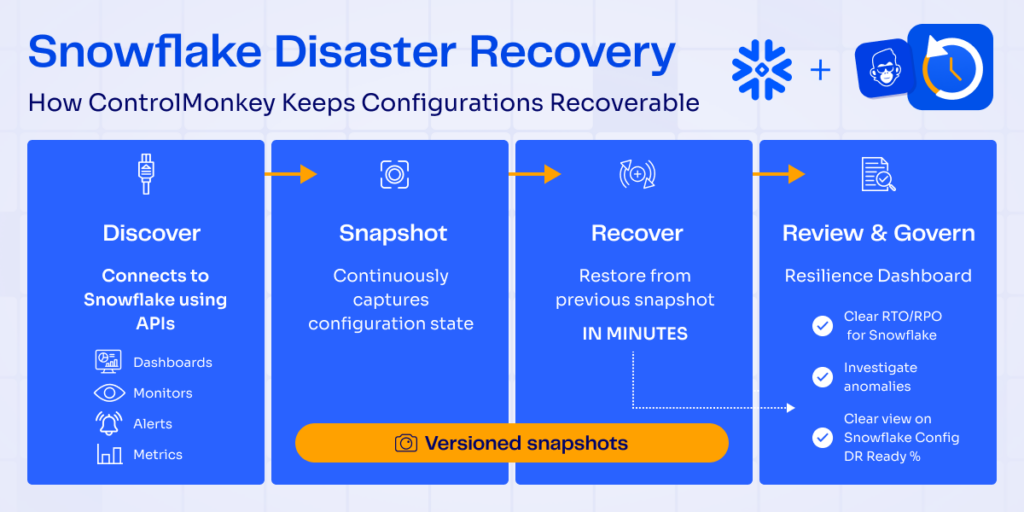
ControlMonkey now supports Snowflake Disaster Recovery, enabling teams to automatically back up and restore critical Snowflake configurations including roles, warehouses, schemas, and access policies when mistakes or incidents occur.
Snowflake powers some of the most critical data workloads in the cloud, yet its configuration layer is rarely protected by a cyber resilience solution.
Reduce operational risk across data infrastructure
Restore Snowflake environments without manual reconstruction
How Snowflake Disaster Recovery Works
ControlMonkey connects to Snowflake using secure APIs and automatically discovers configuration assets across the Snowflake environment. This discovery process maps the operational structure of the data platform, including access controls, compute resources, and governance settings.
These configurations define how Snowflake environments operate and are essential for governance, access control, and workload management.
Snapshot and Backup
ControlMonkey continuously captures the configuration state of Snowflake resources and creates versioned snapshots of those configurations.
This provides a reliable historical, good-know state record of Snowflake configurations.
Recover – Roles, Warehouses, Schemas, and Policies
If roles, warehouses, schemas, or policies are deleted or misconfigured, teams can quickly restore them from a known-good snapshot, recovering Snowflake configuration in minutes.
This eliminates the need for manual reconstruction of complex platform settings.
Review & Govern
The ControlMonkey Cloud Resilience Dashboard provides visibility into disaster recovery readiness across cloud infrastructure, observability platforms, and SaaS tools like Snowflake.
Teams can monitor protection coverage and identify resilience gaps before incidents occur.
Stay Ahead with Snowflake Disaster Recovery
Data platforms like Snowflake are critical to modern cloud operations. Yet while organizations protect data, the configuration layer often remains vulnerable.
ControlMonkey ensures Snowflake configurations are protected alongside infrastructure and SaaS platforms. By continuously backing up configuration states and enabling rapid restoration, teams can recover quickly from ransomware, cyber attacks, AI agents and configuration mistakes and maintain operational continuity.
Ready to be Cyber Resilient?
Explore Snowflake Disaster Recovery with ControlMonkey today.
A 30-min meeting will save your team 1000s of hours
A 30-min meeting will save your team 1000s of hours
Zack is the Marketing Director at ControlMonkey, with a strong focus on DevOps and DevSecOps. He was the Senior Director of Partner Marketing and Field Marketing Manager at Checkmarx. There, he helped with global security projects. With over 10 years in marketing, Zack specializes in content strategy, technical messaging, and go-to-market alignment. He loves turning complex cloud and security ideas into clear, useful insights for engineering, DevOps, and security leaders.
Observability Disaster Recovery is the new addtioan to Controlmonkey DR Soultion. Modern cloud operations rely heavily on observability. During incidents, dashboards, alerts, and monitoring rules are often the first place engineers turn to understand what’s happening.
Yet the configurations behind these systems – dashboards, alert policies, monitors, and escalation rules – are rarely protected by disaster recovery.
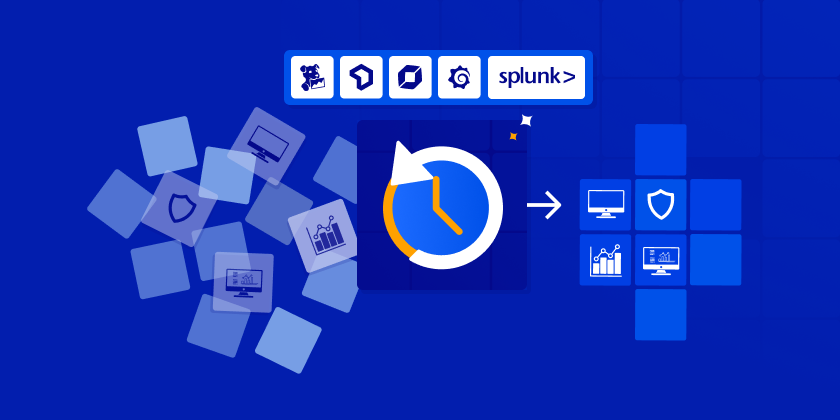
ControlMonkey now extends Cloud Configuration Disaster Recovery to observability platforms, protecting monitoring environments across Datadog, New Relic, Dynatrace, Grafana Cloud, and Splunk.
ControlMonkey automatically captures daily snapshots of observability configurations so teams can restore monitoring environments and maintain operational visibility during incidents.
Observability DR Key capabilities:
Protect operational knowledge Backup dashboards, monitors, alert rules, and escalation policies created over years of operational tuning.
Restore monitoring environments quickly Recover observability configurations from versioned snapshots instead of rebuilding manually.
Detect configuration drift in monitoring systems Track changes across observability platforms and identify unexpected modifications.
Ensure monitoring visibility during incidents Maintain access to critical dashboards and alerts when diagnosing outages.
Extend disaster recovery beyond infrastructure Protect the broader cloud control plane including infrastructure, network, and observability configuration.
How does Observability Configuration Disaster RecoveryWorks?
ControlMonkey Cloud DR solution continuously captures configuration snapshots from supported observability platforms.
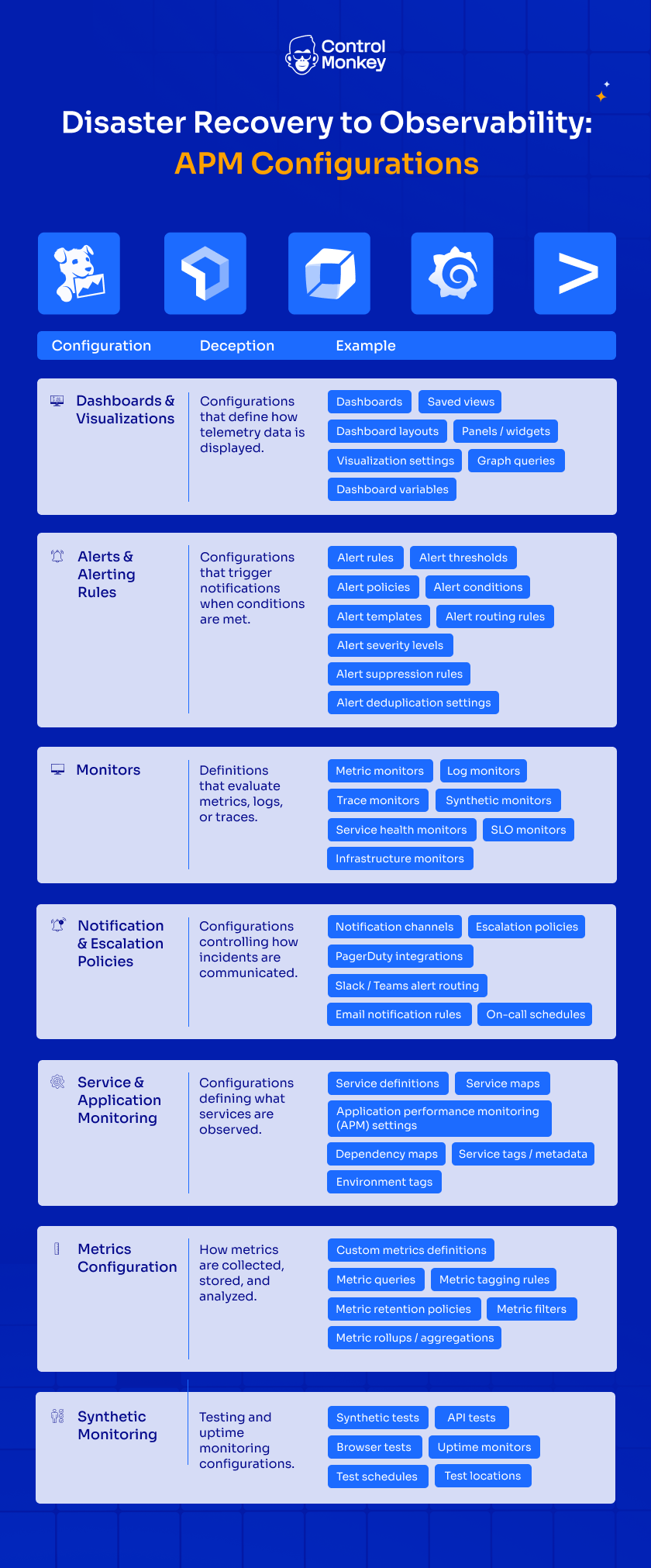
Each snapshot records the structure and settings of monitoring environments, including:
Dashboards and visualizations
Alert rules and alert routing policies
Monitors across metrics, logs, and traces
Notification channels and escalation policies
Service monitoring and APM configurations
Click on the image to enlarge
These configurations are versioned and stored securely, allowing teams to compare changes over time and restore previous configurations when needed.
If dashboards are deleted, alerts are misconfigured, or monitoring rules break during an incident, engineers can restore observability configurations directly from a previous snapshot – without manually rebuilding monitoring environments.
Why Disaster Recovery for the Observability Layer?
But modern cloud environments rely on far more than compute resources. The cloud control plane – including monitoring configuration – contains the operational knowledge engineers depend on to diagnose and resolve incidents.
With ControlMonkey, teams can:
Maintain versioned backups of observability environments
Detect configuration changes and drift
Restore monitoring systems quickly during incidents
Ensure DR visibility by having clear Resilience Score
By extending configuration disaster recovery to observability, ControlMonkey helps teams maintain operational continuity across the entire cloud environment.
During incidents, engineers rely on monitoring systems to understand what’s happening – yet observability configurations themselves are rarely protected by disaster recovery. As a CTO, I know firsthand how valuable it would have been to restore dashboards and monitoring environments instantly instead of rebuilding them under pressure.
Ori Yemini
CTO
Real-World Impact: Datadog dashboards, monitors, and alerting policies
Our Datadog dashboards, monitors, and alerting policies represent years of operational knowledge and tuning. Losing that configuration during an incident would significantly impact our ability to diagnose issues quickly. With ControlMonkey, we know our observability configurations are versioned and recoverable, ensuring we maintain visibility when it matters most<br />
Doron Gutman
Director of DevOps and DevSecOps
Ready to be Cyber Resilient?
Explore Cloud Configuration Disaster Recovery for Observability or schedule a demo today.
Reference Table: Key APM Configurations Used in Observability Platforms
Configuration
Description
Example
Dashboards & Visualizations
Configurations that define how telemetry data is displayed.
Zack is the Marketing Director at ControlMonkey, with a strong focus on DevOps and DevSecOps. He was the Senior Director of Partner Marketing and Field Marketing Manager at Checkmarx. There, he helped with global security projects. With over 10 years in marketing, Zack specializes in content strategy, technical messaging, and go-to-market alignment. He loves turning complex cloud and security ideas into clear, useful insights for engineering, DevOps, and security leaders.
Modern cloud operations rely on observability platforms like Dynatrace to detect incidents and maintain service reliability. But while infrastructure and data may be protected, monitoring configurations themselves are often not recoverable.
With ControlMonkey, teams can now extend Cloud Disaster Recovery to Dynatrace configuration backup – ensuring dashboards, alerts, monitors, and metrics can be restored instantly in case of incidents, misconfigurations, or ransomware.
ControlMonkey now protects critical Dynatrace configurations as part of its Cloud Disaster Recovery platform.
Key capabilities include:
Automated backup of Dynatrace dashboards, metrics, monitors, and alerts
Versioned snapshots of monitoring configurations
Rapid recovery of observability environments after incidents
Resilience Score across monitoring platforms
Unified disaster recovery method across cloud infrastructure and SaaS tools
How Dynatrace Disaster Recovery Works
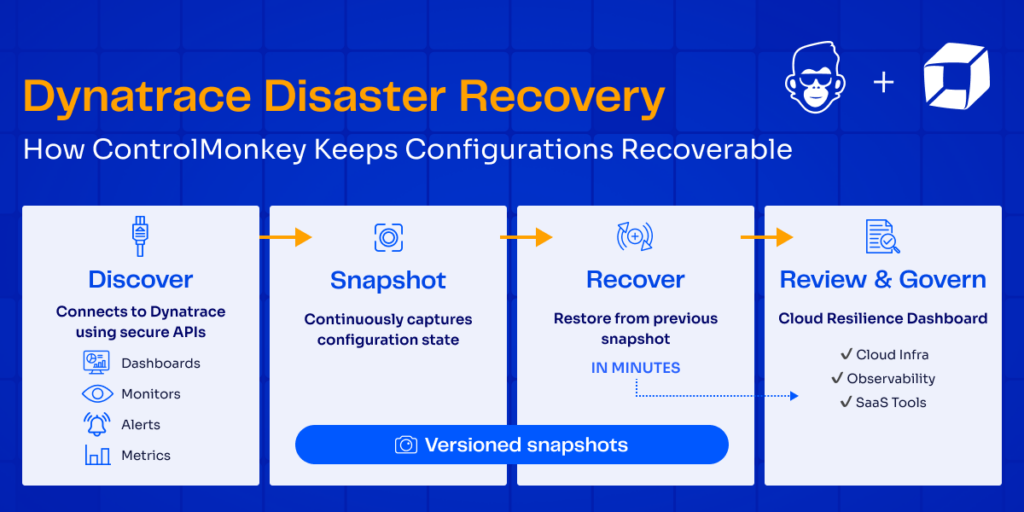
ControlMonkey continuously protects Dynatrace configuration so teams can restore their monitoring environment to a known-good state when incidents occur.
Discover Dynatrace configurations
ControlMonkey connects to Dynatrace using secure APIs and automatically discovers configuration assets including dashboards, monitors, alerts, and metrics.
Snapshot and Backup
On a continuous basis, ControlMonkey captures the exact configuration state of Dynatrace resources and creates versioned snapshots of those configurations.
Recover
If dashboards, monitors, or alerts are deleted or misconfigured, teams can quickly restore them from a good known snapshot – recovering observability environments in minutes.
Review & Govern
The ControlMonkey Cloud Resilience Dashboard provides visibility into DR readiness across cloud infrastructure and SaaS tools, helping teams identify gaps before incidents occur.
Stay Ahead with Dynatrace Disaster Recovery
As a CTO, I’m proud to introduce this capability. In my previous roles, having the ability to quickly recover from mistakes and investigate configuration changes would have saved days of troubleshooting and manual work
Ori Yemini
CTO
Observability platforms are critical for detecting and resolving incidents. If monitoring configurations are lost during an outage or attack, recovery becomes significantly harder.
ControlMonkey ensures Dynatrace configurations are protected alongside infrastructure and SaaS platforms. By continuously backing up configuration states and enabling rapid restoration, teams can maintain operational visibility even during critical incidents.
This extends disaster recovery beyond data and infrastructure – ensuring the monitoring systems themselves are resilient.
Ready to be Cyber Resilient?
Explore Dynatrace Disaster Recovery with ControlMonkey today.
A 30-min meeting will save your team 1000s of hours
A 30-min meeting will save your team 1000s of hours
Zack is the Marketing Director at ControlMonkey, with a strong focus on DevOps and DevSecOps. He was the Senior Director of Partner Marketing and Field Marketing Manager at Checkmarx. There, he helped with global security projects. With over 10 years in marketing, Zack specializes in content strategy, technical messaging, and go-to-market alignment. He loves turning complex cloud and security ideas into clear, useful insights for engineering, DevOps, and security leaders.
Microsoft Entra ID configurations are too critical to leave not backup or unversioned. With ControlMonkey’s new Entra ID support, your identity layer now receives structured backup, visibility, and recovery coverage – just like your data and cloud infrastructure.
Why Backup and Govern Your Entra ID?
Entra ID defines who can access production systems, cloud resources, and business applications. Yet many identity changes still happen manually – without versioning, drift visibility, or rollback capabilities.
Backing up and governing Entra ID ensures:
Configuration Cyber Resilience – Recover users, roles, groups, and policies after mistakes or incidents.
Change Visibility – Track and review identity configuration changes over time.
Drift Detection – Identify manual changes that bypass Infrastructure as Code.
Audit Readiness and guardrails – Have a clear RTO/RPO number for your Idindy layer. Apply the same compliance guardrails across identity and infrastructure.
Introducing Support for Cyber Resilience
ControlMonkey now supports Microsoft Entra ID backup and recovery. With this release, teams gain:
Entra ID Visibility Inventory – Full visibility into users configuration, groups, roles polices, enterprise applications, and policies.
Daily Entra ID Backup Snapshots – Automated configuration backups.
Disaster Recovery Time Machine – Restore Entra ID to a previous known-good state
Import to IaC – Bring unmanaged identity resources under IaC control.
Daily configuration versioning allows teams to investigate access history, recover from misconfigurations, and ensure compliance without manual reconstruction.
Identity Resilience Meets Cloud Governance
See how ControlMonkey reduces risk and brings cyber resilience daily backup to Entra ID. Turn your identity configuration into code – and your code into control.
Zack is the Marketing Director at ControlMonkey, with a strong focus on DevOps and DevSecOps. He was the Senior Director of Partner Marketing and Field Marketing Manager at Checkmarx. There, he helped with global security projects. With over 10 years in marketing, Zack specializes in content strategy, technical messaging, and go-to-market alignment. He loves turning complex cloud and security ideas into clear, useful insights for engineering, DevOps, and security leaders.
Azure teams often rely on Bicep alongside Terraform for managing their infrastructure with code, and without unified visibility, recovery gaps go unnoticed until it’s too late.
ControlMonkey now supports Azure Bicep as part of its IaC coverage model, extending visibility and disaster recovery awareness to Azure-native infrastructure.
This capability is available to all ControlMonkey customers starting today.
Zack is the Marketing Director at ControlMonkey, with a strong focus on DevOps and DevSecOps. He was the Senior Director of Partner Marketing and Field Marketing Manager at Checkmarx. There, he helped with global security projects. With over 10 years in marketing, Zack specializes in content strategy, technical messaging, and go-to-market alignment. He loves turning complex cloud and security ideas into clear, useful insights for engineering, DevOps, and security leaders.
Resources managed by Bicep are codified and can be rebuilt. ControlMonkey helps teams identify which resources fall into that category and which do not.