ControlMonkey is expanding Data Backup Correlation with support for Google Cloud Platform (GCP), bringing unified data backup visibility across AWS, Azure, and GCP.
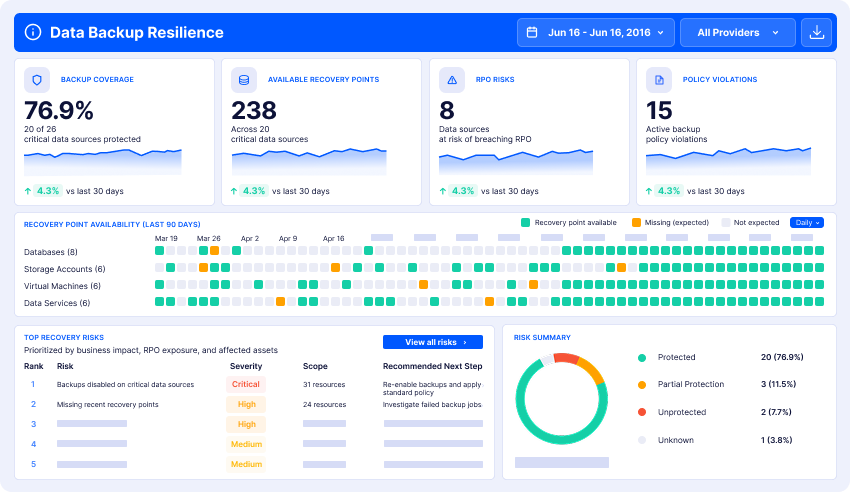
With this expansion, CISOs, cloud teams, and DevOps leaders can gain a clearer picture of data backup coverage, available recovery points, and potential recovery risks across their multi-cloud environments.
Introducing GCP Support for Data Backup Correlation
Building on our initial release for AWS Backup and Azure Backup, Data Backup Correlation now extends its capabilities to Google Cloud environments.
With ControlMonkey, teams can:
- Gain backup visibility: Understand which supported GCP data resources are protected and where coverage is missing.
- Review recovery points: Identify available backup recovery points and assess recovery readiness.
- Detect backup gaps: Uncover missing protection and potential risks before an incident occurs.
- Monitor RPO compliance: Identify data sources at risk of breaching defined Recovery Point Objectives (RPOs).
- Unify multi-cloud visibility: Bring backup posture across AWS, Azure, and GCP into a single resilience view.
Why GCP Data Backup Needs Configuration Context
Google Cloud provides native data backup capabilities across services such as Cloud SQL, Compute Engine, and Filestore. However, managing backups across multiple projects, regions, and cloud providers can make it difficult to maintain a clear picture of data protection.
A backup policy might be disabled, a retention setting changed, or an expected recovery point missing. Whether caused by human error, automation, ransomware, or an over-permissive AI agent, these changes can leave critical data exposed without teams realizing it.
ControlMonkey Data Backup Correlation helps close this visibility gap, giving cloud and security teams a centralized view of backup coverage, available recovery points, and potential RPO violations before they become recovery problems.
How Data Backup Correlation Works for GCP
ControlMonkey connects data backup visibility with cloud infrastructure and configuration, helping teams identify protection gaps and understand recovery readiness across AWS, Azure, and GCP.
The process is simple:
1. Connect Your GCP Environment
ControlMonkey connects to your Google Cloud environment and brings supported data backup information into its unified Cyber Resilience Platform.
2. Discover Data Backup Coverage
Automatically identify which supported cloud data resources have backup protection and which may be exposed due to missing backups or coverage gaps.
3. Review Recovery Points
Gain visibility into available recovery points and identify potential gaps that could impact data recovery.
4. Identify Backup Risks and RPO Violations
Monitor backup coverage and recovery readiness, identify potential RPO violations, and prioritize protection gaps that require attention.
From AWS and Azure to GCP: One View of Data Backup Posture
Following the initial release supporting AWS Backup and Azure Backup, ControlMonkey now extends Data Backup Correlation to GCP. Organizations operating across multiple cloud providers can gain centralized visibility into backup coverage, available recovery points, and protection gaps, rather than reviewing each cloud environment separately.
This expansion helps security and cloud teams better understand their data backup posture, identify recovery risks, and prioritize gaps across AWS, Azure, and GCP.
Strengthen Your Multi-Cloud Recovery Readiness
Your disaster recovery strategy is only as strong as its visibility.
With Data Backup Correlation now supporting AWS, Azure, and GCP, ControlMonkey helps teams move beyond fragmented backup monitoring toward a more complete understanding of data protection and cloud recovery risk.
Ready to see the bigger recovery picture? Explore Data Backup Correlation and discover how ControlMonkey helps identify critical recovery gaps.