



PAN-OS Backup and Recovery is now supported in ControlMonkey Cyber Resilience Platform.
Many Networking, NetOps, and security teams manage critical firewall configurations in Palo Alto Networks PAN-OS, including security policies, NAT rules, objects, routing, VPNs, and device settings.
When it comes to DR strategy, firewall configurations are often overlooked.
A deleted rule, misconfiguration, over-permissive AI agent, ransomware attack, or risky automated change can disrupt connectivity and create significant security and operational risk.
ControlMonkey now supports PAN-OS Backup and Recovery, helping teams back up, track, compare, and recover critical firewall configurations before issues become business disruptions.
Introducing PAN-OS Backup and Recovery
With ControlMonkey’s PAN-OS Backup and Recovery support, teams can gain control over the firewall configuration layer that protects applications, cloud environments, and business-critical networks.
ControlMonkey helps teams automatically back up, track, compare, and recover critical Palo Alto Networks PAN-OS configurations, including:
- Security policies and firewall rules
- NAT rules and policy configurations
- Address objects and address groups
- Service objects and service groups
- Zones and interface configurations
- Routing-related configurations
- VPN and connectivity settings
- Device and system configuration settings
- User access, permissions, and administrative settings
This gives infrastructure, NetOps, and security teams a reliable way to understand what changed, when it changed, and how to recover when a configuration is deleted, misconfigured, damaged, or changed by an over-permissive AI agent or ransomware attack.
Why PAN-OS Backup and Recovery Matters
Palo Alto Networks firewalls are critical to enterprise security, protecting cloud environments, applications, users, and networks.
When firewall rules, NAT policies, or security settings are changed incorrectly—or damaged by ransomware or AI-driven automation – the impact can be immediate. Teams need visibility into what changed and a reliable way to recover.
How PAN-OS Backup and Recovery Works
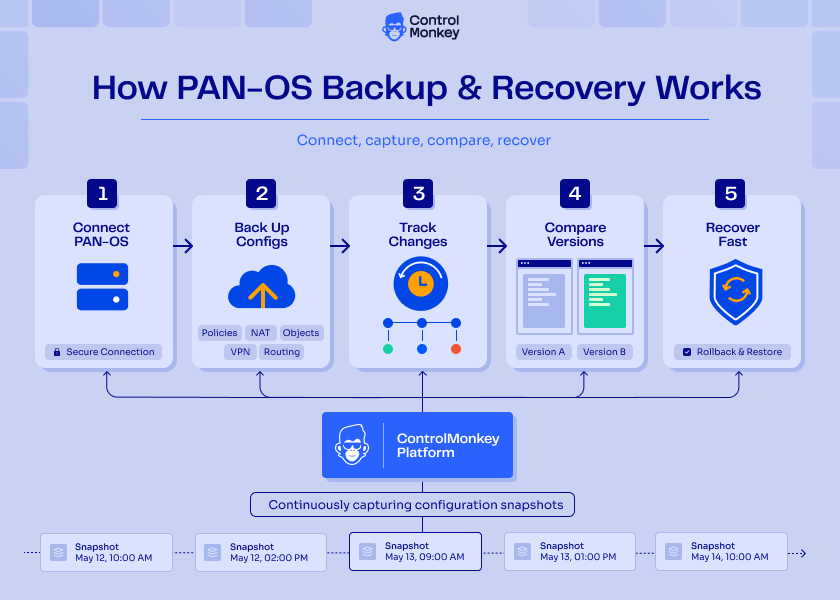
ControlMonkey continuously connects to PAN-OS environments and captures configuration snapshots over time. Each snapshot gives teams a reliable version of their firewall configuration that can be reviewed, compared, and recovered when needed.
The process is simple:
- Connect PAN-OS to ControlMonkey
ControlMonkey securely connects to your Palo Alto Networks PAN-OS environment. - Automatically back up configurations
Firewall rules, policies, objects, NAT rules, zones, interfaces, routing, VPN settings, and device configurations are automatically backed up. - Track every configuration change
Teams can see what changed across versions, helping them identify deleted rules, risky policy updates, broken NAT changes, or suspicious configuration activity. - Compare versions side by side
ControlMonkey makes it easier to understand the difference between the current configuration and a previous known-good version. - Recover when something goes wrong
If a configuration is deleted, misconfigured, damaged by ransomware, or changed by an AI agent or manual action, teams can recover from a previous backup and restore operational stability faster.
Built for Modern Infrastructure and Security Teams
As infrastructure becomes more distributed, firewall configuration management becomes harder to control. Teams are managing hybrid environments, cloud connectivity, branch networks, remote access, and security policies across many systems.
ControlMonkey helps bring order to this complexity by extending configuration backup and recovery beyond cloud infrastructure and into the network security layer. PAN-OS Backup and Recovery gives teams the visibility and control they need to protect critical firewall configurations from accidental, manual, malicious, ransomware-related, or AI-driven changes.
Ready to Take Control?
Explore PAN-OS Backup and Recovery by Palo Alto Networks in ControlMonkey today and strengthen your network configuration resilience.

