Terraform Projects for GCP: Real Examples and Starter Repos
Daniel Alfasi
Backend Developer and AI Researcher
If you want to understand Google Cloud quickly, terraform projects for gcp are a perfect on-ramp. Short, focused repos let you see how real resources get created, destroyed, and version-controlled. Browsing a few gcp terraform example shows exactly which arguments, APIs, and IAM roles are required—and which are optional. For anyone searching “beginner terraform gcp,” compact codebases keep cognitive load low while still demonstrating the power of Iac and GCP.
Before diving into real-world examples, it helps to master the basics in our GCP Terraform Provider Best Practices Guide. Once you understand how providers and state files work, terraform projects for GCP become the perfect on-ramp to hands-on learning.
Project Ideas for GCP with Terraform
Below are four starter-friendly ideas you can finish in an afternoon. Each one scales nicely into a larger portfolio of terraform projects for gcp, and every repo doubles as ready-made gcp terraform examples you can share with recruiters or teammates:
1. Provision a Compute Engine VM with Terraform
Launch a micro VM running Debian, attach a static external IP, and expose port 22. Great for “hello world” networking and firewall rules – classic beginner terraform gcp material.
2. Create and Secure a GCS Bucket
Build a regional bucket, enable uniform bucket-level access, and add a lifecycle rule. This reinforces storage fundamentals and illustrates infrastructure as a code gcp for data durability.
3. Deploy a Static Website with Cloud Storage + Cloud CDN
Combine the previous bucket project with a load-balanced HTTPS front end. It’s still a small repo, yet it highlights production-grade patterns and more advanced gcp terraform examples.
4. Configure Custom IAM Roles in Terraform
Define a minimal-privilege role and bind it to a service account. The pattern is reusable in all Terraform projects for gcp and cements identity-and-access basics for any beginner terraform gcp practitioner.
How to Structure Terraform Project Repos for GCP
A predictable layout keeps every collaborator (including future you) happy:
Pin providers and Terraform versions at the top of main.tf so your infrastructure as code gcp experiments stay reproducible. Treat each folder as a standalone unit; when you finish, you can cherry-pick pieces into bigger terraform projects for gcp without refactoring.
Tips for Iterating and Learning TF Projects for GCP:
3 Things that I personally recommend are:
Embrace modules early
Even tiny repos gain clarity when repetitive blocks move into modules/. Many public gcp terraform examples started as one-file proofs of concept and evolved the same way.
Use version control
Commit every change so you can diff state files, tag milestones, and roll back disaster – a habit every beginner terraform gcp coder needs.
Manage state deliberately
For solo hacks, local backends are fine; for team demos, migrate to Cloud Storage with locking. Sound state hygiene is essential for maintainable infrastructure as code gcp and for scaling your collection of terraform projects for gcp.
Conclusion – Keep Building, Keep Sharing
Small repos turn curiosity into confidence. Start with the ideas above, iterate, and publish your own gcp terraform examples to show progression from “beginner terraform gcp” to seasoned builder.
Backend Developer at ControlMonkey, passionate about Terraform, Terragrunt, and AI. With a strong computer science background and Dean’s List recognition, Daniel is driven to build smarter, automated cloud infrastructure and explore the future of intelligent DevOps systems.
For anyone starting out, the best Terraform projects for GCP are small and self-contained: like creating a Compute Engine VM, provisioning a Cloud Storage bucket, or deploying a static website with Cloud CDN. These beginner Terraform GCP projects help you understand core concepts like IAM roles, resource dependencies, and provider configuration without the risk of large-scale errors.
Yes. Terraform can manage multiple GCP projects through provider aliasing, workspaces, and remote state backends. If you’re scaling beyond beginner Terraform GCP experiments, you can modularize your codebase to handle dev, staging, and production. ControlMonkey helps teams automate and govern these environments so every infrastructure as code GCP deployment stays compliant and drift-free.
GCP Terraform Authentication Guide for Secure GKE Deployments
When your delivery pipeline relies on Google Kubernetes Engine, GCP Terraform authentication is the key link that keeps your Git commits secure and your production stable. Automating identity and certificate handling with cloud governance tools removes copy-pasted secrets, eliminates role sprawl, and keeps every Terraform apply reproducible. For a quick start, see how the ControlMonkey GCP Terraform Import Engine finds unmanaged resources. It turns them into code and shows cloud cost-saving opportunities. No manual state changes are needed.
Human user accounts may seem convenient, yet they often come with browser cookies, forgotten passwords, and unclear audit trails. Terraform runs belong to machines, so treat them that way. Purpose-built service accounts deliver:
This Terraform authentication on GCP flow keeps long-lived keys out of repos, rotates them on your schedule, and aligns with broader cloud governance best practices.
GCP Terraform Authentication with PEM-Encoded Certificates
When Terraform provisions GKE, it stores the cluster’s CA root in cluster_ca_certificatea base64 PEM string.
Downstream modules that expect a Terraform GCP cluster certificate PEM-encoded value can consume the output directly—no extra fetch is required, which streamlines pipelines and reduces costs.
Guard the PEM + valid token carefully: in tandem with a token, it grants API-server access.
Common GCP Terraform Authentication Misconfigurations
Even with solid gcp terraform authentication in place, four slip-ups surface again and again:
1. Hard-coded service-account keys.
Burying JSON keys in repos or CI variables that never rotate hands attackers a permanent backdoor and undermines your terraform gcp authentication strategy.
Follow Google’s guidance to rotate keys at least every 90 days and prefer short-lived tokens whenever possible. For step-by-step remediation, which walks through vaulting and automatic key rotation.
2. Over-broad IAM scopes.
Granting the roles/owner hammer where a tiny wrench would suffice violates least-privilege principles, inflates spending, and magnifies the blast radius.
Google’s IAM docs recommend assigning the narrowest predefined or custom roles required for a task, Terraform’s google_project_iam_member resource makes right-sizing trivial – use it.
3. Expired or mismatched PEM certificates.
A stale cluster_ca_certificate leads to x509: certificate signed by unknown authority errors that brick kubectl and Helm. Whenever you rotate GKE control-plane certs or recreate a cluster, refresh the PEM in state (or output) so downstream modules stay in sync.
4. Local developer credentials sneaking into CI.
Builds that rely on a laptop’s gcloud config break the moment that machine is offline and leave zero audit trail. Always export GOOGLE_CREDENTIALS from a vetted service account in the runner, and consider enforcing terraform validate checks that block plans using user tokens.
Secure GCP Terraform Authentication Best Practices
By codifying gcp terraform authentication from tightly scoped service accounts to refreshed PEM certificates, you transform identity management from an anxious manual chore into a repeatable, auditable control. The payoff is crystal-clear change history, faster incident response, and a security posture that scales with every new GKE cluster.
Ready to apply these patterns across your estate? See how ControlMonkey automates drift detection, policy enforcement, and key rotation in one unified workflow book a ControlMonkey demo today. Questions or feedback? Drop a comment below or book a call with us.
A 30-min meeting will save your team 1000s of hours
A 30-min meeting will save your team 1000s of hours
Yuval is a software engineer at ControlMonkey with a strong focus on DevOps and cloud infrastructure. He specializes in Infrastructure as Code, CI/CD pipelines, and drift detection. Drawing from real-world conversations with engineering teams, Yuval writes about practical ways to automate, scale, and secure cloud environments with clarity and control.
The safest option is using a service account with the right IAM role. Skip user logins and hard-coded keys – they’re messy and insecure.
Instead, store keys properly, rotate them often, and let Terraform pull them in through environment variables or a secret manager.
Google suggests at least every 90 days, but most DevOps teams set up automatic rotation or use short-lived tokens so they don’t have to think about it. The shorter the lifespan, the lower the risk.
Yes and it’s a good idea. Workload Identity Federation lets Terraform authenticate without static keys, using OIDC or identities from AWS/Azure.
It’s cleaner, safer, and avoids the hassle of key management.
GCP Terraform authentication is the process of allowing Terraform to securely access Google Cloud resources. Instead of relying on manual user keys, Terraform uses service accounts, IAM roles, and short-lived credentials to deploy and manage infrastructure safely.
Yes. ControlMonkey automates service account key rotation, drift detection, and policy enforcement. It ensures that Terraform authentication on GCP is secure, compliant, and reproducible across all environments.
GCP Compute Engine Terraform 2025: Create a VM Instance
Daniel Alfasi
Backend Developer and AI Researcher
When teams need to spin up infrastructure quickly, nothing beats gcp compute engine terraform for consistent, declarative deployments. By combining Terraform’s state management with Google’s robust APIs, you can treat every terraform gcp instance like code, repeatable in any environment. Whether your goal is a small lab box or a production-ready cluster, you’ll find that learning to create a Compute Engine VM with Terraform pipelines pays off immediately.
The snippet below shows the absolute minimum you need to define a terraform gcp instance. Once applied, Terraform talks to the Google Cloud API and delivers a ready-to-use terraform vm gcp without clicking around the console.
Before running terraform apply, execute terraform init to pull the GCP provider and lock versions, and terraform plan to preview changes. After one apply, you create compute engine terraform resources that can be shared across projects, audited in version control, and destroyed just as easily.
Configuring Machine Types, Zones, and Metadata in GCP Compute Engine Terraform
Scaling a terraform vm gcp is as simple as swapping the machine_type field—e2-medium for a web server, c3-standard-8 for a test runner. Need to burst into another region? Change zone and Terraform builds a twin. Because each parameter is codified, you can replicate or refactor any terraform gcp instance with zero drift.
Teams can quickly experiment, knowing that peer reviews will help catch any problems before they start creating compute engine terraform resources in production. This kind of consistency is one of the main reasons we decided to standardize on GCP compute engine terraform for all our temporary workloads.
If you store state in Cloud Storage with a backend block, colleagues can collaborate safely, avoiding conflicting writes. Pair it with a service account that has roles/compute.admin plus read access to the bucket for least-privilege security.
Provisioning Startup Scripts and SSH in Terraform GCP Instances
A common pattern when authoring terraform vm gcp blueprints is to attach a startup script that installs packages, configures logging, and registers the node with your CI system.
You can keep the script inline for fast demos, or reference an external file with file(“scripts/startup.sh”) approaches that work identically across every terraform gcp instance you deploy. In fact, the first time you create compute engine terraform resources with scripts attached, you’ll realise how much manual setup disappears. That cemented for our team the value of gcp compute engine terraform repeatability.
Conclusion: Why Standardize on GCP Compute Engine Terraform
With roughly twenty lines of code, you’ve gone from nothing to a reproducible VM, all without leaving your terminal. Ready for production? Check out CMK’s full-featured GCP Compute Module for built-in firewall rules, SSH key management, monitoring hooks, and many best-practice defaults.
Clone it and start shipping infrastructure today! Questions or feedback? Drop a comment below or book a call with us.
A 30-min meeting will save your team 1000s of hours
A 30-min meeting will save your team 1000s of hours
Backend Developer at ControlMonkey, passionate about Terraform, Terragrunt, and AI. With a strong computer science background and Dean’s List recognition, Daniel is driven to build smarter, automated cloud infrastructure and explore the future of intelligent DevOps systems.
to create a VM, define a google_compute_instance resource in your Terraform configuration, specifying parameters like machine type, zone, and boot disk. After running terraform init, terraform plan, and terraform apply, Terraform provisions the VM in Google Cloud Compute Engine. This makes the process reproducible, version-controlled, and easy to scale.
Using Terraform for Compute Engine gives you infrastructure as code. You can version, review, and reuse VM definitions across projects, avoid manual drift, and standardize deployments with peer-reviewed code. Teams gain faster provisioning, repeatability, and stronger security when pairing Terraform with service accounts and remote state.
Before applying Terraform, make sure the Compute Engine API is enabled in your GCP project. You can do this via the GCP Console or by running gcloud services enable compute.googleapis.com. Without it, Terraform cannot create VM resources.
Add or modify the tags block in your google_compute_instance resource. Running terraform apply updates the tags across the instance, making it easy to manage firewall rules or group resources dynamically.
GCP PAM Integration with Terraform: Can You Automate It?
Yuval Margules
Backend Developer
When your delivery pipeline relies on Google Kubernetes Engine, GCP Terraform authentication is the key link that keeps your Git commits secure and your production stable. Automating identity and certificate handling with cloud governance tools removes copy-pasted secrets, eliminates role sprawl, and keeps every Terraform apply reproducible. For a quick start, see how the ControlMonkey GCP Terraform Import Engine finds unmanaged resources. It turns them into code and shows cloud cost-saving opportunities. No manual state changes are needed.
Why GCP Terraform Authentication Matters for Security
Human user accounts may seem convenient, yet they often come with browser cookies, forgotten passwords, and unclear audit trails. Terraform runs belong to machines, so treat them that way. Purpose-built service accounts deliver:
This Terraform authentication on GCP flow keeps long-lived keys out of repos, rotates them on your schedule, and aligns with broader cloud governance best practices.
Generating PEM-Encoded Cluster Certificates
When Terraform provisions GKE, it stores the cluster’s CA root in cluster_ca_certificatea base64 PEM string.
Downstream modules that expect a Terraform GCP cluster certificate PEM-encoded value can consume the output directly—no extra fetch is required, which streamlines pipelines and reduces costs.
Guard the PEM + valid token carefully: in tandem with a token, it grants API-server access.
Common Misconfigurations in Terraform GCP Authentication
Even with solid gcp terraform authentication in place, four slip-ups surface again and again:
1. Hard-coded service-account keys.
Burying JSON keys in repos or CI variables that never rotate hands attackers a permanent backdoor and undermines your terraform gcp authentication strategy.
Follow Google’s guidance to rotate keys at least every 90 days and prefer short-lived tokens whenever possible. For step-by-step remediation, which walks through vaulting and automatic key rotation.
2. Over-broad IAM scopes.
Granting the roles/owner hammer where a tiny wrench would suffice violates least-privilege principles, inflates spending, and magnifies the blast radius.
Google’s IAM docs recommend assigning the narrowest predefined or custom roles required for a task, Terraform’s google_project_iam_member resource makes right-sizing trivial—use it.
3. Expired or mismatched PEM certificates.
A stale cluster_ca_certificate leads to x509: certificate signed by unknown authority errors that brick kubectl and Helm. Whenever you rotate GKE control-plane certs or recreate a cluster, refresh the PEM in state (or output) so downstream modules stay in sync.
4. Local developer credentials sneaking into CI.
Builds that rely on a laptop’s gcloud config break the moment that machine is offline and leave zero audit trail. Always export GOOGLE_CREDENTIALS from a vetted service account in the runner, and consider enforcing terraform validate checks that block plans using user tokens.
Secure GCP Terraform Authentication Best Practices
By codifying gcp terraform authentication from tightly scoped service accounts to refreshed PEM certificates, you transform identity management from an anxious manual chore into a repeatable, auditable control. The payoff is crystal-clear change history, faster incident response, and a security posture that scales with every new GKE cluster.
Ready to apply these patterns across your estate? See how ControlMonkey automates drift detection, policy enforcement, and key rotation in one unified workflow book a ControlMonkey demo today.
A 30-min meeting will save your team 1000s of hours
A 30-min meeting will save your team 1000s of hours
Yuval is a software engineer at ControlMonkey with a strong focus on DevOps and cloud infrastructure. He specializes in Infrastructure as Code, CI/CD pipelines, and drift detection. Drawing from real-world conversations with engineering teams, Yuval writes about practical ways to automate, scale, and secure cloud environments with clarity and control.
GCP Terraform authentication is the process of allowing Terraform to securely access Google Cloud resources. Instead of relying on manual user keys, Terraform uses service accounts, IAM roles, and short-lived credentials to deploy and manage infrastructure safely.
Hard-coding JSON keys in repositories or CI variables creates long-lived secrets that attackers can exploit. A better approach is to rotate keys regularly, store them in a secure vault, or use short-lived tokens with Google’s authentication flows.
Yes. ControlMonkey automates service account key rotation, drift detection, and policy enforcement. It ensures that Terraform authentication on GCP is secure, compliant, and reproducible across all environments.
Choosing GCP Cloud SQL Terraform lets you declare, commit, and reproduce every database across dev, staging, and prod without console clicks or forgotten flags. Instead of treating databases as special snowflakes, you check in code, run a pipeline, and watch Cloud Build create identical services.
By organizing your database layer with the application infrastructure, adding a new service is easy. You just merge a pull request and let the pipeline handle the rest. Even developers who don’t know GCP can create compliant environments in minutes. They can be sure that every instance meets the same standards.
For many organizations, the task boils down to gcp database provisioning terraform define what the instance should look like, and Terraform makes it so. Because state captures every change, rollbacks are one command away, and peer-reviewed pull requests replace risky maintenance.
Required Terraform Config for Cloud SQL
Below is the leanest snippet to launch a Postgres-15 terraform cloud sql instance (swap the engine string for MySQL-8-0).
It totals fewer than forty lines yet delivers a managed database, user, and network-aware settings:
Running this file through gcp cloud sql terraform normally produces a ready-to-connect endpoint in under five minutes.
Handling Passwords and Connections Securely
Hard-coding credentials inside Git is never okay. A better pattern pulls the password from Secret Manager at plan time, or injects it through TF_VAR_db_password in CI. Because values never hit the state file, secrets stay private while gcp database provisioning terraform still completes unattended. Pair the Cloud SQL Auth Proxy with IAM-based service accounts to eliminate static passwords altogether.
Optional Settings and Maintenance Tips
Production needs more than defaults. Enable automated backups, point-in-time recovery, and a maintenance window in the same file. Add ip_configuration.authorized_networksto the whitelist office CIDRs, or go private-IP-only for the proxy. You can even tweak flags, such as availability_type = "REGIONAL” to get synchronous replicas. Re-applying the plan updates the live terraform cloud sql instance and warns if a console edit drifted from code.
For advanced shops, the open-source Terraform SQL module from ControlMonkey includes encryption keys, log exports, and monitoring policies. This provides a flexible but clear starting point.
Conclusion
By utilizing a single HCL file, GCP Cloud SQL Terraform transforms the database configuration from an unreliable process into a reliable pipeline. Fewer late-night emergencies, clearer audits, and safer changes are the payoff. Ready for enterprise-grade features?
Grab ControlMonkey battle-tested terraform sql module, plug in your project ID, and run terraform to apply your next compliant Cloud SQL environment.
A 30-min meeting will save your team 1000s of hours
A 30-min meeting will save your team 1000s of hours
Yuval is a software engineer at ControlMonkey with a strong focus on DevOps and cloud infrastructure. He specializes in Infrastructure as Code, CI/CD pipelines, and drift detection. Drawing from real-world conversations with engineering teams, Yuval writes about practical ways to automate, scale, and secure cloud environments with clarity and control.
Yes. While Terraform provides the foundation for Infrastructure as Code, scaling Cloud SQL management across multiple environments can become complex. Cloud automation platforms such as ControlMonkey add guardrails, drift detection, disaster recovery snapshots, and policy enforcement on top of Terraform. This ensures your GCP Cloud SQL instances remain compliant, secure, and resilient without adding manual overhead.
Terraform GCP Provider: 5 Best Practices from Real Projects
Daniel Alfasi
Backend Developer and AI Researcher
When I first started managing projects on GCP, I quickly realized that clicking through the console didn’t scale. Each change felt like a one-off task that was hard to track and impossible to reproduce. That’s when I began using the Terraform GCP Provider.
Also called the Google provider, it connects Terraform to Google Cloud. Instead of writing API calls, I could define infrastructure once and deploy it consistently across environments.
The shift brought immediate benefits: automation through CI/CD pipelines, version-controlled infrastructure in Git, and the ability to scale changes safely across teams. What used to be manual and error-prone became repeatable and auditable.
5 Best Practices for Terraform GCP Provider
In practice, the GCP Provider became the bridge between my Terraform configurations and Google Cloud’s APIs. It turned infrastructure management into a process that was consistent, automated, and resilient. Here my 5 top tips to you
1. Managing GCP Resources with Terraform GCP Provider
Let’s examine some of the best practices for managing GCP resources with the Terraform GCP Provider on Terraform Google Cloud
a. Least-Privilege Service Accounts
When provisioning resources with Terraform, it should use a service account that has the necessary permissions to perform actions on the GCP project. You can have dedicated service accounts for Terraform with limited authorization. For instance, provide Terraform only enough authorization to create Compute Engine resources within one project if your .tf only provisioning that. You can add more permissions as your IaC evolves.
b. Project Segmentation
Your organization may be working on multiple software products owned by different teams. These applications could have multiple environments. You can organize GCP projects by environment and/or by team. This isolates resources, simplifies access control, and aids cost tracking. For instance, create separate projects, such as myapp-dev and myapp-prod, if you are creating projects per environment.
c. Labeling for Cost Awareness
Tag resources with labels for better cost allocation. Correctly labeling your infrastructure will help you track your costs accurately in GCP’s billing reports.
resource "google_compute_instance" "instance1" {
  name = "my-vm"
  machine_type = "e2-micro"
  labels = {
      env = "dev"
      team = "team1"
      owner = "controlmonkey"
      }
      # ... other configurations
    }
2. Managing State Files with Terraform GCP Provider
The Terraform state file contains the current state of your infrastructure. Terraform requires information in the Terraform state to identify the resources it manages and plan actions for creating, modifying, or destroying resources.
Storing it locally is risky collaborative teams can overwrite it, and it’s not encrypted by default. Instead, you can use a remote backend to host your state file. When using GCP, a popular option is to use GCP Cloud Storage to version, encrypt, and store your Terraform state. You can control access to the state using IAM permissions.
Make sure you have enabled encryption and versioning on your GCS bucket. GCS backend supports state locking (Concurrency Control) natively.
3. Modularizing Terraform GCP Provider Code
Terraform modules make your code DRY (Don’t Repeat Yourself) and accelerate deployments. You can start by identifying common patterns in your existing infrastructure and converting them to modules.
For instance, you can create generic compute, networking, storage, and security config modules. Pass that type of module, parameterized with variables, and reuse across multiple projects or environments within the same project.
Terraform modules bring consistency, collaboration, efficiency, and scalability to GCP infrastructure as code.
Consider the following when you modularize your Terraform code:
Store your module code in a separate repository and manage it using version control. Tag releases in a consistent manner.
When using third-party modules, opt for well-documented modules from reputable registries.
Use variables and locals to parameterize your Terraform modules. Add variable validations and defaults to fit your most common use cases.
Document your modules!
4. Optimizing DevOps with Terraform GCP Provider
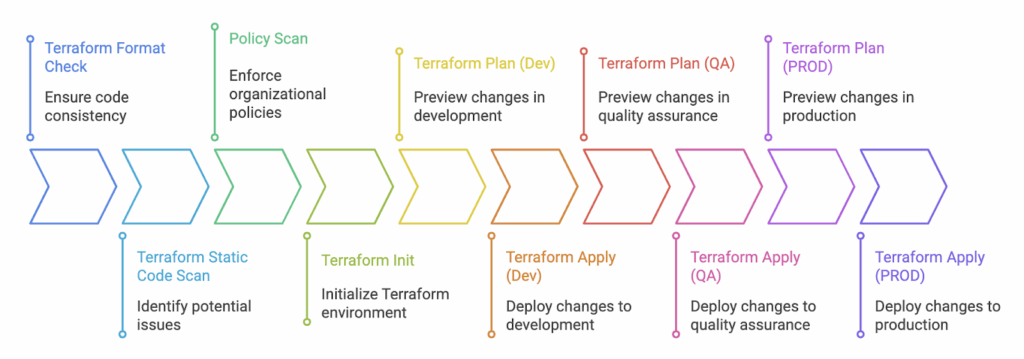
Automation is crucial for effectively managing cloud infrastructure. It reduces manual efforts and significantly improves deployment frequency and speed. Automating Terraform provisioning actively resolves state lock conflicts, permission issues, and speeds up provisioning with cached modules. You can bake steps such as static code scanning, format checks, and drift detection into your automations.
See how teams enforce Terraform best practices on GCP at scale
Many headaches, such as state lock conflicts and permission issues, can be circumvented when using automation with Terraform. Additionally, pipelines maintain detailed logs. It helps you to track changes and pinpoint when they occurred.
For simplicity, you can use a managed CI/CD service such as Google CodeBuild.A simple automation of Terraform would be checking formatting, config verification, planning, and applying changes. Here is a sample minimal codebuild.yml
Consider including the following steps or integrations when setting up your automations;
Add format checks: Terraform has an in-built terraform fmt command that you can use to validate the configuration.
Validate configurations: You can use the terraform validate command to validate the static HCL configuration files.
Incorporate Static Code Analysis: Utilize tools such as Checkov and TFSec with any CI/CD tool to identify known security issues in your Terraform configurations.
Gated Promotions: Deploy to a dev project, test in staging, and promote to prod after approval.
Integrate Drift Detection: Identify when actual infrastructure changes outside your automations. A simple Terraform plan that runs periodically can help you with this. Tools such as ControlMonkey provide advanced drift remediation capabilities.
5. Troubleshooting Terraform GCP Provider Issues
Sometimes, you may encounter unexpected errors with Terraform when using it on GCP. Some of them are from the Terraform GCP (Google Cloud Platform) provider, which we will examine in this section.
API Quota Errors: GCP Provider translates your code into API requests. GCP has specific quotas on the number of requests it will serve within a given time frame. You may at times notice errors in the form of 429 Too Many Requests. In such cases, check quotas in GCP’s Console (IAM & Admin > Quotas) and request an increase. To reduce the load, you may also consider reducing Terraform’s parallelism.
terraform apply -parallelism=3
IAM Binding Errors: Terraform should have permission to create, modify, and delete resources you declare in your Terraform scripts. Verify the service account you use for Terraform has the necessary roles required to provision your infrastructure. For example, to provision GKE, the role roles/container.admin would be required.
Errors from Deleted GCP Resources: When you remove resources without using Terraform, it will generate errors because those resources remain listed in the state.terraform state rm <resource_type>.<resource_name>
Debudding:
You may encounter different errors or warnings when applying Terraform. It would be helpful to know what Terraform is doing underneath, so you can precisely pinpoint the issue.
Consider setting the Terraform log level to get detailed output on Terraform’s actions. You can enable this by setting the environment variable. TF_DEBUG=debug.
Conclusion
The Terraform GCP Provider is the bridge between your code and Google Cloud APIs. By using best practices, you can create secure, scalable, and strong GCP environments. These practices include least-privilege accounts, remote state, modular code, and automation.
Start small, experiment, and grow with confidence. AIf you need to manage Terraform on a large scale, platforms like ControlMonkey provide guardrails. They also offer drift detection and compliance enforcement right away.
Backend Developer at ControlMonkey, passionate about Terraform, Terragrunt, and AI. With a strong computer science background and Dean’s List recognition, Daniel is driven to build smarter, automated cloud infrastructure and explore the future of intelligent DevOps systems.
Assuming you have already installed Terraform, you can install the gcloud CLI to authenticate with GCP. Alternatively, you can download a service account credential file. Next, you can create a .tf file that specifies the Google provider and configure it to use your credentials and project. You can then define the resources you need to create. Run terraform init, plan, and apply to deploy.