Join our next Live Demo on Mar 16th!

Resource Blog News Customers Stories

Updated: Feb 17, 2026 Upd: 17.02.26

12 min read

Practical DevOps Guide to Scaling Terraform

Ori Yemini

Ori Yemini

CTO & Co-Founder

Practical DevOps Guide to Scaling Terraform

To scale Terraform is essential for modern DevOps teams managing infrastructure across distributed environments. As physical boundaries no longer limit access to talent, organizations are using Terraform. This helps them manage teams around the world and improve cloud operations. By leveraging Infrastructure as Code (IaC), businesses can enhance collaboration, automate infrastructure management, and maintain consistency—regardless of where their teams are located.

Forming distributed DevOps teams is a natural choice to enhance business agility. This approach has numerous benefits—24/7 operations, cost efficiency, global talent access, and business continuity and resilience, to name a few.

However, when working as a distributed team, you can run into challenges such as: collaboration, maintaining consistency, change management, access control, versioning and implementing auditing across cloud infrastructure.

So, in this article, let’s explore how Terraform can be used to effectively manage large-scale cloud infrastructure with distributed DevOps teams.

How to Scale Terraform for Multi-Team Collaboration

Collaboration makes distributed DevOps possible and allows teams to operate at scale.

Collaborating on the infrastructure directly raises many concerns since there is no transparency on what changes other members are working on. The solution to this problem is to use Infrastructure as Code (IaC).

IaC is integral for collaboration, where multiple developers can contribute to improving the configurations. The syntax and structure of IaC depends on the IaC tool that you use. Terraform is a popular IaC tool, which is cloud-agnostic. Mastering Terraform allows teams to apply the same skills across projects involving infrastructure in different cloud platforms. Terraform provides the required features and functionalities that support collaboration among multiple users and teams.
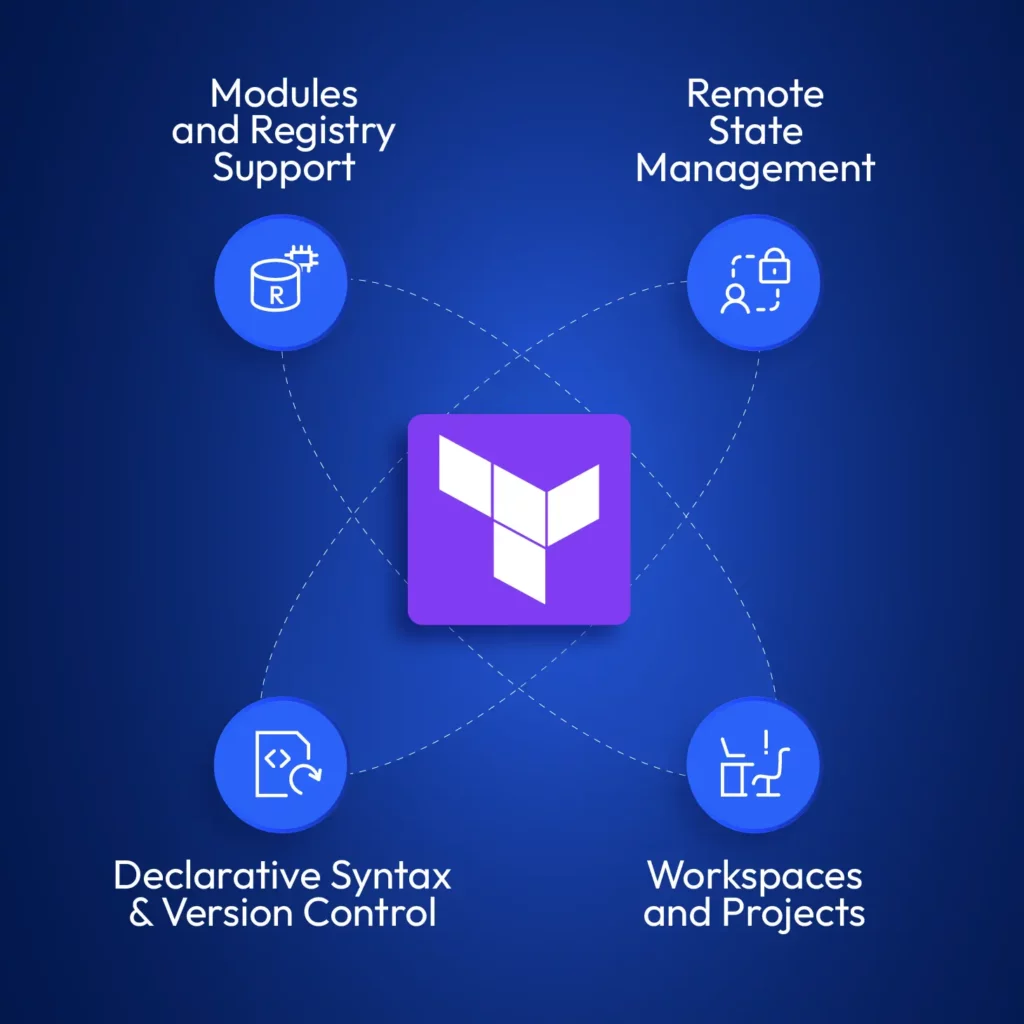
Diagram showing four core features—Modules and Registry Support, Remote State Management, Declarative Syntax & Version Control, and Workspaces and Projects—around the Terraform logo, representing essential capabilities to scale Terraform.
Key capabilities needed to scale Terraform effectively: from registry-backed modules to secure remote state, declarative versioning, and workspace segmentation.

Remote State Management to Scale Terraform at Scale

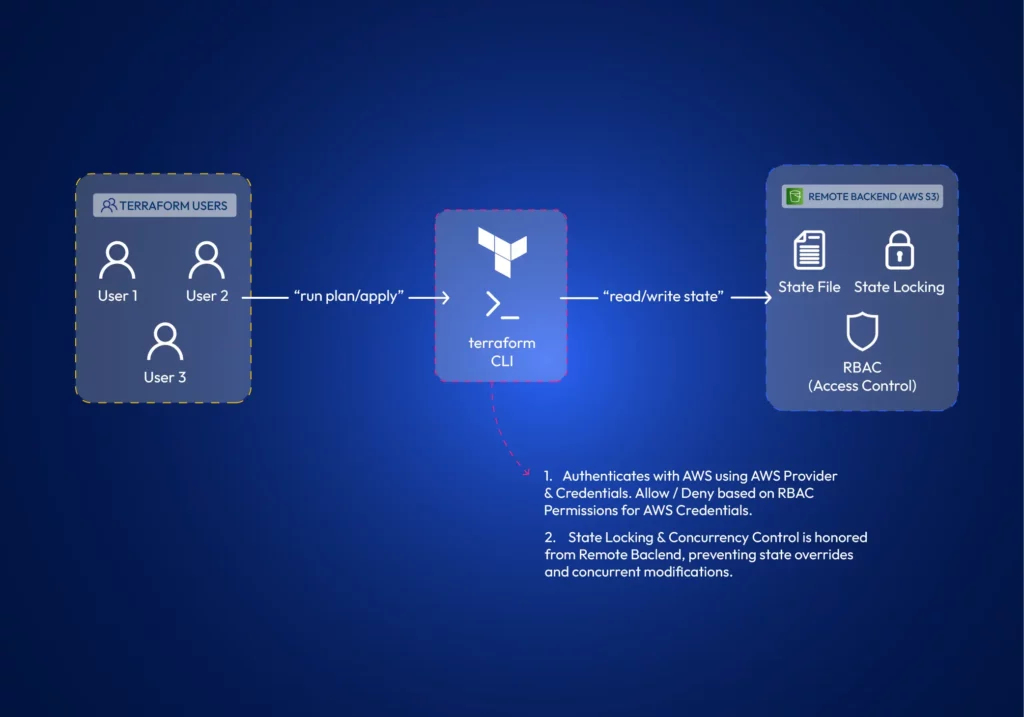
Terraform state contains details about the infrastructure it manages and its current status. It’s how Terraform keeps track of changes it needs to do to existing infrastructure. Every team member requires a copy of the state file to make changes to existing infrastructure. Terraform supports different state backends, such as AWS S3 or other cloud-agnostic solutions to store and share the state. Many remote backends offer state-locking mechanisms, which prevent concurrent modifications by multiple team members, ensuring infrastructure integrity.
Workspaces (and Projects)

Workspaces allow teams to manage multiple isolated environments (such as development, staging, and production) within a single Terraform configuration. Teams can work on different environments in isolation. Terraform projects allow administrators to scope and assign workspace access to teams or developers. In larger environments, teams often use scoped workspaces and project-based access to isolate environments and assign permissions.

Declarative Syntax

What really distinguishes between developers is how they think and the logic they apply to solve a problem.

To print numbers from 1 to 5 in the console, a developer could use a for loop, a while loop, or just type the print command 5 times. Collaboration raises questions about consistency and standards.

Luckily, Terraform is declarative. You do not have to say “how”, but rather “what” to do. This is helpful for collaboration since the actual logic of deploying the resources is not a part of IaC. It is taken care of by Terraform.

Here is how you would define creating an AWS S3 bucket with Terraform;

resource "aws_s3_bucket" "data_lake" {
bucket = "controlmonkey-data-lake"

tags = {
Environment = "Production"
}
}

Just to compare how it would be without Terraform, here is a shell script to do the same operation without Terraform;

#!/bin/bash

# Configure AWS CLI
aws configure set region us-west-2

# Check if bucket already exists
BUCKET_EXISTS=$(aws s3api head-bucket --bucket controlmonkey-data-lake 2>&1 || echo "not exists")

# Create bucket only if it doesn't exist
if [[ $BUCKET_EXISTS == *"not exists"* ]]; then
echo "Creating S3 bucket..."
aws s3api create-bucket \
--bucket controlmonkey-data-lake \
--region us-west-2 \
--create-bucket-configuration LocationConstraint=us-west-2

# Add tags to the bucket
aws s3api put-bucket-tagging \
--bucket controlmonkey-data-lake \
--tagging "TagSet=[{Key=Environment,Value=Production}]"

echo "Bucket created successfully"
else
echo "Bucket already exists, skipping creation"
fi

A simpler code is generally better for collaboration.

Reusable Modules to Scale Terraform Consistently Across Environments

With Terraform, you can encapsulate common infrastructure patterns into modules. Teams can develop modules separately and reuse them to ensure they deploy infrastructure components in a consistent and compliant manner.
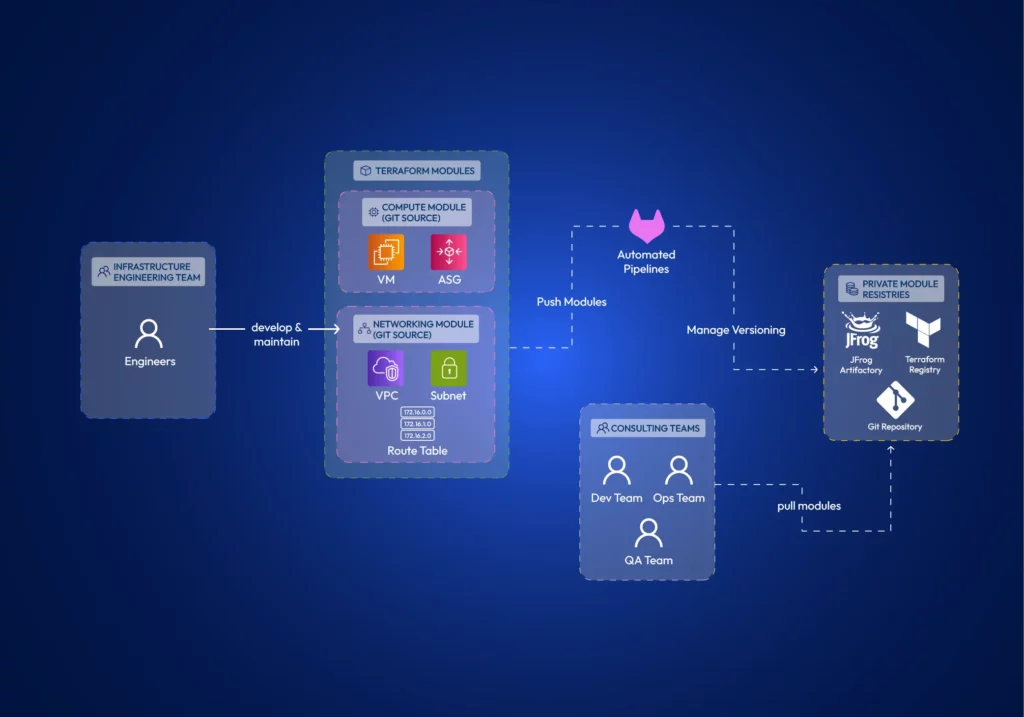
Terraform supports remotely hosting these modules in private registries such as JFrog Artifactory, Terraform Registry, or Git. Therefore, multiple teams can effectively utilize them.

5 Ways to Scale Terraform for Teams

We have already identified the Terraform features that allow collaboration. Let’s explore how to properly architect Terraform projects for effective collaboration across distributed teams.

Using identical Terraform versions across all teams & members.

The Terraform version should be an organizational policy. Using different terraform versions can cause several major issues;

  • Terraform syntax might not be backward compatible between certain versions.
  • Deprecated features might work in older versions but fail in newer ones.
  • State-file changes. The internal state format can change between major versions, leading to state corruption or inability to read state files.

Another thing to watch out for is that the terraform core executable comes in both amd64 and arm formats. Terraform providers are architecture-specific binary plugins. A provider compiled for amd64 won’t work on ARM systems and vice versa. It’s best practice to install amd64 on both systems (You can install it on ARM systems using environment variable TFENV_ARCH ). Otherwise, some team members may be unable to use providers defined in the code if provider developers haven’t compiled them for their specific architecture.

Decomposed and Modular Infrastructure:

Using Terraform modules helps establish the principle of separation of concerns. Teams can develop Terraform modules in isolation. Terraform modules minimize dependencies between different parts of the system, reducing the potential impact of changes (the blast radius).

Granular access control is a theme when working with distributed teams. When you architect your modules, you need to be concerned about how you manage the module source code and how you publish modules. When developing module source code, it is best practice to have separate git repositories per each module. Distributed teams can focus on different modules. With this approach, you can granularly control the read-write permissions per repo. Further, suppose you use git as the module registry itself. In that case, having monolithic repos causes the whole git repository to be copied to the .terraform directory, regardless of whether you only refer to a single path (a module) within the repository.

The developed modules should be versioned and shared with the Distributed Teams. Terraform Registry or a compatible artifact registry can store Terraform modules so other teams can refer to them in their infrastructure configurations. Access controls can be implemented in registries as well.

Remote State & Environment Isolation Strategies

We have already discussed Terraform’s capabilities to store state remotely and its features such as state locking, versioning, and RBAC access to state. However, the Terraform state is also important in environment isolation.
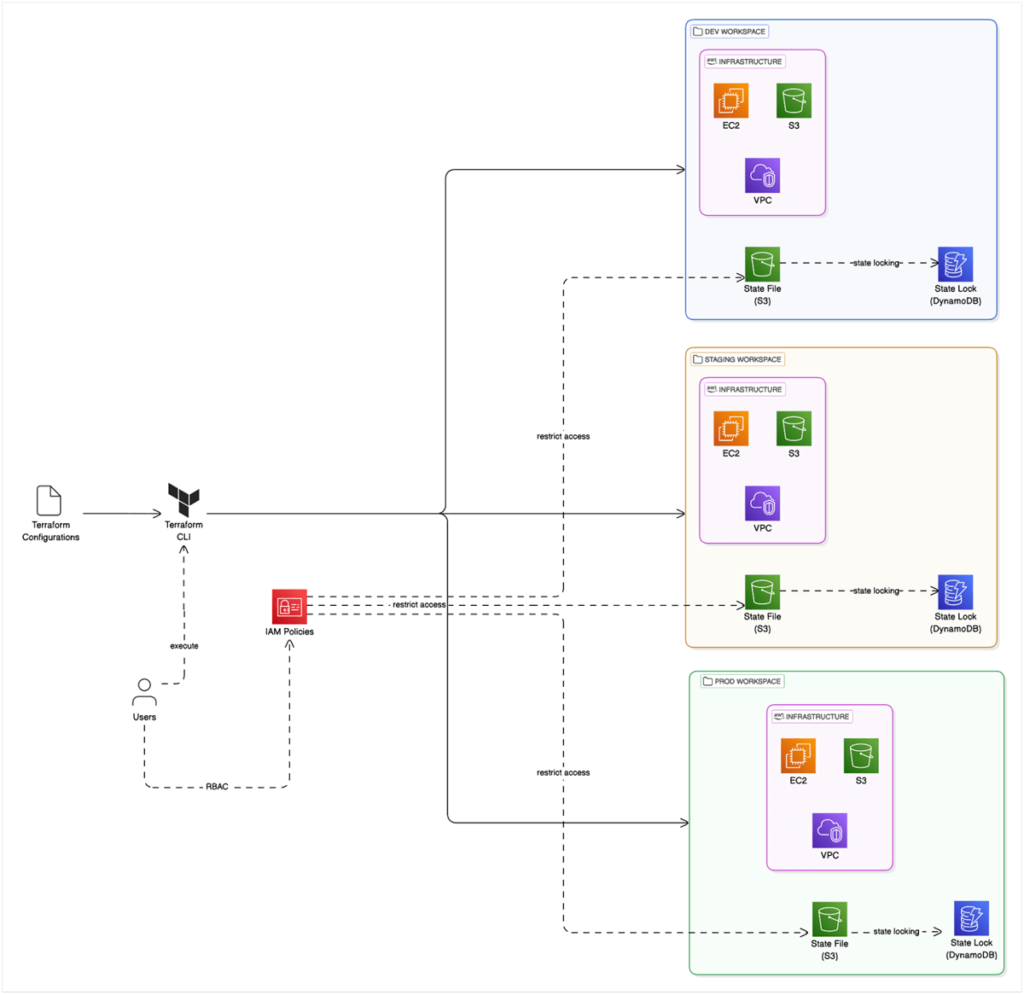

Teams can utilize Terraform workspaces to isolate environments. Terraform Workspaces automatically manages a separate state file per environment (Note: State files do not require distinct S3 buckets; instead, you can use different keys). In this example, we are using Terraform in AWS and leveraging IAM policies to control access to environments.

However, another approach is to use a directory structure that isolates environments.
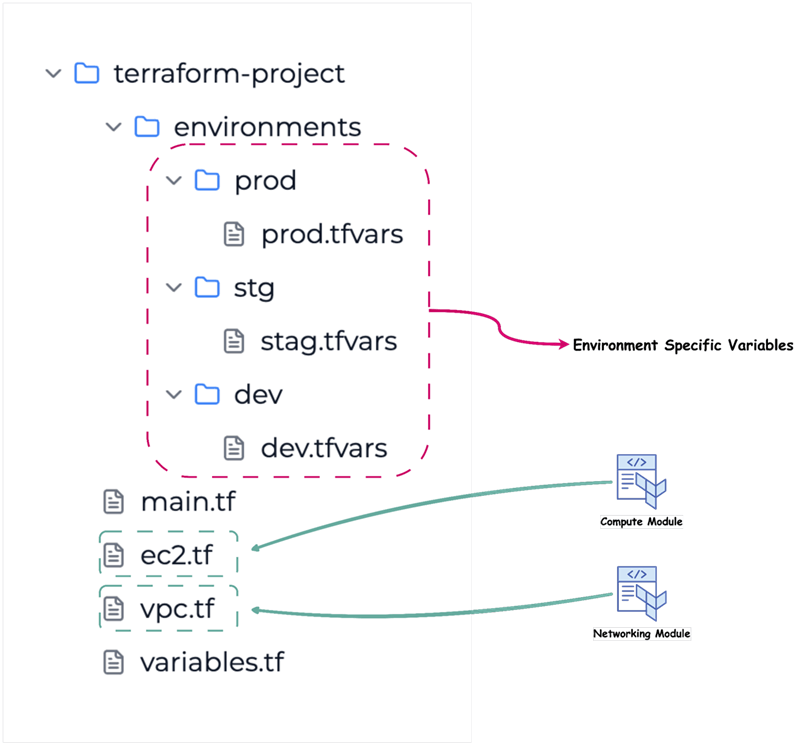
Workflow Organization for Teams

Workflow is essentially how the team or teams operate. When working as a distributed team, there should be a defined set of standards when using source control and changes. First, teams should use a branching strategy, such as GitFlow or GitHub Flow to manage different environments and features.

Another strategy for Terraform code is “trunk-based development”. This strategy suits better since infrastructure can have only one version deployed. Workflow should focus on facilitating code reviews, controlling the promotion of changes through the development lifecycle, and drift detection when infrastructure changes outside of your sources.

With trunk-based development, developers merge directly to the main branch after reviewing their code.
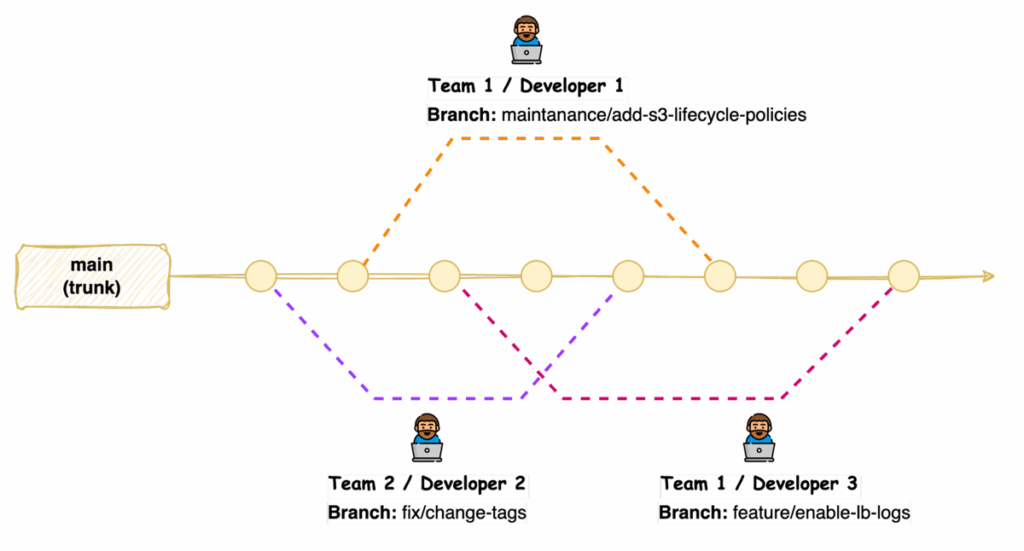
Distributed teams can benefit from implementing code review processes, which allow team members to provide feedback, identify potential issues, and ensure adherence to coding standards before changes are applied to the infrastructure.

The basis of change management is to ensure that all changes go through Terraform. You can explore implementing centralized auditing and implementing policy-as-code to manage change at scale.

Enhancing and maintaining the security of Terraform-managed infrastructure becomes an issue when multiple teams are involved, with frequent updates to Terraform modules and live configurations. Static code analysis tools such as Checkov, tfsec, or Terrascan can be used as part of the workflow.

Using Pipelines to Automate Terraform at Scale

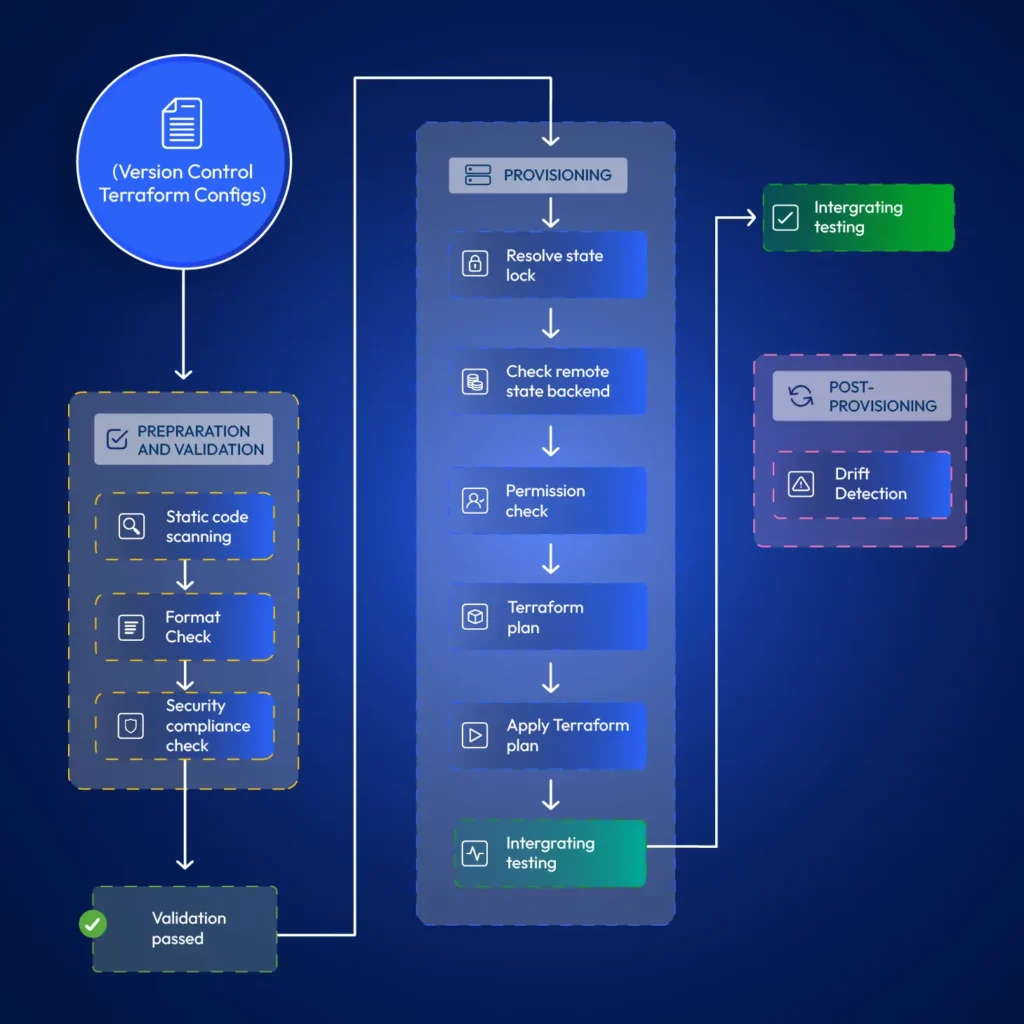
It is typical for developers to test Terraform modules locally. However, when promoting changes to live environments, it is best practice if the developer’s duty ends at merging code to the relevant git branch. Automation for terraform provisioning can resolve issues around state locks, permission issues, faster provisioning (cached modules) and allow implementing stages such as static code scanning, format checks, drift detection, etc. Also, pipelines retain a log that teams can refer to later, allowing them to discover when exactly some changes happened.
3 Best Practices for Distributed Teams – Tips for managing infrastructure with geo-scattered teams.

Communication and Collaboration

Clear and documented communication channels are important for distributed teams working with Terraform. Teams should define protocols for infrastructure-related discussions, updates, and issue resolution, ensuring all members know about changes and potential impacts. There can be two levels of communication. When working on internal developments, teams can use channels such as Slack, Teams, or other communication tools the organization uses. However, these channels are unsuitable for change management.

Change management is critical. When promoting changes to live environments, distributed teams should choose a time window with minimal impact on the business and maintain a mechanism to approve and track those changes. Teams generally use tools such as ServiceNow for this purpose.

Standardization

You can achieve standardization by using consistent coding styles and naming conventions across all Terraform configurations. Doing so improves readability, maintainability, and collaboration within distributed teams. Organizations need to enforce using standardized Terraform modules from a private registry ensuring that infrastructure components are deployed in a consistent and compliant manner. Tools such as AWS Config can help you enforce rules on cloud infrastructure if you are using Terraform with AWS.

Version Control

Terraform configurations should be stored in version control, and it should be maintained as the reference to the actual infrastructure. This allows for tracking changes over time, collaborating effectively through branching and merging, and enabling easy rollbacks to previous configurations if necessary. There is no way to version control infrastructure itself, except for resources such as AWS Task Definitions or Launch Templates if using Terraform in AWS environments. Version control is limited to IaC only, not the actual infrastructure.

Security and Access Control in Terraform Workflows – Managing permissions and secrets.

Least Privilege

Least privilege in Terraform Workflows involves granting only the necessary permissions to users, teams, and automation processes required to provision and manage infrastructure resources. When using Terraform with AWS, teams can use IAM roles with scoped permissions instead of credentials.

Secure Handling of API Keys and Credentials

Teams should never include passwords, secrets, or other sensitive data in Terraform code. They may appear in the state file, so make sure that the state file is not readable by unauthorized personnel. Terraform can integrate with dedicated secrets management tools like AWS Secrets Manager.

If using Terraform in AWS, you can retrieve secrets using a data block;

data "aws_secretsmanager_secret_version" "api_key" {
secret_id = aws_secretsmanager_secret.api_key_secret.id
}

Policy Enforcement as Code

You can implement policy enforcement as code within your Terraform workflows. For example, when using Terraform in AWS environments, you may want to ensure that you add mandatory tags to all resources you create in your Terraform configurations. You can use policy-as-code tools such as Open Policy Agent (OPA) to define and enforce security and compliance rules. These tools allow you to define and enforce organizational rules for security and compliance across all Terraform configurations.

Limit Direct Access and Enforce Code Reviews

In any organization using DevOps, teams utilize R&D environments for development and separate live environments (dev, staging, and prod) for customer applications. Changes to R&D environments can be made without peer reviews. Developers will have more permissions in R&D environments. This includes permissions to modify infrastructure directly through a cloud console or CLI.

However, peer reviews should be mandatory for all infrastructure code changes in live environments. All changes to live environments should happen only through Terraform.

Monitor and Audit Practices to Scale Terraform for Compliance

Distributed DevOps teams must ensure compliance, track resource deployments, and troubleshoot issues effectively. This requires governance and visibility over infrastructure.

Teams can vaguely track infrastructure changes using cloud-built tools like CloudTrail in AWS. If using Terraform with AWS, you can configure CloudWatch for applicable resources through Terraform itself. However, multi-cloud monitoring platforms such as DataDog can reduce manual configurations and help distributed teams gain end-to-end visibility into their infrastructure. Setting up alerts for critical infrastructure changes, security-related events, and potential compliance violations is good practice.

Another vital aspect is saving Terraform run logs. If you have CI/CD configured, you can use the logs from CI/CD tool for this purpose. You can evaluate platform features such as run history and audit logs if you’re considering automation platforms to manage Terraform provisioning.

Conclusion: How to Scale Terraform for Distributed DevOps Teams

Terraform as an IaC tool requires thoughtful implementation with best practices in mind for infrastructure management within distributed DevOps teams. Terraform comes packed with features required to configure it in a way that promotes collaboration across geo-separated teams. Proper configuration of terraform with AWS or other cloud providers is required to ensure that infrastructure management becomes a competitive advantage rather than a logistical challenge. Terraform is a tool, but using end-to-end solutions such as ControlMonkey can help organizations operate distributed DevOps teams at scale while automatically incorporating all the best practices and advanced features such as drift detection, compliance enforcement and access control baked in.

If you’re scaling Terraform across distributed DevOps teams, ControlMonkey can help streamline operations, enforce compliance, and simplify collaboration without added overhead.

Bottom CTA Background

A 30-min meeting will save your team 1000s of hours

A 30-min meeting will save your team 1000s of hours

Book Intro Call

Author

Ori Yemini

Ori Yemini

CTO & Co-Founder

Ori Yemini is the CTO and Co-Founder of ControlMonkey. Before founding ControlMonkey, he spent five years at Spot (acquired by NetApp for $400M). Ori holds degrees from Tel Aviv and Hebrew University.

    Sounds Interesting?

    Request a Demo

    FAQs

    Terraform is free to use. Your costs would be from the AWS resources you provision. Some platforms provide advanced features for managing Terraform at scale, but may come with additional costs. ControlMonkey is an alternative solution that works as an automation platform for Terraform, with advanced features to provision and govern cloud infrastructure.

    You can establish emergency procedures that allow critical changes directly to infrastructure. However, you must ensure proper documentation and retrospective updates to the Terraform code.

    We have a detailed guide on configuring terraform for multi-region cloud as an e-book, which you can download and refer to for free!

    As Terraform usage grows, teams often struggle with state file conflicts, inconsistent configurations, limited access control, and managing module reuse. Scaling Terraform requires standardizing workflows, isolating environments using workspaces, enforcing RBAC, and leveraging CI/CD for safer deployments.

    To scale Terraform effectively, split infrastructure into reusable modules and organize them by service or environment. Store modules in a shared registry, isolate states per workspace or environment, and implement automation pipelines for testing and deployment. This structure reduces bottlenecks and supports cross-team development.

    Resource Blog News Customers Stories

    Updated: Aug 20, 2025 Upd: 20.08.25

    9 min read

    Self-Service Terraform AWS for DevOps Teams

    Self-Service Terraform AWS for DevOps Teams

    If you’ve worked with AWS, you’ve likely had to provision cloud infrastructure — maybe databases, storage buckets, or compute instances. Many teams start by using the AWS Console for these tasks. But manual provisioning doesn’t scale — especially when managing multiple environments like development, QA, staging, and production. That’s where Self-Service Terraform AWS workflows come in — enabling teams to provision infrastructure autonomously, securely, and at scale.

    That’s where Self-Service Terraform AWS comes in. By integrating Infrastructure as Code (IaC) principles with Terraform’s HCL scripting, teams can create reusable and modular infrastructure that scales reliably across different environments.

    In this guide, we’re going to explore how to set up Self-Service Terraform AWS environments. We’ll also cover how to incorporate Git workflows, CI/CD pipelines, and cost governance into your provisioning strategy.

    Setting up Self-Service Infrastructure on AWS

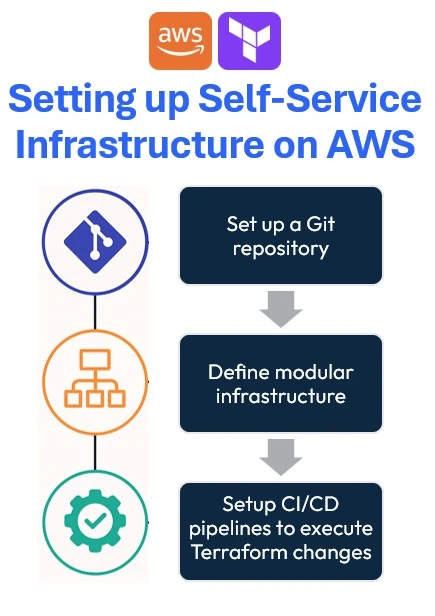
    Setting up Self-Service Terraform AWS infrastructure helps provision resources autonomously, securely, and consistently. These are the steps you would have to follow:

    1. Set up a Git repository
    2. Define modular infrastructure
    3. Setup CI/CD pipelines to execute Terraform changes

    Set up a Git repository

    Start creating a Git repository using services like GitHub, GitLab, or Bitbucket to track and version control Terraform code. This helps teams to manage all changes made to the cloud infrastructure over time.

    Additionally, it automates the provisioning of the infrastructure using CI/CD for Terraform.

    Define modular infrastructure

    It’s important to create the Terraform code for better readability and long-term maintenance. Defining modular infrastructure involves breaking down infrastructure resources into reusable Terraform modules, each encapsulating specific AWS components like VPCs, EC2 instances, or RDS databases.

    By using Terraform modules, teams can abstract complex configurations to easily deploy consistently across multiple environments (development, staging, production).

    Setup CI/CD pipelines to execute Terraform changes

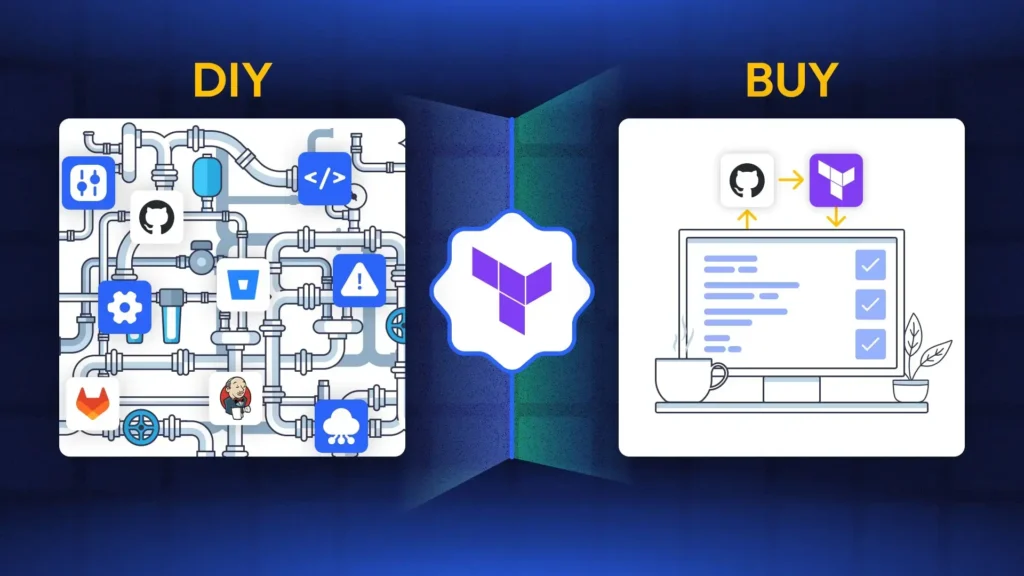
    Creating a pipeline to execute Terraform changes involves automating infrastructure deployments. You can either build (and maintain) pipelines on your ownusing CI/CD tools such as GitHub Actions, and AWS CodePipeline or you can use a dedicated tool for that.
    We believe that software-dedicated pipelines are not good enough for infrastructure.

    These pipelines automate the complete Terraform lifecycle:

    1. Initialization
    2. Validation
    3. Planning
    4. Applying configurations automatically upon each code commit.

    For large-scale cloud environments, set up an AWS Terraform infrastructure governance tool integrated into your pipeline for continuous infrastructure drift detection and validation.

    This ensures infrastructure changes are thoroughly tested and reviewed before deployment, preventing errors or configuration drift.

    Implementing Self-Service Terraform AWS Environments

    Start by creating an IAM User and a Secret access key with the necessary permission to provision your infrastructure in AWS. After that, proceed with the next section.

    Step 01: Initialize Terraform AWS Boilerplate for Self-Service

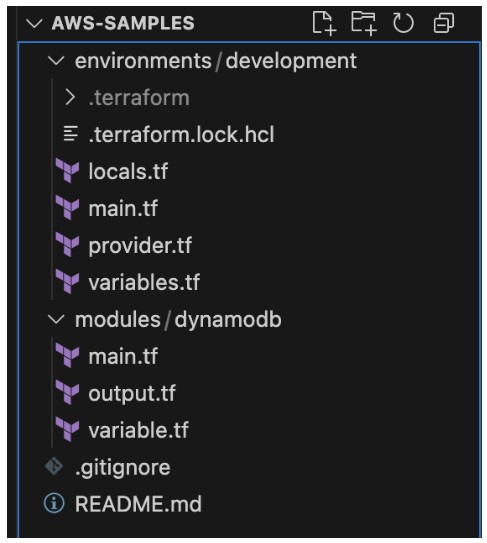
    In this article, let’s create one module infrastructure component – DynamoDB, and maintain one environment – Development. To do so, create the folder structure showcased below:

    The project structure enforces self-service:

    1. environments/ keeps each deployment (dev, staging, prod) isolated—so you don’t accidentally apply prod changes to dev.
    2. modules/ houses composable building blocks you can reuse (e.g. your DynamoDB module) across environments.
    3. A clean root with .gitignore & README.md helps onboard new team members.

    Step 02: Defining self-service infrastructure

    You can define the providers for your infrastructure. In this case, you’ll need to configure the AWS provider with S3 backed state:

    terraform {
     required_providers {
       aws = {
        source = "hashicorp/aws"
        version = "~> 4.16"
       }
     }
     backend "s3" {
       bucket = "lakindus-terraform-state-storage"
       key = "development/terraform.tfstate"
       region = "us-east-1"
     }
     required_version = ">= 1.2.0"
    }
    
    provider "aws" {
     region = "us-east-1"
    }

    Note: Ensure that the S3 bucket that you are using to manage your Terraform State is already created.

    Next, you’ll need to define your tags that can help better track your infrastructure. Part of building a self-service infrastructure is to keep reusability and maintainability high. To do so, you can define your tags as a local variable scoped to your particular development environment, like so:

    locals {
     tags = {
       ManagedBy = "Terraform"
       Environment = "Development"
     }
    }

    Next, you can specify these tags by referencing locals.tags onto any resource you wish to tag.

    Afterwards, you can start defining the module for DynamoDB. You’ll see three files:

    1. main.tf: This holds the resource declaration
    2. output.tf: This holds any output that will be generated from the resource
    3. variable.tf: This defines all inputs required to configure the resource.

    For instance, to provision a DynamoDB table, you’ll need:

    1. Table name
    2. Tags
    3. Hash key
    4. Range key
    5. GSIs
    6. LSIs
    7. Billing Mode
    8. Provisioned capacity – if billing mode is PROVISIONED

    To accept these values, you can define the variables for the module:

    variable "table_name" {
     description = "The name of the DynamoDB table"
     type = string
    }
    
    variable "hash_key" {
     description = "The name of the hash key"
     type = string
    }
    
    variable "hash_key_type" {
     description = "The type of the hash key: S | N | B"
     type = string
     default = "S"
    }
    
    variable "range_key" {
     description = "The name of the range key (optional)"
     type = string
     default = ""
    }
    
    variable "range_key_type" {
     description = "The type of the range key: S | N | B"
     type = string
     default = "S"
    }
    
    variable "billing_mode" {
     description = "Billing mode: PROVISIONED or PAY_PER_REQUEST"
     type = string
     default = "PROVISIONED"
    }
    
    variable "read_capacity" {
     description = "Read capacity units (for PROVISIONED mode)"
     type = number
     default = 5
    }
    
    variable "write_capacity" {
     description = "Write capacity units (for PROVISIONED mode)"
     type = number
     default = 5
    }
    
    variable "global_secondary_indexes" {
     description = "List of global secondary index definitions"
     type = list(object({
     name = string
     hash_key = string
     range_key = optional(string)
     projection_type = string
     non_key_attributes = optional(list(string))
     read_capacity = optional(number)
     write_capacity = optional(number)
     }))
     default = []
    }
    
    variable "tags" {
     description = "Tags to apply to the DynamoDB table"
     type = map(string)
     default = {}
    }
    Next, you can define the module:
    resource "aws_dynamodb_table" "this" {
     name = var.table_name
     billing_mode = var.billing_mode
     hash_key = var.hash_key
     range_key = var.range_key == "" ? null : var.range_key
    
     attribute {
     name = var.hash_key
     type = var.hash_key_type
     }
    
     dynamic "attribute" {
       for_each = var.range_key == "" ? [] : [var.range_key]
       content {
        name = range_key.value
        type = var.range_key_type
       }
     }
    
     dynamic "global_secondary_index" {
      for_each = var.global_secondary_indexes
      content {
       name = global_secondary_index.value.name
       hash_key = global_secondary_index.value.hash_key
       range_key = lookup(global_secondary_index.value, "range_key", null)
       projection_type = global_secondary_index.value.projection_type
       non_key_attributes = [global_secondary_index.value.non_key_attributes]
       read_capacity = lookup(global_secondary_index.value, "read_capacity", var.read_capacity)
       write_capacity = lookup(global_secondary_index.value, "write_capacity", var.write_capacity)
      }
     }
    
     read_capacity = var.billing_mode == "PAY_PER_REQUEST" ? null : var.read_capacity
     write_capacity = var.billing_mode == "PAY_PER_REQUEST" ? null : var.write_capacity
    
     tags = var.tags
    }

    Next, you can define the module:

    resource "aws_dynamodb_table" "this" {
     name = var.table_name
     billing_mode = var.billing_mode
     hash_key = var.hash_key
     range_key = var.range_key == "" ? null : var.range_key
    
     attribute {
     name = var.hash_key
     type = var.hash_key_type
     }
    
     dynamic "attribute" {
       for_each = var.range_key == "" ? [] : [var.range_key]
       content {
        name = range_key.value
        type = var.range_key_type
       }
     }
    
     dynamic "global_secondary_index" {
      for_each = var.global_secondary_indexes
      content {
       name = global_secondary_index.value.name
       hash_key = global_secondary_index.value.hash_key
       range_key = lookup(global_secondary_index.value, "range_key", null)
       projection_type = global_secondary_index.value.projection_type
       non_key_attributes = [global_secondary_index.value.non_key_attributes]
       read_capacity = lookup(global_secondary_index.value, "read_capacity", var.read_capacity)
       write_capacity = lookup(global_secondary_index.value, "write_capacity", var.write_capacity)
      }
     }
    
     read_capacity = var.billing_mode == "PAY_PER_REQUEST" ? null : var.read_capacity
     write_capacity = var.billing_mode == "PAY_PER_REQUEST" ? null : var.write_capacity
    
     tags = var.tags
    }

    As shown above, you now have a blueprint for a DynamoDB table that anyone can use to create a table. By doing so, you enforce consistency in your project. Different developers can provision a table using this module and guarantee the same configurations to be applied.

    Finally, you can define your outputs:

    utput "table_name" {
     description = "The name of the DynamoDB table"
     value = aws_dynamodb_table.this.name
    }
    
    output "table_arn" {
     description = "The ARN of the DynamoDB table"
     value = aws_dynamodb_table.this.arn
    }
    
    output "hash_key" {
     description = "The hash key name"
     value = aws_dynamodb_table.this.hash_key
    }
    
    output "range_key" {
     description = "The range key name"
     value = try(aws_dynamodb_table.this.range_key, "")
    }

    This helps you access values that will be made available only upon resource creation.

    Finally, you can provision the resource by configuring the module in your main.tf :

    module "db" {
     source = "../../modules/dynamodb"
     table_name = "sample-table"
     billing_mode = "PAY_PER_REQUEST"
     hash_key = "id"
     hash_key_type = "S"
     tags = local.tags
    }

    As shown above, it’s extremely simple to create a table using the module. You don’t need to define the resource and all the properties every single time. All you need to do is fill in the input variables defined in your module.

    Final Step: CI/CD for Self-Service Terraform AWS Deployments

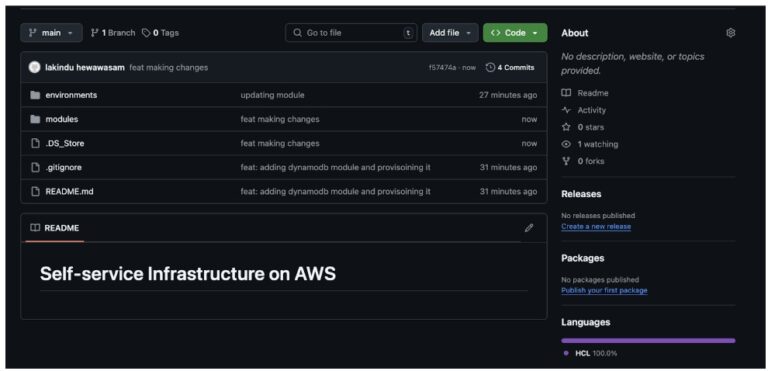
    Once you’re ready to provision the infrastructure, you can push changes to your repository:

    Next, you will need to create the following:

    1. GitHub Actions Workflow to deploy your changes using CI/CD
    2. IAM Service Role that authenticates via OIDC to help the GitHub Runner communicate with AWS.

    Note: To learn about creating an OIDC Role with AWS, check this out.

    Once you’ve created an IAM Role that can be assumed using OIDC, you can create the following GitHub Workflow:

    name: Terraform Deployment with AWS OIDC

    name: Terraform Deployment with AWS OIDC
    
    on:
      push:
        branches:
          - main
      pull_request:
    
    permissions:
      id-token: write # Needed for OIDC token
      contents: read # To checkout code
    
    jobs:
      terraform:
        name: Terraform OIDC Deploy
        runs-on: ubuntu-latest
    
        env:
          AWS_REGION: us-east-1
    
        steps:
          - name: Checkout Repository
            uses: actions/checkout@v4
    
          - name: Configure AWS Credentials via OIDC
            uses: aws-actions/configure-aws-credentials@v4
            with:
              role-to-assume: ${{ secrets.AWS_ROLE_ARN }}
              aws-region: ${{ env.AWS_REGION }}
    
          - name: Change Directory to Environment
            run: cd environments/development
    
          - name: Setup Terraform
            uses: hashicorp/setup-terraform@v3
            with:
              terraform_version: "1.7.4"
    
          - name: Terraform Init
            run: terraform init
            working-directory: environments/development
    
          - name: Terraform Plan
            run: terraform plan -out=tfplan
            working-directory: environments/development
    
          - name: Terraform Apply
            if: github.ref == 'refs/heads/main'
            run: terraform apply -auto-approve tfplan
            working-directory: environments/development

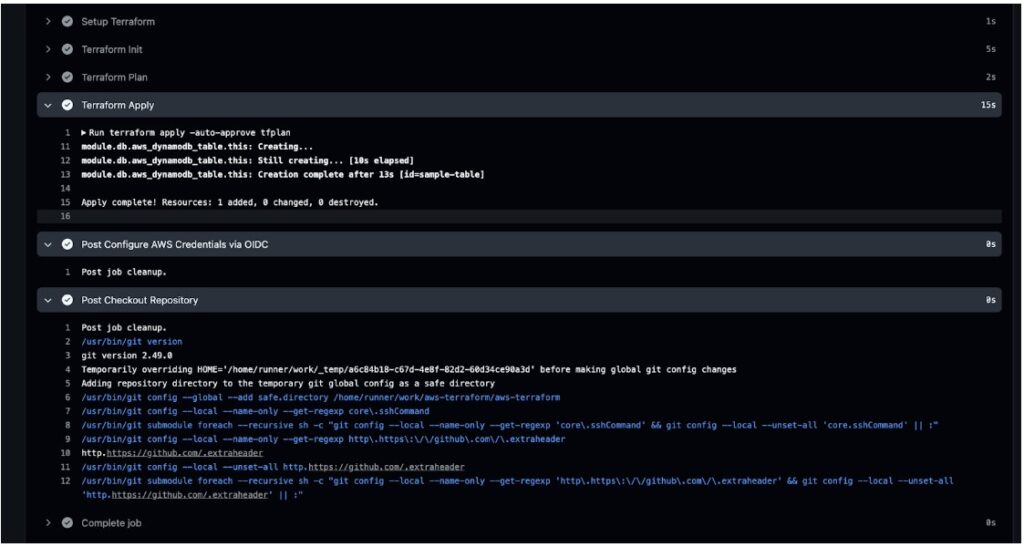
    With this workflow, the GitHub actions workflow will:

    1. Assume the IAM role using OIDC
    2. Perform a Terraform plan and auto apply the changes.

    After you run it, you should see the status in the GitHub actions workflow:

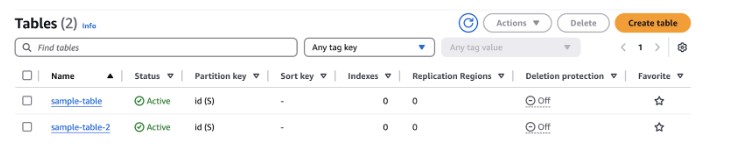
    Next, you can view your resource in the AWS Console:

    And that’s all you need. Next, all your pushes to the repository will trigger plans that will be applied automatically.

    Pricing & cost management

    After you start managing infrastructure with Self-Service Terraform AWS, it’s important to understand the techniques to adopt to efficiently manage costs:

    1. Enforce Consistent Tagging for Cost Allocation

    Tag every resource with a common set of metadata so AWS Cost Explorer and your billing reports can slice & dice by team, project or environment.

    # variables.tf
    variable "common_tags" {
      type = map(string)
      default = {
        Project     = "my-app"
        Environment = "dev"
        Owner       = "team-backend"
      }
    }
    
    # main.tf (example)
    resource "aws_dynamodb_table" "users" {
      # … table settings …
    
      tags = merge(
        var.common_tags,
        { Name = "users-table" }
      )
    }

    Benefits:

    1. Chargeback/showback by team or cost center
    2. Easily filter unused or mis-tagged resources

    2. Shift-Left Cost Estimation with Infracost

    Catch cost surprises during code review by integrating an open-source estimator like Infracost.

    Install & configure infracost

    brew install infracost
    infracost setup –aws-project=your-aws-credentials-file

    Generate a cost report

    infracost breakdown --path=./environments/dev \ --format=json --out-file=infracost.json

    Embed in CI (e.g. GitHub Actions) to comment on pull requests with line-item delta.

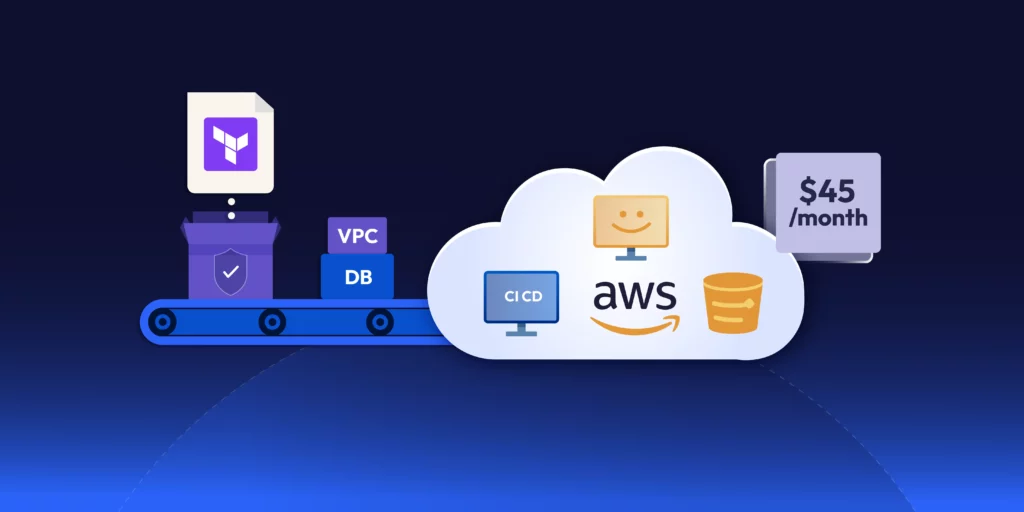
    That way every Terraform change shows you “this will add ~$45/month.” This helps teams take a more proactive approach to cost management.

    3. Automate Cleanup of Ephemeral Resources

    This is critical for Self-Service Terraform AWS pipelines where dev environments are short-lived it Prevent “zombie” resources from quietly racking up bills. To do so, you can:

    1. Leverage Terraform workspaces or separate state buckets for short-lived environments.
    2. Use CI/CD triggered destroys for feature branches. This helps remove unnecessary costs that could incur for infrastructure created for feature branches.
    3. TTL tags + Lambda sweeper: tag dev stacks with a DeleteAfter=2025-05-12T00:00:00Z and run a daily Lambda that calls AWS APIs (or Terraform) to tear down expired resources.
    4. Drift & Orphan Detection: Regularly run terraform plan in a scheduler to detect resources that exist in AWS but not in state, then review and remove them.

    4. Tie into AWS Cost Controls

    Even with perfect tagging and cleanup, you need guardrails:

    1. AWS Budgets & Alerts: Create monthly budgets per tag group (e.g. Project=my-app) with email or SNS notifications.
    2. Cost Anomaly Detection: Enable AWS Cost Anomaly Detection to catch sudden spikes.

    Securing Self-Service Terraform AWS Projects

    In addition to cost management, you’d need to consider best practices for securely managing your infrastructure with Terraform. To do so, you can leverage the following:

    1. Enforce Least-Privilege IAM

    Always provision IAM roles using principles of least privilege. This means that you should only define access control policies for actions that a user will perform.

    Additionally, consider using IAM Assume Role rather than access keys as the tokens are not long-lived. By doing so, any leaks in credentials will not result in a large-scale attack as the credentials will expire quickly.

    2. Secure & Version Terraform State

    Consider managing your state in DynamoDB consistency control with encryption in rest and in transit using KMS Keys. By doing so, you ensure security in your Terraform state.

    Concluding Thoughts

    Building Self-Service Terraform AWS environments is a powerful way to scale cloud provisioning while keeping control in the hands of your developers. With the right modular approach, CI/CD pipelines, and cost visibility, you can eliminate bottlenecks and reduce operational overhead.

    Want to take it further?

    ControlMonkey brings intelligence and automation to every step of your Self-Service Terraform AWS lifecycle. From AI-generated IaC modules to drift detection and policy enforcement, we help you govern infrastructure without slowing down innovation.

    👉 Book a Self-Service Terraform AWS demo to see how ControlMonkey simplifies Terraform at scale.

    Bottom CTA Background

    A 30-min meeting will save your team 1000s of hours

    A 30-min meeting will save your team 1000s of hours

    Book Intro Call

      Sounds Interesting?

      Request a Demo

      FAQs

      Self-Service Terraform on AWS enables developers and DevOps teams to provision infrastructure—like VPCs, databases, or compute—without waiting on central platform teams. By using Terraform modules, version-controlled Git repositories, and CI/CD pipelines, organizations can scale infrastructure provisioning securely and consistently across environments.

      To secure Self-Service Terraform AWS environments, use IAM Assume Roles instead of long-lived access keys, enforce least-privilege permissions, and store state securely in S3 with encryption and DynamoDB state locking. You should also integrate drift detection and apply guardrails via CI/CD pipelines for safer deployments.

      Yes. ControlMonkey automates every step of the Self-Service Terraform AWS lifecycle – from generating reusable Terraform modules to enforcing policies, detecting drift, and integrating with your CI/CD workflows. It’s designed to give DevOps teams autonomy without sacrificing governance, visibility, or security.

      Resource Blog News Customers Stories

      Updated: Aug 25, 2025 Upd: 25.08.25

      8 min read

      Engineering Toil: The Real DevOps Bottleneck

      Aharon Twizer

      Aharon Twizer

      CEO & Co-founder

      Engineering Toil: The Real DevOps Bottleneck

      Today, productivity is a key priority for software engineering teams. Every software development, DevOps and cloud team wants to ensure they are working as productively, efficiently and cost effectively as possible. However, teams frequently get bogged down with manual, repetitive tasks, firefighting to keep the lights on, which impacts their ability to move the needle for the organization on technology innovation.

      In the DevOps and R&D world, this term is frequently referred to as engineering toil – the bottleneck that DevOps teams are constantly fighting against. This article examines what engineering toil is, why it happens and what actions your DevOps team can put in place to help eliminate excess toil.

      Why Scale and Velocity are Challenging to DevOps?

      Right now, the scale and velocity of software development present an enormous challenge for enterprises, with software being built faster than it can be secured. In parallel, organizations expect new infrastructure and cloud workloads to be spun up just as quickly, often with little or no cloud governance around them. However, the reality is that the more mature the cloud environment, the more cloud accounts are added, and as configurations evolve, the environment becomes more complex.

      This leads to bloated clouds with risk accumulating, which is not only difficult to manage but inefficient and exposes the organization to increasing security incidents. This has been made worse with the advent of AI-powered development, which has raised the stakes. AI is already accelerating software delivery. This means more code, more changes, more infrastructure to support it and if you’re still relying on manual processes to manage your environment, AI just adds fuel to the fire.

      How Engineering Toil Impacts DevOps Productivity

      This scenario often leads to excessive engineering toil. Far from simply being irritating, there is growing evidence that the impact of engineering toil in today’s high-stakes, high-velocity cloud environments isn’t just annoying, it is incredibly expensive. It also eats up valuable engineering time, slows down delivery, impacts productivity, puts a blocker on innovation and impacts the ability for the business to create a competitive advantage.

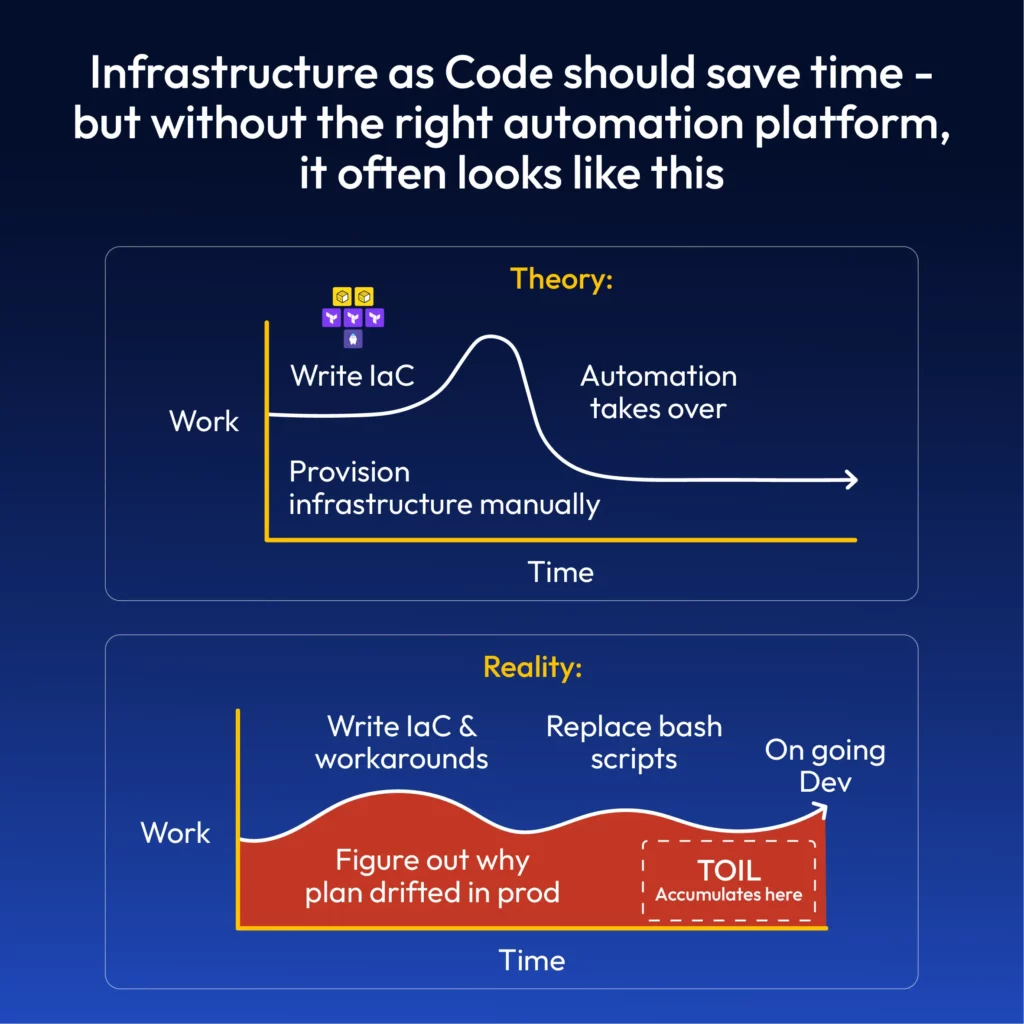
      But toil is common throughout most programming and DevOps positions, whether we like it or not. And when it comes to platform engineering, the chances of encountering toil are high. You can think of toil as those tedious workarounds that should be automated but rarely are. This could be due to a lack of standard configurations for deployments, meaning engineers must copy and paste data from one module to another, or it could be an integration that has not yet been automated.

      Less Than 50% of an Engineer’s Time Should Be Spent on Toil

      According to Google’s SRE Book, which defines toil as manual, repetitive, automatable work that scales linearly, it advocates that organizations should strive to keep toil well below 50% of an engineer’s time. It emphasizes automation and strategic engineering practices to reduce toil. Explore the chapter on eliminating toil.

      Additionally, a LeadDev article highlights how unchecked toil can lead to burnout, errors, low morale and career stagnation, with employees voting with their feet. If the DevOps engineers who created your infrastructure leave, your corporate knowledge and experience walk out the door with them.

      Engineers have different limits for how much toil they can tolerate, but everyone has a limit. Too much toil leads to burnout, boredom, and discontent. This article advocates that the way to eliminate toil is through automation and/or system redesign.

      Furthermore, a recent Eindhoven University of Technology academic paper titled: Toil in Organizations That Run Production Services found that toil is more nuanced than Google’s definition and the challenges in reducing toil include cultural inertia combined with a lack of time to automate. But the paper emphasizes that a concerted effort to reduce toil will yield positive outcomes for both individuals and organizations.

      In summary, the research found that what machines should be doing is being done manually and if you’re running cloud infrastructure at scale without a purpose-built automation platform, then toil will just continue to escalate.

      Importance of Prioritizing Long-Term Engineering Projects

      The good news is that toil is measurable, and this is where surveys and ticket metrics can help to quantify it. Reducing toil requires engineering effort with automation and system improvements whereby teams prioritize long-term engineering projects over reactive, repetitive tasks.

      However, it is important to recognize that not all toil is bad. Small amounts can be tolerable and even satisfying for your engineers, predictable and repetitive tasks can produce a sense of accomplishment and quick wins. They can be low-risk and low-stress activities. Some people gravitate toward tasks involving toil and may even enjoy that type of work. But be warned, excess toil is harmful – it impacts productivity and velocity.

      This Google cloud blog offers some practical steps for identifying, measuring, and reducing toil. In particular, it encourages using Infrastructure as Code (IaC) and automation as key strategies.

      How Infrastructure as Code (IaC) Helps Reduce Engineering Toil

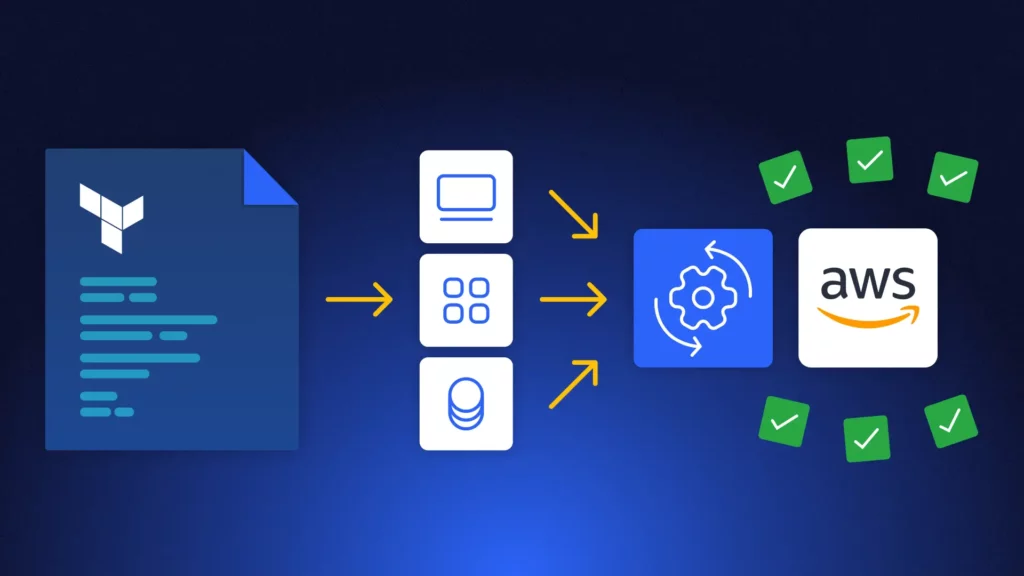
      Infrastructure as Code (IaC) is a powerful tool in the fight against engineering toil. By allowing infrastructure to be defined, provisioned, and managed through code, this enables better cloud control. But layered onto this, engineering teams need automation, and this is where platforms like Terraform enable DevOps to define, provision, and manage cloud and on-prem resources using declarative configuration. In effect, Terraform transforms manual, repetitive tasks into automated, scalable processes using machine-readable configuration files to define infrastructure (servers, networks, databases), automate provisioning and configuration and enable version control and repeatability.

      Here’s how IaC directly tackles the characteristics of toil:

      Toil TraitHow IaC Helps
      ManualAutomates the setup and configuration of infrastructure
      RepetitiveScripts can be reused across environments and deployments
      AutomatableIaC is inherently automatable, you run once, apply anywhere
      TacticalShifts focus from reactive fixes to proactive system design
      No enduring valueIaC creates reusable templates that add long-term value
      Scales linearlyIaC enables scalable infrastructure without increasing manual effort

      The benefits of Using IaC to Eliminate Toil

      There are several key benefits of using IaC to eliminate toil and these include:

      • Consistency: Eliminates “it works on my machine” issues by standardizing environments.
      • Speed: Rapid provisioning and updates reduce downtime and manual effort.
      • Reliability: Reduces human error and improves system stability.
      • Version Control: Infrastructure changes are tracked and auditable.
      • Self-healing Systems: Can be integrated with monitoring to auto-remediate issues.

      Tackling Toil in Terraform and Cloud Workflows

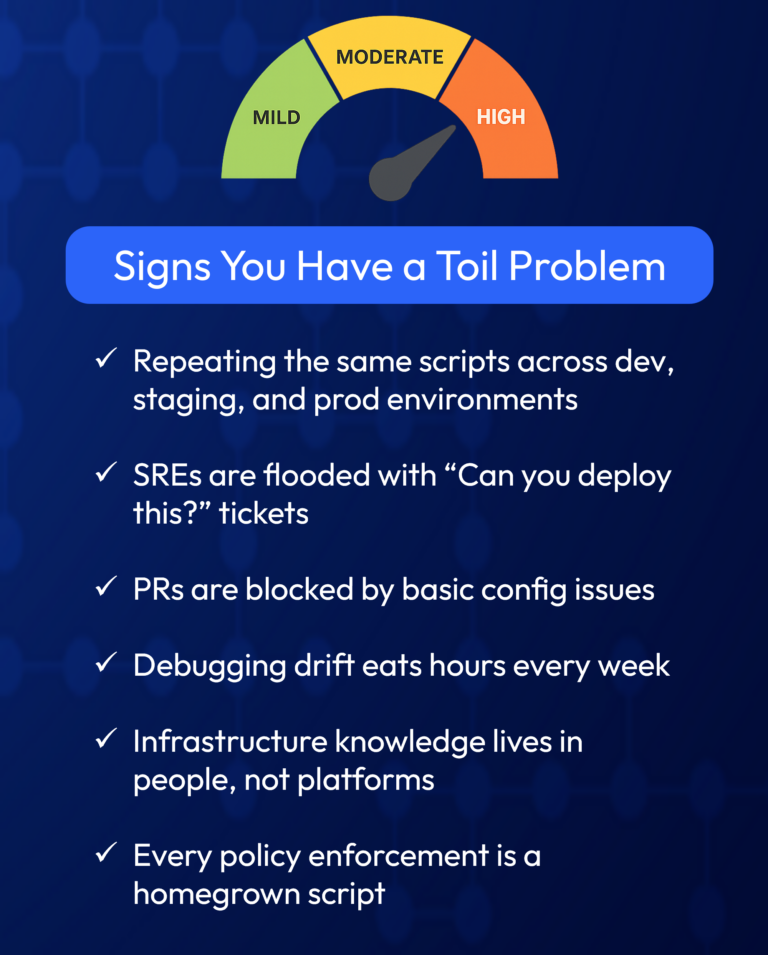
      So, if you are ready to tackle toil, here is a list of common engineering toil issues found in Terraform and cloud workflows, such as:

      • Manually running Terraform Plan to preview changes before applying them
      • Approving and tracking changes in Slack or spreadsheets
      • Debugging cloud drift without full visibility
      • Writing custom scripts to enforce policies
      • Manually provisioning a VM
      • Reviewing code for basic issues, such as open S3 buckets and bad IAM roles
      • Your SREs are swamped with “can you deploy this?” tickets.

      While each task might not sound that onerous, if you multiply each of these by every developer, in every environment, every week, it is easy to see how arduous toil can become.

      Why Toil Often Goes Unnoticed

      So why does toil frequently go unnoticed, even if you are using Terraform? If you have a patchwork of GitHub repositories, Jenkins jobs, in-house scripts, and Slack approvals, unfortunately, this isn’t an end-to-end platform, it’s a mismatch of tools and it’s where toil lives and multiplies. As a result, most teams don’t even realize how much toil they’re carrying. Toil creeps in quietly. But it scales quickly.

      How ControlMonkey Eliminates Engineering Toil

      ControlMonkey was built to erase engineering toil from the Terraform workflow. It’s the only complete solution for end-to-end Terraform automation, allowing DevOps to manage cloud infrastructure with the same confidence that they manage software delivery.

      Terraform Automation, ReimaginedIt enables the delivery of self-service deployments. PR-based workflows. Policy enforcement is baked in. There are no custom scripts, no friction, and thereby enabling fast infrastructure provisioning without DevOps bottlenecks. ControlMonkey:

      • Auto-runs plans and applies with approval gates
      • Enables templatized environments via QualityGates
      • Imports legacy resources into Terraform in seconds

      Cloud Drift is Eliminated. Visibility? Total.Our Cloud vs. Code guarantee detects drift before it becomes a problem – what’s running in your cloud is mirrored in your code, ensuring predictability and:

      • Real-time infra snapshots
      • Drift alerts with context
      • One-click remediation

      Governance Without Grit

      And unlike homegrown pipelines or partial tools, it all runs on a platform built for Total Cloud Control.

      From Engineering Toil to Total Cloud Control

      Toil doesn’t scale. And in today’s cloud, neither should your engineering team.

      ControlMonkey eliminates Terraform toil by replacing manual workarounds with intelligent automation and proactive governance, giving engineers back their time and your organization back its development velocity.

      Request a Demo →

      Bottom CTA Background

      A 30-min meeting will save your team 1000s of hours

      A 30-min meeting will save your team 1000s of hours

      Book Intro Call

      Author

      Aharon Twizer

      Aharon Twizer

      CEO & Co-founder

      Co-Founder and CEO of ControlMonkey. He has over 20 years of experience in software development. He was the CTO of Spot.io, which was bought by NetApp for more than $400 million. There, he led important tech innovations in cloud optimization and Kubernetes. He later joined AWS as a Principal Solutions Architect, helping global partners solve complex cloud challenges. In 2022, he started ControlMonkey to help DevOps teams discover, manage, and scale their cloud infrastructure with Infrastructure as Code. Aharon loves creating tools that help engineering teams. These tools make it easier to manage the complexity of modern cloud environments.

        Sounds Interesting?

        Request a Demo

        FAQ – Engineering Toil, DevOps Toil and SRE Toil

        Toil refers to repetitive, manual tasks that add little long-term value – like re-running scripts, debugging drift, or handling infra tickets. In software engineering, toil slows teams down and causes burnout.

        Engineering toil in DevOps includes low-leverage tasks like manual Terraform applies, Slack-based approvals, and firefighting drift. These tasks scale with infra, but not with business value – making them a bottleneck.

        Toil consumes SRE time with non-strategic tasks. Instead of improving system reliability, they’re stuck deploying code, debugging misconfigurations, or managing infrastructure manually.

        According to Google’s SRE handbook, toil is work that is manual, repetitive, automatable, and scales linearly. Eliminating toil is a core tenet of site reliability engineering.

        DevOps toil slows you down. Automation speeds you up. Replacing toil with automation means faster delivery, fewer production issues, and happier teams.

        Resource Blog News Customers Stories

        Updated: Aug 24, 2025 Upd: 24.08.25

        5 min read

        Terraform AWS Automation: Scalable Best Practices

        Terraform AWS Automation: Scalable Best Practices

        Terraform has become essential for automating and managing AWS infrastructure. It is a tool called Infrastructure as Code (IaC). It helps DevOps teams manage and set up AWS assets in a cost-effective way.

        Terraform AWS provider is designed to interact with AWS, allowing teams to use code to provision AWS resources such as EC2 instances, S3 buckets, RDS databases, and IAM roles. This eliminates the possibility of human misconfigurations and makes the infrastructure scalable and predictable.

        Terraform’s use of code to manage infrastructure has many benefits, including easy version control, collaboration, and continuous integration and delivery (CI/CD).

        Using Terraform on AWS accelerates resource deployment and simplifies complex cloud configurations to be easier to manage. You can advance your cloud automation projects by applying best practices in your workflow.

        New to Terraform on AWS?

        👉Beginner’s Guide to the Terraform AWS Provider

        👉3 Benefits of Terraform with AWS

        Best Practices for Terraform on AWS

        1. Managing AWS Resources through Terraform Automation

        Managing AWS resources with Terraform is efficient. However, it is important to provision them well for cost and performance efficiency.

        Below are some of the best practices for optimizing resource provisioning.

        • Use Instance Types Based on Demand: You are running the correct size of instances in AWS that match your expected workloads. For example, Auto-scaling groups ensure the right number of EC2 instances based on the load.
        • Tagging AWS Resources: Tag your AWS resources to manage them efficiently. Tags assist you in tracking costs, grouping resources, and automating management.

        Terraform Example: Tagging an EC2 Instance:

        resource "aws_instance" "control-monkey_instance" {
          ami           = "ami-0e449927258d45bc4"
          instance_type = "t2.micro"
          tags = {
            Name        = "control-monkey_instance EC2 Instance"
            Environment = "Production"
          }
        }
        • Use Spot Instances for Cost-Efficient AWS Deployment:. Utilize Spot Instances to handle flexible and non-critical workloads. These are usually cheaper than on-demand instances and can be readily allocated through Terraform.

        2. Handling State Files and Remote Backends

        Terraform employs a state file (terraform.tfstate) to store and track the state of the infrastructure resources. This file should be handled carefully, especially in multi-team environments.

        • Remote Backends Use: Storing state files locally can lead to collaboration issues. You can use a remote storage service like Amazon S3 to store state files. DynamoDB can help with state locking and keeping things consistent.

        Example Terraform Configuration of Remote Backend with S3 and DynamoDB:

        terraform {
          backend "s3" {
            bucket         = "control-monkey-terraform-state-bucket"
            key            = "state/terraform.tfstate"
            region         = "us-east-1"
            encrypt        = true
            dynamodb_table = "terraform-lock-table"
          }
        }
        • State Locking: Enable state locking to prevent concurrent operations with the risk of corrupting the state file. Use DynamoDB with the s3 backend to accomplish that.

        3. Modularizing Terraform Code for AWS

        Breaking up Terraform code into modules is a best practice for deploying on AWS. This is especially helpful for large and complex environments.

        Organizing your Terraform code as reusable modules simplifies management, reduces duplicates, and improves collaboration.

        • Create Reusable Modules: Each Terraform module should be a single AWS resource or a group of related resources. This reduces the effort of maintaining and updating the code in the long run.

        Example Module for EC2 Instance (file: ec2_instance.tf)

        variable "instance_type" {
          default = "t2.micro"
        }
        
        resource "aws_instance" "control-monkey_instance" {
          ami           = "ami-0e449927258d45bc4"
          instance_type = var.instance_type
        }
        Main Configuration File (file: main.tf):
        module "ec2_instance" {
          source        = "./modules/ec2_instance"
          instance_type = "t2.medium"
        }
        • Use Input Variables and Outputs: Input variables let you reuse modules. Outputs give you important information, like instance IDs or IP addresses. You can use this information in other parts of your infrastructure.

        4. Automating Terraform Workflows in AWS Environments

        Setting Up CI/CD Integrating Terraform with your CI/CD pipeline allows you to automate infrastructure provisioning and management. By utilizing Terraform with AWS in your pipeline, you can streamline the speed and consistency of deployments.

        • CI/CD for Infrastructure as Code:
          • Use Jenkins, GitLab CI, or AWS CodePipeline. These tools will automatically run Terraform updates when configuration files change. This ensures that the infrastructure is always and securely updated.
        • Automate Terraform Validation:
          • Add terraform validation to your CI pipeline. This will check your configuration files before you apply them to AWS.

        terraform validate

        5. Troubleshooting Terraform AWS Automation

        Terraform deployments fail due to issues such as wrong configurations, AWS limits on the services, or provider-related problems. Below are some of the problems and what you can do to troubleshoot them.

        • Authentication Issues:
          • Ensure that your AWS credentials are set up correctly, either through the AWS_ACCESS_KEY_ID and AWS_SECRET_ACCESS_KEY environment variables or through an AWS profile in ~/.aws/credentials. If you’re utilizing AWS IAM roles, ensure the role has the correct access permissions.
        • Resource Conflicts:
          • Search for existing similar-named resources or conflicting configurations.
          • If Terraform cannot create the resource because another one already exists, use the Terraform state rm command. This will remove the current resource from the Terraform state file. You can then reapply it later.
        • Service limits: AWS has limits on certain services (such as EC2 instances and S3 buckets). Terraform will fail if you hit a limit. Visit the AWS Service Limits page and request a limit increase from AWS support if needed.
        • Debugging Terraform logs: 
          • If Terraform does not provide enough details to fix the problem, enable debugging. Set TF_LOG to DEBUG
        export TF_LOG=DEBUG
        terraform apply

        Final Thoughts on Automating with Terraform

        Using the Terraform in AWS and cloud automation makes infrastructure management more effortless. Organizations can build reliable and scalable cloud deployments by following best practices. These include managing state files with remote backends, using modular Terraform code, and implementing Terraform with CI/CD pipelines. You can find and fix deployment issues by checking Terraform logs and reviewing configurations. This will help improve the reliability of your cloud infrastructure.

        If you’re looking for automated policy enforcements and Terraform scanning integration, consider adopting ControlMonkey. It can bring your AWS assets into compliance with the latest security and operational best practices.

        Additionally, by reducing the need for human intervention and policy enforcement automation, ControlMonkey optimizes cloud automation to be faster, more trustworthy, and easier to manage with the confidence that your Terraform-based deployments are compliant and secure.

        Bottom CTA Background

        A 30-min meeting will save your team 1000s of hours

        A 30-min meeting will save your team 1000s of hours

        Book Intro Call

          Sounds Interesting?

          Request a Demo

          FAQs: Terraform Automation in AWS

          Terraform AWS Automation uses code to automatically deploy, manage, and scale AWS infrastructure for faster, consistent, and secure cloud operations.

          To successfully manage AWS resources using Terraform, keep these best practices in mind:

          • Use modules to break down complex configurations into reusable and manageable.
          • Tag your resources for better organization and cost tracking.
          • Optimize instance sizes and use auto-scaling to adjust resources based on demand.
          • Leverage remote backends like AWS S3 for state management, ensuring team collaboration and consistency.

          Use Terraform variables to parameterize configurations and make your code more flexible.

          Terraform state configuration is crucial to achieve consistency in infrastructure. Using remote backends like AWS S3 for state files and DynamoDB for locking state is recommended for AWS deployments. This setup will safely store your state files in an accessible repository and facilitate collaboration.

          Example remote backend configuration:


          terraform {
            backend "s3" {
             bucket = "control-monkey-terraform-state-bucket"
             key = "state/terraform.tfstate"
             region = "us-east-1"
             encrypt = true
             dynamodb_table = "terraform-lock-table"
            }
          }
          

          Modularizing your Terraform code is an effective way to organize resources and improve code reusability. Creating modules for common AWS resources, like EC2 instances, VPCs, and S3 buckets, helps you organize your work. This makes the code easier to manage and allows you to reuse settings in different environments.

          Example module for creating an EC2 instance:

          # ec2_instance.tf
          variable "instance_type" {
            default = "t2.micro"
          }
          resource "aws_instance" "control-monkey_instance" {
            ami = "ami-0e449927258d45bc4"
            instance_type = var.instance_type
          }
          In the main configuration file:
          module "ec2_instance" {
            source = "./modules/ec2_instance"
            instance_type = "t2.medium"
          }
          
          • Authentication Errors: Ensure your AWS credentials are correctly set up in the environment variables or through AWS CLI profiles.
          • Resource Conflicts: Check for conflicting resources (e.g., names) in AWS or the Terraform state file. If necessary, use terraform state rm to remove resources from the state.
          • IAM Permission Issues: Terraform requires the appropriate permissions to provision resources. Ensure that the IAM user or role has sufficient permission to perform the actions Terraform attempts to execute.
          • Service Limits: If you hit AWS service limits (e.g., max number of EC2 instances), you may need to request a limit increase through AWS support.

          Resource Blog News Customers Stories

          Updated: Jan 20, 2026 Upd: 20.01.26

          5 min read

          AWS Atlantis at Scale: How to Streamline Terraform Workflows

          AWS Atlantis at Scale: How to Streamline Terraform Workflows

          As cloud infrastructure becomes increasingly complex, many DevOps teams use AWS with Atlantis to automate Terraform workflows. This open-source tool links Git pull requests to Terraform operations. It helps teams improve Infrastructure as Code practices across different environments. It also helps maintain governance on a large scale.

          Terraform is widely adopted for provisioning AWS infrastructure—but as environments grow, teams encounter new layers of complexity:

          • Multiple DevOps teams making concurrent changes
          • Hundreds of thousands of resources across accounts
          • Complex dependencies between modules and services
          • Security, IAM, and compliance constraints
          • Need for consistent, auditable deployments at scale

          Many teams start with Atlantis—but as infrastructure scales, so do the limitations. This post is your deep-dive guide to scaling Terraform on AWS with Atlantis—and making it work in high-scale, multi-team environments.

          👉 Want to explore alternative tools beyond Atlantis? Read our comparison blog

          What is Atlantis?

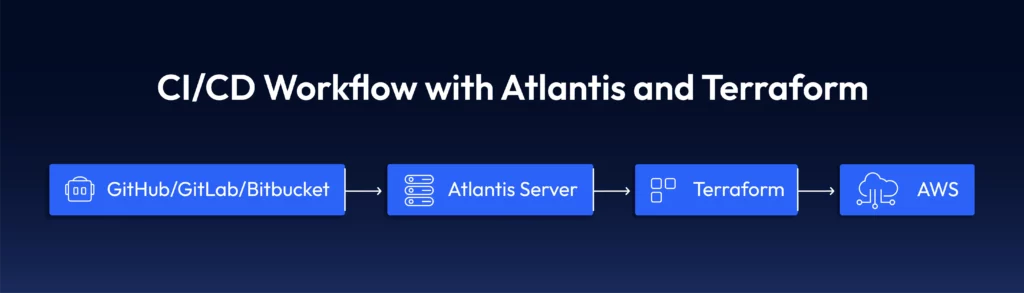
          Atlantis is an open-source tool that automates the Terraform workflow using pull requests. It bridges your version control system (GitHub, GitLab, or Bitbucket) and Terraform execution and enables collaborative infrastructure development.

          How Atlantis Works with Terraform

          Atlantis listens for webhook events in your repository hosting service. When a pull request modifies Terraform configuration files, Atlantis automatically:

          1. Runs terraform plan on the changed files
          2. Post a comment directly on the pull request
          3. Provides a mechanism to deliver changes by commenting
          4. Lock workspaces to prevent multiple concurrent changes

          Here’s a typical diagram of where Atlantis fits within your workflow:

          Key Features of Atlantis:

          • Pull Request-based Workflow: Atlantis syncs your Git repository and automatically triggers Terraform runs on open or updated pull requests.
          • Approval Process: Atlantis integrates support for approval workflow so that teams may audit Terraform plans before deployment to guarantee that modifications are compliant and secure.
          • Multi-Tenant Support: It enables multiple Terraform configurations for different environments so that multiple teams are unaffected by each other.
          • State Locking: Terraform handles state locking internally to prevent concurrent runs from overriding each other.

          To see how Atlantis compares to other Terraform automation tools, check out our in-depth Atlantis alternatives guide.

          5 Best Practices for Scaling Terraform with AWS Atlantis

          Before diving into Terraform scaling on AWS with Atlantis, you need to understand some basics about the tool. Here are five key points about Atlantis to help you start scaling your Terraform workflow:

          1. Use Terraform Workspaces for Multi-Environment

          When dealing with large AWS infrastructures, you must split your Infrastructure into multiple environments (e.g., dev, staging, production). Terraform workspaces fit well in Atlantis. You can have multiple state files for different environments. This allows you to keep one large codebase.

          Example of Workspace Configuration:

          terraform workspace new dev
          terraform workspace select dev
          terraform apply -var="environment=dev"

          2. Custom Workflows for Complex Pipelines

          Atlantis’s default workflow (plan → apply) works for simple cases, but complex Infrastructure often requires custom steps:

          Custom workflow definition in atlantis.yaml:

          workflows:
            custom:
              plan:
                steps:
                - run: terraform init -input=false
                - run: terraform validate
                - run: terraform plan -input=false -out=$PLANFILE
                - run: aws s3 cp $PLANFILE s3://terraform-audit-bucket/plans/$WORKSPACE-$PULL_NUM.tfplan
              apply:
                steps:
                - run: terraform apply -input=false $PLANFILE
                - run: ./notify-slack.sh "Applied changes to $WORKSPACE by $USER"

          3. Handling State Files Securely

          Scaling and managing Terraform state becomes critical and Atlantis works best with remote state storage:

          terraform {

          terraform {
            backend "s3" {
              bucket         = "terraform-state-${var.environment}"
              key            = "network/terraform.tfstate"
              region         = "us-east-1"
              dynamodb_table = "terraform-locks"
              encrypt        = true
            }
          }

          4. Security and Access Control for Atlantis

          Atlantis also facilitates using SSH and IAM roles to secure AWS communications. Atlantis also allows you to lock down who will approve and execute Terraform plans as a security and accountability mechanism. You also can establish AWS IAM roles in Atlantis to communicate with AWS resources securely.

          resource "aws_iam_role" "atlantis" {
            name = "atlantis-execution-role"
            
            assume_role_policy = jsonencode({
              Version = "2012-10-17"
              Statement = [{
                Action = "sts:AssumeRole"
                Effect = "Allow"
                Principal = {
                  Service = "ec2.amazonaws.com"
                }
              }]
            })
          }
          
          resource "aws_iam_role_policy_attachment" "atlantis_policy" {
            role       = aws_iam_role.atlantis.name
            policy_arn = "arn:aws:iam::aws:policy/PowerUserAccess"
          }

          Assuming Different Roles for Different Environments

          #In your provider configuration
          provider "aws" {
            region = "us-west-2"
            
            assume_role {
              role_arn = "arn:aws:iam::${var.account_id}:role/TerraformExecutionRole"
            }
          }

          5. Automating Terraform Plans and Applies

          Using Atlantis after you set up Atlantis on your Git repository, the Terraform plan runs automatically. This happens for all updated or opened PRs. Atlantis also has a provision to apply Terraform changes directly once the PR has been approved. This removes the necessity for Terraform to run within the CI/CD pipeline.

          AWS Atlantis Challenges When Scaling Terraform

          1. Slow Plan and Apply Times

          When the Infrastructure grows, Terraform operations begin to slow. Large infrastructures have 5-10-min or longer plans that act as bottlenecks.

          Solution: Use Workspace Splitting

          Divide monolithic designs into separate, focused work areas:

          atlantis.yaml with parallel execution:

          version: 3
          parallel_plan: true
          parallel_apply: true
          projects:
          - name: networking
            dir: networking
          - name: databases
            dir: databases
          - name: compute
            dir: compute

          2: Managing Permissions Across Multiple AWS Accounts

          In the case of multiple AWS accounts, managing permissions becomes complex.

          Solution: Use Cross-Account Role Assumption

          Create roles in each account that Atlantis can assume

          resource "aws_iam_role" "terraform_execution_role" {
            name = "terraform-execution-role"
            
            assume_role_policy = jsonencode({
              Version = "2012-10-17"
              Statement = [{
                Action = "sts:AssumeRole"
                Effect = "Allow"
                Principal = {
                  AWS = "arn:aws:iam::${var.atlantis_account_id}:role/atlantis-role"
                }
              }]
            })
          }

          #In your provider configuration

          provider "aws" {
            alias  = "production"
            region = "us-west-2"
            
            assume_role {
              role_arn = "arn:aws:iam::${var.production_account_id}:role/terraform-execution-role"
            }
          }

          3: Managing Terraform Version Compatibility

          As your Infrastructure expands, it becomes challenging to manage Terraform version updates.

          Solution: Use Terraform Version Control with Atlantis

          #atlantis.yaml
          version: 3
          projects:
          - name: legacy-system
            dir: legacy
            terraform_version: 0.14.11
            
          - name: new-system
            dir: new
            terraform_version: 1.5.7

          4: Sensitive Variable Control

          Managing secrets securely with Terraform and Atlantis requires careful consideration.

          Solution: AWS Secrets Manager Integration

          Create a wrapper script for Terraform that fetches secrets:

          #!/bin/bash
          fetch-secrets.sh
          
          Get database password from Secrets Manager
          DB_PASSWORD=$(aws secretsmanager get-secret-value --secret-id db/password --query SecretString --output text)
          
          Export as environment variable for Terraform
          export TF_VAR_db_password="$DB_PASSWORD"

          Execute terraform with all arguments passed to this script

          terraform "$@"
          Then update your Atlantis workflow:
          workflows:
            secure:
              plan:
                steps:
                - run: ./fetch-secrets.sh init -input=false
                - run: ./fetch-secrets.sh plan -input=false -out=$PLANFILE
              apply:
                steps:
                - run: ./fetch-secrets.sh apply -input=false $PLANFILE

          How Teams Automate Workflows to Scale Terraform Deployments on AWS

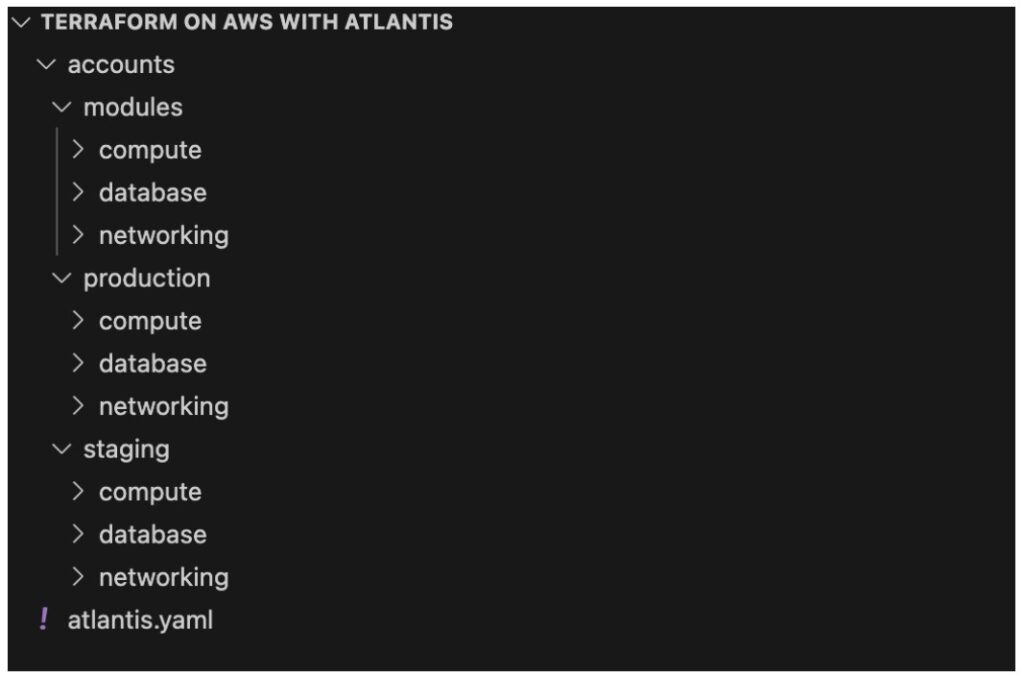
          Step 1: Implement Repository Structure for Scale

          Organize your Terraform code for maximum parallelization and clear ownership:

          Step 2: Set Up Advanced Atlantis Configuration

          #atlantis.yaml
          version: 3
          automerge: true
          delete_source_branch_on_merge: true
          parallel_plan: true
          parallel_apply: true
          
          workflows:
            production:
              plan:
                steps:
                - run: terraform init -input=false
                - run: terraform validate
                - run: terraform plan -input=false -out=$PLANFILE
                - run: ./policy-check.sh
              apply:
                steps:
                - run: ./pre-apply-checks.sh
                - run: terraform apply -input=false $PLANFILE
                - run: ./post-apply-validation.sh
                - run: ./notify-teams.sh "$WORKSPACE changes applied by $USER"
          
          projects:
          - name: prod-network
            dir: accounts/production/networking
            workflow: production
            autoplan:
              when_modified: ["*.tf", "../../../modules/networking/**/*.tf"]
            apply_requirements: ["approved", "mergeable"]
          
          - name: prod-databases
            dir: accounts/production/databases
            workflow: production
            autoplan:
              when_modified: ["*.tf", "../../../modules/database/**/*.tf"]
            apply_requirements: ["approved", "mergeable"]
          
          #Additional projects would be defined similarly

          Step 3: Implement Dependency Management

          Create a script to manage dependencies between projects:

          #!/bin/bash
          dependency-manager.sh
          
          Define dependencies
          declare -A dependencies
          dependencies["prod-compute"]="prod-network prod-databases"
          dependencies["staging-compute"]="staging-network staging-databases"
          
          Check if dependencies have been successfully applied
          check_dependency() {
            local dependency=$1
            local status=$(curl -s "http://atlantis-server:4141/api/projects/$dependency" | jq -r '.status')
            
            if [[ "$status" == "applied" ]]; then
              return 0
            else
              return 1
            fi
          }
          
          Check all dependencies for the current project
          PROJECT_NAME=$1
          if [[ -n "${dependencies[$PROJECT_NAME]}" ]]; then
            for dep in ${dependencies[$PROJECT_NAME]}; do
              if ! check_dependency "$dep"; then
                echo "Dependency $dep is not in applied state. Cannot proceed."
                exit 1
              fi
            done
          fi
          
          If we get here, all dependencies are met
          echo "All dependencies satisfied, proceeding with Terraform operation"
          exit 0

          Step 4: Implement Drift Detection

          Create a scheduled task to detect infrastructure drift:

          resource "aws_cloudwatch_event_rule" "drift_detection" {
            name                = "terraform-drift-detection"
            description         = "Triggers Terraform drift detection"
            schedule_expression = "cron(0 4   ? *)"  # Run daily at 4 AM
          }
          
          resource "aws_cloudwatch_event_target" "drift_detection_lambda" {
            rule      = aws_cloudwatch_event_rule.drift_detection.name
            target_id = "DriftDetectionLambda"
            arn       = aws_lambda_function.drift_detection.arn
          }
          
          resource "aws_lambda_function" "drift_detection" {
            function_name = "terraform-drift-detection"
            role          = aws_iam_role.drift_detection_lambda.arn
            handler       = "index.handler"
            runtime       = "nodejs16.x"
            timeout       = 300
            
            environment {
              variables = {
                ATLANTIS_URL = "https://atlantis.controlmonkey.com"
                GITHUB_TOKEN = "{{resolve:secretsmanager:github/token:SecretString:token}}"
              }
            }
          }

          Step 5: Implement Approval Workflows with AWS Services

          resource "aws_lambda_function" "approval_notification" {
            function_name = "terraform-approval-notification"
            role          = aws_iam_role.approval_lambda.arn
            handler       = "index.handler"
            runtime       = "nodejs16.x"
            
            environment {
              variables = {
                SNS_TOPIC_ARN = aws_sns_topic.terraform_approvals.arn
              }
            }
          }
          
          resource "aws_sns_topic" "terraform_approvals" {
            name = "terraform-approval-requests"
          }
          
          resource "aws_sns_topic_subscription" "approval_email" {
            topic_arn = aws_sns_topic.terraform_approvals.arn
            protocol  = "email"
            endpoint  = "[email protected]"
          }
          
          resource "aws_api_gateway_resource" "webhook" {
            rest_api_id = aws_api_gateway_rest_api.atlantis_extensions.id
            parent_id   = aws_api_gateway_rest_api.atlantis_extensions.root_resource_id
            path_part   = "webhook"
          }
          
          resource "aws_api_gateway_method" "webhook_post" {
            rest_api_id   = aws_api_gateway_rest_api.atlantis_extensions.id
            resource_id   = aws_api_gateway_resource.webhook.id
            http_method   = "POST"
            authorization_type = "NONE"
          }

          What If Atlantis with AWS Isn’t Enough?

          If your team is managing thousands of Terraform resources, dozens of AWS accounts, or struggling with policy enforcement and visibility—you may have outgrown Atlantis.

          While Atlantis is a solid open-source tool for automating Terraform plans and applies through pull requests, it wasn’t designed for enterprise-scale cloud governance. Teams scaling Terraform on AWS often face challenges around:

          • Large, complex configurations
          • Multi-account IAM permissions
          • Policy enforcement and compliance gaps
          • ClickOps and infrastructure drift

          This is where a platform like ControlMonkey comes in—offering full visibility, automated drift detection, real-time policy enforcement, and Terraform CI/CD that works across cloud and code.

          Infrastructure automation should grow with your cloud footprint. If Atlantis is slowing you down, it’s time to explore what’s next.

          👉 Book a demo and see how ControlMonkey scales what Atlantis started.

          Bottom CTA Background

          A 30-min meeting will save your team 1000s of hours

          A 30-min meeting will save your team 1000s of hours

          Book Intro Call

            Sounds Interesting?

            Request a Demo

            FAQs

            Atlantis helps DevOps teams automate Terraform workflows by triggering plan and apply via pull requests. When used with the AWS provider, it allows teams to apply changes across AWS accounts consistently—without embedding Terraform directly into CI/CD pipelines.

            Atlantis wasn’t designed for large-scale, multi-account AWS environments. Teams often run into slow plan times, complex IAM role setups, and limited policy enforcement. For advanced use cases, many teams adopt additional tools to handle drift detection, security, and governance at scale.

            Resource Blog News Customers Stories

            Updated: Aug 25, 2025 Upd: 25.08.25

            8 min read

            How DORA and Cloud Governance Prevent DevOps Burnout

            Zack Bentolila

            Zack Bentolila

            Marketing Director

            How DORA and Cloud Governance Prevent DevOps Burnout

            DORA explains how improved cloud governance can combat burnout and boost DevOps efficiency.

            The Google DORA (DevOps Research & Assessment) Community provides opportunities to learn and collaborate on Cloud Governance solution, software delivery, operational performance and continuous improvement. Its State of DevOps 2024 report delves into ways to increase DevOps resilience, wellbeing and efficiency.

            The report found a significant portion of DevOps professionals are experiencing burnout – a state of emotional, physical, and mental exhaustion caused by excessive stress. This results in low productivity, a drop in morale, potential job hopping as well as issues and mistakes that can impact compliance, cloud governance and security.

            Teams that cultivate a stable and supportive environment that empowers DevOps to excel drive positive outcomes. This blog looks at practical ways to reduce burnout in your DevOps team by improving cloud governance through Terraform automation and implementing a proactive DevOps strategy.

            More Code, More Cloud, More Burden

            In mature cloud deployments, scale brings complexity, as more cloud accounts, regions and users are added, and configurations evolve. DevOps find it harder to manage large-scale environments, especially when configurations are not managed by Infrastructure-as-Code (IaC) resources, so they gradually spiral out of control.

            Consequently, DevOps find their cloud infrastructure is not serving the business efficiently or safely. With cloud governance out-of-control, workloads continue to grow at an alarming rate.

            The Hidden Risks of Weak Cloud Governance in DevOps Teams

            According to DORA:

            • Work overload – A move-fast-and-constantly-pivot mentality negatively impacts well-being
            • Lack of control – DevOps find they are firefighting daily with an ongoing chase of continuously scaling more and more
            • Poor project management – Poor planning and unrealistic deadlines
            • High stress – The fast paced nature of DevOps leads to a constant state of pressure
            • Bad culture – Unrealistic expectations, lack of support and a general feeling of being treated unfairly

            The net result of this is that performance starts to dip and burnout creeps in. At the same time, weak cloud governance contributes to uncertainty and a lack of control.

            The DORA report outlines the correlation between organizational culture and burnout levels, recommending that organizations can combat burnout by:

            • Fostering a healthy DevOps culture
            • Providing better tools to support DevOps teams, strengthen cloud governance, and deliver operational excellence.

            Why Poor Cloud Governance Solutions Leads to DevOps Burnout & Compliance Failures

            Tackling DevOps burnout is important because it has real-world implications. Overworked teams become a bottleneck as they can’t handle the volume and frequency of infrastructure-related tickets. Cloud infrastructure is unable to scale, and cloud governance suffers as DevOps can’t easily detect or remediate cloud drifts and other problems.

            Changes in infrastructure risk breaking cloud governance, compliance and/or best practices. Demotivated DevOps teams have no time to focus on strategic projects, putting a brake on innovation and strategic ambitions. Worse still, individuals could walk out the door at any moment, causing even more resource issues as they take vital corporate knowledge with them.

            Most companies with mature cloud environments carry legacy infrastructure that is often retained in DevOps minds and inadequately documented. Teams desperately need real-time insights to bridge the gap between strategic initiatives and daily operations.

            Infrastructure as Code (IaC) for Scalable & Secure Cloud Governance Solution

            Today, the market has shifted towards automation and IaC is a journey, deemed as the present and future of cloud infrastructure engineering.

            IaC standardizes and automates infrastructure management, delivering visibility and reducing risk. This enables teams to scale more easily across cloud environments, building repeatable processes and operational excellence.

            However, this is only the first building block to deliver infrastructure at scale. Most of today’s IaC automation tools are point solutions only partially resolving cloud problems. To deliver effective IaC and adopt scalable cloud governance solutions, automation must be end-to-end and completely controlled

            Terraform Automation for Cloud Governance & Compliance: Key Benefits

            Terraform automation enhances cloud compliance and governance by enabling the definition and management of cloud infrastructure through code.  This allows for consistent deployments, automated compliance checks, clear audit trails, and the ability to enforce security policies across all environments. In turn, this leads to better control and visibility over cloud resources and minimizes the risk of human error in infrastructure management. It also enables:

            1. Policy as code
              • The creation of custom security and compliance policies that can be integrated into the infrastructure provisioning process, automatically identifying and preventing potential misconfigurations.
            2. Drift Detection
              • Detects discrepancies between the desired state of infrastructure defined in code and the actual deployed state, allowing for proactive remediation of unauthorized changes.
            3. Centralized Management
              • With Terraform, managing cloud resources across multiple cloud providers and environments can be done from a single pane, simplifying administration and ensuring consistent cloud governance practices.
            4. Role-Based Access Control (RBAC):
              • By assigning permissions based on user roles, Terraform helps enforce granular access controls to infrastructure, preventing unauthorized modifications.
            5. Self-service IaC
              1. Terraform automation enables standardized, compliant infrastructure provisioning to remove DevOps bottlenecks. Developers can self-serve infrastructure that complies with regulations such as PCI-DSS, HIPAA, and GDPR, without having to consult DevOps.

            5 Proven Cloud Governance Strategies to Avoid DevOps Burnout

            Cloud governance gaps create compliance risks, inefficiencies, and excessive manual work—all of which contribute to DevOps burnout. By applying proactive automation and governance strategies, teams can reduce stress, increase efficiency, and improve cloud security. Here’s what DevOps leaders should focus on:

            1. Identify Cloud Governance Gaps & Automate Manual Tasks

            DevOps teams often get bogged down handling repetitive governance and compliance tasks manually, leading to inefficiencies and burnout.

            Key tips:

            • Run an audit of infrastructure tickets—identify tasks that can be automated (e.g., repetitive IAM role assignments, security group modifications, environment provisioning).
            • Implement ticket automation with Terraform workflows or internal bots to reduce manual approvals.
            • Track the percentage of infrastructure requests automated versus those that are handled manually—aim to increase automation coverage over time.

            2. Reduce Firefighting with Real-Time Drift Detection

            Drift detection ensures cloud environments match IaC definitions, preventing unexpected changes that lead to compliance failures and security risks.

            Key tips:

            • Look into a drift detection tool (e.g., ControlMonkey, Open Policy Agent) to automate drift monitoring and remediation.
            • Run a bi/weekly drift audit—compare Terraform state with live cloud environments and auto-correct unauthorized changes.
            • Track the time your team is spending resolving drift-related incidents – the less manual intervention, the less burnout, and this strengthens governance.

            3. Strengthen Compliance & Security Without Slowing Down DevOps

            Security and compliance enforcement often slows down deployments when handled manually – automating these processes ensures governance without creating friction.

            Key tips:

            • Look into policy-as-code (e.g., Terraform Sentinel, Open Policy Agent) to automate compliance checks pre-deployment.
            • Run compliance tests in staging before production—ensure infrastructure meets SOC 2, HIPAA, or CIS benchmarks automatically.
            • Track policy violations caught pre-deployment versus post-deployment: the goal is to shift security left and reduce last-minute rollbacks.

            4. Implement Self-Service Infrastructure to Reduce Bottlenecks

            DevOps teams shouldn’t be gatekeepers for every infrastructure request – self-service IaC enables developers to provision resources safely without delays. Your team shouldn’t be bogged down with an overload of tickets – they need this valuable time back!

            Key tips:

            • Set up a self-service IaC catalog (e.g., pre-approved Terraform modules, AWS Service Catalog or even ControlMonkey) so developers can deploy infrastructure without DevOps intervention.
            • Run a monthly audit of provisioning requests – identify repetitive approvals, many of which can be automated.

            5. Prevent Incidents & Reduce Stress with Automated Rollbacks

            Handling cloud failures manually increases downtime and stress – automated recovery ensures stability and confidence in cloud governance.

            Key tips:

            • Disasters happen – enable daily Terraform state backups to allow instant rollback in case of infrastructure failures. This saves your team time in advance.
            • Periodically undertake a disaster recovery drill – test restoring infrastructure from backups to ensure rollback readiness. There will be key learnings to be gained from such an exercise.
              • Aim for under 10 minutes to minimize disruption and reduce operational stress.

            Enterprise Adoption of Terraform for Cloud Governance and Compliance

            Cloud governance isn’t just about controlling infrastructure—it’s about empowering DevOps teams to focus on innovation instead of firefighting.

            • Terraform automation eliminates governance bottlenecks, ensuring that compliance, security, and infrastructure provisioning happen proactively rather than reactively.
            • A proactive DevOps culture reduces burnout, shifting teams away from manual fixes and last-minute compliance checks toward automated, scalable infrastructure management.

            With the right cloud governance strategy, enterprises can achieve both control and efficiency, giving DevOps teams the tools they need to succeed.

            This is the start of the infrastructure delivery revolution. DevOps teams are already reaping productivity and efficiency benefits with better cloud cost management, 30% increase in productivity and a 3x boost in deployment speed, plus 100% cloud configuration backup.

            Avoid stress and burnout and build the right culture and environment to empower your team. Fix your past cloud governance and compliance issues and stop them happening again in the future.

            Get peace of mind with ControlMonkey

            Ready to Automate Your Cloud Governance Strategy? Download our free guide to mastering Infrastructure as Code (IaC), preventing drift, and automating compliance with Terraform. Or book a live demo to see Terraform automation in action

            Bottom CTA Background

            A 30-min meeting will save your team 1000s of hours

            A 30-min meeting will save your team 1000s of hours

            Book Intro Call

            Author

            Zack Bentolila

            Zack Bentolila

            Marketing Director

            Zack is the Marketing Director at ControlMonkey, with a strong focus on DevOps and DevSecOps. He was the Senior Director of Partner Marketing and Field Marketing Manager at Checkmarx. There, he helped with global security projects. With over 10 years in marketing, Zack specializes in content strategy, technical messaging, and go-to-market alignment. He loves turning complex cloud and security ideas into clear, useful insights for engineering, DevOps, and security leaders.

              Sounds Interesting?

              Request a Demo

              FAQ – Frequently Asked Questions on DevOps Burnout

              DevOps burnout often stems from constant firefighting, unrealistic delivery pressures, and a lack of control over increasingly complex cloud environments. As teams scale, poor cloud governance and manual processes create inefficiencies, leading to chronic stress, fatigue, and eventually burnout.

              Without strong governance, cloud environments quickly become chaotic—configurations drift, security gaps widen, and DevOps teams are stuck solving the same problems repeatedly. This lack of structure and control creates a high-pressure environment that drains energy and undermines morale.

              The DORA (DevOps Research & Assessment) report highlights that poor organizational culture, lack of support, and high workload contribute to burnout. It also points to better tooling, including cloud governance solutions, as essential for improving DevOps well-being and performance.

              Automation eliminates repetitive tasks, reduces the margin for error, and helps teams scale cloud environments without increasing pressure. Tools like Terraform automation handle compliance checks, drift detection, and provisioning—so DevOps can spend more time building and less time babysitting infrastructure.

              Warning signs include constant last-minute fixes, high ticket volumes for routine changes, missed deadlines, increased turnover, or a general drop in morale. If your cloud governance is reactive instead of proactive, burnout is likely not far behind.

              Policy-as-code tools automatically enforce compliance and security standards, reducing the mental burden on DevOps teams. By flagging misconfigurations before deployment, they prevent last-minute rollbacks and firefighting, which are key stress drivers.

              Self-service infrastructure removes DevOps bottlenecks by letting developers safely deploy resources themselves. This frees up DevOps to focus on higher-value work and reduces the workload imbalance that often leads to burnout.

              Cookies banner

              We use cookies to enhance site navigation, analyze usage, and support marketing efforts. For more information, please read our. Privacy Policy