
Your team did everything right. Three copies, two media, one offsite. Then ransomware hit, and the offsite copy turned out to be reachable and encrypted too. The 3-2-1 backup rule survives fires and dead drives. It was never built for an attacker who hunts your backups on purpose. Modern ransomware needs the 3-2-1-1-0 upgrade, and even a clean restore is not a recovered business. This guide covers the definition, why ransomware breaks it, the 3-2-1-1-0 fix, whole-environment recovery, and how to implement it.
TL;DR:
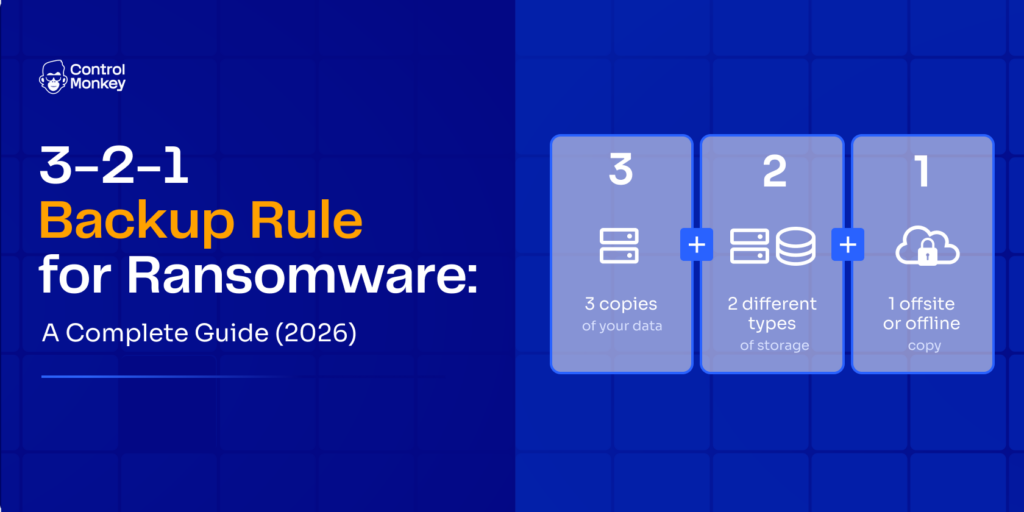
- The 3-2-1 backup rule means 3 copies of your data, on 2 media types, with 1 copy offsite. It is still the right foundation, but built for accidents, not attackers.
- Modern ransomware hunts connected backups, deletes snapshots, and dwells before detonating. A reachable backup is not a safe backup.
- The fix is 3-2-1-1-0: add 1 immutable or air-gapped copy and prove 0 restore errors with tested restores.
- Restoring data is not recovering the business. You also have to rebuild infrastructure config, IAM, networking, and dependencies, which is what actually drives your RTO.
- ControlMonkey brings the air-gap principle to your configuration: this SaaS platform backs up your infrastructure config to a separate VCS under a different set of credentials, so you can rebuild the whole environment (config, IAM, networking, dependencies) and hit your RTO even when production is compromised.
What Is the 3-2-1 Backup Rule?
The 3-2-1 backup rule is a backup strategy that keeps 3 copies of your data on 2 storage media with 1 copy offsite. It is the most widely taught rule in data protection, and for good reason. And it is exactly the foundation ControlMonkey builds on, complementing the rule by recovering the rest of your environment (infrastructure configuration, IAM, networking, and dependencies) when ransomware takes down more than files. Break the digits out and the logic is plain.
- 1 offsite. One copy stored away from your primary site, so a fire, flood, or theft at one location does not end you.
- 3 copies. Your production data plus two backups. One damaged copy never takes down the whole set.
- 2 media. Two different storage types, so a single media-type failure cannot wipe out every copy at once.
The rule is technology-agnostic and predates both cloud and ransomware. It originated with photographer Peter Krogh, who coined it in The DAM Book in the mid-2000s to protect digital photo libraries. That heritage is exactly why it needs modernizing, not dismissing.
Here is the canonical model at a glance, before the article complicates it.
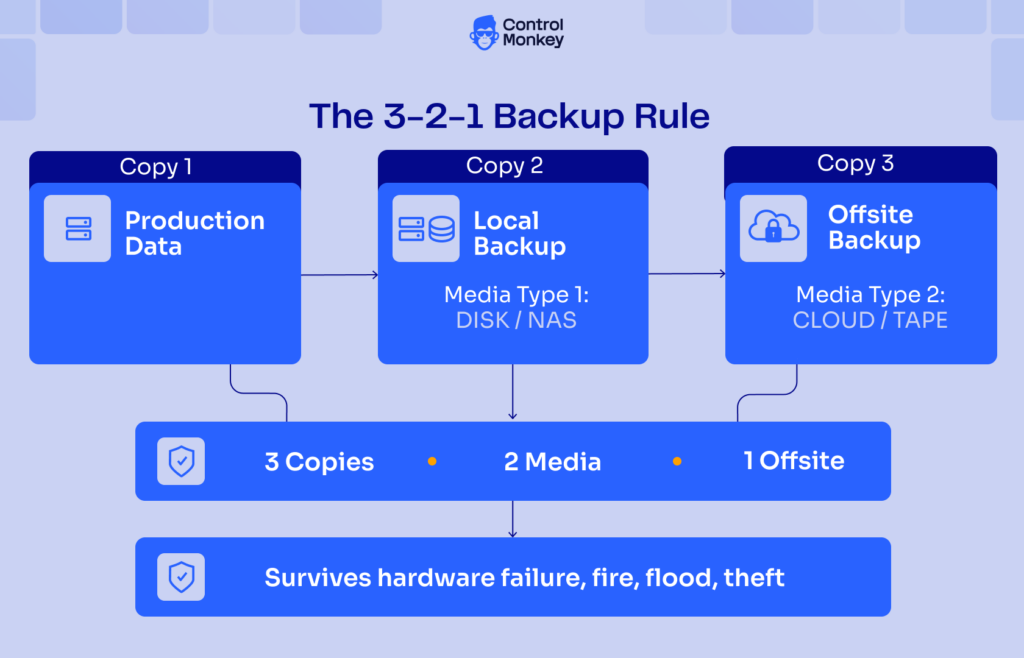
One caveat bridges to the next section. The rule was designed for accidental failure, hardware death, fire, and flood, not for an adversary. A copy that is reachable from production is exposed, so 3-2-1 is one layer of a broader recovery strategy, not the whole plan. This is also why ControlMonkey works alongside your backups rather than inside them. It does not back up your data; it backs up and air-gaps your configuration, which is a different job.
Why Ransomware Breaks a Naive 3-2-1 Backup Strategy
Yes, ransomware can encrypt or delete your backups. Modern strains actively hunt network-reachable and cloud-synced copies, delete snapshots and shadow copies, and often dwell for weeks before detonating. A connected “backup” gets encrypted right alongside production. That is why a plain 3-2-1 backup strategy is no longer enough on its own.
The numbers back this up. In a Sophos survey of nearly 3,000 organizations hit by ransomware, 94% said the attackers tried to compromise their backups. Of those attempts, 57% succeeded. When backups were hit, victims were far more likely to have production data encrypted too.
The behaviors are specific and worth naming. Attackers encrypt connected backups, delete snapshots and shadow copies, and steal backup admin credentials to reach repositories directly. Many also run double extortion: they steal your data before encrypting it, then threaten to leak it. Paying the ransom does not un-leak anything.
Here is the reframe that matters. A reachable backup is not a safe backup. An offsite copy is not automatically a safe copy if it is still online. Whatever your production network can reach, a patient attacker can often reach too. The lessons from real cloud outages apply here in reverse. Availability alone was never the point. What you need is a copy a compromised admin account cannot touch.

Not sure how exposed your recovery path actually is? Start by measuring it.
The 3-2-1-1-0 Rule: the Ransomware-Era Upgrade
The 3-2-1-1-0 rule keeps the classic 3-2-1 and adds two digits. Its +1 is an immutable or air-gapped copy, and its +0 means zero restore errors, proven by tested restores. This standard exists because plain 3-2-1 predates ransomware, so a reachable offsite copy is no longer automatically safe. Think of it as the same foundation, hardened for an adversary.
The two new digits break out cleanly.
- +1 (immutable or air-gapped). At least one copy a compromised admin cannot touch. That means object lock or WORM storage, offline tape, or a cold vault. This is your last line of defense.
- +0 (zero restore errors). Backups you have actually restored, on a schedule, using restore testing. An untested backup is a hope, not a control.
The transition from one model to the other is worth seeing in full.
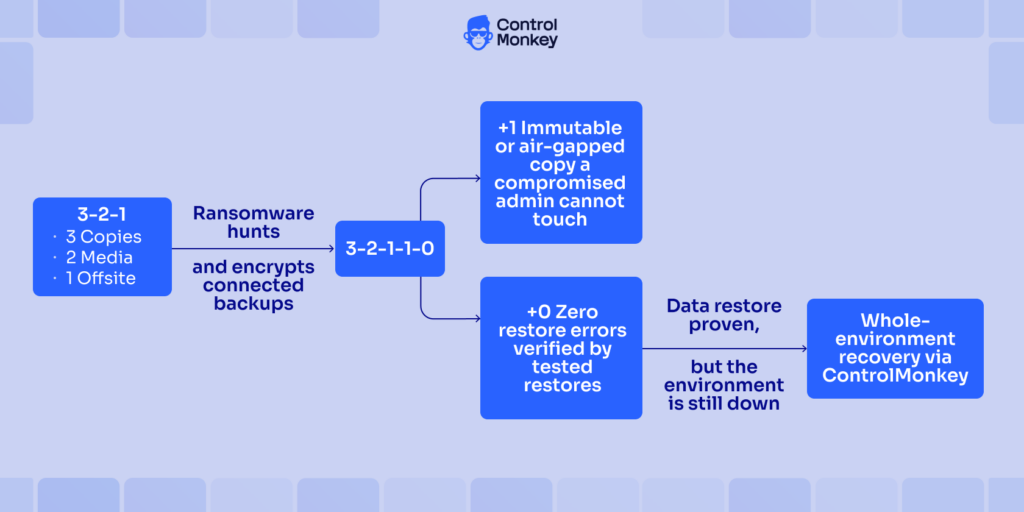
The classic model on the left hardens into 3-2-1-1-0 on the right, but even a proven data restore leaves the environment down.
This is not vendor marketing dressed up as a standard. The offline and immutable recommendation comes straight from official guidance. CISA’s #StopRansomware Guide tells teams to keep offline, encrypted, regularly tested backups. The reason is blunt: many ransomware variants find and delete or encrypt any reachable copy.
CISA also recommends object lock and delete protection on storage. NIST SP 1800-25 anchors the same point around protecting data integrity through backups, secure storage, and integrity checking.
What the Extra 1 and 0 Add to the 3-2-1 Rule
An immutable backup and an air-gapped backup are not the same thing, and the difference matters. The immutable kind uses storage policies like object lock or WORM so data cannot be changed for a set retention period. It may still be network-reachable, though. An air-gapped backup, by contrast, is physically or logically isolated from the network entirely. For real defense in depth against ransomware, layer both.
One honest caveat, straight from practitioners. “Immutable” is a configuration you must verify and isolate, not an absolute guarantee. A management-plane misconfiguration or an escape hatch can still expose a repository that looks locked. Verify the setting, lock down the management interface, and keep a truly offline copy behind it. That is the nuance most top pages blur, and it is worth getting right. We cover the deep ransomware playbook in a dedicated deeper ransomware backup guide for further reading.
Hardening the data layer is necessary. It is also where the story stops for every other guide, and where recovering the whole environment begins.
Data Recovery Is Not Business Recovery
No, restoring your data is not the same as recovering your business after a ransomware attack. A clean data recovery hands you your files. It does not hand you a running environment. You also have to recover infrastructure configuration, IAM, networking, and dependencies. That environment-rebuild gap is what actually drives your Recovery Time Objective (RTO).
Think about what a clean restore leaves broken. Your files come back. The environment they ran in does not.
- Infrastructure configuration. Compute, storage, and service settings are gone or drifted from their known-good state.
- IAM permissions. Roles, policies, and trust relationships have to be rebuilt before anyone or anything can act.
- Networking. VPCs, subnets, security groups, and DNS wiring need to be recreated from memory or scattered docs.
- Dependencies. Service-to-service links and third-party tool integrations sit unresolved until someone maps them again.
Picture a mid-market fintech that restores its transaction database from an immutable copy in an hour. The data is pristine. Then the team spends two days hand-rebuilding IAM roles, security groups, and service connections before checkout can take a single payment. The restore finished on day one. The business came back on day three.
The recovery flow makes the gap obvious.
Restoring data from an immutable copy gets you partway. Restoring the environment as code closes the RTO gap.
That gap is measured in one number executives actually watch: RTO. Every hour spent hand-rebuilding infrastructure after a clean data restore is RTO you never budgeted for. Boards do not ask how many copies you kept. They ask how long you were down and what it cost.
This is where ControlMonkey fits, honestly and specifically. It is not a data-backup tool. Rather, ControlMonkey is a SaaS platform that continuously backs up your infrastructure configuration as code to a separate version control system (VCS), one secured with a different set of credentials from your production environment. That separation is the entire point. It gives you an air-gapped copy of your configuration, held outside the cloud accounts under attack, so a compromised admin or ransomware loose in production cannot reach, alter, or encrypt it. Because ControlMonkey runs as SaaS, that config backup lives outside your blast radius by design, not on the infrastructure you are trying to recover.
When recovery time comes, ControlMonkey rebuilds that known-good configuration as code: your infrastructure configuration, IAM permissions, networking, and dependencies. A manual scramble becomes a controlled, repeatable process, and that is what turns data recovery into business recovery. This is the discipline of infrastructure disaster recovery, and you cannot recover what you have not captured in codified, reproducible form.
How to Implement the 3-2-1 Backup Rule Against Ransomware
This playbook turns the rest of this guide into action. It operationalizes the 3-2-1 backup rule and its 3-2-1-1-0 rule upgrade against ransomware, and it closes the gap this article keeps returning to: recovering the whole environment, not just the data. Work through it in order. Steps 1 through 4 harden your data recovery; Step 5 extends it to business recovery and the RTO executives track, the layer ControlMonkey owns.
Inventory and classify what you must recover
Identify the workloads and data your business cannot run without, then classify them by criticality to set backup cadence. Go past files. Note the infrastructure configuration, credentials, and dependencies each tier needs to actually resume operations. NIST frames this broadly: the assets to protect include configurations, system files, and applications, not just data.
Build the 3-2-1 base
Establish three copies across two independent media types, with one copy truly offsite. Offsite means geographically and logically separate, not another server on the same network. A common pairing is a local NAS or disk plus cloud object storage. Remember that cloud sync is not a backup.
Add the immutable or air-gapped copy (+1)
Make at least one copy immutable with object lock or WORM, or air-gapped and offline. This is the copy a compromised admin cannot touch. Isolate backup infrastructure and credentials from production, require MFA, and verify the immutability config, because management-plane escape hatches quietly defeat it.
Prove zero restore errors (+0)
Test your restores on a regular, automated cadence. A common pattern is monthly file-level restores, quarterly application-level restores, and an annual full-environment failover. Document the actual recovery times so your RTO reflects reality, not optimism. An untested backup gives false confidence, and false confidence fails at the worst moment.
Plan to recover the environment, not just the data
Extend the plan past data. Codify infrastructure configuration, IAM, networking, and dependencies so the whole environment can be rebuilt to a known-good state fast. This is where data recovery becomes business recovery, and where RTO is won or lost. ControlMonkey owns this step as a SaaS platform: it backs up your configuration as code to a separate VCS secured with its own credentials, giving you an air-gapped config copy that survives even when production and its admin accounts are compromised. It complements the data-backup tooling in Steps 2 through 4 rather than replacing it. For the operational side, see building a cloud disaster recovery plan.
Making the 3-2-1 Backup Rule Ransomware-Ready
The 3-2-1 backup rule is still the right foundation, and 3-2-1-1-0 hardens it for ransomware with an immutable copy and tested restores. Get those in place and your data can survive an attacker, not just an accident. That is the baseline every team should hold.
But a clean restore is not a recovered business. Recovery means the whole environment, your infrastructure configuration, IAM, networking, and dependencies, and that is what moves your RTO. ControlMonkey turns “data restored” into “business recovered” by keeping an air-gapped, SaaS-hosted copy of your configuration in a separate VCS, ready to rebuild the environment on demand. It complements the backup strategy you just built. The fastest way to understand the difference is to watch it happen.

A 30-min meeting will save your team 1000s of hours
A 30-min meeting will save your team 1000s of hours
Author