

At enterprise scale, Azure backup best practices need to answer a bigger question than “Can we restore the data?” The real question is whether the business can operate again after an outage or ransomware attack.
Azure Backup protects supported workloads, including Azure Virtual Machines, SQL Server databases, and Azure Files. But these workloads also depend on Azure Virtual Networks (VNets), Network Security Groups (NSGs), Microsoft Entra ID, and Azure RBAC. If those configurations are missing or misconfigured, successful data restores may still leave business applications unavailable.
TL;DR
- ControlMonkey complements Azure Backup by making critical Azure configurations recoverable. While Azure Backup protects supported data and workloads, ControlMonkey helps restore the identity, networking, security, and infrastructure configurations required to operate.
- Measure and test complete Azure recovery. Account for cross-subscription dependencies, validate configuration recovery, and verify that critical applications can return to operation within recovery targets.
- Successful backups don’t guarantee business recovery. Restored Azure Virtual Machines and databases may remain inaccessible if Microsoft Entra ID, network configurations, or security policies are missing.
- Define RTO, RPO, backup frequency, and retention based on business criticality. Recovery objectives should reflect the complete application, not just individual Azure workloads.
- Protect Azure backups against ransomware and accidental deletion. Use immutable vaults, soft delete, multi-user authorization (MUA), and least-privilege access to secure recovery points.
What Does Azure Backup Protect – and What Doesn’t It Protect?
Azure Backup is designed to protect and recover data and supported workloads, including files, databases, virtual machines, and storage. However, it does not provide comprehensive backup and recovery of the Azure configuration layer, such as networking, identity, access permissions, and security policies.
Understanding the difference is essential for building an Azure disaster recovery strategy that restores not just data, but the environment required to operate.
| Azure resource or configuration | Azure Backup coverage |
|---|---|
| Files, folders, and application data | Supported for eligible workloads |
| SQL Server, SAP HANA, and supported database data | Supported |
| Azure Files and Blob Storage data | Supported |
| Azure Virtual Machines and VM disks | Supported |
| Azure Managed Disks | Supported |
| Virtual networks (VNets) and subnets | Not covered No standalone configuration backup |
| Network security groups (NSGs) and routing | Not covered No standalone configuration backup |
| Azure RBAC roles and assignments | Not covered |
| Azure Policy definitions and assignments | Not covered |
| Microsoft Entra ID configuration | Limited Requires separate recovery capabilities |
| Cloud infrastructure configuration and dependencies | Limited coverage |
Coverage varies by workload, region, and backup method. Azure VM backups can preserve certain VM settings, but do not provide comprehensive recovery of the broader cloud configuration. Full Azure Backup Coverage Matrix
Why This Matters for Disaster Recovery
Restoring data doesn’t necessarily restore business operations. A recovered database or virtual machine may still be inaccessible if the network configuration, identity permissions, or security policies it depends on have been deleted or misconfigured.
A complete Azure disaster recovery strategy must protect both data and workloads, as well as the configuration required to operate them.
Where ControlMonkey Fits Into Azure Backup and Recovery
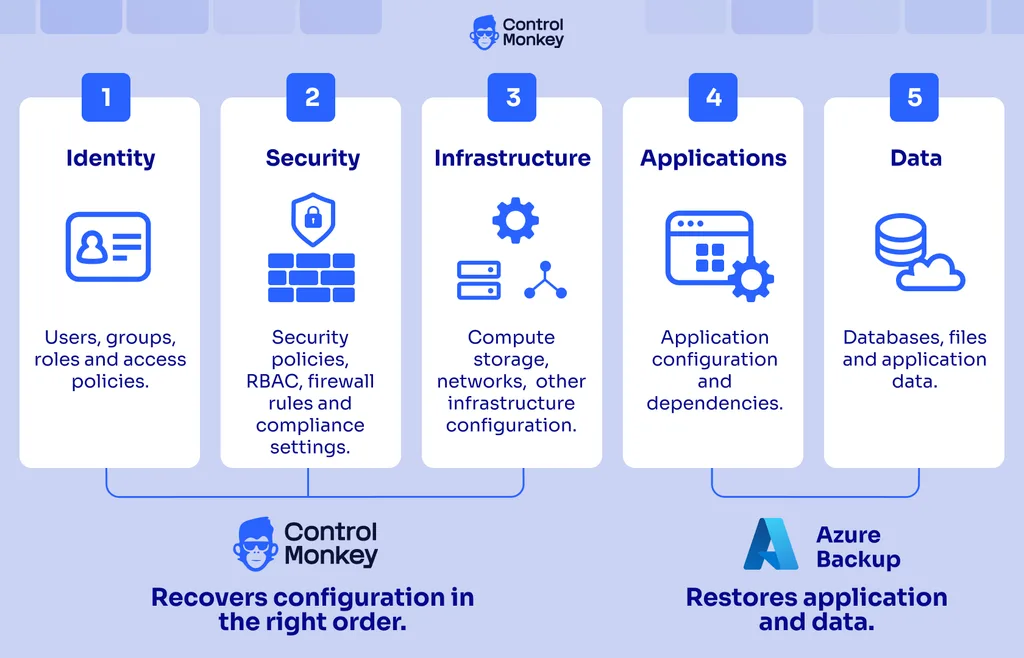
ControlMonkey complements Azure Backup by protecting and recovering the configuration layer that Azure environments depend on to operate. While Azure Backup focuses on restoring data and workloads, ControlMonkey continuously discovers and snapshots configurations across identity, networking, security, infrastructure, and third-party systems, enabling teams to restore them from a known-good state before bringing applications and data back online.
Azure Backup and ControlMonkey aren’t solving the same problem, which is exactly why they need to be planned together instead of separately:
- Azure Backup → data and workloads
- ControlMonkey → cloud and SaaS configuration
- Together → a more complete recovery of the operating environment, not just the files inside it
This distinction is the throughline for the rest of this article. Every practice below either strengthens the data-recovery side (Azure Backup’s job) or the configuration-recovery side (where ControlMonkey fits) – and the practices that most enterprise runbooks miss are almost always on the configuration side.

Azure Backup protects your data. What protects the configuration required to operate?
Check how ControlMonkey extends disaster recovery beyond data backup by making critical cloud and SaaS configurations recoverable.
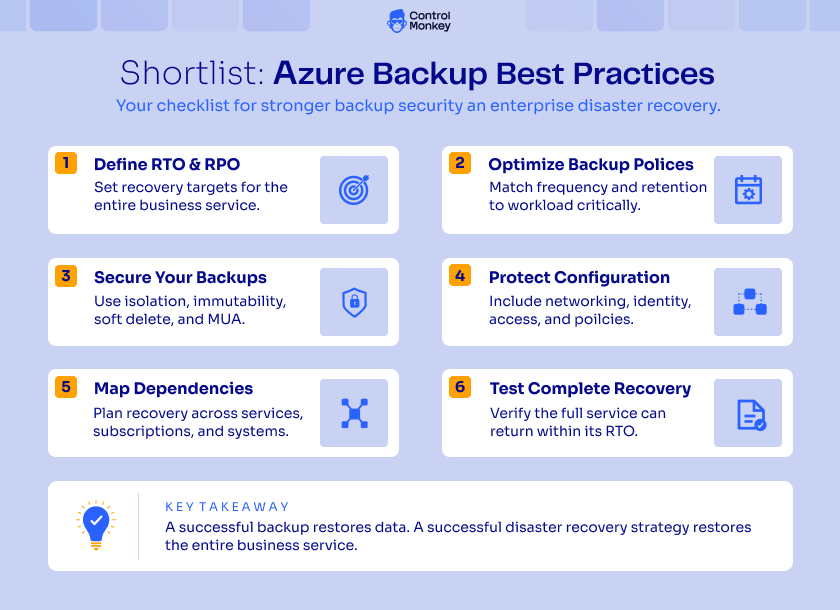
1. Define RTO and RPO Based on Business Criticality
Recovery time objective (RTO) and recovery point objective (RPO) are often defined for individual resources or workloads. That’s a reasonable starting point, but it doesn’t answer the question the business actually cares about: How long until the service is operational again?
To define effective Azure Backup policies, consider three things:
- RTO (Recovery Time Objective): The maximum acceptable time a business service can remain unavailable after a disruption.
- RPO (Recovery Point Objective): The maximum acceptable amount of data loss, measured in time.
Consider the following example:
| Recovery Component | Example Recovery Time |
|---|---|
| Database | 20 minutes |
| Identity and access (Entra ID) | 2 hours |
| Network configuration | 30 minutes |
| Application infrastructure | 45 minutes |
Even when individual components meet their recovery targets, the complete service may still miss its RTO.
Key Takeaway: Set Recovery Objectives for the Entire Service
Define RTO and RPO at the business service level, then map the critical dependencies required to meet them, including data, identity, networking, infrastructure, and third party services.
Measure recovery success by when the application becomes operational again, not just when its database or virtual machine has been restored.
2. Define Azure Backup Frequency and Retention by Workload
There’s no universally “correct” Azure backup frequency. The right schedule depends on how much data loss the business can tolerate for each workload, balanced against storage costs and operational overhead.
Azure backup frequency and retention should be defined by workload criticality and recovery point objectives (RPO), rather than applying the same policy across the entire environment.
Azure Backup policies determine two things:
- Workload classification: Use Azure resource tags to group workloads by business criticality and recovery requirements. Where supported, use Azure Policy to automatically protect newly deployed resources.
- Backup frequency: How often recovery points are created, influencing how much data could be lost between backups.
- Backup retention: How long recovery points remain available, determining how far back teams can restore data.
The following examples illustrate how backup policies can differ by workload:
| Workload | Example RPO | Backup frequency | Retention consideration |
|---|---|---|---|
| Business-critical databases | 15 minutes | Frequent transaction log backups, where supported | Operational recovery and compliance requirements |
| Production Azure VMs | 4 hours | Every 4 hours using Enhanced policy | Daily recovery points and longer-term retention |
| Azure file shares | 24 hours | Daily | Daily, weekly, and monthly recovery points |
| Non-critical environments | 24 hours | Daily | Shorter retention to control storage costs |
Azure Backup Retention Best Practices
A practical retention strategy should balance recovery requirements, compliance obligations, and storage costs:
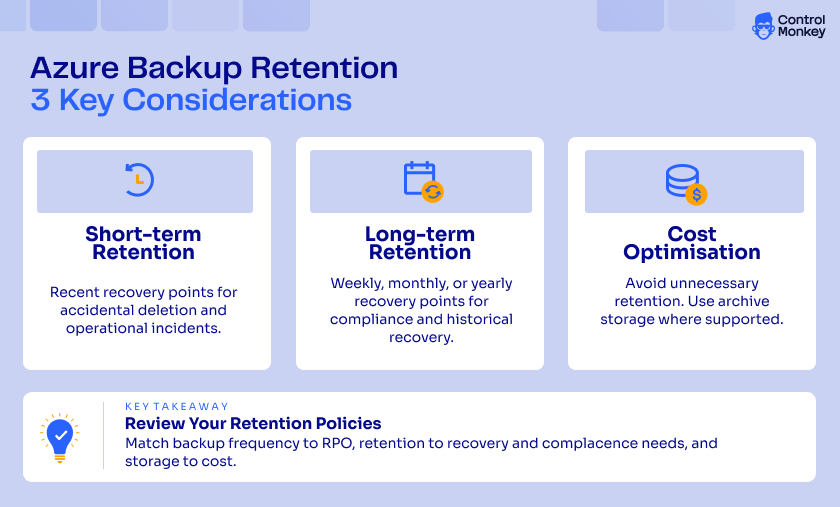
- Short-term retention: Keep recent recovery points for accidental deletion, corruption, and operational incidents.
- Long-term retention: Maintain weekly, monthly, or yearly recovery points when required for compliance, audits, or historical recovery.
- Cost optimization: Avoid retaining recovery points longer than necessary. Consider supported archive storage options for infrequently accessed long-term backups.
- Classify workloads and automate backup protection: Use Azure resource tags to group workloads by business criticality and recovery requirements. Where supported, use Azure Policy to automatically apply backup protection to newly deployed resources.
Best practice: Review backup policies whenever workload criticality, RPO requirements, or compliance obligations change. A policy that worked six months ago may no longer meet current recovery needs.
3. Apply Azure Backup Security Best Practices
Backup infrastructure is itself a target. Ransomware attackers may attempt to delete or compromise recovery points before launching an attack. Azure Backup provides several security controls to reduce this risk.
Azure Backup Security Checklist
Use this checklist to verify that your Azure backup environment is protected against unauthorized changes, accidental deletion, and ransomware.
- Isolate backup access: Separate backup administration from production roles and apply least-privilege access through Azure RBAC.
- Enable immutable vaults: Protect recovery points against unauthorized deletion and retention reductions.
- Before permanently locking immutability, verify your backup and retention policies, as the lock cannot be reversed once enabled.
- Verify soft delete protection: Confirm soft delete is enabled and configured with an appropriate retention period.
- Configure multi-user authorization (MUA): Use Azure Resource Guard to add an independent authorization boundary for critical backup operations.
- Secure administrator accounts: Enforce MFA and Conditional Access for identities that manage backup and recovery.
- Monitor suspicious activity: Configure Azure Monitor alerts for critical backup failures, policy changes, and destructive operations.
- Test recovery regularly: Verify that protected recovery points can actually be restored after a simulated incident.
Key Takeaway: Secure Your Recovery Points Before an Incident
Start by auditing your most critical backup vaults against this checklist. Prioritize immutable protection, restricted administrative access, and tested recovery procedures.
Remember that securing backup data is only one part of cyber resilience. Identity, network, and infrastructure configurations must also be recoverable to restore business operations.
4. Protect Azure Configuration Alongside Your Azure backup best practices
Recovering an Azure application isn’t just about restoring its VM or database. It also depends on whether users can authenticate, network traffic can reach the application, and the underlying infrastructure can be reconstructed.
An effective Azure disaster recovery plan must identify, protect, and validate the configurations that critical applications depend on. This includes networking, security policies, identity, access permissions, and resource dependencies across Azure subscriptions.
Azure Configuration Recovery Readiness Scorecard
Having Azure backups is one thing. Knowing whether your cloud configuration can actually be recovered is another.
Use this scorecard to evaluate recovery readiness across critical Azure configurations, application dependencies, and recovery processes.
| Question to ask | What to measure | Illustrative result* |
|---|---|---|
| READINESS & RECOVERABILITY | ||
| Do we know which critical configurations support our applications? | % of critical services with documented identity, networking, security, and infrastructure dependencies | 72% mapped |
| Are critical Azure configurations backed up? | % of in-scope configurations with versioned recovery points | 89% covered |
| Can we restore a known-good configuration? | % of critical configurations with successfully tested recovery points | 81% validated |
| Are configuration recovery objectives defined? | % of critical services with defined configuration RTO/RPO | 66% defined |
| RECOVERY PROOF | ||
| Have configuration recovery procedures been tested? | % of critical configurations successfully restored during recovery exercises | 58% tested |
| Can dependencies be restored in the correct order? | % of critical services with successfully tested dependency-aware recovery procedures | 61% validated |
| Can the complete application return to operation? | % of end-to-end recovery exercises that restored service functionality within the target RTO | 75% successful |
| CONTINUOUS IMPROVEMENT | ||
| Are recovery gaps being addressed? | Number of open recovery gaps and completed remediation actions during the reporting period | 9 open / 4 closed |
| Are configuration changes introducing recovery risk? | % of critical configurations with unresolved drift or unmanaged changes | 18% flagged |
*All results are hypothetical examples, not actual customer results or industry benchmarks.
Key takeaway: Backup coverage is only the starting point. Enterprises should also measure configuration recoverability, successful recovery testing, and whether identified gaps are being closed.
How ControlMonkey Supports Azure Configuration Recovery
ControlMonkey is a Cyber Resilience Platform for Cloud Configuration Disaster Recovery. It complements Azure Backup by making critical Azure configurations recoverable, including infrastructure, networking, security, and identity settings. Through continuous discovery, versioned snapshots, and recovery-readiness visibility, teams can identify configuration recovery gaps and restore supported resources to known-good states.
When an incident occurs, teams can identify a known-good recovery point and restore supported configurations or entire environments, with dependency-aware recovery that reduces manual rebuilding.
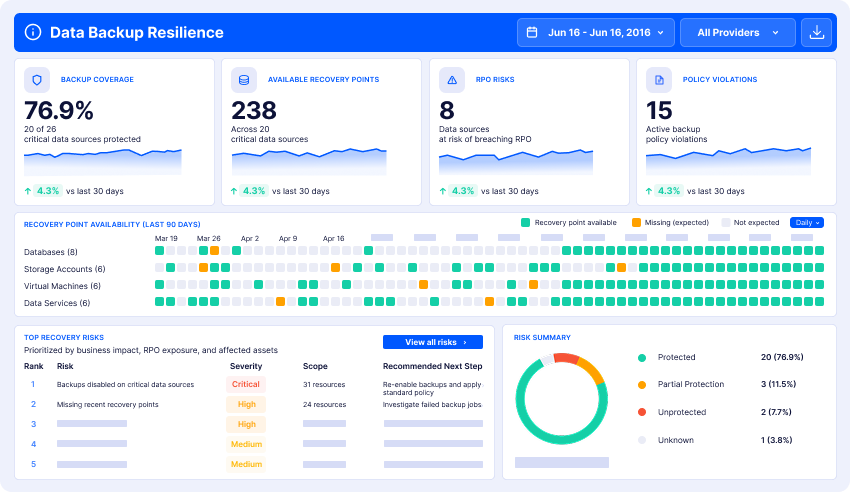
ControlMonkey also provides recovery-readiness visibility, helping cloud and security teams understand what is protected, what changed, and where configuration recovery gaps remain.
Why IaC Alone Isn’t an Azure Configuration Backup
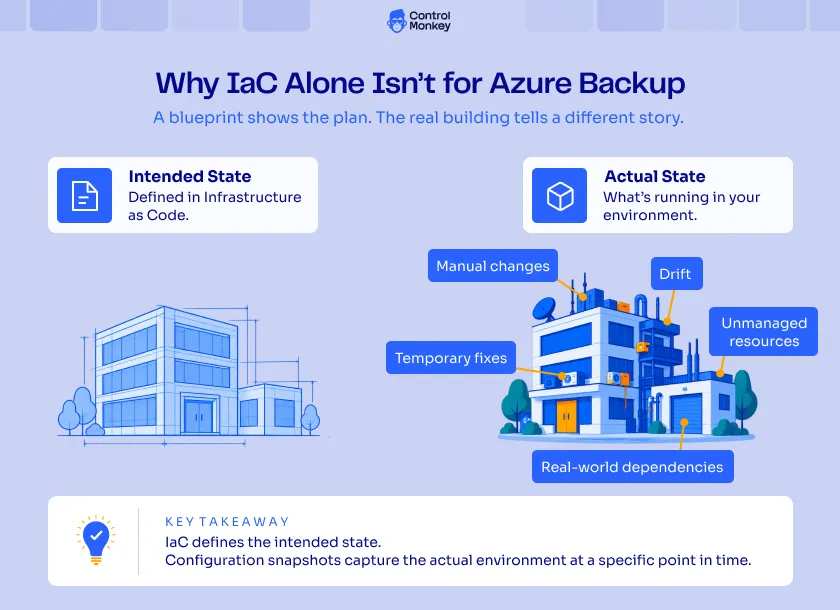
Infrastructure as Code (IaC) tools like Terraform help teams define and provision Azure resources, but an IaC repository doesn’t necessarily reflect what’s actually running in production.
Manual portal changes, temporary access permissions, configuration drift, and resources created outside IaC can all create a gap between the intended design and the real environment.
IaC defines how infrastructure should look. Configuration snapshots preserve how it actually looked at a specific point in time.
5. Include Microsoft Entra ID in Azure Backup and Recovery
Every recovery scenario above assumes someone can actually sign in to Azure once the infrastructure is back – and that assumption depends entirely on Entra ID configuration surviving the incident intact.
This is also, not coincidentally, the layer most enterprise DR plans forget to plan for at all.
Entra ID recovery needs to account for:
- Users and groups – including the group memberships that drive access and Conditional Access scoping
- Roles – both built-in and custom directory roles, and specifically the privileged role assignments that are the most attractive target for an attacker and the most damaging to lose or leave misconfigured after a restore
- Conditional Access policies – including MFA enforcement, which is a policy setting, not a credential – losing or misconfiguring it during recovery either locks legitimate users out or, worse, silently drops the MFA requirement altogether
- App registrations and service principals – the identities that automation, CI/CD, and service-to-service auth depend on, which are easy to overlook because they don’t belong to a person
Microsoft Entra Backup and Recovery is now generally available for eligible Microsoft Entra ID P1 and P2 tenants. It automatically captures daily backups of supported directory objects and retains them for seven days. Administrators can review configuration changes and recover supported objects to a previous state.
However, native recovery has limitations. Hard-deleted objects and objects synchronized from on-premises Active Directory cannot be recovered through this feature. Organizations should verify coverage, retention, and recovery procedures as part of their broader identity disaster recovery strategy.
How ControlMonkey Supports Microsoft Entra ID Recovery?
ControlMonkey’s role is to protect and version Entra ID configuration – roles, Conditional Access, app registrations – alongside Azure infrastructure configuration, so identity and infrastructure configuration can be protected as part of the same configuration-recovery strategy, rather than treated as separate DR workstreams.
6. Design Azure Backup and Recovery Across Multiple Subscriptions
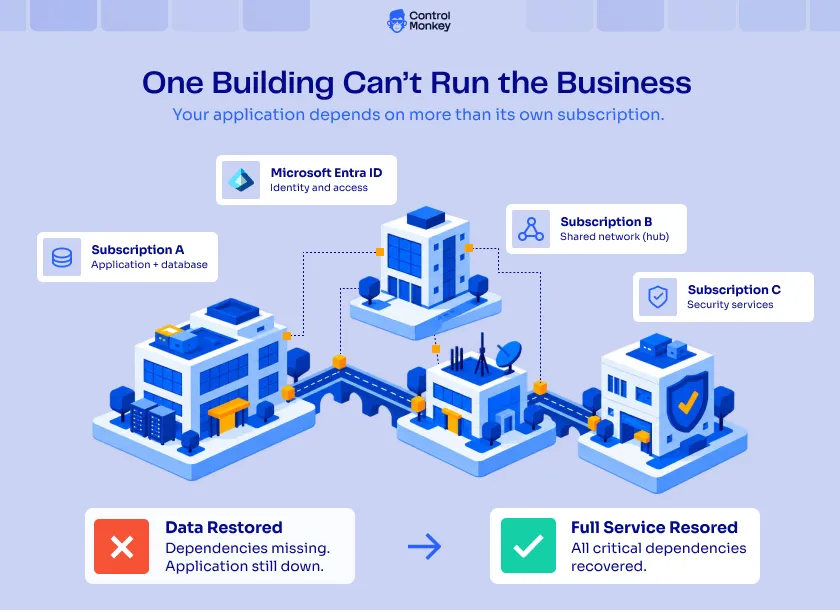
Enterprise Azure environments often span dozens of subscriptions, with shared networking, security policies, and identity services supporting applications across them.
Backing up each subscription independently doesn’t guarantee that the entire application can be recovered.
For example, an application may run in one Azure subscription but depend on a hub network managed in another. Even if its virtual machines and databases are restored, the application may remain unavailable if that shared network configuration is missing.
To address this, organizations should centralize backup visibility, map cross-subscription dependencies, and ensure critical shared configurations are recoverable.
ControlMonkey helps teams identify configuration recovery gaps across Azure subscriptions and restore supported configurations to known-good states.
7. Map Azure Recovery Dependencies and Automate Recovery Order
Recovery order matters as much as recovery completeness. A simplified way to visualize the dependencies involved in Azure recovery is:
Identity & Access → Networking & DNS → Security → Infrastructure → Applications & Data → Business Service
This is a dependency model, not a fixed recovery sequence. The actual order depends on each application’s architecture. Some components can be restored in parallel, while others require shared configurations to be available first.
Map these dependencies before an incident and automate recovery in the sequence each application requires.
ControlMonkey complements Azure Backup by helping restore supported configurations from known-good recovery points, reducing manual rebuilding during recovery.
8. Test Azure Backup and End-to-End Disaster Recovery
The equation that actually matters for DR testing is:
Data + Identity + Configuration + Infrastructure + Dependencies → Business Service
Test multiple recovery scenarios, including accidental deletion, ransomware, and regional outages. Combine tabletop exercises with live restores, and validate both granular recovery and complete workload recovery where supported. Record actual recovery times, failed dependencies, and remediation actions.
Confirming that a specific backup can be restored is a necessary test, but it only validates one term in that equation. It doesn’t prove the business service comes back within its defined RTO, because it says nothing about whether the identity configuration, network path, and dependency chain around that data are also in a recoverable state.
Recovery testing at the enterprise level should validate the whole equation – which means including configuration recovery and Entra ID recovery in the same exercise as the backup restore, not as a separate, less-rehearsed workstream.
ControlMonkey’s configuration recovery should be part of that same test, exercised on the same schedule as the Azure Backup restore test, so both sides of the recovery are validated together instead of one side being assumed to work because the other one does.
9. Coordinate Azure Backup and Configuration Recovery in One Runbook
Azure Backup and configuration recovery are often managed by different teams. During an incident, those separate processes must work together to restore critical business services.
Build a single Azure recovery runbook that defines:
- Recovery points: Identify the Azure data backups and known-good configuration snapshots required for each critical service.
- Recovery ownership: Assign responsibilities across cloud infrastructure, networking, security, identity, and application teams.
- Recovery sequence: Document dependencies, restoration steps, and handoffs between Azure Backup and configuration recovery tools.
- Recovery validation: Define how teams will verify that applications are accessible, connected, and operating within their recovery targets.
ControlMonkey complements Azure Backup by helping teams identify and restore supported cloud configurations from known-good recovery points, reducing manual rebuilding during incidents.
Azure recovery isn’t complete when the last backup is restored. It’s complete when users can sign in, applications can communicate, and critical business services are back online.
The goal isn’t just to restore Azure resources. It’s to restore the business services that depend on them.

A 30-min meeting will save your team 1000s of hours
A 30-min meeting will save your team 1000s of hours
Author