
A regional Okta outage and an accidental admin deletion look identical from the outside: nobody can log in, and the business stops. Yet only one of them is what Okta Enhanced Disaster Recovery is built to fix. Identity is the perimeter now, so an Okta event of either kind halts every downstream app at once. Here is the central claim this guide makes plainly: Enhanced DR protects Okta’s service availability, but it does not back up your configuration. Below, you will see what it protects, what it misses, what a complete plan requires, and how to close the remaining gap.
TL;DR
- Okta Enhanced Disaster Recovery is a real Okta add-on that cuts Okta’s failover RTO from about an hour to roughly five minutes during a regional Okta outage. It adds self-service failover and read-only authentication continuity, with full read-write typically back within about 24 hours.
- It protects Okta’s service availability during Okta-side outages. It does not back up your tenant configuration and offers no point-in-time restore of your own Okta setup.
- The config most likely to be lost – SSO settings, MFA policies, user groups, roles, app assignments, and Group Push group/membership mappings – is exactly what Enhanced DR does not cover.
- ControlMonkey complements Okta Enhanced Disaster Recovery with continuous configuration backup and point-in-time recovery for complete disaster recovery readiness.
What Okta Enhanced Disaster Recovery Actually Protects
Start with what the feature genuinely does, because it does it well. Okta Enhanced Disaster Recovery is a paid add-on layered on top of Okta’s built-in Standard Disaster Recovery. Standard DR gives every Okta customer roughly a one-hour Recovery Time Objective (RTO) across two regions. Enhanced DR upgrades that path, cutting the RTO to about five minutes during a regional event.
The target is a specific failure: a Regional Outage in the AWS infrastructure running core Okta products. According to Okta’s documentation, these are AWS infrastructure, storage, or networking issues. Symptoms are unmistakable – elevated authentication failure rates, degraded latency, and HTTP 500 errors as the login path buckles.
Recovery centers on Self-Service Failover. Admins can trigger failover and failback through the Okta Disaster Recovery Admin app or the disaster recovery APIs. Okta can also fail over proactively when it detects a cell-level problem, and a support-assisted path exists for P1 cases. If you initiate failover yourself, you own the failback once the disaster clears. One operational detail matters here. The Disaster Recovery Admin app does not authenticate through external IdPs. Your admins need locally-sourced Okta credentials plus a supported MFA factor already in place before an incident. Plan that access ahead of time, not during the outage.
During failover, your Okta org runs in a specific mode. It becomes read-only, but users keep Authentication Continuity – they can still sign in to their apps regardless of prior authentication state or device. That Read-Only Access covers the admin console and configuration. Okta’s stated window for restoring full Read-Write Access to core services – configuration, settings, adding or removing users, changing permissions – is up to 24 hours during a regional failover, the same core-services restoration that applies under Standard DR.
Availability now spans real geography. Okta states Enhanced DR is Generally Available across commercial production cells in the US, EMEA, and Australia, with cells in Ireland, Frankfurt, and Sydney. Treat every figure here as Okta’s stated behavior rather than a contractual guarantee.
| Standard DR | Enhanced DR | |
|---|---|---|
| RTO | ~1 hour | ~5 minutes |
| Failover trigger | Okta-managed | Self-service, proactive, or support-assisted |
| During failover | Read-only, users authenticate | Read-only, authentication continuity |
| Full read-write | Up to ~24 hours | Up to ~24 hours |
What Okta Enhanced Disaster Recovery Does Not Cover
Now draw the line, because this is the distinction the whole guide turns on. Enhanced DR remediates Okta-side regional infrastructure outages. It does not protect against events that originate inside your own tenant.
Okta’s own documentation is refreshingly direct about the boundary. Enhanced DR does not provide protection against request floods, including DoS or DDoS attacks. It does not cover issues with ISV vendors and application connections, nor code-related issues affecting Okta services. Critically, it does not protect against bad actors deleting or modifying data, or unintended configuration mistakes made by customer admins.
Here is the crisp version for an executive: Okta Enhanced Disaster Recovery is not Okta Configuration backup. There is no Point-in-Time Recovery of your tenant. If an admin deletes a group or a bad change ships to production, failover will not bring the old state back – that event was never in scope.
This is why the two failure modes matter. To your end users, a config-loss incident and a regional outage are indistinguishable: authentication breaks and work stops. Enhanced DR addresses only one of them. Data recovery is not business recovery, and you cannot recover what you do not understand.
The at-risk configuration is not trivial: SSO Settings, MFA Policies, User Groups, Roles and Permissions, application assignments, and Group Push mappings all sit outside the availability layer. This is the customer’s own responsibility, and it maps directly to the broader problem of identity provider disaster recovery across any IdP you run. The next section details each component; first, take stock of where you stand.

Know Your Identity Recovery Gaps Before They Become Outages
Okta Enhanced Disaster Recovery keeps the service available, but it doesn’t protect your configuration. Get a Free Cloud Resilience Assessment Report to identify recovery gaps across your identity, cloud, and SaaS environments – and see how quickly you could restore after an incident.
What an Okta Disaster Recovery Plan Includes
A complete Okta Disaster Recovery plan has to cover two different failure modes: Okta service availability and Okta tenant configuration recovery. Okta’s native Standard and Enhanced Disaster Recovery help with regional service continuity. They do not restore a deleted policy, broken app assignment, changed admin role, or lost Group Push mapping. Use the checklist below to cover both sides of the plan.
Step 1: Cover service availability with Okta’s DR layer
Keep Okta’s native DR in the plan. Okta provides Standard Disaster Recovery for all customers across two regions. Enhanced Disaster Recovery is the option for organizations with stricter uptime requirements, reducing service failover RTO from about one hour to about five minutes.
For self-service Enhanced DR, authorized admins can initiate failover and failback through the Okta Disaster Recovery Admin app or API. During failover, users can continue accessing apps, while admins have read-only access to the Admin Console and users cannot reset passwords. This protects Okta service availability during a regional event. It does not roll back tenant misconfiguration, so it should sit inside your wider cloud disaster recovery plan rather than being treated as the whole strategy.
Step 2: Inventory the configuration you cannot afford to lose
Catalog the Okta configuration that determines who can authenticate, which policies apply, and which apps users can reach: SSO settings, MFA and authenticator policies, sign-on policies, groups and memberships, roles and permissions, application assignments, provisioning settings, and Group Push or Group Linking mappings.
Okta Group Push sends Okta-sourced groups and memberships to provisioning-enabled downstream apps. Group Linking, sometimes surfaced in searches as “Okta enhanced group push,” covers pushing Okta-managed membership into existing groups in supported apps. These mappings deserve their own inventory line because a lost or changed mapping can silently break downstream access.
Step 3: Back up that configuration continuously, with point-in-time restore
Inventory alone changes nothing. A plan needs versioned Configuration Backup with Daily Snapshots and Point-in-Time Recovery, so any object – a deleted group, a reverted MFA rule – restores to a known-good state. Continuous Okta backup and recovery covers groups, roles, and Group Push mappings that manual methods miss. Do not treat Okta’s System Log, read-only mode, or soft-delete behavior as a configuration backup. They help with investigation and continuity, but they do not restore complex policy state or the cross-object dependencies that hold the tenant together.
Step 4: Test recovery and track drift
Untested DR is still an assumption. Define both service RTO and configuration RTO, then add configuration RPO: how much Okta configuration change the business can afford to lose. Run recovery validation drills against a sandbox or controlled production test object, and measure how long it takes to identify, approve, and restore a broken policy, group, or app assignment.
Run drift detection continuously so accidental or unauthorized changes are caught before they become incidents. A measured restore in minutes is more valuable than a diagram of intended behavior.
Closing the Okta Configuration Recovery Gap with ControlMonkey
Okta Disaster Recovery keeps the identity service available during regional outages. ControlMonkey closes the configuration recovery gap by backing up, detecting drift in, and restoring the tenant configuration that controls access. Together, they give teams service continuity, configuration rollback, and evidence-backed recovery.
The gap is now clear: Okta keeps the service available, but your tenant configuration remains your job. ControlMonkey complements Okta Enhanced Disaster Recovery by making that configuration recoverable. Okta owns uptime; ControlMonkey owns your ability to get a known-good config back. It plugs in as an identity resilience and recovery platform alongside the availability layer, never as a substitute for it.
For Okta specifically, ControlMonkey continuously backs up Okta Configuration – SSO Settings, MFA Policies, User Groups, Roles and Permissions, application assignments, and Group Push group and membership mappings. It captures Daily Snapshots, provides Point-in-Time Recovery, performs Drift Detection, and runs Recovery Validation. Every one of those objects becomes restorable to a specific moment, which is what versioned Okta backup and governance with ControlMonkey delivers.
Consider the failure that Enhanced DR correctly ignores. An admin deletes a critical group, or a bad MFA Policies change ships on a Friday. There is no regional outage, so failover never fires. The diagram below contrasts the two recovery paths.
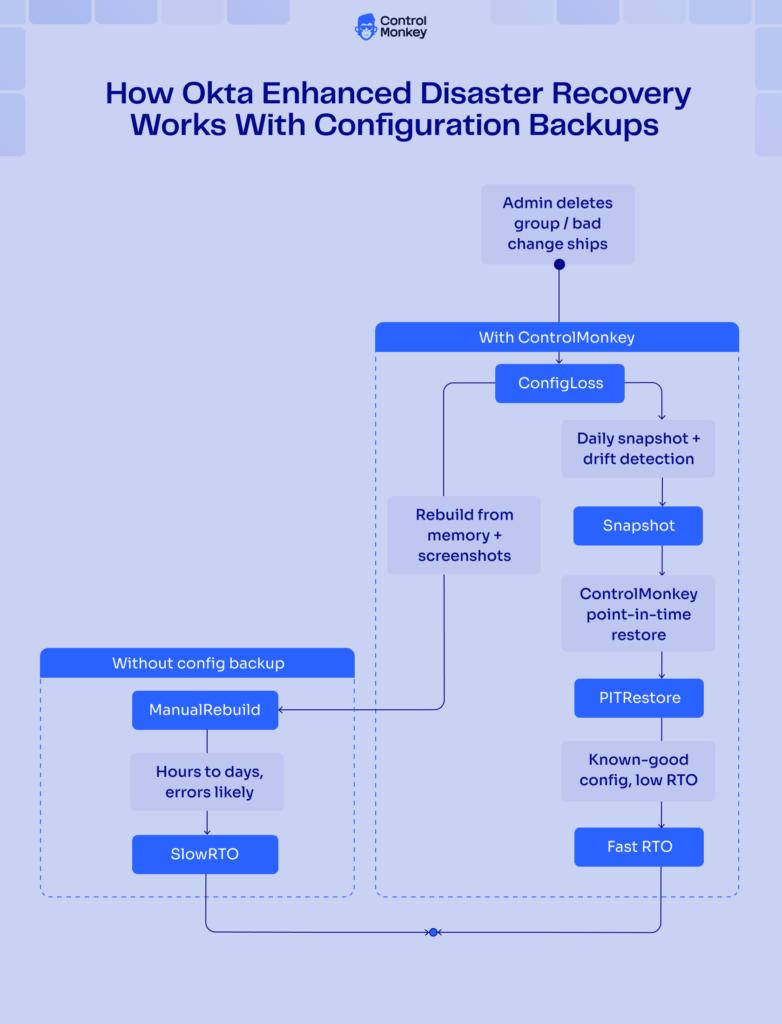
The real differentiator is scope. Identity-only tools stop at the IdP; ControlMonkey recovers the entire cloud environment. It is IaC-native and spans 30+ SaaS platforms, so identity recovery is not a silo – it is one part of whole-environment recovery. When Ransomware or a bad deploy hits several systems at once, you restore them together, not one console at a time. That matters because a real incident rarely respects tool boundaries: a compromised admin account can touch your IdP, your cloud accounts, and your connected SaaS in the same afternoon. Recovering the identity layer while the surrounding infrastructure stays broken still leaves you down.
Tie it back to the metric that matters. This is about RTO and genuine Business Continuity. Data recovery is not business recovery; recovering the whole environment to a known-good state, fast, is what keeps the business running. ControlMonkey improves that number by removing the manual rebuild from the critical path.
Building Identity Recovery That Survives a Bad Day
Two takeaways carry this guide. First, Okta Enhanced Disaster Recovery is real and effective for Okta-side outages, cutting the failover RTO from about an hour to roughly five minutes. Second, it does not back up your configuration or offer point-in-time restore – that is a separate, customer-owned job.
A complete plan resolves the tension. Layer Okta’s availability with continuous configuration backup, drift tracking, and tested recovery, and both failure modes are covered. Okta’s Enhanced DR handles the outage; configuration backup handles the deletion, the misconfiguration, and the ransomware event. RTO is what executives track, so recover the whole environment, not just uptime.

A 30-min meeting will save your team 1000s of hours
A 30-min meeting will save your team 1000s of hours
Author