
In this post, I’ll walk you through each of Terraform Cloud’s pricing levels, show you what your actual bill would be, and highlight some of the “hidden” costs that surprise most teams.
I’ll also introduce you to ControlMonkey, which takes a fundamentally different approach to cloud infrastructure management, including its pricing model and capabilities that Terraform Cloud doesn’t have.
TL;DR
- ControlMonkey offers all of this, plus everything you need beyond Terraform execution, cloud inventory, automated code generation, remediation of drift, and disaster recovery and starts from $800 per month.
- The Terraform Cloud pricing model follows a RUM model. The free plan offers $500 in credits and 500 managed resources.
- The paid plans start at $0.10 per resource per month, up to $0.99 per resource per month. Terraform Enterprise’s self-hosted model is custom but has an average contract value of $36,726 per year.
Disclaimer:
ControlMonkey is a Terraform Cloud Alternative.
If you’re interested in comparing the two, click here to discover what sets ControlMonkey apart as a strong alternative to Terraform Cloud.
Overview of Available Terraform Pricing Tiers
Before we delve into the specifics of what each plan gets you, here is an overview of the Hashicorp Terraform Cloud pricing model as of 2026:
| Tier | Price | Hourly Rate | Key Features | Best For |
|---|---|---|---|---|
| Free | $0 (up to 500 resources/month) | — | Remote state, VCS connection, projects, secure variables, private registry | Solo developers, small experiments |
| Standard | $0.10 per resource/month | $0.00013/hour | Team management, cost estimation, Silver support | Small teams adopting IaC |
| Plus | $0.47 per resource/month | $0.00064/hour | Unlimited policies, run tasks, audit logs, HCP Waypoint, drift detection, no-code provisioning | Mid-size teams standardizing IaC |
| Premium | $0.99 per resource/month | $0.00135/hour | Advanced governance, self-service workflows, Waypoint actions, premium features | Enterprises with strict compliance |
| Enterprise (Self-Hosted) | Custom | Custom | All Premium features, self-managed, premium support | Regulated industries, air-gapped environments |
View full details on HashiCorp’s official page
The pricing approach is based on Resources Under Management (RUM), the core of Terraform Cloud usage limits, with each resource billed per hour. If you choose the Free tier, you’ll receive the first 500 resources for free each month, which is ideal for modest projects or initial testing.
Each of the Еerraform pricing tiers expands upon its predecessor, allowing you to manage more infrastructure, automate processes, implement better governance, and increase optimization. One-man cloud teams can take advantage of the Free plan and run pilot tests. However, as your team scales and your requirements become more intricate, shifting to a paid plan unlocks enhanced team functionalities and production-grade stability tailored for frequently used environments.
👉 Learn more about ControlMonkey Competitive Pricing
Is Terraform Cloud Free?
Sort of. Terraform is free or paid, depending on what you’re using.
The Terraform CLI (community edition) is completely free. You can run terraform plan and terraform apply from your laptop all day without paying a cent.
Terraform Cloud (HCP Terraform) used to have a legacy free tier with a hard 500-resource cap.
However, this is being phased out. HashiCorp has announced that the legacy free plan reaches end-of-life on March 31, 2026.
New users now get a Pay-As-You-Go plan with $500 in trial credits to use across the HCP platform.
Once those credits run out, you pay based on usage. So the HCP Terraform free tier isn’t really “free forever” anymore. It’s more like a prepaid trial.
Terraform Cloud Pricing: What’s Included in Each Plan
Terraform Cloud pricing isn’t just about how much you use—it’s more about the features you get with each plan. As your team grows, you unlock better tools to help manage your setup, boost security, set rules, and scale up.
Here’s a quick breakdown of what each plan offers, sorted by the stuff that matters most:
| Feature | Free | Standard | Plus | Premium |
|---|---|---|---|---|
| Remote state storage | Yes | Yes | Yes | Yes |
| Secure variable storage | Yes | Yes | Yes | Yes |
| Test-integrated module publishing | 5 modules | 10 modules | Unlimited | Unlimited |
| Module deprecation | No | No | Yes | Yes |
| No-code provisioning | No | No | Yes | Yes |
Unified Workflow Management
Terraform Cloud Cost Visibility & Optimization Features
| Feature | Free | Standard | Plus | Premium |
|---|---|---|---|---|
| Workspace management | Yes | Yes | Yes | Yes |
| Workspace explorer | Yes | Yes | Yes | Yes |
| Audit logging | No | No | Yes | Yes |
| Drift detection | No | No | Yes | Yes |
| Continuous validation | No | No | Yes | Yes |
Governance, Risk & Compliance in Terraform Cloud Tiers
This is where Terraform Cloud features pricing gets interesting and expensive.
Policy enforcement in Terraform Cloud relies on Sentinel and OPA.
But here’s the catch: on the Essentials tier, you get no policy enforcement at all. Standard gives you limited policies.
Premium unlocks unlimited policies and advanced governance.
If your team needs serious guardrails (region restrictions, required encryption, budget caps, service blocking), you’ll need Premium or Enterprise.
And those policies don’t write themselves. Your team has to author, test, and maintain every Sentinel or OPA policy manually.
| Feature | Free | Standard | Plus | Premium |
|---|---|---|---|---|
| Audit trails API | No | No | Yes | Yes |
| Private VCS Access | No | No | No | Yes |
| Private policy enforcement | No | No | No | Yes |
| Private run tasks | No | No | No | Yes |
How Much Do Enterprise Terraform Governance Platforms Cost for Large Teams?
For organizations asking this question, the answer with Terraform Cloud is: a lot more than the base per-resource price suggests.
Compliance-heavy organizations can’t stay on Essentials or even Standard. Premium pricing ($0.99/resource/month) is the floor for real governance, and you’re still writing all the policies yourself.
The Terraform Enterprise self-hosted pricing is custom, however, according to Vendr’s transaction data. According to the insider information, some deployments go up to $300,000 depending on scale and negotiated terms.
You’ll also need to factor in the infrastructure cost to run it, the ops team to maintain it, and the ongoing update cycles.
The Replicated deployment option’s support ends April 1, 2026, which means existing Enterprise customers need to migrate to newer deployment methods.
How Much Does Terraform Cloud Really Cost?
Let’s do the math that actually matters. The Hashicorp cloud pricing page lists clean per-resource rates, but real-world bills tell a different story.
Here’s what Terraform Cloud pricing looks like at different scales on the Essentials plan ($0.10/resource/month) and other plans:
| Managed Resources | Monthly Cost (Essentials) | Monthly Cost (Standard) | Monthly Cost (Premium) | Annual Cost (Essentials) |
|---|---|---|---|---|
| 500 | $0 (free tier) | $0 (free tier) | $0 (free tier) | $0 |
| 1,000 | ~$100 | ~$470 | ~$990 | ~$1,200 |
| 2,500 | ~$250 | ~$1,175 | ~$2,475 | ~$3,000 |
| 5,000 | ~$500 | ~$2,350 | ~$4,950 | ~$6,000 |
| 10,000 | ~$1,000 | ~$4,700 | ~$9,900 | ~$12,000 |
| 50,000 | ~$5,000 | ~$23,500 | ~$49,500 | ~$60,000 |
These are simplified estimates. Real costs run higher because HCP Terraform bills on hourly peak usage, not monthly averages.
If you spin up temporary resources during a CI run and they exist for even part of an hour, that hour counts.
And remember, “resources” means everything in your state. Security groups, IAM policies, individual DNS records.
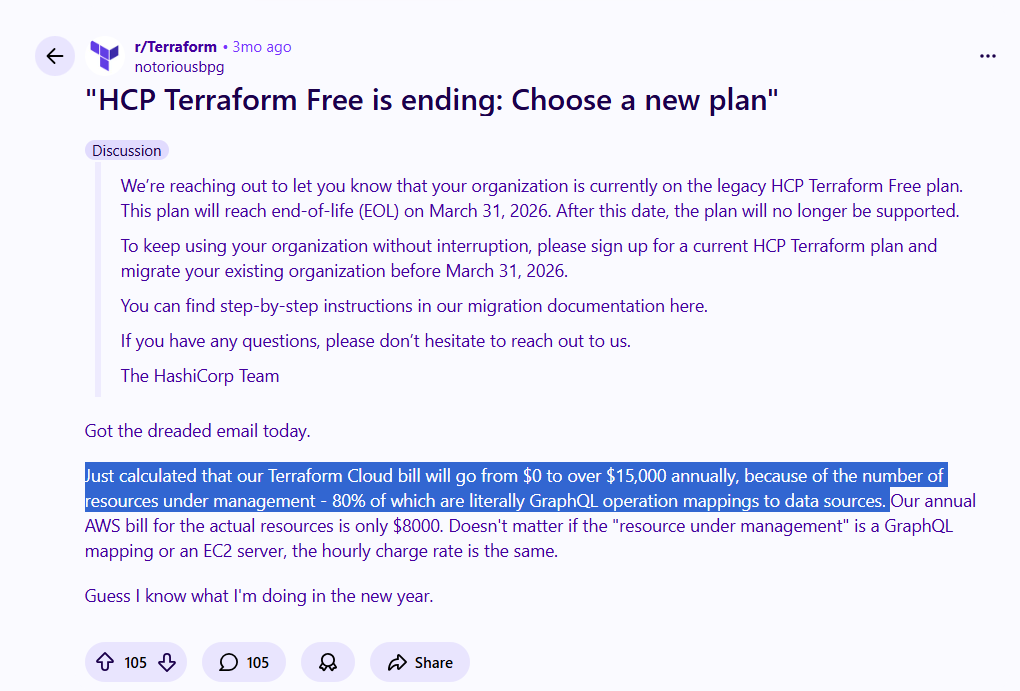
One engineer on Reddit described facing a potential $15,000/year bill because of the number of resources under management, which is more than their actual AWS infrastructure costs.
Factors Contributing to Unexpected Costs
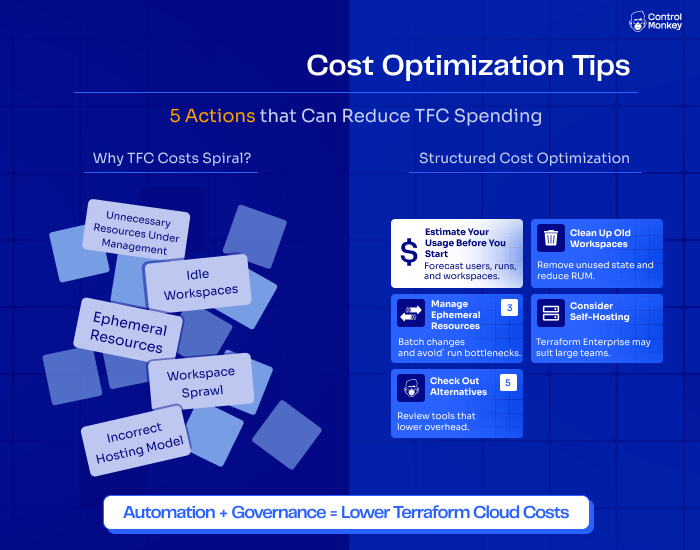
The biggest factors contributing to unexpected costs in Terraform Cloud are unnecessary resources under management, idle workspaces, ephemeral resources, workspace sprawl, and incorrect hosting models.
The base Terraform Cloud price per resource is straightforward. What’s not straightforward is how quickly everything else adds up.
There are five main reasons why TFC costs spiral:
1. Unnecessary Resources Under Management
Every resource in your Terraform state gets billed. Security groups, IAM roles, individual DNS entries, and route table associations.
One Terraform module can create dozens of small resources you didn’t even think about.
The fix isn’t always obvious either. Many community Terraform modules are written to create lots of small individual resources for documentation and readability.
That coding style was fine under the old per-user pricing. Under RUM billing, it costs real money.
2. Idle Workspaces
This is the silent budget killer. Old proof-of-concept workspaces, abandoned staging environments, test deployments that nobody cleaned up.
They all still have resources in state. They all still count.
I’ve seen teams discover that 30-40% of their managed resources sit in workspaces nobody has touched in months. That’s money going nowhere.
3. Ephemeral Resources
HCP Terraform bills on hourly peak usage. If you spin up temporary resources during a CI pipeline and they exist for even part of an hour, that full hour gets billed.
This matters a lot for teams using Terraform in CI pipelines or multi-region deploys.
A PR preview environment that exists for 15 minutes gets billed the same as one that runs for 59 minutes.
Multiply that by dozens of PRs per week, and ephemeral usage becomes a meaningful part of your monthly Terraform Cloud cost.
4. Workspace Sprawl
Let’s say you have a production environment with 600 managed resources. On Essentials ($0.10/resource/month), that’s $60/month. Manageable.
Now clone it for staging. You’re at 1,200 resources. That’s $120/month, or $1,440/year.
Add a dev environment. You’re at 1,800 resources, $180/month, $2,160/year.
On Essentials, the scaling is linear. The real problem starts when your team realizes Essentials doesn’t include audit logs, unlimited policies, or continuous validation.
So you upgrade to Standard ($0.47/resource/month).
Now that same 1,800 resources across three environments cost $846/month. That’s $10,152/year.
And if compliance requirements push you to Premium ($0.99/resource/month)? Those same 1,800 resources cost $1,782/month, or $21,384/year.
The workspace sprawl itself is predictable. The cost spiral happens when environment duplication collides with a tier upgrade.
Teams that follow standard promotion patterns (dev, staging, prod) end up tripling their resource count AND paying a higher per-resource rate for the governance features they need.
That’s the real trap.
5. Incorrect Hosting Model
Some teams stay on Terraform Cloud’s SaaS tiers when Terraform Enterprise (self-hosted) would actually cost less. Others do the opposite, paying for Enterprise licenses and server infrastructure when their resource count is small enough for a SaaS plan.
For a team managing 15,000 resources or more on Standard ($0.47/resource/month), that’s $84,600/year in SaaS costs.
The wrong hosting model can easily mean overpaying by 2-3x.
Terraform Cloud Cost Optimization Tips
The best ways to optimize your Terraform Cloud costs are to estimate your usage before you start, clean up old workspaces, manage ephemeral resources, consider self-hosting, and check out alternatives.
1. Estimate Your Usage Before You Start
Before choosing a plan, consider the number of people, workspaces, and runs you’ll have. This helps you determine if the free plan will suffice for your team’s work or if you’ll encounter limits quickly.
2. Clean Up Old Workspaces
Unused state files and workspaces consume your RUM (Resources Under Management) quota.
Clean out old workspaces every two or three months. Remove or archive what you no longer need.
3. Manage Ephemeral Resources
Batch changes and avoid run bottlenecks.
If you’re spinning up short-lived environments for CI testing or PR previews, those resources still get billed per hour.
4. Consider Self-Hosting
Terraform Enterprise may suit large teams. If you’re managing 15,000 resources or more on a paid SaaS tier, self-hosting can be cheaper despite the operational overhead.
For large teams or organizations with strict compliance requirements, Terraform Enterprise can be more cost-effective in the long run. You only pay for the license and your servers, and avoid per-user cloud fees and keep full control.
5. Check Out Alternatives
Review tools that lower overhead. The IaC automation market has matured significantly since Terraform Cloud launched.
Platforms like ControlMonkey offer different pricing models (e.g., run-based, fixed, or concurrency-based) that might fit your team better than RUM-based billing.If your main pain points are unpredictable costs, missing drift remediation, or needing cloud visibility beyond what Terraform state shows you, it’s worth evaluating TFC alternatives before committing to a multi-year Terraform Cloud contract.
Does Terraform Cloud Provide a Good Value for Money in 2026?
Whether Terraform Cloud provides good value for money depends on your scale and your needs.
For small teams managing fewer than 500 resources, the free tier (while it lasts) is hard to beat.
You get remote state management, VCS integration, and basic team features without spending anything.
For mid-size teams with 1,000 to 5,000 resources on Essentials, the value is decent if all you need is Terraform execution and collaboration. The Terraform Cloud cost stays manageable at that scale.
But things shift once you need governance, compliance features, or you’re managing 10,000 resources or more.
At that point, Terraform Cloud’s RUM model becomes expensive relative to the value it delivers, especially since it doesn’t include cloud inventory, automatic code generation, drift remediation, or disaster recovery.
And the HCP Terraform pricing changes suggest IBM is pushing toward enterprise-grade commitments.
The free tier is sunsetting, and long-term contracts are being encouraged.
If your team values cost predictability and avoiding vendor lock-in, that trajectory is worth paying attention to.
Looking for a Terraform Cloud alternative?
If you’ve made it this far and you’re thinking “there has to be a better way to manage Terraform at scale without unpredictable per-resource billing,” you’re not alone.
ControlMonkey is the leading alternative to Terraform Cloud in 2026 because it solves a fundamentally bigger problem.Instead of giving you faster terraform plan and terraform apply, ControlMonkey gives you full cloud visibility, automatic Terraform code generation, built-in drift remediation, and infrastructure disaster recovery. All out of the box.
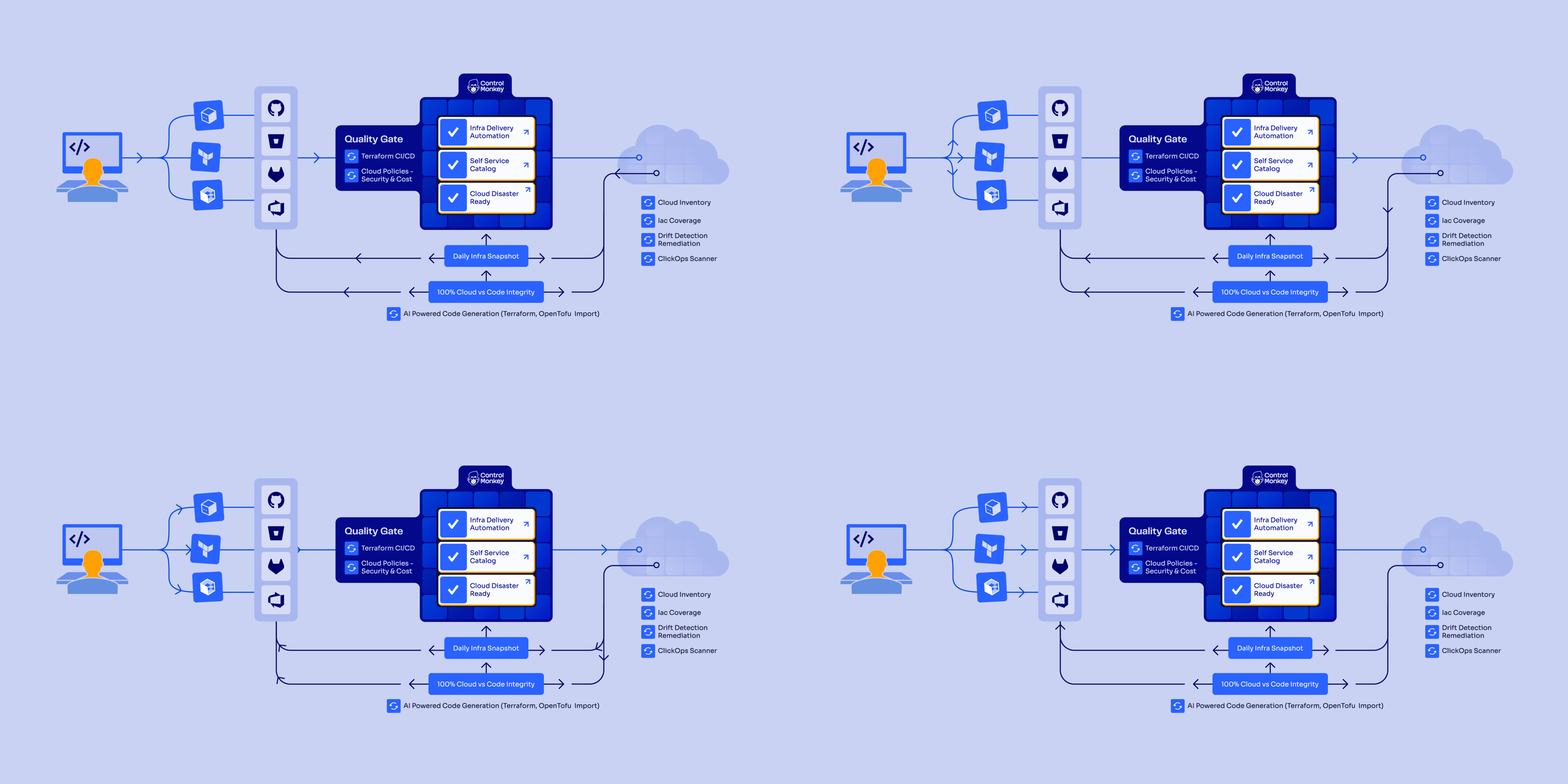
Our platform helps teams at Intel, AWS, and Comcast manage real-world cloud environments where infrastructure already exists, drift happens daily, and outages are expensive.
And we do all of this without requiring you to write OPA or Sentinel policies, maintain custom CI/CD pipelines, or stitch together multiple point tools.
Let’s go over the features:
Automatically Generate Terraform Code
ControlMonkey connects directly to your cloud accounts (AWS, Azure, GCP) and third-party vendors like Datadog, Cloudflare, Okta, and MongoDB.
It continuously scans them to create a complete, real-time inventory of all resources.
Our platform shows what infrastructure is already managed by IaC and what’s unmanaged, so you can find blind spots and shadow IT that Terraform Cloud can’t even see.
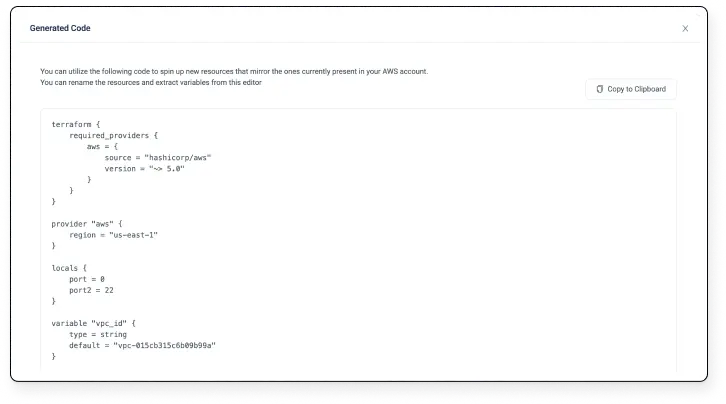
Unlike Terraform Cloud, which has no built-in code generation, ControlMonkey automatically generates production-ready Terraform code and state files for existing resources.
This “Cloud-to-Code” approach removes the manual, error-prone work of onboarding legacy infrastructure into IaC.
Drift Detection and Automated Remediation
ControlMonkey continuously monitors your cloud environments for configuration drift, whether it’s caused by manual console changes, misconfigurations, or security issues.
Terraform Cloud can detect drift. But it stops at alerting. Your team has to fix it manually.
ControlMonkey goes further by automatically remediating drift through Git-based pull requests and safe rollbacks.
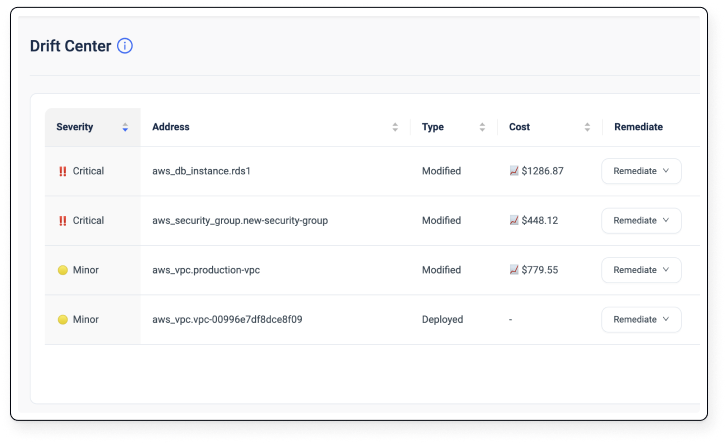
When our platform detects a mismatch, the Remediation Engine offers one-click fixes to bring infrastructure back into compliance.
This turns drift from an alerting problem into a resolved issue. Less firefighting. Fewer outages. Less downtime.
You’ll also get our ClickOps scanner, which automatically identifies unsupervised manual operations from the cloud console.
Built-In Compliance and Governance With AI-Powered Guardrails
ControlMonkey provides enterprise-grade governance without requiring your team to write or maintain OPA or Sentinel policies.
Our platform includes out-of-the-box security, compliance, and cost guardrails, along with AI-driven Quality Gates and IaC risk scoring.
The way it works is that our platform scans existing IaC code for misconfigurations and policy violations.
Guardrails are applied automatically during CI/CD, so nothing non-compliant ever gets deployed.
And ControlMonkey keeps a complete audit trail for compliance frameworks like PCI DSS, SOC 2, and ISO 27001.
See how Windward uses ControlMonkey to provision Amazon Bedrock in a self-serve, governed and private way, without compromising on security, compliance, or costs.
With Terraform Cloud, you’d pay Premium pricing ($0.99/resource/month) and still need dedicated policy engineers to build and maintain all of this manually.
Infrastructure Resilience and Disaster Recovery
ControlMonkey treats infrastructure resilience as a first-class feature, not an afterthought.
Our platform maintains daily snapshots of your entire cloud configuration and enables instant rollback and recovery from misconfigurations or accidental deletions.
You can back up not only your cloud resources, but also all third-party vendor configurations across over 30 platforms, including Datadog, Cloudflare, Okta, Confluent, and Temporal.
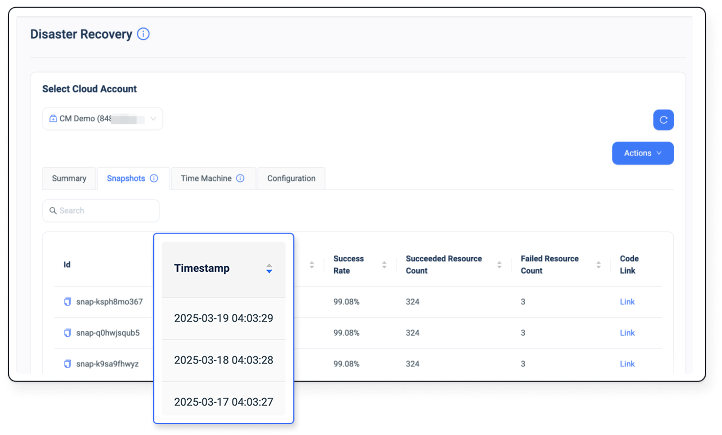

Terraform Cloud has no built-in backups and no disaster recovery.
If someone accidentally deletes a critical VPC or misconfigures your IAM policies, you’re rebuilding from memory or incomplete documentation.
See how ControlMonkey solves this.
What Makes ControlMonkey Different From Terraform Cloud?
The main difference is that Terraform Cloud runs your Terraform, while ControlMonkey controls your cloud.
Here’s how the two platforms compare head-to-head:
| Capability | ControlMonkey | Terraform Cloud |
|---|---|---|
| Cloud Asset Inventory and Terraform Coverage | Full cloud scanning and Terraform coverage insights. Detects unmanaged resources. | No cloud account scanning. Lacks visibility into unmanaged resources. |
| Terraform Code Generation | Automatically generates Terraform code and state from existing cloud resources. | No automatic code generation. Manual creation required. |
| Daily Cloud Backups and Disaster Recovery | Daily infra configuration backups and full cloud disaster recovery with instant rollback. | No built-in backups or disaster recovery. |
| Drift Detection and Remediation | Continuous drift detection with automated remediation and rollback. | Detects drift but requires manual intervention. |
| ClickOps Scanner | Detects unsupervised manual operations from the cloud console. | Not supported. |
| Policies for Security, Cost and Compliance | Out-of-the-box AI guardrails. No need to code policies from scratch. | Requires Sentinel for policy authoring and maintenance. |
| Terraform Modules Insights | Identifies outdated modules across your code. | Not supported. |
| CI/CD Flexibility | Use ControlMonkey’s built-in IaC CI/CD or integrate with your existing pipelines. | Replaces your existing CI/CD pipelines for IaC. |
| Support | 24/7 VIP customer support in all plans. | Premium support is only on the Enterprise plan. |
| Multi-IaC Support | Terraform, OpenTofu, and Terragrunt. | Terraform only. |
| Pricing Model | Fixed, predictable pricing starting at $800/month. | RUM-based, variable pricing starting at $0.10/resource/month. |
ControlMonkey Pricing
ControlMonkey offers three plans:
- Startup: $800/month for up to 10 users, up to 5,000 cloud assets, cloud DR backup for up to 2,000 resources, and up to 500 deployments/month. Includes Terraform Code Generator, Terraform CI/CD, Policy Enforcement, Drift Detection and Drift Remediation.
- Pro: Custom pricing for up to 50 users, which adds up to 50,000 cloud assets, cloud DR backup for up to 50,000 resources, unlimited deployments per month, and specialized support.
- Enterprise: Custom pricing with unlimited users, cloud assets, and cloud DR backup resources.
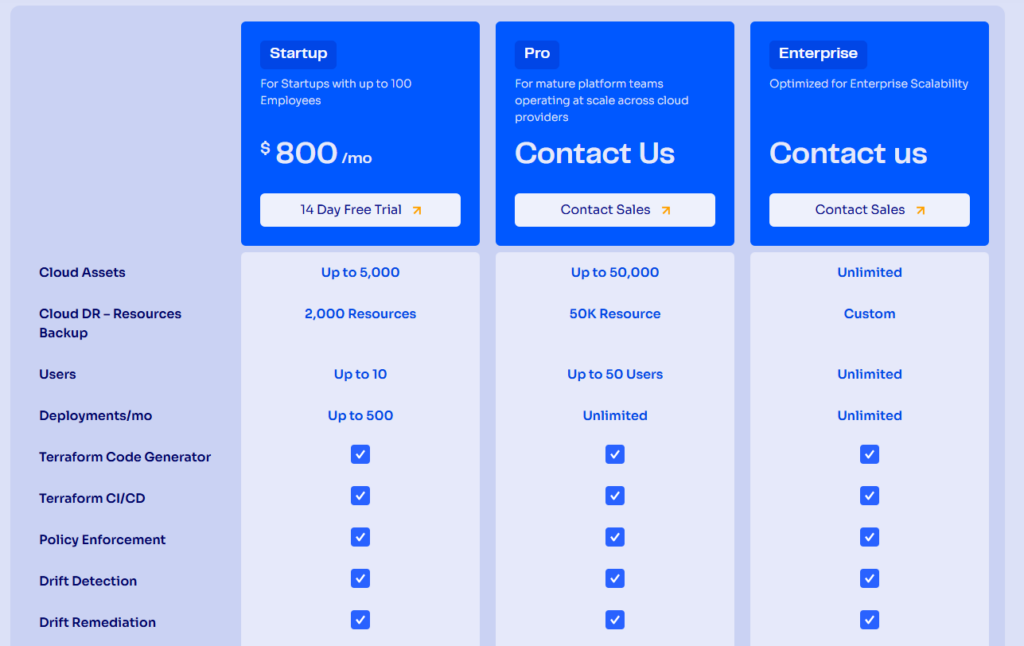
Compare that to Terraform Cloud. A team managing 5,000 resources on Standard pays ~$2,350/month and gets zero code generation, zero drift remediation, zero disaster recovery, and zero cloud inventory.
With ControlMonkey, you pay $800/month and get all of that. Fixed. Predictable. No surprises at renewal.
You can apply for startup pricing by sending us your company name and size, or register for a free trial.
Migrating From Terraform Cloud to ControlMonkey
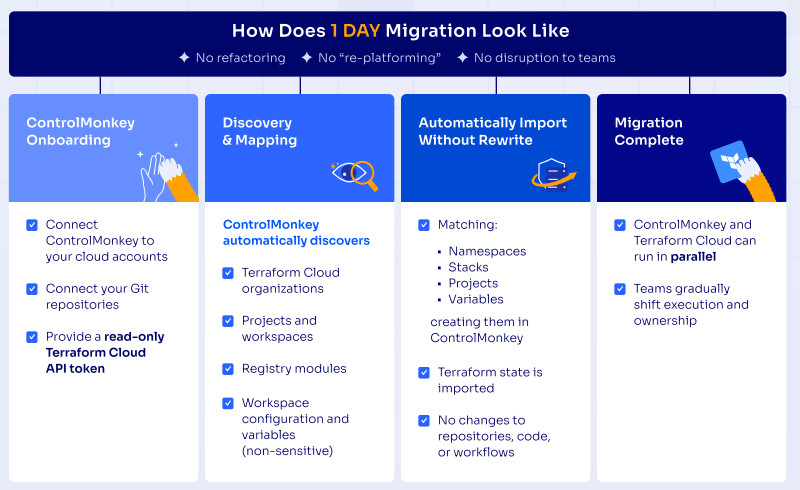
Switching from TFC to ControlMonkey doesn’t require months of planning or a team of consultants.
The migration process is automated, requires no code rewriters, and can be completed in as little as one day.
Here’s what the process looks like:
- 1. Connect and Onboard. Connect your AWS, Azure, or GCP cloud accounts and your Git repositories to ControlMonkey. Then, provide a read-only Terraform Cloud API token. That’s all ControlMonkey needs to start.
- 2. Automated Discovery and Mapping. ControlMonkey automatically discovers your Terraform Cloud organizations, projects, workspaces, registry modules, and workspace configuration (including non-sensitive variables).
- 3. Automatically Import Without Rewrite. ControlMonkey matches and recreates your namespaces, stacks, projects, and variables inside the platform. Terraform state is imported directly. There are no changes to your existing repositories, code, or workflows.
- 4. Migration Complete. ControlMonkey and Terraform Cloud can run side by side during the transition. Teams gradually shift execution and ownership at their own pace with zero disruption to production.
The result: better visibility into what’s actually running in their cloud, faster deployments, and infrastructure that’s actually recoverable when things go wrong.
For example, UBIQ was able to migrate from Terraform Cloud to ControlMonkey in just 1 day thanks to ControlMonkey’s automated migration tool.
They were able to achieve a 100% SOC 2 compliance acceptance rate in the infrastructure delivery process and cut cloud provisioning effort by 75% (from four people to one).
Conclusion: Terraform Cloud Pricing
Getting a handle on Terraform Cloud pricing is critical for making informed, cost-effective decisions as your infrastructure grows.
The platform is capable of running Terraform workflows. The free tier works well for small projects.
The Essentials plan is reasonable for teams with modest resource counts.
But the RUM-based pricing model punishes growth. The terraform cloud pricing changes since the IBM acquisition have pushed costs higher for mid-size and enterprise teams.
And the platform still doesn’t solve the broader infrastructure challenges, such as finding unmanaged resources, generating Terraform code, remediating drift automatically, or recovering from infrastructure failures.
If your team is outgrowing Terraform Cloud or you’re tired of watching costs climb every time you add a new environment, it’s worth exploring what’s out there.
ControlMonkey delivers full cloud visibility, automatic Terraform code generation, built-in drift remediation, and infrastructure disaster recovery, all at a predictable cost.

A 30-min meeting will save your team 1000s of hours
A 30-min meeting will save your team 1000s of hours
Author