Join our next Live Demo on April 9th!

Resource Blog News Customers Stories

Updated: Feb 11, 2026 Upd: 11.02.26

2 min read

Stack-Level Permissions: Granular Access Control for Automation

Zack Bentolila

Zack Bentolila

Marketing Director

Stack-Level Permissions: Granular Access Control for Automation

As Terraform workspaces grow, permission models that stop at the project or namespace level quickly become a challange. Critical production stacks don’t deserve the same access rules as everything else.

ControlMonkey now introduces Stack-Level Permissions, giving teams precise control over who can plan, deploy, and approve changes – down to the individual stack.

Introducing Stack-Level Permissions

Stack-Level Permissions extend ControlMonkey’s existing RBAC model beyond namespaces, enabling true enterprise-grade access control for Terraform environments.

What you can do:

  • Assign permissions at the individual stack level, not just the namespace
  • Limit high-risk actions (like deployment approval) to specific teams
  • Map your IDP groups to ControlMonkey RBAC permissions
  • Protect production and high blast-radius stacks without slowing delivery
  • Maintain flexibility for DevOps and SRE teams across less sensitive stacks
Terraform namespace-level permissions compared to stack-level permissions showing granular access control per stack.

Fine-Grained RBAC for Terraform Stacks / Precise Permissions for Complex Terraform Environments

With Stack-Level Permissions, ControlMonkey closes a critical gap found in many Terraform Cloud alternatives.

This capability helps teams:

  • Improve visibility into who can change what – and where
  • Reduce operational risk by isolating sensitive stacks
  • Strengthen IaC governance without introducing friction
  • Scale Terraform safely, even as environments grow more complex

If you’re evaluating a Terraform Cloud replacement, granular permissions are not optional – they’re foundational.

Enterprise-Grade Permissions for Terraform Cloud Migrations

Terraform Cloud supports workspace-level permissions. When replacing it, the real question is whether you can enforce least privilege at the same granularity your production stacks demand.

ControlMonkey provides stack-level RBAC to isolate sensitive stacks while keeping delivery fast across everything else.

CTA: Ready to take control?

Explore Stack-Level Permissions and see why ControlMonkey is the most enterprise-ready Terraform Cloud alternative.

Bottom CTA Background

A 30-min meeting will save your team 1000s of hours

A 30-min meeting will save your team 1000s of hours

Book Intro Call

Author

Zack Bentolila

Zack Bentolila

Marketing Director

Zack is the Marketing Director at ControlMonkey, with a strong focus on DevOps and DevSecOps. He was the Senior Director of Partner Marketing and Field Marketing Manager at Checkmarx. There, he helped with global security projects. With over 10 years in marketing, Zack specializes in content strategy, technical messaging, and go-to-market alignment. He loves turning complex cloud and security ideas into clear, useful insights for engineering, DevOps, and security leaders.

    Sounds Interesting?

    Request a Demo

    Resource Blog News Customers Stories

    Updated: Feb 08, 2026 Upd: 08.02.26

    1 min read

    Introducing Azure Bicep Support

    Zack Bentolila

    Zack Bentolila

    Marketing Director

    Introducing Azure Bicep Support

    Azure teams often rely on Bicep alongside Terraform for managing their infrastructure with code, and without unified visibility, recovery gaps go unnoticed until it’s too late.

    ControlMonkey now supports Azure Bicep as part of its IaC coverage model, extending visibility and disaster recovery awareness to Azure-native infrastructure.

    This capability is available to all ControlMonkey customers starting today.

    Key benefits Azure Bicep Backup & Visibility:

    • Full visibility into Azure resources managed by Bicep
    • Clear separation between codified and non-codified infrastructure
    • Improved disaster recovery readiness for Azure-native stacks
    • Reduced blind spots during ransomware or cyber incidents
    • IaC visibility and recovery coverage across Terraform, CloudFormation, and Bicep

    Cloud Infrastructure with Full IaC Visibility

    Codified infrastructure can be restored after configuration loss or compromise. Unmanaged resources lack a reliable recovery path.

    By including Azure Bicep in its IaC coverage, ControlMonkey helps teams:

    • Understand recovery readiness across Azure environments
    • Identify hidden DR risks caused by non-codified resources
    • Strengthen cloud governance without forcing tool migrations
    • Plan incident response with confidence during cyber or ransomware event.

    This helps teams understand recovery readiness in environments that use multiple IaC frameworks.

    Ready to see what’s recoverable and what isn’t?

    Explore Azure Bicep visibility in ControlMonkey today.

    Bottom CTA Background

    A 30-min meeting will save your team 1000s of hours

    A 30-min meeting will save your team 1000s of hours

    Book Intro Call

    Author

    Zack Bentolila

    Zack Bentolila

    Marketing Director

    Zack is the Marketing Director at ControlMonkey, with a strong focus on DevOps and DevSecOps. He was the Senior Director of Partner Marketing and Field Marketing Manager at Checkmarx. There, he helped with global security projects. With over 10 years in marketing, Zack specializes in content strategy, technical messaging, and go-to-market alignment. He loves turning complex cloud and security ideas into clear, useful insights for engineering, DevOps, and security leaders.

      Sounds Interesting?

      Request a Demo

      FQA about Azure Bicep and Controlmonkey

      Resources managed by Bicep are codified and can be rebuilt. ControlMonkey helps teams identify which resources fall into that category and which do not.

      No. Azure Bicep support is limited to visibility and disaster recovery awareness. Terraform automation remains unchanged.

      Yes. Like CloudFormation, Bicep is included for visibility and disaster recovery coverage, not automation.

      Resource Blog News Customers Stories

      Updated: Oct 09, 2025 Upd: 09.10.25

      2 min read

      New Security Posture Dashboard

      Zack Bentolila

      Zack Bentolila

      Marketing Director

      New Security Posture Dashboard

      We’re excited to introduce the Security Posture Dashboard: unified view of existing Cloud vulnerabilities across your cloud accounts, regions, and vendors. The goal is to give Security and DevSecOps teams a clear, detective lens into their current security posture, so they can understand the risks already present in their environments and decide where to focus first.

      The Security Posture Dashboard surfaces all vulnerabilities in your cloud infrastructure, regardless of Infrastructure as Code (IaC) coverage. This complements the IaC Risk Index, which focuses on the intersection of vulnerabilities and IaC coverage – showing which issues could be prevented by shifting to automation vulnerabilities and IaC coverage. It shows which risks can be removed by using automation.

      While some vendors help you see what’s missing from IaC, ControlMonkey Iac Platform shows you every security exposure across your cloud whether IaC-managed or not.

      Introducing Security Posture Dashboard

      With the new dashboard, you can:

      • Unify visibility into vulnerabilities across every cloud environment.
      • Drill down instantly by account, region, vendor, or resource type.
      • Filter by severity to prioritize the most urgent exposures.
      • Spot misconfigurations such as public IPs, open ports, or weak databases setups.
      • Connect findings to IaC strategy and prevent issues with automation and quality gates.

      Linking Cloud Security to IaC Coverage

      By combining the Security Posture Dashboard with the IaC Risk Index, organizations can see not only what risks exist, but also how much those risks shrink when infrastructure is fully governed by IaC.

      • Security teams and DevSecOps gain a complete picture of all vulnerabilities in the cloud – regardless of IaC coverage.
      • Cloud and DevOps leaders can demonstrate the measurable reduction in risk when moving workloads into IaC pipelines.

      For Cloud and DevOps leaders, the IaC Risk Index adds an essential layer of context. By showing the overlap between vulnerabilities and IaC coverage, we can see which risks we can prevent. This creates a clear link between using IaC and lower security risks. It gives leaders the proof they need to push for automation, improve governance, and show progress to stakeholders.

      Learn More about Security Posture Dashboard

      Explore the new Security Posture Dashboard in our upcoming Product Showdown.

      Bottom CTA Background

      A 30-min meeting will save your team 1000s of hours

      A 30-min meeting will save your team 1000s of hours

      Book Intro Call

      Author

      Zack Bentolila

      Zack Bentolila

      Marketing Director

      Zack is the Marketing Director at ControlMonkey, with a strong focus on DevOps and DevSecOps. He was the Senior Director of Partner Marketing and Field Marketing Manager at Checkmarx. There, he helped with global security projects. With over 10 years in marketing, Zack specializes in content strategy, technical messaging, and go-to-market alignment. He loves turning complex cloud and security ideas into clear, useful insights for engineering, DevOps, and security leaders.

        Sounds Interesting?

        Request a Demo

        Frequently Asked Questions

        The Security Posture Dashboard is a detective view of all existing vulnerabilities across your cloud accounts, regions, and vendors. It helps Security and DevSecOps teams understand their current risk exposure and decide where to focus remediation efforts.

        The Security Posture Dashboard shows all vulnerabilities, regardless of Infrastructure as Code (IaC) coverage. The IaC Risk Index shows the intersection of vulnerabilities and IaC coverage, highlighting which risks could be prevented by adopting IaC automation.

        The dashboard is designed primarily for Security and DevSecOps teams, but it also helps Cloud and DevOps leaders quantify risk reduction when shifting workloads into IaC pipelines

        No. The Security Posture Dashboard is a detective tool that reveals existing vulnerabilities in your infrastructure. Prevention comes when you combine it with ControlMonkey’s IaC automation capabilities and guardrails, as reflected in the IaC Risk Index

        Yes. The Security Posture Dashboard provides visibility across cloud accounts, regions, and vendors, giving a unified view of vulnerabilities in AWS, Azure, GCP, and more.

        Resource Blog News Customers Stories

        Updated: Nov 26, 2025 Upd: 26.11.25

        3 min read

        IaC Risk Index

        Zack Bentolila

        Zack Bentolila

        Marketing Director

        IaC Risk Index

        Today, ControlMonkey is proud to announce the launch of the IaC Risk Index. The IaC Risk Index is a new part of the IaC Platform that transforms the dialogue surrounding cloud security between DevOps and Security teams by highlighting the security discrepancies between infrastructure deployment and cloud-related risks. It provides a comprehensive perspective that correlates Terraform coverage with security vulnerabilities, enabling teams to identify weaknesses, comprehend their origins, and implement measures for remediation.

        Introducing the IaC Risk Index

        The IaC Risk Index enhances cloud security by providing clarity and control in five key aspects:

        IaC-Aware Risk Scoring

        A color-coded benchmark that helps teams assess risk posture by environment. In production, green is the goal—anything less is exposure:

        • 🔴 Red (<50% coverage): High risk. Most infrastructure is unmanaged.
        • 🟠 Orange (50–80%): Medium risk. Some governance, but critical gaps remain.
        • 🟡 Yellow (80–90%): Low risk. Strong coverage, not yet complete.
        • 🟢 Green (90–100%): Full control. Infrastructure is governed by code, policy, and pipeline.

        Vulnerability Mapping by Delivery Method

        See whether a vulnerable resource was created manually, drifted from code, or fully governed:

        • Unmanaged: ControlMonkey imports the resource into Terraform, remediates with a secure-by-default fix, and enforces governance policies.
        • Managed but Drifted: Drift is resolved first, then an IaC-based security patch is applied with proactive policies.
        • Managed and In-Sync: ControlMonkey patches directly in Terraform and ensures compliance is maintained.

        Coverage Gap Detection

        Instantly identify which resources fall outside Terraform governance—and why.

        One-Click Remediation

        Import unmanaged resources, generate compliant code, and resolve risk at the source.

        Shared Dashboard for Cloud & Security

        Align both teams around a single, real-time view of infrastructure coverage and risk exposure.


        ControlMonkey’s IaC Risk Index provides a unified view of infrastructure risk by mapping IaC coverage to active cloud vulnerabilities—enabling precise, policy-driven remediation.

        What’s behind IaC Risk Index

        “We found that unmanaged infrastructure—resources not governed by Terraform or delivered through a secure pipeline – carry up to 2x the security risk of governed resources,” said Aharon Twizer, CEO and co-founder of ControlMonkey.

        “And yet, most enterprises can’t answer a basic question: What percentage of our infrastructure is governed by code? Our research shows actual coverage is typically 30–40% lower than teams assume—highlighting significant hidden risk.”

        IaC Risk Index from a CISO Perspective

        “More IaC coverage means fewer security issues – period,” said ,Rapyd CISO, Nir Rothenberg”. What stood out with ControlMonkey was how easy it became to do things the right, modern way. When infrastructure and security teams can finally collaborate by design, that’s when security actually works.”

        image of Nir Rothenberg sharing qoute of Testimonial about ControlMonkey iac Platform

        Nir Rothenberg

        CISO at Rapyd about the new security release of ControlMonkey

        What’s in It for Me? Why look into Cloud Risk Now?

        The IaC Risk Index empowers cloud and security leaders to:

        1. Improve visibility into unmanaged or drifted infrastructure
        2. Reduce risk by exposing vulnerabilities at their origin – delivery
        3. Strengthen IaC alignment with secure-by-default remediation
        4. Scale confidently with a governance model that’s measurable and proactive

        Explore the IaC Risk today

        The IaC Risk Index is available now to all ControlMonkey customers at no additional cost.
        New to ControlMonkey? Access a IaC Risk Assessment as part of our onboarding and discovery process.  Learn more and request a meeting

        Bottom CTA Background

        A 30-min meeting will save your team 1000s of hours

        A 30-min meeting will save your team 1000s of hours

        Book Intro Call

        Author

        Zack Bentolila

        Zack Bentolila

        Marketing Director

        Zack is the Marketing Director at ControlMonkey, with a strong focus on DevOps and DevSecOps. He was the Senior Director of Partner Marketing and Field Marketing Manager at Checkmarx. There, he helped with global security projects. With over 10 years in marketing, Zack specializes in content strategy, technical messaging, and go-to-market alignment. He loves turning complex cloud and security ideas into clear, useful insights for engineering, DevOps, and security leaders.

          Sounds Interesting?

          Request a Demo

          FAQs

          It provides visibility into IaC coverage gaps, correlates those gaps with active security vulnerabilities, and guides precise, state-aware remediation. This enables security and DevOps teams to reduce risk before it reaches production.

          Also support OpenTofu, Terragrunt, CloudFormation.

          The IaC Risk Index is available to all ControlMonkey customers at no additional cost. New users can also access it as part of a free IaC Risk Assessment during onboarding.

          Resource Blog News Customers Stories

          Updated: Nov 25, 2025 Upd: 25.11.25

          1 min read

          Email Alerts for IaC Events in ControlMonkey

          Zack Bentolila

          Zack Bentolila

          Marketing Director

          Email Alerts for IaC Events in ControlMonkey

          Cloud Infrastructure changes happen fast. With ControlMonkey you already get alerts in Slack or Teams — but sometimes, email just makes more sense. Now you can get ControlMonkey notifications in your inbox too.

          Introducing Email Notifications in ControlMonkey

          You can now receive ControlMonkey alerts via email — giving your teams more flexibility in how and where they stay informed.

          • Get notified when drift and ClickOps are detected, a plan starts, or a deploy completes
          • Route alerts to individual users or shared team inboxes (e.g., [email protected])
          • Use email alongside Slack or Teams for layered visibility
          • Configure per namespace (e.g. project) for clear audience

          screenshot of the email alerts

          Stay Ahead with Cloud Governance and Infrastructure Control

          This small update allows DevOps and SRE teams the flexibility to receive notifications across various platforms, rather than being confined to just one channel. It supports stronger governance, faster response, and better alignment with incident workflows and team preferences.

          Whether you’re monitoring Terraform plans, managing approvals, or tracking production changes – ControlMonkey ensures you’re always informed 

          FAQs

          1. Slack (via Slack Webhook or Slack App)
          2. Microsoft Teams (via Teams Webhook)
          3. Email

          You can subscribe to notifications for a variety of events, including:

          • AWS Console Operations – when someone performs an action directly through the AWS Console.
          • Deployment Started – when ControlMonkey begins applying infrastructure changes.
          • Deployment Finished – when infrastructure changes have been successfully completed.
          • Deployment Failed – when an attempt to apply infrastructure changes has failed.
          • Approval Required – when a deployment is paused and awaiting user approval.
          • Approval Timeout – when a deployment is cancelled because it was waiting too long for approval.
          • Policy Violation Approval Required – when a deployment is waiting for approval after failing internal policy checks.
          • Drift Detected – when differences between your planned infrastructure and actual resources are detected.
          • Plan Started – when ControlMonkey starts preparing a set of changes.
          • Plan Finished – when preparation of infrastructure changes is completed successfully.
          • Plan Failed – when preparation of infrastructure changes encounters an error.

          You can set notifications at multiple levels to best suit your needs:

          • Entire Organization
          • Specific Namespace (a logical group of stacks)
          • Specific Stack (an individual set of infrastructure defined by Terraform)
          • Cloud Provider Account (for example, a particular AWS account)
          • This granularity ensures you’re informed about exactly what’s important to you, avoiding unnecessary noise.

          Bottom CTA Background

          A 30-min meeting will save your team 1000s of hours

          A 30-min meeting will save your team 1000s of hours

          Book Intro Call

          Author

          Zack Bentolila

          Zack Bentolila

          Marketing Director

          Zack is the Marketing Director at ControlMonkey, with a strong focus on DevOps and DevSecOps. He was the Senior Director of Partner Marketing and Field Marketing Manager at Checkmarx. There, he helped with global security projects. With over 10 years in marketing, Zack specializes in content strategy, technical messaging, and go-to-market alignment. He loves turning complex cloud and security ideas into clear, useful insights for engineering, DevOps, and security leaders.

            Sounds Interesting?

            Request a Demo

            Resource Blog News Customers Stories

            Updated: Sep 16, 2025 Upd: 16.09.25

            2 min read

            Load Terraform & OpenTofu Variables Automatically in ControlMonkey

            Zack Bentolila

            Zack Bentolila

            Marketing Director

            Load Terraform & OpenTofu Variables Automatically in ControlMonkey

            ControlMonkey now makes it easier than ever to work with Terraform variables. Our new “Load Variables from Code” feature lets you pull variables from your Terraform files automatically. This means no more manual entry and no missed inputs.

            (New to Terraform variables? Read our Terraform Variables Guide to learn how they work and why they matter.)

            Why Load Terraform Variables from Code?

            Previously, every Terraform Stack setup meant manually entering variables — even if they were already defined in your code. This cloud has slowed down onboarding and left room for errors. These variables are typically declared in files like variables.tf following Terraform’s official variable configuration standards

            Now, with a single click, ControlMonkey loads your Terraform variables directly from any variables.tf file in your git directory instantly.

            How to Load Terraform Variables Automatically

            When you create a new stack, ControlMonkey looks through your code directory and subfolders. It finds all declared variables and fills them in the UI. You can still modify values, mark them sensitive, or override as needed—without starting from zero.

            Benefits of Loading Automatically

            • Faster onboarding and stack creation
            • Fewer input mistakes and mismatches – consistent use across environments
            • Create dozens of variables in seconds

            Use it on your next stack setup—click “Load Variables from Code” and let ControlMonkey do the rest.

            Bottom CTA Background

            A 30-min meeting will save your team 1000s of hours

            A 30-min meeting will save your team 1000s of hours

            Book Intro Call

            Author

            Zack Bentolila

            Zack Bentolila

            Marketing Director

            Zack is the Marketing Director at ControlMonkey, with a strong focus on DevOps and DevSecOps. He was the Senior Director of Partner Marketing and Field Marketing Manager at Checkmarx. There, he helped with global security projects. With over 10 years in marketing, Zack specializes in content strategy, technical messaging, and go-to-market alignment. He loves turning complex cloud and security ideas into clear, useful insights for engineering, DevOps, and security leaders.

              Sounds Interesting?

              Request a Demo

              Frequently Asked Questions About Loading Terraform Variables

              ControlMonkey automatically scans your specified code directory (including subdirectories) for variables.tf files. It detects all declared variables and imports them into the stack creation UI for easy configuration.

              Yes. Once loaded, you can fully edit each variable—change values, mark them as sensitive, or remove them as needed. You’re always in control.

              ControlMonkey supports scanning paths and subdirectories, so your variables will still be detected and imported correctly.

              Resource Blog News Customers Stories

              Updated: Aug 23, 2025 Upd: 23.08.25

              1 min read

              Introducing Cross-Cloud Visibility in Cloud Inventory

              Zack Bentolila

              Zack Bentolila

              Marketing Director

              Introducing Cross-Cloud Visibility in Cloud Inventory

              ControlMonkey now offers a unified Cloud Inventory view. With our latest update, users can search and visualize resources across all cloud providers- AWS, Azure, and GCP in a single dashboard. Whether you’re managing a global architecture or multiple cloud accounts, ControlMonkey brings total Cross Cloud Visibility and control to your fingertips.

              Introducing Cross-Cloud Visibility in Cloud Inventory 

              With multi-cloud inventory search, ControlMonkey users can now:

              • Search and find any resource: like Queues, Load Balancers, or Buckets – across clouds and accounts in seconds
              • Instantly spot IaC coverage gaps, including unmanaged resources by cloud, region, and state
              • Drill down to any asset and see if it’s managed by IaC, where it the code in your version control system that manages that asset, and by which ControlMonkey stack


              Screenshot from ControlMonkey platform showing cross cloud visibility from GCP, AWS and Azure

              Stay Ahead with Cross-Cloud Visibility and Governance

              As cloud environments grow in complexity, visibility becomes non-negotiable. ControlMonkey’s new Cloud Inventory ensures DevOps and CloudOps teams can confidently track and govern resources across regions, vendors, and IaC states — Get time with us today!

              Frequently Asked Questions About Cross Cloud Visibility

              It gives you a single pane of glass to search, find, and manage cloud resources across AWS, Azure, and GCP.
              What clouds does ControlMonkey support?

              ControlMonkey currently supports AWS, Azure, and Google Cloud (GCP) for unified cloud inventory and governance.

              Yes. You can quickly identify what’s unmanaged and where, helping reduce risk and regain control.

              By giving you a clear view of unused, unmanaged, or duplicate resources across clouds and regions, ControlMonkey helps teams reduce waste and cost optimize spend proactively.

              Cross Cloud helps DevOps teams understand what’s running across AWS, Azure, and GCP—without switching tools or guessing. It improves control, reduces risk, and ensures consistent governance across all cloud environments.

              Bottom CTA Background

              A 30-min meeting will save your team 1000s of hours

              A 30-min meeting will save your team 1000s of hours

              Book Intro Call

              Author

              Zack Bentolila

              Zack Bentolila

              Marketing Director

              Zack is the Marketing Director at ControlMonkey, with a strong focus on DevOps and DevSecOps. He was the Senior Director of Partner Marketing and Field Marketing Manager at Checkmarx. There, he helped with global security projects. With over 10 years in marketing, Zack specializes in content strategy, technical messaging, and go-to-market alignment. He loves turning complex cloud and security ideas into clear, useful insights for engineering, DevOps, and security leaders.

                Sounds Interesting?

                Request a Demo

                Resource Blog News Customers Stories

                Updated: Aug 21, 2025 Upd: 21.08.25

                2 min read

                Slack App Integration: Cloud Infra Alert

                Zack Bentolila

                Zack Bentolila

                Marketing Director

                Slack App Integration: Cloud Infra Alert

                ControlMonkey now offers Slack App Integration, making it even easier to receive and manage cloud alerts directly in Slack. Previously, we supported Slack Webhooks and Microsoft Teams Webhooks, but with this new integration, teams can streamline notifications without complex setup.

                With real-time alerts, DevOps, security, and compliance teams can keep up with infrastructure changes. They can find issues faster and ensure cloud governance without using many different tools

                Instant Cloud Alerts with ControlMonkey’s Slack App Integration

                With ControlMonkey’s Slack App, you can:

                • Monitor Terraform drift detection in real-time – Receive instant alerts about unauthorized changes to your infrastructure. This helps prevent disruptions.
                • Strengthen cloud governance – Ensure every Terraform-driven infrastructure update is logged, reviewed, and fully auditable.
                • Improve compliance and security – Detect security misconfigurations and compliance violations before they become a risk.
                • Enhance DevOps efficiency – Keep teams aligned with infrastructure alerts for any deployment waiting for approval.
                • Improve governance for AWS, Azure, and Google Cloud

                  You can gain full visibility into changes in your multi-cloud infrastructure. This helps you maintain compliance across different cloud providers

                Stay Ahead of Terraform Drift thanks to Slack App Integration

                Infrastructure is constantly changing, and untracked modifications can lead to compliance risks, security vulnerabilities, and operational inefficiencies. Terraform drift, unapproved changes, or misconfigurations can slip through unnoticed—until they create bigger problems.

                With ControlMonkey’s Slack App Integration, your team receives quick alerts. These alerts are about Terraform drift detectionClickOps, cloud governance issues, and security risks. This helps you act fast, cut downtime, and keep full control of your cloud environments.

                Utilize ControlMonkey’s Slack App today and gain real-time visibility into your infrastructure changes.

                Bottom CTA Background

                A 30-min meeting will save your team 1000s of hours

                A 30-min meeting will save your team 1000s of hours

                Book Intro Call

                Author

                Zack Bentolila

                Zack Bentolila

                Marketing Director

                Zack is the Marketing Director at ControlMonkey, with a strong focus on DevOps and DevSecOps. He was the Senior Director of Partner Marketing and Field Marketing Manager at Checkmarx. There, he helped with global security projects. With over 10 years in marketing, Zack specializes in content strategy, technical messaging, and go-to-market alignment. He loves turning complex cloud and security ideas into clear, useful insights for engineering, DevOps, and security leaders.

                  Sounds Interesting?

                  Request a Demo

                  Resource Blog News Customers Stories

                  Updated: Aug 20, 2025 Upd: 20.08.25

                  2 min read

                  Gain Full Visibility Into Your Infrastructure as Code Versions

                  Gain Full Visibility Into Your Infrastructure as Code Versions

                  Keeping track of Infrastructure as Code (IaC) versions across multiple repositories can be a challenge.
                  With different teams using different versions of Terraform, Terragrunt, or OpenTofu, keeping track of compliant and vetted modules while ensuring alignment within the team becomes a burden.

                  Today, we are happy to announce the release of IaC Versions Explorer, the single source of truth for all your IaC versions.
                  This means:

                  • See it all in one place: Instantly view all Terraform, Terragrunt, and OpenTofu versions in use across your stacks.
                  • Prevent version drift: Identify outdated or unapproved versions.
                  • Standardize across teams: Ensure everyone uses the correct versions, reducing compatibility issues.

                  How It Works

                  The IaC Versions Explorer gives you a real-time view of all the Terraform and OpenTofu versions running in your environment. With just a few clicks, you can:

                  • See a full breakdown of the IaC versions in use.
                  • Drill down into each version to check where it’s deployed across namespaces and stacks.
                  • Catch outdated versions early and ensure consistency across all teams.

                  ControlMonkey helps eliminate uncertainty and keeps your IaC environments consistent by giving you complete visibility and Control.

                  No more misaligned versions

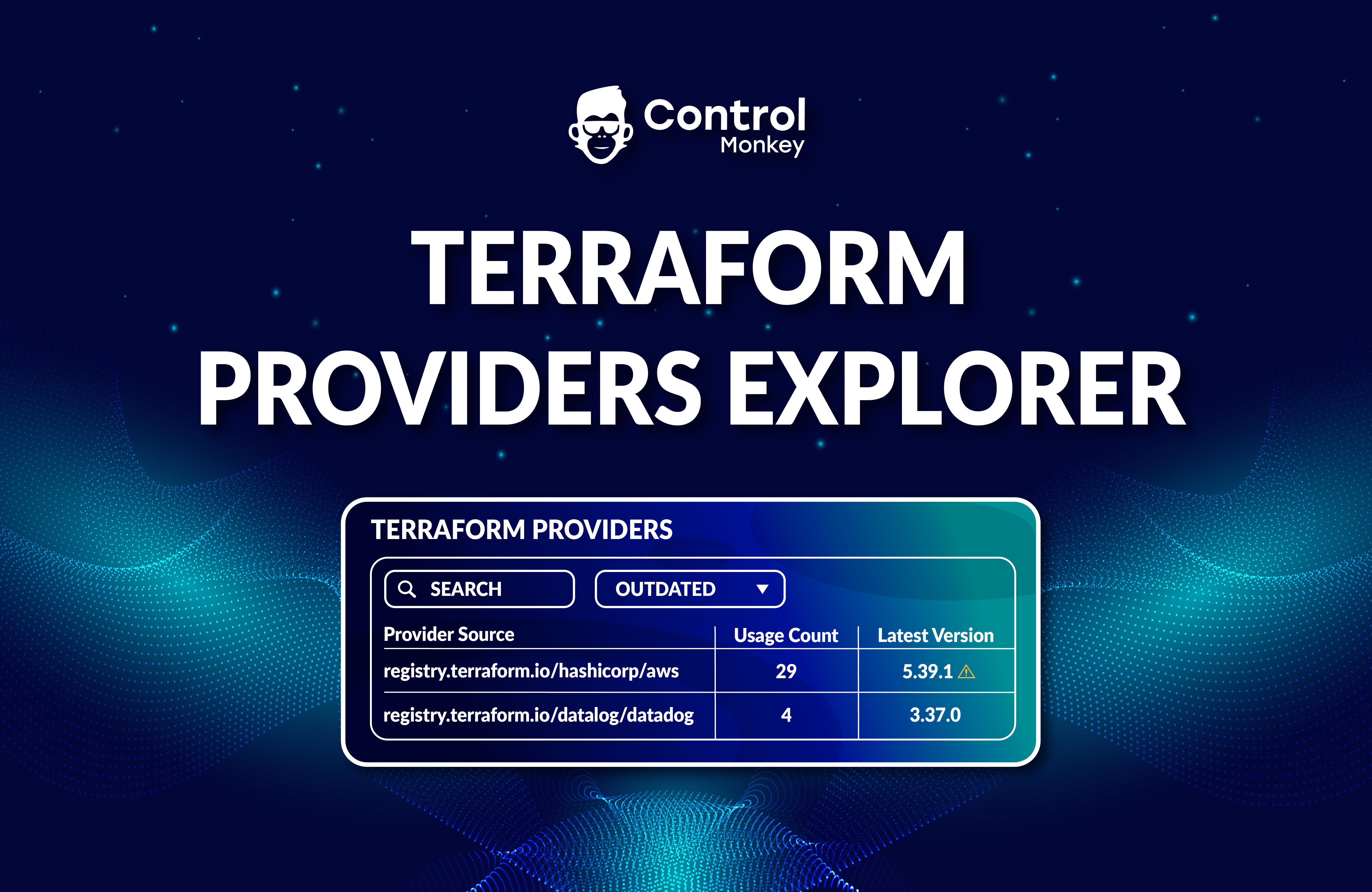
                  ControlMonkey’s Terraform Knowledge Hub solution provides all the tools to visualize and control your Terraform modules, providers, IaC versions, and repositories on a single platform. 

                  Ready to take control of your infrastructure?
                  Meet with our Terraform experts for a 30-minute technical call to learn more.

                  Bottom CTA Background

                  A 30-min meeting will save your team 1000s of hours

                  A 30-min meeting will save your team 1000s of hours

                  Book Intro Call

                    Sounds Interesting?

                    Request a Demo

                    Resource Blog News Customers Stories

                    Updated: Aug 28, 2025 Upd: 28.08.25

                    2 min read

                    Enhanced IaC Visibility: Group Cloud Accounts with Custom Labels

                    Zack Bentolila

                    Zack Bentolila

                    Marketing Director

                    Enhanced IaC Visibility: Group Cloud Accounts with Custom Labels

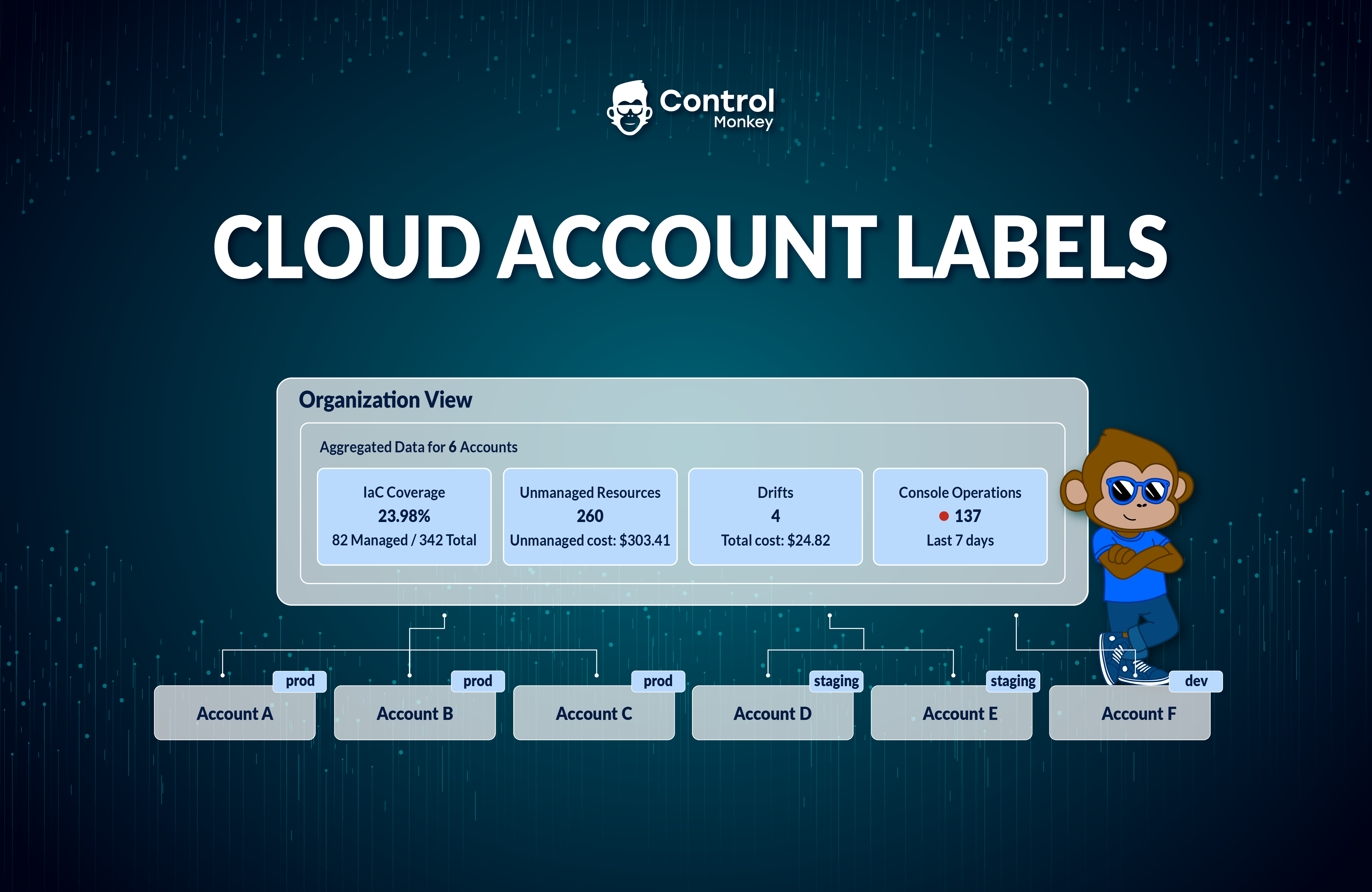
                    We are excited to announce that we have reinforced our Cloud Inventory Dashboard‘s organization view. We added the option to aggregate accounts by predefined labels.

                    IaC Posture Overview

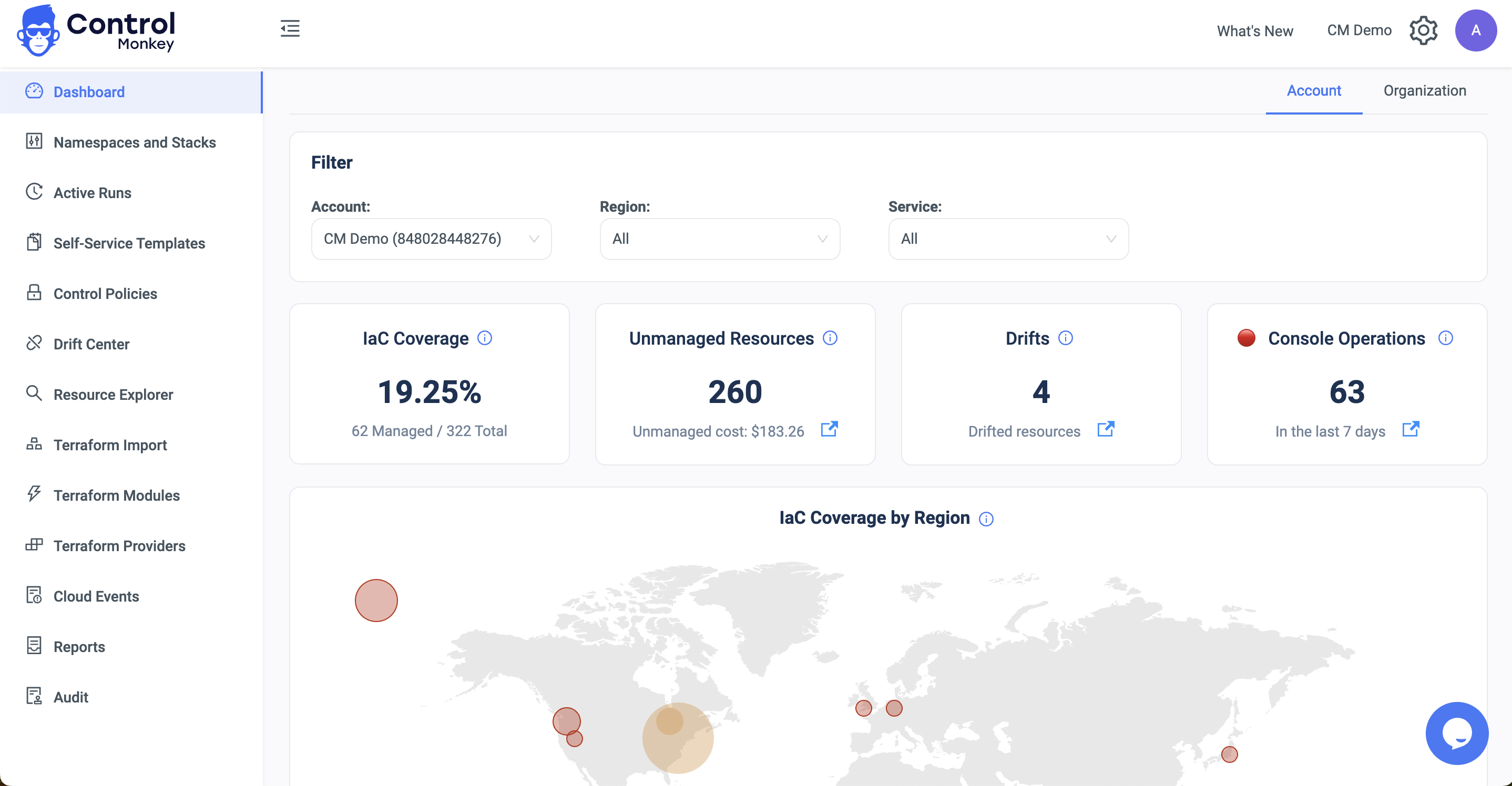
                    The ControlMonkey’s dashboard organization view provides a 30K feet IaC Posture overview. It encompasses the entire organization’s AWS accounts, GCP Projects, and Azure Subscriptions.

                    ControlMonkey’s IaC posture overview shows the user at any given time their IaC Coverage, # of unmanaged resources, # of Terraform, OpenTofu or Terragrunt Drifts, and # of Console Operations (ClickOps)


                    Starting today, ControlMonkey users can aggregate the IaC Posture overview on a labeled set of accounts. They can filter by those accounts, such as Production, Staging, Networking, etc.

                    Not all Cloud Account Labels are created equal.

                    Production and Development environments fundamentally differ in how they are managed and governed.

                    A drift or ClickOps in production is way more severe than in dev environments. Furthermore, high Terraform coverage in staging is more significant than in QA.

                    Hence, this capability lets our customers get a better IaC posture overview of important selected accounts.

                    Cloud Account Labels enables infrastructure teams

                    • Easily group accounts with custom labels.
                    • Have an aggregated view of labeled groups.


                    Organizations that manage large-scale cloud environments with dozens or hundreds of accounts can now logically group them. They can have selective visibility into that group’s IaC posture.

                    If you have a large-scale cloud environment with multiple accounts and are struggling to get an accurate, real-time IaC Posture view, we would love to chat!

                    Bottom CTA Background

                    A 30-min meeting will save your team 1000s of hours

                    A 30-min meeting will save your team 1000s of hours

                    Book Intro Call

                    Author

                    Zack Bentolila

                    Zack Bentolila

                    Marketing Director

                    Zack is the Marketing Director at ControlMonkey, with a strong focus on DevOps and DevSecOps. He was the Senior Director of Partner Marketing and Field Marketing Manager at Checkmarx. There, he helped with global security projects. With over 10 years in marketing, Zack specializes in content strategy, technical messaging, and go-to-market alignment. He loves turning complex cloud and security ideas into clear, useful insights for engineering, DevOps, and security leaders.

                      Sounds Interesting?

                      Request a Demo

                      Cookies banner

                      We use cookies to enhance site navigation, analyze usage, and support marketing efforts. For more information, please read our. Privacy Policy