
ControlMonkey now supports PagerDuty Backup and Recovery, helping DevOps, SRE, IT, and platform teams protect the critical PagerDuty configurations that keep incident response running.
PagerDuty sits directly in the operational response path. Schedules determine who is on call, escalation policies determine who gets notified, and services connect incidents to the right response process. If those configurations are accidentally changed, deleted, or compromised, an organization can have working infrastructure – but a broken incident response process.
PagerDuty Disaster Recovery Features
With ControlMonkey, teams can protect PagerDuty configuration with versioned recovery points and recover known-good configurations when something goes wrong.
- Back up critical PagerDuty configuration continuously
- Maintain versioned recovery points instead of relying on the current state
- Track configuration changes over time to understand what changed
- Recover from accidental deletion or misconfiguration faster
- Extend cyber resilience to the incident response layer
Why Do You Need PagerDuty Backup?
1. Human Error
A change to an escalation policy, on-call schedule, service, or routing configuration can disrupt who receives an alert during a critical incident.
2. Cyber Incidents
PagerDuty is part of the operational response path. If critical response configurations are altered by a malicious change during an attack, teams need a known-good state they can return to.
3. Automation and AI Agents
APIs, scripts, Terraform, and increasingly AI agents can modify operational systems at scale. A bad automated change can affect far more than a single PagerDuty setting – which is why continuous, versioned backup matters more as more of the configuration surface is touched by automation rather than people.
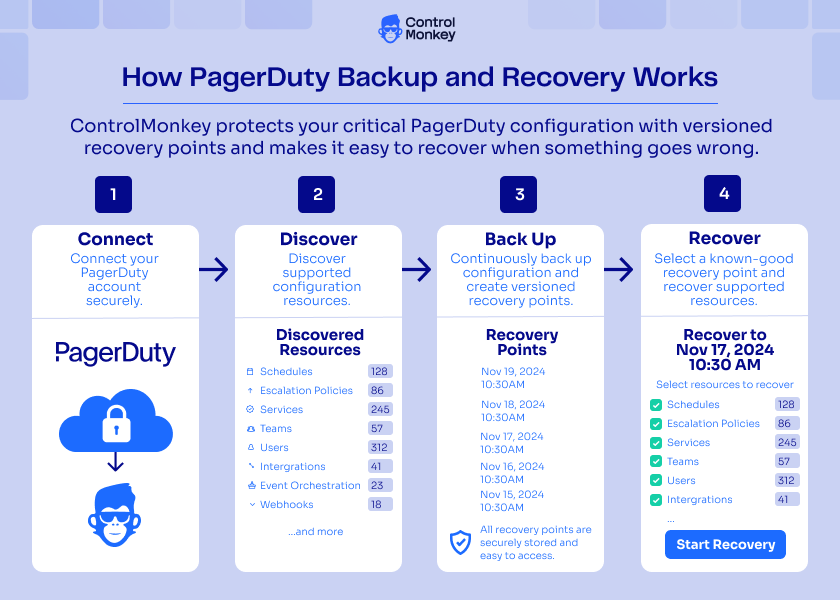
How PagerDuty Backup and Recovery Works
ControlMonkey connects to PagerDuty, discovers supported configuration resources, and continuously creates versioned recovery points. If a configuration is changed, deleted, or compromised, teams can use those recovery points to return supported resources to a known-good state.
How Is ControlMonkey Different from Other PagerDuty Backup Options?
There are several ways teams can protect PagerDuty configuration, but they do not all provide the same recovery model.
Traditional backup vendors may capture configuration versions, while Terraform-based approaches rely on PagerDuty resources being represented and maintained as code. ControlMonkey focuses on protecting the live PagerDuty environment with versioned recovery points designed for recovery.
| Capability | ControlMonkey | Traditional Backup Vendors | Terraform Provider / IaC |
|---|---|---|---|
| Protect live PagerDuty configuration | Yes — discovers and captures supported PagerDuty configuration | Typically yes, depending on supported resources | Only resources represented and maintained as code |
| Historical configuration versions | Versioned recovery points over time | Typically available through configuration snapshots or fetches | Primarily Git and Terraform state history |
| Automated protection | Continuous protection with versioned recovery points | Usually scheduled configuration captures | No native PagerDuty backup schedule |
| Recover a previous configuration | Return supported resources to a known-good recovery point | Restore from a previous captured version | Re-apply or reconstruct configuration from code/state |
| Requires PagerDuty to be fully managed as IaC | No | Depends | Yes, for complete IaC-based recovery |
| Primary recovery model | Configuration backup and recovery | Configuration backup and restoration | Configuration as Code |
Backup Is Different from Having PagerDuty in Git
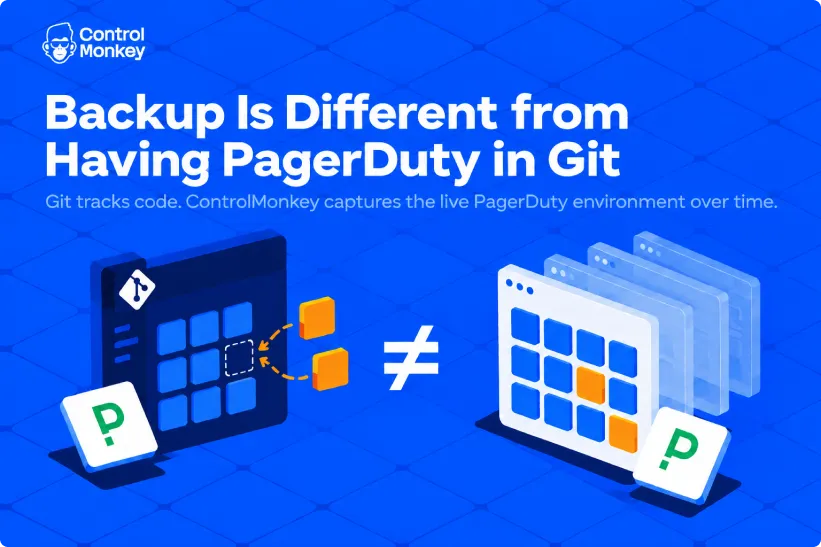
Terraform can provide strong protection when PagerDuty is fully managed as code. Git keeps configuration history, and Terraform can be used to recreate resources.
But recovery depends on that code accurately representing the current live PagerDuty environment.
ControlMonkey protects the environment itself by capturing supported PagerDuty configuration over time and maintaining known-good recovery points, including changes that may happen outside the IaC workflow.
Keep the Incident Response Layer Recoverable
Disaster recovery is not only about restoring applications and data.
During an outage or cyberattack, teams also depend on PagerDuty to reach the right people and coordinate the response. Protecting that configuration helps ensure the systems responsible for managing the recovery are themselves recoverable
Explore PagerDuty Backup and Recovery with ControlMonkey.