
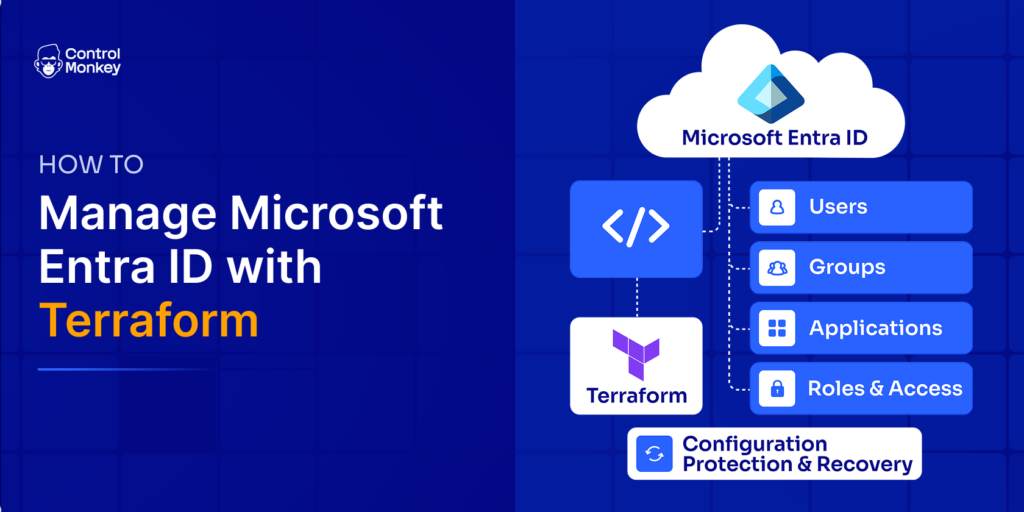
Microsoft Entra ID controls access to users, groups, applications, and roles, yet much of its configuration is still changed manually.
Terraform brings version control and repeatability to Entra ID configuration, but Infrastructure as Code alone is not a complete recovery strategy. Changes can happen outside Terraform, and Terraform state is not a backup. Microsoft Entra ID disaster recovery also requires configuration protection, versioned recovery points, and the ability to restore known-good configuration after misconfigurations or incidents
TL;DR
- The
azureadTerraform provider is the primary way to manage Microsoft Entra ID resources as code. - Terraform can manage users, groups, applications, service principals, role assignments, and more.
- Microsoft Entra External ID (customer-facing identity) needs its own tenant and provider configuration – it isn’t a drop-in extension of core Entra ID.
- Manual, API-driven, or application-driven changes can create configuration drift outside Terraform.
- Terraform state is not a recoverable backup of your Entra ID environment. ControlMonkey complements Terraform by protecting Entra ID configuration with versioned recovery points and recovery to a known-good state.
What Is the Terraform Provider for Microsoft Entra ID?
The Terraform Entra ID provider is called azuread. It’s maintained by the Azure providers team at HashiCorp and published in the HashiCorp Terraform Registry. It still carries the older “Azure AD” name in its provider address because Microsoft renamed Azure Active Directory to Microsoft Entra ID in October 2023 – after the provider’s name was already established – so the documentation treats “azuread” and “Entra ID” as interchangeable.
Under the hood, azuread talks to Microsoft Graph, the API that sits behind almost everything in Entra ID. When you declare an azuread_group or azuread_application resource, Terraform translates that into Graph API calls on your behalf. A newer, Microsoft-published provider called msgraph also exists for specific Graph resources azuread doesn’t cover yet – more on that shortly.
Setting Up the Terraform Entra ID Provider
Step 1 – Register an Application in Microsoft Entra ID
Terraform needs its own identity to authenticate against Entra ID, the same way any automated system does. Register an application in the Entra admin center – this becomes the service principal Terraform authenticates as.
Step 2 – Grant the Required Microsoft Graph Permissions
Grant only the Graph API permissions your configuration actually needs. For the resources covered in this article, that typically means Application.ReadWrite.All, User.ReadWrite.All, and Group.ReadWrite.All – narrower scopes exist for more constrained use cases, and it’s worth checking the current permission requirements listed on each resource’s registry documentation page before granting broader access than you need.
Step 3 – Configure Authentication for Terraform
azuread supports several authentication methods: the Azure CLI (convenient for local runs), a service principal with a client secret, a service principal with a client certificate, managed identity, and OIDC/workload identity federation. For CI/CD pipelines, workload identity federation is worth prioritizing – it avoids storing long-lived secrets entirely.
Step 4 – Configure the Provider and Run Terraform
With authentication in place, the standard Terraform flow applies: terraform init to install the provider, terraform plan to preview changes, and terraform apply to make them.
If you already have Entra ID applications, groups, or users that predate your Terraform adoption, don’t recreate them – import them into Terraform instead, so the existing objects come under management without disruption.
Core Microsoft Entra ID Resources You Can Manage with Terraform
Once the provider is configured, azuread exposes resources for most day-to-day identity objects:
| Terraform resource | Manages | Typical use case |
|---|---|---|
| Users | Provisioning and managing workforce identities |
| Groups (including dynamic groups) | Access and authorization grouping |
| App registrations | Authentication and application integrations |
| Enterprise applications | Application identities and permissions |
| Role assignments | Controlling which identities can use which applications |
| Conditional Access policies | Enforcing MFA, device compliance, and session controls |
Privileged Identity Management support is worth a specific callout rather than a blanket claim: PIM for Groups – making a group eligible for time-bound activation – is supported today via azuread_privileged_access_group_eligibility_schedule
Managing these resources through Terraform creates a controlled desired state – but it does not guarantee that every Entra ID change will originate from Terraform.
Managing Microsoft Entra External ID with Terraform
Microsoft Entra External ID is a separate identity environment built for customer and partner-facing identity (CIAM) rather than workforce identity, and it typically requires its own tenant and its own provider configuration – not just more resources layered onto your existing azuread
Why Entra External ID Needs Its Own Terraform Configuration
Entra External ID lives in a distinct “external tenant,” separate from your organization’s primary Entra ID tenant. To manage it with azureadApplication Administrator
Which Terraform Provider Should You Use: azureadmsgraph
azureadmsgraphUse azureadazuread_groupazuread_applicationazuread
| | |
|---|---|---|
| Approach | Purpose-built Entra ID resources | Generic Microsoft Graph resource interface |
| Status | Established, GA | Public preview |
| Best for | Common identity resources (users, groups, apps, Conditional Access) | Graph resources not yet covered elsewhere |
| Configuration style | Terraform-native resource types | Closer to raw Graph API objects |
Neither provider universally replaces the other today – many teams end up using both, azureadmsgraphazuread
How Entra ID Configuration Drift Happens Outside Terraform
Adopting Terraform doesn’t stop the live Entra ID environment from changing outside it. Changes can still come through the Entra admin center, direct Microsoft Graph API calls, PowerShell scripts, other automation tools, applications that modify their own configuration, and emergency administrative actions during incidents.
A simple example: Terraform defines a group’s membership as five specific users. An administrator, in a hurry, adds a sixth user directly in the Entra portal to unblock someone. The live environment has now diverged from what Terraform believes it manages.
Terraform may surface that difference the next time someone runs a refresh or terraform plan, but drift detection and disaster recovery solve different problems. Detecting configuration drift tells you that the live Entra ID environment has changed. Recovery requires a trusted history of previous configuration and a way to restore a known-good state. For a deeper look at how this kind of drift shows up and gets caught, see ControlMonkey’s guide to Terraform drift detection.
Why Terraform State Alone Isn’t Enough for Entra ID Recovery
What Terraform State Actually Does
Terraform state maps the resources in your configuration to the real objects Terraform believes it’s managing, tracking IDs and attributes so Terraform knows what to compare against on the next plan. It’s an operational component that exists to make Terraform’s own job possible – not a general-purpose record of your identity environment.
Terraform State Is Not an Entra ID Backup
It’s worth keeping these three things distinct:
- Terraform code defines the configuration you want.
- Terraform state records Terraform’s view of what it’s managing.
- Microsoft Entra ID holds the actual, live identity configuration – including anything changed outside Terraform.
If configuration is changed, deleted, or corrupted outside Terraform’s view, Terraform state doesn’t give you anything to recover from. It was never built to be a versioned backup of the identity environment – it’s a working record for Terraform’s own operations.
Where ControlMonkey Fits: Microsoft Entra ID with Terraform Backup and Recovery
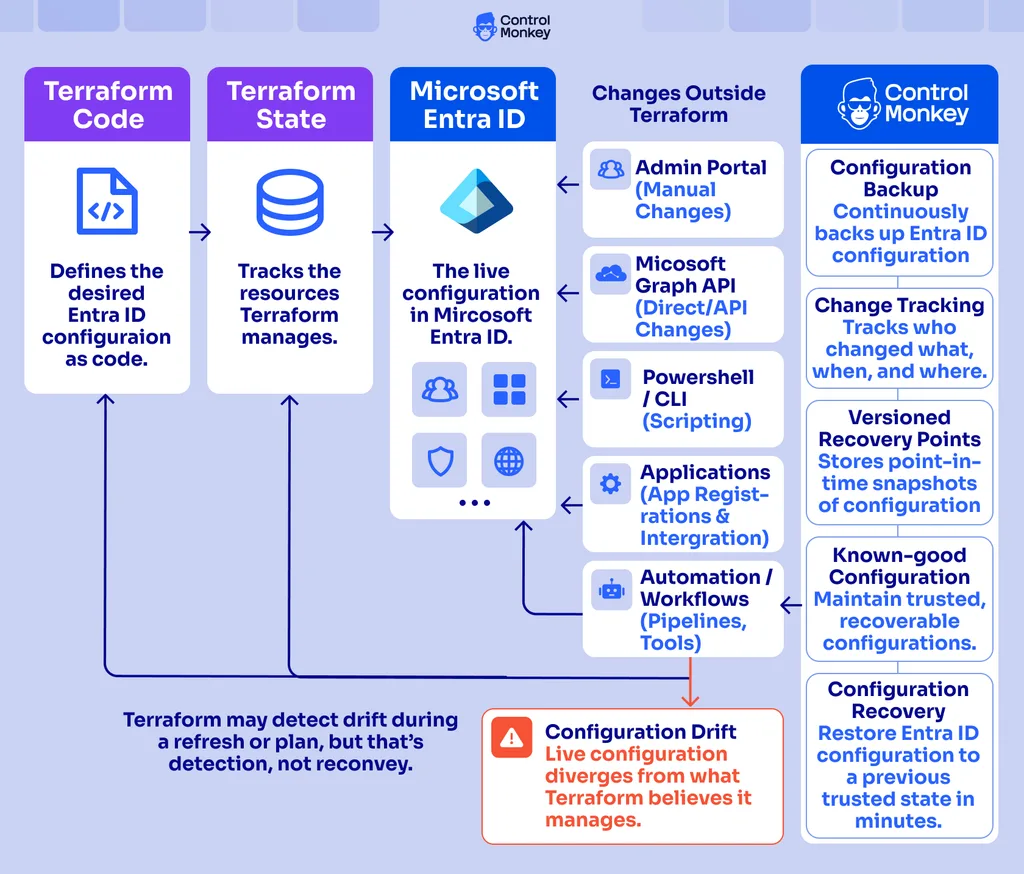
Terraform helps teams define and manage the desired state of Microsoft Entra ID, but it does not by itself provide identity configuration backup and disaster recovery for the live environment. Microsoft Entra ID disaster recovery requires a protected record of configuration changes, versioned recovery points, and the ability to restore trusted identity settings after accidental changes, misconfigurations, or incidents.
ControlMonkey provides this configuration protection and recovery layer alongside Terraform. It continuously discovers Microsoft Entra ID configuration, tracks changes to the live environment – including changes that bypass Terraform – and maintains versioned recovery points that teams can use to restore affected settings to a known-good configuration. Terraform remains the Infrastructure as Code layer for defining and deploying desired configuration; ControlMonkey adds configuration backup, change tracking, and recovery for the live identity environment.
Together, Terraform and ControlMonkey connect configuration management with identity resilience: Terraform helps control how Entra ID should be configured, while ControlMonkey helps protect how that configuration can be recovered. This supports recovery readiness and business continuity for identity-dependent cloud, SaaS, and operational systems.
Terraform manages the desired Microsoft Entra ID configuration and keeps an operational state record. ControlMonkey protects the live identity configuration over time with change tracking and versioned recovery points, providing the configuration recovery layer needed for Microsoft Entra ID disaster recovery.

Protect your Microsoft Entra ID configuration
ControlMonkey provides versioned configuration backup and recovery for Microsoft Entra ID, helping teams restore known-good identity configurations when incidents occur.
Building a Recovery-Ready Entra ID Strategy Beyond Terraform
Terraform gives you a strong foundation for treating Entra ID configuration as code: version control, peer review, and a repeatable way to define what your identity environment should look like. A complete identity resilience strategy builds on top of that foundation to also account for changes made outside Terraform, configuration drift, accidental deletion or misconfiguration, a versioned history of what actually changed, and a reliable way to recover critical identity and access configuration when something goes wrong.
Terraform and ControlMonkey solve complementary parts of the Microsoft Entra ID configuration lifecycle. Terraform controls how identity configuration should be defined and deployed. ControlMonkey adds configuration backup, change tracking, versioned recovery points, and restore capabilities for the live identity environment. Together, these capabilities help teams move from configuration management to identity configuration disaster recovery.
Because Microsoft Entra ID controls access to cloud infrastructure, SaaS applications, internal systems, and operational tools, identity configuration recovery directly affects recovery readiness and business continuity. Protecting and restoring Entra ID configuration is therefore part of a broader cloud and SaaS resilience strategy – not a separate identity-only concern.

A 30-min meeting will save your team 1000s of hours
A 30-min meeting will save your team 1000s of hours
Author