Join our next Live Demo on Feb 12th!

Resource Blog News Customers Stories

Updated: Nov 04, 2025 Upd: 04.11.25

3 min read

ControlMonkey Supports Existing Pipelines Integration

Zack Bentolila

Zack Bentolila

Marketing Director

ControlMonkey Supports Existing Pipelines Integration

Meeting Teams Where They Are

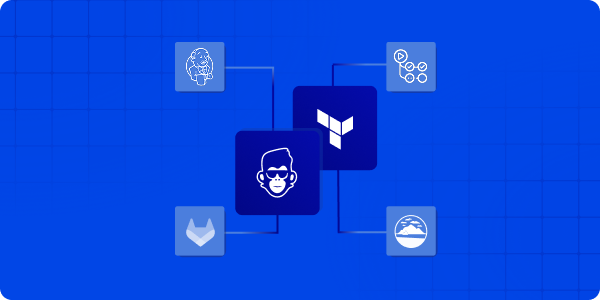
Until now, ControlMonkey’s automation engine managed the full Infrastructure as Code (IaC) lifecycle –  plan, apply, and governance – through our managed pipeline. With the new support for IaC Pipeline Integration into customers’ existing pipelines, ControlMonkey now connects directly to the pipelines you already use –  Jenkins, GitHub Actions, GitLab CI, or Atlantis.

We call this Bring Your Own Pipeline (BYOP) model –  a way for teams to keep their existing workflows while adding ControlMonkey’s policy, visibility, and audit layers on top. The new IaC Pipeline Integration seamlessly fits into this approach.

Your pipeline stays the same. ControlMonkey adds governance, audit and visibility around it.

Introducing IaC Pipeline Integration

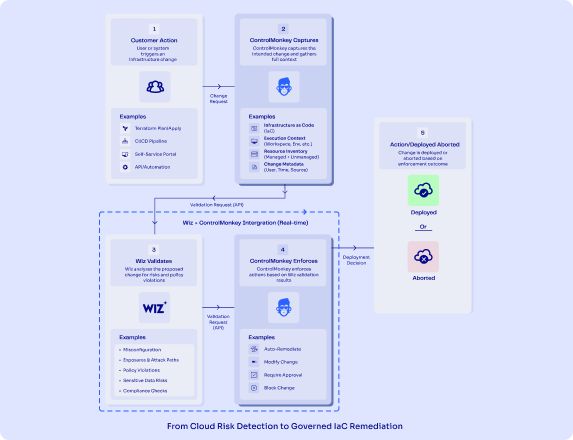
ControlMonkey can connect directly with your CI/CD systems to evaluate IaC plans, enforce policies, and centralize visibility across all environments. This new IaC integration ensures your pipeline is part of a robust infrastructure.

Key Capabilities

  • Works with any IaC pipeline – Integrate with Jenkins, GitHub Actions, GitLab CI, or Atlantis or your home-grown solution and include IaC Pipeline integration.
  • Built-in policy evaluation – Automatically check plans against cost, compliance, and security rules and provide feedback loop.
  • Unified visibility – Track all plans and apply across teams from one dashboard of your existing pipeline and controlmonkey.
  • No pipeline migration required – Integrate ControlMonkey in minutes, with no pipeline migration required with no need for training or enablement for the wider team. 

“Our goal isn’t to change the way teams work – it is to strengthen it. That’s why we added IaC Pipeline Integration to ControlMonkey to help with delivery flows to add governance, visibility, and audit control – not slow team down.”

Ori Yemini - ControlMonkey CTO Headshot Photo

Ori Yemini,

CTO

How does IaC Pipeline Integration Works?

ControlMonkey’s Integration – How does it work?

  1. Keep your existing pipeline.
    Continue running Terraform, OpenTofu, or other IaC frameworks in Jenkins, GitHub Actions, GitLab CI, or Atlantis –  no change to your setup.
  2. Add a ControlMonkey step after the plan.
    After your pipeline runs the plan phase, send the plan output to ControlMonkey through a simple API call.
  3. ControlMonkey evaluates the plan.
    The platform checks the plan against defined cost, security, and compliance policies, then returns a clear result and detailed findings.
  4. Run Terraform/OpenTufo apply as usual.
    Your pipeline continues to apply infrastructure changes as before.
  5. Send apply logs for visibility.
    Apply logs are sent to ControlMonkey, creating a complete audit trail and deployment history across environments. This is a crucial step of IaC Pipeline Integration.

This setup takes just a few configuration lines. After that, your pipelines gain ControlMonkey’s governance, compliance, and audit capabilities –  without moving or refactoring anything.

Benefits of IaC Pipeline Integration to ControlMonkey

IaC Pipeline Integration gives organizations a consistent governance layer across their   deployments. ControlMonkey provides a unified view of infrastructure activity –  ensuring every deployment is compliant, traceable, and auditable. With the integration of IaC pipelines, these benefits expand even further.

Teams can:

  • Apply cost, security, and compliance rules consistently across environments.
  • Review every change from one interface.
  • Provide instant audit evidence for SOC 2, ISO 27001, or internal compliance.
  • Detects configuration drift and prevents policy violations before they reach production.

Ready to connect your pipeline?

Connect ControlMonkey to your existing IaC pipelines and standardize governance across Terraform, OpenTofu, and beyond. Join our next Product Showdown to see it in action

Bottom CTA Background

A 30-min meeting will save your team 1000s of hours

A 30-min meeting will save your team 1000s of hours

Book Intro Call

Author

Zack Bentolila

Zack Bentolila

Marketing Director

Zack is the Marketing Director at ControlMonkey, with a strong focus on DevOps and DevSecOps. He was the Senior Director of Partner Marketing and Field Marketing Manager at Checkmarx. There, he helped with global security projects. With over 10 years in marketing, Zack specializes in content strategy, technical messaging, and go-to-market alignment. He loves turning complex cloud and security ideas into clear, useful insights for engineering, DevOps, and security leaders.

    Sounds Interesting?

    Request a Demo

    Resource Blog News Customers Stories

    Updated: Jan 20, 2026 Upd: 20.01.26

    1 min read

    Introducing AWS Organization Support: Connect all of your AWS accounts in a few Clicks

    Introducing AWS Organization Support: Connect all of your AWS accounts in a few Clicks

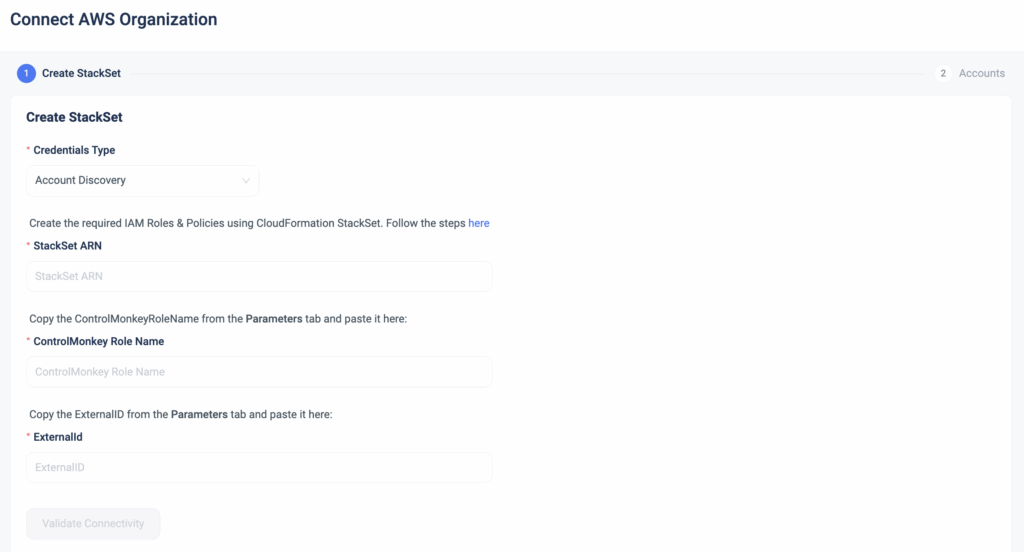
    As part of our continuous Enterprise-ready support and in response to our customers’ growing needs, we are happy to announce a massive upgrade to our Onboarding process.
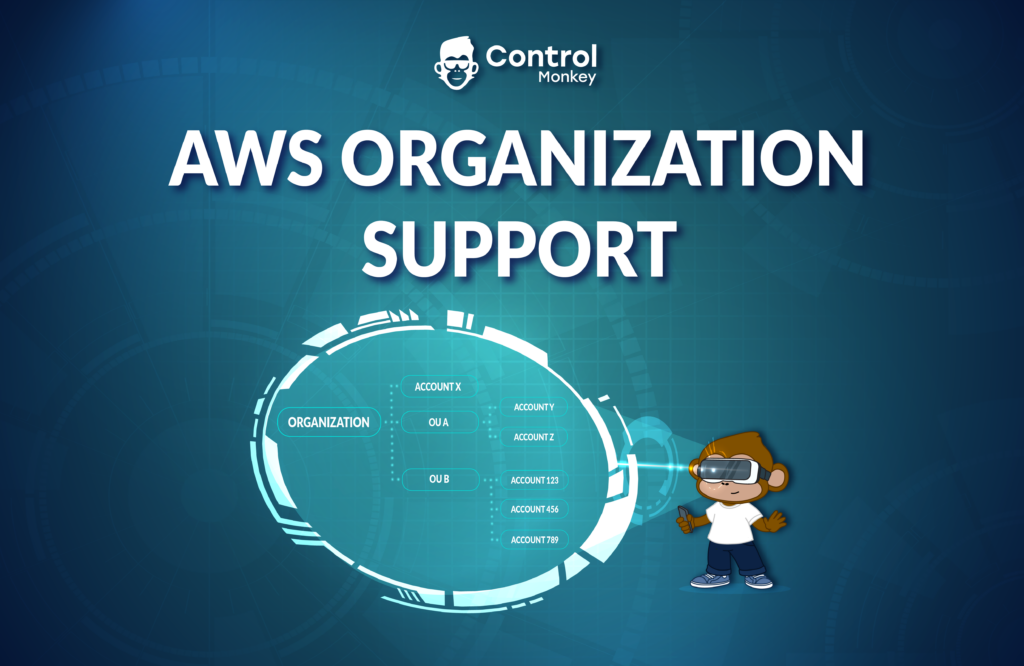
    Starting today, ControlMonkey users can Connect an AWS organization with dozens or hundreds of accounts to ControlMonkey with a few clicks.

    Instead of onboarding each account individually, which was very time-consuming, Connect an AWS Organization allows you to onboard hundreds of accounts in a few clicks, streamlining the onboarding process.

    This capability leverages CloudFormation’s StackSet feature.


    The StackSet in your parent (organization) account will generate an IAM Role and IAM Policy (which enable the connection to the ControlMonkey platform) in the organizational units and accounts you choose to opt-in.

    With Connect an AWS Organization, ControlMonkey customers with dozens or even hundreds of AWS accounts can shorten the onboarding by 90%, saving precious engineering time and gaining a faster time to value.


    Once the entire organization is connected, customers gain a complete cloud inventory of their AWS footprint in minutes!

    Our Terraform experts are ready to hop on a 30-minute call  and help you solve your Day 2 challenges.

    Bottom CTA Background

    A 30-min meeting will save your team 1000s of hours

    A 30-min meeting will save your team 1000s of hours

    Book Intro Call

      Sounds Interesting?

      Request a Demo

      Resource Blog News Customers Stories

      Updated: Aug 20, 2025 Upd: 20.08.25

      2 min read

      Attribute-Based Access Control with ControlMonkey Single Sign-On

      Attribute-Based Access Control with ControlMonkey Single Sign-On

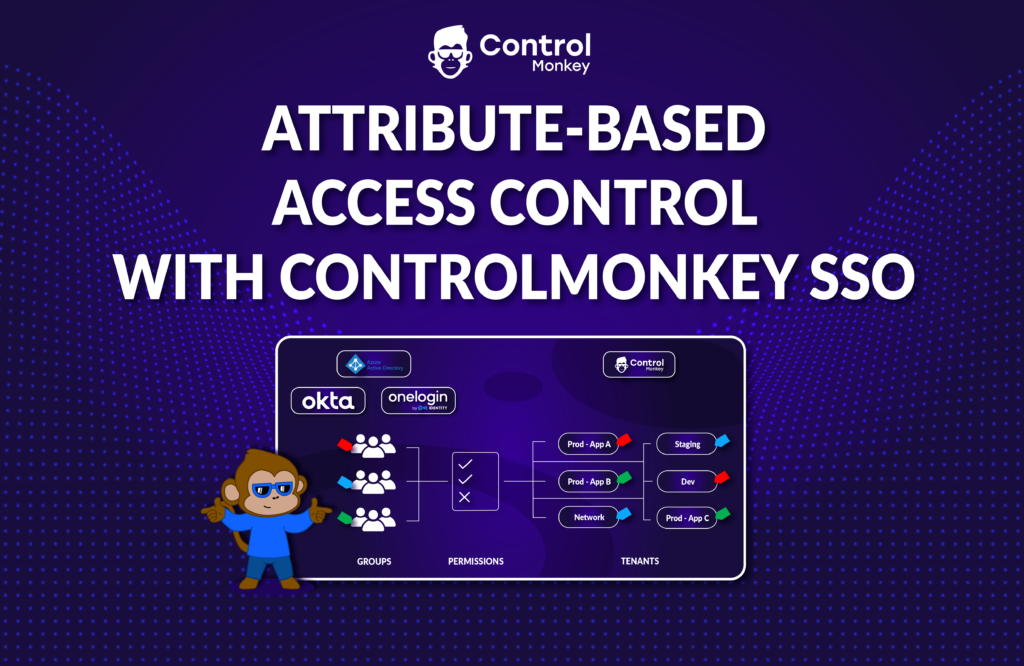
      As part of our Enterprise-ready support and in response to our customers’ growing needs, we are happy to announce the recent enhancement to our permission management, which now supports Attribute-Based Access Control(ABAC) using ControlMonkey SSO.

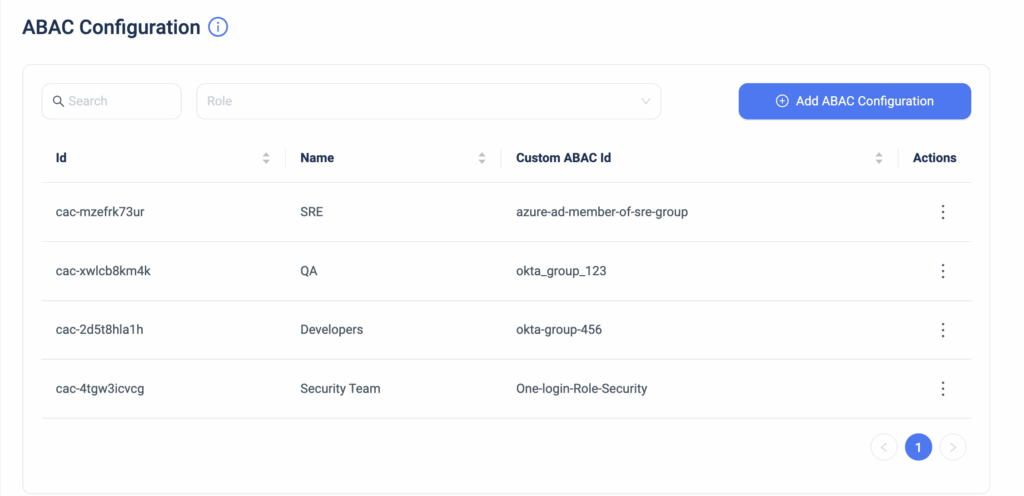
      Companies that are leveraging IDPs (Identity Providers) such as Okta, Azure AD, or OneLogin can now grant their users access to the ControlMonkey platform based on the corresponding group they belong to in the IDP.
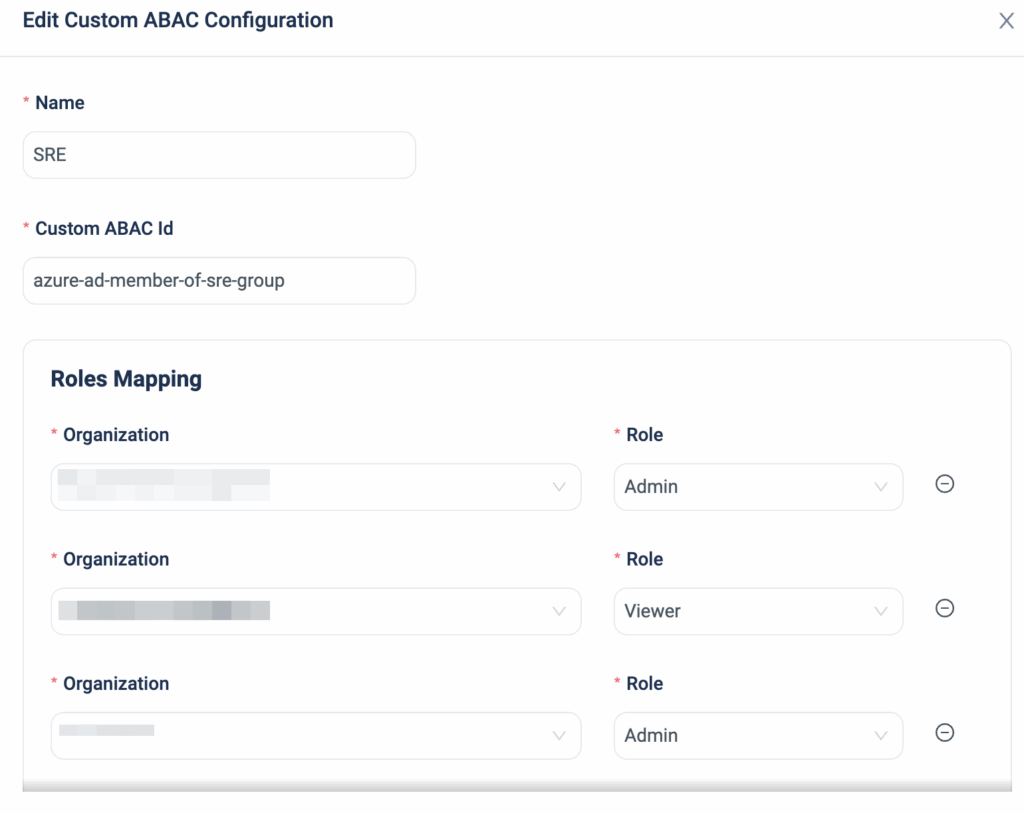
      So if, for example, you manage multiple teams (Dev, QA, Security, SRE) permissions on Okta, you can map a ControlMonkey Access Role and Tenant to the relevant Okta user group in just a few clicks.

      Granting access to ControlMonkey with SSO simplifies the onboarding process, adds permission granularity, maintains your security posture, and helps prevent misconfigurations by fully governing each user’s actions.
      Creating permissions based on matching attributes instead of functional roles helps reduce the number of distinct permissions and roles you must create and manage in your ControlMonkey environment.

      You get centralized account access management for Single Sign-On and ABAC, with the flexibility to use any external identity provider as your identity source.

      This supports large organizations with multiple teams that require different permissions for ControlMonkey tenants or certain platform actions.

      SSO ABAC support makes enterprise life way easier when it comes to managing permissions in ControlMonkey.

      ControlMonkey is the most comprehensive Terraform Automation Platform for enterprise companies.
      It offers all the necessary solutions to manage and govern your cloud seamlessly with Terraform.

      Our Terraform experts are ready to hop on a 30-minute call and help you solve your Day 2 challenges.

      Bottom CTA Background

      A 30-min meeting will save your team 1000s of hours

      A 30-min meeting will save your team 1000s of hours

      Book Intro Call

        Sounds Interesting?

        Request a Demo

        Resource Blog News Customers Stories

        Updated: Aug 20, 2025 Upd: 20.08.25

        1 min read

        Advanced Terraform Plan/Apply with Replace/Target Flags

        Advanced Terraform Plan/Apply with Replace/Target Flags

        We are pleased to announce that we have enhanced the Terraform Plan and Deployment capabilities that are available from the ControlMonkey dashboard.

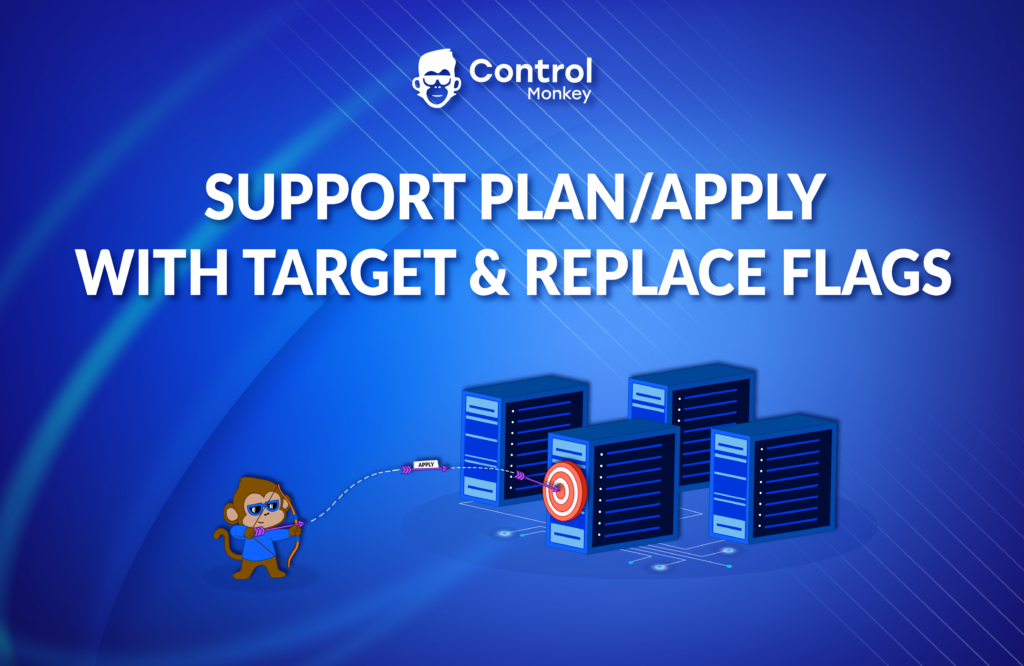
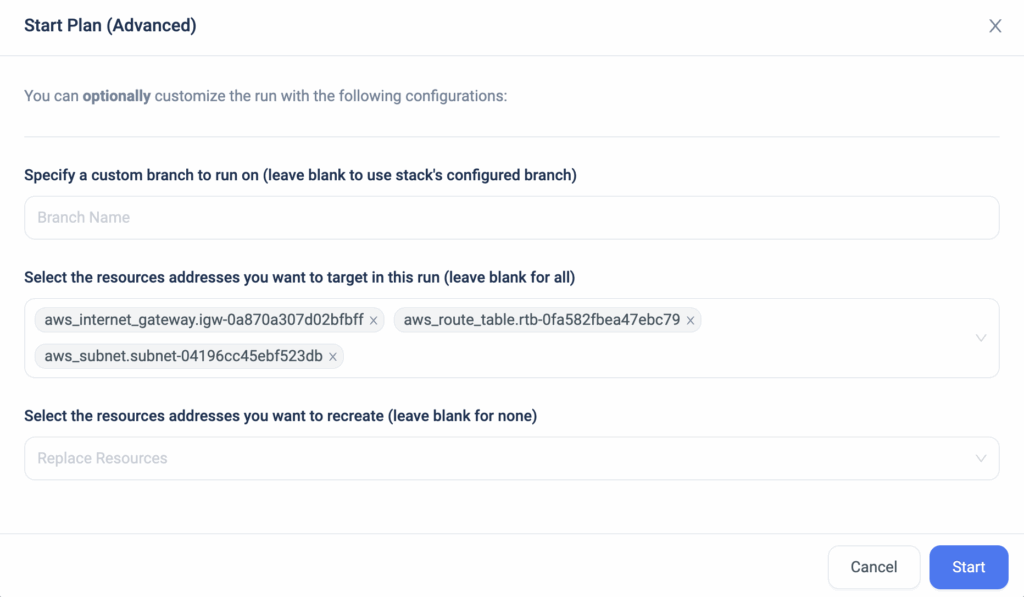
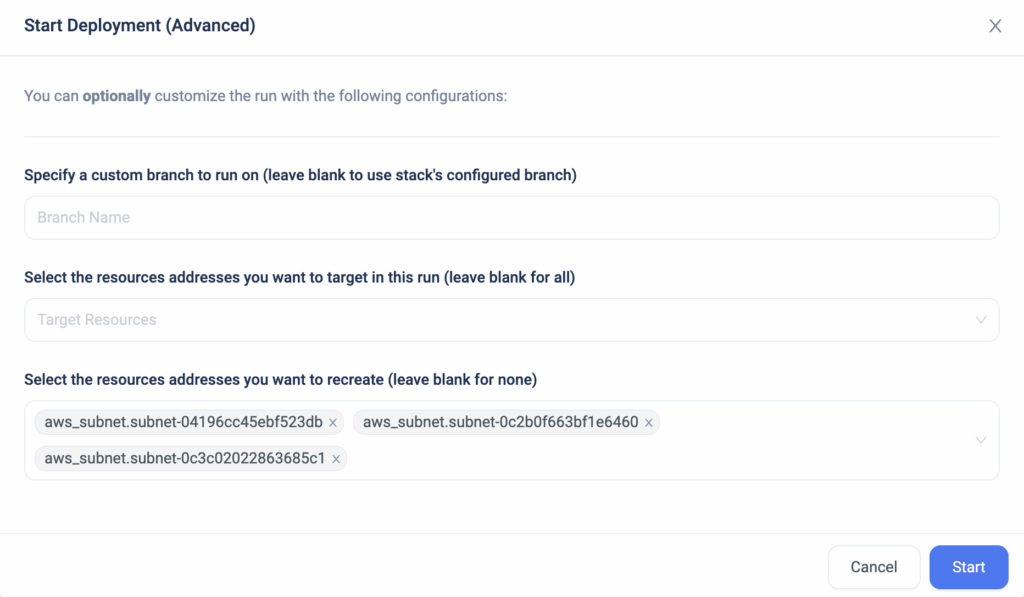
        Starting today, ControlMonkey customers can run advanced ‘Terraform Plan’ and ‘Terraform Apply’ with ‘Target’ and ‘Replace’ flags on their deployments.
        This is a request we got from multiple customer and we always love to make sure our customers get what they need.

        A target flag (Target Resources) runs a deployment on specific resources rather than the entire branch.


        A replace flag (Resource re-creation) is used to force a re-creation of specific resources rather than the entire branch.

        Through the ControlMonkey dashboard, you can now send a flag in a simplified way that makes it easier to modify a specific resource.

        Looking to improve your Terraform automation? Let’s talk.

        Bottom CTA Background

        A 30-min meeting will save your team 1000s of hours

        A 30-min meeting will save your team 1000s of hours

        Book Intro Call

          Sounds Interesting?

          Request a Demo

          Resource Blog News Customers Stories

          Updated: Aug 20, 2025 Upd: 20.08.25

          2 min read

          Terraform Modules SBOM Report in 1 click

          Test User

          Test User

          CTO & Co-Founder

          Terraform Modules SBOM Report in 1 click

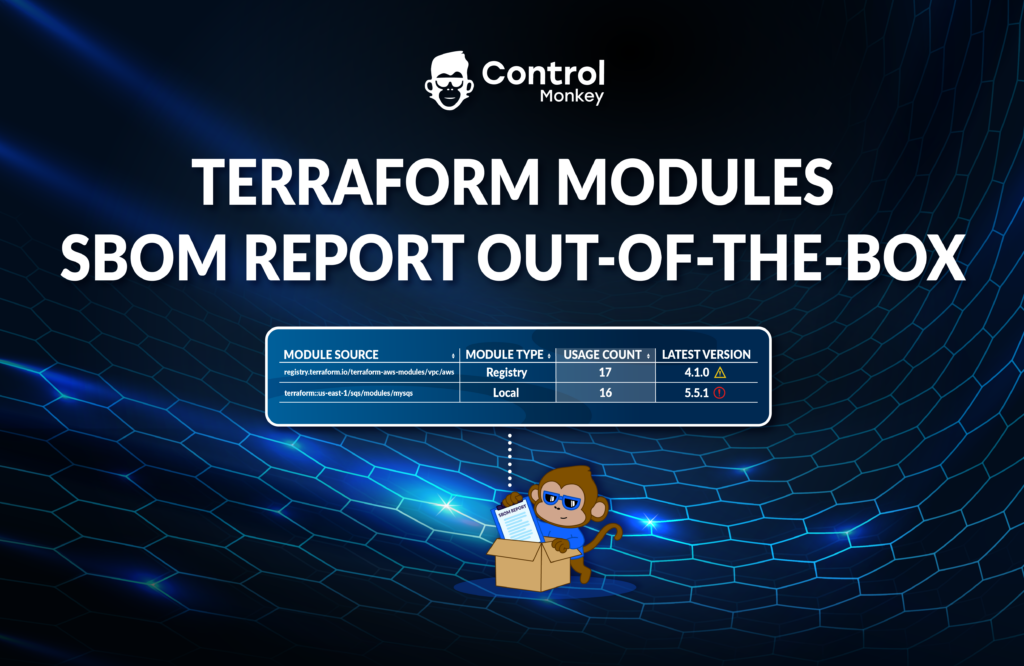
          We are very excited to announce that we have reinforced our Terraform Insights solution by allowing users to generate an SBOM (Software bill of materials) report of the Terraform Modules used in your environment with a click of a button.

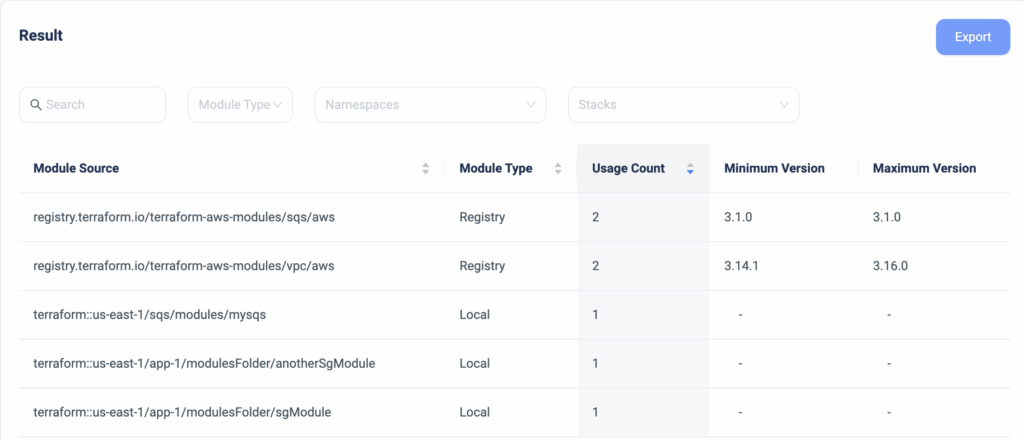
          A couple of months ago, we announced the release of our Terraform Modules Explorer, which provides DevOps teams with visibility into which Terraform Modules are being used, whether their source is a registry or local Git repository, where they are used in the code, and whether or not they are running on the latest version.

          Starting today, ControlMonkey users can generate an easy-to-read and digest SBOM report that is based on the information of the Terraform Modules Explorer with a click of a button.
          This is extremely handy for teams that need to provide this information during security audits.

          Create a Terraform Modules report that contains:

          • Which Terraform Modules are being used
          • Is their source Registry or Local
          • How many modules
          • Version control

          Gain full control over your Terraform Modules and take another step forward to being on top of your infrastructure.

          ControlMonkey is the most comprehensive Terraform Automation Platform. Do you want to know why?
          Book a 30-minute intro call with us and find out!

          Bottom CTA Background

          A 30-min meeting will save your team 1000s of hours

          A 30-min meeting will save your team 1000s of hours

          Book Intro Call

          Author

          Test User

          Test User

          CTO & Co-Founder

          Lorem ipsum dolor sit amet, consectetur adipisicing elit. Animi architecto consequuntur dicta dolor, excepturi ipsam iste laudantium, magnam molestiae obcaecati odio quam quas repellendus sed, sint magnam molestiae.

            Sounds Interesting?

            Request a Demo

            Resource Blog News Customers Stories

            Updated: Aug 20, 2025 Upd: 20.08.25

            1 min read

            Self-service templates support for Terragrunt & OpenTofu

            Self-service templates support for Terragrunt & OpenTofu

            Today, we are happy to announce that we have reinforced our Self-service infrastructure solution with support for Terragrunt and OpenTofu Iac frameworks.

            ControlMonkey’s solution for self-service enables DevOps teams to allow other teams to spin up secure and compliant cloud environments on their own in minutes by using predefined Terraform templates.
            Self-service Infrastructure enables agility without sacrificing governance and frees DevOps teams from responding to tickets for infrastructure provisioning.

            ControlMonkey users that use Terragrunt or OpenTofu IaC frameworks can now allow other teams to launch cloud environments using our Self-service solution, which promotes engineering autonomy and increases team productivity while maintaining governance.

            As supporters of the OpenTofu project, we are excited to see more of the ControlMonkey capabilities support the OpenTofu code, and we have a lot more coming your way.

            Are you using OpenTofu and want to learn more about how the ControlMonkey platform can help you with your Day 2 challenges? Our team is waiting to hear from you; we promise we will blow your mind.


            Bottom CTA Background

            A 30-min meeting will save your team 1000s of hours

            A 30-min meeting will save your team 1000s of hours

            Book Intro Call

              Sounds Interesting?

              Request a Demo

              Resource Blog News Customers Stories

              Updated: Aug 23, 2025 Upd: 23.08.25

              2 min read

              Terraform Microsoft Teams Support: Real-Time Infrastructure Notifications

              Zack Bentolila

              Zack Bentolila

              Marketing Director

              Terraform Microsoft Teams Support: Real-Time Infrastructure Notifications

              Today, we’re excited to announce that ControlMonkey now supports Terraform Microsoft Teams integration for real-time infrastructure notifications. With this new capability, DevOps teams can receive critical updates—such as drift detection, deployment successes or failures, and compliance guardrail alerts—directly inside their Microsoft Teams channels.

              Real-time visibility is essential in modern Terraform workflows. Without instant alerts, misconfigurations or failed deployments can go unnoticed, slowing down response times and increasing operational risk. By connecting Terraform with Microsoft Teams, ControlMonkey ensures your team stays aligned, reacts faster, and collaborates on issues in the same space where they already communicate daily.

              How to Use Terraform Microsoft Teams Integration in ControlMonkey

              With ControlMonkey notifications, you can get notified about various important events that happen on your infrastructure directly to your team collaboration application.
              Events such as ‘Drift detected’ or ‘Deployment is done/failed’ and more.

              So if you’re using Microsoft Teams, you can get these event notifications directly to a Teams channel and ensure you never miss them.

              What is Microsoft Teams?

              Microsoft Teams is one of the most widely used collaboration platforms, trusted by millions of organizations worldwide. It brings together chat, video meetings, file sharing, and integrations with hundreds of business applications in a single workspace. For distributed engineering teams, it acts as the central hub for daily communication and decision-making.

              In a DevOps environment, Microsoft Teams goes beyond messaging. It enables ChatOps workflows, where infrastructure events and alerts flow directly into team channels. Engineers can discuss issues, approve changes, and resolve incidents without leaving the collaboration space they already use. By integrating Terraform notifications into Teams, DevOps teams gain faster visibility into infrastructure changes, reducing context-switching and accelerating incident response.


              Bottom CTA Background

              A 30-min meeting will save your team 1000s of hours

              A 30-min meeting will save your team 1000s of hours

              Book Intro Call

              Author

              Zack Bentolila

              Zack Bentolila

              Marketing Director

              Zack is the Marketing Director at ControlMonkey, with a strong focus on DevOps and DevSecOps. He was the Senior Director of Partner Marketing and Field Marketing Manager at Checkmarx. There, he helped with global security projects. With over 10 years in marketing, Zack specializes in content strategy, technical messaging, and go-to-market alignment. He loves turning complex cloud and security ideas into clear, useful insights for engineering, DevOps, and security leaders.

                Sounds Interesting?

                Request a Demo

                Resource Blog News Customers Stories

                Updated: Aug 20, 2025 Upd: 20.08.25

                1 min read

                Import Direct Connect to Terraform

                Import Direct Connect to Terraform

                Today ControlMonkey is pleased to announce that we have reinforced our Terraform Import Engine with the ability to Import AWS Direct Connect resources to Terraform.

                AWS Direct Connect is a networking service that provides an alternative to using the internet to connect to AWS. Using AWS Direct Connect, data that would have previously been transported over the internet is delivered through a private network connection between private facilities and AWS.

                ControlMonkey now supports one-click Terraform Import of the following Direct Connect resources:

                Connections (aws_dx_connection)
                Lag (aws_dx_lag)
                Virtual Interface (aws_dx_private_virtual_interface)

                Are you using Direct Connect and have resources that you would like to shift to Terraform?
                Feel free to book an intro meeting  with us to learn more!

                Bottom CTA Background

                A 30-min meeting will save your team 1000s of hours

                A 30-min meeting will save your team 1000s of hours

                Book Intro Call

                  Sounds Interesting?

                  Request a Demo

                  Resource Blog News Customers Stories

                  Updated: Aug 20, 2025 Upd: 20.08.25

                  2 min read

                  Approval Policies

                  Approval Policies

                  ControlMonkey solution for Terraform CI/CD acts as a quality gate for any changes performed to the infrastructure in the Git repository, so whenever someone pushes new code, we run a procedure called ‘Deployment’ that validates the code change and runs ‘Terraform Apply’, in case all tests pass successfully.

                  Today we are pleased to announce that we have enhanced our CI/CD solution with Approval Policies, an additional validation mechanism for any infrastructure change done in your Git repository.
                  Starting today, ControlMonkey users can set approval policies that require the review of any requested infrastructure change.
                  These approval policies can be applied to a namespace or to a specific stack for that extra layer of granularity.

                  Setting approval policies introduces a manual approval step before the ‘Terraform Apply’ command actually runs. By default, Every deployment requires manual approval.

                  Types of approval policies:

                  • Auto Approve
                  • Require 1 approval
                  • Require 2 approvals

                  Changes to production are always risky, but with ControlMonkey Approved Policies, you can add an extra layer of control and prevent costly misconfigurations before every ‘Terraform Apply’ is executed.

                  Approval Policies are predefined and are available out of the box, so no manual policy writing is needed here.
                  Interested to learn how ControlMonkey streamlines every infrastructure change and helps companies like yours in their Day 2?
                  Our team is waiting to speak with you!

                  Bottom CTA Background

                  A 30-min meeting will save your team 1000s of hours

                  A 30-min meeting will save your team 1000s of hours

                  Book Intro Call

                    Sounds Interesting?

                    Request a Demo

                    Resource Blog News Customers Stories

                    Updated: Aug 20, 2025 Upd: 20.08.25

                    1 min read

                    Terraform Repo Scanner

                    Test User

                    Test User

                    CTO & Co-Founder

                    Terraform Repo Scanner

                    Here at ControlMonkey, we strive to provide a completely customer-centric Terraform Operations platform for our users, right from the onboarding.

                    So today we are happy to announce a huge enhancement to the ControlMonkey platform onboarding with our new release, Terraform Repo Scanner.
                    This new capability automatically scans all the repos that contain the Terraform/Terragrunt/OpenTofu code and displays all the paths that are not managed by ControlMonkey, the IaC type, and the number of resources under that path, and with a single click enables the user to create “Stacks” in the ControlMonkey platform.

                    This is big news for new ControlMonkey customers who are onboarding their accounts because rather than manually creating “stacks” based on existing paths in the repo, they can generate all the stacks in one shot, saving them precious time.

                    So if you have your own Terraform Code and are looking to leverage ControlMonkey’s advanced solutions like Terraform CI/CD with proactive policies and Drift Detection & Remediation, you can now onboard in a few clicks, with absolutely zero code changes.

                    Onboarding ControlMonkey has never been easier, and we’re happy seeing our new customers save time starting from the onboarding.

                    Bottom CTA Background

                    A 30-min meeting will save your team 1000s of hours

                    A 30-min meeting will save your team 1000s of hours

                    Book Intro Call

                    Author

                    Test User

                    Test User

                    CTO & Co-Founder

                    Lorem ipsum dolor sit amet, consectetur adipisicing elit. Animi architecto consequuntur dicta dolor, excepturi ipsam iste laudantium, magnam molestiae obcaecati odio quam quas repellendus sed, sint magnam molestiae.

                      Sounds Interesting?

                      Request a Demo
                      Cookies banner

                      We use cookies to enhance site navigation, analyze usage, and support marketing efforts. For more information, please read our. Privacy Policy