Join our next Live Demo on Feb 19th!

Resource Blog News Customers Stories

Updated: Aug 20, 2025 Upd: 20.08.25

3 min read

Restrict specific Terraform Modules versions with Control Policies

Restrict specific Terraform Modules versions with Control Policies

Terraform Modules  are a great way to reduce the amount of code engineers write for similar infrastructure resources and are considered an efficient way to replicate cloud services across environments.

An essential aspect of using modules is versioning, which enables cloud teams to systematically release module upgrades. This ensures the use of a more secure and compliant infrastructure by keeping the modules up-to-date.

However, controlling strictly which Module versions and sources engineers are allowed to use becomes a massive challenge at scale.
An everyday use case is if, for example, I upgrade a few of my Terraform Modules with extra security measures and want to ensure that engineers are using the latest version.

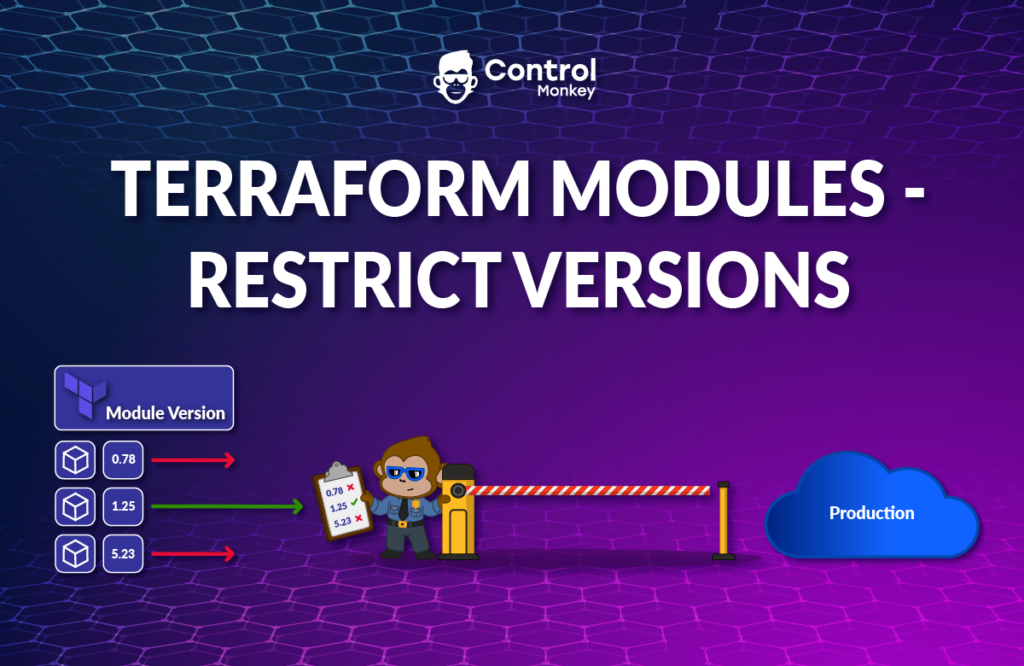
To tackle this challenge, we proudly announce the latest enhancement to our Terraform CI/CD engine, Terraform Modules – Restrict Versions control policies.

ControlMonkey users can now easily create Control Policies that allow or restrict Terraform Modules Sources or Versions as part of the Infrastructure CI/CD.

Terraform Modules – Restrict Versions consists of 3 types of policies:

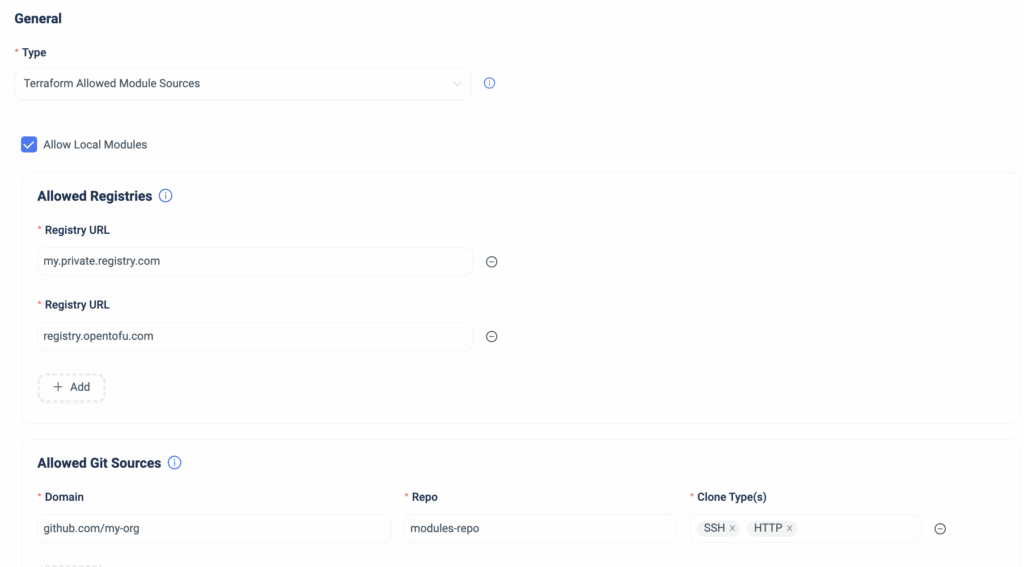
Terraform Allowed Module Sources Policy

This policy enforces that all the Terraform Modules used in the code reside in a pre-approved Registry or an organization’s GitHub repo.

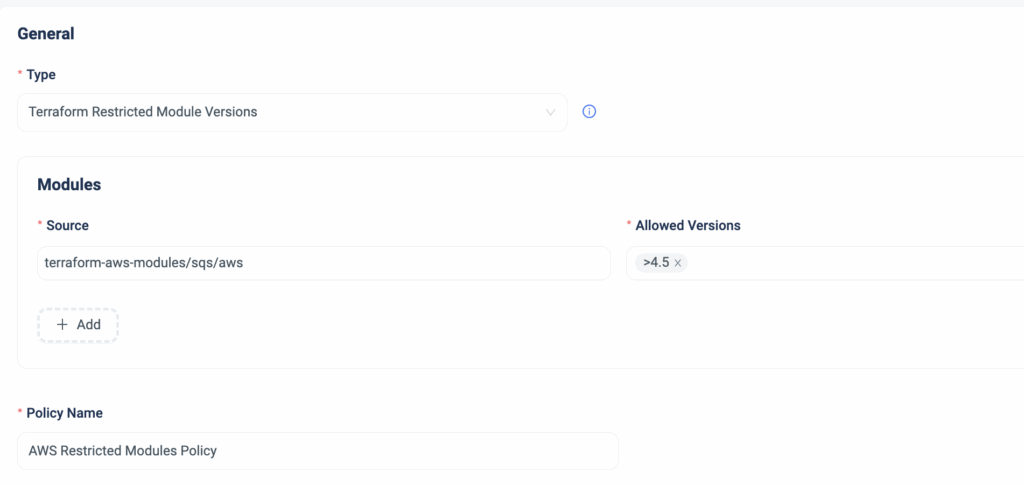
Terraform Restricted Module Versions Policy

This policy enforces the Terraform Modules versions that can be used in the code.
The value can be a specific version, a range of versions, or from a particular version and above.

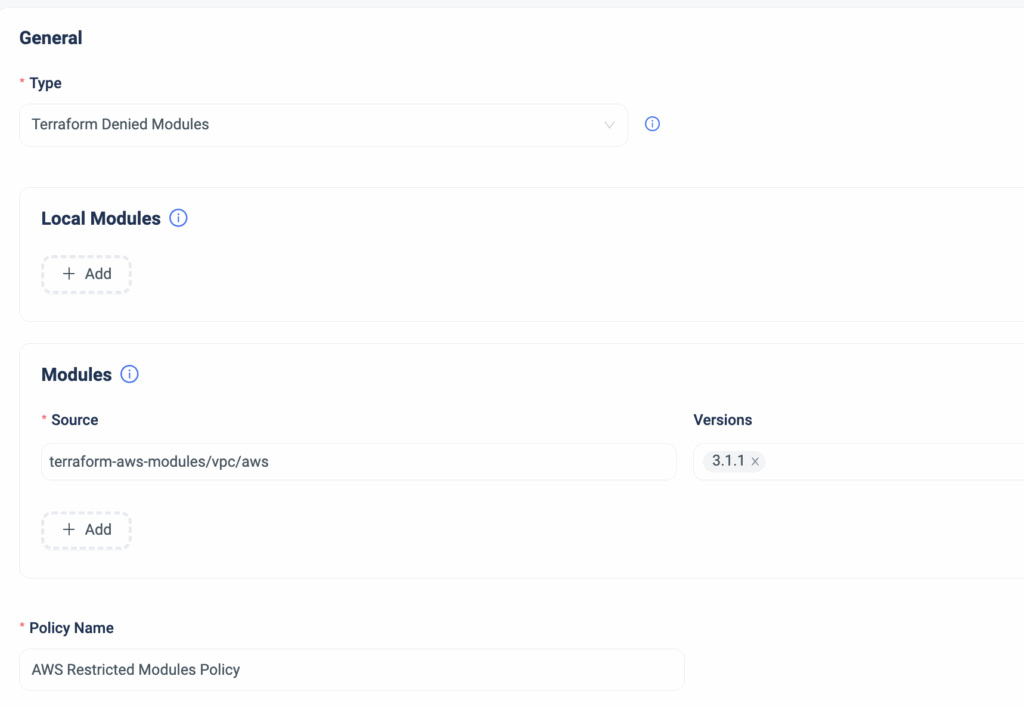
Terraform Denied Modules Policy

This policy ensures that Terraform Modules from unauthorized sources are not used.
For instance, if there is a folder in your Git repository containing legacy modules that should not be used, you can designate these as ‘Denied.’ This provides immediate feedback to all users, preventing accidental usage

Summary

In case one of these policies is violated, ControlMonkey will warn the user who issues a PR that either their Terraform Module version is outdated, the Terraform Module path they are trying to use is restricted, or the specific Terraform Module they wish to use is restricted.

Managing and Governing Terraform Modules at scale is a massive challenge for infrastructure teams and, in some instances, poses a risk to the organization.
With ControlMonkey, you can create policies that strengthen your control over Terraform Modules and ensure they remain an efficiency driver rather than an operational burden with just a few clicks.

Are you looking for the best way to stay on top of your Terraform Modules?
Our Terraform experts can’t wait to show you around .

Bottom CTA Background

A 30-min meeting will save your team 1000s of hours

A 30-min meeting will save your team 1000s of hours

Book Intro Call

    Sounds Interesting?

    Request a Demo

    Resource Blog News Customers Stories

    Updated: Aug 20, 2025 Upd: 20.08.25

    1 min read

    Discover your IaC coverage on Azure

    Discover your IaC coverage on Azure

    2 months ago, we announced the support of Resource Explorer for Azure environments, which was the first major release for ControlMonkey on Azure.
    We’re happy to announce another milestone in our multi-cloud support with ControlMonkey
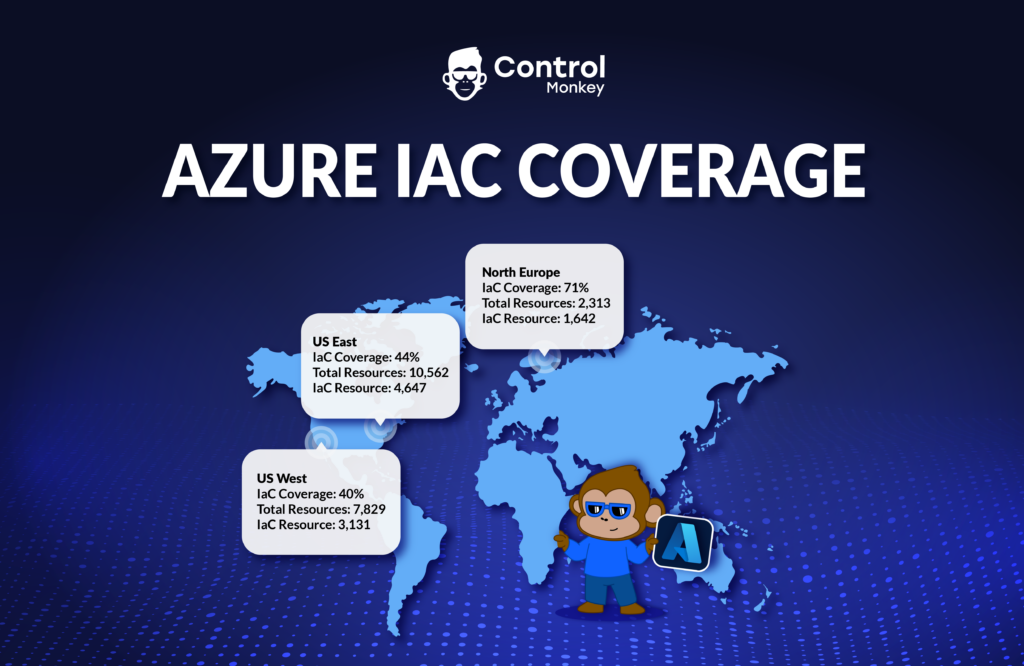
    IaC Coverage Dashboard for Azure.

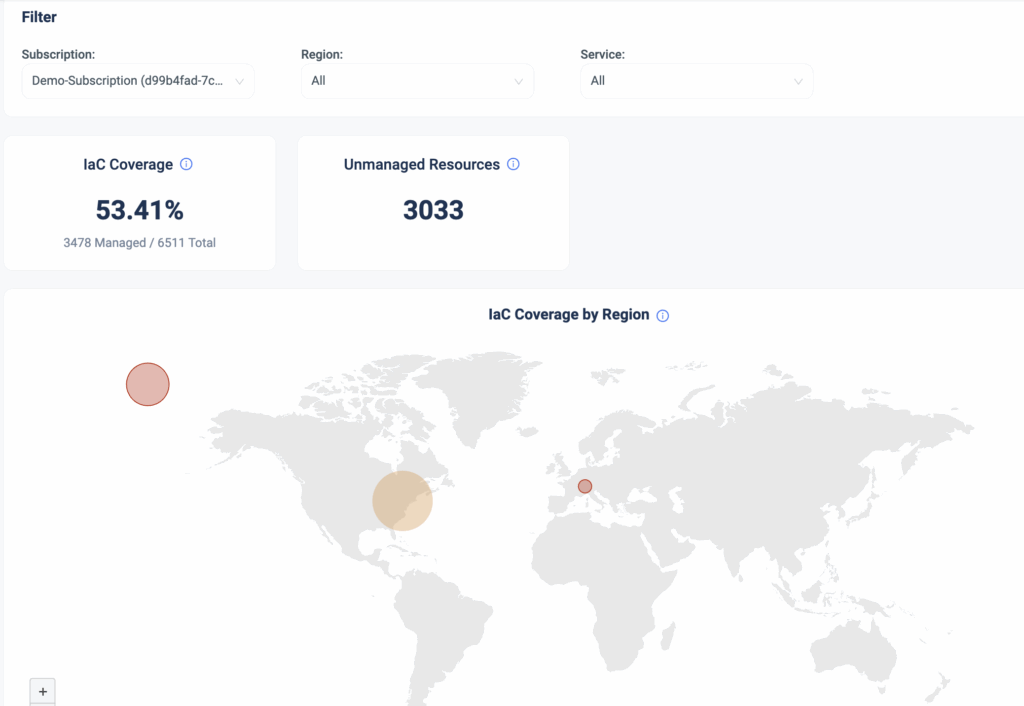
    Starting today, ControlMonkey customers with Azure environments can gain visibility into their Azure Subscriptions and understand:

    1. What is their IaC coverage across their subscription
    2. What is the IaC coverage per region
    3. How many resources are unmanaged by IaC

    As well as:

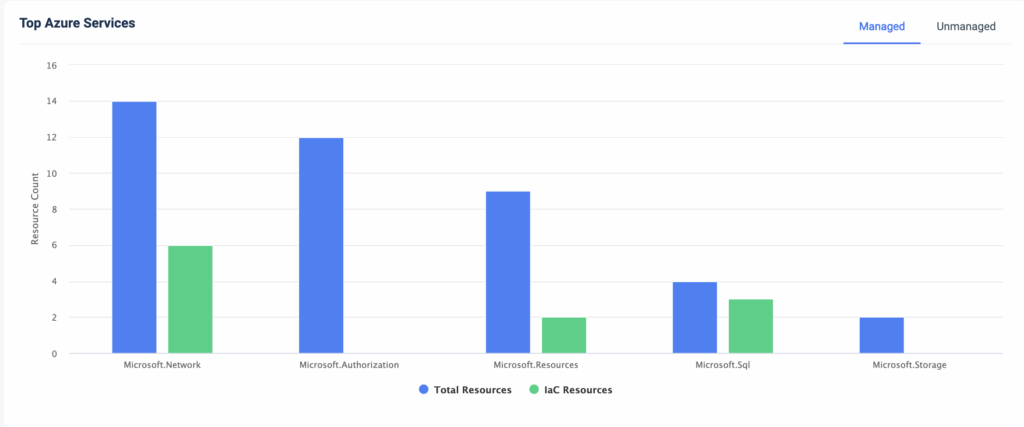
    1. Top Azure resources and their IaC coverage
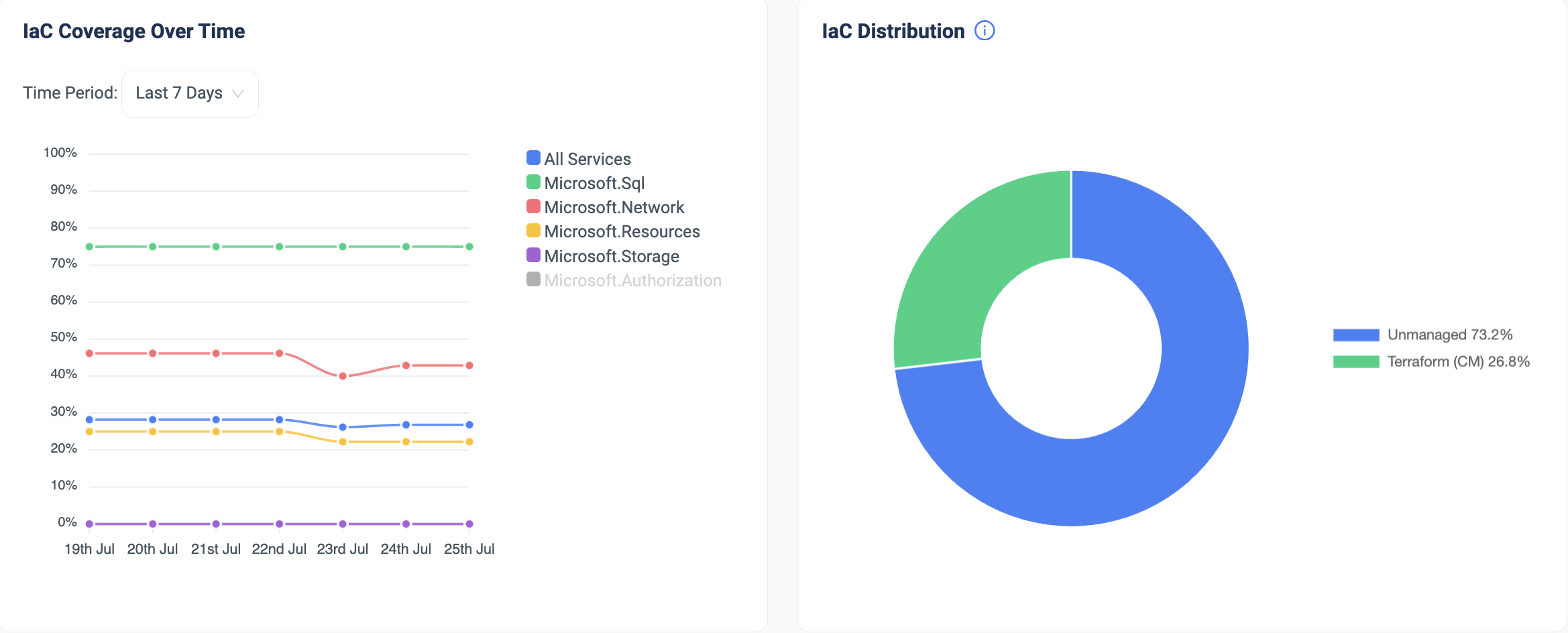
    2. IaC Coverage over time
    3. IaC Distribution across IaC tools

    With this new capability, companies running Azure workloads at scale with multiple subscriptions in multiple regions can get a bird’s-eye view of their IaC coverage.

    The release of Azure IaC Dashboard reinforces ControlMonkey’s multi-cloud capabilities and provides our customers with a centralized view across clouds, subscriptions/accounts, and regions.

    This is just the tip of the iceberg. We have many exciting new capabilities for our Azure customers planned until the end of the year, so stay tuned!

    Running on Azure? Our team would love to jump on a call and show you how ControlMonkey can help.

    Bottom CTA Background

    A 30-min meeting will save your team 1000s of hours

    A 30-min meeting will save your team 1000s of hours

    Book Intro Call

      Sounds Interesting?

      Request a Demo

      Resource Blog News Customers Stories

      Updated: Aug 20, 2025 Upd: 20.08.25

      2 min read

      Remote Plan from Local Machine

      Remote Plan from Local Machine

      Today, we are pleased to announce the release of ‘Remote Plan from Local Machine,’ the latest enhancement to our Terraform CI/CD engine.

      How do your cloud engineers properly test their Terraform code changes before committing to Git and getting feedback without running a PR?
      There are a few challenges there:

      • The Secrets and variables their code requires are unavailable on their local machine and shouldn’t be for security reasons.
      • They don’t have the organization’s guardrails and policies to test their local code.

      Up until now, users had to commit the code, create a PR, and then get the needed feedback from their centralized Terraform pipeline. This process, of course, slowed down the pace of development and created a lot of “waiting time” between each code update and PR inspection.

      Today, we’re happy to announce our “Remote Plan from Local Machine” capability, where cloud engineers can test their Terraform Code changes locally without initiating a full PR and pushing the GIT code.

      Remote Plan enables you to run your ‘Terraform plan’ locally by triggering a plan simulation remotely on ControlMonkey and getting feedback on the plan’s output.

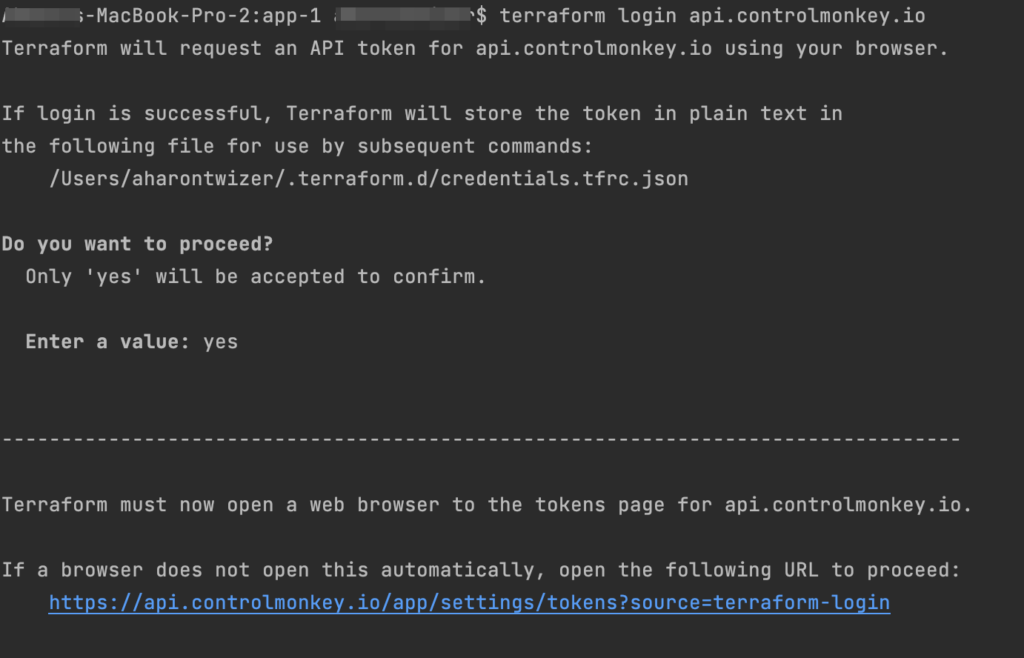
      The integration is pretty easy. All you have to do is run the ‘terraform login api.controlmonkey.io’ command:


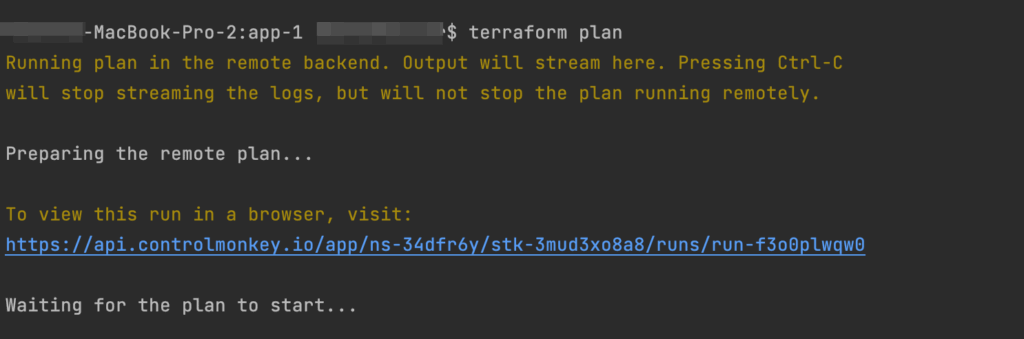
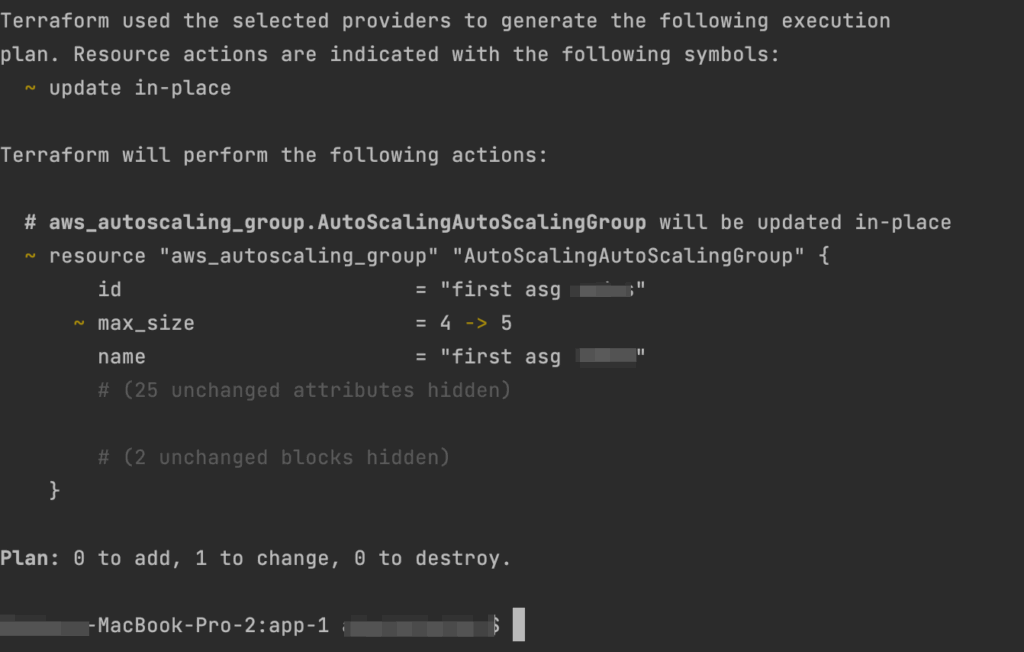
      And then you can work as you’re used to, running ‘terraform plan’ commands on your local machine:


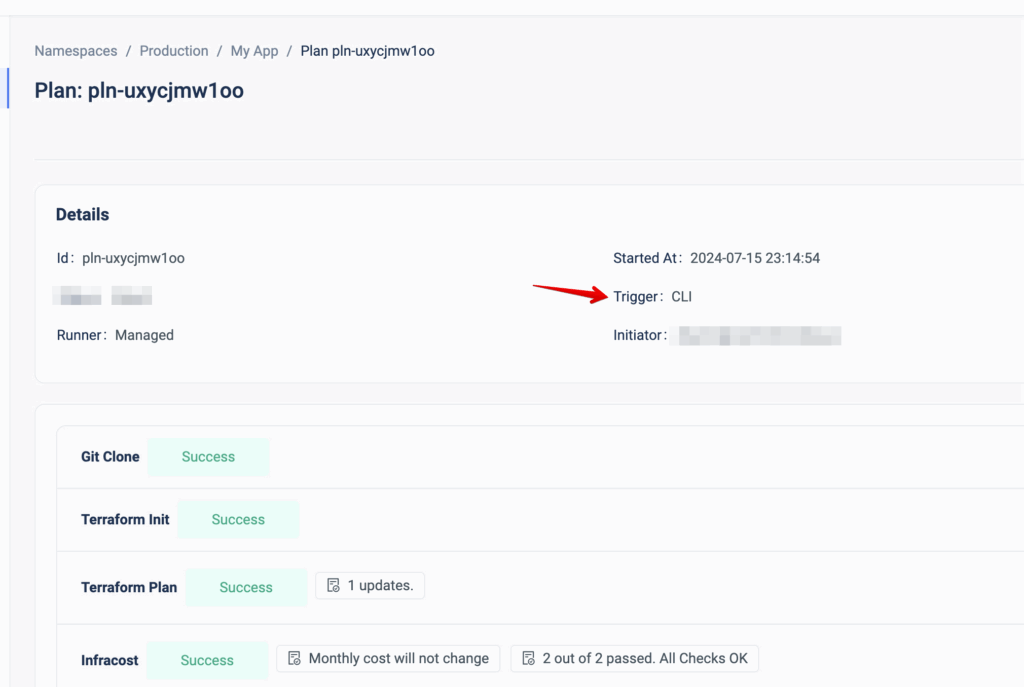
      It uses your local Terraform files but actually runs it remotely in ControlMonkey, using the shared state and your environment’s variables and secrets. Every Remote Plan triggers a Plan in ControlMonkey, so you will have the full audit also on the ControlMonkey console:


      By running a remote plan, your engineers can build faster and test their changes locally before committing to them.

      Are you managing Terraform at scale?
      Our Experts are available for a quick call so you can learn more about the future of Terraform Automation and how it can benefit your team.

      Bottom CTA Background

      A 30-min meeting will save your team 1000s of hours

      A 30-min meeting will save your team 1000s of hours

      Book Intro Call

        Sounds Interesting?

        Request a Demo

        Resource Blog News Customers Stories

        Updated: Aug 20, 2025 Upd: 20.08.25

        1 min read

        Import OpenSearch to Terraform

        Import OpenSearch to Terraform

        Today, ControlMonkey is pleased to announce that we have added the capability to easily import AWS OpenSearch domain resources to Terraform Code using our Terraform Import Engine.

        AWS OpenSearch is a fully managed service that simplifies the deployment, operation, and scaling of OpenSearch, a powerful search and analytics engine based on Elasticsearch.
        It provides real-time search, monitoring, and analysis capabilities for various use cases.

        Managing OpenSearch resources with Terraform provides a consistent, version-controlled, and automated way to provision, update, and manage OpenSearch deployments, which enhances efficiency and reduces the risk of manual misconfigurations.

        ControlMonkey now supports the one-click Terraform Import of the following OpenSearch resources:

        OpenSearchService::Domain (aws_opensearch_domain)

        So, if you’re using OpenSearch in your environments, swiftly shift your OpenSearch resources to Terraform code and manage the cluster’s configuration with Terraform to create, update, and delete OpenSearch domains reliably and repeatedly.

        Are you using OpenSearch and have resources you would like to shift to Terraform?
        Feel free to book an intro meeting to learn more about how ControlMonkey generates the Terraform code that represents your OpenSearch configuration, making the shift to Terraform as seamless as possible.

        Bottom CTA Background

        A 30-min meeting will save your team 1000s of hours

        A 30-min meeting will save your team 1000s of hours

        Book Intro Call

          Sounds Interesting?

          Request a Demo

          Resource Blog News Customers Stories

          Updated: Aug 23, 2025 Upd: 23.08.25

          3 min read

          Introducing Terraform and OpenTofu Stack Dependencies

          Zack Bentolila

          Zack Bentolila

          Marketing Director

          Introducing Terraform and OpenTofu Stack Dependencies

          Today, we are excited to announce that we have enhanced our Terraform or OpenTofu Orchestration Engine to execute Introducing Terraform and OpenTofu Stack Dependencies in any specific order/hierarchy dependent on other related Stacks’ output.

          Why Terraform and OpenTofu Stack Dependencies matters?

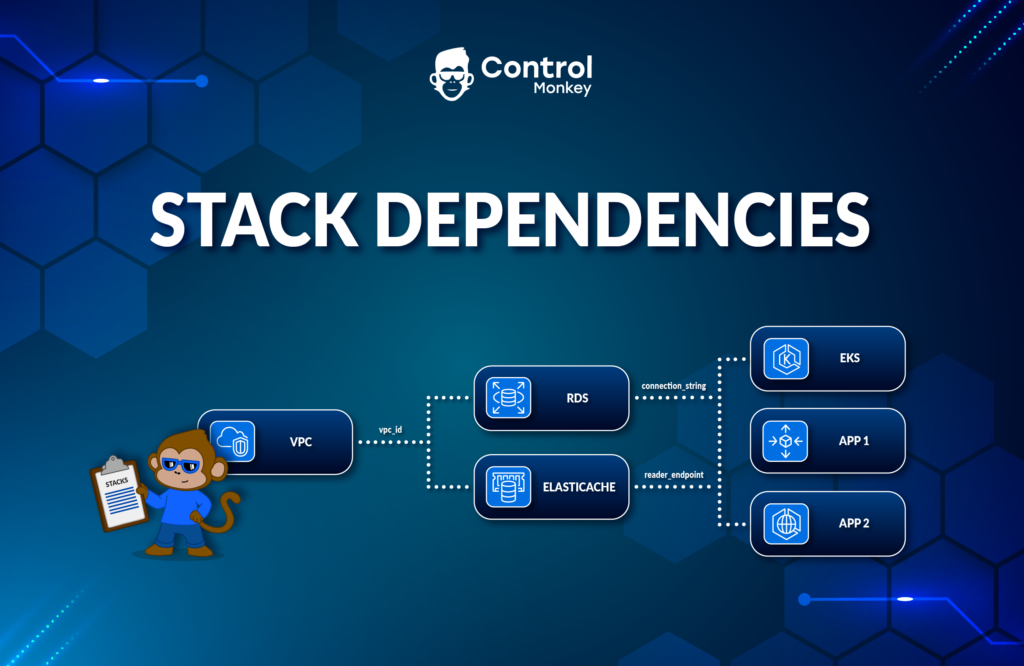
          Stack Dependencies allow ControlMonkey users to create a flow of interdependent stacks that run in a custom-defined order, with critical information passed from one to another.

          This provides a deeper granularity and control over what triggers each Terraform and OpenTofu Stack and the inputs and outputs required for a successful execution.

          Real life Example for Stack Dependencies

          Example: Let’s take a company with a complex infrastructure comprising multiple cloud environments with few Terraform/OpenTofu Stacks strongly linked to one another to deploy the entire infrastructure.

          Building the infrastructure is a linear process in which these stacks must be orchestrated precisely, starting with Account Configuration, Access Control & Authentication, Networking, Databases, Compute, Alerting, Monitoring, etc.
          Moreover, the information generated in each Stack has to be passed along to the next Stack in the execution Queue.

          A typical scenario would involve passing along critical networking information from the ‘network’ stack to the ‘compute resources’ stack so they can have the right network configuration, for example.

          Controlmonkey Terraform and OpenTofu Stack Dependencies

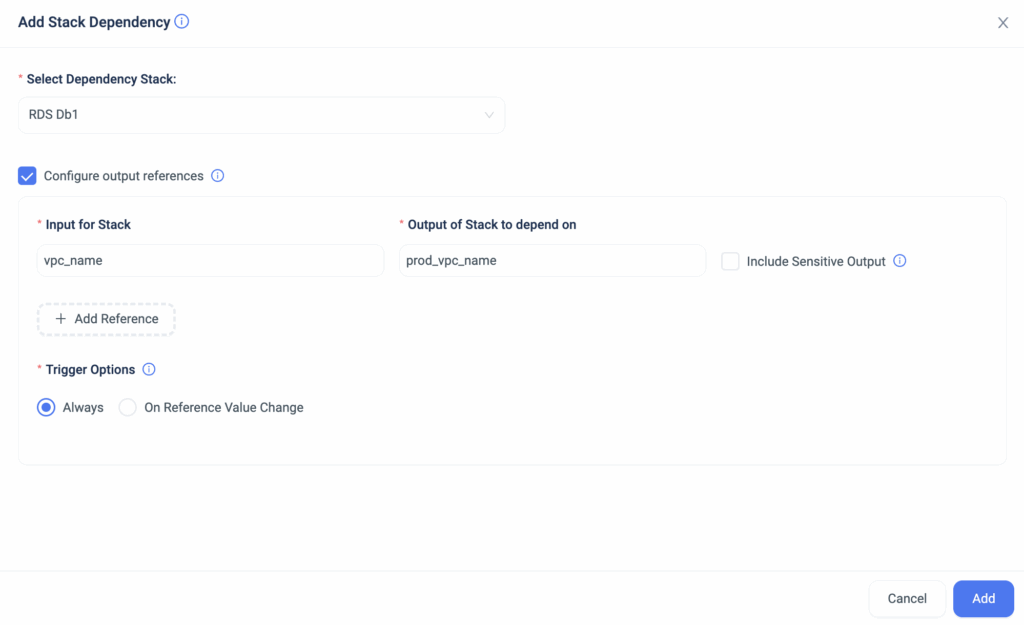
          With ControlMonkey Stack Dependencies, you can now easily define the order, triggers, inputs, and outputs of each Terraform and OpenTofu Stack to customize your infrastructure orchestration.

          Cloud engineering teams no longer need to manually collect the data produced in each stack deployment to configure the next stack. ControlMonkey collects the stack’s required outputs in runtime and automatically inserts the data into the next stack in the deployment flow.

          The Benefits of Stack Dependencies:

          • Link Terraform or OpenTofu Stacks. Users can tightly manage stacks when closely connected due to interdependencies.
          • Direct Information Transfer.Variables can now be passed directly from one stack to another. There is no need to fetch this information within the stack; you can simply use it as the value of a variable. This shortens execution times and eliminates the possibility of misconfiguration.

          To summarize, with Stack Dependencies, you now have the option to connect two stacks to execute one after another and pass information created in the runtime of one stack to another.

          This enables stronger interconnection between stacks and saves time by building the infrastructure automatically without the need to manually trigger pipeline executions.


          Managing Terraform/OpenTofu at scale?

          Our Experts are available for a quick call so you can learn more about the future of Terraform/OpenTofu Automation.

          Bottom CTA Background

          A 30-min meeting will save your team 1000s of hours

          A 30-min meeting will save your team 1000s of hours

          Book Intro Call

          Author

          Zack Bentolila

          Zack Bentolila

          Marketing Director

          Zack is the Marketing Director at ControlMonkey, with a strong focus on DevOps and DevSecOps. He was the Senior Director of Partner Marketing and Field Marketing Manager at Checkmarx. There, he helped with global security projects. With over 10 years in marketing, Zack specializes in content strategy, technical messaging, and go-to-market alignment. He loves turning complex cloud and security ideas into clear, useful insights for engineering, DevOps, and security leaders.

            Sounds Interesting?

            Request a Demo

            Resource Blog News Customers Stories

            Updated: Jan 20, 2026 Upd: 20.01.26

            2 min read

            One-to-one mapping between infrastructure resources and Terraform code.

            One-to-one mapping between infrastructure resources and Terraform code.

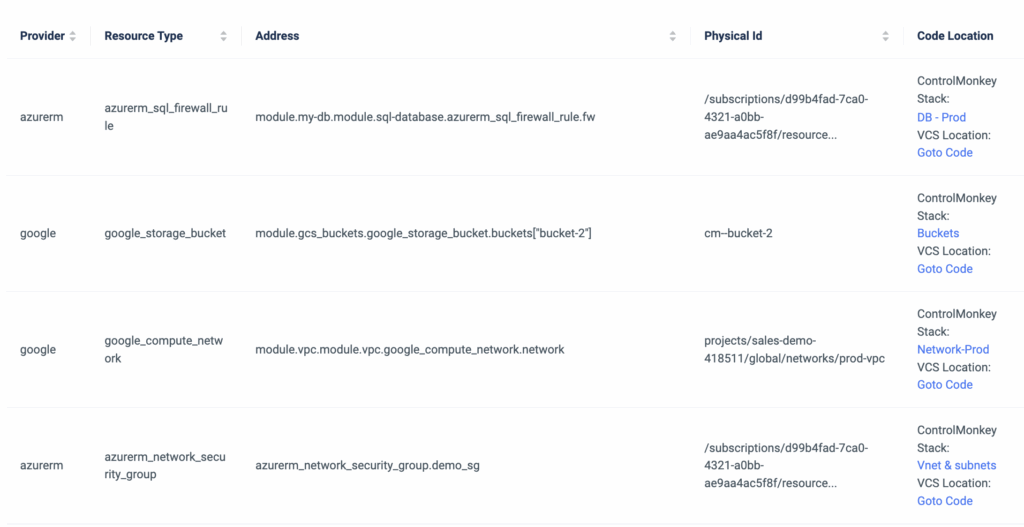
            ControlMonkey’s resource explorer is a simplified dashboard that is part of our Terraform Insights product. It helps DevOps teams discover and easily investigate all of their cloud resources and the corresponding Terraform code in their Git repo.

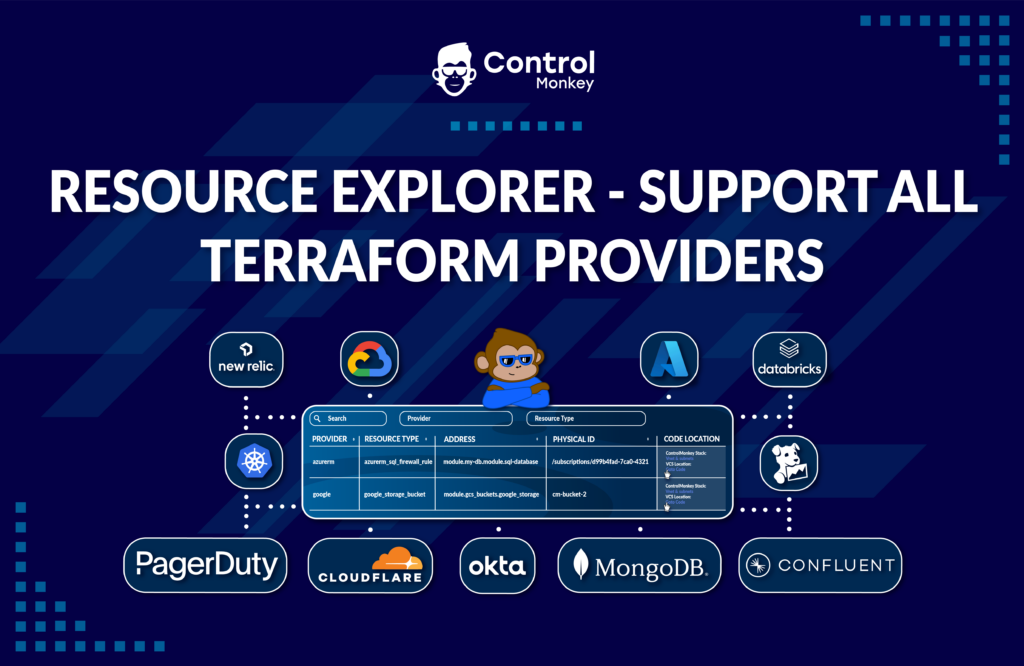
            Until now, Our Resource Explorer has supported only AWS & Azure Terraform Providers, but today, we are happy to announce that it supports ALL Terraform Providers.

            The Terraform Provider view serves as your Terraform knowledge base, providing your team with an easy way to locate Terraform code across your Git repositories regardless of specific team member seniority or tenure within the organization.

            It provides a one-click link for each cloud resource that opens the corresponding line of code in your GIT repository.

            Imagine a scenario where a new engineer joins the team and needs to modify an Azure Vnet or GCP SQL Database. They need to understand where the resource is located in the Terraform code.
            What would be the best way to locate that resource in a large environment with thousands of lines of code?

            Not manually, that’s for sure.

            So, if you need a clear mapping between your resource infrastructure provider (Datadog, Azure, Okta, or GCP, etc) and the exact location in your Terraform code, you can do it seamlessly with ControlMonkey.

            It doesn’t matter which Terraform Provider you are using, ControlMonkey provides a clear one-to-one mapping between your infrastructure resources and the Terraform code.

            Don’t let your team waste time searching for needles in a haystack.

            Book a 30-minute Intro Call with our experts and learn how ControlMonkey changes the Terraform Automation game.

            Bottom CTA Background

            A 30-min meeting will save your team 1000s of hours

            A 30-min meeting will save your team 1000s of hours

            Book Intro Call

              Sounds Interesting?

              Request a Demo

              Resource Blog News Customers Stories

              Updated: Aug 20, 2025 Upd: 20.08.25

              1 min read

              Import Image Builder to Terraform

              Import Image Builder to Terraform

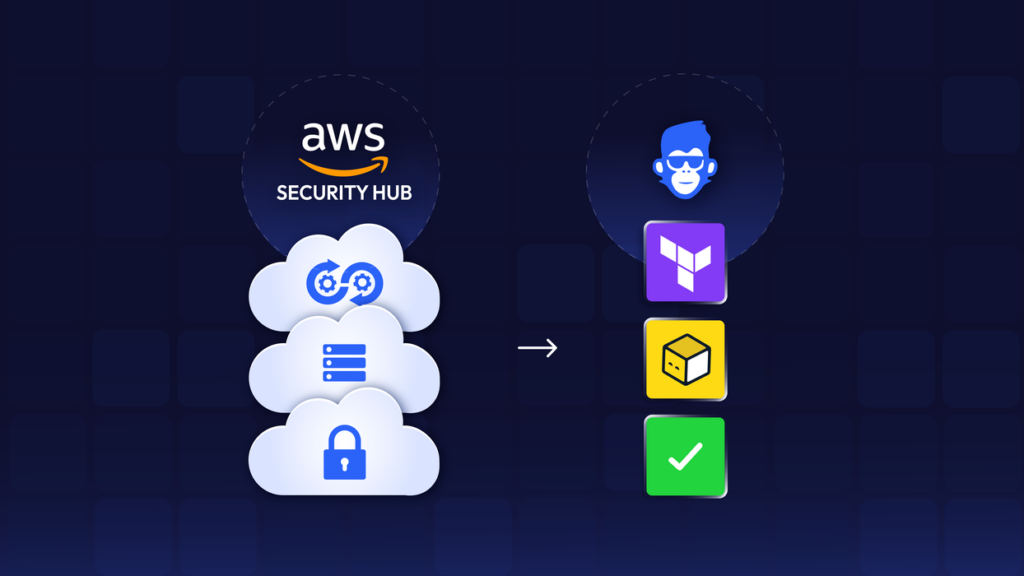
              Today, ControlMonkey is pleased to announce that we have added the capability to easily import EC2 Image Builder resources to Terraform Code using our Terraform Import Engine.

              EC2 Image Builder is an AWS service that automates creating, managing, and deploying customized and secure machine images for EC2 instances.

              Managing EC2 Image Builder with Terraform is important because it ensures consistent, repeatable, and version-controlled deployments of machine images across different environments.

              ControlMonkey now supports the one-click Terraform Import of the following Image Builder resources:

              ImageBuilder::Component (aws_imagebuilder_component)
              ImageBuilder::ContainerRecipe (aws_imagebuilder_container_recipe)
              ImageBuilder::DistributionConfiguration (aws_imagebuilder_distribution_configuration)
              ImageBuilder::Image (aws_imagebuilder_image)
              ImageBuilder::ImagePipeline (aws_imagebuilder_image_pipeline)
              ImageBuilder::ImageRecipe (aws_imagebuilder_image_recipe)
              ImageBuilder::InfrastructureConfiguration (aws_imagebuilder_infrastructure_configuration)
              ImageBuilder::Workflow (aws_imagebuilder_workflow)

              So, if you’re building images using EC2 Image Builder, you can now manage their configuration with Terraform.

              Are you using Image Builder and have resources you would like to shift to Terraform?
              Feel free to book an intro meeting with us to learn more about how ControlMonkey generates the Terraform code that represents your Image Builder resources configuration, making the shift to Terraform as seamless as possible.
              Bottom CTA Background

              A 30-min meeting will save your team 1000s of hours

              A 30-min meeting will save your team 1000s of hours

              Book Intro Call

                Sounds Interesting?

                Request a Demo

                Resource Blog News Customers Stories

                Updated: Oct 20, 2025 Upd: 20.10.25

                3 min read

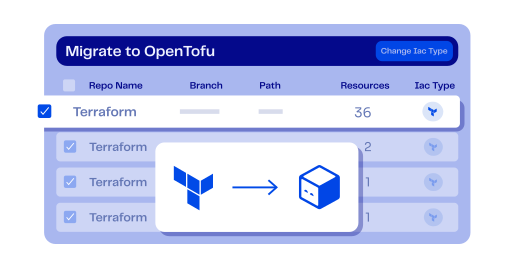
                Migration from Terraform to OpenTofu in 1-Click

                Migration from Terraform to OpenTofu in 1-Click

                Ever since it was announced GA, OpenTofu migration has seen rapid adoption by DevOps teams  around the world to keep their IaC framework open-source.
                Hashicorp’s Terraform license change and IBM’s recent acquisition have pushed more and more DevOps to migrate their stacks from Terraform to OpenTofu.

                If you have come to the decision that OpenTofu is the right IaC framework for your team and you’re planning to migrate, then the release of our ‘OpenTofu 1-Click Migration’ solution is exactly for you.
                ControlMonkey users who want to migrate their stacks to OpenTofu can now easily do it via the ControlMonkey platform in a few clicks.

                How hard is it to migrate from Terraform to OpenTofu at scale?

                It’s pretty straightforward to migrate a couple of Terraform stacks to OpenTofu on your own.
                But what if you have hundreds or thousands of stacks that you wish to migrate?

                That’s when OpenTofu migration becomes complex and risky—especially at scale.

                When you have big-scale environments or a large terraform codebase, manually inspecting and preparing your code to be migration-compatible can be a long, daunting, and error-prone process.
                So, if you have many Terraform Stacks, you can now seamlessly migrate them to OpenTofu using ControlMonkey.

                Here is how we do it:

                OpenTofu Readiness Assessment

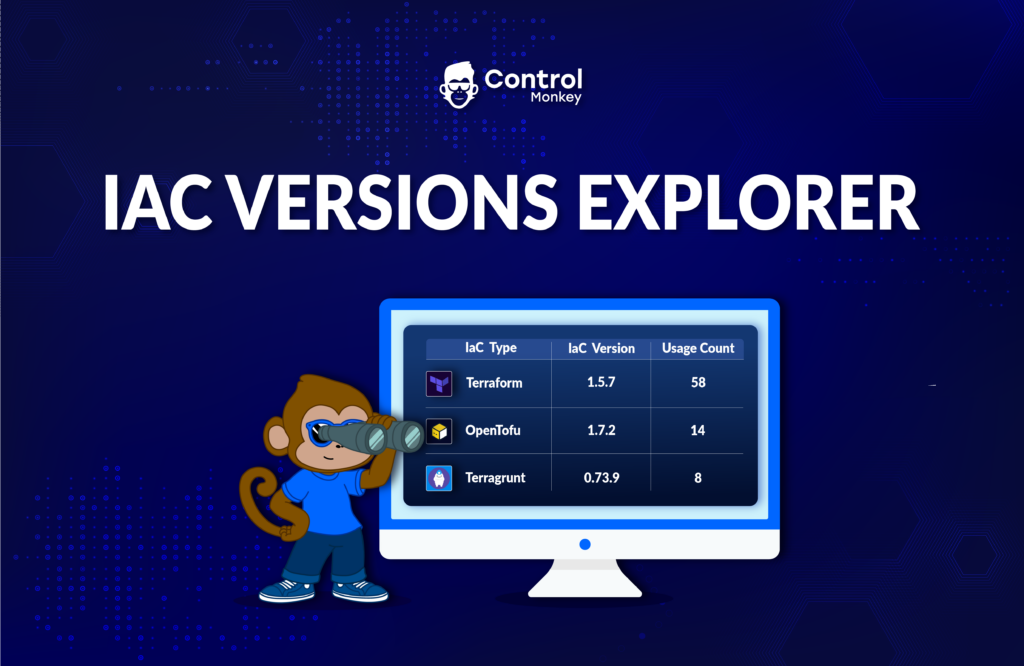
                As always the first step is visibility – Gain complete visibility into your code readiness with a clear assessment report and understand your migration gaps and dependencies.
                See exactly which stacks are not ready to shift to OpenTofu, and whether your Terraform Stacks are OpenTofu compatible.
                1-Click OpenTofu Migration

                Shift your IaC engine binary to OpenTofu with minimal effort. 
                ControlMonkey provides a 1-click migration where we automatically change your Infrastructure CI/CD IaC framework to OpenTofu.

                Fix Code Gaps and Dependencies

                ControlMonkey scans your code to search for HashiCorp’s registry references in your Modules or providers definitions.
                If your Terraform code was written with the fully qualified name of HashiCorp’s registry, ControlMonkey will automatically generate a PR that fixes the code pointing to the OpenTofu registry. 


                Quick Wrap Up

                Migrating from Terraform to OpenTofu is more of a management challenge than a technical one.
                When you have large environments with many stacks, manually assessing and preparing thousands of lines of Terraform Code is counterproductive and error-prone.

                With ControlMonkey, you get the automation that scans and assesses all of your Terraform Stacks, runs compatibility tests, and helps you seamlessly fix any gaps or dependencies in your code.
                Don’t spend your DevOps team’s time preparing your stacks for migration.
                We are providing the easiest and safest way to migrate from Terraform to OpenTofu.

                Interested in learning more about how ControlMonkey supports OpenTofu Migration and makes the migration a walk in the park?
                Our Terraform Experts are waiting to jump on a quick call and show you.

                Bottom CTA Background

                A 30-min meeting will save your team 1000s of hours

                A 30-min meeting will save your team 1000s of hours

                Book Intro Call

                  Sounds Interesting?

                  Request a Demo

                  Resource Blog News Customers Stories

                  Updated: Aug 20, 2025 Upd: 20.08.25

                  2 min read

                  Resource Explorer support for Azure Resources

                  Resource Explorer support for Azure Resources

                  Today, we are super excited to announce that we are continuing our expansion beyond AWS and adding support to Microsoft Azure in our Resource Explorer.

                  Until now, ControlMonkey’s resource explorer helped DevOps teams discover and investigate their AWS resources. Starting today, we have added the option to discover and investigate Azure resources.

                  Azure users can leverage our Resource Explorer to:

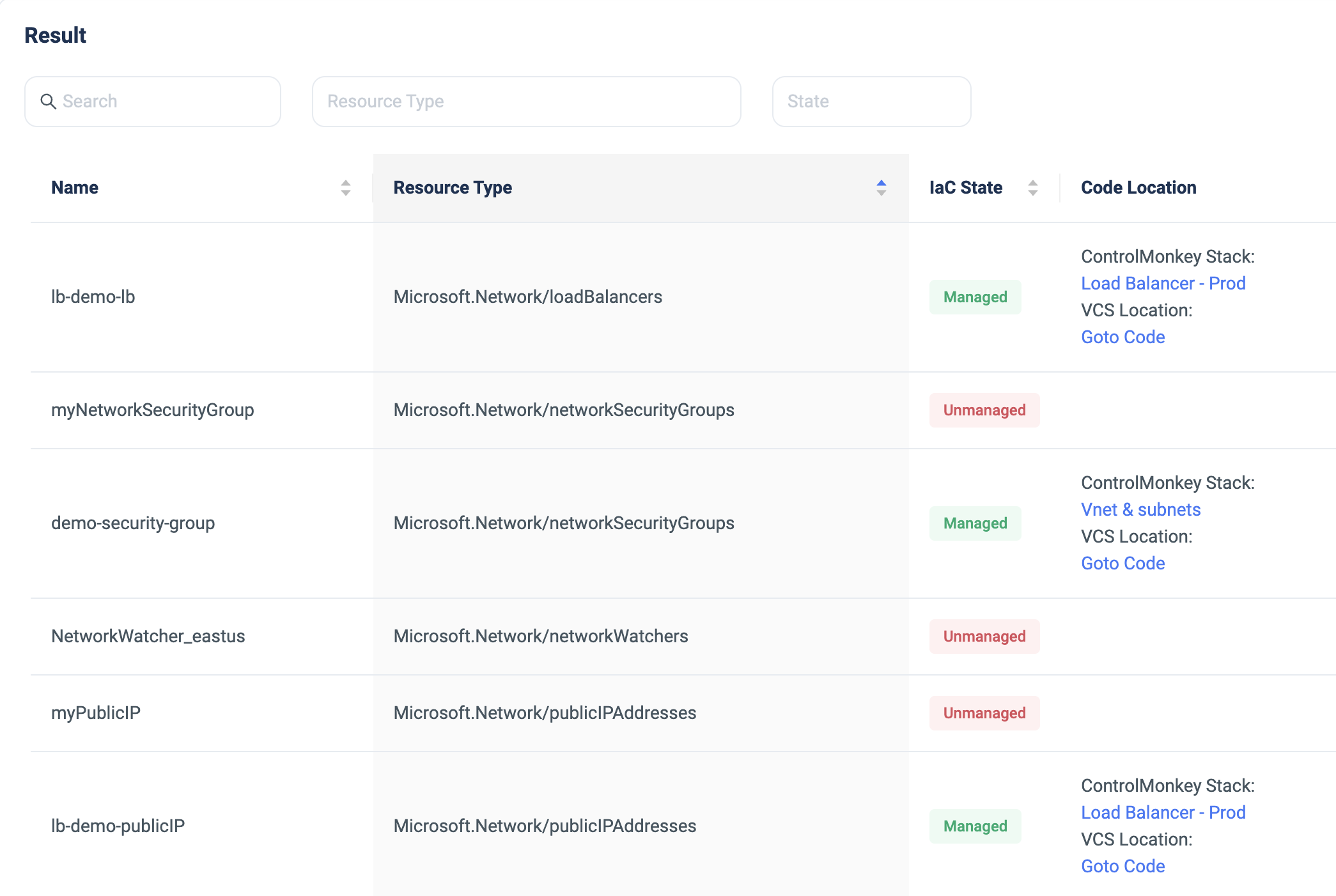
                  • Search for Azure resources per subscription, region, resource type, and name.
                  • Determine whether this resource is managed by Terraform code or not.
                  • Access the resource’s corresponding code in your GIT repository with a 1-click link.
                  • Access the resource’s corresponding ControlMonkey stack with a 1-click link.

                  With Resource Explorer, you can search for any Azure resource, gain visibility into your Terraform coverage, and easily access the corresponding Terraform Code in your GIT repository or corresponding ControlMonkey stack.

                  ControlMonkey’s Resource Explorer serves as the organization’s Terraform knowledge base, providing your team an easy way to locate Terraform code across your Git repositories regardless of specific team member seniority or tenure within the organization.

                  Save precious time when searching for resources and ensure that all your Azure resources are covered with Terraform Code.

                  This is one of many Azure enhancements we will release this year, so stay tuned to what’s coming next!

                  Bottom CTA Background

                  A 30-min meeting will save your team 1000s of hours

                  A 30-min meeting will save your team 1000s of hours

                  Book Intro Call

                    Sounds Interesting?

                    Request a Demo

                    Resource Blog News Customers Stories

                    Updated: Aug 23, 2025 Upd: 23.08.25

                    1 min read

                    Granular RBAC Terraform and Opentofu Support 

                    Zack Bentolila

                    Zack Bentolila

                    Marketing Director

                    Granular RBAC Terraform and Opentofu Support 

                    We are happy to announce that we have upgraded our permission management and added support for custom roles.

                    Up until today, our users had the option to grant permissions to certain namespaces based on a predefined system role (Viewer, Deployer, or Admin).
                    We’ve identified our customers’ needs to have more granularity with their permissions management by adding more customization options.

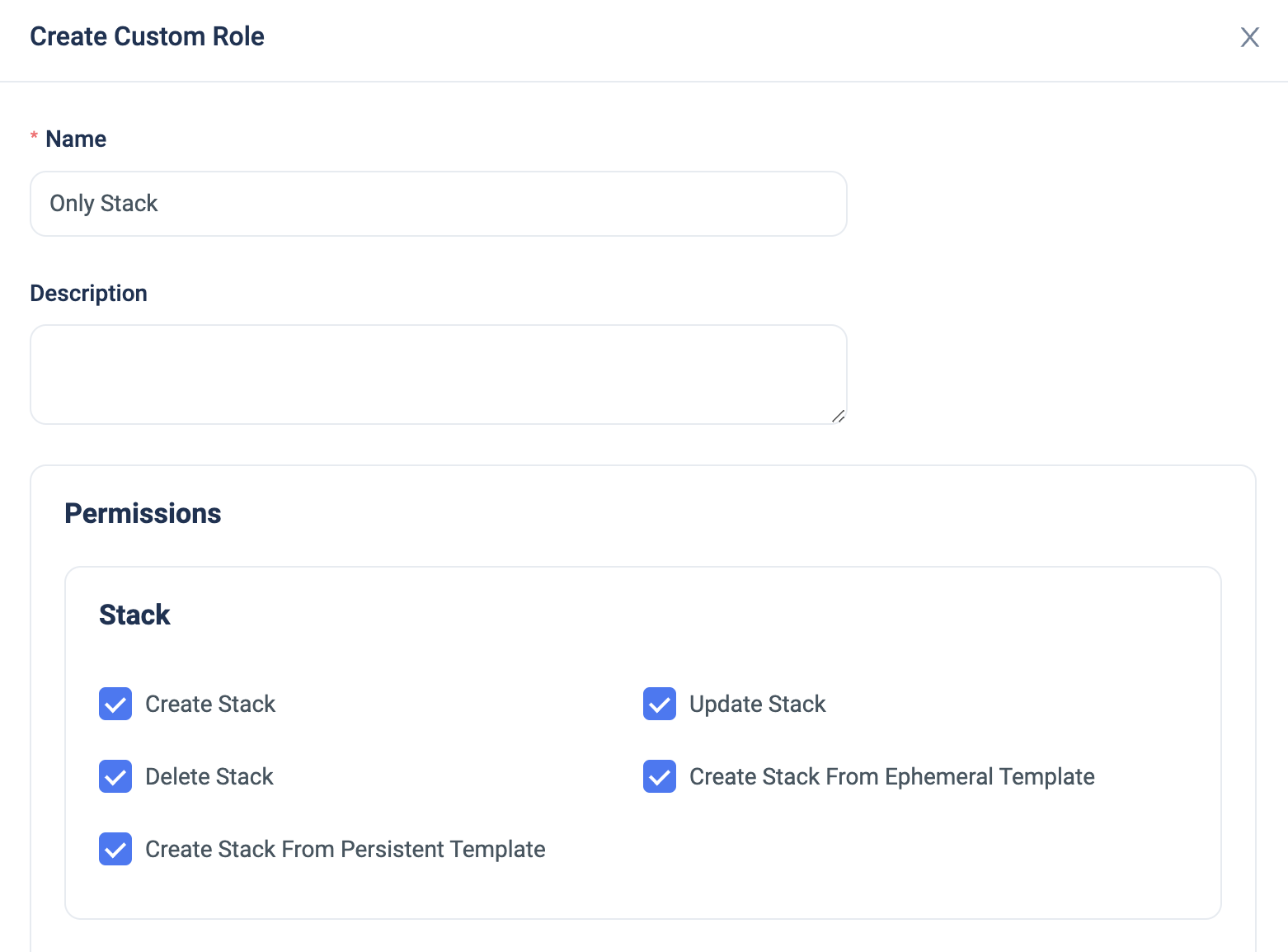
                    Now, ControlMonkey users can create a custom role with permissions that are based on Stacks, Deployments, or Plans.


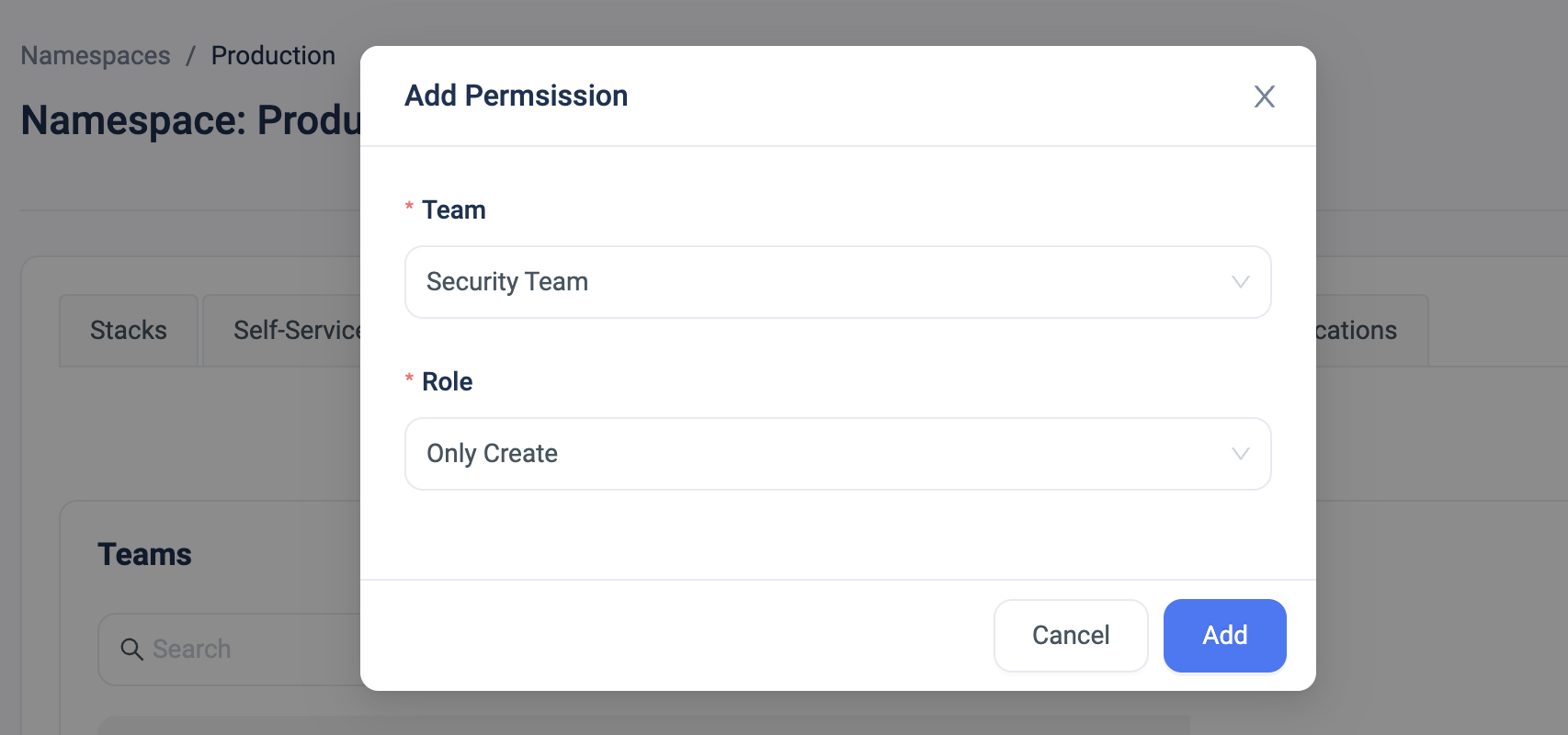
                    The custom role can then be granularly applied on a user/team in a specific namespace for that additional layer of customization.


                    With the option to limit certain users’ actions, our customers are reducing the risk of misconfigurations, allowing for better control mechanism in their environments by preventing certain users from performing ‘high-risk’ actions such as ‘Approve Deployment’ or ‘Delete Resources’.


                    Bottom CTA Background

                    A 30-min meeting will save your team 1000s of hours

                    A 30-min meeting will save your team 1000s of hours

                    Book Intro Call

                    Author

                    Zack Bentolila

                    Zack Bentolila

                    Marketing Director

                    Zack is the Marketing Director at ControlMonkey, with a strong focus on DevOps and DevSecOps. He was the Senior Director of Partner Marketing and Field Marketing Manager at Checkmarx. There, he helped with global security projects. With over 10 years in marketing, Zack specializes in content strategy, technical messaging, and go-to-market alignment. He loves turning complex cloud and security ideas into clear, useful insights for engineering, DevOps, and security leaders.

                      Sounds Interesting?

                      Request a Demo
                      Cookies banner

                      We use cookies to enhance site navigation, analyze usage, and support marketing efforts. For more information, please read our. Privacy Policy